-
Daz Studio 4.16[.0.x] Pro, General Release! (*UPDATED*)
A little over a year ago (12/2019 to be exact) I made the horrible mistake of installing a Studio 4.14 upgrade into my then-existing 4.12 through Install Manager. Studio 4.14 wouldn't open, and if it did, would shut down within a matter of seconds. Tech Support instructed me to install the 4.14 beta. To do that I had to change IM's download and installation protocols. Those changes were irreversible; from that moment Install Manager completely ignored all the items I've been installing since around 2013. So, if I wanted to remove something from my library I had to do it all manually, a very time-consuming prospect. And instructions I received from Tech Support did not help fix the problem.
But the purpose for my entry is I'm stll shell-shocked, so to speak, about installing upgraded Daz Studio software (4.15 to be exact) and thus be free of the beta 4.14. How can I be guaranteed that all the work I've done for the past 17 months (character development and creation specifically) will still be there and accessible? How can I be guaranteed that history won't repeat itself and this updated 4.15 will work fine?
As it did turn out, some of the resource files of 4.12 were corrupted by the 4.14 upgrade, which caused the problems I was experiencing.
And the last question, which I raised 17 months ago but never received a satisfactory answer - why can't the exe file for 4.15 (or any other version prior to that) be available for download by the artist for him/her to install as it used to be? Why does it have to be downloaded and installed only through Install Manager or even Daz Central? It was this, as mentioned earlier, that caused all of the problems I had, as well as caused the corruption of my Install Manager.
Missing FilesHarbadix said:
I bought 8.1 male cos the mouse said it was for 8.1
Mouse for 8.1 means you need genesis 8.1 (it does not come with Mouse 8.1)
Genesis 8.1 male or female is NOT for sale. It is free, and part of the Genesis 8 Essential package. You can download them thru Daz Central or DIM (Daz Install Manager.
[Released] Osoview Arid Scrub and Pine Ridge Backdrops [Commercial]Ever feel you need to sort of... fill in that bit behind these trees or some other scene, but the prospect of plopping down an environment with a thousand trees is a bit... much?
Backdrops are perfect! Set up one or more backdrops at various distances, adjust diffuse overlay to create a sense of distance haze, and voilà! A credible sense of landscape and distance at a small fraction of the render load.
These backdrops are inspired by landscape here in California's central valley and some of the other fairly dry, evergreen vistas in northern California. The climate here is Mediterranean, and I believe these backdrops are familiar to a number of similar places in the world (northern Italy, for example).
This product pairs well with UltraSceneryPro, but can also add some depth to any outdoor scene.
Also, importantly, these backdrops are transparent masked so you can easily use them with skies of your choice (or further backdrops).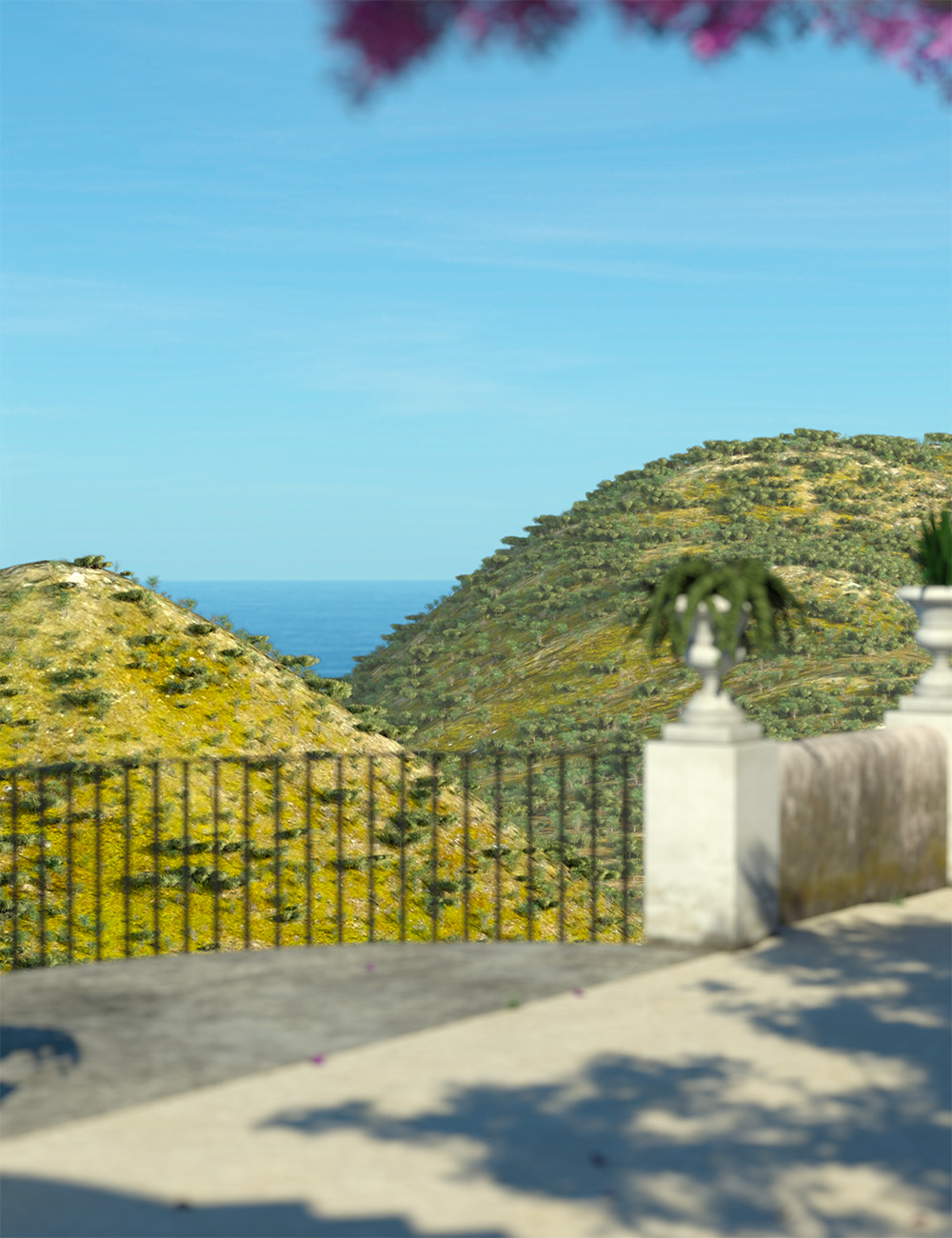 Gen 8.1 missing posing morphs
Tsuba said:
PerttiA said:
How did you install your Genesis 8 Starter Essentials? (DIM/DAZ Central/DAZ Connect/Manuallly)
If your content is installed in a "traditional" installation path (No 'Cloud' in the path), this will get the expressions working;Making the G8 base expressions (and any expressions that are using them) work on G8.1 requires removing dummy/placeholder expressions that are installed to G8.1 morph folders - These dummy/placeholder expression files have no other function than to prevent the base G8 expressions from loading.
The dummy/placeholder files are located in;
...\Data\DAZ 3D\Genesis 8\Female 8_1\Morphs\Daz 3D\Base Pose Head\ (255 files)
...\Data\DAZ 3D\Genesis 8\Female 8_1\Morphs\Daz 3D\Expressions\ (24 files)
...\Data\DAZ 3D\Genesis 8\Male 8_1\Morphs\Daz 3D\Base Pose Head\ (255 files)
...\Data\DAZ 3D\Genesis 8\Male 8_1\Morphs\Daz 3D\Expressions\ (24 files)Please make sure you are removing the files from G8.1 morph folders and not G8 morph folders.
That worked, pose morphs are back. Thanks !
Richard Haseltine said:
on your own head be it.
Sounds ominous, what's the risk ? :)
Increased load time (how bad will depend on how heavily loaded your character is already), there are a couple of overlapping labels (easy enough to fix). But there may be other issues that will crop up, and daz obviously won't be able to offer any suport if you've gone off piste like that (other than telling you to put the blockers back and see if your issue is resolved)
Glitchy Power Pose Panel?OK, so the face template is fine but not the head one. That's even more mystifying to me.
If you have used Daz Central then I would advise you DO NOT use Connect as well - it just duplicates the installation and may get you into a worse mess. I think PerttiA was just specifying which file you needed if you manually installed or used DIM.
DS 4.15 is the current release (DS4.9 is much older - they way DAZ numbers its releases they ran DS4.9 then 4.10 then 4.11 then 4.12, etc)
Gen 8.1 missing posing morphsPerttiA said:
How did you install your Genesis 8 Starter Essentials? (DIM/DAZ Central/DAZ Connect/Manuallly)
If your content is installed in a "traditional" installation path (No 'Cloud' in the path), this will get the expressions working;Making the G8 base expressions (and any expressions that are using them) work on G8.1 requires removing dummy/placeholder expressions that are installed to G8.1 morph folders - These dummy/placeholder expression files have no other function than to prevent the base G8 expressions from loading.
The dummy/placeholder files are located in;
...\Data\DAZ 3D\Genesis 8\Female 8_1\Morphs\Daz 3D\Base Pose Head\ (255 files)
...\Data\DAZ 3D\Genesis 8\Female 8_1\Morphs\Daz 3D\Expressions\ (24 files)
...\Data\DAZ 3D\Genesis 8\Male 8_1\Morphs\Daz 3D\Base Pose Head\ (255 files)
...\Data\DAZ 3D\Genesis 8\Male 8_1\Morphs\Daz 3D\Expressions\ (24 files)Please make sure you are removing the files from G8.1 morph folders and not G8 morph folders.
That worked, pose morphs are back. Thanks !
Richard Haseltine said:
on your own head be it.
Sounds ominous, what's the risk ? :)
Carrara Community Art Gallery - Show us your Renders!!!Stezza said:
Mystiarra said:
theres 5,000 cows in scene, scattered so far can only see a few.
i converted the terrain to vertex. deleted mose of the polies off to the sides to make a smaller area.
didnt want to drop a plane in, wanted the cows on the hills. poor bessie lookin lonelyI just use a smaller terrain

Me too. One smaller central terrain inside larger ones that go the distance.
Five Minute Carrara Animation "Dream Vacation"QUOTE
See the awards show and the screening of the winning film on Sunday, May 23 at 3 pm Eastern on the official 48HFP YouTube Channel: 48HFP Central
END QUOTE
My prediction is :
Carotte Team (Paris) -
'Of pipings and rings'
A very clever 2D animation with cool water color graphics and great voice acting. They won last year, you can see that short animation here, plus the 2nd and 3rd place finishers:
Glitchy Power Pose Panel?Yes, that's the panel I'm looking for. There must be something wrong with my install. I followed an instructional video that had me create an account on the Daz website. Download Daz Central then install Daz central from the downloaded .exe file. Then from within Daz Central, I installed Daz Studio, everything was from within DC that's for sure. I have the Genesis Starter Essentials. That and a few others came with the Daz Studio installation. I'll try to uninstall and reinstall them from your link.
Glitchy Power Pose Panel?What method are you using in installing your content, DIM/DAZ Central/DAZ Connect (Inside DS/'Smart' Content tab)/Manual installation?
Are you sure the PowerPose Templates for G8.1 are installed? They are included in Genesis 8 Starter Essentials since the release of Genesis 8.1.
https://www.daz3d.com/downloader/customer/files#prod_42071I'm using manual installation only, not logging in to DS and not allowing DS to use any outside connections and this is how the Power Pose looks like with G8.1F
Note the Template Set "Base (Genesis 8.1 Female)" at the top.Gen 8.1 missing posing morphsHow did you install your Genesis 8 Starter Essentials? (DIM/DAZ Central/DAZ Connect/Manuallly)
If your content is installed in a "traditional" installation path (No 'Cloud' in the path), this will get the expressions working;Making the G8 base expressions (and any expressions that are using them) work on G8.1 requires removing dummy/placeholder expressions that are installed to G8.1 morph folders - These dummy/placeholder expression files have no other function than to prevent the base G8 expressions from loading.
The dummy/placeholder files are located in;
...\Data\DAZ 3D\Genesis 8\Female 8_1\Morphs\Daz 3D\Base Pose Head\ (255 files)
...\Data\DAZ 3D\Genesis 8\Female 8_1\Morphs\Daz 3D\Expressions\ (24 files)
...\Data\DAZ 3D\Genesis 8\Male 8_1\Morphs\Daz 3D\Base Pose Head\ (255 files)
...\Data\DAZ 3D\Genesis 8\Male 8_1\Morphs\Daz 3D\Expressions\ (24 files)Please make sure you are removing the files from G8.1 morph folders and not G8 morph folders.
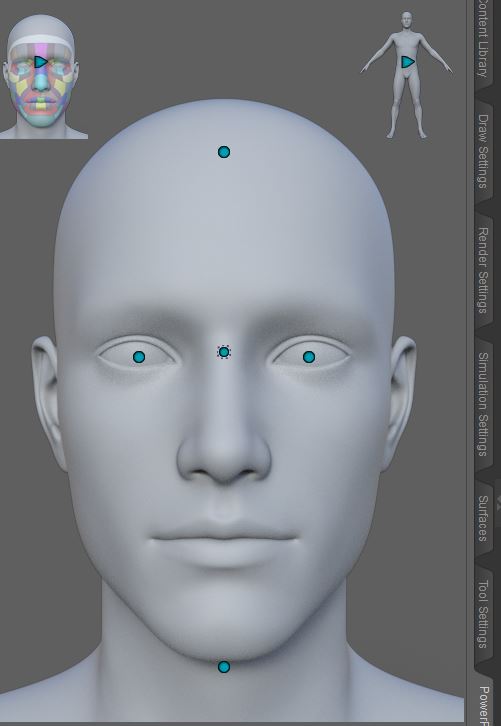
Glitchy Power Pose Panel?I've got a delay for moderation or some such thing, as I'm new here I think, so I keep missing you guys. I managed to do a complete reinstall of Daz Studio. I got very lost for a while with the whole Daz central thing but I got it done and it took its time on the install, flashing lots of windows, some talking about repairing stuff. In Power Pose all the body and hand nodes are present and working perfectly. The head is still missing all the expression nodes with only nodes for moving the whole head or the eyes. Maybe they have been removed from the latest version for some reason?
Do you guys have the expression nodes in Power Pose for the Head, for opening the mouth, lips making them frown and such?
This is all I got...
 [Released] Gescon, CSG plugin for Daz Studio [commercial]
nicktechnical said:
Alberto said:
nicktechnical said:
Bought the tool. A little disappointed Daz didn't include the cutters. I've logged a ticket as suggested.
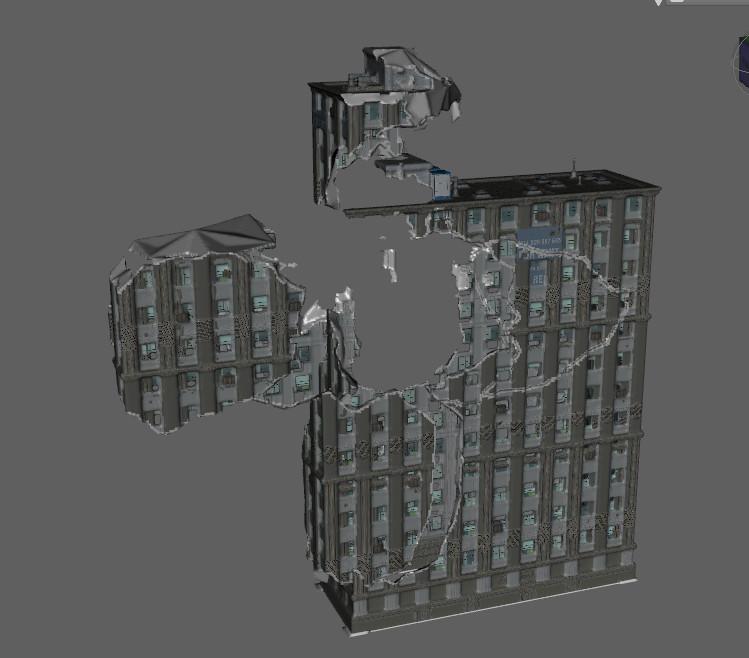
I'm attempting to blow a hole out of one of Stonemason's Ubran Sprawl 2 and 3 buildings. I've tried with both but I flat out can't get it work. I've tried substituting the cutter for various primitives and also some debris props. No luck. It flat out won't cut. I've confirmed there's plenty of polys in the building mesh. Nothing happens when I hit fracture. Any suggestions?
Screenshot attached.
They're open-mesh, not solid objects. This is the Building 17 of your image.
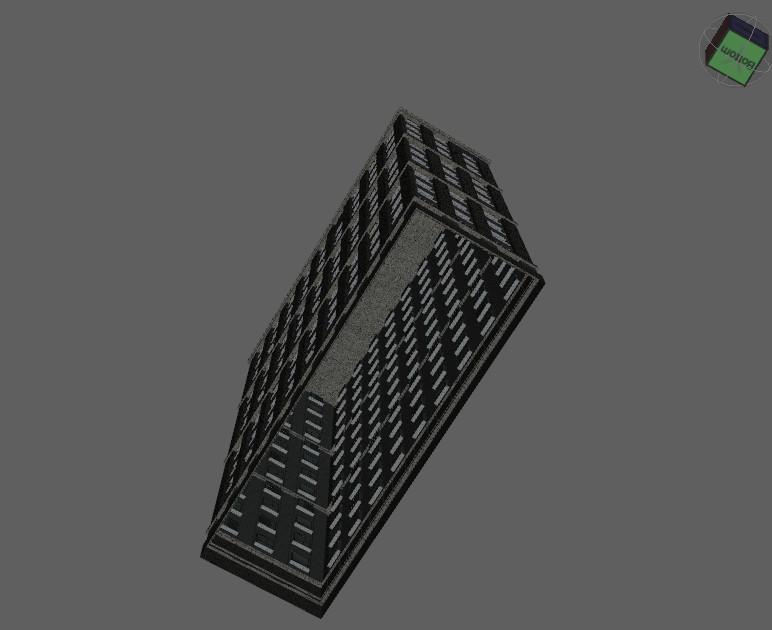
Oh ok! Sorry, dumb moment. Thanks for replying. So if I used your merge tool to merge a solid block into this, I could then use the fracture tool?
There is a trick to force Gescon to fracture these buildings using a geometric shell (or a duplicate of the node) and four planes.
- Create a geometric shell of the building (or duplicate the building).
- Scale down the duplicate or shell (global scale to 90-92 %).
- Translate the duplicate or shell so the bottom part is at the same level as the original building.
- Create four primitive planes and scale them to get two pairs of planes that cover the gap between the original building and the duplicate. Let alone the central hole.
- Set invisible all the objects in the scene, except the planes, the building, and its duplicate.
- Export as .obj and re-import it. The imported object will have a closed-mesh geometry. You can use it with Gescon.
- Very large objects will need a high precision value to give acceptable results, but it could be beyond the scale of precision. The solution is to scale down these objects. After the operation, you can scale up the results, if you wish.
- I suggest setting the scale of the (imported) building 17 of Urban Sprawl 2 to 10 %. Then set the precision to 10 and the surface adaptivity to 0.001 to apply the fracture operation. If you choose to preserve the surfaces and uv map, it can take a while. In my test, it takes more than a hour.
This is the building and its geoshell (in red):
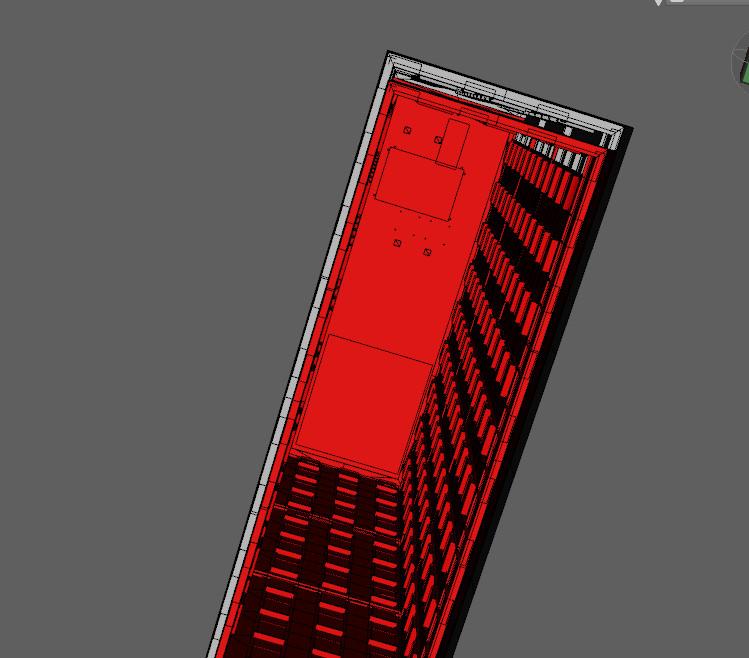
Here are the four planes:
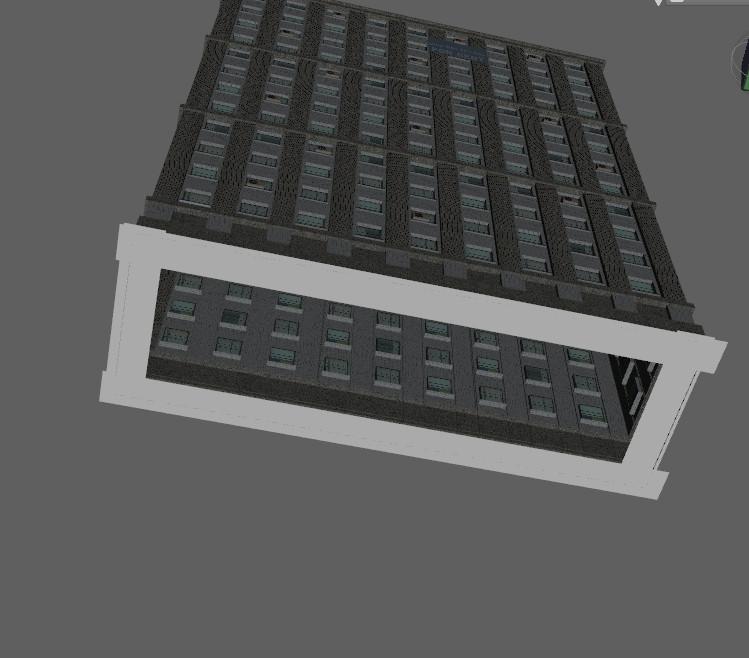
The final result:
 BLACK render - DigiVault Stardomes
It says this on the product page. NOTE THAT IT SAYS DAZ STUDIOS ONLY. I'm try to stay AWAY from products that are not DAZ compatible. Why are they lying about it? I'm going to take the time and effort to ask for a refund:
Details
The Universe at your fingertips!
The Self Illuminating High Resolution Stardome comes with 24 Diffuse and Ambient texture maps at true 8k resolution (8192 X 8192). Simple to use and fast rendering, this is the perfect tool to add a variety of star filled night skies to your renders, ranging from the dramatic to the very subtle, terrestrial to off planet.
Please note that this product is for DAZ Studio only.
Compatible Software: Daz Studio 4.15, Daz to Maya Bridge, Daz to C4D Bridge, Daz to 3ds Max Bridge, Daz to Unity Bridge
Install Types:
 Daz Connect DIM Manual Install
SKU:21550
HeadShop 13 with LoveChildDoes anyone know what folder I'm supposed to install Headshop 13 to? It doesn't show up in the Daz Central app to install. Thanks! - Ski
Introduce Yourself, Hello, my name is.....Hi. My name is Jim. I would love to see your content in an android compatible 'daz central. How can I use your content and clips on my new S21 Ultra 5G?L4N4 Daz Connect only?Richard Haseltine said:
Daz Central, not Daz Connect - which does, almost always, indicate that there are no files on the server so I am not sure why it would then be downloadable.
Oops... Apologies (I had just got out of bed, and was side-tracked by a certain auction site ^^').
L4N4 Daz Connect only?Daz Central, not Daz Connect - which does, almost always, indicate that there are no files on the server so I am not sure why it would then be downloadable.
NEW 2021 Sales thread: Report Issues Here "There's Always Another Sale™"L4N4 is only has Daz Connect as an install type:
https://www.daz3d.com/l4n4-hd-morph-for-genesis-8-females
I originally posted about it in a seperate thread: https://www.daz3d.com/forums/discussion/495076/l4n4-daz-connect-only#latest
Late edit: I meant Daz Central ^^'
Daz studio can't be run with elevated permissions, when logged in the Administrator account[Solved]I have the same error message.
DAZ Central can not be run with elevated permissions
I am new to all of this. I am just opening DAZ central for the first time after installing it. I checked the admin permissions and that is unchecked like suggested. But I can't figure this out. Are you saying I have to log out of my computer as admin and log in as another user? I would rather not do that. I'm just a simple book cover designer and wanted to try this out to create models etc. I have no idea how it works, I am a photoshop expert but don't know anything about DAZ. I was hoping to teach myself but can't get it to open. Thanks
Daz 3D is part of

Connect
DAZ Productions, Inc.
7533 S Center View Ct #4664
West Jordan, UT 84084Licensing Agreement | Terms of Service | Privacy Policy | EULA
© 2026 Daz Productions Inc. All Rights Reserved.