-
XTransfer Module 1- Genesis 3 to Genesis 8 Morph Converter (Commercial)
Hi
Downloaded the script from my product library and deleted then replaced the previous version. Now getting a constant "Debug: Error finding' when I try to load the script. It doesn't matter what I try to transfer...GenX, purchased characters, base characters, G3M, G3F, everything brings up the error message on both laptop and desktop, 4.11 and 4.12, both running W7
2020-03-31 14:12:25.545 Loading script: Z:/Lorraine/Documents/daz 3d/studio4/My Library/Scripts/XTransfer/XTransfer G3 to G8.dse
2020-03-31 14:12:25.686 DEBUG: Error finding
2020-03-31 14:13:46.081 Script executed successfully: Z:/Lorraine/Documents/daz 3d/studio4/My Library/Scripts/XTransfer/XTransfer G3 to G8.dse
2020-03-31 14:13:47.360 Loading script: Z:/Lorraine/Documents/daz 3d/studio4/My Library/Scripts/XTransfer/XTransfer G3 to G8.dse
2020-03-31 14:13:47.485 DEBUG: Error finding
2020-03-31 14:13:50.225 Script executed successfully: Z:/Lorraine/Documents/daz 3d/studio4/My Library/Scripts/XTransfer/XTransfer G3 to G8.dseIt's not being very helpful in telling me what it can't find, help please :)
Hi. The files the script looks for in your mapped content is (depending on gender): "People/Genesis 8 Female/Developer Kit/Genesis 8 Female Dev Load.duf" "People/Genesis 8 Male/Developer Kit/Genesis 8 Male Dev Load.duf"
Have those been moved or removed? The script uses those for transfers. If not then we need to dig deeper at your issue.
Aha! I knew it would be something simple! Yes, I renamed 'People' to 'Figures' long time ago. I found a couple of products needed the Genesis 8 Basic Male and Female in a People folder, so I will add the Dev Loads to that and try again. Thank you!
Edit: that fixed it, transferred GenX morph in 27 secs. Woot!
Upgrade Genesis 2 => Genesis 8For morph conversions. Character converter(https://www.daz3d.com/character-converter-from-genesis-2-female-to-genesis-8-female-) Seems to work fairly well. Still a bit of work to get textures to work correctly.Auto Muscle Enhancer HD [Commercial]Pretty cool, can't wait. I would love to see the standard 'A' pose on G8M with the AME dialed in at 25, 50, 75 and perhaps a dynamic pose of some sort with the same treatment. For me this is one of the best ways to demonstrate a morph. That first figure (01) looks totally awesome!!!

you can see I have turn on the morph from 0-100
XTransfer Module 1- Genesis 3 to Genesis 8 Morph Converter (Commercial)Hi
Downloaded the script from my product library and deleted then replaced the previous version. Now getting a constant "Debug: Error finding' when I try to load the script. It doesn't matter what I try to transfer...GenX, purchased characters, base characters, G3M, G3F, everything brings up the error message on both laptop and desktop, 4.11 and 4.12, both running W7
2020-03-31 14:12:25.545 Loading script: Z:/Lorraine/Documents/daz 3d/studio4/My Library/Scripts/XTransfer/XTransfer G3 to G8.dse
2020-03-31 14:12:25.686 DEBUG: Error finding
2020-03-31 14:13:46.081 Script executed successfully: Z:/Lorraine/Documents/daz 3d/studio4/My Library/Scripts/XTransfer/XTransfer G3 to G8.dse
2020-03-31 14:13:47.360 Loading script: Z:/Lorraine/Documents/daz 3d/studio4/My Library/Scripts/XTransfer/XTransfer G3 to G8.dse
2020-03-31 14:13:47.485 DEBUG: Error finding
2020-03-31 14:13:50.225 Script executed successfully: Z:/Lorraine/Documents/daz 3d/studio4/My Library/Scripts/XTransfer/XTransfer G3 to G8.dseIt's not being very helpful in telling me what it can't find, help please :)
Hi. The files the script looks for in your mapped content is (depending on gender): "People/Genesis 8 Female/Developer Kit/Genesis 8 Female Dev Load.duf" "People/Genesis 8 Male/Developer Kit/Genesis 8 Male Dev Load.duf"
Have those been moved or removed? The script uses those for transfers. If not then we need to dig deeper at your issue.
XTransfer Module 1- Genesis 3 to Genesis 8 Morph Converter (Commercial)Hi Zevo
Downloaded the script from my product library and deleted then replaced the previous version. Now getting a constant "Debug: Error finding' when I try to load the script. It doesn't matter what I try to transfer...GenX, purchased characters, base characters, G3M, G3F, everything brings up the error message on both laptop and desktop, 4.11 and 4.12, both running W7
2020-03-31 14:12:25.545 Loading script: Z:/Lorraine/Documents/daz 3d/studio4/My Library/Scripts/XTransfer/XTransfer G3 to G8.dse
2020-03-31 14:12:25.686 DEBUG: Error finding
2020-03-31 14:13:46.081 Script executed successfully: Z:/Lorraine/Documents/daz 3d/studio4/My Library/Scripts/XTransfer/XTransfer G3 to G8.dse
2020-03-31 14:13:47.360 Loading script: Z:/Lorraine/Documents/daz 3d/studio4/My Library/Scripts/XTransfer/XTransfer G3 to G8.dse
2020-03-31 14:13:47.485 DEBUG: Error finding
2020-03-31 14:13:50.225 Script executed successfully: Z:/Lorraine/Documents/daz 3d/studio4/My Library/Scripts/XTransfer/XTransfer G3 to G8.dseIt's not being very helpful in telling me what it can't find, help please :)
Is all the content on the same HD? Did you re-install and update the metadata? I transfered "Lorraine" myself with no error, but another character file gave an error for a hidden morph file from Tween 7, which I didn't own.
All content is on the one drive: Z:/Lorraine (Lorraine being me), I've never used metadata ever, wouldn't even know where to put it, and the previous iteration loaded fine, just stalled at 71% and refused to go any further. This iteration that I downloaded from my product library (I don't use DIM either) will not open, it just gives me that debug message and when I click 'ok' disappears. I'm hoping @Zev0 might know what the problem is. If it does need metadata, is that the manifest and supplement file? Where do they go?
Edit: I deleted the new file and reinstalled the original. It opens, does some stuff, puts some morphs in to G8 data, stalls at 71%, I close it, load G8, morphs are there, do not work properly. I think that's where I was at before the update.
Novica & Forum Members Tips & Product Reviews Pt 13Couple things here new to me. Some I have used before in parts and the light set Novica has reviewed before and the reason I picked up the set in the first place. I have used Amira before but I don't think I have actually used the whole character set (morphs and textures). I know I have used like the smile settings and her morph settings previously.
Fashion Editorial Poses - I have used Those Things poses many times and love them she has a couple of different sets and all are top notch. This is not the default pose I had to change a few things with the arms/hands.
BJ Amira -Love her, not suprising BJ makes awesome characters. Shes cute and smile is great. Shes got a couple of makeup options along with a default no makeup. *Tip-Her smile works great with many other characters* I actually have at this time both Amira and Sahel and both characters are worth their price just for the smile presets. I use them frequently on various characters and very seldom run in to problems.
Arwen Hair for G8F- Its got several morphs to help pose along with some to affect fullness. It looks good, although you can't really tell with the lights in this one. It's also has several colors options included.
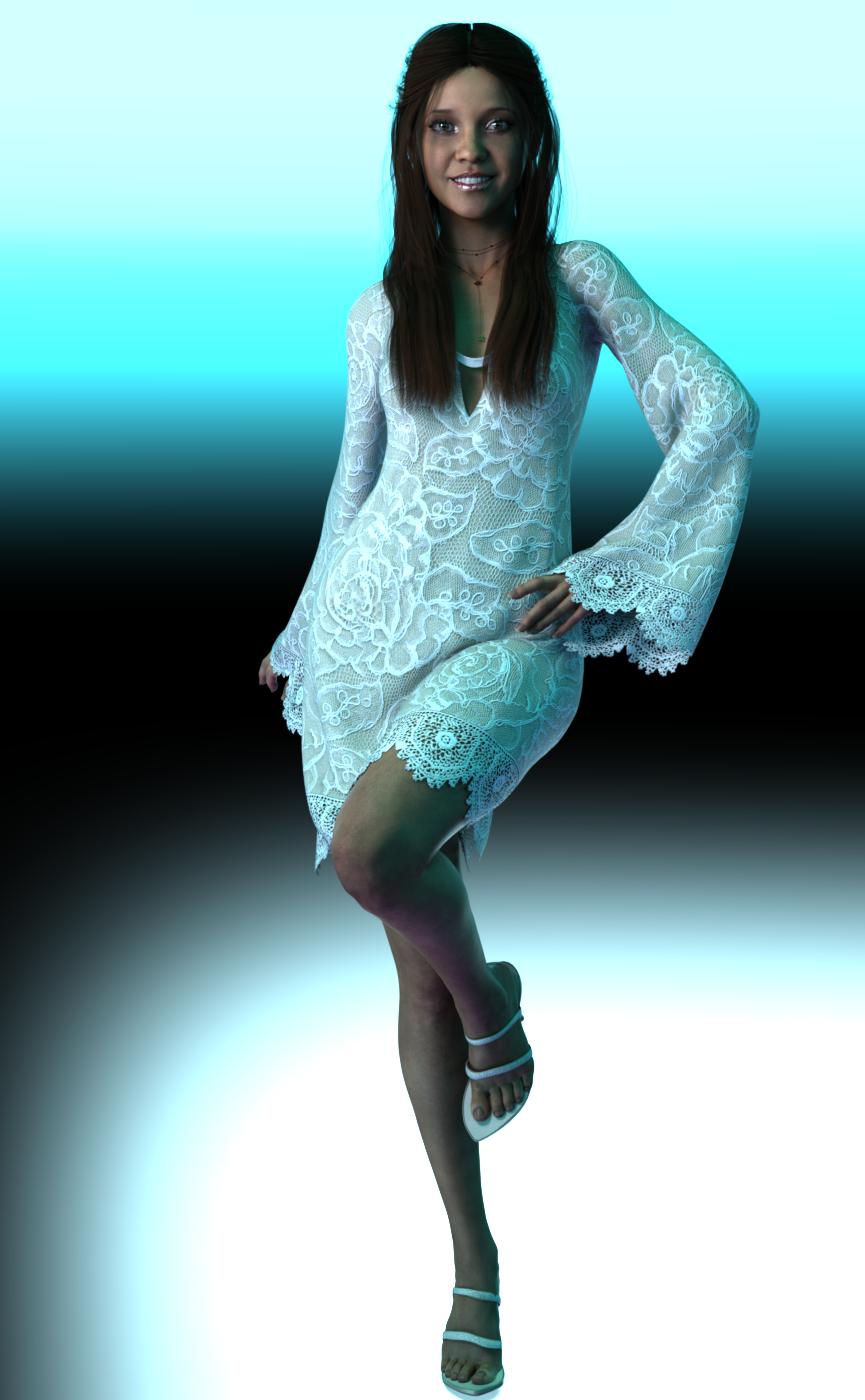
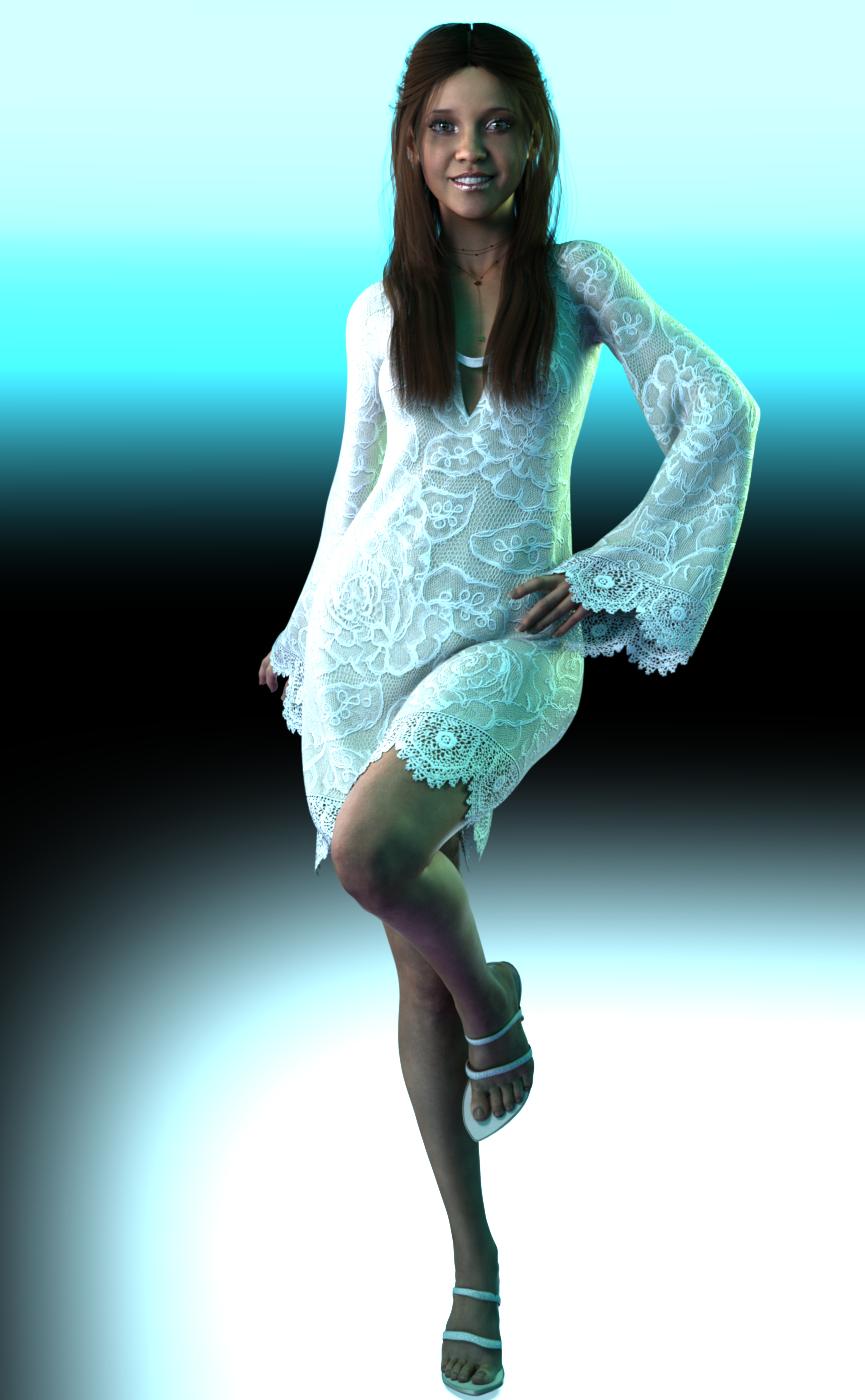
Bell Sleeve Shift Dress G8F - I bought this dress reciently in one of the sales mainly because I liked the textures in the New Age Shift Dress texture set. I didn't really check out the textures includeded with the dress but to me they were pretty basic, one maroon and one black. The New Age set comes with 5 cute textures 3 patterned and 2 lace. I had some dforce issues with the dress and some sizing issues compared to Amira. I ended up having to go into the abd upper area and adjusting the scaling of abdomen area on the dress because it was so much bigger than Amira. It does have some adjustment dials mainly for the back and skirt. I ended up also changing some of the surface dforce settings to get a drape I liked better.
Paper Tiger's Vivid HDRI Light Set - available from the other site. I like the set for a dramatic look. It comes with a whole bunch of different settings and options. It also comes with an XRay camera that lets the hrdi come through the walls of an indoor scene. (Dont know if I explained that properly) I have included 2 different renders here #1 is the scene set up only with the options in the set #2 is with a couple of rim lights added to make it just a tad more dramatic. No other changes where done to the image, usually I would make some adjustment's in an editor but I wanted the full effect for these examples.
 XTransfer Module 1- Genesis 3 to Genesis 8 Morph Converter (Commercial)
Hi Zevo
Downloaded the script from my product library and deleted then replaced the previous version. Now getting a constant "Debug: Error finding' when I try to load the script. It doesn't matter what I try to transfer...GenX, purchased characters, base characters, G3M, G3F, everything brings up the error message on both laptop and desktop, 4.11 and 4.12, both running W7
2020-03-31 14:12:25.545 Loading script: Z:/Lorraine/Documents/daz 3d/studio4/My Library/Scripts/XTransfer/XTransfer G3 to G8.dse
2020-03-31 14:12:25.686 DEBUG: Error finding
2020-03-31 14:13:46.081 Script executed successfully: Z:/Lorraine/Documents/daz 3d/studio4/My Library/Scripts/XTransfer/XTransfer G3 to G8.dse
2020-03-31 14:13:47.360 Loading script: Z:/Lorraine/Documents/daz 3d/studio4/My Library/Scripts/XTransfer/XTransfer G3 to G8.dse
2020-03-31 14:13:47.485 DEBUG: Error finding
2020-03-31 14:13:50.225 Script executed successfully: Z:/Lorraine/Documents/daz 3d/studio4/My Library/Scripts/XTransfer/XTransfer G3 to G8.dseIt's not being very helpful in telling me what it can't find, help please :)
Is all the content on the same HD? Did you re-install and update the metadata? I transfered "Lorraine" myself with no error, but another character file gave an error for a hidden morph file from Tween 7, which I didn't own.
You can rig and save via Shape Rigger. I'm confused. It has a save feature. Why can't you save?
I also haven't been able to save XTransfer morphs using Shape Rigger.
Here's an extract from the log file:
2020-03-30 23:13:55.264 DEBUG: ERC Freeze Successful for XT Rune 7 Head
2020-03-30 23:15:15.869 WARNING: Script Error: Line 1292
2020-03-30 23:15:15.869 WARNING: TypeError: Result of expression 'sVendorName' [undefined] is not an object.
2020-03-30 23:15:15.869 WARNING: Stack Trace: <anonymous>()@D:/Software/Daz/Studio Content/Scripts/Shape Rigger Plus/Shape Rigger Plus.dse:1292
2020-03-30 23:15:15.916 Error in script execution: D:/Software/Daz/Studio Content/Scripts/Shape Rigger Plus/Shape Rigger Plus.dse
You can rig and save via Shape Rigger. I'm confused. It has a save feature. Why can't you save?
Most likely it's because it's an X-Transfer morph dealing with the Gen-X morphs, which are problematic.
Shape Rigger would need to be updated for compatibility with XT but that's if the update is already available but wasn't brought up. Busy people can forget sometimes.
Auto Muscle Enhancer HD [Commercial]Pretty cool, can't wait. I would love to see the standard 'A' pose on G8M with the AME dialed in at 25, 50, 75 and perhaps a dynamic pose of some sort with the same treatment. For me this is one of the best ways to demonstrate a morph. That first figure (01) looks totally awesome!!!
[Released] Character Converter from Genesis 8 Female to Genesis 3 Female - Conv JCMs too[Commercial]You‘re very welcome, thanks to you for being so supportive, especially with an older product!
I‘ve found a very simple solution for the iris problem now, just to wrap this up: the iris realism bulge and depth morphs for G3 by j.cade over at ShareCG. Either of these eliminates the ‚break ring‘ distortion completely, even if only applied at 10 or 20%. Works like a charm! So now one can convert G8 characters with zero tolerance, making them really unbelievably close to the original, and afterwards get rid of the distortion via the iris realism morph. (Oh, one might also need to do some tweaking of the teeth in the end, because they get a bit distorted as well. But that‘s easily done (and I never render open mouths anyway ;-)).
Maybe some day someone wants to look into this in depth, just to see if something like these morphs could be used to prevent such distortions altogether. As for me, right now I’m completely satisfied with the way my characters turn out. Yay! (•runs off happily to convert more characters*)
Wow, that is fantastic. I will have to try it. Can you post a pic?
Auto Muscle Enhancer HD [Commercial]Thank you for the review. I was a little concerned about conflicts as I have experienced them many times in the past when using multiple HD characters. I was hoping that dialing down the resolution of the host body might help with this.If this comes with a base shape I will be happy to use it and then use my plethora of shaping morphs to get the perfect Endo-Meso I have been looking for. I grew up in and around gymnasiums and weight rooms and can attest that muscularity can be taken too far, for both form and function, and will be judicious with the use of this product.
Looking forward to putting this in my cart as soon as it arrives, I do appreciate the honest review. Knowing the possible limitations now, helps to prevent possible disappointments later.
Thank you again.
You're very welcome. There are additional features to this he has aimed for animation, but I do not do animation. So, I'm probably not the best person to explain those features. To your point about multiple HD details, Auto Muscle Enhancer (AME) exist as multiple components that enhance the character's musculature. I've attached three screenshots, 06 and 07 show the same character/pose with AME Body dialed in at the same amount. However, 06 has AME Muscle Definition at 0% and the 07 has it at 100% where you can see the additional details its added, but you can also see in the inner thigh near the knee area there are "Muscle Definition" lines that are laying on top of other muscles from other character morphs and do not like up exactly.
08 is an actual screenshot of the morphs that you're getting with AME. As you can see, it's not an all in one morph dial, so you can adjust the components to your liking. Like I said, it's a bit like "Muscle MSG"

As a whole, it's another great product from D. Master and a whole hearted recommendation for buying it.
Thank you so much for these careful review things. I, too, am still planning on getting it. I bouth the Auto SHAPE Enhancer a couple of days ago, and I have experimented with using both it and the Bend Control for Hips and Legs on two separate posed figures in some bending poses. It seems to work well with that product. It did add some extra musculature to the figures, which I thought was fine.
I have not seen it interfering badly with any existing jcm add-ons. I also have custom jcm's for some of my larger figure to handles things like the hamstrings and back of the kneeds when the shing are bent all the way back and they have no interferred with it.
Auto Shape Enhancer by default works on a 1:1 ratio with Auto Muscle Enhancer body morph. If you dial AME body morph to 40%, ASE will automatically follow to 40%. You can change ASE's level afterwards if you desire.
Again, I will say a little can go a long way.
In the pics below 01 is a character with AME dialed into to 100%, 02 is a figure with Swole Sampson dialed into 100%, 03 is with both Sampson and AME dialed to 100% (I think it's gone too much at that point for my taste), 04 is Sampson at 100% and AME at 40%, and finally 05 is Sampson at 40% and AME at 100%
I show these to point out that there is an underlying shape with AME that is quite different from a figure like Swole or Brute, so adding both at 100% is going to get you something just a bit overboard and wonky, but part of each can actually build you a nice, unique character.
[Released] Character Converter from Genesis 8 Female to Genesis 3 Female - Conv JCMs too[Commercial]You‘re very welcome, thanks to you for being so supportive, especially with an older product!
I‘ve found a very simple solution for the iris problem now, just to wrap this up: the iris realism bulge and depth morphs for G3 by j.cade over at ShareCG. Either of these eliminates the ‚break ring‘ distortion completely, even if only applied at 10 or 20%. Works like a charm! So now one can convert G8 characters with zero tolerance, making them really unbelievably close to the original, and afterwards get rid of the distortion via the iris realism morph. (Oh, one might also need to do some tweaking of the teeth in the end, because they get a bit distorted as well. But that‘s easily done (and I never render open mouths anyway ;-)).
Maybe some day someone wants to look into this in depth, just to see if something like these morphs could be used to prevent such distortions altogether. As for me, right now I’m completely satisfied with the way my characters turn out. Yay! (•runs off happily to convert more characters*)
[Released] Character Converter from Genesis 8 Female to Genesis 3 Female - Conv JCMs too[Commercial]Thanks again, Riversoftart, will try that too! Right now, I’m still trying to get the zero tolerance morph setting to work eye-wise, because it looks real good on the face.
Just for everyone who might have the same problem, I’ve been fiddling around a little and found that that broken ring within the iris almost completely disappears if I put a smoother on G3 after morphing. Will try to bake that, maybe exclusively to the eyes, and see where that takes me. Looks really promising though.
Also, there‘s a tutorial on Youtube on how to remove morphing errors which could possibly work quite well here - only the eyes are within such a dense mess of morph targets that one simply cannot separate them properly to delete the deltas. Will try with upscaling the figure maybe.
Thank you so much for sharing!
Auto Muscle Enhancer HD [Commercial]I've been wondering what "made for animation" means. Does it mean that the figure will flex correctly as I move the arms or legs and bend the figure? But in the video I've just watched, you wrote something like "Don't adjust the FLEX setting while in animation or it will animate the FLEX also." What does that mean? I'm just trying to understand.
It's great if made for animation means that the figure will flex correctly as I move the arms or legs and bend the figure, even as I try to adjust a scene that will be rendered as a single frame. Does it mean that?
Yes, it is Auto. In Daz, we call it Joint Control Morph, JCM. Thus Auto Muscle Enhancer. In animation, each character we have to test out all the movement. During the test, we adjust the level of the percentage of the flex to make sure the character has the correct setting.
Once We find the sweet spot we save the character AME setting. For example, after testing animation we find Michale 8 looks good with flex level at 75% - so we make sure we lock that flex level in for all his movement. We do not want the arm muscle to change size when we load in dif animation.
If you move the slider in animation you are then animating the Flex adding on top the AUTO FLEX. When You start animating. You will understand.
Auto Muscle Enhancer HD [Commercial]Thank you for the review. I was a little concerned about conflicts as I have experienced them many times in the past when using multiple HD characters. I was hoping that dialing down the resolution of the host body might help with this.If this comes with a base shape I will be happy to use it and then use my plethora of shaping morphs to get the perfect Endo-Meso I have been looking for. I grew up in and around gymnasiums and weight rooms and can attest that muscularity can be taken too far, for both form and function, and will be judicious with the use of this product.
Looking forward to putting this in my cart as soon as it arrives, I do appreciate the honest review. Knowing the possible limitations now, helps to prevent possible disappointments later.
Thank you again.
You're very welcome. There are additional features to this he has aimed for animation, but I do not do animation. So, I'm probably not the best person to explain those features. To your point about multiple HD details, Auto Muscle Enhancer (AME) exist as multiple components that enhance the character's musculature. I've attached three screenshots, 06 and 07 show the same character/pose with AME Body dialed in at the same amount. However, 06 has AME Muscle Definition at 0% and the 07 has it at 100% where you can see the additional details its added, but you can also see in the inner thigh near the knee area there are "Muscle Definition" lines that are laying on top of other muscles from other character morphs and do not like up exactly.
08 is an actual screenshot of the morphs that you're getting with AME. As you can see, it's not an all in one morph dial, so you can adjust the components to your liking. Like I said, it's a bit like "Muscle MSG"
As a whole, it's another great product from D. Master and a whole hearted recommendation for buying it.
Thank you so much for these careful review things. I, too, am still planning on getting it. I bouth the Auto SHAPE Enhancer a couple of days ago, and I have experimented with using both it and the Bend Control for Hips and Legs on two separate posed figures in some bending poses. It seems to work well with that product. It did add some extra musculature to the figures, which I thought was fine.
Auto Muscle Enhancer HD [Commercial]I've been given a chance to play with it and cut some video for D. Master of using Auto Muscle Enhancer as a demo. He also asked me to give an honest review of it. I'm enjoying it so far. It does add a lot to the G8M gene pool, especially if you build "big guys". I will say that "a little dab will do you" when it comes to using Auto Muscle Enhancer. Loading it and cranking everything to 100% will get you something that looks like a flayed corpse. You are best to add it in to other characters. It's kinda like Muscle MSG, it enhances and improves, but it works better working with other "flavors" than by itself. The character I whipped up below is a combination of George 8, Brute 8, Swole Sampson and Auto Muscle Enhancer dialed in to 70%. There are additonal morphs for playing with the back and stomach. You can see the "Belly In" morph on display in the image of the character lifting up the beach ball ala Atlas.
The only knocks I really have against it so far is the Muscle Definition morph really only works well with the body shape of Auto Muscle Enhancer. You get a definition lines etched into the figure that do not necessarily line up with the muscles of other body shapes morphs. It would have been nice if it also did a better job of the whole lat/bicep/delt insertion area. Poses where the character has the arms lifted straight up, still look akward like they always do.
Otherwise, this product is great and I think it will definitely be useful to a lot of people that work with male figures.
You mentioned Swole Samson. I have that Swole set. If you combine any of the morphs from that with this product, do they not line up OK? I also have the Bend Control for Hips and Legs by Sickleyield. If you have that, have you tried using that along with this product, and, if so, what do you think?
[Released] Character Converter from Genesis 8 Female to Genesis 3 Female - Conv JCMs too[Commercial]Thanks again, Riversoftart, will try that too! Right now, I’m still trying to get the zero tolerance morph setting to work eye-wise, because it looks real good on the face.
Just for everyone who might have the same problem, I’ve been fiddling around a little and found that that broken ring within the iris almost completely disappears if I put a smoother on G3 after morphing. Will try to bake that, maybe exclusively to the eyes, and see where that takes me. Looks really promising though.
Also, there‘s a tutorial on Youtube on how to remove morphing errors which could possibly work quite well here - only the eyes are within such a dense mess of morph targets that one simply cannot separate them properly to delete the deltas. Will try with upscaling the figure maybe.
asymmetrical morph questionOk, I followed the video until the very end, taking the Eyes Pupil Dilate morph from G8M Head Morphs, and adjusting it so it only affects one eye.
But how can I save this adjusted morph under a different name?
Giving it a new "product name" and "vendor" seems to not affect how the morph is called, only where it's saved. It then overwrites the original unadjusted morph. I want both, the original that affects both eyes and my adjusted morph that affects only one eye.
Morph import/export problemHmm.. you get the error when importing via Morph Loader Pro - it doesnt even load the morph sucessfully?
When i make morphs in Blender, I have to check keep vertex order, or otherwise the morph will explode the mesh, but even if vertex order is not maintained, the morph still loads in fine via morph loader pro.
Morph import/export problemI export my figure as OBJ, Genesis 8 Female from DAZ, with base geometry and no subdivisions, no eyelashes. This export is correct, I can import it back with Morph Loader Pro and geometries match. But, anything I do in 3DsMax messes the same geometry. I import that same OBJ, with the following settings (see attached), I don't even touch it and export it back as OBJ (see attached) and geometries do not match. It's making me go crazy, can anybody see anything wrong in my export/import workflow? Thanks.
asymmetrical morph questionIf you have a morph that changes both you can save it as 2 different morph assets, then use the geometry editor to remove unwanted vertices from the morphs and save these.
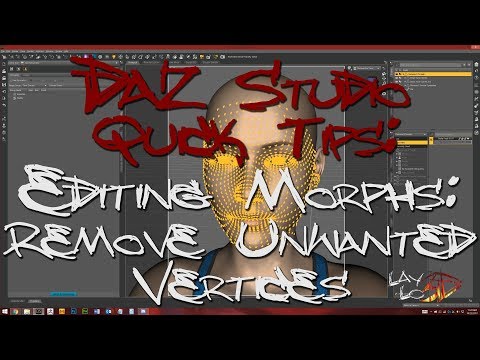
Well worth learning how to do this (and weighted morphs eventually), I use it almost daily.
Daz 3D is part of

Connect
DAZ Productions, Inc.
7533 S Center View Ct #4664
West Jordan, UT 84084Licensing Agreement | Terms of Service | Privacy Policy | EULA
© 2026 Daz Productions Inc. All Rights Reserved.