-
RSSY 3Delight And Iray To Filament
It will never look like the Iray render, not is it intended to. I think a fairer comparison would be what it looks like in Filament before and after running the script.
RSSY 3Delight And Iray To FilamentCharlie Judge said:
This looks like it will be extremely useful. Howver, considering the price, I would be interested in comments and seeing renders from people who have purchased it. How well does it actually work and how easy is it to use, etc.?
Well I tried it first with this picture:
Original:

And with the conversion tool:
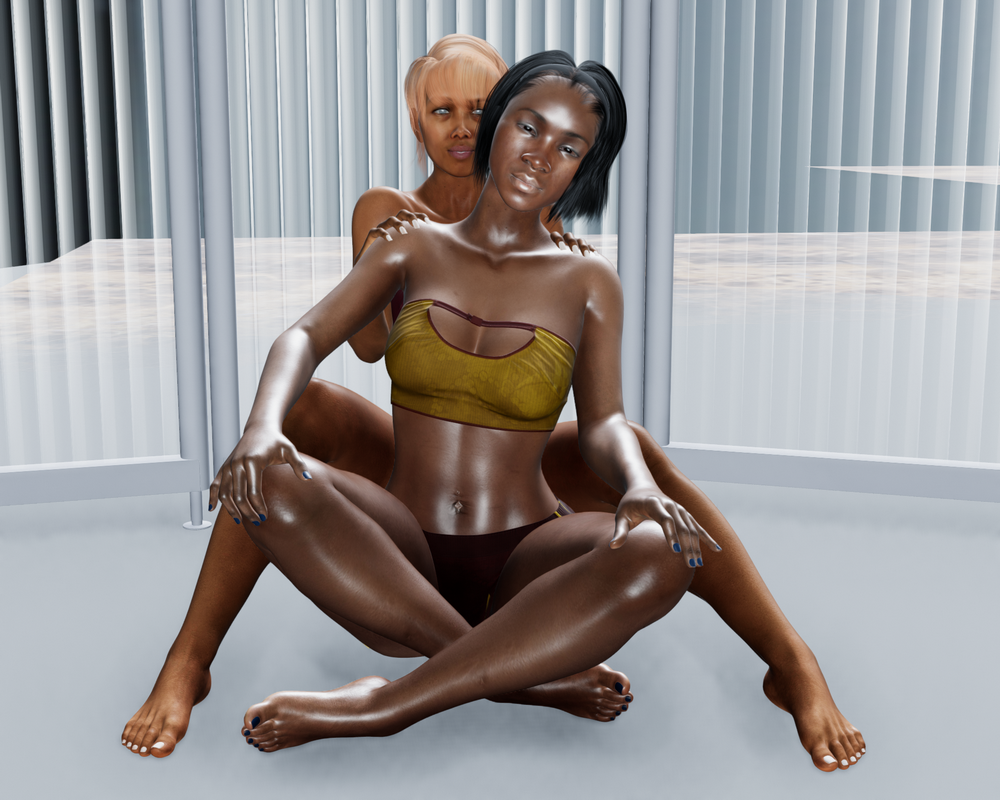
Then I tried this one:
Original:

And with the conversion tool:

In both cases, I loaded the original scene, clicked on the script, chose to scan for items and scan for matches, and had the box checked to update the materials. And in both cases I dragged the exposure slider in the script dialog to try to get the brightness level to be similar to what I remembered the originals to be like. I don't believe I changed any other settings from the default. This was my first and second attempt at using the product.
{Solved} Dark object rendering [Light does not catch it]I'm not using Filament. I do render in Iray. One of the easiest ways to get some decent light on targets is by making some "spheres" [under the Create menu]. You can create one, after fixing it to be light, make instances of it and rearrange those instances wherever you please.
On the surfaces tab, select Emission and change the colour to white. More options appear, adjust a few. Then on the geometry dial, set opacity to something like 0.00001.
The further away the light source is the softer the shadows edges might be. [just like real life lighting]
[Released] RSSY 3Delight And Iray To Filament [Commercial]It seems to support Genesis 8 only, I was seeing seams on a Gen 2 figure. Is this an inherent flaw in filament, or is this something that can be fixed?
{Solved} Dark object rendering [Light does not catch it]Hello, I have adjusted some parameters (Light,Camera,Shader) but they did not work out the way I want
The first picture is an object on viewport with texture shaded.
The second is a rendered one, there are lights on the object but it just too tiny (this is a thread, help please)
The third is when I change to "Dome and Scene" then rendered. Most of the time I stay on "Scene Only"
The forth one is with "Filament(PBR)" on viewport, this is what after render suppose to be for the finish result
so, any suggestion would be great
regard,
Steve
Daz Studio Pro BETA - version 4.15.0.30! (*UPDATED*)jbowler said:
There seems to have been a correction to the 2EV overexposure problem in Filament rendering; I'm still checking that out but the viewport Filament rendering is now much closer in exposure to the Iray render.
That's incorrect. The 2EV bug with respect to dome (Environment Map) illumination is still present.
[Released] RSSY 3Delight And Iray To Filament [Commercial]I can't get my head around the create conversion/expression. It probably isn't helped by the fact that I don't really understand coding.
I've also been looking over one of my Filament scenes, and I've got a few items in the scene that are metal. However, the Filament converter isn't converting the items to a metal (filament) shader, but just the "basic" Filament Shader.
Daz Studio Pro BETA - version 4.15.0.30! (*UPDATED*)It looks like no improvements have been made to the long open/load/close times in 4.15. Here are the results from timing (mainly based on times in the log file) for a test scene with architecture, props, a dome, 2 G8F and one G8M:
Scene load time: 4:04.371 (from log file)
DAZStudio close time: 3:58.118 (from log file; "Deleting Scene" to the last entry in the log file).
Close time with my work-round: About 1 minute (based on the time from the end of the load to the last entry in the log file - almost exactly 1 minute).There seems to have been a correction to the 2EV overexposure problem in Filament rendering; I'm still checking that out but the viewport Filament rendering is now much closer in exposure to the Iray render.
The Mac FAQI saw the new version, 4.15, a few minutes ago. I'm also waiting to see how well it runs before/if deciding to update to that version. Still running 4.12.0.86 on a 2015 Mac mini (Sierra) and a 2020 MacBook Pro 16" (Catalina).
And waiting to see if Filament is in 4.15. :)
Lee
[Released] RSSY 3Delight And Iray To Filament [Commercial]Does this tool change the materials of characters skin and hair for filament rendering?[Released] RSSY 3Delight And Iray To Filament [Commercial]Artini said:
Just got it. Waiting for some more experienced with filament than me, to show up the renders.
Thanks @Artini!
More Non-photorealisitic Renders (NPR II)Having fun with Filament - Daz Outline (script) render and Photoshop
RSSY 3Delight And Iray To FilamentI am actually hoping DAZ will just add emission to their version of Filament
Daz Studio Pro 4.15 - Highlights4.15.0.2 (January 7, 2021)
- NVIDIA Iray
- Integrated Iray 2020.1.3 (334300.6349); see this thread for more detail
- REQUIRES: NVIDIA Driver 451.48 (or newer) on Windows; see NVIDIA Driver Downloads
- NVIDIA recommends installing Studio Drivers
- REQUIRES: NVIDIA Driver 451.48 (or newer) on Windows; see NVIDIA Driver Downloads
- Added support for tinting environment light
- Control color via Environment > Dome > Environment Tint
- Added support for controlling ground reflectivity/glossiness
- Control color via Environment > Ground > Ground Reflectivity
- Control glossiness via Environment > Ground > Ground Glossiness
- Added support for controlling whether or not the environment ground can be seen through
- Control via Environment > Ground > Ground Visible from Below
- Added support for visualizing an Iray Section Plane node in the viewport
- Control color via Display > Scene View > Plane > Plane Color
- Control opacity via Display > Scene View > Plane > Plane Opacity
- Does not influence Render Settings (NVIDIA Iray) > Section Objects > Section Caps Color, only what is drawn in the viewport
- ...
- Integrated Iray 2020.1.3 (334300.6349); see this thread for more detail
- Real-Time Rendering
- Filament (PBR) DrawStyle
- Shader/Material Support
- Automatic translation of specifically named properties in the PBRSkin (MDL) shader:
- Translated property names:
- Metallicity Enable, diffuse_enable, Diffuse Enable, Dual Lobe Specular Enable, Dual Lobe Specular Roughness Mult, Specular Lobe 2 Roughness Mult, bump_enable, Bump Enable, Makeup Enable, Makeup Weight, Makeup Base Color, Makeup Roughness Mult, Detail Enable, Detail Weight, Top Coat Enable, Top Coat Bump Weight
- Translated property names:
- Automatic translation of specifically named properties in the PBRSkin (MDL) shader:
- Shader/Material Support
- Filament (PBR) DrawStyle
- Shader Mixer
- Texture Instance brick
- Added a "Image Polarity (MDL)" setting
- Added a "Is Polarity Flipped (MDL)" output parameter
- Added a "Has Mapped Value" output parameter
- Comparison Operator bricks
- Fixed RSL version of comparison operator bricks (<, <=, >, >=, ==, etc)
- Bricks (Default) > Functions > Mathematical > Operators
- Dynamically Hidden Parameters brick
- Bricks (Default) > Functions > Utility
- Is User Parameter Mapped brick
- Bricks (Default) > Functions > Utility
- Drag and drop events between brick inputs/outputs in order to establish connections are now validated by both sides of the connection
- Added tooltips to brick input connectors
- Provides the brick title and output parameter label for a connected input parameter
- Texture Instance brick
- Preparations toward migration to a considerably newer version of the application framework (i.e., Qt)
- Changes made should have no discernible impact on use of the application
- Scripting API
- Made additions in various areas; see the Change Log for more detail
- Fixed bugs and/or made improvements in various areas; see the Change Log for details
RSSY 3Delight And Iray To FilamentI can set up scenes too in Filament and do, where this could be useful is those sets with hundreds of emissive surfaces such as Urban future 7 or other neon city scenes.
I will probably pick it up eventually but yes not a huge priority at the price it is, there are other things I want more badly.
[Released] RSSY 3Delight And Iray To Filament [Commercial]Just got it. Waiting for some more experienced with filament than me, to show up the renders.
[Released] RSSY 3Delight And Iray To Filament [Commercial]RiverSoftArt said:
Martial said:
Ok i got it now
It is fast but Iray rendering is much better according the comparaisons i did today
Oh, I agree. Iray is what I use (and I have a 2080Ti so it is not terrible to render). But if I ever start doing more animations, I would use Filament for pre-viz.
Yeah, one of the big complaints from animators is that it took them ages to find out if their animations even worked, because rendering was so slow. Iterating was also a huge pain for the same reason. If you're mostly interested in that, Filament is a great solution.
Render a filament sceneMartial said:
Ok i got it now.
It is fast but Iray rendering is much better according some comparaisons i did today
Yes, of course. Filament is handy for quick scene evaluations and for animation, because it is quick. It is not intended to be a competitor to Iray for quality. You pick, based on your need: top speed (Filament) or top quality (Iray).
[Released] RSSY 3Delight And Iray To Filament [Commercial]Martial said:
Ok i got it now
It is fast but Iray rendering is much better according the comparaisons i did today
Oh, I agree. Iray is what I use (and I have a 2080Ti so it is not terrible to render). But if I ever start doing more animations, I would use Filament for pre-viz.
[Released] RSSY 3Delight And Iray To Filament [Commercial]Daz 3D is part of

Connect
DAZ Productions, Inc.
7533 S Center View Ct #4664
West Jordan, UT 84084Licensing Agreement | Terms of Service | Privacy Policy | EULA
© 2026 Daz Productions Inc. All Rights Reserved.
















