-
Endlessly ongoing... playing cards/casino chips/coins/banknotes scatter... hiatus time (still)
I mentioned back here about the problem I ran into when using the same image for the front/back of a chip. The problem occurs if the colours around the circumference of the chip are not left-right symmetrical.The fix for the example I gave was to simply rotate the outer colours until they were left-right symmetrical.
However, I've just realized that chips with two-colour inserts around the edge can't be done like that.
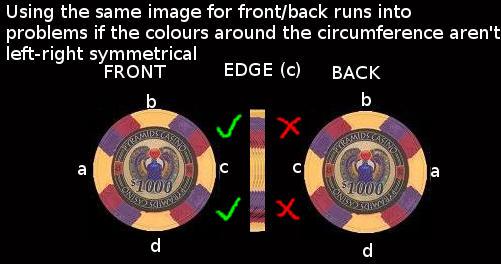
The* solution I can see is to create a separatemap for the back of the chip with the colours (but not the label) flipped left-right:
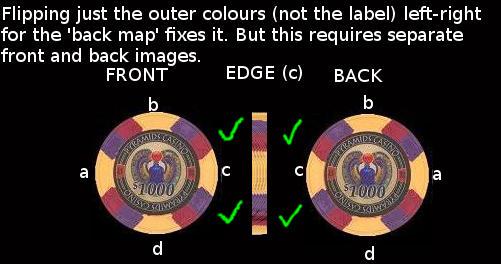
Obviously the chips would then need two material zones, 'front'and 'back' (edge colours are taken from the front map).
*An alternative is to modify the mesh so that the label and outer colours are separate material zones. But then I'd have to redo all those morph targets...and that's just not going to happen !
MCS Mega Bundle?What's the latest version of Unity with which they are compatible? I had them in 2019.3.7f1 and hoo boy do they not morph right. At least the MCS Male 1.6 (the latest version on the Asset Store).
Importing .bvh filesSo I have had luck importing mocap files into DS via BVH and a good Bone MAP to G1 figures. From there you can find various tools to apply the animations to G2/G3/G8 figures. DS does have retargeting (transfer utility?) I believe.
As for sliding feet, check out this utility: https://www.daz3d.com/glue-to-floor-utility-for-genesis-8-females
Good luck.
Muscle-Based Deformation take 2Daz has some prety unique tools for character creation and I don't think I could have achieved the same results in any other program.
I am really interested .. what tools do you use that are unique to daz studio ?
Daz has some prety unique tools for character creation and I don't think I could have achieved the same results in any other program.
I am really interested .. what tools do you use that are unique to daz studio ?
Same here. I tried to do a research on the tools offered by Daz, but found sparse info here and there
It's the ease of use Daz has above all else. Its design philosophy was to be able to be used by people with zero knowledge of 3D work. Everything is user friendly though behind its interface lies a similar complexity to that of any other 3D package. The amount of knowledge and work it takes to unite 2 rigged models into one is shocking for a Daz user who does it by the press of a button.
My favorite is Adjust Rigging to Shape. Having used other 3D packages it shocks me how well Daz does it and I only have to press a button. Can it be done in other programs? Yes. Can it be done in other programs in under 10 seconds? Absolutely not. I have a male and female version of my figure. I estimated it would take me around 2 weeks to properly transfer the rig. I didn't even considered that Adjust Rigging to Shape would help, I don't believe in magic. I just tried it for kicks and literally yelled out loud when I saw 99% of the job was done.
The same goes for most of Daz's tools, one of which is the Propriety Hierarchy. The ease of use allowed me to experiment easily and get instant results. If I were to do something like this in 3dsmax I would have needed to learn how to code, I would need to use several scripts, plug-ins, etc. If I had to worry of the technical aspect of the program, like whether this line of code is compatible with so and so version of the program, I doubt I would've gotten to where I am now. Even how stable the porgram is amazes me.
Keep in mind I'm just one guy. I only have a few years of 3D experience. This started as a side hobby and only got really into it 2 years ago. I'm no genius, I don't know how to code and I'm not an industry professional. My thing was trial and error and with Daz I was able to make tons of mistakes but in a relatively short period of time.
[Released] Character Converter from Genesis 8 Male to Genesis 3 Male [Commercial]Hi and thanks for the quick response. Here is a screenshot. When I filter on the currently used morphs under Shaping nothing shows up. Then what's strange is if I search for Sanjay morphs the Head and Body regions highlight but the morphs do not show up. And insight you have on this is deeply appreciated.
Looking at the figure, the Sanjay CTRL is not on. It looks like the script had a hard time finding the CTRL file to fix it, which means setting CTRL to 1 was not done in the character preset. I would select top-level Sanjay and filter there. Also, check your data/DAZ 3D/Genesis 3/Male/Morph and search for sanjay to make sure the FHM, FBM, and CTRL are there.
Bamboozle for Matt , morph + compatibilityThere is another path you can follow. Clothes Converter 4.0 can take Millennium Generation 3 clothes and "convert" them to other Generation 3 and Generation 4 figures (yes, it's old, but so are Millennium Generation 3 products, and this is the sort of product it was made for). You will have to shape things a bit, like with Mesh Grabber, but this has symmetry, rotations and scaling and will export a new .obj file, fully rigged as a Poser .cr2 figure for the new actor, and can use the existing material presets.
In this case, you can basically fit it for Kids 4 and then from Kids 4 to Genesis and higher with autofit or other products.
And, no, there is no open jacket morph...
[Released] Character Converter from Genesis 8 Male to Genesis 3 Male [Commercial]Hiya - RiverSoftArt - Thanks for all the great products you produce - I have used many and find them really useful to the projects I'm working on.
One quick question - when I convert a character from G8 -> G3, the character comes over great, but I don't get the morph dials and controllers in the shaping tab for the morphs that were transferred over so they are not added into the 'gene pool' for easy combination of existing G3 characters.
Troubleshooting so far:
- I do have Show Hidden Properties enabled. If I export the character via fbx the morphs are avaiable to export.
- If I search for the morph, the region is properly highlighted but the morph dials do not show.
Is there something that needs to be done to make them available?
Again thanks for the great work you do in these products.
You're welcome! If the characters are converting over, then the morphs are there to see. I would love in a character and then filter on the used properties. They will show up.
[Released] dForce Magnet [Commercial]the magnet is loading in like a half a screen away from the fabric.
The magnet uses the vertex location of the base mesh in default state. When you have a morph applied, a transformation or anything else that changes the object's appearance the Magnet will load with an offset. I recommend creating the magnet before you move or morph anything.
To use the magnet on a morphed dress, for example with a morph that widens the skirt, have the dress in default shape in frame 0, create the magnet there, and then apply the morph in frame 1 and move the magnet to fit the vertex's position.
I struggle with that restriction regullary. Is there no option to use the morphed mesh for the magnet position?
Not right now.
XTransfer Module 1- Genesis 3 to Genesis 8 Morph Converter (Commercial)What are you transferring? Genesis 1 Base morph has not been resolved yet. All joins on GenX G1 and G2 character shapes should be fine. Can I see what morphs you are trying to transfer please?
I used Sadie from 3D Universe, I'm trying some more right now.
Like before the elbows, knees and nape gets really bad bendings, along with some other, less noticeable, problems in whole body. I even tried re-rigging it following your previuos post, nothing to do, it solves only the hands issue and even the wrong way (when bending the fingers they also twists)
[Released] dForce Magnet [Commercial]the magnet is loading in like a half a screen away from the fabric.
The magnet uses the vertex location of the base mesh in default state. When you have a morph applied, a transformation or anything else that changes the object's appearance the Magnet will load with an offset. I recommend creating the magnet before you move or morph anything.
To use the magnet on a morphed dress, for example with a morph that widens the skirt, have the dress in default shape in frame 0, create the magnet there, and then apply the morph in frame 1 and move the magnet to fit the vertex's position.
I struggle with that restriction regullary. Is there no option to use the morphed mesh for the magnet position?
Star Trek Builders Unite 8: THE REBOOTguys the thing is it doesn't matter what character it's for as long as the texture is for Victoria 4 . I've already built my own morph to make the character . I just need to texture to finish her outModify Daz clothes in Hexagon?You need to modify the mesh.
I assume you can do that in Hexagon, but I have never used that. But if you export the clothing to Hexagon, and then pull the top row of verteces up to where you want the collar to be. Then import it back to Daz Studio as a morph. The texture will be stretched, but if it is a solid color you won't notice.
Pay attention, that you in Hexagon only move vertices. If the vertex order get changed it will mesh up the morph.
Edit to add: if you have https://www.daz3d.com/mesh-grabber then you can do it inside Daz Studio.
[Released] Character Converter from Genesis 8 Male to Genesis 3 Male [Commercial]Hiya - RiverSoftArt - Thanks for all the great products you produce - I have used many and find them really useful to the projects I'm working on.
One quick question - when I convert a character from G8 -> G3, the character comes over great, but I don't get the morph dials and controllers in the shaping tab for the morphs that were transferred over so they are not added into the 'gene pool' for easy combination of existing G3 characters.
Troubleshooting so far:
- I do have Show Hidden Properties enabled. If I export the character via fbx the morphs are avaiable to export.
- If I search for the morph, the region is properly highlighted but the morph dials do not show.
Is there something that needs to be done to make them available?
Again thanks for the great work you do in these products.
Endlessly ongoing... playing cards/casino chips/coins/banknotes scatter... hiatus time (still)Maybe I'm being stupid - in fact I probably am - but where is the link to download these groovy freebies?
Hey, I bagsied 'being stupid' first !

My original plan... well... sort of ran into a brick wall (as far as the cards and banknotes are concerned) due to the "But do I really want to go through all this morph target creation again for a pack of cards and a wad of bank notes ?" mentioned in this post.
However, Catherine3678ab's comment about little asteroids gave me an idea for a different approach, using geometry swapping, which works beautifully in Poser.
But unfortunately not in DAZ Studio - it appears* that DS4.[something, 5/6 perhaps?] broke Poser-style geometry swapping.
However (again), using a figure with 54 (effectively) disconnected bones, but without the geometry swapping is a possibility for DS, although there's some tedious and error-prone stuff that I'd have to do up front (assigning each individual card/banknote/chip mesh to a separate bone) which I can't really face ! Luckily I've already done that for the deck of cards (which is actually why I know I can't face doing it again in the forseeable future for the banknotes or chips)So.
The only stuff that I've actually released for this so far is the pre-release stuff - links in the first couple of lines of the OP so you don't have to plough through the thread to find them somewhere on page 2.
But (too many 'however's already) as I mentioned in the previous post I've found the blend file for the 54 casino chips, and (despite my penchant for dual-club-wielding ladies in pink bikinis standing in the grass) I've actually started work on creating the release version of the 54 chip scatter prop. So fingers crossed on that.
And since there's now no way that I'm going to do the cards in that same morphing prop way, I've decided to do them as a 54-loose-boned figure. Fingers crossed there too.
*mentioned here, 4th paragraph, 1st sentence
[Released] RSSY Clothing Converter from Victoria 4 to Genesis 8 Female [Commercial]Please delete the first item in your list. Instead of a valid conformer, it has been filled it in with C:/Users.../Genesis 8 Basic Female.duf. The other ones in the list have a valid conformer identified: Converter Bodysuit, Converter Cape.
That helped. I thought that was the trick. Now I only have to figure out why the shoulder straps on all my converted stuff are up over the character's ears...
It's a new look, though. Maybe I'll start a trend or something. Thanks for the reply.
If you are talking about looseness, there are a ton of helper morphs to fix things like that. The helper morphs are in the Parameters pane, below Actor->Converter Morphs (see Figure 10). Adjusting the Tighten All morph and turning on Smoothing can fix most issues.
If you are talking about shoulder armor becoming all bendy, that cannot be fixed.
What character is used in this promo image ?I named her May. She is a custom dial mixed character. Her body is a mix of 5 different character morphs while her head is a mix of over 17 different character and morph sets. Her skin is Sage for G3F by Thorne.
That particular image is a promo from my new set - https://www.daz3d.com/mmx-knitted-fabric-and-patterns-for-iray
If you look through my store, you will see more promo images of here as far back as my 3rd earring set.
My Artstation gallery, link below, contains more images of her that dont appear in my Daz gallery.
Make me Itsy Bitsy - Terry "Bump"Displacement can be a bit of a swine to get right. Remember that ALL of the material zone is affected, so if the base grey is out by a bit then the whoel garment will be displaced out too. Of course the mid-point for a grey scale is actually 127.5, which is not simple to do in 8 bits of a byte, so the base of 128 actually will displace eberythign a little. You could see if the garment has a shrink morph or an expand that allows negative values and you'd need to have the item just under the skin of the figure so that whjen the displacment is applied at render time it will appear correctly - rinse, repeast on that one! ;) You might be able to adjust the minimum displacemnt value to achieve something similar.
L'Adair's WIPsA new tool in my toolbox is Mesh Grabber. I've gotten pretty darn good with dForms, but the Mesh Grabber is faster and more intuitive for most situations. I love this tool but it can be slow and combersome if you need to make changes to a large number of polys/vertices at one time; a limitation I attribute to the code running Daz Studio, currently in version 4.12.
For example, in the image below with the centaur, I used an outfit for G8F that included a dForce cape. I needed the cape to bend up parallel with the horse back before I could run the simulation. Selecting 2/3 of the cape and trying to bend it up using Mesh Grabber took foorever for the viewport to update with each movement of the mouse. I actually used Hexagon to create the bend morph for the cape.
I used Mesh Grabber for everything else: creating a Fit to Centaur morph for the belted waist of the dress, and numerous tweaks of the outfit as I went along. It's perfect for such smaller changes. I also used it to create several morphs for the "collar" including one that allowed me to move the rigid pieces up, so they were out of the way during the dForce simulation, moving down into place by the end of the animation.
But what I really want to talk about is how I used the Mesh Grabber to create churned sand under the centaur. Here's the finished image:

First, I should mention I was using the beta, which is no longer working. The released version of the Rotations addon is in the Daz queue, and should be available soon. It is a "must have" as far as I'm concerned, and considering the amount of work the PA put into it, I'm fine with it being a paid addon.
XTransfer Module 1- Genesis 3 to Genesis 8 Morph Converter (Commercial)What are you transferring? Genesis 1 Base morph has not been resolved yet. All joins on GenX G1 and G2 character shapes should be fine. Can I see what morphs you are trying to transfer please?
Bamboozle for Matt , morph + compatibilityHi,
I just discovered this:
https://www.daz3d.com/bamboozle-for-matt
and I love it! But... does anyone have it and does it fit on G8? I have mesh grabber and can fix poke throughs a bit, but if the complete pose is broken, then its too much.
And... because I love moprhs: Have the jacket a openable morph? :D
Daz 3D is part of

Connect
DAZ Productions, Inc.
7533 S Center View Ct #4664
West Jordan, UT 84084Licensing Agreement | Terms of Service | Privacy Policy | EULA
© 2026 Daz Productions Inc. All Rights Reserved.