-
Freebie Challenge March 2024 - "Power Source" - Entries Thread
Source of Power
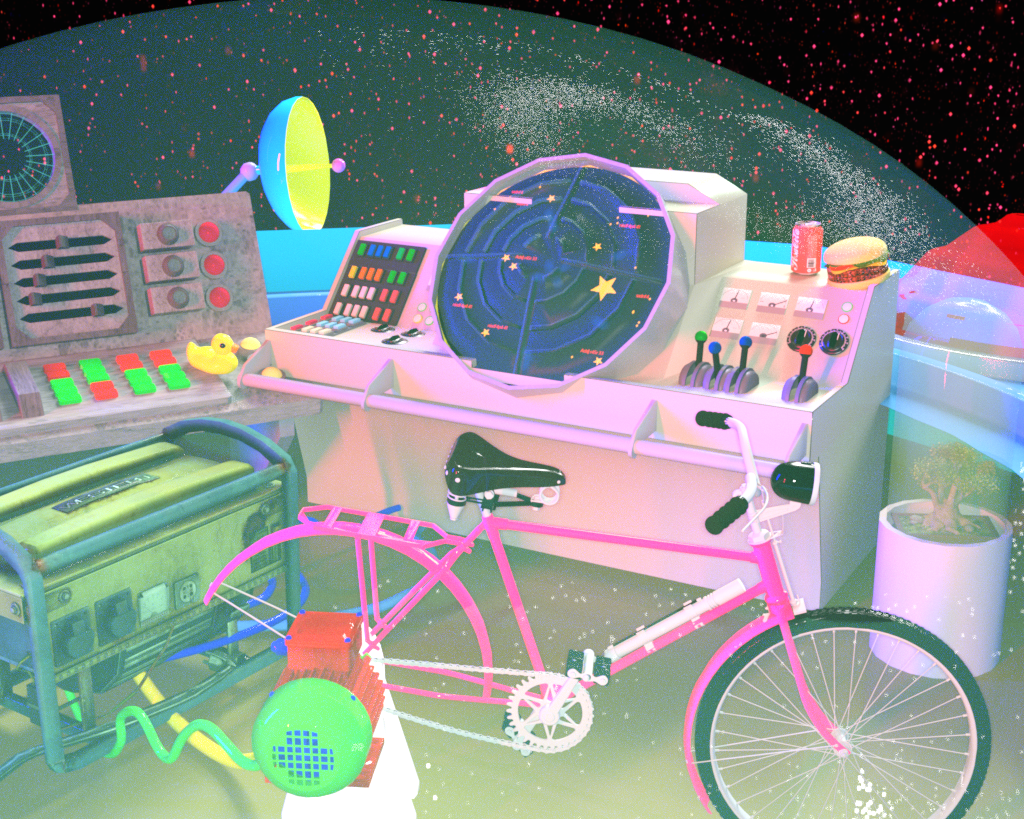
List of Freebies:
1) Bicycle
https://www.renderosity.com/freestuff/items/67871/bicycle-old-military
2) electric motor (import .dae file into DS)
https://sketchfab.com/3d-models/electric-motor-19d028eb4e504314bf909a381b6796eb
3) electric generator
https://www.renderosity.com/freestuff/items/58738/generator-low-poly
4) Console left side: SiFi Console Construction Kit (scroll down page)
http://www.joes3dfantasyworlds.com/down/scifi01/scifi01.htm
5) Console middle: HX Console
https://www.renderosity.com/freestuff/items/95172/hx-console
6) Rubber Duck
https://www.most-digital-creations.com/free_poser_poses_textures_morphs_props_32.htm ; (scroll down page to get :
https://www.most-digital-creations.com_RubberDuck.zip ;
7) Burger: by Adam Thwaites
https://www.most-digital-creations.com/free_poser_poses_textures_morphs_props_19.htm ; (scroll down page to get :
https://www.most-digital-creations.com/BigBurger.zip ; )
8) Surveilance System (part of the Add-Ons for Flying Saucers)
https://www.renderosity.com/freestuff/items/85842/mc-saucer-add-ons
9) Flying Saucer
https://free3d.com/3d-model/flying-saucer-v1--212678.html
10) Starfiled (on Backdrop) is nightsky from
https://www.renderosity.com/freestuff/items/64710/4-space
11) Bonsai Tree by TruForm
https://www.renderosity.com/freestuff/items/74694/bonsai-tree
Not counted for
- Beaverage Can (old freebie, seems not longer available)
- Daz Primitives: Plane (for Backdrop, texture starfield see above)
- Daz Primitives: Cylinder (used for floor and interior of saucer)
- simple supporting props made on the fly in Hexagon:
Support for bicycle
Showcase for plant
Electric cable (on the floor)
paid item: Light Presets, Click N Render
Workflow Information:
DAZ Studio Geometrie Tool was used to add several surfaces to saucer (hide inner surface for interior, the DS Cylinder see above; creation of several additional surfaces to apply different shaders)
Material of Bicycle and other items were manual adjusted in DS Surface Tab by manual setting of color, glossy reflection etc.
No postwork was done.
Hope that you like it.
Nice Days and Nice Renders
atoxic
How do I persuade DAZ Studio to rebuild the content database?Richard Haseltine said:
No, because there is no way to know what product dispalced files berlong to or, in most cases, what target they should act on. That is why metdata is needed, to provide that information for the files in their default location. You can move files within Daz Studio and that will preserve the links between CMS entries and files, as long as the database survives (and possibly as long as there isn't an update). You could put the files back, or you could edit the metadata for the product they came from (but note that any product update will overwrite those edits). A safer way to move files is via links, creating a .djl file in the preferred location that points to the original: you can do that via right-click, or using http://docs.daz3d.com/doku.php/public/software/dazstudio/4/referenceguide/scripting/api_reference/samples/specific_ui/create_asset_links/start .
If it is just the user-facing file that has moved it should contain all links relative to the base install location, so it still works, and indeed the moved files still load perfectly when double-clicked. Studio however, was presenting me with icons for missing files in the original locations because the content database was out of sync, plus those items were not showing up in smart content as they should. Going through the help system here eventually found me an answer (after way too many searches) and it all now works perfectly and the missing file icons have vanished. Just right click in the content pane, select DB Maintenance and reimport all metadata. That fixed it, the moved files still work and the missing file icons have vanished, and the smart content once again shows up in the smart content pane.
Product updates will be another problem, but I imagine that will just be a matter of reinstalling and then moving the updated file, then DB maintenace again to ensure Studio can find it.
Thanks to everybody who tried to help, even if I found the answer elsewhere I always appreciate it when some attempts to help me.
Help with Clothing
What software will I be able to do this? I'm interested since, it doesn't look right.crosswind said:Content creators have no way to make and fix FBM / PBM on the wearables for the character's shape that users customize... If you do need that shape, you have to always fix the distortion yourself.
If the geometry in the area of cleavage / under breasts are badly distorted, a better way is always to export the wearable to external modeling software for fixing and import back OBJ to update the generated FBM / PBM on the wearables, or make a corrective morph.
Freebie Challenge March 2024 - "Power Source" - Main Threadatoxic said:
Source of Power
List of Freebies:
1) Bicycle
https://www.renderosity.com/freestuff/items/67871/bicycle-old-military
2) electric motor (import .dae file into DS)
https://sketchfab.com/3d-models/electric-motor-19d028eb4e504314bf909a381b6796eb
3) electric generator
https://www.renderosity.com/freestuff/items/58738/generator-low-poly
4) Console left side: SiFi Console Construction Kit (scroll down page)
http://www.joes3dfantasyworlds.com/down/scifi01/scifi01.htm
5) Console middle: HX Console
https://www.renderosity.com/freestuff/items/95172/hx-console
6) Rubber Duck
https://www.most-digital-creations.com/free_poser_poses_textures_morphs_props_32.htm ; (scroll down page to get :
https://www.most-digital-creations.com/BigBurger.zip ;
7) Burger: by Adam Thwaites
https://www.most-digital-creations.com/free_poser_poses_textures_morphs_props_19.htm ; (scroll down page to get :
https://www.most-digital-creations.com_RubberDuck.zip ; )
8) Surveilance System (part of the Add-Ons for Flying Saucers)
https://www.renderosity.com/freestuff/items/85842/mc-saucer-add-ons
9) Flying Saucer
https://free3d.com/3d-model/flying-saucer-v1--212678.html
10) Starfiled (on Backdrop) is nightsky from
https://www.renderosity.com/freestuff/items/64710/4-space
11) Bonsai Tree by TruForm
https://www.renderosity.com/freestuff/items/74694/bonsai-tree
Not counted for
- Beaverage Can (old freebie, seems not longer available)
- Daz Primitives: Plane (for Backdrop, texture starfield see above)
- Daz Primitives: Cylinder (used for floor and interior of saucer)
- simple supporting props made on the fly in Hexagon:
Support for bicycle
Showcase for plant
Electric cable (on the floor)
paid item: Light Presets, Click N Render
Workflow Information:
DAZ Studio Geometrie Tool was used to add several surfaces to saucer (hide inner surface for interior, the DS Cylinder see above; creation of several additional surfaces to apply different shaders)
Material of Bicycle and other items were manual adjusted in DS Surface Tab by manual setting of color, glossy reflection etc.
No postwork was done.
Hope that you like it.
Nice Days and Nice Renders
atoxic
Entry approved, please move to Entries Thread!
(the links to Adam Thwaites' site are all a little funky, but I assume it's the forum software that's being weird again. I know the freebies are still there.)
How do I persuade DAZ Studio to rebuild the content database?kpr said:
crosswind said:
kpr said:
https://www.daz3d.com/forums/discussion/comment/8098256 <-- Try that link (its a topic on this forum) 1 up from the bottom post is a post of mine linking another post with instructions, and how to fix up a few things after following them.
No avail... still "Page not found".
It's Daz+ will be how come.
This is the post I reference in that post: https://www.daz3d.com/forums/discussion/627611/another-postgresql-problem
And after doing that (content of that Daz+ post):
Ah ha~ that must be the reason. I used to be a Daz+ user for a long time before I turned into a "disgruntled customer", hahaha ~ But still, Scan... won't help to rebuild complete metadata for the moved files.
Setting the path in "Preferences" seems to save the new cluster path. Setting it only in the Content Directory Manager didn't.
Having done that ... And a "rescan", so that search functions ... All content and CMS successfully shifted to a new hard-drive.
And having done that, new/update content is put in "new location"
Smart Content only functions if - once you've done that - you select an item in Content Library, then right-click on "Content Library Tab" and select "Content DB Editor" and set the "Types" <-- It does then appear with "Filter by Context" ticked.
Yep, I got this but this action is to set a Content Type but not rebuilding correct and complete metadata for the moved files. For instance, if you move a user-facing duf file from its original location to another whatever location, when DB editing on it, you'll lose all product info. from metadata.
Freebie Challenge March 2024 - "Power Source" - Main ThreadSource of Power
List of Freebies:
1) Bicycle
https://www.renderosity.com/freestuff/items/67871/bicycle-old-military
2) electric motor (import .dae file into DS)
https://sketchfab.com/3d-models/electric-motor-19d028eb4e504314bf909a381b6796eb
3) electric generator
https://www.renderosity.com/freestuff/items/58738/generator-low-poly
4) Console left side: SiFi Console Construction Kit (scroll down page)
http://www.joes3dfantasyworlds.com/down/scifi01/scifi01.htm
5) Console middle: HX Console
https://www.renderosity.com/freestuff/items/95172/hx-console
6) Rubber Duck
https://www.most-digital-creations.com/free_poser_poses_textures_morphs_props_32.htm ; (scroll down page to get :
https://www.most-digital-creations.com/BigBurger.zip ;
7) Burger: by Adam Thwaites
https://www.most-digital-creations.com/free_poser_poses_textures_morphs_props_19.htm ; (scroll down page to get :
https://www.most-digital-creations.com_RubberDuck.zip ; )
8) Surveilance System (part of the Add-Ons for Flying Saucers)
https://www.renderosity.com/freestuff/items/85842/mc-saucer-add-ons
9) Flying Saucer
https://free3d.com/3d-model/flying-saucer-v1--212678.html
10) Starfiled (on Backdrop) is nightsky from
https://www.renderosity.com/freestuff/items/64710/4-space
11) Bonsai Tree by TruForm
https://www.renderosity.com/freestuff/items/74694/bonsai-tree
Not counted for
- Beaverage Can (old freebie, seems not longer available)
- Daz Primitives: Plane (for Backdrop, texture starfield see above)
- Daz Primitives: Cylinder (used for floor and interior of saucer)
- simple supporting props made on the fly in Hexagon:
Support for bicycle
Showcase for plant
Electric cable (on the floor)
paid item: Light Presets, Click N Render
Workflow Information:
DAZ Studio Geometrie Tool was used to add several surfaces to saucer (hide inner surface for interior, the DS Cylinder see above; creation of several additional surfaces to apply different shaders)
Material of Bicycle and other items were manual adjusted in DS Surface Tab by manual setting of color, glossy reflection etc.
No postwork was done.
Hope that you like it.
Nice Days and Nice Renders
atoxic
How do I persuade DAZ Studio to rebuild the content database?Yep... for Smart Content.
Categorizing always works on items as well as in Content Library but a "metadata" is not only with categories but quite a few things. By the way, the link you posted is a "page not found", I didn't know what it would refer to.
As for product update, you can simply test it. Move some items from a product to wherever a location, then uninstall / reinstall the product in DIM... you'll find the moved files will be still there. So you have duplicated user-facing files...
An update package just does the same thing.
How do I persuade DAZ Studio to rebuild the content database?crosswind said:
...This way doesn't work if one moves product items (user-acing files) to other folders from their original location, as OP mentioned.... 'cause the file link info. in cms database are broken, and files' Reference are orphaned (with exclamation marks...)
The above is just Categorizing the items rather than rebuiding the metadata with the new file locations for the product.
And then, a product update first uninstall the product items before reinstalling. So, in this case, the update is not able to remove the moved files from their new location 'cause DSX file never knows where they're placed by the user, so after installation, duplicate user-facing files will be seen.
For Smart Content, or Content Library?
For Content Library I moved to an external SSD. Following the notes in the linked post my Content Library works fine. After that Smart Content seems to work if you do the DB Editor / Type thing (there'd be a lot to do, to do all content I have... but then I don't use the Smart Content tab... so haven't)
Or do you mean something else, Crosswind?
Product Updates - I've seen some flow through DIM, but I haven't kept an eye on what. As far as I know, all content is still working
How do I persuade DAZ Studio to rebuild the content database?kpr said:
This works for things you've shifted: https://www.daz3d.com/forums/discussion/comment/8098256/#Comment_8098256 <-- So your Content Library will work (as far as I know, for Product Updates too... I'll try to keep an eye on that in future updates)
However, seems smart content (which I don't use) misbehaves. To fix that...
Find an item in the Content Library Tab
- Select it.
- Then Right-Click it and categoriZe. (e.g. find a pair of shoes - that are for Gen8 female - and categoriZe as Wardrobe/Shoes).
- With it still selected, right click the Content Library Tab and select "Content DB Editor"
- Select it in the list at the top of the dialog (If it's part of an outfit)
- Set its type (middle of dialogue box): Follower / Wardrobe / Footwear
- Click "Accept"
Go take a look in Smart Content (with a Gen8 female selected in your scene and "Filter by Context" selected in Smart Content tab)

This way doesn't work if one moves product items (user-acing files) to other folders from their original location, as OP mentioned.... 'cause the file link info. in cms database are broken, and files' Reference are orphaned (with exclamation marks...)
The above is just Categorizing the items rather than rebuiding the metadata with the new file locations for the product.
And then, a product update first uninstall the product items before reinstalling. So, in this case, the update is not able to remove the moved files from their new location 'cause DSX file never knows where they're placed by the user, so after installation, duplicate user-facing files will be seen.
Are G2 items still selling?It's funny, I had a few addons for G2 when it was released and then G3 came out and I stopped buying and using G2. Then a couple of years ago I discovered a VR sandbox game that used the G2 figures and also allowed users to import G2 items they owned, so I went on a G2 spending spree to add more to my version of the game. As for Daz Studio, I rarely even load G2 since I mostly use G9 now
How do I persuade DAZ Studio to rebuild the content database?If you DO want to move the product items with metadata, after moving the file locations... etc, you can always use the function "Create a Product from" in Content Library by selecting the "moved files" and paste the Product Name there. Then you'll see them correctly in Smart Content.
Or Copy the moved items first, then locate the Product in Content Library, under Products database, then use the function Paste Reference in RMB menu. Finally "Remove Orphaned References" there.
However, we always suggest NOT move files, especially with the Products from Daz store. You have to "correct" a lot of things. Besides, if there's a product update you're gonna install... doomed...
Upside down texture problemWell, I simulated the case you have then show you an alternative way first.
1) In DS, you GoZ with the shirt first. In ZB, Flattern it, you'll get Ss1. Then Rotate it, you'll get Ss2.
2) Export it to OBJ file. In DS, follow Ss3 to Load a UV Set with the OBJ file, name it as "Flip UV".
3) Go to Surface pane, set UV Set to "Flip UV". You'll get Ss4 which is a "right shader result". Then you can export and re-import this shirt with correct UV for rigging... etc.
Now similarly, in this way, work on a Clone in your original ZB project, rotate the UV before export to mesh OBJ, recreate a Wearable in DS, see if works or not. I never use ZB to make clothing and texture but using MD / Pt / Blender instead... so never have to do the above. Then I either paint on the mesh of the clothing or make texutures based on UV layout.
Finally I show you a product from a Daz PA who mainly uses ZB / Maya, etc. You can see the same inverted shader issue on the back of the dress in Ss5... The way of fixing it is just to rotate that UV island... but for a User, there's no way to set a nagative tiling value since there's only a single Body surface....unless the user separate the polygons to create a surface for Back.
So such the issue you have also happens to some Daz products...
Are G2 items still selling?Drogo Nazhur said:
Faeryl Womyn said:
I still use G2 and buy for G2 if there's a really good sale. I'm kinda in the process of learning to fit stuff from different generations onto other generations.
I tried that but it never seemed to work right for me :(
It's actually a lot easier then you think. Morph Loader Pro allows you to export the item to a chosen program to fit the model you want and import it back to Daz as a morph preset. I recently bought the Mesh Grabber bundle and going to give that a try, thereby reducing the number of steps to make things fit. It's remembering to export and import and save as a new morph present I keep forgetting and get stuck having to refit the item...lol
Are G2 items still selling?I don't bother with the converters for clothes, If I can't make something fit in Daz, then I export the outfit as an obj and import into Blender (use to be Hexagon) to make it fit the required avatar I want it to fit, then delete the model and export the clothing item and import to Daz as a morph preset, then you can keep the rigging and morphs it comes with. Of course it's a problem if there are major differences between models, but there are ways around that as well.
The only thing I can't do this with is footwear, since each model has something different that messes with the mesh if you try to fit to a different model. In this case I simply do the export thing and when I bring it back to Daz, I redo the whole rigging and such and save as a new item(have a folder for these things so as not to forget who actually made them).
One reason I also like the older products is because their texture sizes don't run in the thousands, the majority are 1024 x 1024 and smaller, not 4000 and up, which makes them lighter on the computer and easier to render and animate.
LOL was just about to go on a rant about texture sizes, but you are safe, I stopped myself in time lol
How do I persuade DAZ Studio to rebuild the content database?No, because there is no way to know what product dispalced files berlong to or, in most cases, what target they should act on. That is why metdata is needed, to provide that information for the files in their default location. You can move files within Daz Studio and that will preserve the links between CMS entries and files, as long as the database survives (and possibly as long as there isn't an update). You could put the files back, or you could edit the metadata for the product they came from (but note that any product update will overwrite those edits). A safer way to move files is via links, creating a .djl file in the preferred location that points to the original: you can do that via right-click, or using http://docs.daz3d.com/doku.php/public/software/dazstudio/4/referenceguide/scripting/api_reference/samples/specific_ui/create_asset_links/start .
Mesh and Texture Stretching, a way to fix?I wasn't able to put some time into trying this out until today.. putting noob hat back on head (although I never really took it off heh). I feel pretty comfortable in DS, but something this simple kinda defeated me.. after about two hours I gave up.
I did manage to get the Daz to Blender bridge to work but it wouldn't ever let me just send the skirt to Blender, it kept sending the actor and everything. I wasn't able to get the deformation to occur without the skirt being fit-to an actor and the moment I remove the actor from the scene the skirt reverts back to normal, so at the very least I had to have an actor present. This is probably just due to my lack of experience with these sorts of things, as I did feel like I was blindly stumbling around to get this to work in the first place. The only real way I was able to get it into Blender was to export it as a wavefront from DS and then import it normally into Blender, but then ran into other issues that are already commonly reported about the forum (such as loss of textures, etc). I smoothed it out and then exported it as a wavefront from Blender and tried to bring it back into DS but then got lost as to how to make it a corrective morph heh. Since I already have the textures, it wasn't a big deal that they were lost during the transfer, I could always put those back on... I'll look up some more tutorials on creating morphs to try to advance past this part, it's been a while since I made or converted anything into one.
I tried this in Hexagon also, and ended up with some weird results, lol. But I don't have any problems importing and exporting things that way either, so figured it was worth a shot.
Anyway, I'll try at this periodically as my understanding of things improves over time, until I eventually get it right. :)
In the meantime, I found a rather simple workaround.. adding smoothing to the object in DS, and then applying smoothing, will also work.. at least for this item it does. I'm certain this is not the best method of going about it, and I can't say if it'll work with everything I have that stretches out like that--but if anyone finds themselves in a similar situation as me it might work for you as well.
Simple smoothing in DS method:
- Select desired object in Scene tab
- Navigate to Edit on the menubar
- Object submenu
- Geometry submenu
- Choose Add Smoothing Modifier
- With object still selected in Scene, navigate to Parameters window pane
- If skirt is not selected, use dropdown menu to select it
- Click All to show all parameters
- Find Enable Smoothing, tick to "On" if it is not already
- Increase Smoothing Iterations until desired effect is acquired (check for changes in Iray preview mode if nothing is occurring and I can't guarantee this method will work for everything)
Most clothes already come with smoothing modifiers, but I have had to add them to clothing items before for poke-through problems. Check to make sure your clothing item doesn't already have it added first (in parameters), although I don't really think adding a smoothing modifier to something that already has it will harm anything. The higher smoothing and collison iterations you use, the more time to calculate such things is required, and can cause lag in DS when you're trying to work with the model (posing, translating, etc).
@crosswind has the best solution, and if you're able to you should use their posted method.
Recommend me a free alternative to photoshopFor a lot of the utility stuff, Gimp wins. For painting, I prefer Krita. Both have the ability to import .aco palettes as well as import some PS brushes. I won't do the subscription, but getting PS Elements and even the PSE/Premiere Elements 2-pack (if you want video capability) is well worth the money. There are periodic sales from major online retailers, too. This is especially true at the holidays. Also the Elements+ plugin is reasonably priced and recommended.
Since I mentioned video, a lot of folks love Davinci Resolve. That's also free, and they have a studio program that's ~$300 - Not free, maybe not a deal-breaker. But I guess this thread is not "name all the free software that is pretty cool for Daz and 3D people."
Upside down texture problemI am perplexed. I am learning how to make shirts in ZBrush and then import them in to DAZ. It took me forever to figure out that I need to Flip V all of my textures, Normal & Displacement maps so that they match up with the shirt’s Uvs made in ZBrush. I can now export from ZBrush a test texture, open it in an art program, and then add a big F to the shirt’s front.
I then bring the shirt into DAZ using either import or GoZ and then add that test texture. Everything aligns perfectly - the shirt's texture fits like a glove and the F is on the shirt’s front. Hurray I figured it out.
Everything seemed well until I added a shader which had a bunch of dogs. They were upside down. I even imported an image (from Filter Forge) of a bird. It too was upside down.
So as long as the shader is just a color or pattern which can be viewed just fine upside down, I am OK. But not something with a picture.
What am I missing?
How to determine assets in scene?I get this here:
Primary
Name :
W06_Shoes_12306
Label :
Shoes
Class :
DzLegacyFigure
-----
MetadataScene ID :
#W06_Shoes_12306
-----
ObjectName :
W06_Shoes_12306
Class :
DzObject
-----
ShapeName :
W06_Shoes_12306
Class :
DzGraftingFigureShape
-----
GeometryName :
W06_Shoes
Vertices :
12,306
Faces :
12,128
Lines :
0
Class :
DzFacetMeshhow to load a morph for v4?You mean Inject a Head / Body morph from the runtime folder or export OBJ and import OBJ as morph slider with Morph Loader Pro ?
If you mean the latter, you have to first go to : Edit - Figure - Rigging - Convert Figure to Weight Mapping : General Weight Mapping, then export / import OBJ with MLP. You'll find the morph slider under "Morphs/Morph Loader" (the path by default)
Daz 3D is part of

Connect
DAZ Productions, Inc.
7533 S Center View Ct #4664
West Jordan, UT 84084Licensing Agreement | Terms of Service | Privacy Policy | EULA
© 2026 Daz Productions Inc. All Rights Reserved.