-
Replicate a face from a frontal photo, at hand, no plugins that fails
It looks pretty good from the front. You might get it slighter better if you edited the photo image, removing the glasses and hair from the face. [I'm not sure but from your post I'm thinking you used Face Transfer.]
For a better 3D morph, this is the companion product which was an instant buy for many [including me] when it came out:
https://www.daz3d.com/face-transfer-shapes-for-genesis-8
It corrects the flatness aspect of the profiles. Plus it has some extra morphs.
Replicate a face from a frontal photo, at hand, no plugins that failshate to say it but those K pop singers have had a lot of work and makeup
hahaha you are right but they can not morph in an alien or gorilla like G8 does!!
Geometric Protrusion in Groin of Jeans?Thanks. Hadn't thought about re-texturing. How doe you make a morph? Other than adjusting the various sliders provided with a garment?
I have a little tutorial here which covers making a morph ... difference would be that you would want to morph the figure in Hexagon, not D/S, and to be careful to select 'only' the new morph when saving it. It would be auto-saved to your folders and there's no way anybody wants a billion extra morphs in their folder lol ;-)
Also if the figure morph is drastic enough, you would want to go into the bone tool and right-click on one to Adjust rigging to shape. Then on the Parameter Tab, right-click on any dial and select 'edit' mode. Then select the new dial, I think it was the wheel cog, and click on ERC Freeze. Select everything. Then zero out the morph and save it. Then when your new morph is finished, the rigging will be adjusted as it's dialed in, and return to normal when the new morph is dialed out.
Oh yes, for using the Genesis # figures in Hexagon, best to scrap the fancy shaders before porting it over the bridge. Hexagon was made in pre-Iray days. And remember to save, incre-save, the project often esp. if it is a time consuming one. It's easier and a happier moment deleting a bunch of unneeded project files than it is to lose a day's work when the program crashes or freezes, which it will when the memory is tapped out. Sometimes if it starts to show signs of going to act up. Just close the program, open the program and load the project to continue working on it. That clears the memory. If D/S is closed when you are ready to make the morph, let Hexagon open the D/S program. Whatever it sends over just delete it from the scene. Load a fresh figure in D/S, base resolution and NO eyelashes. Back in Hexagon, click the Accept button [validates/closes the previous action] and once again select the morphed figure and send it over the bridge to D/S, make the morph.
Replicate a face from a frontal photo, at hand, no plugins that failsHad anyone tried this?, is doable or is impossible?, is my resignation hire a Zbrush artist for $500 USD to do that morph?
any tip is valuable for me, I post the photo to achieve or search for "Sakura Miyawaki" for more references.
 Long load time for G8F -- Stumped on log file
Problem is that it doesn't tell you which alias files are bad, so finding them is likely to be a royal pain, especially if it's just started happening and you've just batch installed a bunch of content. Only good news is they are alias files, basically a dummy slider on a bone, majority of them are totally worthless and a waste of drive space, so deleting the broken ones wont cause you any issues, especially as they are broken and not working to begin with.
Thank you for some more insight to this. Do you know if alias files are a specific file type/extension, or are they stored within the various DSF/DUF file(s)?
Regarding the eyelash morph, I'll take a closer look into that, but it didn't appear to add noticable time to the load so I just ignored it.
Novica & Forum Members Tips & Product Reviews Pt 13. And I am not sure, but I think with Nida's skin, there is a likeness to Michelle Obama.
Nida 8 skin
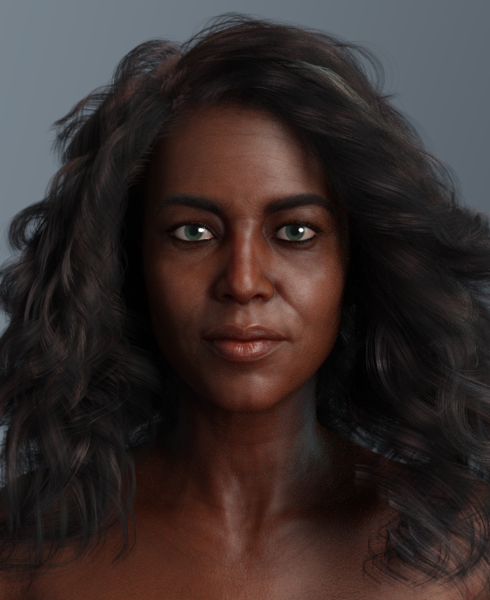
I totally agree!!!!
And compliments on everyone's renders. Wow, just wow.
I mixed Edward 8 and Tristan 8 together, along with their HD morphs to 50%, Trevor Hair Set. Edward does not have fibermesh brows, so I used the ones from Liam, one of his add-on characters. Tristian 8 is one of the neglected core characters, with only two add-on characters and a morph pack.
Edward skin.
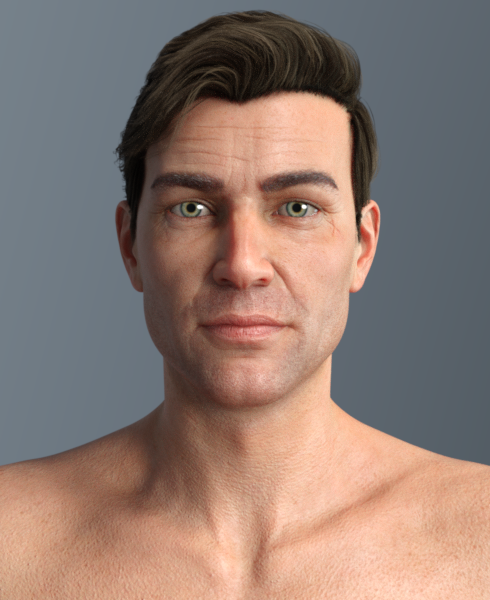
Tristan skin

Mary
That's a shame about Tristan.Those men look really good!
So I think we got almost everyone, if not everyone covered for the 8's.
Novica & Forum Members Tips & Product Reviews Pt 13@L'Adair, to say that I am in awe of what you described, is an understatement. You are incredible.
Mary
Awww. Thank you.
(Give yourself another 4-5 years working in DS and you'll probably be running circles around me…!)
That looks like a good compromise on the Sakura eye problem.
I started out using the two G8F figures in the scene from the previous comparison. I didn't fully realize Sakura used replacement objects for the eye balls and eye sockets until I was trying to load the materials. At that point, I probably wasted half an hour or so trying to apply similar changes to the addons as I had for the built in eyes. I decided it wasn't worth the effort, to be honest.
I found using two figures in the scene, in the same space worked really well. In 4.12, ctrl-click on the top level hides everything parented to the figure, so I unparented the hair, and I could quickly go back and forth between the figures to test lighting, hair color, etc. Selecting both in the scene tab and the choosing All in the Parameters tab allowed me to make most shape changes to both figures at the same time. Same with pose controls for the expressions, untiil I started using the Expression Mixer. Then I created a preset to transfer the expression to the other figure.
I parented the camera to one head, so it moved up or down with the head as the shape morphs changed the figure height. Then I tweaked the view, if necessary.
Novica & Forum Members Tips & Product Reviews Pt 13The problem with Sakura's eyes may be surmountable, but I found the easiest thing to do was to delete the separate Sakura 8 Eye Balls and Sakura 8 Eye Sockets. That does mean, however, you'll have to find another source for the eye materials. The G8F eye materials zones are essentially turned off by the Sakura 8 materials preset. I don't have a lot of toon characters, but I was able to apply Toon Dad's eyes and get a reasonable result. If you look close, you'll see the Sakura 8 materials essentially hide the lacrimals. I ended up using the DG Iray Toon Styles for Genesis 2 on the eyes for the Iris color, which applied without issue, so the UVs must not have changed much from G2 to G8, (or there was an update that's not mentioned on the product page.)
To blend the two face shapes, I had to modify the eyes. Selecting first the Left Eye bone and then the Right Eye bone in the scene tab, I increased the scale to 105%. I moved both down, (Y-Translate,) -0.20 and forward, (Z-Translate,) 0.20; I moved the left eye to the left, (X-Translate,) 0.10 and the right eye to the right, (X-Translate,) -0.10. Finally, I increased the size of the Irises by 25% using the Eyes Iris Size morph from the Head Morphs for Genesis 8 female(s), although it might look fine to increase the size even more for the toon materials version.
Here are the renders, Gabriela 50%, Sakura 50%, eyes modified as described above. Expression created using Expression Mixer, Randomize All, (as mentioned by @barbult. Thanks!) and then tweaked.
Materials: The Gabriela default load, Low Translucency.

Materials: The Sakura default load, Low Translucency; Sakura 8 Eyelashes, Sakura 8 Eyebrows. (Eye materials modified as described in the first paragraph of the post.)

The hair is Bella Bleu Hair for G3F/G8F, default load.
Honorary PC+ MemberThe 30% off is likely the price that will show in the cart. All DAZ Originals are at least 30% off for Platinum Club members. Sometimes a steeper plain discount happens, and when it does that is the price displayed in both pages and cart.
There are frequent offers, which amount to "buy one (or more) new release(s) to get better savings on other items." If you think of that new release purchase as a key that "unlocks" extra savings, it comes out less confusing. Or, at least, that idea helps me.
Hope that helps!
Thank you, Eden Evergreen, I saw that type of offer on a page, and that analogy actually is helpful. I guess it's no harm to try a cart combination that gets me to a happy place.
"Don't forget that the pattern with the Genesis figures is somewhat different from that of the older figures - the base morphs are usually not in the Pro Bundles but are separate products, so depending on what you want a Pro bundle may not be the ideal first add-on."
Than you as well, Richard. Yes, at first, I was a little disarmed at how surfaces are organized with Genesis, but I appreciated the grouping of surfaces available above the individual surfaces. I understand that G8F comes with few morphs, but there are a few free ones out there that are very worthy of consideration, and some sculpted characters that dont require any morph packs. Ive been testing/enjoying G8 with those. I chose the pro bundle based on the most pleasing combination of hair, outfits, and character textures more than shape. There are some characters that interest me which require morph packs, so I will be getting those in the future. I just didnt want to get too wacky with the cc, until I see when my work situation improves. I was deemed "mission critical' until 10 days ago, and even had a driving pass. Someone got spooked, unfortuately, and shut the project down. I feel it may get reinstated earlier than other things because of the project's nature.
How to fill a sweater in a skirt?Are you just trying to eliminate poke-through? Or are you trying to make the sweater muffin out at the bottom? Scaling the pelvis/lower abdomen of the sweater might solve the former problem, while Mesh Grabber could solve either or both.
Thanks! Scaling helped but not completely. Where can I find the Mesh Grabber tool?
What is the best way to properly fill up a sweater? Built-in morphs don't help much :(
Send it over the bridge to Hexagon. Freeze the character and clothing except for the sweater. Select faces, from uvpaint tab, select the balloon tool, gently pat the sweater until it is all out from under the skirt. Click Accept to validate/finish the tool. Select the smoothing brush to smooth where might be necessary. In D/S select the sweater. Back in Hexagon select and send the sweater over to D/S. Make a new morph ;-) If like, save the new morph {remember to reverse deformations}.
I have never downloaded Hexagon. This is the most professional method of solving the problem, do I understand correctly? If so, then I do not mind starting to study this program. For example, I want to manipulate clothes as I want, and not with the help of morphs, is this best done in the hexagon or can this be done with built-in tools in daz3d, for example, Mesh Grabber?
Geometric Protrusion in Groin of Jeans?Thanks. Hadn't thought about re-texturing. How doe you make a morph? Other than adjusting the various sliders provided with a garment?
I don't think that this can be done but is there a way to ... ?If a product / package offers a character with only one dial for the entire character (not seperate dials for head and body), is there a way to disable the head morph and dial just the body morph? Thank you in advance.
How to fill a sweater in a skirt?What is the best way to properly fill up a sweater? Built-in morphs don't help much :(
Send it over the bridge to Hexagon. Freeze the character and clothing except for the sweater. Select faces, from uvpaint tab, select the balloon tool, gently pat the sweater until it is all out from under the skirt. Click Accept to validate/finish the tool. Select the smoothing brush to smooth where might be necessary. In D/S select the sweater. Back in Hexagon select and send the sweater over to D/S. Make a new morph ;-) If like, save the new morph {remember to reverse deformations}.
Geometric Protrusion in Groin of Jeans?This is for a Toon Generations 3 G3 version figure. Just using the straight figure and haven't made any anatomical adjustments.
Ah ha! The toon figures are a class to themselves ;-) Like extreme morphs for the huge characters, clothing not designed to accomodate them may require additional morphs and/or joint control morphs.
You could try making a morph, it may or not work as intended.
The Toon family does have clothing, hair, etc. designed for them. For example: https://www.daz3d.com/toon-generations-2-male-clothing-for-genesis-3-male-s
Retexturing their pants with denim might be easier.
Novica & Forum Members Tips & Product Reviews Pt 13Stephanie 8 and Nida 8 I have to say, I haven't looked at Stephanie since her release because of the orange skin. But I think with Nida mixed in, that skin color seems to mellow and work with the adjusted morph. And I am not sure, but I think with Nida's skin, there is a likeness to Michelle Obama. Need to mess again with Altern 8 for Stephanie's skin.
Stephanie 8 Skin
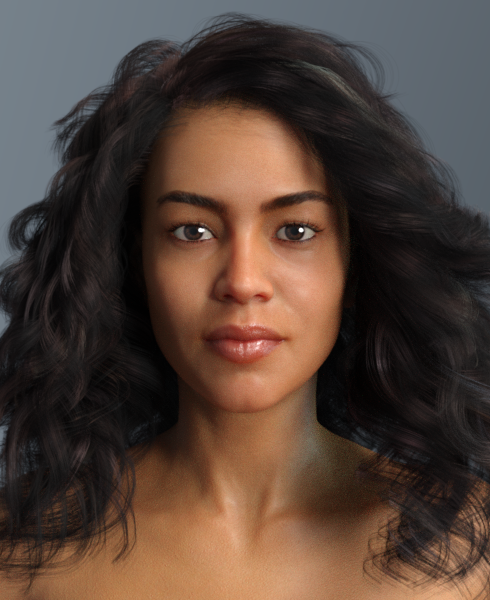
Nida 8 skin
G8 individual head dials"click on the Head"
Where are you doing this? In the Scene tab? If so, then the behaviour that you are describing is normal - only the pose controls for the head will be shown under the Parameters tab. If you select G8F in the scene rather than just the head, all the available morphs and pose sliders for the figure will be shown under the Parameters tab. You can then narrow that down by expanding the left pain, i.e, choosing Actor > Head > Face, etc., or choose Pose Controls if you only want to pose, rather than morph, the figure.
I am not sure what you are referring to when you say your G3F does not behave as I have described for G8F, because it does - selecting the head in the Scene tab will result in only the pose controls appearing under the Parameters tab, just like G8F. Older figures, like Victoria 4, needed the head selected in order to access facial pose/expression sliders which did not appear in the Parameters tab with the entire figure selected. The newer figures (Genesis, Genesis 2, Genesis 3 and Genesis 8) display all the morph and pose sliders for the figure with the entire figure selected.
Novica & Forum Members Tips & Product Reviews Pt 13I mixed Edward 8 and Tristan 8 together, along with their HD morphs to 50%, Trevor Hair Set. Edward does not have fibermesh brows, so I used the ones from Liam, one of his add-on characters. Tristian 8 is one of the neglected core characters, with only two add-on characters and a morph pack.
Edward skin.
Tristan skin
Mary
Hair joints to figure jointsUes the general Transfer Utility, without picking a template - you may need to reduce or remove the influence of the arms, and it it's really long the legs, depending on how you want it to behave. The templates generally have a subset of the main figure's bones and may have additional bones too, to give a rig more appropriate for whatever theya re designed for, but you don't have to make use of them. For your own use, as long as you are not going to share the model in any way, you cana lso use an existing figure with the desired rigging as the source rather than the base figure.
Hair joints to figure jointsThe things is, I can use the transfer utility but the hair is too long, when I try to do it, i use the (shoulder length hair) template, and the the part of hair that is after the shoulder just gets messy.
G8 individual head dialsI have just started using G8 figures and want to create my own facial expressions. When I use my G3 figures and click on Head, I get individual dials for the parts of the face. Head> Brows> Cheeks> Expressions> Eyes> Mouth and so on.
When I load my G8 figures and click on the Head all I get are the Expressions. Where do I find the individual dials for the head or what items am I missing?
I have: the G8 Female Head Morph and G8 Female Expression programs installed.
Daz 3D is part of

Connect
DAZ Productions, Inc.
7533 S Center View Ct #4664
West Jordan, UT 84084Licensing Agreement | Terms of Service | Privacy Policy | EULA
© 2026 Daz Productions Inc. All Rights Reserved.