-
AIUTO...CHI CONOSCE L’ITALIANO? PARTE DODICI
Basta mettere le braccia orizzontali. I Size dial sono quelli che usi per cambiare le dimensioni dei modelli, lo trovi nel tab Parameters. Se non li vedi, attiva le voci nascoste.
Quindi una volta praticamente fatta questa maglia con questo processo, resta tranquilla di quella dimensione?
Si, rimane in quella forma dopo averla trattata con in Transfer. Puoi anche tenere la scena "intermedia" del processo per crearne una diversa o per usarla in pose in cui la maglia deve poggiare da qualche parte.
Fit Control for Genesis 8 (Commercial)Hi,
I think about stuff like Jackets maybe to open them if a unversal morph can do that.
And maybe like here:
https://www.renderosity.com/mod/bcs/sparkman-denim-sundress-for-genesis-3-female/124757/
For Overalls/dungarees a Strap pulling down thing, I'm not sure now if a Strap morph loads on a pant. Special on a male.
Because some morphs loads only on female.
And... well I love to make long Comics and use the clothes I like, I also fit them perfect, because of Poketrhough.
Bluejaunte appreciationThis mixed morph character uses Noemi's skin with freckles. I think the freckles look very realistic. I dialed down some of the bump, normal, and roughness settings, because the defauls were stronger than I wanted for this close portrait.
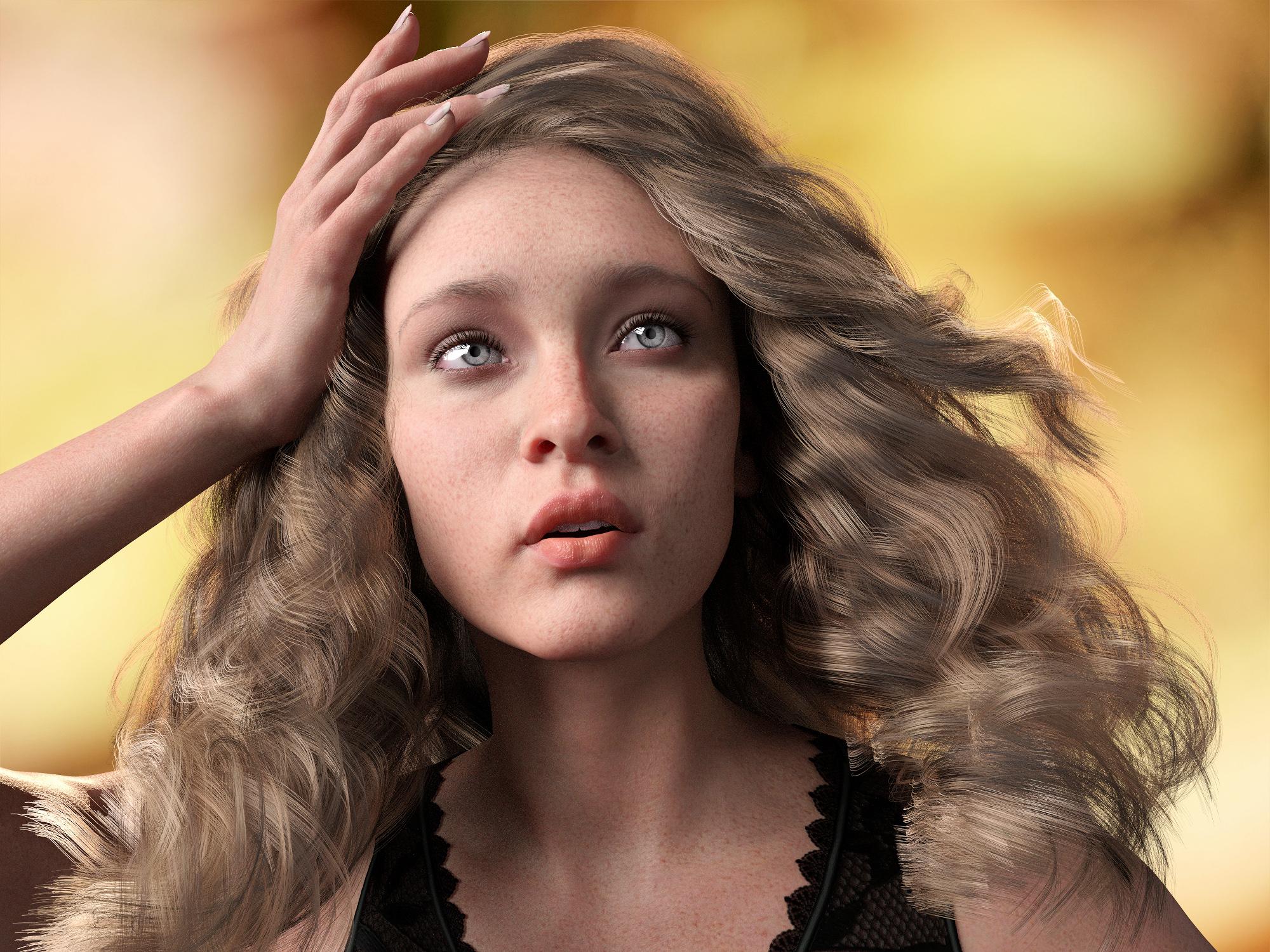 is there a Face Transfer thread
I have a MAC. Face transfer only wirks with a Windows operating system. Does anyone know if it would work with Windows Parellels for MAC? If not, are there other options?
Custom CharacterThank you for the response. I am using for personal use, not commercial. I would love to use the Face Transfer Plug In, which seems to work well. However, I hav a MAC and I beleive Face Transfer only works with a Windows operating sysem. That is why I was inquiring if someone could create a custom character for me or tell me other options.
Fit Control for Genesis 8 (Commercial)Well...Technically you only supposed to have loaded on your figure what you want to use. Hiding an entire closet isn't really practical lol. So when you apply Fit Control I would only have loaded the essential clothing I would want it to apply to.
"Btw. would you make more Morph bundles in the future? For other clothings too? And also more for both genders."
I do not understand your question. Can you be more specific as to what type of morphs?
Looking for a bird character for G8FYou can also do the 2 figure trick where you place 2 figures together and hide the parts of each one that you don't want to get a composite figure rendered in one pass.
I've been thinking that may be the way to go but it will have the problem with things not quite matching up. I would prefere to get the morph on G8F so I guess I'll try the script first and see what happens.
Fit Control for Genesis 8 (Commercial)Hmmm thats bad for me, i LOVE dressing xD... (thats why I just need 1-2 days for styling a new char...) my boy have a rain outfit, a farm outfit and a "chilled" outfit, so... a lot clothes :)
Btw. would you make more Morph bundles in the future? For other clothings too? And also more for both genders.
I think from base, is there not a morph for the Pants, just for underpants.
Also if a Man have a gown/skirt item it would not load the skirt morph.
Novica & Forum Members Tips & Product Reviews Pt 13Here is my blended Christian 8 and Lucas 8 and I used Milo and Giuseppe for Lucas and Bain and James for Christian. Four white guys, but released 15 months apart and you can see the difference in the skins. I used Side Part hair on them. RedzStudio's short hair is perfect for normal, average, business-style hair.
Milo's skin made me see a friend's adult son.

Giuseppe is ruddy and the cleanest shaven of the four.
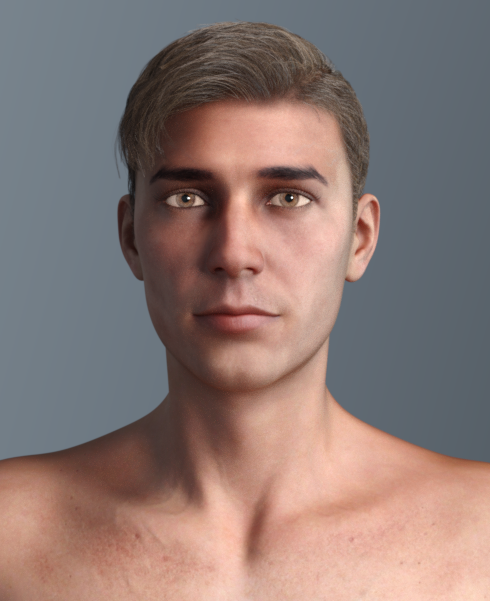
Bain is the adult who grew up from a boy who bumped his face a few times.
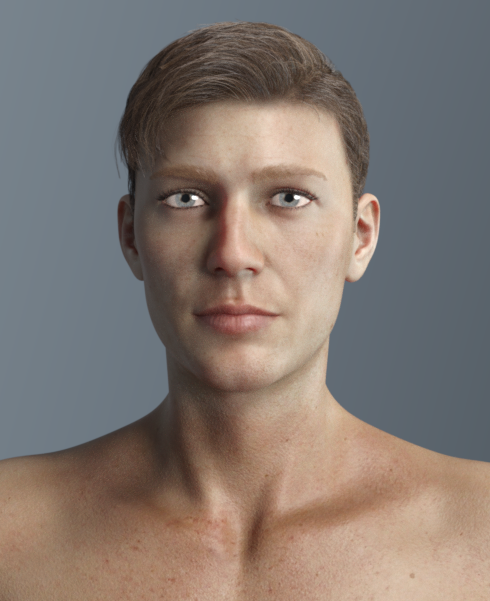
James' facial hair fit on the adjusted face.
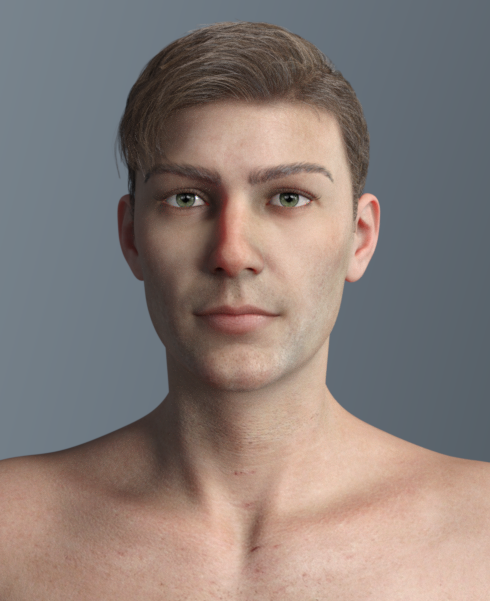
As a note, when I use morph packs or fool around with the sliders, I grab skin textures without thinking if they will fit, just if they are the right generation. Other than not the look I wanted, I have never had a skin texture that didn't work with a morph sculp. But, I won't swear to an extreme morph, such as a monster.
XTransfer Module 1- Genesis 3 to Genesis 8 Morph Converter (Commercial)And is anyone experimenting with this version to see how well it might transfer morphs from David3 or Michael4? (I know it wasn't designed for that.)
How To Keep The Original Clothing Size?If you're shrinking the character using a morph, I think you can animate it. I.e. having the character at full size when the simulation starts, and then shrink it at maybe frame 10 so the clothing has time to adjust.
I do not think it is possible if you're using the scale vakue.
I never use the scale value!
If you shrink the character, the clothes always follow it.
Grimes - You'll Miss Me When I'm Not AroundI failed my Cultural Knowledge roll. Can someone explain the origins of this? Or at least where can I find out more about this.
From the description of this Instagram post:
Quarantine Art Kit ???????????? Link in bio •we shot 5 of these greenscreen “lyric videos” so we could have visuals for the album (doing our regular intensive videos in my state didn’t seem super wise etc etc) •But obvs w delete forever we started messing around in post and making better stuff than we thought we could. •Anyhow -
Because we’re all in lockdown we thought if people are bored and wanna learn new things, we could release the raw components of one of these for anyone who wants to try making stuff using our footage. ???????????? •In my bio is a we-transfer file with - the “you’ll miss me when I’m not around” greenscreen footage, some shorter snippets (might be easier to mess around with but feel free to cut up master file however, make gifs, whatevs). - stems for the song if you wanna mess around wit audio (and some native inst tools are included). + single art etc. - Starting April 8th Native Instruments is offering free 1 month http://sounds.com subscription and/or $25 NI Store Voucher (TBC) for remixing and some other bonus audio stuff (like, One randomly selected participant will get Komplete 12)
- We’re also working on securing free short term access to the visual tools we use (keep u posted).
- So basically, just a bunch of tools for anyone who wants to use them ???????? (This is how we made delete forever if your interested). •Anyway we were inspired by all the amazing art that gets sent our way,
So hoping some of these things are of use when the days are long and lonely. •Anyway, I hope everybodies doing ok!
_____________________
•Ps other tools we’ve enjoyed using are:
- Blender (free online!) (And FYI - Blender can do all the compositing and tracking needed to make stuff )
- Adobe suite (for editing and stuff)
- Daz 3D (what we use to make @Warnymph) - We’re always down for recommendations too if u guys have anyAIUTO...CHI CONOSCE L’ITALIANO? PARTE DODICILa mia speranza è trovare un metodo per freezare la dimensione dell'abbigliamento, e poi fare direttamente la simulazione di volta in volta in quella posizione.Ma scusa, cosa ti ho appena spiegato? (ノಠ益ಠ)ノ︵ ┻━┻
E' il metodo per freezare le dimensioni e usare il vestito in qualsiasi posa. ┻━┻ ︵ヽ(`Д´)ノ︵ ┻━┻
lol!

Con questo sistema ho risolto una marea di "guai".
Il Transfer Utility è molto semplice da usare, devi solo selezionare Source (Genesis) e Target (La maglia) e pigiare su OK, fa tutto in modo ottimale anche con le impostazioni di base. Se poi vuoi maggior controllo, le opzioni sono abbastanza ovvie nel loro uso, già il nome dice tutto.

Il requisito base è che il vestito che devi "adattare" deve essere nella giusta posizione e nella giusta dimensione, altrimenti le parti si "piegano" nel modo sbagliato e non coincide con il movimento del personaggio.
Il fatto che esploda il vestito è perchè devi seguire il vecchio tutorial che ti avevo dato. Lì ti spiegavo come eseguire il DForce su personaggi seduti.Se ti interessa, avevo trovato uno script che trasforma automaticamente figure e vestiti in prop. L'ho usato per una scena di combattimento in cui un pugno deformava l'intero personaggio (con Mesh Grabber).In questi casi il DForm funziona molto meglio e garantisce un controllo migliore grazie allo slider.
Il Mesh Grabber è ottimo ma manca di un sistema per modificare in separata sede la "forza" del effetto.Anche io ho fatto una scena animata di una ragazza che tira un pugno ad un brutto ceffo e gli sposta la mandibola di sei centrimentri verso destra.
 How To Keep The Original Clothing Size?
If you're shrinking the character using a morph, I think you can animate it. I.e. having the character at full size when the simulation starts, and then shrink it at maybe frame 10 so the clothing has time to adjust.
I do not think it is possible if you're using the scale vakue.
AIUTO...CHI CONOSCE L’ITALIANO? PARTE DODICISi quel bundle ad alcuni appare free e altri no.
Meglio aspettare che fixino, allora.

Imago, tu che sei la persona con le conoscenze più versatili di Daz che conosco, mi sapresti dire se c'è un modo semplice per fare questa scena bene?
Ho trasferito la maglia che aveva l'uomo, e ci ho applicato dForce e una marea di morph di Fit Control, ma il risultato fa abbastanza schifo :(
Il problema è che questo benedetto Daz modifica sempre le dimensioni dei vestiti, ma non sarebbe realistico se la maglia si rimpicciolisse da sola :/
EDIT: lavoricchiando con dForce ho ottenuto questo risultato. Comunque si può fare di meglio?
Esagerato!
Sono solo uno che non si ferma al "pronto".Per un buon effetto "maglia da uomo su ragazza" ci sono un paio di passaggi da fare. Mi pare di avertelo già spiegato in passato, ma rieccoti il tutorial.
Prima di tutto devi creare una scena vuota, carica Genesis8, applica i morph per il tuo personaggio, fagli indossare la maglia e mettilo in T-Pose (Non la A-Pose di Genesis8). Aggiungi i morph che vuoi usare alla maglia e applicali.
Ora nascondi l'ometto cliccando sull'occhio nel tab Scene e tieni visibile solo la maglia. Esporta in OBJ togliendo la spunta alle opzioni delle zone e delle textures, altrimenti la maglia si romperà in seguito.
Avvia una nuova scena e carica la donnina che vuoi vestire e mettila nella stessa T-Pose di prima. Importa l'OBJ della maglia appena creato e posizionalo quanto meglio puoi sulla ragazza senza imparentarla.
A questo punto, usando i dial Size deforma la ragazza in modo che corpo e braccia siano in dentro rispetto alla maglia (nessun poke-thru) e allunga le braccia in modo che le mani spuntino abbastanza dalle maniche ed il collo perchè la testa non tocchi il tessuto.
Salva la scena per evitare crash (molto frequenti usando Genesis8).
Adesso memorizza la posa della ragazzotta da Edit->Figure->Memorize->Memorize Figure Pose.
La parte che richiede più pazienza è il DForce.
Al frame 0 tieni la T-Pose e imposta nel frame 30 la A-Pose di Genesis8 e ripristina tutti i dial Size in modo che torni alla sua posa normale. Visto che hai memorizzato la T-Pose dovrai usare un Zero Pose preset.
Applica alla maglia le impostazioni DForce più adatte.
Ora avvia la simulazione partendo dalla posa memorizzata con un Initialization time di 0.50 o 1 e su tutta la timeline. Dimezza gli altri valori per una simulazione più veloce e un pò più grezza.
Attendi la fine e prega che Genesis8 non faccia crashare tutto.
Non appena avrai ottenuto la maglia della forma giusta freeza la simulazione nel punto giusto, tanto per andare sul sicuro e salva la scena, poi esporta la maglia come OBJ.
Ora, nuova scena e ricarica Genesis8Female base, importa la nuova maglia e fai un veloce Transfer Utility per poterla usare in tutte le scene.Fammi sapere se funziona tutto correttamente.
Grazie mille Imago!
Sì, ricordo questo metodo, e grazie ancora anche per l'altra volta!
Non sapevo di questa cosa di spuntare zone e texture. Uso l'OBJ pochissime volte.
Se ti interessa, avevo trovato uno script che trasforma automaticamente figure e vestiti in prop. L'ho usato per una scena di combattimento in cui un pugno deformava l'intero personaggio (con Mesh Grabber).Il problema di questo metodo è che non è facilmente implementabile nel mio workflow senza allungare di molto i tempi di produzione. Per esempio questa storia ha una trasformazione in 7 step, che con due personaggi fanno 14, se dovessi rifarlo 14 volte mi prenderebbe solo per la simulazione più tempo di quello che mi richiede il rendering dell'intero update settimanale :(
Non so usare Transfer Utility!
La mia speranza è trovare un metodo per freezare la dimensione dell'abbigliamento, e poi fare direttamente la simulazione di volta in volta in quella posizione.
Con questo metodo purtroppo i vestiti esplodono spesso, e spesso crasha tutto, soprattutto perché nella posa attuale ci sono molti contatti dei tessuti fra loro e fra tessuto e persona.
Forse, per le mie esigenze, il modo migliore è quello che sto usando, ovvero di usare Fit Control fino a fare i vestiti enormi a caso e lanciare dForce senza partire dalla posa memorizzata.
Alla fine il risultato non è così male, non crasha nè esplode mai, e prende giusto qualche minuto di simulazione:
Ho simulato senza pavimento, avrei potuto metterci un plane, ma tanto nell'inquadratura non si vedono i piedi.New Bluejaunte character alert - Ensley HDA bug has been identified. The HD morph is currently always set to 100% even on G8F. I submitted a fix, but keep that in mind until it's live.
Dear Rascal3D... proper bent bar morph for the long bars?Hi Rascal3D your new set in the store today was VERY nice. One thing that's missing... a proper bent bar morph for the long bar or a seperate bent bar. Please see the image below.
Thank you!
Creating morphsi am not a content creator and i have no knowledge in things like ZBrush or Hexagon.
I tried often to learn hex and i watched some tutorials but i was not able to follow the steps in the tuts because hex had it's own life und does not want to make the steps that are shown in the tuts ... so i gave up a long time ago.
BUT: some years ago i have seen how a fried added morphs to a figure in a few easy steps in hex.
But i forgt.
Can anyone tell me in a few steps how i can create morphs for G8 or G3 in Hex?
and how i transfer them to daz?
and how i can delete them if they are wrong?(I am not a native english speaker)
Thanks
AIUTO...CHI CONOSCE L’ITALIANO? PARTE DODICISi quel bundle ad alcuni appare free e altri no.
Meglio aspettare che fixino, allora.
Imago, tu che sei la persona con le conoscenze più versatili di Daz che conosco, mi sapresti dire se c'è un modo semplice per fare questa scena bene?
Ho trasferito la maglia che aveva l'uomo, e ci ho applicato dForce e una marea di morph di Fit Control, ma il risultato fa abbastanza schifo :(
Il problema è che questo benedetto Daz modifica sempre le dimensioni dei vestiti, ma non sarebbe realistico se la maglia si rimpicciolisse da sola :/
EDIT: lavoricchiando con dForce ho ottenuto questo risultato. Comunque si può fare di meglio?
Esagerato!
Sono solo uno che non si ferma al "pronto".Per un buon effetto "maglia da uomo su ragazza" ci sono un paio di passaggi da fare. Mi pare di avertelo già spiegato in passato, ma rieccoti il tutorial.
Prima di tutto devi creare una scena vuota, carica Genesis8, applica i morph per il tuo personaggio, fagli indossare la maglia e mettilo in T-Pose (Non la A-Pose di Genesis8). Aggiungi i morph che vuoi usare alla maglia e applicali.
Ora nascondi l'ometto cliccando sull'occhio nel tab Scene e tieni visibile solo la maglia. Esporta in OBJ togliendo la spunta alle opzioni delle zone e delle textures, altrimenti la maglia si romperà in seguito.
Avvia una nuova scena e carica la donnina che vuoi vestire e mettila nella stessa T-Pose di prima. Importa l'OBJ della maglia appena creato e posizionalo quanto meglio puoi sulla ragazza senza imparentarla.
A questo punto, usando i dial Size deforma la ragazza in modo che corpo e braccia siano in dentro rispetto alla maglia (nessun poke-thru) e allunga le braccia in modo che le mani spuntino abbastanza dalle maniche ed il collo perchè la testa non tocchi il tessuto.
Salva la scena per evitare crash (molto frequenti usando Genesis8).
Adesso memorizza la posa della ragazzotta da Edit->Figure->Memorize->Memorize Figure Pose.
La parte che richiede più pazienza è il DForce.
Al frame 0 tieni la T-Pose e imposta nel frame 30 la A-Pose di Genesis8 e ripristina tutti i dial Size in modo che torni alla sua posa normale. Visto che hai memorizzato la T-Pose dovrai usare un Zero Pose preset.
Applica alla maglia le impostazioni DForce più adatte.
Ora avvia la simulazione partendo dalla posa memorizzata con un Initialization time di 0.50 o 1 e su tutta la timeline. Dimezza gli altri valori per una simulazione più veloce e un pò più grezza.
Attendi la fine e prega che Genesis8 non faccia crashare tutto.
Non appena avrai ottenuto la maglia della forma giusta freeza la simulazione nel punto giusto, tanto per andare sul sicuro e salva la scena, poi esporta la maglia come OBJ.
Ora, nuova scena e ricarica Genesis8Female base, importa la nuova maglia e fai un veloce Transfer Utility per poterla usare in tutte le scene.Fammi sapere se funziona tutto correttamente.
Is it possible to copy morphs from Female to male?Hi,
I got a nice Toddler morph for the Sixus1, G8F, is it possible to kinda copy it to the G8M? Because kids dont have breasts I assume it could maybe be a bit working.
Thanks.
Daz 3D is part of

Connect
DAZ Productions, Inc.
7533 S Center View Ct #4664
West Jordan, UT 84084Licensing Agreement | Terms of Service | Privacy Policy | EULA
© 2026 Daz Productions Inc. All Rights Reserved.