-
Transfer Utility bug - G8F/G8M
"Favorites" option is not showing up in the dropdown menu within the Transfer Utility's Extended Options. Version 4.23 and 4.21, same problem.
Edit>Figure>Transfer Utility
Accessories Distort when attached to characterYes, but actually, using Rigidity groups is one the of ways. You can, alternatively, load the equipment into the scene without fitting, then export it to OBJ with Base Resolution. Then import OBJ to the fitted equipment as a Fix morph with Morph Loader Pro. Then dial the morph before export to OBJ again... for fixing the fit in Blender.
The Sky is Falling Complaint ThreadArtAngel said:
Urrrrrggg Complaint: Building a huge indoor Catio from scratch with no time to cook. Hubby ordered a pizza (including tip for $43+) and got a call center person who was very hard to understand. Gave that person the debit card number and was told no the card did not go thru. After 3 attempts he said maybe card is locked or you have no money. My husband was very frustrated, so I took his phone and said, "Maybe you are entering the card number wrong. So I slowly repeated the info and the guy says, "Are you sure you have enough money in your account. To which I made a rude retort and said transfer me to the local Pizza ***. He said I can do cash delivery and I said no transfer me. I get the local pizza guy (attorneys have lessor gate keepers) and say you guys need to fire the call center dude. He's either dyslexic or on drugs, because after 4 tries he could not get anything right. They tried once and it was approved for 35 without tip (tip to be paid on arrival). As the driver pulls up we get a fraud alert from our bank for the 43+ and click no amount not approved. The bank responds 'card locked contact customer support'. The pizza delivery says we have a cash order for 43+. We say no you should have an order for 35 prepaid and we will pay a cash tip. They drive away with our pizza. We check the bank and see there were 4 charges of 43+ and 3 for 35+. Seven charges for 1 pizza. Called the bank fumed. Obviously the guy was not dyslexic and the bank was the culprit. And to unlock our card they made us confirm every transaction made for April and March. Urrrrgggg x 2. Moral of the story? Cook while building a Catio, or pay cash for for deliveries, don't eat, or set the cats free. Sighs . . . and returns to building Catio Condo.
Quite a tale.
 Some people don't deserve their jobs.
 Only story I have to compare is a trip to my usual Popeye's in middle of Washington DC during the '90s. Drove up to the 1st take-out window, ordered a meal, but was advised by the window attendant that if I ordered from the next window(rarely used) and paid cash I could get a couple extra chicken breasts for half the price. So I did. Then later (after they were eaten) I thought about it for a while and decided that I should probably advise the restaurant owner that the sketchily behaving people at their windows were probably skimming profits by stealing product and pocketing cash.
 So, I did. Never heard what happened, but was never offered cheap chicken from there again either.
 Let's appreciate/discuss today's new releases - more ongoinger thread
doubledeviant said:
cheard said:
- A bull counterpart to Marguerite and Denver (Denver must have a dad, right?)
Immaculate mooception.or a veterinarian outfit with a long plastic glove and matching morph for the cow
Accessories Distort when attached to charactercrosswind said:
n.aspros123 said:
crosswind said:
n.aspros123 said:
crosswind said:
Well, I checked the suit and the accessory, it's not a really simple case. As I said above, you have to use Blender as well to make a morph to fix the fitting on the equipment with rigidity groups.
Thank you for having a look. @crosswind
You know I'm going to ask you- What did you do to fix the equipment? You would like a Coffee?
Will Jill and the accessories destort and warp if I save as a Subset Scene?
The RE Revelations Equipment Belts destort and warp as well.
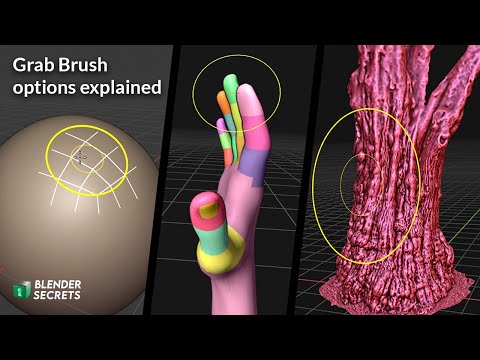
Ah... nothing special, still used Grab brush with Sculpt mode in Blender, as I ever showed you in previous video...
There won't be distortion if you save the equipments as whatever wearable preset or subset.
And you can fix other stuff in the same way.
I have not used the Grab Brush tool in Blender. Only the welding accessory and Quadmesh for the sexy chair.
Is the grab brush tool used on all parts of the object? @crosswind
Yup, one Grab Brush can fix almost everything in 98%+ cases... wisely change angle of view, turn on/off Symmetry, as well as sculpt with Mask at the same time.
e.g.
Is the Accessories export/imported to Blender the same way as the sexy chair?
Are the accessories exported After Posing the character and separately to Blender.
Is the Grab Brush tool used the same way as Mesh Grabber?
Is Silhouette or Falloff used?
How is the morph fix implemented?
How do I straighten and reattach the breathing pipe?
I had a look at that video. It's very brief in explanation. I'd like to learn how to fix these issues. Apologies for asking Alot of questions
Accessories Distort when attached to charactern.aspros123 said:
crosswind said:
n.aspros123 said:
crosswind said:
Well, I checked the suit and the accessory, it's not a really simple case. As I said above, you have to use Blender as well to make a morph to fix the fitting on the equipment with rigidity groups.
Thank you for having a look. @crosswind
You know I'm going to ask you- What did you do to fix the equipment? You would like a Coffee?
Will Jill and the accessories destort and warp if I save as a Subset Scene?
The RE Revelations Equipment Belts destort and warp as well.
Ah... nothing special, still used Grab brush with Sculpt mode in Blender, as I ever showed you in previous video...
There won't be distortion if you save the equipments as whatever wearable preset or subset.
And you can fix other stuff in the same way.
I have not used the Grab Brush tool in Blender. Only the welding accessory and Quadmesh for the sexy chair.
Is the grab brush tool used on all parts of the object? @crosswind
Yup, one Grab Brush can fix almost everything in 98%+ cases... wisely change angle of view, turn on/off Symmetry, as well as sculpt with Mask at the same time.
e.g.
Let's appreciate/discuss today's new releases - more ongoinger threadtsroemi said:
Cam Fox said:
Gordig said:
I love that it looks like it works with the saddles & armors!
YES too, but also WHY: Why a sheep which we already have and not finally, FINALLY a GOOOOOOAAAAAAAAT?
Agreed! My ancient Near East/SW Asia scenes would really benefit from:
- A goat morph for Daz Horse 3 or Daz Horse 2, along the lines of DA’s new sheep, or a unique goat model
- A bull counterpart to Marguerite and Denver (Denver must have a dad, right?)
- And varieties of breeds and markings for all these livestock
So grateful for what exists, so eager to see more varieties of livestock.
Note: I do have and use an old goat morph for the original Daz Sheep, from Philosopher’s Egg, and https://www.daz3d.com/forums/discussion/435747/horse2goat by cathan01_wwg1wga. I have a lot of trouble getting horns to work right on Horse2Goat though, and would love to see an easier-to-use kit.
Accessories Distort when attached to charactercrosswind said:
n.aspros123 said:
crosswind said:
Well, I checked the suit and the accessory, it's not a really simple case. As I said above, you have to use Blender as well to make a morph to fix the fitting on the equipment with rigidity groups.
Thank you for having a look. @crosswind
You know I'm going to ask you- What did you do to fix the equipment? You would like a Coffee?
Will Jill and the accessories destort and warp if I save as a Subset Scene?
The RE Revelations Equipment Belts destort and warp as well.
Ah... nothing special, still used Grab brush with Sculpt mode in Blender, as I ever showed you in previous video...
There won't be distortion if you save the equipments as whatever wearable preset or subset.
And you can fix other stuff in the same way.
I have not used the Grab Brush tool in Blender but would like to learn how to fix these issues, please? I've used only the welding accessory and Quadmesh to fix the sexy chair.
Is the grab brush tool used on all parts of the object? @crosswind
Accessories Distort when attached to charactern.aspros123 said:
crosswind said:
Well, I checked the suit and the accessory, it's not a really simple case. As I said above, you have to use Blender as well to make a morph to fix the fitting on the equipment with rigidity groups.
Thank you for having a look. @crosswind
You know I'm going to ask you- What did you do to fix the equipment? You would like a Coffee?
Will Jill and the accessories destort and warp if I save as a Subset Scene?
The RE Revelations Equipment Belts destort and warp as well.
Ah... nothing special, still used Grab brush with Sculpt mode in Blender, as I ever showed you in previous video...
There won't be distortion if you save the equipments as whatever wearable preset or subset.
And you can fix other stuff in the same way.
Accessories Distort when attached to charactercrosswind said:
Well, I checked the suit and the accessory, it's not a really simple case. As I said above, you have to use Blender as well to make a morph to fix the fitting on the equipment with rigidity groups.
Thank you for having a look. @crosswind
You know I'm going to ask you- What did you do to fix the equipment? You would like a Coffee?
Will Jill and the accessories destort and warp if I save as a Subset Scene?
The RE Revelations Equipment Belts destort and warp as well.
Accessories Distort when attached to characterWell, I checked the suit and the accessory, it's not a really simple case. As I said above, you have to use Blender as well to make a morph to fix the fitting on the equipment with rigidity groups.
The Sky is Falling Complaint ThreadUrrrrrggg Complaint: Building a huge indoor Catio from scratch with no time to cook. Hubby ordered a pizza (including tip for $43+) and got a call center person who was very hard to understand. Gave that person the debit card number and was told no the card did not go thru. After 3 attempts he said maybe card is locked or you have no money. My husband was very frustrated, so I took his phone and said, "Maybe you are entering the card number wrong. So I slowly repeated the info and the guy says, "Are you sure you have enough money in your account. To which I made a rude retort and said transfer me to the local Pizza ***. He said I can do cash delivery and I said no transfer me. I get the local pizza guy (attorneys have lessor gate keepers) and say you guys need to fire the call center dude. He's either dyslexic or on drugs, because after 4 tries he could not get anything right. They tried once and it was approved for 35 without tip (tip to be paid on arrival). As the driver pulls up we get a fraud alert from our bank for the 43+ and click no amount not approved. The bank responds 'card locked contact customer support'. The pizza delivery says we have a cash order for 43+. We say no you should have an order for 35 prepaid and we will pay a cash tip. They drive away with our pizza. We check the bank and see there were 4 charges of 43+ and 3 for 35+. Seven charges for 1 pizza. Called the bank fumed. Obviously the guy was not dyslexic and the bank was the culprit. And to unlock our card they made us confirm every transaction made for April and March. Urrrrgggg x 2. Moral of the story? Cook while building a Catio, or pay cash for for deliveries, don't eat, or set the cats free. Sighs . . . and returns to building Catio Condo.
Chloe 9 thoughtsI've been rendering with Chloe this evening and have decided I'm in the like camp. Her body shapes are possibly even two of my favourite G9 sculpts. I'm loving how clothing hangs on them - very natural looking. I like her face too, although I'm not particularly blown away by the HD details. She looks a bit G8 in the face to me - just lacking something. But a good base shape and takes expressions well.
Possibly the render settings I favour, but I find her skin a lot darker than in the promos. Because of that and her relatively flat facial profile, I'm not 100% getting the yet another Caucasian vibes others have mentioned, but I can understand that perception from the settings used to render the images on the store page, some of which look incredibly Nordic. Yet I'm finding that with a little mixing and dialling that you can get a lot more than that out of her.
Cellulite HD details are fab. As are her knees. I just wish there was a bit more detail work in her HD head morph.
Clothes are fab too. Nothing out of the ordinary style-wise, perhaps, but they look very good in renders. As someone who wishes for more everyday clothes of a good quality, they're a very welcome addition to my runtime.
All in all, an interesting release for me. Not keen on the value offer at full price, but both bundles for $14 with tokens and a voucher - and with every item being pretty much useful to me - makes her bundles some of my favourite DO releases for a while.
Another model ID request (sorry)Apologies if already requested - does anyone know who this (ann hathaway esque) morph is?
https://www.daz3d.com/dforce-ak-sonsy-hair-for-genesis-9
Thank you!
Chloe 9 thoughtsI see the render by Netherfalcon of Chloe9 in a top:
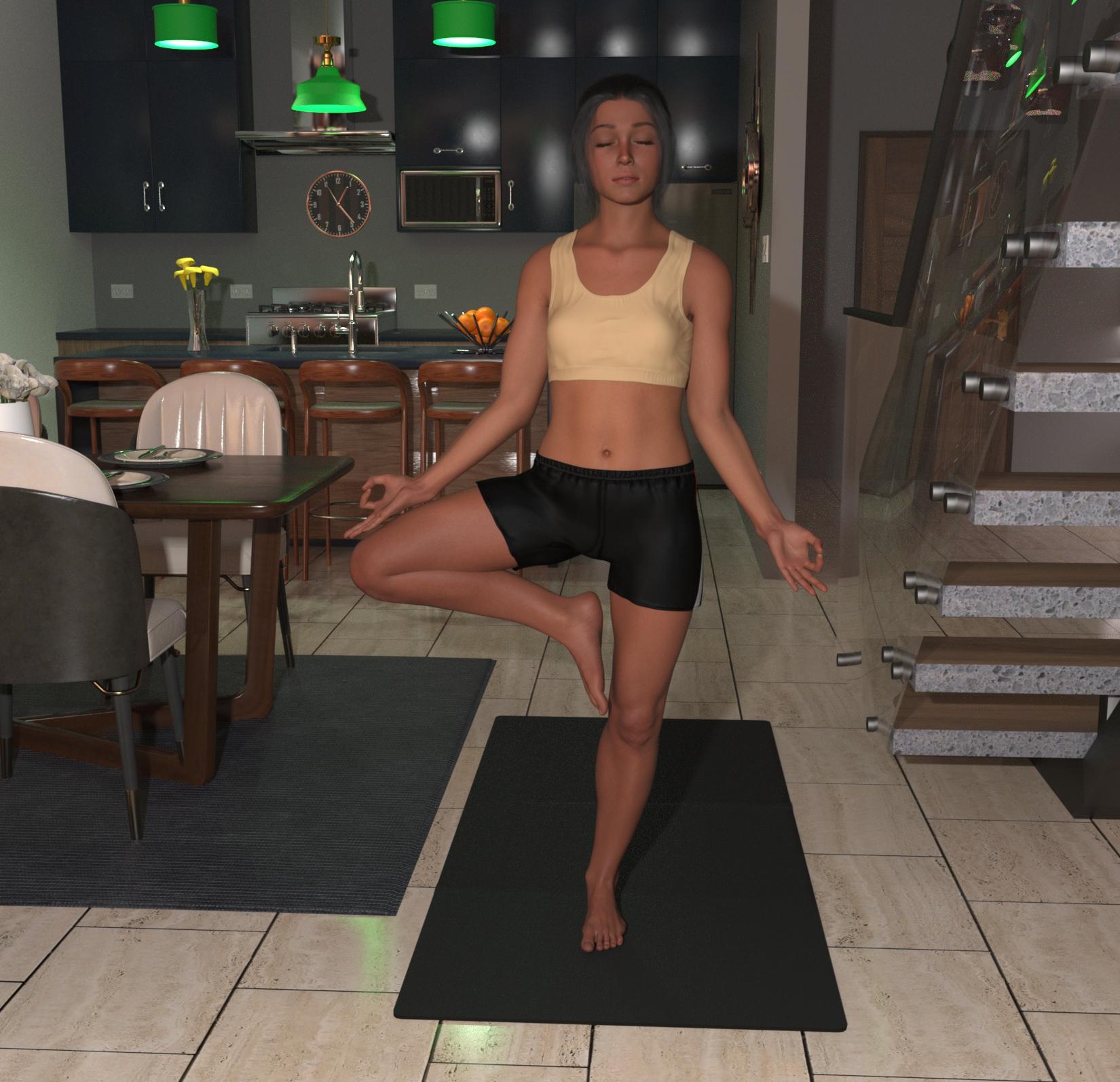
And see that there is no complete character specific projection morph if I'm reading the odd shaped wrinkles in the top right. The front of her top looks, frankly, a bit of a mess with odd creases radiating around each breast, having a slight central bulge in the top between the breasts and an apparent crease in the top where the unisex base figure's pectorals go. If I'm right, this shows a terrible missed opportunity to have a small chested 'state of the art' character showing how it should be done for future G9 characters. Instead, I am sadly disappointed. A missed oportunity to get this sort of thing sorted once & for all to show as a reference for how to do it.
Regards,
Richard.
My ancient farm scenes could use some bulls and goats!I’m very excited about the new DA Sheep for Daz Horse 3 by Design Anvil! Alongside Marguerite and Denver for Daz Horse 2 by Deepsea, these will be a very welcome addition to many farm scenes.
But I would really love to see the following join them in the Daz Shop:
- A goat morph for Daz Horse 3 or Daz Horse 2, along the lines of DA’s new sheep
- A bull counterpart to Marguerite and Denver (Denver must have a dad, right?)
- And varieties of breeds and markings for all these livestock
So grateful for what exists, so eager to see more varieties of livestock.
Note: I do have and use an old goat morph for the original Daz Sheep, from Philosopher’s Egg, and https://www.daz3d.com/forums/discussion/435747/horse2goat by cathan01_wwg1wga. I have a lot of trouble getting horns to work right on Horse2Goat though, and would love to see an easier-to-use kit.
There's Always Another Sale Thread -- Discussions Only Pt 4...another change I've been noticing particularly with clothing and to a point with hair contend t is that we often get just a base texture and have to purchase textures separately to get a wide variety. more. For hair this his what led me to Sloshworks UHT shaders and they were not content specific (not even generation specific) to get more variations. of colour. I also have a large collection of clothing shaders however those are dependent on how well detailed the material zones are.
As to character design this is why like I have mentioned elsewhere I have a hefty investment in morph, shaping, skin, merchant resource kits and cross generation transfer utilities.. Personally I like more diverse characters beyond the original "stable" of Vicky, Mike, Stephanie, Aiko, etc. G8 in particular was where I felt really interesting and unique characters like Floyd, Mabel, Edie Mr Woo, Mrs Chow and Nida along with the more unique fae/fantasy, and S-F characters. .The lest of the original base Daz characters I purchased was Girl 7.
3 heads and 4 arms goddess or monstersOso3D said:
I've often thought of doing multiarmed characters and... there are some very very very large obstacles:
Any limbs you add would not take any of the morphs you add later. Also there would be problems with morphs mixing with the limbs you added.
So, for example, if you add a muscular morph, not only would the additional arms not be muscular, but there'd probably be some ugly warping/tearing between the main body and the new arms.Clothes would just be a mess.
Skin textures. You could provide some, but people would want their own textures. You could work things so that the new arms take the old arms' textures, but then you're going to have an obvious seam where the new arms are placed on the torso.
Yeah.
Your best bet is to use something like RawArt's severed products and some postwork Heal brush.
I have the 4 Arms for Genesis (as well as the two RawArt products that used the geograft), and the limitations you mentioned are probably the main reasons they were discontinued. The graft did respond to a few morphs, such as bodybuilder, but for more extreme morphs, like Swole and Mr. Hyde, the second pair of arms stayed normal size. I've gotten a few clothing items to work with 4 Arms (an open-sided tank top, bikini tops, and so on), but it's simpler to do shirtless figures, which often isn't what is needed or wanted. Probably most grafts won't work with standard clothing.
The texture issue could probably be handled with a script; there are several geografts over at the adult content site I can't link to that use a script to copy the figure's texture to the graft. It works well on the few products I have.
Before They're Gone - Favorite ShareCG AssetsMcGyver said:
Dang... Figures... Everything else in the world is going to hell.
I'll try at some point to transfer my stuff to that "R" place... I'm not sure if we are allowed to mention the name here anymore, but they host freebies (or used to, the last time I looked).
16 years and 96 items... it was fun.
I like your freebies, they are much appreciated - I do hope you get them all backed up! :)
broken bricksSilent Winter said:
Drogo Nazhur said:
Silent Winter said:
Had these in my old Kung Fu School (that was sold on my Rendo store before I had to close that). I would upload it to ShareCG but that's closing and it's pretty old anyway.
Image below - if it's what you're after, I can upload it somewhere - PM me. (No offense taken if it's "thanks but no thanks" as it was my first product and most of it is dated by now, at least for the main building and most of the props).
The promo below shows the brick and board (solid version plus 2 halves version with break morphs - no bits flying off though).
How complicate is it to use in DAZ? I know have to apply shaders to things and that's about it. Even though I've been sing DAZ for over a decade, I really don't know too much on how to use them outside of the norm. Can someone on the novice level use your morph? If so, I'm definitely interested.
Yes, easy - load prop, go to parameters tab, slide morph slider for angle, slide morph slider for length. See screenshots. Selecting both brick halves at the same time, you can use one slider to make the 2 halves match (but you won't see it until you make one slightly shorter as they blend together perfectly.
No need to muck about with shaders - they load with the textures as shown below (unless you want to apply a new shader).
There's also a preload of a set of bricks for breaking (see render) - the top one is the two halves, whereas the support bricks are the 'whole brick' props.
Yes, I am interested
Daz 3D is part of

Connect
DAZ Productions, Inc.
7533 S Center View Ct #4664
West Jordan, UT 84084Licensing Agreement | Terms of Service | Privacy Policy | EULA
© 2026 Daz Productions Inc. All Rights Reserved.