-
Does anyone know of any product or outfit with decent, normal looking everyday belted jeans for G8F?
Here it is.
It was the file size. So I changed it to an accessory instead of a wearable.
Besides the belt there is a morph for the pants to expand the belt straps. It is in morph loader pro (I was too lazy to move it).
Let me know if issues.
New Character: Mateovwrangler said:
TriCounter said:
Why is he not 6 foot 3 inches?
The Daz name-and-number official characters are frequently not the size stated on their product page. No idea why.
That said, there's a Mateo 9 Proportion slider. For whatever reason, this isn't included in his default shape. When you slide the Mateo 9 Proportion slider to 100%, he grows to almost -- but not quite -- his stated height. You then have to nudge the entirely separate Proportion Height slider from its Mateo-current 48% to 55% to get him all the way to 6-foot-3.
Thanks
I was just having a look round at some of the Daz characters and they seemed to measure up to the height on the product page.
Mateo just seemed way off at around 5"8-10 where he is listed as 6"3. He's way shorter than Michael 9 out of the box who is around 6 foot.
@nemesis10 totally understand but no point buying these chars in that case... just use a morph kit ;) I can assume he's bugged.
Accessories Distort when attached to charactercrosswind said:
That's normal. You were just fixing Base shape (FBM: full body morph...) with figure's A-Pose. After you pose the figure, you have to further fix pJCMs. Most of the 3rd-party vendors who rip and make these wearables from the games never or rarely fix pJCMs... users have to fix pJCMs themselves if they want to have perfect shape on the posed figure ~~
To fix them, check mada's Daz3D University series tutorials : https://youtu.be/bglmHi3sWGM?si=f8gLx0wLMGHlz5o5
Looks like a lot of work to fix the pJCMS of the RE accessories.
What modeller is used to push/pull?
Render your buys! 1, 2, 3 Testing!!And we're off. Great idea SapphireBlue !
A quick repost from the other thread. Bought the Sue Yee jeans outfit and the hair at the same time.
https://www.daz3d.com/dforce-su-autumn-day-clothes-for-genesis-9-81-and-8-female
https://www.daz3d.com/annabelle-hair-for-genesis-8-female-s
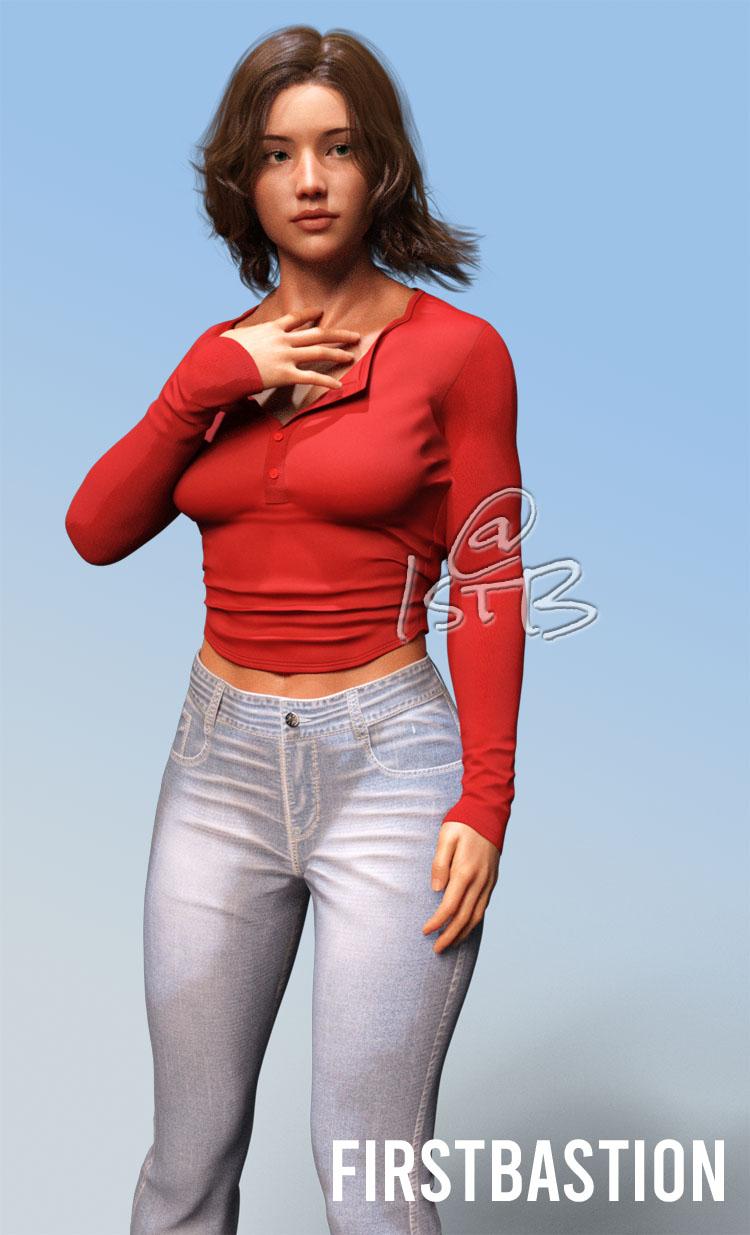
There was a discussion thread in Product suggestions on finding a nice pair of jeans for female characters that fit well.
This is what I wrote there. "It is very surprising how difficult it is to find a nice pair of female jeans that fit right and follow the gentle curves of the female form. Add to that finding realistic belt-loops, a proper standard leather belt with a typical buckle, and modelled front and back pockets that actually look like they could accept a wallet or the fingers of a hand. The finding the natural wrinkles that are common with cotton denim, and the correct realistic raised stitching and the appropriate fading that comes from regular washing. Definitely hard to find. "
Then I stumbled on these in the store and they checked most of the boxes. I might tweak the displacement maps at some point, and might even morph those belt loops to accept a nice leather belt. All in all, a very nice pair of jeans. And we get the cool long sleeve top too. As for the hair. Can never have enough hair styles. With lots of morphs for adjustment, windblow and shaping.
[EDIT]
I reloaded the image using the Attach option here in the forum. As SapphireBlue mentioned the main gallery links are now broken.
(Released) - dForce Christian Hair for Genesis 9 [Commercial]JUJU said:
Great hair! And a handsome man, who is he?

Hello there!
The skin textures are - https://www.daz3d.com/vx-blake-for-genesis-9 and the morph is a mix of different characters I have in my library.
ToyenAccessories Distort when attached to characterThat's normal. You were just fixing Base shape (FBM: full body morph...) with figure's A-Pose. After you pose the figure, you have to further fix pJCMs. Most of the 3rd-party vendors who rip and make these wearables from the games never or rarely fix pJCMs... users have to fix pJCMs themselves if they want to have perfect shape on the posed figure ~~
To fix them, check mada's Daz3D University series tutorials : https://youtu.be/bglmHi3sWGM?si=f8gLx0wLMGHlz5o5
Let's appreciate/discuss today's new releases - more ongoinger threadElor said:
Regarding pregnancy, Olivia 9 also has a pregnant shape: https://www.daz3d.com/olivia-9-hd
No idea how it compare to the newly realesed morphs though.
About the baby, someone released a free morph for Caryn (if you have Caryn):
https://sharecg.com/v/96182/browse/21/DAZ-Studio/Anne-for-Caryn-8-mn
https://www.renderosity.com/freestuff/items/85841/anne-for-caryn-8-mn
Unfortunately with Olivia's pregnant shape, it looks like you have to dial the entire body in to get it. That'd mess up the custom character(s) I have that would need it. Having a separate bump is far more versatile.
Thanks for the heads up for Anne! I'll pick her up for some diversity, but I'm still looking for an actual baby of the newborn vintage. There's a age adjusting utility for G8 that goes that low, and I keep hoping one will come out for G9 soon so I can use all my alteration utilities on it, but a quality standalone G9 infant would be welcome, too.
Accessories Distort when attached to charactercrosswind said:
n.aspros123 said:
crosswind said:
You didn't set Base Resolution on the equipment before exporting to OBJ... that was why you got error message of geometry mismatch. Carefully check the tutorial...
Here's the quick video of the workflow: https://mega.nz/file/ODx1xJxL#yM6B4qiv11v06Xu7_pKrj5Zf0fAKX3djt7EMBCpq7Vw
Yea. In the video I didn't set Base Resolution. Before I recorded, I was setting Base Resolution and still was getting errors. I followed your tutorial, now it's working.
I managed to get the suit and Equipment into Blender and use the Grab Brush and I exported it back to DAZ.
When using the Morph Loader Pro to load the obj it asks the following, See Morph Name 1 pic. How do you overwrite the previous morph FixBase?
Check the video... at 00:25. Use the settings: Reverse Deformations: Yes, Overwrite Existing: Deltas Only.
This worked when importing the obj from Blender.
When I apply a pose, the accessory is still distorting/warping even after the obj fixed morph is imported from Blender using Morph Loader Pro is used. See Revs Equip 6
Let's appreciate/discuss today's new releases - more ongoinger threadRegarding pregnancy, Olivia 9 also has a pregnant shape: https://www.daz3d.com/olivia-9-hd
No idea how it compare to the newly realesed morphs though.
About the baby, someone released a free morph for Caryn (if you have Caryn):
https://sharecg.com/v/96182/browse/21/DAZ-Studio/Anne-for-Caryn-8-mn
https://www.renderosity.com/freestuff/items/85841/anne-for-caryn-8-mn
Accessories Distort when attached to character...Does each accessory need it's own morph and your tutorial used to apply it or multiple accessories can be attached to the wet-suit and imported/exported?
What happens when there's a T-shirt instead of a wet-suit? Is the T-shirt imported/exported with the accessory?
@crosswind
Yes, each accessory you want to fix needs a Fix morph of its own... but you can holistically export them all together, i.e. Suit + all accessories. Import OBJ into Blender, fix the accessory one by one and export them to OBJ one by one. You'll be just repeating the workflow I showed.
The reason why we export the suit is that we'll need to use it as a reference to fix the fitting of accessories equiped on the suit. If the accessories are equiped on a shirt, you export the shirt together... if on a coat, you export the coat together. The approach is all the same ~~
There's Always Another Sale Thread -- Discussions Only Pt 4Gordig said:
The Dog Men banner is all that's on the front page today. Not only is that not reflective of today's products, but I don't remember those products ever actually being released.
Yeah... I was like "woo hoo! medieval taverns!" and then got so distracted by being excited about there finally being a pregnancy morph for G9 that I forgot there were no taverns.
So now hopefully they just put the wrong banner up and we have taverns to look forward to as well.
Accessories Distort when attached to charactern.aspros123 said:
crosswind said:
You didn't set Base Resolution on the equipment before exporting to OBJ... that was why you got error message of geometry mismatch. Carefully check the tutorial...
Here's the quick video of the workflow: https://mega.nz/file/ODx1xJxL#yM6B4qiv11v06Xu7_pKrj5Zf0fAKX3djt7EMBCpq7Vw
Yea. In the video I didn't set Base Resolution. Before I recorded, I was setting Base Resolution and still was getting errors. I followed your tutorial, now it's working.
I managed to get the suit and Equipment into Blender and use the Grab Brush and I exported it back to DAZ.
When using the Morph Loader Pro to load the obj it asks the following, See Morph Name 1 pic. How do you overwrite the previous morph FixBase?
Check the video... at 00:25. Use the settings: Reverse Deformations: Yes, Overwrite Existing: Deltas Only.
Accessories Distort when attached to charactercrosswind said:
You didn't set Base Resolution on the equipment before exporting to OBJ... that was why you got error message of geometry mismatch. Carefully check the tutorial...
Here's the quick video of the workflow: https://mega.nz/file/ODx1xJxL#yM6B4qiv11v06Xu7_pKrj5Zf0fAKX3djt7EMBCpq7Vw
Yea. In the video I didn't set Base Resolution. Before I recorded, I was setting Base Resolution and still was getting errors. I followed your tutorial, now it's working.
I managed to get the suit and Equipment into Blender and use the Grab Brush and I exported it back to DAZ.
When using the Morph Loader Pro to load the obj it asks the following, See Morph Name1 attach. How do you overwrite the previous morph FixBase or is it deleted? I just named it FixBase 2 for the time being.
When I apply a pose, the accessory still distorting even after the fixed morph is added back from Blender. See Revs Equip 6
Does each accessory need it's own morph and your tutorial used to apply it or multiple accessories can be attached to the wet-suit and imported/exported?
What happens when there's a T-shirt instead of a wet-suit? Is the T-shirt imported/exported with the accessory?
@crosswind
Let's appreciate/discuss today's new releases - more ongoinger threadUnusual for me: actually excited over a new release! That pregnancy morph package is badly needed, consdiering how the belly for the slider dial tends to distort and crumple if you bend the character at all (Now maybe we can have a good-lookin' baby to go with it?)
I need to point out one error with https://www.daz3d.com/maternity-props-and-poses-for-pregnancy-morphs-and-materials-for-genesis-9, though: It says it comes with positive and negative options for the pregnancy test, but the two pictured are both positive. Any line at all is positive. In fertility communities, that top one is known as a "faint positive," the sort of thing one is more likely to get testing a few days before an expected period (or possibly on or even a week later, depending on when implantation occurred). (Source: my kids were hard to come by, and not all of them stayed. I could probably teach a class at this point.) So if the PA doesn't make an update, you'll need to go into the texture file and edit out that faint line if you want your test to be negative.
ETA: if the PA is reading this, it would be cool to keep the two that are already there but add a third that's a negatve, so folk can have variations for early/late testers as well!New Character: MateoTriCounter said:
Why is he not 6 foot 3 inches?
it depends which "he" you are talikng about. Generic Mateo is roughly about the average height of men around the world. Ivan is tall for Americans but would be roughly average in the Czech Republic being over 6 feet tall. Fortunately, changing a value in the proportion morph can make him whatevcer height you like.
Posing any hair?Technically, yes ~~ but rigging and morphing are different techniques, with different workflows.
- Rigging: You need to create custom bones and face groups on the hair as needed. Assign face group to bone(s) and paint weight on the bone(s) that you want to rotate (pose).
- Morphing: you don't have to create any custom bones but just send the hair to external modeling / sculpting softare, e.g. Blender. Make the hair shapes as needed and import them as Morphs onto the hair by using Morph Loader Pro.Transfer Utility bug - G8F/G8MRichard Haseltine said:
So you are trying to select Source Shape? Your screenshots are just showing the dialogue, no active lists, so I am having trouble following. If it is the Source Shape you can always aply it/them to the figure and select Use Current.
So, maybe I'm being confusing. My issue is just that my daz3d "transfer utility dialogue" is not showing the options in the "extended options" section like it used to. The morph I want is already favorited in the parameters but I can't select it in the transfer utility because the favorites tab doesn't appear.
thanks for your patience
Transfer Utility bug - G8F/G8MYou just unchecked some options but didn't select Morph Targets option, that was why you couldn't see Extended Options...
Transfer Utility bug - G8F/G8MI've done this a few times and I remember it working. I'm trying to transfer a morph from g8f to g8m. I'm using the transfer utility, but nothing appears in the "extended options" section. I've opened daz3d on 2 different computers, with 2 different versions of the application. I can't see "from source/favorites". I've already pressed the favorite "heart" on the morph I want. Thanks
The Sky is Falling Complaint ThreadSfariah D said:
Oops! I was wondering if a guy who is half elf and he has twins. Is is possible for one child to be an elf but the other one is not. I can't think of a term for a regular person we see everyday. Like you and me. (Unless you are actually an elf.)
How many types of elves are there?
How many elf ears does Genesis 9 have without buying too many products?
Q1: Maybe, depend on how the genes assort during meiosis & a few other things. Sorry, my bio degree is 30 odd years old and rustier than my memory.
Q2: Varies, by the fantasy author/artist/game dev you ask & whether they believe Retconning is a legit fiction writing style. If you ask the Tootsie Pop Owl it's "...crunch!!! Three."
Q3: That reminds me...is there an elf ear morph in the starter essentials? Oh, wait, I have a G9 elf character, so I have at least 1.
Daz 3D is part of

Connect
DAZ Productions, Inc.
7533 S Center View Ct #4664
West Jordan, UT 84084Licensing Agreement | Terms of Service | Privacy Policy | EULA
© 2026 Daz Productions Inc. All Rights Reserved.