-
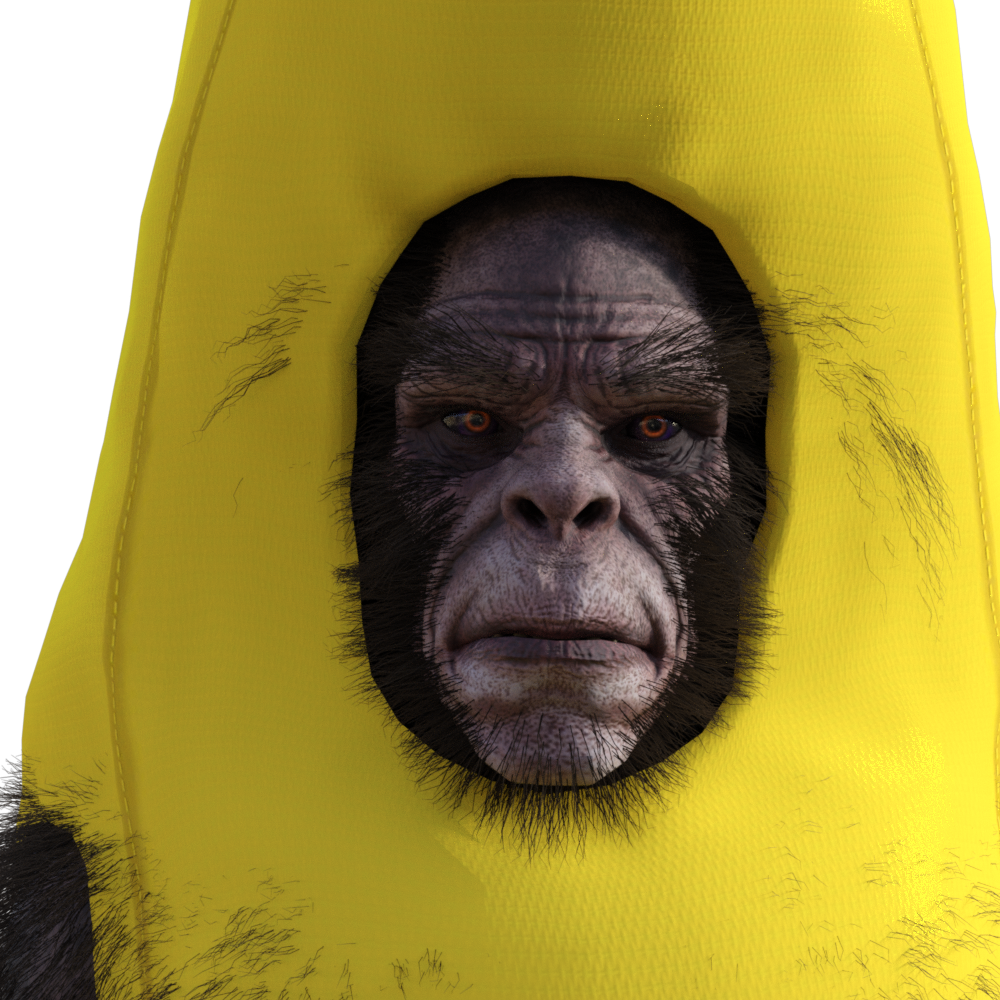
$419.98 Banana Suit?
Can the Yeti wear this? Lol!
:-) Mind you a morph helps it look better. And you can't be minding that it'll become a little bit hairy of a banana.
For those that want it, click here.
Thats great
$419.98 Banana Suit?Can the Yeti wear this? Lol!
:-) Mind you a morph helps it look better. And you can't be minding that it'll become a little bit hairy of a banana.
For those that want it, click here.
Black Is Beautiful II
Grace for V4, materials and face morph transferred to G8.
Freebie credits:
Gown by Adam Thwaites: https://www.most-digital-creations.com/g8f_gown.php
Body Morph by bu_es: https://www.renderosity.com/mod/freestuff/aminata-for-g8f-monique-8/79842
Pose Converter by MCphylyss: https://www.sharecg.com/v/89846/browse/8/Script/Daz3d-Pose-Converter-Standalonelovely.. what hair is that?
[Released] Character Converter from Genesis 2 Female to Genesis 8 Female [Commercial]I'm excited to try this out. I backed off every attempt I've made to switch to G8 because I couldn't give up the the characters I've made for G2, and they couldn't be converted to G8. I use dial morphs to create characters and many of the G8 equivalents of the G2 base morphs either don't exist at all or have been replaced by HD garbage. Some of them have merely been renamed and are tricky to find, but some really just don't exist period. G8 handles expressions so much better though, so I really do want to make the switch. If this makes G8 usable for me, I will be forever greatful.
It will copy over any morph that is being used in a character.
[Released] Character Converter from Genesis 8 Female to Genesis 3 Female - Conv JCMs too[Commercial]Sure can! I'm attaching a couple of comparisons, all figures are labelled for clarity. With this figure morph (Albany by Mousso), the distortion is white (other times it's black), it's this white ring inside the eye which looks like I've painted it in real badly ;-)
Have taken all lashes off for better visibility. Also, the renders are just baked for a few minutes as I didn't have the time to finish them, my poor iMac takes rather long with multiple figures. So that's why the reflections are still very hard and lots of noise visible. Main point is quite clear though I think - almost no eye distortion left!
Those are fabulous! Thank you for sharing!
Lara rendersWell my first render in a long time! Took some time to finish my Lara morph. I keep wasting money on models thinking they would be better, but never are (imo). I'm settled. No more tweaking the model, just clothes, props and env's for Lara now, if she needs 'em.
 saving clothing poses don't save changes
Maybe try saving as morph {shaping} preset.
edited to correct oopsie.
[Exporting & Importing] Animated Daz3D to C4D or Marvelous // DOES NOT MATCH?Apologise for the uncensored-I've censored the pictures now. I've also attached the export settings from DAZ to C4D.
This happens to all the morph I exported so far so I must surely be doing something wrong? It also seems to happen only on certain parts of the model so I wonder if the approach when posing is wrong.
Maybe a combination of sliders and gizmo isn't a solution?
Thanks for your prompt help Richard.
Marvelous Designer export cloth with texture.Hell-o lilweep thank you for your advice I didn't even know about UV editor in MD and I tried to follow what u reccomended and i made it work:)
Have another question if you dont mind. Is it possible to make animation with gen8 with MD clothes on? Already checked some tutorials but with gen3 it works in slightly different way than gen8 cuz skeleton si more complex and MD reads only simple moves.. Can you redirect me to another post/web or tell me if i can make it work?
Thanks, d3athhhh
I think you can either
1) make your clothing item in MD, export as obj, and then use the Daz transfer utility or Dforce to fit your clothing within Daz - and then it will conform or be dforced to the animation you make. Obviously this method isnt utilising Marvelous Designer's cloth simulation - so will be a lower quality method.
or
2) If you want MD simulated cloth, you can export your daz animation in either alembic or an MDD Cache animation into MD. These are the two vertext exact methods i am aware of but both of these methods rely on purchased addons from the daz store. I think there are more details on these methods in the Marvelous Designer thread i mentioned before. And then you can animate in MD and export back to Daz (not sure which file type you should export from MD for importing back to Daz but i assume this would become clear in the fullness of time)
Anyways, i think there are some youtube tutorials that suggest using Collada .dae files but these are not vertex-exact, and your MD simulation will not match up exactly with your Daz model if you try to import your clothing back to Daz this way.
Auto Muscle Enhancer HD [Commercial]Does this product then provide an all new self contained full set of muscle morphs apart from the HD muscle morphs provided in a separate product? If so, does this new system of morphs work well and/or enhance those or work against that package of morphs?1- no AME does not give you a set of muscle morphs. It is Auto build into the G8M figure for you. You do have control of the % of the overall AME.
2- You can use other muscle morph products to add control to that part of the muscle you looking for. The key here is for you to mix the morphs.
don't set AME to 100% and the other morphs to 100%. Play with it and start out at 50% each and adjust as you need.
The best part about Daz is the ability to control mix and blend system morphs together.
[Released] Character Converter from Genesis 8 Female to Genesis 3 Female - Conv JCMs too[Commercial]Sure can! I'm attaching a couple of comparisons, all figures are labelled for clarity. With this figure morph (Albany by Mousso), the distortion is white (other times it's black), it's this white ring inside the eye which looks like I've painted it in real badly ;-)
Have taken all lashes off for better visibility. Also, the renders are just baked for a few minutes as I didn't have the time to finish them, my poor iMac takes rather long with multiple figures. So that's why the reflections are still very hard and lots of noise visible. Main point is quite clear though I think - almost no eye distortion left!
Weird Missing Files issue after DB resetAfter a content DB reset and importing the installed products only (no user data), some of the scenes I had made prior to that started showing missing file errors, regardless of the fact if the files were present or not. Tried unistalling and reinstalling it again and again, and after having wasted 2 hours into fixing it, without any success I got fed up and decided to hit the issue here.
The heck is wrong here. The product in question is Rarestone's Face morphs. And after another reset into the DB now it shows me more missing file erros from the same morph. I am not sure if it's affecting my character or not, because the changes were really minute. But, in the currently used morphs none of the RSFM morphs are in use. SO I am guessing that their values have been reset back to 0. The files are present there and I never, ever made any changed to that morph or any product from daz, aside from some local content, due to which I had to reset it up. I don't know what to do, aside from getting driven crazy due to the errors. I really need an explanation and a fix for this weird behaviour.
EDIT: Okay, after a couple of reinstalls I am back to 4 errors. I can see those files still inside the folder and I have no explanation why it's showing missing file error. I even tried renaming them but it had no effect at all. In the screenshot you can see, 3 of those files are already present. The last 4th one is there too, so idk what's happening anymore.
EDIT2: Happens with the male morph now too. Such a disaster.
Saving an Asset [Solved]Hi,
Here's what I'd like to fix. I make an asset. Give it a name. Load it into Daz. Transfer the asset to G8. Realise I'm not too happy with the name. Change the name in the Scene Tab then Save the asset out again. Then I discover that the old name for the asset still exists in the Data folder.
Is there a way to change the name everywhere without starting from scratch?
Also, somtimes I seem to have been succesful in creating a nice iray preview for it, whilst other times no matter what I do I cant replace the horrible Texture Shaded preview. I'm not saving as Compressed by the way.
I swear, I just spent longer saving and resaving an asset than it took to make it. Typing 'Woolly' Didn't help Argh. it's like a tongue twister for your right ring finger.
Is it my imagination or is there a product that does, at least the last bit for you?
Thanks.
TritiumCG Freebie Thread
Here my" cheap render: for your lovely Lela Star Morph . Thanks for it.
Yeah this one not really look like Lela but your morph still beauty and useful
XTransfer Module 1- Genesis 3 to Genesis 8 Morph Converter (Commercial)Hi
Downloaded the script from my product library and deleted then replaced the previous version. Now getting a constant "Debug: Error finding' when I try to load the script. It doesn't matter what I try to transfer...GenX, purchased characters, base characters, G3M, G3F, everything brings up the error message on both laptop and desktop, 4.11 and 4.12, both running W7
2020-03-31 14:12:25.545 Loading script: Z:/Lorraine/Documents/daz 3d/studio4/My Library/Scripts/XTransfer/XTransfer G3 to G8.dse
2020-03-31 14:12:25.686 DEBUG: Error finding
2020-03-31 14:13:46.081 Script executed successfully: Z:/Lorraine/Documents/daz 3d/studio4/My Library/Scripts/XTransfer/XTransfer G3 to G8.dse
2020-03-31 14:13:47.360 Loading script: Z:/Lorraine/Documents/daz 3d/studio4/My Library/Scripts/XTransfer/XTransfer G3 to G8.dse
2020-03-31 14:13:47.485 DEBUG: Error finding
2020-03-31 14:13:50.225 Script executed successfully: Z:/Lorraine/Documents/daz 3d/studio4/My Library/Scripts/XTransfer/XTransfer G3 to G8.dseIt's not being very helpful in telling me what it can't find, help please :)
Hi. The files the script looks for in your mapped content is (depending on gender): "People/Genesis 8 Female/Developer Kit/Genesis 8 Female Dev Load.duf" "People/Genesis 8 Male/Developer Kit/Genesis 8 Male Dev Load.duf"
Have those been moved or removed? The script uses those for transfers. If not then we need to dig deeper at your issue.
Aha! I knew it would be something simple! Yes, I renamed 'People' to 'Figures' long time ago. I found a couple of products needed the Genesis 8 Basic Male and Female in a People folder, so I will add the Dev Loads to that and try again. Thank you!
Edit: that fixed it, transferred GenX morph in 27 secs. Woot!
Upgrade Genesis 2 => Genesis 8For morph conversions. Character converter(https://www.daz3d.com/character-converter-from-genesis-2-female-to-genesis-8-female-) Seems to work fairly well. Still a bit of work to get textures to work correctly.Auto Muscle Enhancer HD [Commercial]Pretty cool, can't wait. I would love to see the standard 'A' pose on G8M with the AME dialed in at 25, 50, 75 and perhaps a dynamic pose of some sort with the same treatment. For me this is one of the best ways to demonstrate a morph. That first figure (01) looks totally awesome!!!

you can see I have turn on the morph from 0-100
XTransfer Module 1- Genesis 3 to Genesis 8 Morph Converter (Commercial)Hi
Downloaded the script from my product library and deleted then replaced the previous version. Now getting a constant "Debug: Error finding' when I try to load the script. It doesn't matter what I try to transfer...GenX, purchased characters, base characters, G3M, G3F, everything brings up the error message on both laptop and desktop, 4.11 and 4.12, both running W7
2020-03-31 14:12:25.545 Loading script: Z:/Lorraine/Documents/daz 3d/studio4/My Library/Scripts/XTransfer/XTransfer G3 to G8.dse
2020-03-31 14:12:25.686 DEBUG: Error finding
2020-03-31 14:13:46.081 Script executed successfully: Z:/Lorraine/Documents/daz 3d/studio4/My Library/Scripts/XTransfer/XTransfer G3 to G8.dse
2020-03-31 14:13:47.360 Loading script: Z:/Lorraine/Documents/daz 3d/studio4/My Library/Scripts/XTransfer/XTransfer G3 to G8.dse
2020-03-31 14:13:47.485 DEBUG: Error finding
2020-03-31 14:13:50.225 Script executed successfully: Z:/Lorraine/Documents/daz 3d/studio4/My Library/Scripts/XTransfer/XTransfer G3 to G8.dseIt's not being very helpful in telling me what it can't find, help please :)
Hi. The files the script looks for in your mapped content is (depending on gender): "People/Genesis 8 Female/Developer Kit/Genesis 8 Female Dev Load.duf" "People/Genesis 8 Male/Developer Kit/Genesis 8 Male Dev Load.duf"
Have those been moved or removed? The script uses those for transfers. If not then we need to dig deeper at your issue.
XTransfer Module 1- Genesis 3 to Genesis 8 Morph Converter (Commercial)Hi Zevo
Downloaded the script from my product library and deleted then replaced the previous version. Now getting a constant "Debug: Error finding' when I try to load the script. It doesn't matter what I try to transfer...GenX, purchased characters, base characters, G3M, G3F, everything brings up the error message on both laptop and desktop, 4.11 and 4.12, both running W7
2020-03-31 14:12:25.545 Loading script: Z:/Lorraine/Documents/daz 3d/studio4/My Library/Scripts/XTransfer/XTransfer G3 to G8.dse
2020-03-31 14:12:25.686 DEBUG: Error finding
2020-03-31 14:13:46.081 Script executed successfully: Z:/Lorraine/Documents/daz 3d/studio4/My Library/Scripts/XTransfer/XTransfer G3 to G8.dse
2020-03-31 14:13:47.360 Loading script: Z:/Lorraine/Documents/daz 3d/studio4/My Library/Scripts/XTransfer/XTransfer G3 to G8.dse
2020-03-31 14:13:47.485 DEBUG: Error finding
2020-03-31 14:13:50.225 Script executed successfully: Z:/Lorraine/Documents/daz 3d/studio4/My Library/Scripts/XTransfer/XTransfer G3 to G8.dseIt's not being very helpful in telling me what it can't find, help please :)
Is all the content on the same HD? Did you re-install and update the metadata? I transfered "Lorraine" myself with no error, but another character file gave an error for a hidden morph file from Tween 7, which I didn't own.
All content is on the one drive: Z:/Lorraine (Lorraine being me), I've never used metadata ever, wouldn't even know where to put it, and the previous iteration loaded fine, just stalled at 71% and refused to go any further. This iteration that I downloaded from my product library (I don't use DIM either) will not open, it just gives me that debug message and when I click 'ok' disappears. I'm hoping @Zev0 might know what the problem is. If it does need metadata, is that the manifest and supplement file? Where do they go?
Edit: I deleted the new file and reinstalled the original. It opens, does some stuff, puts some morphs in to G8 data, stalls at 71%, I close it, load G8, morphs are there, do not work properly. I think that's where I was at before the update.
Novica & Forum Members Tips & Product Reviews Pt 13Couple things here new to me. Some I have used before in parts and the light set Novica has reviewed before and the reason I picked up the set in the first place. I have used Amira before but I don't think I have actually used the whole character set (morphs and textures). I know I have used like the smile settings and her morph settings previously.
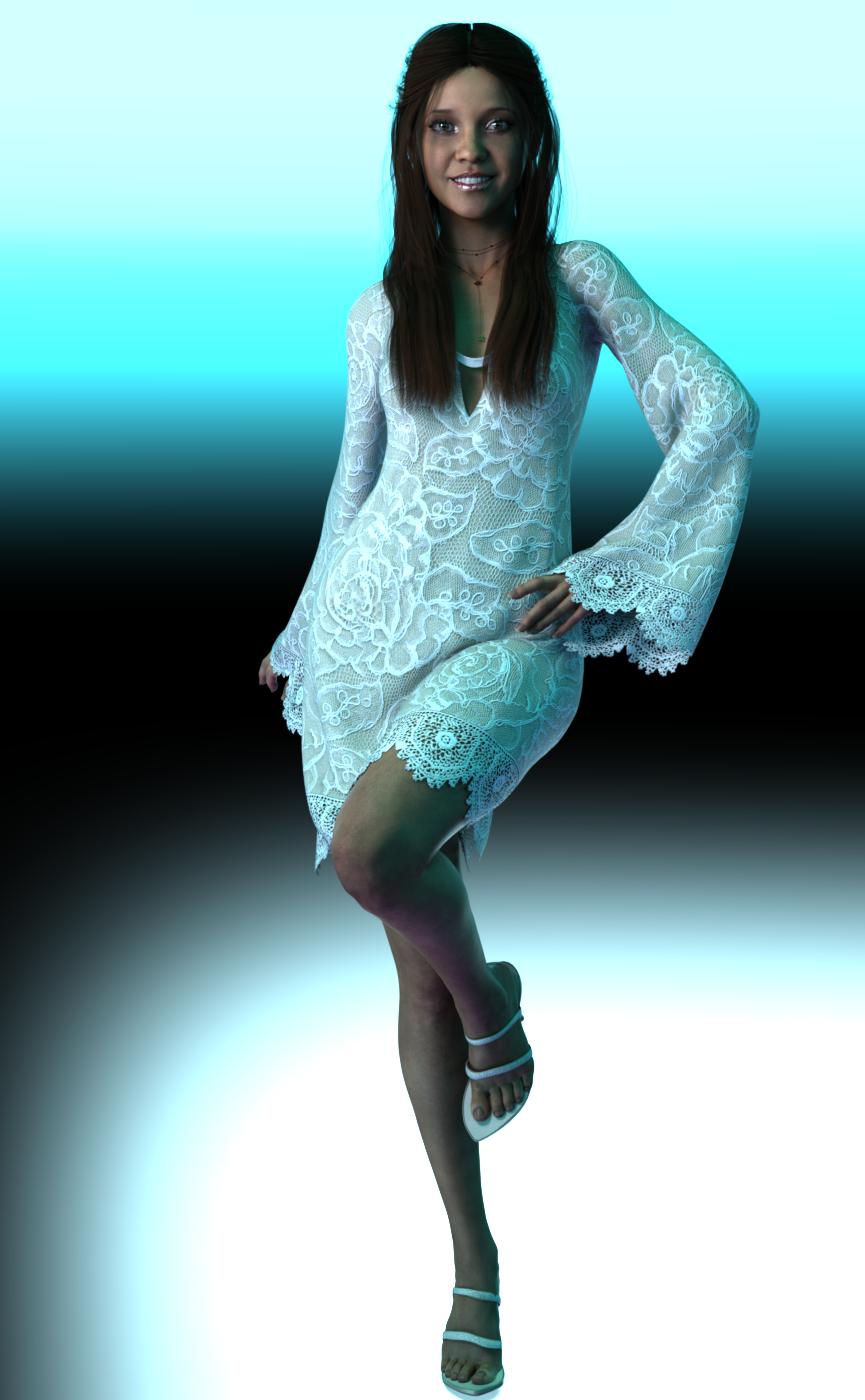
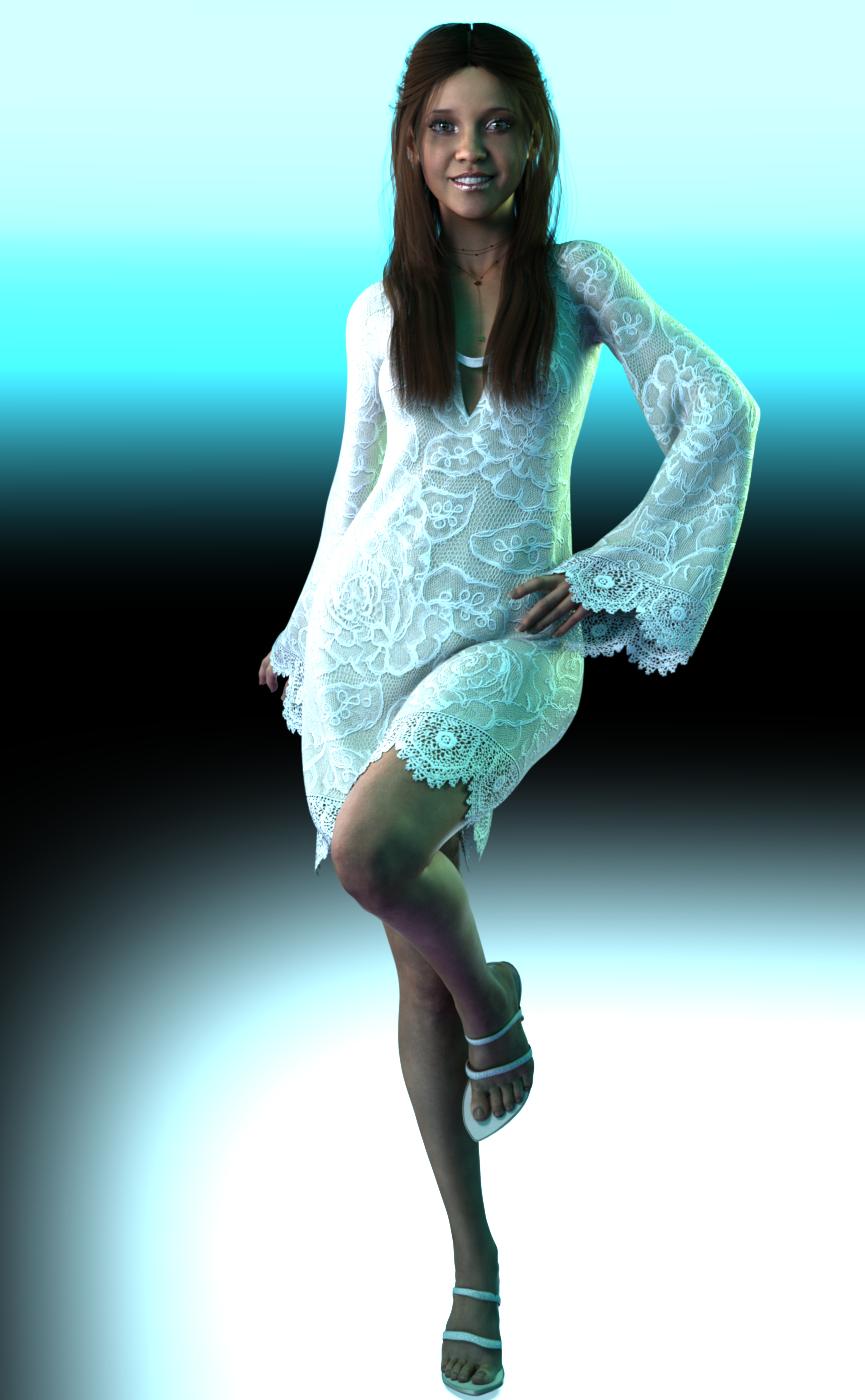
Fashion Editorial Poses - I have used Those Things poses many times and love them she has a couple of different sets and all are top notch. This is not the default pose I had to change a few things with the arms/hands.
BJ Amira -Love her, not suprising BJ makes awesome characters. Shes cute and smile is great. Shes got a couple of makeup options along with a default no makeup. *Tip-Her smile works great with many other characters* I actually have at this time both Amira and Sahel and both characters are worth their price just for the smile presets. I use them frequently on various characters and very seldom run in to problems.
Arwen Hair for G8F- Its got several morphs to help pose along with some to affect fullness. It looks good, although you can't really tell with the lights in this one. It's also has several colors options included.
Bell Sleeve Shift Dress G8F - I bought this dress reciently in one of the sales mainly because I liked the textures in the New Age Shift Dress texture set. I didn't really check out the textures includeded with the dress but to me they were pretty basic, one maroon and one black. The New Age set comes with 5 cute textures 3 patterned and 2 lace. I had some dforce issues with the dress and some sizing issues compared to Amira. I ended up having to go into the abd upper area and adjusting the scaling of abdomen area on the dress because it was so much bigger than Amira. It does have some adjustment dials mainly for the back and skirt. I ended up also changing some of the surface dforce settings to get a drape I liked better.
Paper Tiger's Vivid HDRI Light Set - available from the other site. I like the set for a dramatic look. It comes with a whole bunch of different settings and options. It also comes with an XRay camera that lets the hrdi come through the walls of an indoor scene. (Dont know if I explained that properly) I have included 2 different renders here #1 is the scene set up only with the options in the set #2 is with a couple of rim lights added to make it just a tad more dramatic. No other changes where done to the image, usually I would make some adjustment's in an editor but I wanted the full effect for these examples.
Daz 3D is part of

Connect
DAZ Productions, Inc.
7533 S Center View Ct #4664
West Jordan, UT 84084Licensing Agreement | Terms of Service | Privacy Policy | EULA
© 2026 Daz Productions Inc. All Rights Reserved.