-
[Released] Character Converter from Genesis 2 Male to Genesis 8 Male [Commercial]
I'm noticing that nipples and navels are misplaced. In comparing G2 and G8 they are in different places--I was hoping that "fixing" this in the clone object would take care of it (the clone doesn't match in this area), but it looks like the script is bringing in G8M instead of the clone and that throws that idea out the window. Most of the converted males have what look like sagging chests.
FWSA Tomsy has x and z scaling that aren't copying. I had thought at first that the script couldn't handle the thinner body. I started messing the the x and z scaling and realized I could match the body fairly close. Out of curiosity I opend FWSA and saw that there are scaling values for some of the body parts/bones. The head comes close, except for the bottom lip--it looks like the script is extending belowing the lip, making the crease under the lip swell out like it is part of the lip. Also the lower lids are too high. These can be manually adjusted so much with some G8M morphs, except for the eyeballs themselves (see Fiends Forever Male).
Cory 6 transferred well, the only issue being his eyes are somewhat misshapen. I can get smooth irises, but the eyeball itself flalttens at the bottom.
OOT Fiends Forever Male, forget it lol. The head gets close, but the eyes are misshapened, eyeballs are weirdly misshapened, and the bottom lip issue with Tomsy happens here as well.
The really weird thing, though, is that OOT Olly transferred very well... The only issue being the irises are smaller and have to be cranked up size-wise to match the original. I would have thought the transfer would have been similar to Fiends Forever, so I'm surprised. I don't understand why the eyeballs transferred ok here but not with Cory 6, because Olly's eye placement seems more extreme to me.
The iris sizes between G2M and much larger than G8M too... Can adjust with iris size morphs, but you'd think that if the clone had the adjustment already...
What is the clone object being used for? It looks like G8M is being loaded a lot, but not so much the clone.
I'm not able to make any screenshots atm, I have renders running that I've been holding off making.
The transfer utility is... interesting... in its choices sometimes. I can run the same script on the same figure and get different results. I think the same tolerance can sometimes pull in different polygons.
The clone is loaded for the head only. The G8M is loaded for the body or if there is not a FHM-named morph found.
CC Avandrael & CC ZophaelThank you :D I had thought about doing the hooves as a graft instead of a separate morph, but with Mada's wings, the lashes, brows, and tail in there, possible body hairs, that's a lot of polys, and I was pretty certain I couldn't model hooves in with less/same polys with as much detail as I could with the morphs. But the materials for the hooves were done in shape and not in base shape so there wouldn't be any stretching issues.
Exporting FBX to Cinema 4D problems with clothingThanks for helping. I've uploaded a video on Dropbox of the workflow. I've followed all of the steps you mentioned above, but when I export the OBJ and then clear the simulation and Load Morph I assume the imported OBJ then should overwrite the clothes? But it doesn't, it just stays the same. Am I missing something here again?
[Released] Character Converter from Genesis 2 Male to Genesis 8 Male [Commercial]I'm noticing that nipples and navels are misplaced. In comparing G2 and G8 they are in different places--I was hoping that "fixing" this in the clone object would take care of it (the clone doesn't match in this area), but it looks like the script is bringing in G8M instead of the clone and that throws that idea out the window. Most of the converted males have what look like sagging chests.
FWSA Tomsy has x and z scaling that aren't copying. I had thought at first that the script couldn't handle the thinner body. I started messing the the x and z scaling and realized I could match the body fairly close. Out of curiosity I opend FWSA and saw that there are scaling values for some of the body parts/bones. The head comes close, except for the bottom lip--it looks like the script is extending belowing the lip, making the crease under the lip swell out like it is part of the lip. Also the lower lids are too high. These can be manually adjusted so much with some G8M morphs, except for the eyeballs themselves (see Fiends Forever Male).
Cory 6 transferred well, the only issue being his eyes are somewhat misshapen. I can get smooth irises, but the eyeball itself flalttens at the bottom.
OOT Fiends Forever Male, forget it lol. The head gets close, but the eyes are misshapened, eyeballs are weirdly misshapened, and the bottom lip issue with Tomsy happens here as well.
The really weird thing, though, is that OOT Olly transferred very well... The only issue being the irises are smaller and have to be cranked up size-wise to match the original. I would have thought the transfer would have been similar to Fiends Forever, so I'm surprised. I don't understand why the eyeballs transferred ok here but not with Cory 6, because Olly's eye placement seems more extreme to me.
The iris sizes between G2M and much larger than G8M too... Can adjust with iris size morphs, but you'd think that if the clone had the adjustment already...
What is the clone object being used for? It looks like G8M is being loaded a lot, but not so much the clone.
I'm not able to make any screenshots atm, I have renders running that I've been holding off making.
[Released] Character Converter from Genesis 2 Female to Genesis 8 Female [Commercial]I think I've identified the problem: I suspect the script is ignoring/skipping the RS Clone when the script tries to process the body morph, or otherwise processing it incorrectly. But only the body, the face works great. Found and checked the RSClone in /AppData/blahblahblah and it's perfect too. If I dial in the regular G2F Clone, the body is fixed, but the head looks terrible from being applied twice, so obviously that is not a solution.
Here are a couple images demonstrating the issue with a grey G2F Ninive in the same location and a similar pose as G8, overlayed with a blue transparent G8F Ninive, with and without the G2F clone. As you can see, without the G2F Clone dialed in, the breasts are too big, and everything but the face is off. Every character I've converted has this problem, so it's not specific to Ninive.
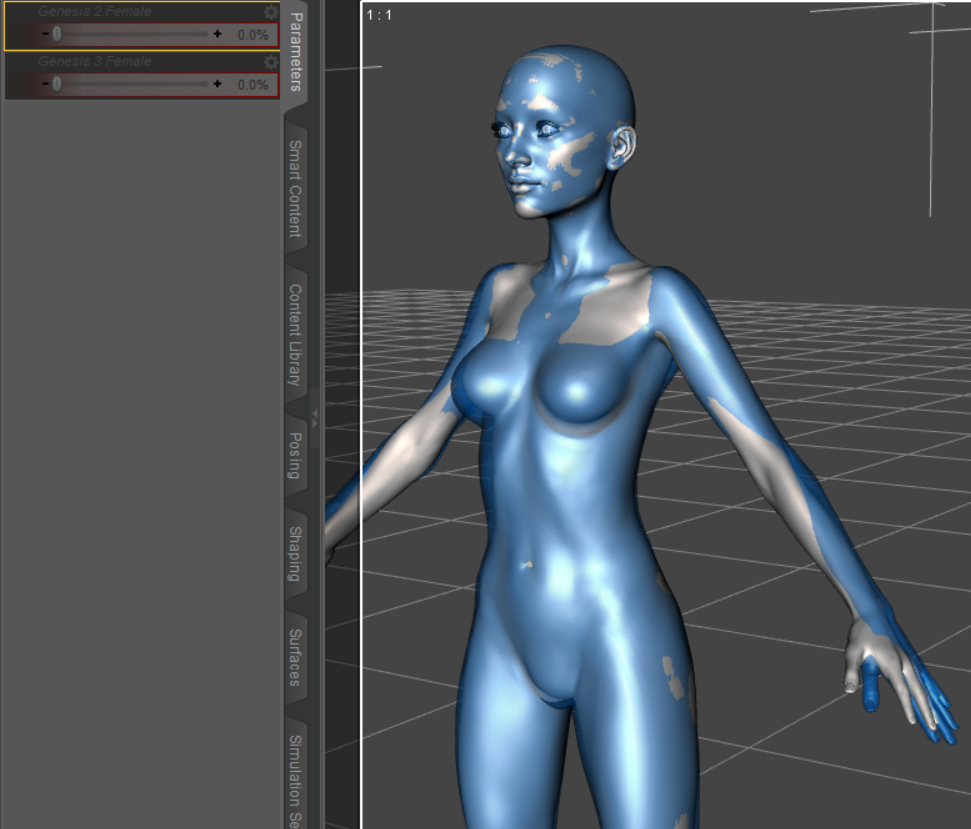
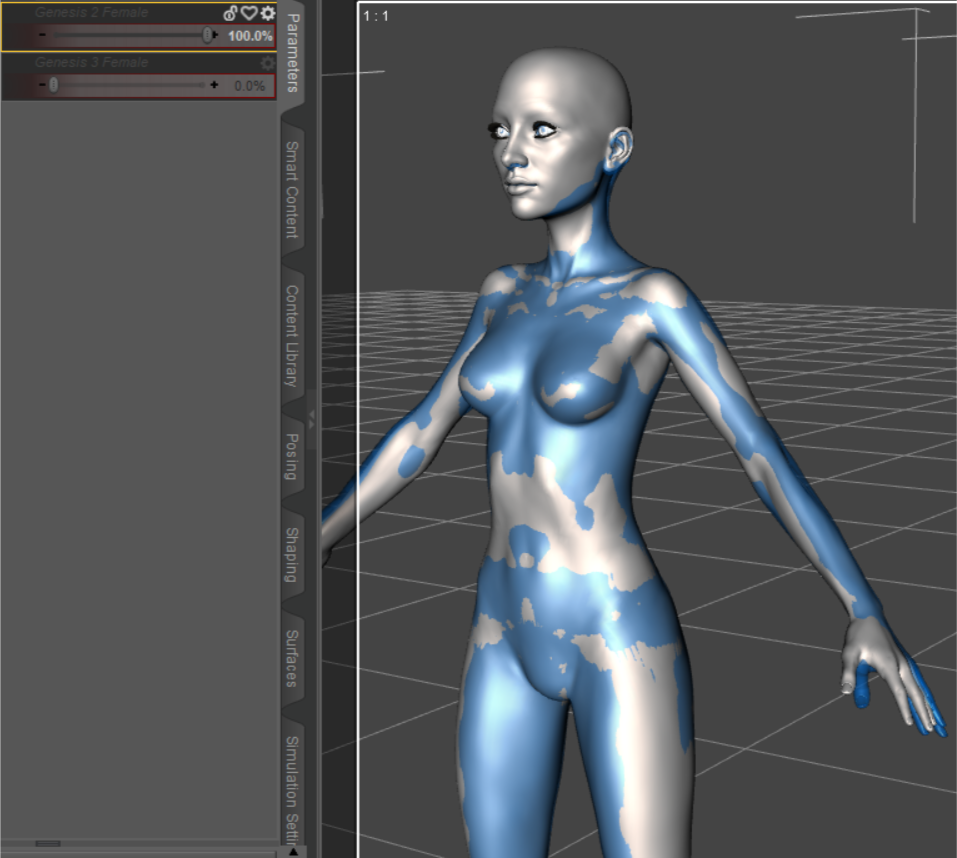
This is with the 2020 method on an up to date Windows 10 machine running an up to date Daz Studio, with similar results regardless of tolerance (several values between 0.2 and 0.005). Eyes checked/unchecked doesn't make a difference (just being thorough). Log doesn't indicate a failure at any point during the conversion, but based on these images, I don't think the G2F clone is influencing the converted body morph creation as intended. I haven't tried deleting the the RS Clone in app data and rerunning the script, but since that clone is a perfect match for G2F, I don't see the point in trying that. I don't know whether this problem is affecting everyone's conversion and but only @Sevrin and I noticed and commented on it, or if this is a glitch affecting only a subset of users.
I will try running the 2019 method on the body morphs, and see if it works properly. If it doesn't produce desirable results, I found a a tutorial on YouTube on how to separate full body G8 morphs into separate head and body morphs, which I'll use to create a separate body morph of the G2F clone, and use that to fix my converted G2F characters.
I had gone through the same thing and had the same results, and I was attempting Nineve and Belle. I had mentioned it a few times, but at the time I was the only one saying something about it. I'm glad to see I'm not the only one.
Exporting FBX to Cinema 4D problems with clothingYou did have the simulation applied when you exported? There were two separate parts to my suggestion - remove sim to see if that was the issue (which it appears not to be, at least not wholly), export as OBJ with the sim still applied (or resim), remove the simulation, and load the morph.
Exporting FBX to Cinema 4D problems with clothingAh, just went through the settings carefully again and this time it did morph, but nothing changed, the clothes now just look the way they looked without the simulation. See screenshot. Is there a next step after this?
Exporting FBX to Cinema 4D problems with clothingThanks for the help. I've attached a screenshot of how the clothes look with the simulation cleared.
Unfortunately when I go through the steps you mentioned it gives me an error message: "Geometry did not match, failed to create morph." when I do the Morph Loader Pro. The preset I used is the same and I set the Reverse Deformations to Yes
I'm having a problem with the Transfer Utility and genesis 8 characters.Basically, I can't get the transfer utility to work the way it should be. I set everything up with the transfer utility and then the clothes i made all attach to the head for some reason.
I made custom clothes in Marvelous Designer and want to attach them to my figures. Both G8 male and female. Now there is an abundance of morphs dialed in and both characters are completely custom characters. The clothing was created around these characters for these characters, so there's no way it will fit the base genesis figure. I have read that not using the base G8 figures can mess up the process, but I currently don't have another choice then to use the custom characters.
Now, in Maya, this process takes less than 10 seconds to accomplish. After uploading the character and clothes and lining them up, I simply use Deform---->Wrap and I'm finished. The clothes now move with the character. That's all I'm really trying to accomplish, and I thought the transfer utility was either the best way or the only way, but no luck with it sofar. I could be very wrong with literally everything I'm trying to do, though, because I'm new to daz and still learning how it all works. Thank you for any help I can get trying to figure this one out everyone.
For me, at least, I find it doesn't really matter whether I choose 'Current' or 'Default'. So, I always leave it on Default.
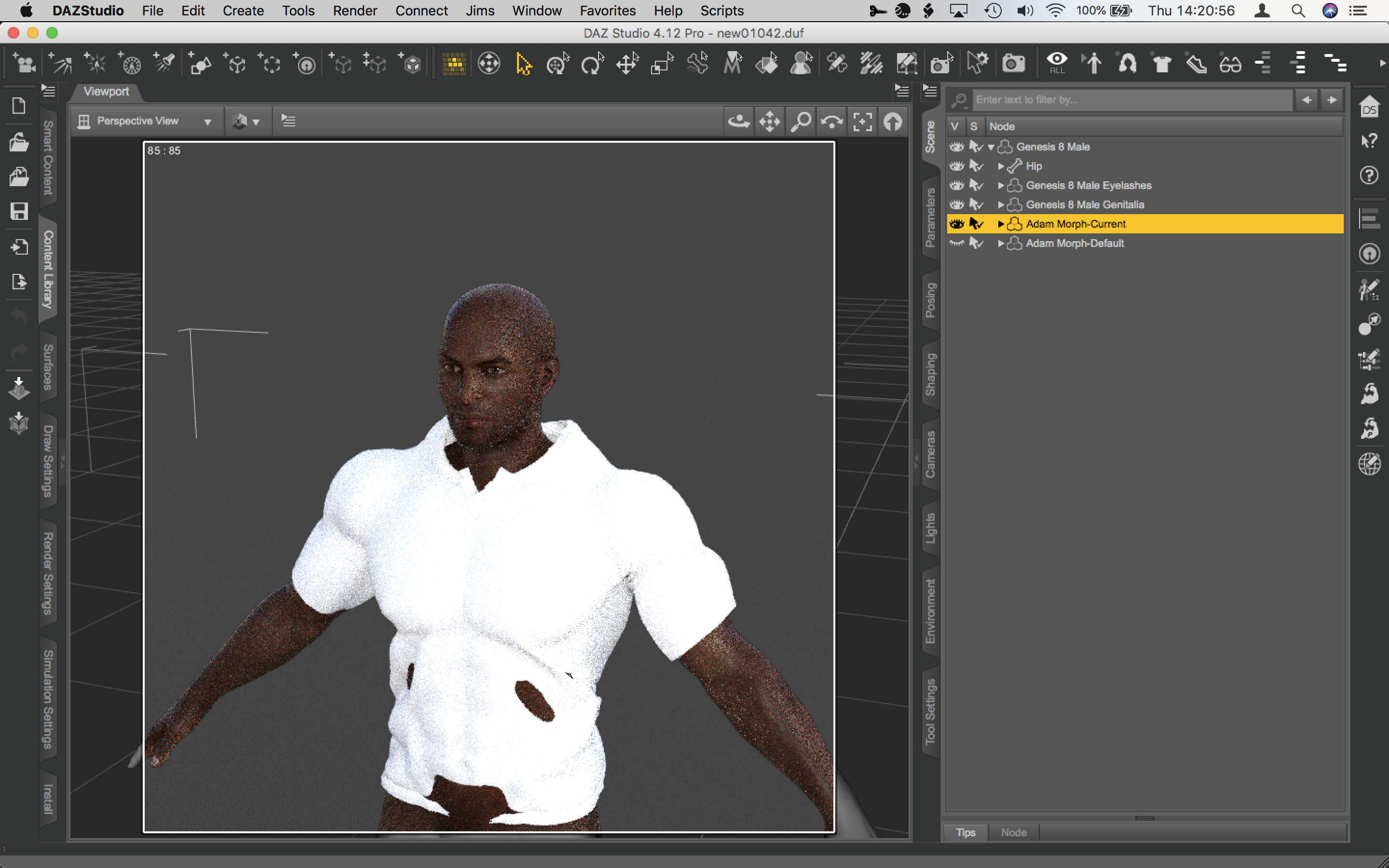
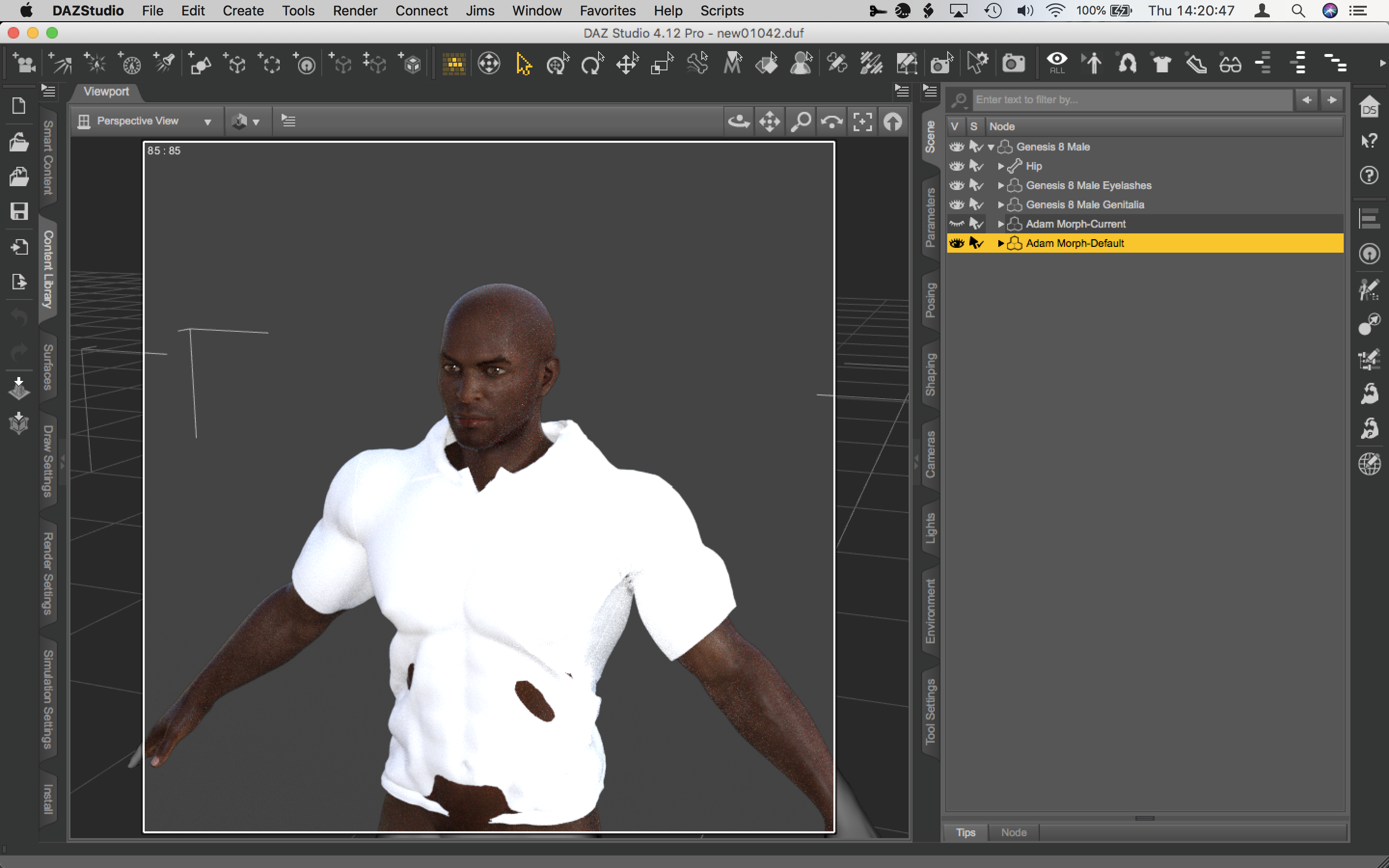
You just have to import the clothing as a morph with reverse def.

Just BTW, this was only for demonstration, this isn't my method but, ansering your question this is the best way I've found.
[Released] Character Converter from Genesis 2 Female to Genesis 8 Female [Commercial]I think I've identified the problem: I suspect the script is ignoring/skipping the RS Clone when the script tries to process the body morph, or otherwise processing it incorrectly. But only the body, the face works great. Found and checked the RSClone in /AppData/blahblahblah and it's perfect too. If I dial in the regular G2F Clone, the body is fixed, but the head looks terrible from being applied twice, so obviously that is not a solution.
Here are a couple images demonstrating the issue with a grey G2F Ninive in the same location and a similar pose as G8, overlayed with a blue transparent G8F Ninive, with and without the G2F clone. As you can see, without the G2F Clone dialed in, the breasts are too big, and everything but the face is off. Every character I've converted has this problem, so it's not specific to Ninive.
This is with the 2020 method on an up to date Windows 10 machine running an up to date Daz Studio, with similar results regardless of tolerance (several values between 0.2 and 0.005). Eyes checked/unchecked doesn't make a difference (just being thorough). Log doesn't indicate a failure at any point during the conversion, but based on these images, I don't think the G2F clone is influencing the converted body morph creation as intended. I haven't tried deleting the the RS Clone in app data and rerunning the script, but since that clone is a perfect match for G2F, I don't see the point in trying that. I don't know whether this problem is affecting everyone's conversion and but only @Sevrin and I noticed and commented on it, or if this is a glitch affecting only a subset of users.
I will try running the 2019 method on the body morphs, and see if it works properly. If it doesn't produce desirable results, I found a a tutorial on YouTube on how to separate full body G8 morphs into separate head and body morphs, which I'll use to create a separate body morph of the G2F clone, and use that to fix my converted G2F characters.
For the body, the script is using the 2019 method, which does not use the clone. It only uses the clone for the face as I was afraid of breaking something that already worked (and that portion of code is very complex and it would be easy to break stuff). As I try to push this back for easier generations (which is not going well), I may change it again and if so, it could be pushed into the G2-G8 conversion. For now though, I recommend using a breast morph if you are bothered by the discrepancy.
Single Dial Morph correcting. [Solved]Hi,
Yesterday I made a single dial morph [SDM] added the icon and saved it. Then this morning realised I'd forgotten the two things I nearly always forget, the navel and Adam's Apple. I have at least made a SDM for those items, but I thought it makes sense to have all in together. But, can you save over an SDM? I tried making a third one but, that just links to two previous SDM's. Then I thought, I'll try copying and pasting the shape but that also copied the SDM. I tried deleting the SDM's but that reset the figure to G8M basic. I read somewhere on the forum that it's best to use a Shaping preset which is what I'd done yesterday first before making the SDM. Only problem is, after deleting the SDM, the first thing I did was to try the Shaping Preset I'd made but that didn't work. I have no clue why it didn't work.
So, what is the best course of action? Is there a way to 'unpick' a SDM. Obviously I can see all the dials when I click on Currently Used in the parameters pane, but how to remove the SDM's without resetting the dials it links to?
Edit:
BTW, I'd forgotten, I'd also saved him out as an Actor, a character preset. I loaded that, thinking, I'd have a 'clean' figure to work with but, when I looked, the SDM, the basic one, without the navel and Adam's Apple, was loaded in. I know that I definitely saved that character preset first which, is why I'd forgotton. My Daz crashed so many times in the last 24 hours. The first time I'd not even saved the file with the character. Luckily I did remember what I'd dialled in. So, why don't I make it again? Welll, yes, I could but I'm after knoweldge more than a shortcut. There will be another character and my cack-handedness won't have got any better.
Thanks.
StrangeFate's stuff: Argentheart Crowns promos.Lilweep - I just often throw stuff at things until something sticks.
Came up with an alternate decoration for the skull, reusing a piece I had laying around from something else. A morph switches between the 2 variants.
Textures not final yet. Now that everything's textured we're finishing the rigging and after that, when everything's assembled properly I'll do a quick texture pass fixing some things I don't like and shifting some tones etc.
Some metals look too similar when they shouldn't and other things feel a bit off. Chevybabe's Dforce SBH Hair Thread
Fitted items are usually parented to the figure node, it makes them easier to find for morph adjustment etc.
I'm having a problem with the Transfer Utility and genesis 8 characters.Set the Source Shape in the Transfer Utility to Use Current.
Exporting FBX to Cinema 4D problems with clothingHow does it look in DS if you clear the simulation data? I think it's that the dForce modifier isn't exported as a morph - you may need to create a morph from it first (hide all but the garment, or one garment if there are multiple parts, make sure it's in Base rsolution, export as OBJ making a note of the preset used, then clear the simulation data, Edit>Figure>Morph Loader Pro, select the OBJ exported, make sure he preset is the same as for export, and expand the the option under the OBJ name to set Revese Deformations on).
Gradually Change the Color of a SurfaceRichard,
Have you ever actually managed to animate a surface created with the proxy scripts? I had this problem recently, although my issue was animating the Emissive Color. No matter how I tried, I could get it to happen. In fact, I passed the problem on to Josh and Carl at DAZ to see if they could figure it out.
But the reason I ask is that I had the thought at the time that it would be cool to link surface color change to a morph or other control property. If you've ever got it working, I might investigate it again.
Also, what do you mean by 'numeric values'?
ZDG random Daz Studio discoveries and questions.the past few weeks things had gotten a tad delirious regarding the feelings of ink on a piece of paper or the physical wellbeing of ones and zeros inside of graphics card screen buffers.

A level of insanity (Patreon and other stuff ban YT vid) that had me questioning if I should bother continuing the gen6 to gen8 conversion tinkering I was doing.

Thankfully, I already purchased Aiko8, so PayPal can't block that purchase, lol. I wasn't that interested in what was blocked (Projekt Melody, not to be confused with Melody Project), yet the context did give me some doubts about other similar ethnic styled art, as even a Vocaloid is apparently 'bad' (Miku Amazon ban yt vid). At the end of the day, a pixel on a screen is not going to be harmed by someone looking at it, and 3D-mesh data won't be offended by someone thinking it looks nice without an Artificial Intelligence connected to it. none of it is real, it's just art.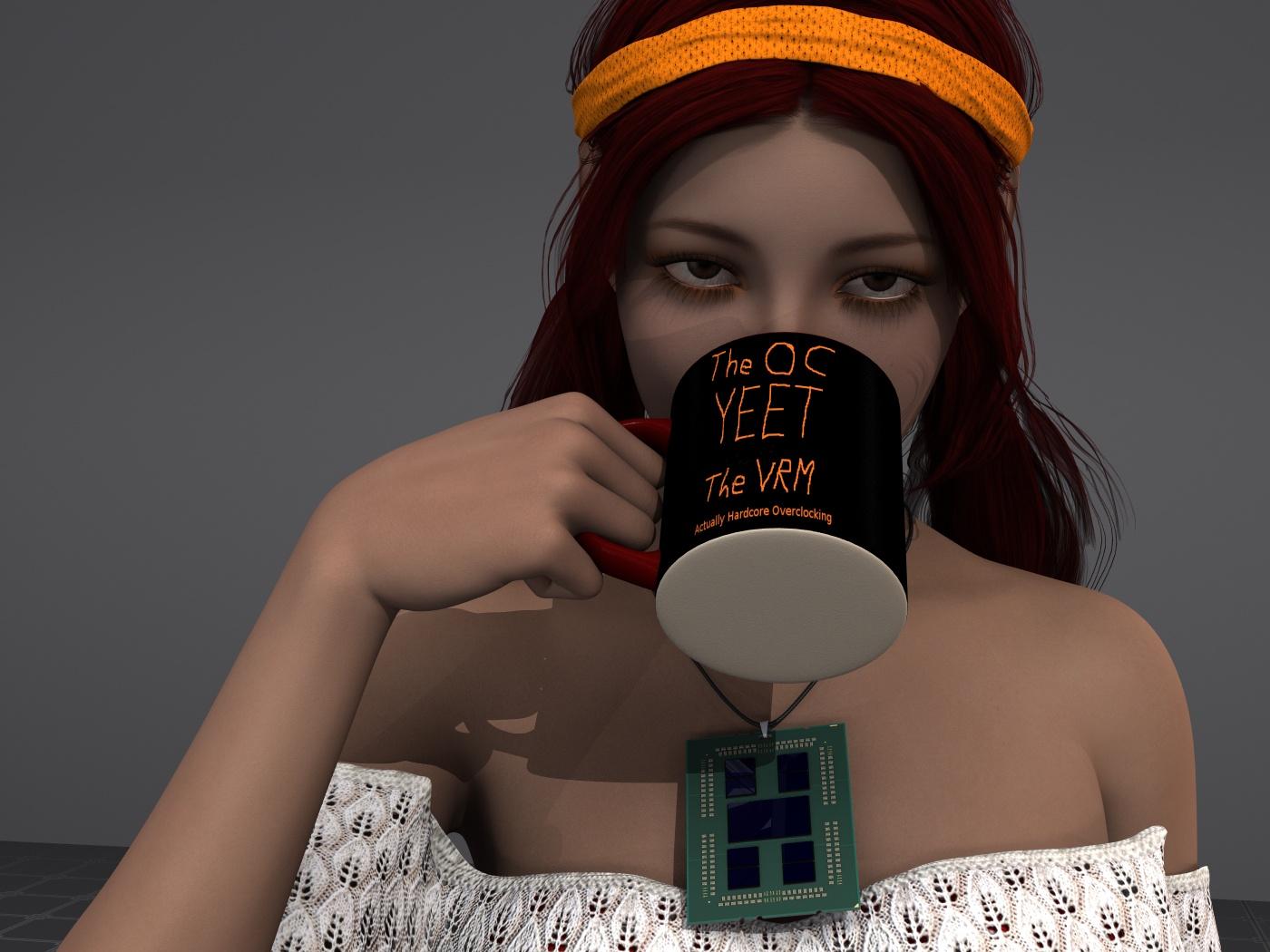
So, I thought I had the outfit from one of Cassia's promos, however, after scrolling through the smart tab and some blind guessing on the product page, I decided to just go with one of the many other great elf-Kini style things I have.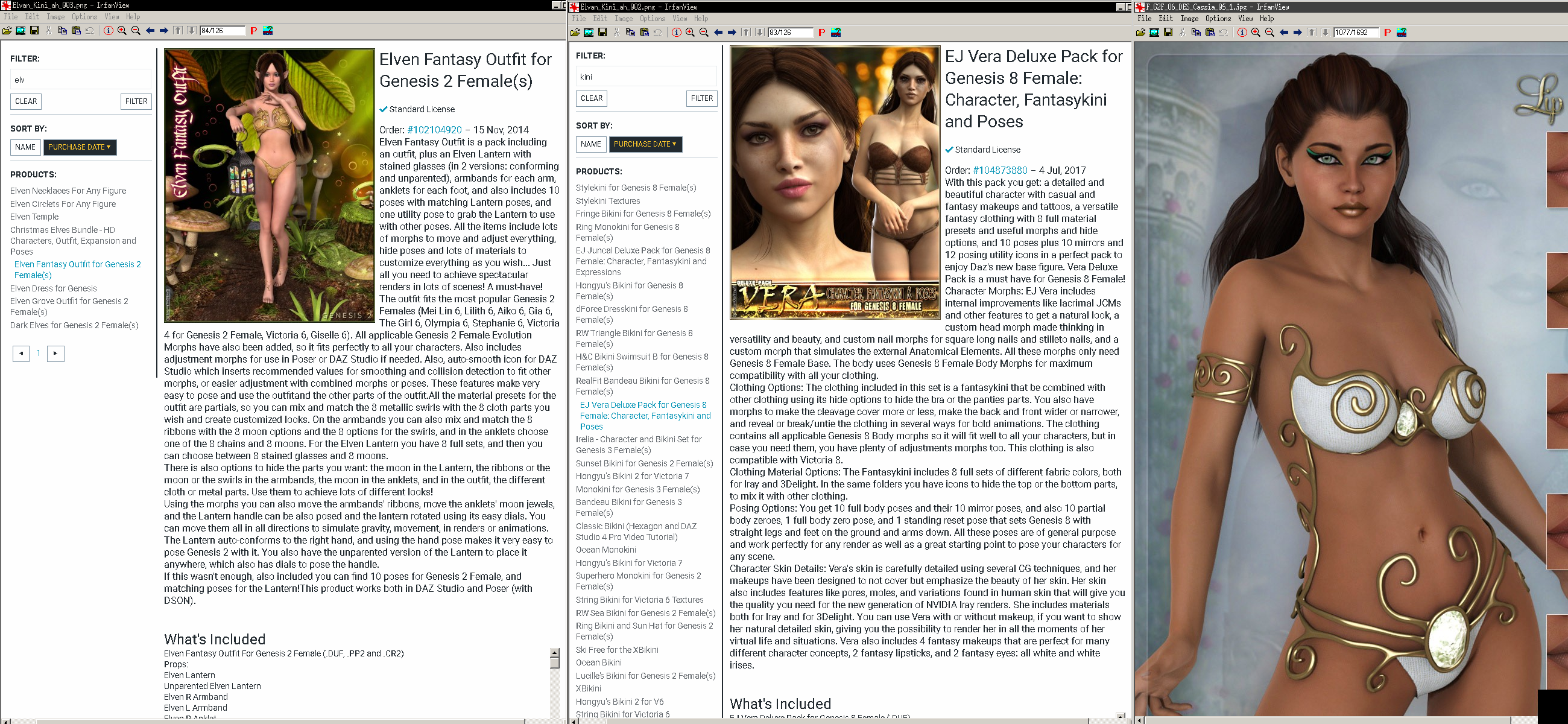
I tried one item, and had some random some times and sometimes not poke-through where the gen6 outfit sometimes refused to follow the gen8 mesh after autofitting then saving the scene. it was very odd and I wasn't able to figure out exactly what it was that caused it to be fine immediately after autofitting the outfit however loading the saved scene, later on, had the outfit inside the figure. it was almost like the outfit-autofit relied on a figure fit morph/shape-projection that wasn't saved, causing the thing to end up inside the figure when loading the saved scene.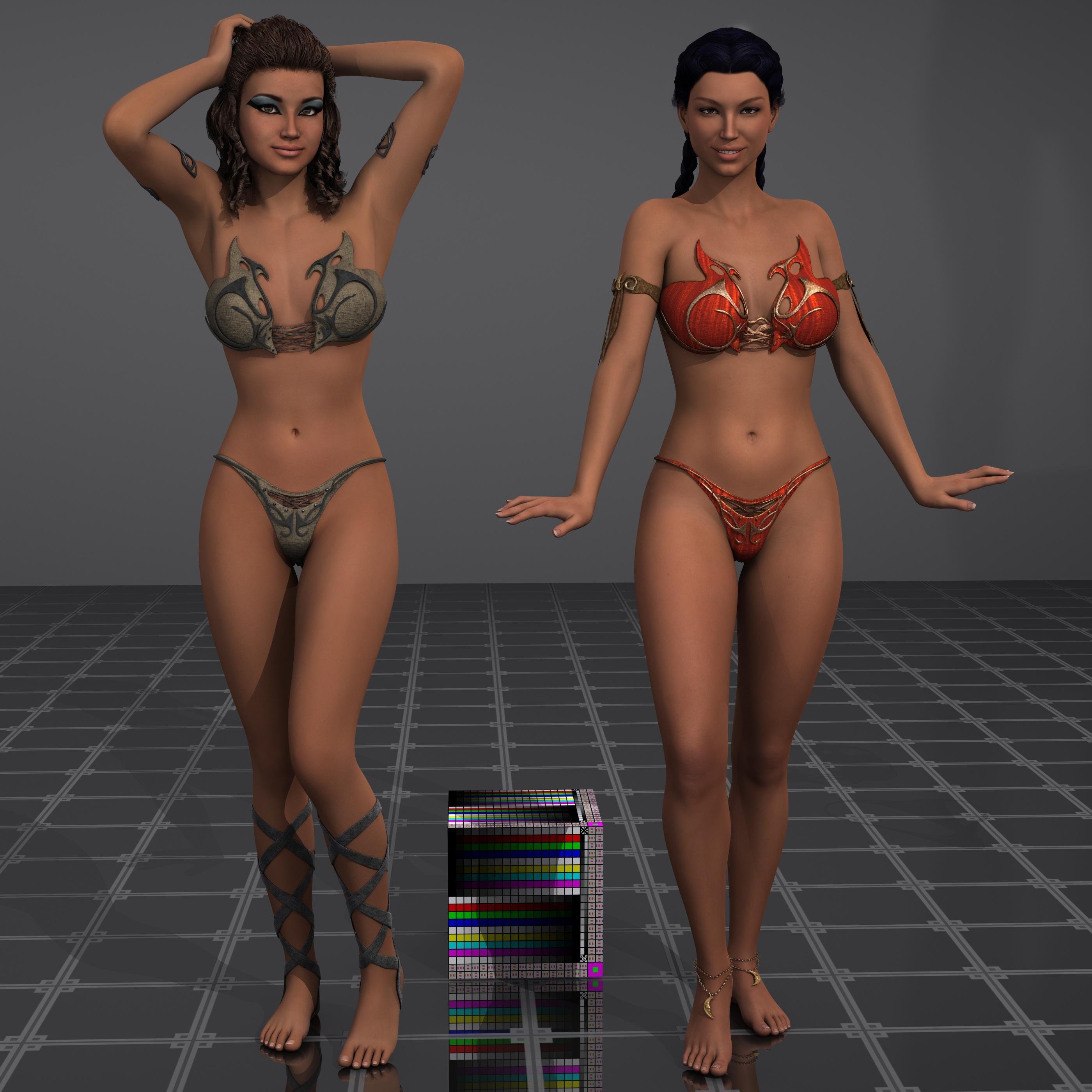
So, left is Cassia gen6 on Olympia6, right is the converted shape on gen8 with Olympia8 using a slight adjustment of Paloma's (gen7) maps. That nifty shape converter thing really is working rather nice I think.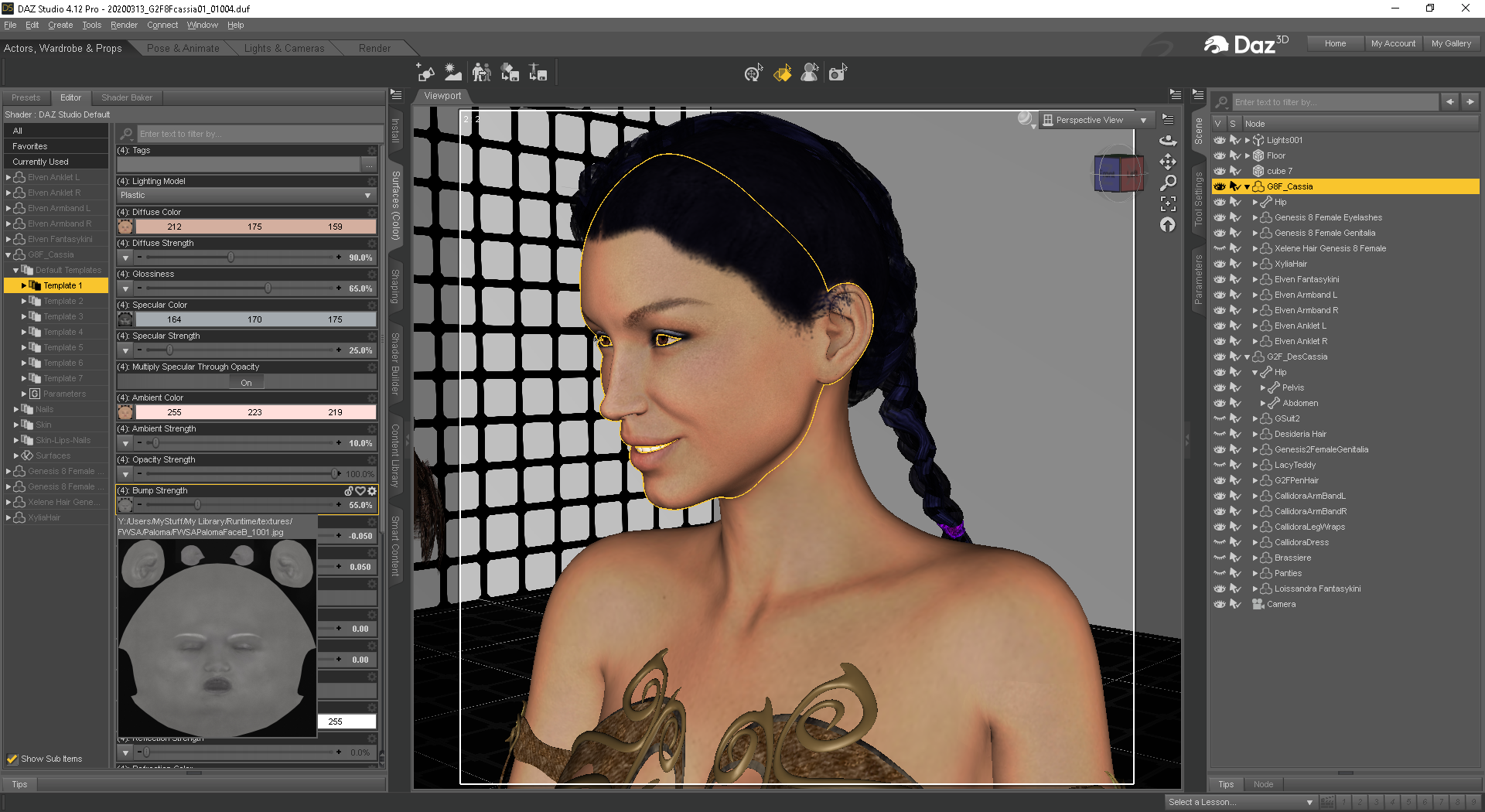
overall that went really well, and I have yet to have any of that autofit save oddities with the Loissandra Kini, Elvan Fantasy did have some issues with some figures sometimes. And to be clear, the probs are NOT on gen6 with the gen6 outfits, it's only when autofitting 'some' of them to gen8 'sometimes' after saving and then, later on, loading the saved scene.Edit, oh, it is/was Apr1st, well, sorry I wasn't joking, perhaps Gray can offer a tad bit of fun to the day with Satan's Pit Crew (YT vid).

Remember, their just ones and zeros in a video-game, with some whacked out funny plots, lol.
Lara rendersWell my first render in a long time! Took some time to finish my Lara morph. I keep wasting money on models thinking they would be better, but never are (imo). I'm settled. No more tweaking the model, just clothes, props and env's for Lara now, if she needs 'em.

This really look like Lana TR from game , Congrats !
Upgrade Genesis 2 => Genesis 8Okay. I tried a few methods and, I think the Transfer Utility ist the best way to convert my favorite morphs and modifier (and it's out of the box). But thank you for your suggestion, DrunkMonkey
For the material, I have successfully done what you said, Leana. Unfortunately the UV-geograft doesn't work as expected, because afterwards I'm unable to use some other grafts. But it doen't matter. I've found a way to reconfigure (transfer) my shaders, so I'm happy now with the default G8 materials (I'm still using 3Delight, because my grafic card is a really really really old one xD).
[Released] Character Converter from Genesis 2 Female to Genesis 8 Female [Commercial]I think I've identified the problem: I suspect the script is ignoring/skipping the RS Clone when the script tries to process the body morph, or otherwise processing it incorrectly. But only the body, the face works great. Found and checked the RSClone in /AppData/blahblahblah and it's perfect too. If I dial in the regular G2F Clone, the body is fixed, but the head looks terrible from being applied twice, so obviously that is not a solution.
Here are a couple images demonstrating the issue with a grey G2F Ninive in the same location and a similar pose as G8, overlayed with a blue transparent G8F Ninive, with and without the G2F clone. As you can see, without the G2F Clone dialed in, the breasts are too big, and everything but the face is off. Every character I've converted has this problem, so it's not specific to Ninive.
This is with the 2020 method on an up to date Windows 10 machine running an up to date Daz Studio, with similar results regardless of tolerance (several values between 0.2 and 0.005). Eyes checked/unchecked doesn't make a difference (just being thorough). Log doesn't indicate a failure at any point during the conversion, but based on these images, I don't think the G2F clone is influencing the converted body morph creation as intended. I haven't tried deleting the the RS Clone in app data and rerunning the script, but since that clone is a perfect match for G2F, I don't see the point in trying that. I don't know whether this problem is affecting everyone's conversion and but only @Sevrin and I noticed and commented on it, or if this is a glitch affecting only a subset of users.
I will try running the 2019 method on the body morphs, and see if it works properly. If it doesn't produce desirable results, I found a a tutorial on YouTube on how to separate full body G8 morphs into separate head and body morphs, which I'll use to create a separate body morph of the G2F clone, and use that to fix my converted G2F characters.
Daz 3D is part of

Connect
DAZ Productions, Inc.
7533 S Center View Ct #4664
West Jordan, UT 84084Licensing Agreement | Terms of Service | Privacy Policy | EULA
© 2026 Daz Productions Inc. All Rights Reserved.