-
About the g9 character deformation is very strange(solved)
lilweep said:
Well we can see that there is a non-zero morph even in that screenshot. In your Properties panel, the Cici Body Apply morph is still showing as non-zero, thus you have not zero'd the figure
You said in OP
My g9 character always looks weird no matter what body morph I use
Is that true? Or is it only true that your morph "Cici Body Apply" is the one that "always looks weird"?
Being accurate about what the problem is could be useful for diagnostic purposes.
If it's only one morph that looks weird, then logic dictates that it is that morph that has the problem...
Yes, because I had to use body deformation, I zeroed the character and needed to test if it was normal, but the result was still excessive sagging and separation of the breasts, which was very strange. I don't know what the problem is, or if other people are the same as me, and this is seriously different from the reference picture when purchasing the product.
And it's not that body, every body has the problem, but this didn't happen in the g8, so I've been using the g8 models, but the G9 female models have a more polished looking face, so I tried using the G9, but I get this problem that I can't solve.
AIUTO...CHI CONOSCE L’ITALIANO? PARTE QUATTORDICIvangelrise said:
Ma quindi, per esempio, una Victoria 7 sta a Genesis 8 come ci starebbe una G3? Cioè qualcosa di antecedente ma comunque compatibile, oppure è proprio un personaggio a sé con outfit suoi, morph suoi, ecc.?
Di base dovresti tenere conto del numero SOLO se ha una rilevanza per i morph o i prodotti che ti interessano.
Ora provo a spiegarti meglio.
Praticamente hanno mantenuto una "numerazione" costante per quanto riguarda la "famiglia", tipo Victoria 1,2,3,4 e via dicendo. Tuttavia con l'arrivo delle figure Genesis questa numerazione si è un pò spezzata in quanto si trattava di un salto enorme rispetto alle figure precedenti in quanto in passato ogni figura era a sè e con Genesis venivano tutte assorbite da una sola base.
Quindi si hanno: Victoria pre-Genesis (e tutti gli altri annesi) che vanno da 1 a 4 singolarmente (ognuno è una figura a sè) poi si hanno Victoria ( e tutti gli altri ) che arrivano su Genesis1 e prendono il numero 5. Ma di base si tratta solo di un morph per mantenere viva la "linea famigliare" e per distinguerla dalla generazione 4.
Quando esce Genesis2 le figure vengono separate come generi (uomo e donna) e le figure "famigliari" prendono il numero 6 per mantenere la numerazione.
Arriva Genesis3 ancora separato per generi e tutti i personaggi classici prendono il numero 7.
Genesis8 si chiama così solo per "riallineare" il numero della "famiglia" con quello della base. E in Genesis9 si è mantenuto questo passo.
In pratica tu lavori su Genesis1, Genesis3 o Genesis9, il numero 5 sui personaggi per Genesis1 sono solo "decorativi" e servono sprattutto per distinguere i nuovi morph che necessitano, per dire, di Victoria5 per esser pienamente funzionali.
Alla fin fine, Victoria5 è solo "Victoria per Genesis1", Victoria6 è "Victoria per Genesis2Female" e via dicendo.
AIUTO...CHI CONOSCE L’ITALIANO? PARTE QUATTORDICIvangelrise said:
Imago said:
La generazione precedente andava da Victoria 1 a Victoria 4, poi con l'arrivo di Genesis c'è stata una doppia nomenclatura: Genesis e Victoria 5. Poi è arrivato Genesis2 e il nuovo sotto-nome Victoria 6.
Con la sventurata nascita di Genesis3 è poi giunto il nome Victoria 7... A quel punto, vista la confusione che due o tre utenti hanno percecipto, hanno deciso ti tagliare la testa al toro e chiamare la generazione successiva solo Genesis8 e poi Genesis9.
poi, se mi sbalio mi corigerete.
Ma quindi, per esempio, una Victoria 7 sta a Genesis 8 come ci starebbe una G3? Cioè qualcosa di antecedente ma comunque compatibile, oppure è proprio un personaggio a sé con outfit suoi, morph suoi, ecc.?
Un tempo (fino al 4) Victoria e Michael erano figure a parte (come anche i vari David, Star, Aiko, ecc..).
Poi la DAZ creò i Genesis 1. Siccome però la gente era ancora affezionata alle vecchie figure, la DAZ creò delle versioni nuove di quelle figure (Michael 5 e Victoria 5) che però erano morph e texture per Genesis 1 (in modo che così la gente passasse a Genesis 1 ma rimanesse familiare coi nomi Victoria e Michael).
Con l'uscita di Genesis 2 ripeterono la cosa (Michael 6 e Victoria 6) vendendo nuovamente i morph visto che ormai i nomi erano famosi.
La cosa è ormai una consuetudine e anche oggi coi Genesis 9 abbiamo Michael e Victoria 9 che sono dei morph con texture.AIUTO...CHI CONOSCE L’ITALIANO? PARTE QUATTORDICIImago said:
La generazione precedente andava da Victoria 1 a Victoria 4, poi con l'arrivo di Genesis c'è stata una doppia nomenclatura: Genesis e Victoria 5. Poi è arrivato Genesis2 e il nuovo sotto-nome Victoria 6.
Con la sventurata nascita di Genesis3 è poi giunto il nome Victoria 7... A quel punto, vista la confusione che due o tre utenti hanno percecipto, hanno deciso ti tagliare la testa al toro e chiamare la generazione successiva solo Genesis8 e poi Genesis9.
poi, se mi sbalio mi corigerete.
Ma quindi, per esempio, una Victoria 7 sta a Genesis 8 come ci starebbe una G3? Cioè qualcosa di antecedente ma comunque compatibile, oppure è proprio un personaggio a sé con outfit suoi, morph suoi, ecc.?
About the g9 character deformation is very strange(solved)Well we can see that there is a non-zero morph even in that screenshot. In your Properties panel, the Cici Body Apply morph is still showing as non-zero, thus you have not zero'd the figure
You said in OP
My g9 character always looks weird no matter what body morph I use
Is that true? Or is it only true that your morph "Cici Body Apply" is the one that "always looks weird"?
Being accurate about what the problem is could be useful for diagnostic purposes.
If it's only one morph that looks weird, then logic dictates that it is that morph that has the problem...
How can I save model by himself without any morphs or figures neededIf you used a figure, morph or texture in your scene, then when you open that scene on a new PC you will need to have those figures, morphs and textures installed on the new PC for the scene to load correctly.
A simple option is to install all your content on both PCs or install your content in a shared location used by both PCs (like an external drive you could plug on either PC for example). Copying over your content directory to the new PC could work, if you installed with DIM. If you want DIM on the new PC to see that content as installed you will also need to copy over DIM's Manifest Archive directory.
Another option would be to use the content gatherer utility. That utility creates a zip archive with all the dependant files used by your scene included, at the right place, and unziping that archive to your content directory should give you all the required files. You are not allowed to distribute that archive unless all the files in it were 100% your own creation, but for moving content between 2 of your computers it works well.
an utility to treat duplicate formulasRichard Haseltine said:
The last build or so of DS don't get greatly slowed by dupicate formula issues, at least for me.
Generally duplicate formulas happen when two different people use the same name for their morphs - so the links (formulae) between a full character slider and the head/body morphs or between one of the morphs and the joint centres are refrring to the same name at both ends of the link. Ideally artists should prefix their proprty names with their initials or the like, to greatly reduce the risk of a conflict, and Daz Studio now appends a string generated from the timestamp when creating a new morph from an imported OBJ. In principle a script could fix the issue by being given the names of the conflicting properties (which can be obtained from the log file - a script might even be able to parse that itself, though it would be fairly version-specific) - and editing the values to make the names unique and fix the internal refrences. However, that would potentially conflict with any eventual official fix which would probably break saved scenes.
The Log file is really intimidating : perhaps a simpler duplicate formulae file would be more informative : I suppose it'a lot of work, and explaining for real dummies which files interfer with which else and proposing the least destructive solution is out of competencies for your programmers.
Importing fully custom textured, rigged, and weighted hair for Genesis 9?Just export the hair as FBX from Blender. Import FBX into DS and rig the hair to Genesis figure with Transfer Utility. If you want to keep the custom bones on the hair, in Transfer Utility > Weight Maps, tick the option: Merge Hierarchies. After rigging, check the bones rotation / weight map on the custome bones.
Edit: If you don't want to tweak weight maps in DS but just in Blender (much better in terms of weight painting funcitons...), in the same way, after painting weight is done, export the hairto FBX. Import FBX into DS, then copy / paste the weight from FBX > custom bones to the rigged hair > custom bones.
Does anyone know of any product or outfit with decent, normal looking everyday belted jeans for G8F?felis said:
Here it is.
It was the file size. So I changed it to an accessory instead of a wearable.
Besides the belt there is a morph for the pants to expand the belt straps. It is in morph loader pro (I was too lazy to move it).
Let me know if issues.
You absolute legend - thank you so much. This is perfect.
Can I ask you how you made it? I've dabbled with Marvelous Designer myself, managed to make some relatively simple pieces of apparel (e.g. skirts, shirts), but this is quite interesting!
EDITThere's a small issue with the folder structure - some files are expected to be in the data\felis\Product\SU_Autumn_Jeans_Belt_G8F, but the folder in the archive is data\felis\Product\SU_Autumn_Jeans_Belt
Some other files are vice-versa - how I made it work:
- Rename SU_Autumn_Jeans_Belt into SU_Autumn_Jeans_Belt_G8F
- Make another folder (at the same leve) called SU_Autumn_Jeans_Belt, then move the UV_Sets folder from SU_Autumn_Jeans_Belt_G8F into it...
- ...however, file /UV Sets/felis/Base/default.dsf needs to stay in SU_Autumn_Jeans_Belt_G8F
About the g9 character deformation is very strange(solved)Richard Haseltine said:
There is almost certainly a morph loading with a non-zero value which shouldn't - quite possibly a corective morph that should apply only with some combination of shapes or shape and pose. A way to test this is to zero the figure - Edit>Figure>Zero>Zero Figure - confirming that yes you do mean Zero and not restore; if that fixes the issue the next step is toi identify the culprit.
Thanks for your reply, but this doesn't work, still the same.
About the g9 character deformation is very strange(solved)There is almost certainly a morph loading with a non-zero value which shouldn't - quite possibly a corective morph that should apply only with some combination of shapes or shape and pose. A way to test this is to zero the figure - Edit>Figure>Zero>Zero Figure - confirming that yes you do mean Zero and not restore; if that fixes the issue the next step is toi identify the culprit.
About the g9 character deformation is very strange(solved)My g9 character always looks weird no matter what body morph I use.
The breasts always sag excessively and are separated, which is completely different from the reference pictures when purchasing the products.How should I solve this problem, is it my daz that has a problem or is it the same for everyone?
Mechasar Evil Pumpkin add-on textures are missingNorthOf45 said:
Eh-h, cross-post...
Technically the metadata is correct, but a Product can only have one name, so everything ends up in the same place. Yes, it could have been handled better, but that's the way it is.
You could make some custom categories, one for each character, with the relevant assets. You could also make some presets for characters that do not have one.
Yes. I have had to do this with some other characters that were notoriously hard to track down in the library. Find the morph. Create a scene subset with the character and save it in a work in progress folder for later. It is just wild to me though because some of the characters have an "Actor/Character" file while most of them do not. Searching in the parameters tab brings the morph up if the morph was given the proper name (hopefully it is not one of those duplicate, commonly used names). It is definitely frustrating how the Smart Content portion was handled though. Smart Content is my biggest draw to using Daz content over content elsewhere purely because of my library size. I like to load a base figure and then let Smart Content tell me what is available for shaping, clothing, accessories, etc. This won't stop me from buying Mechasar products as the rest handle just fine in searches. Just sad that this cool pack and idea fell apart in presentation.
Render your buys! ALL TIME Challengesjoanna said:
SU Japan School Uniform for G8, G8.1, and G9 look stunning (and all those materials included), but loading it as an outfit on ES3D Masina (not not a curvy or big character) resulted in quite a few poke throughs, and the morphs aren't ideal. It also had a triangular artifact issue on the crotch area, and I'm sad to report that either I don't know how to use it properly, or Sickleyield's Detriangulator did nothing with it. Definitely not the results like in the promo pictures, and the attached document suggests it's a tool for when you autofit other generation clothes to G9 which is not what I got from its description. I'll test both the uniform and detriangulator more, bo so far, I'm not impresse
They are dForce clothes, so did you try to set a simulation timeline to avoid the triangle problem ?
Afaik, during a simultion, the body morph will not have an impact on dforce clothes, at least not on the part that is simulated: if the clothes have static parts (either through surface settings or using a dForce weight node), these parts will be subject to the morph.
I don't have Masina, so I'm using MW Flora who is also smaller than Genesis 9 Base (scaled at 90.5%).
I'm usually doing it with a 45 frames simulation using Best in collision mode.
- At frame 0, character in the base pose and base shape, scaled down to the same level as the character you're using (otherwise the clothes will likely be too big) to reduce the risk of the character floating into her clothes.
- At frame 15, character in its base pose and final shape, making sure the scaling of the previous frame is not applied on top of the scaling of the character shape (so making sure it's, in my case, 90.5% at each step).
- At frame 30, character in its final pose and final shape.
The last 15 frames are here to let the simulation stabilize.
One thing to keep in mind, after posing the character at frame 30, you'll likely have to go back at frame 15 to reset it's character position. I don't know if there is a way to pre-emptively set the base pose at frame 15.
Here's the result on the skirt (sorry, the screenshots are a bit small but they were taken from the viewport):
1. No timeline used:
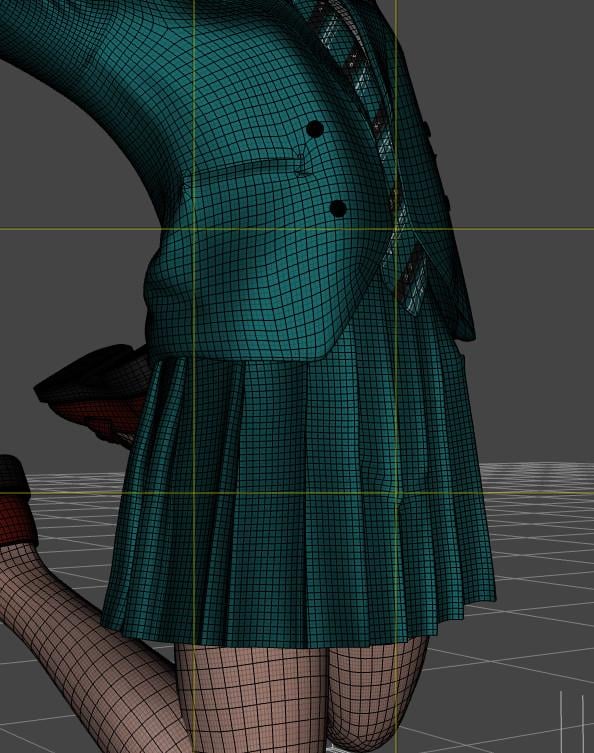
2. Timeline set up as explained and used:
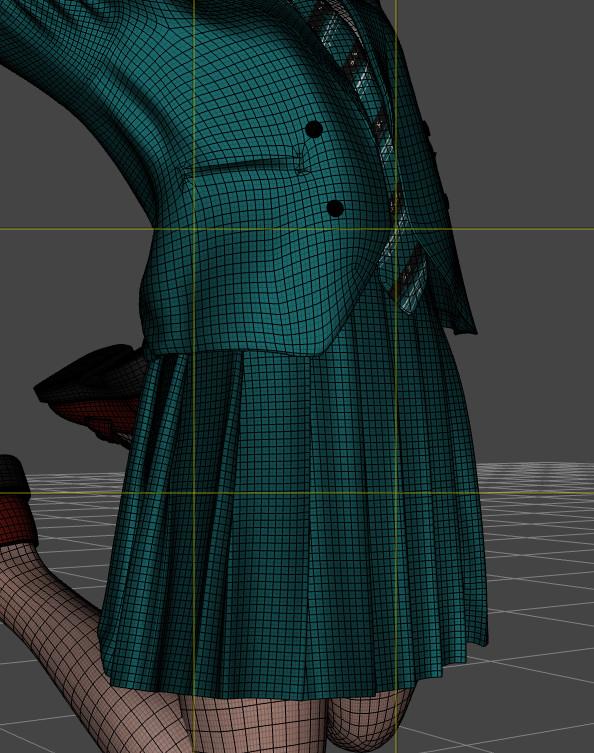
As you can see, the skirt is a bit longer (I only saw it after looking at both screenshots back and forth) but there is no strange deformation due to the triangle area.
It's also possible to use the same technic with dForce clothes from other generation, but it require additionnal steps like creating a clone of the character you're using for the generation of the clothes you're using (so a Genesis 8 clone of a G9 character if you want to use Genesis 8 clothes) and other I can details if you wish.
The biggest downside of this technic: you're now working with a timelined scene.
Regarding the chest, I didn't see any glaring problem with Flora (her chest is close in size to Genesis 9 Base chest so maybe it was enough).
I know that the G8F version of Fit Control has a couple of morphs to improve the way clothes are drapping aroud a chest smaller than G8F. I don't remember ever needing to check if the Genesis 9 version does too, but to be fair, as long as a piece of clothing is not pleated, I now know how to create a custom morph with Blender (I'm not at the level of PAs, but it's usually enough as a starting point for a simulation).
Some G8F Character Morphs do not work anymore...* SOLVED *dainagon said:
None of my morphs are working, and nothing I do seems to fix it. Can anyone help?
in order to help, it needs more information.
How did you install the morph assets?
By hand (zip file)?
DIM?
Smart content?
Install path of DAZ studio and path of the content folder. Default or custom?How can I save model by himself without any morphs or figures neededHello :)
I wanted to ask until today I saved my models when I need the Figures that I bought before in the software , And If I don't have the models that I use on my figure she changed her face until I install the figure I used again , My question is how can I save my model without any Figures or morphs needed in the software , For example the model build like how I made her and she will can arrive how she looks exactly without any installed stuff she had. (The skin tone morpsh and more)
And If I save her like that it's the same like I saved until today? For example better save her wtihout any outfits and only how I made her? If I save her with more morph I added her and piercings it will be ok?Thank you ^^
Daz changes the subD of genesis 8.1 characters randomlyHello !
Thanks crosswind, I didn't know you can access it by removing the forum word. It works.
Just wanted to say that what Richard indicated me to do should have worked because indeed, a morph loaded at the same time of the character were changing the subD. If I couldn't find out which one using your technique, you put me on the good tracks to identify it.
So I tracked when it started to occur and found which package I installed around this date. One of them contained morphs that changed the subD, I removed them and now I don't have any problem. So again, thank very much for helping me !
Best regards
Import material Daz to blenderchrisvn said:
crosswind said:
You bought the product from Renderosity.com ... The vendors there usually have to split the product into multiple ZIP packages, like the one in your ss4, from 01 to 06. You need to put those six ZIP files into a folder, and unzip all of them. Then you'll got the sub-folders: data, People, Runtime.
Then copy them into the root directory of your Daz Library !
I looked at the installation note and on the manual the instructions were to unzip the folders directly into the Library, so I did that, I was able to use the cropped hoodies except one where I don't see the US colors and there are edges that interact with the character's skin and also when you move it the hoodie goes through the skin (screen_V1), I think it's more a settings thing, but I'm new to this is there a tutorial for that?
You either can unzip the package file one by one or holistically unzip them into a temp folder and copy them to the library all together. I always install 3rd-party product with Content Wizard, so I always make a one package without any garbage folders / files (e.g. Documents... etc.)
Short Hoodie 10 material preset is with "US textures"... though I never use it ~~
The issue you had is because of the character's shape is Sakura 8 but the vendor didn't give a FULL HEAD MORPH for it on the hoodie. You can follow this tutorial to fix the FHM... https://youtu.be/HLt0jpxQA20?si=UeJ67vXsv0k2HCg1
The tutorial from Mada is for fixing FULL BODY MORPH (FBM) but you can follow it similarly to fix FHM for the hoodie. I fixed it by using Blender. (ss1) If you don't know Blender or ZBrush but have Mesh Grabber, you also can fix it...
I noticed that to change the hoodie material at first it didn't work, then clicking on the eye deactivated it then reactivating it by clicking on the hoodie for example I changed it and it's the same for the rest this is correct way (screen_V2) ?
The material presets work for me. I couldn't reproduce any issue with them. Maybe it was a glitch on your side....
Mechasar Evil Pumpkin add-on textures are missingzombiecharger65 said:
Here we are years later and I just bought this product and it is a total mess! All parts installed individually in DIM, which is fine and probably better. However, it has the wrong name on the bundle in smart content and in the content library. It shows as Madam Wicked Add-On and most of the files are there. I have chunks of the files only as well. For instance, Bryana for Beverly (for Brooke 8.1) has the textures only. Not the morph. No amount of searching and prodding has helped to find it. I then downloaded that package individually manually, copy paste and dropped it into the content library. 81 of 99 files were "replaced" which means that 18 files were missing from something I installed with DIM less than a month ago. Now I feel like I am going to have to go one by one and download all of this pack manually and drop them all into my Daz library by hand to see what other files are totally missing. I absolutely loathe having to search for things and Smart Content is king for me but this is a total mess. Its almost as bad as all the content creators from the other sites having their products ported over to Daz and not having any smart content. I stopped buying anything that I can tell lacks smart content. I have over 20,000 products and it gets super messy when I cannot use smart content to find stuff. Vendors are far too inconsistent with where they store the files to keep track of a library the size of mine.
Have you read from the top? File names and metadata issues have been identified and workarounds provided. I do not know of any more complications with DIM installations.
The status of this product has not changed since the last update in June, 2023, so it is safe to assume that the same problems persist.
Regarding Bryana for Beverly, there are no user-facing files for the shape, but there is one Control to dial her in (Parameters/Actor/People/Real World). You do need Beverly and Brooke (sort of) installed to get the proper shape. (Beverly uses Brooke, but Bryana removes Brooke and keeps the Beverly part)
Mechasar Evil Pumpkin add-on textures are missingRichard Haseltine said:
zombiecharger65 said:
Here we are years later and I just bought this product and it is a total mess! All parts installed individually in DIM, which is fine and probably better. However, it has the wrong name on the bundle in smart content and in the content library. It shows as Madam Wicked Add-On and most of the files are there. I have chunks of the files only as well. For instance, Bryana for Beverly (for Brooke 8.1) has the textures only. Not the morph. No amount of searching and prodding has helped to find it. I then downloaded that package individually manually, copy paste and dropped it into the content library. 81 of 99 files were "replaced" which means that 18 files were missing from something I installed with DIM less than a month ago. Now I feel like I am going to have to go one by one and download all of this pack manually and drop them all into my Daz library by hand to see what other files are totally missing. I absolutely loathe having to search for things and Smart Content is king for me but this is a total mess. Its almost as bad as all the content creators from the other sites having their products ported over to Daz and not having any smart content. I stopped buying anything that I can tell lacks smart content. I have over 20,000 products and it gets super messy when I cannot use smart content to find stuff. Vendors are far too inconsistent with where they store the files to keep track of a library the size of mine.
Do you have the base products for which theya re add-ons?
Of course I do or I wouldn't have bought the add-ons. 8 year veteran of Daz here with 20,000 products. In fact this add-on had items I didn't own so I bought them just to say I had them. I might have a spending issue. ;)
Daz 3D is part of

Connect
DAZ Productions, Inc.
7533 S Center View Ct #4664
West Jordan, UT 84084Licensing Agreement | Terms of Service | Privacy Policy | EULA
© 2026 Daz Productions Inc. All Rights Reserved.