-
About the g9 character deformation is very strange(solved)
Richard Haseltine said:
There is almost certainly a morph loading with a non-zero value which shouldn't - quite possibly a corective morph that should apply only with some combination of shapes or shape and pose. A way to test this is to zero the figure - Edit>Figure>Zero>Zero Figure - confirming that yes you do mean Zero and not restore; if that fixes the issue the next step is toi identify the culprit.
Thanks for your reply, but this doesn't work, still the same.
About the g9 character deformation is very strange(solved)There is almost certainly a morph loading with a non-zero value which shouldn't - quite possibly a corective morph that should apply only with some combination of shapes or shape and pose. A way to test this is to zero the figure - Edit>Figure>Zero>Zero Figure - confirming that yes you do mean Zero and not restore; if that fixes the issue the next step is toi identify the culprit.
About the g9 character deformation is very strange(solved)My g9 character always looks weird no matter what body morph I use.
The breasts always sag excessively and are separated, which is completely different from the reference pictures when purchasing the products.How should I solve this problem, is it my daz that has a problem or is it the same for everyone?
Mechasar Evil Pumpkin add-on textures are missingNorthOf45 said:
Eh-h, cross-post...
Technically the metadata is correct, but a Product can only have one name, so everything ends up in the same place. Yes, it could have been handled better, but that's the way it is.
You could make some custom categories, one for each character, with the relevant assets. You could also make some presets for characters that do not have one.
Yes. I have had to do this with some other characters that were notoriously hard to track down in the library. Find the morph. Create a scene subset with the character and save it in a work in progress folder for later. It is just wild to me though because some of the characters have an "Actor/Character" file while most of them do not. Searching in the parameters tab brings the morph up if the morph was given the proper name (hopefully it is not one of those duplicate, commonly used names). It is definitely frustrating how the Smart Content portion was handled though. Smart Content is my biggest draw to using Daz content over content elsewhere purely because of my library size. I like to load a base figure and then let Smart Content tell me what is available for shaping, clothing, accessories, etc. This won't stop me from buying Mechasar products as the rest handle just fine in searches. Just sad that this cool pack and idea fell apart in presentation.
Render your buys! ALL TIME Challengesjoanna said:
SU Japan School Uniform for G8, G8.1, and G9 look stunning (and all those materials included), but loading it as an outfit on ES3D Masina (not not a curvy or big character) resulted in quite a few poke throughs, and the morphs aren't ideal. It also had a triangular artifact issue on the crotch area, and I'm sad to report that either I don't know how to use it properly, or Sickleyield's Detriangulator did nothing with it. Definitely not the results like in the promo pictures, and the attached document suggests it's a tool for when you autofit other generation clothes to G9 which is not what I got from its description. I'll test both the uniform and detriangulator more, bo so far, I'm not impresse
They are dForce clothes, so did you try to set a simulation timeline to avoid the triangle problem ?
Afaik, during a simultion, the body morph will not have an impact on dforce clothes, at least not on the part that is simulated: if the clothes have static parts (either through surface settings or using a dForce weight node), these parts will be subject to the morph.
I don't have Masina, so I'm using MW Flora who is also smaller than Genesis 9 Base (scaled at 90.5%).
I'm usually doing it with a 45 frames simulation using Best in collision mode.
- At frame 0, character in the base pose and base shape, scaled down to the same level as the character you're using (otherwise the clothes will likely be too big) to reduce the risk of the character floating into her clothes.
- At frame 15, character in its base pose and final shape, making sure the scaling of the previous frame is not applied on top of the scaling of the character shape (so making sure it's, in my case, 90.5% at each step).
- At frame 30, character in its final pose and final shape.
The last 15 frames are here to let the simulation stabilize.
One thing to keep in mind, after posing the character at frame 30, you'll likely have to go back at frame 15 to reset it's character position. I don't know if there is a way to pre-emptively set the base pose at frame 15.
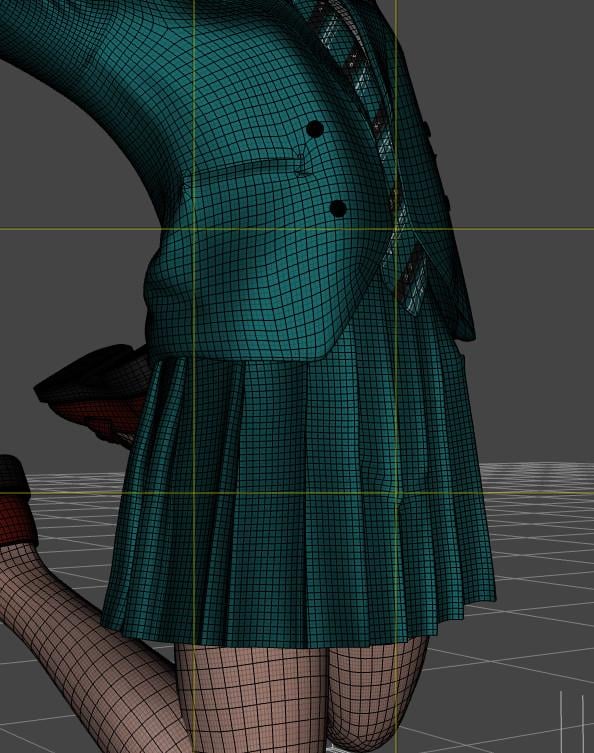
Here's the result on the skirt (sorry, the screenshots are a bit small but they were taken from the viewport):
1. No timeline used:
2. Timeline set up as explained and used:
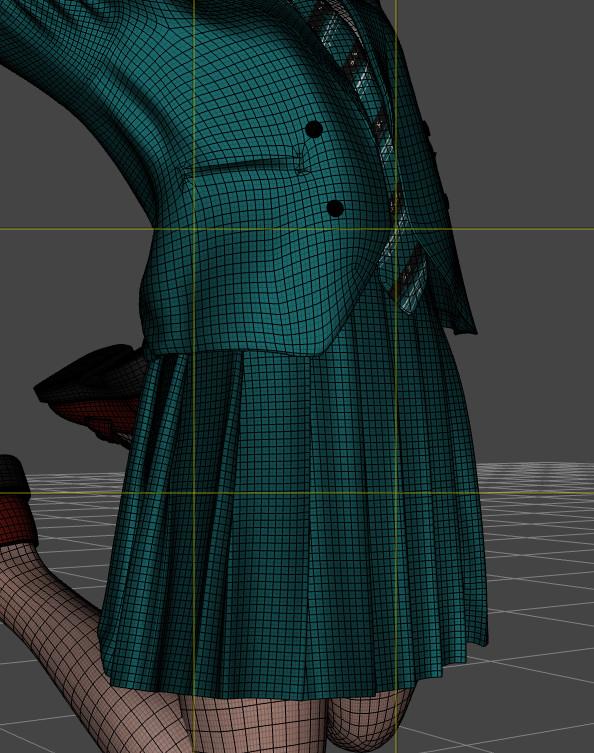
As you can see, the skirt is a bit longer (I only saw it after looking at both screenshots back and forth) but there is no strange deformation due to the triangle area.
It's also possible to use the same technic with dForce clothes from other generation, but it require additionnal steps like creating a clone of the character you're using for the generation of the clothes you're using (so a Genesis 8 clone of a G9 character if you want to use Genesis 8 clothes) and other I can details if you wish.
The biggest downside of this technic: you're now working with a timelined scene.
Regarding the chest, I didn't see any glaring problem with Flora (her chest is close in size to Genesis 9 Base chest so maybe it was enough).
I know that the G8F version of Fit Control has a couple of morphs to improve the way clothes are drapping aroud a chest smaller than G8F. I don't remember ever needing to check if the Genesis 9 version does too, but to be fair, as long as a piece of clothing is not pleated, I now know how to create a custom morph with Blender (I'm not at the level of PAs, but it's usually enough as a starting point for a simulation).
Some G8F Character Morphs do not work anymore...* SOLVED *dainagon said:
None of my morphs are working, and nothing I do seems to fix it. Can anyone help?
in order to help, it needs more information.
How did you install the morph assets?
By hand (zip file)?
DIM?
Smart content?
Install path of DAZ studio and path of the content folder. Default or custom?How can I save model by himself without any morphs or figures neededHello :)
I wanted to ask until today I saved my models when I need the Figures that I bought before in the software , And If I don't have the models that I use on my figure she changed her face until I install the figure I used again , My question is how can I save my model without any Figures or morphs needed in the software , For example the model build like how I made her and she will can arrive how she looks exactly without any installed stuff she had. (The skin tone morpsh and more)
And If I save her like that it's the same like I saved until today? For example better save her wtihout any outfits and only how I made her? If I save her with more morph I added her and piercings it will be ok?Thank you ^^
Daz changes the subD of genesis 8.1 characters randomlyHello !
Thanks crosswind, I didn't know you can access it by removing the forum word. It works.
Just wanted to say that what Richard indicated me to do should have worked because indeed, a morph loaded at the same time of the character were changing the subD. If I couldn't find out which one using your technique, you put me on the good tracks to identify it.
So I tracked when it started to occur and found which package I installed around this date. One of them contained morphs that changed the subD, I removed them and now I don't have any problem. So again, thank very much for helping me !
Best regards
Import material Daz to blenderchrisvn said:
crosswind said:
You bought the product from Renderosity.com ... The vendors there usually have to split the product into multiple ZIP packages, like the one in your ss4, from 01 to 06. You need to put those six ZIP files into a folder, and unzip all of them. Then you'll got the sub-folders: data, People, Runtime.
Then copy them into the root directory of your Daz Library !
I looked at the installation note and on the manual the instructions were to unzip the folders directly into the Library, so I did that, I was able to use the cropped hoodies except one where I don't see the US colors and there are edges that interact with the character's skin and also when you move it the hoodie goes through the skin (screen_V1), I think it's more a settings thing, but I'm new to this is there a tutorial for that?
You either can unzip the package file one by one or holistically unzip them into a temp folder and copy them to the library all together. I always install 3rd-party product with Content Wizard, so I always make a one package without any garbage folders / files (e.g. Documents... etc.)
Short Hoodie 10 material preset is with "US textures"... though I never use it ~~
The issue you had is because of the character's shape is Sakura 8 but the vendor didn't give a FULL HEAD MORPH for it on the hoodie. You can follow this tutorial to fix the FHM... https://youtu.be/HLt0jpxQA20?si=UeJ67vXsv0k2HCg1
The tutorial from Mada is for fixing FULL BODY MORPH (FBM) but you can follow it similarly to fix FHM for the hoodie. I fixed it by using Blender. (ss1) If you don't know Blender or ZBrush but have Mesh Grabber, you also can fix it...
I noticed that to change the hoodie material at first it didn't work, then clicking on the eye deactivated it then reactivating it by clicking on the hoodie for example I changed it and it's the same for the rest this is correct way (screen_V2) ?
The material presets work for me. I couldn't reproduce any issue with them. Maybe it was a glitch on your side....
Mechasar Evil Pumpkin add-on textures are missingzombiecharger65 said:
Here we are years later and I just bought this product and it is a total mess! All parts installed individually in DIM, which is fine and probably better. However, it has the wrong name on the bundle in smart content and in the content library. It shows as Madam Wicked Add-On and most of the files are there. I have chunks of the files only as well. For instance, Bryana for Beverly (for Brooke 8.1) has the textures only. Not the morph. No amount of searching and prodding has helped to find it. I then downloaded that package individually manually, copy paste and dropped it into the content library. 81 of 99 files were "replaced" which means that 18 files were missing from something I installed with DIM less than a month ago. Now I feel like I am going to have to go one by one and download all of this pack manually and drop them all into my Daz library by hand to see what other files are totally missing. I absolutely loathe having to search for things and Smart Content is king for me but this is a total mess. Its almost as bad as all the content creators from the other sites having their products ported over to Daz and not having any smart content. I stopped buying anything that I can tell lacks smart content. I have over 20,000 products and it gets super messy when I cannot use smart content to find stuff. Vendors are far too inconsistent with where they store the files to keep track of a library the size of mine.
Have you read from the top? File names and metadata issues have been identified and workarounds provided. I do not know of any more complications with DIM installations.
The status of this product has not changed since the last update in June, 2023, so it is safe to assume that the same problems persist.
Regarding Bryana for Beverly, there are no user-facing files for the shape, but there is one Control to dial her in (Parameters/Actor/People/Real World). You do need Beverly and Brooke (sort of) installed to get the proper shape. (Beverly uses Brooke, but Bryana removes Brooke and keeps the Beverly part)
Mechasar Evil Pumpkin add-on textures are missingRichard Haseltine said:
zombiecharger65 said:
Here we are years later and I just bought this product and it is a total mess! All parts installed individually in DIM, which is fine and probably better. However, it has the wrong name on the bundle in smart content and in the content library. It shows as Madam Wicked Add-On and most of the files are there. I have chunks of the files only as well. For instance, Bryana for Beverly (for Brooke 8.1) has the textures only. Not the morph. No amount of searching and prodding has helped to find it. I then downloaded that package individually manually, copy paste and dropped it into the content library. 81 of 99 files were "replaced" which means that 18 files were missing from something I installed with DIM less than a month ago. Now I feel like I am going to have to go one by one and download all of this pack manually and drop them all into my Daz library by hand to see what other files are totally missing. I absolutely loathe having to search for things and Smart Content is king for me but this is a total mess. Its almost as bad as all the content creators from the other sites having their products ported over to Daz and not having any smart content. I stopped buying anything that I can tell lacks smart content. I have over 20,000 products and it gets super messy when I cannot use smart content to find stuff. Vendors are far too inconsistent with where they store the files to keep track of a library the size of mine.
Do you have the base products for which theya re add-ons?
Of course I do or I wouldn't have bought the add-ons. 8 year veteran of Daz here with 20,000 products. In fact this add-on had items I didn't own so I bought them just to say I had them. I might have a spending issue. ;)
Mechasar Evil Pumpkin add-on textures are missingzombiecharger65 said:
Here we are years later and I just bought this product and it is a total mess! All parts installed individually in DIM, which is fine and probably better. However, it has the wrong name on the bundle in smart content and in the content library. It shows as Madam Wicked Add-On and most of the files are there. I have chunks of the files only as well. For instance, Bryana for Beverly (for Brooke 8.1) has the textures only. Not the morph. No amount of searching and prodding has helped to find it. I then downloaded that package individually manually, copy paste and dropped it into the content library. 81 of 99 files were "replaced" which means that 18 files were missing from something I installed with DIM less than a month ago. Now I feel like I am going to have to go one by one and download all of this pack manually and drop them all into my Daz library by hand to see what other files are totally missing. I absolutely loathe having to search for things and Smart Content is king for me but this is a total mess. Its almost as bad as all the content creators from the other sites having their products ported over to Daz and not having any smart content. I stopped buying anything that I can tell lacks smart content. I have over 20,000 products and it gets super messy when I cannot use smart content to find stuff. Vendors are far too inconsistent with where they store the files to keep track of a library the size of mine.
Do you have the base products for which theya re add-ons?
Mechasar Evil Pumpkin add-on textures are missingHere we are years later and I just bought this product and it is a total mess! All parts installed individually in DIM, which is fine and probably better. However, it has the wrong name on the bundle in smart content and in the content library. It shows as Madam Wicked Add-On and most of the files are there. I have chunks of the files only as well. For instance, Bryana for Beverly (for Brooke 8.1) has the textures only. Not the morph. No amount of searching and prodding has helped to find it. I then downloaded that package individually manually, copy paste and dropped it into the content library. 81 of 99 files were "replaced" which means that 18 files were missing from something I installed with DIM less than a month ago. Now I feel like I am going to have to go one by one and download all of this pack manually and drop them all into my Daz library by hand to see what other files are totally missing. I absolutely loathe having to search for things and Smart Content is king for me but this is a total mess. Its almost as bad as all the content creators from the other sites having their products ported over to Daz and not having any smart content. I stopped buying anything that I can tell lacks smart content. I have over 20,000 products and it gets super messy when I cannot use smart content to find stuff. Vendors are far too inconsistent with where they store the files to keep track of a library the size of mine.
AIUTO...CHI CONOSCE L’ITALIANO? PARTE QUATTORDICISilvhe said:
Se selezioni una superficie qualsiasi del personaggio, vai sul tab surfaces e clicchi sull'icona del base color, ti viene fuori l'elenco di tutti i file con le texture del personaggio. Cliccando su browse in alto ti apre la cartella in cui si trova la texture che hai selezionato, da qui è facile (più o meno) capire quali materiali hai applicato.
Se non vado errato c'è anche un tool (non ricordo se nello store DAZ o su Rendo) che fa proprio questo, credo anche per i morph
Mi sono perso dopo l'icona del base color: cliccandola si apre la tavolozza dei colori, non vedo elenchi!
Free Toon Characters coming July 1st, early download available nowCES3D said:
wsterdan said:
CES3D said:
If the distribution of the base figure's mesh data (data consisting only of vertex lists, without vertex coordinate data) is not permitted, then all creators selling or distributing their unique character morphs and part morphs would be committing license violations.
Since it's unlikely that all of them are violating licenses, wouldn't it suggest that the distribution of mesh data is not prohibited?
Or, in principle, the distribution of mesh data is not permitted, but DAZ 3D is tacitly condoning the situation?I'm currently working on getting things resolved (if possible) and I'm going to try to avoid too much legal discussions here but will post here as soon as I know anything one way or another.
That said, it's been my understanding that character morphs are a special case because they absolutely require the user to own the original meshes; no one is releasing a complete Genesis 3 mesh, for example.
Clothing -- even bodysuits that essentially copy the figures shape -- are allowed by DAZ's licensing as they are considered "add-ons" and don't compete with the character meshes themselves.
I've probably over-simplified things but I think that's how things work. I'm sure Richard will clarify if I've messed it up, but this is my understanding.
Ah, yes. My understanding of morphs was a bit off.
The vertex data stored in morphs are relative coordinates to the base object, so there's no way a morph creator could be in violation of any licenses.If it includes part of a previous morph (e.g. export a shape, modify it, and reimport it as a full morph without reversing out the original shape) then yes it would be in violation. As would a morph wholly created by sculpting for figure X that reproduced the shape of Figure Y or one of its morphs.
How to fix graft?Masterstroke said:
crosswind said:
You export the figure with the geo-graft, sculpt what you want. When import OBJ, in Morph Loader Pro dialogue box, select Primary Figure from Graft (Facet Order) from Load Morph for: (ss1)
In this way, if you select the figure, it'll create the morph on the figure. If you select the graft, it'll create morph on the graft.
I did not know that.
GREAT, thank you :-DNP !
 an utility to treat duplicate formulas
The last build or so of DS don't get greatly slowed by dupicate formula issues, at least for me.
Generally duplicate formulas happen when two different people use the same name for their morphs - so the links (formulae) between a full character slider and the head/body morphs or between one of the morphs and the joint centres are refrring to the same name at both ends of the link. Ideally artists should prefix their proprty names with their initials or the like, to greatly reduce the risk of a conflict, and Daz Studio now appends a string generated from the timestamp when creating a new morph from an imported OBJ. In principle a script could fix the issue by being given the names of the conflicting properties (which can be obtained from the log file - a script might even be able to parse that itself, though it would be fairly version-specific) - and editing the values to make the names unique and fix the internal refrences. However, that would potentially conflict with any eventual official fix which would probably break saved scenes.
Free Toon Characters coming July 1st, early download available nowCES3D said:
wsterdan said:
CES3D said:
If the distribution of the base figure's mesh data (data consisting only of vertex lists, without vertex coordinate data) is not permitted, then all creators selling or distributing their unique character morphs and part morphs would be committing license violations.
Since it's unlikely that all of them are violating licenses, wouldn't it suggest that the distribution of mesh data is not prohibited?
Or, in principle, the distribution of mesh data is not permitted, but DAZ 3D is tacitly condoning the situation?I'm currently working on getting things resolved (if possible) and I'm going to try to avoid too much legal discussions here but will post here as soon as I know anything one way or another.
That said, it's been my understanding that character morphs are a special case because they absolutely require the user to own the original meshes; no one is releasing a complete Genesis 3 mesh, for example.
Clothing -- even bodysuits that essentially copy the figures shape -- are allowed by DAZ's licensing as they are considered "add-ons" and don't compete with the character meshes themselves.
I've probably over-simplified things but I think that's how things work. I'm sure Richard will clarify if I've messed it up, but this is my understanding.
Ah, yes. My understanding of morphs was a bit off.
The vertex data stored in morphs are relative coordinates to the base object, so there's no way a morph creator could be in violation of any licenses.And, there should be no problem distributing your Toon character shape morphs for G3/G8.
You already have the G3/G8 clones for your Toon characters.
Using those clones, you can create Toon character shape morphs for G3/G8. You can then distribute those created morphs to users.
Users can create G3/G8 clones for your Toon characters based on those morphs and your Toon characters.
This procedure allows users to legally obtain G3/G8 clones for your Toon characters.
However, this assumes users (and you) know how to create reverse morphs using morphs. If they don't, you can include instructions or a script to perform the procedure.I believe this procedure should work. Are there any oversights?
AIUTO...CHI CONOSCE L’ITALIANO? PARTE QUATTORDICIvangelrise said:
Adesso spammerò anche io questa soluzione su tutti i capelli pesantissimi in cui mi sono imbattuto. ^^
Domanda tecnica. Se io prendo una qualsiasi female generica, diciamo G8, e ci applico sopra i mats di un personaggio con nome, facciamo a caso Genoveffa 8.Se io poi in seguito non mi ricordo più di quale personaggio ho messo i mats sulla mia G8F, c'è scritto da qualche parte tra i parametri il nome del personaggio da cui derivano i mats?
Se selezioni una superficie qualsiasi del personaggio, vai sul tab surfaces e clicchi sull'icona del base color, ti viene fuori l'elenco di tutti i file con le texture del personaggio. Cliccando su browse in alto ti apre la cartella in cui si trova la texture che hai selezionato, da qui è facile (più o meno) capire quali materiali hai applicato.
Se non vado errato c'è anche un tool (non ricordo se nello store DAZ o su Rendo) che fa proprio questo, credo anche per i morph
Free Toon Characters coming July 1st, early download available nowwsterdan said:
CES3D said:
If the distribution of the base figure's mesh data (data consisting only of vertex lists, without vertex coordinate data) is not permitted, then all creators selling or distributing their unique character morphs and part morphs would be committing license violations.
Since it's unlikely that all of them are violating licenses, wouldn't it suggest that the distribution of mesh data is not prohibited?
Or, in principle, the distribution of mesh data is not permitted, but DAZ 3D is tacitly condoning the situation?I'm currently working on getting things resolved (if possible) and I'm going to try to avoid too much legal discussions here but will post here as soon as I know anything one way or another.
That said, it's been my understanding that character morphs are a special case because they absolutely require the user to own the original meshes; no one is releasing a complete Genesis 3 mesh, for example.
Clothing -- even bodysuits that essentially copy the figures shape -- are allowed by DAZ's licensing as they are considered "add-ons" and don't compete with the character meshes themselves.
I've probably over-simplified things but I think that's how things work. I'm sure Richard will clarify if I've messed it up, but this is my understanding.
Ah, yes. My understanding of morphs was a bit off.
The vertex data stored in morphs are relative coordinates to the base object, so there's no way a morph creator could be in violation of any licenses.Daz 3D is part of

Connect
DAZ Productions, Inc.
7533 S Center View Ct #4664
West Jordan, UT 84084Licensing Agreement | Terms of Service | Privacy Policy | EULA
© 2026 Daz Productions Inc. All Rights Reserved.