-
More Non-photorealisitic Renders (NPR II)
mmitchell_houston said:
juvesatriani said:
Revisit my old pwToon Multipass preset (JS Multipass) .Skin still not quite right though
Amazing work. But yeah, the skin isn't right. Also, I think you need to manually put a line on the nose to give it definition.
Have you tried to create a page of comics using this technique? That would be very telling to see if you can replicate the outcome enough to go from panel-to-panel and keep it looking similar enough in terms of consistency in line width and colors.
Thanks for all the inputs. You're The BEST!!
Regarding Consistency I think it will be difficult, except if I only use the base color of pwToon and without relying too much on the texture of DAZ assets.Although I've used techniques like Multipass where the controls on layer blending - color - shadow - FX - Outline can be fully customized , it will consume quite a lot of time if the texture of each asset clashes with each other.
The funny thing is that IRAY Render promises consistency even more, so in the postwork phase I can easily do color control at once. But that will be another quest. After I can afford better GPU :)
About Comics, I've had a few drafts that have been written a few years ago, but somehow I haven't really "moved to get started.
Its feel strange because those dreams are the reason why I know POSER and DAZ in first place (beside my huge effort to hide my horrible Manual drawing skill)My goal with DAZ assets right now and beyond is to use them as Static or Web Ads - T Shirt and Poster print elements .
I Dont know why? maybe with those think I can getaway with 'unconsistency " , right ? :)Thanks again
More Non-photorealisitic Renders (NPR II)juvesatriani said:
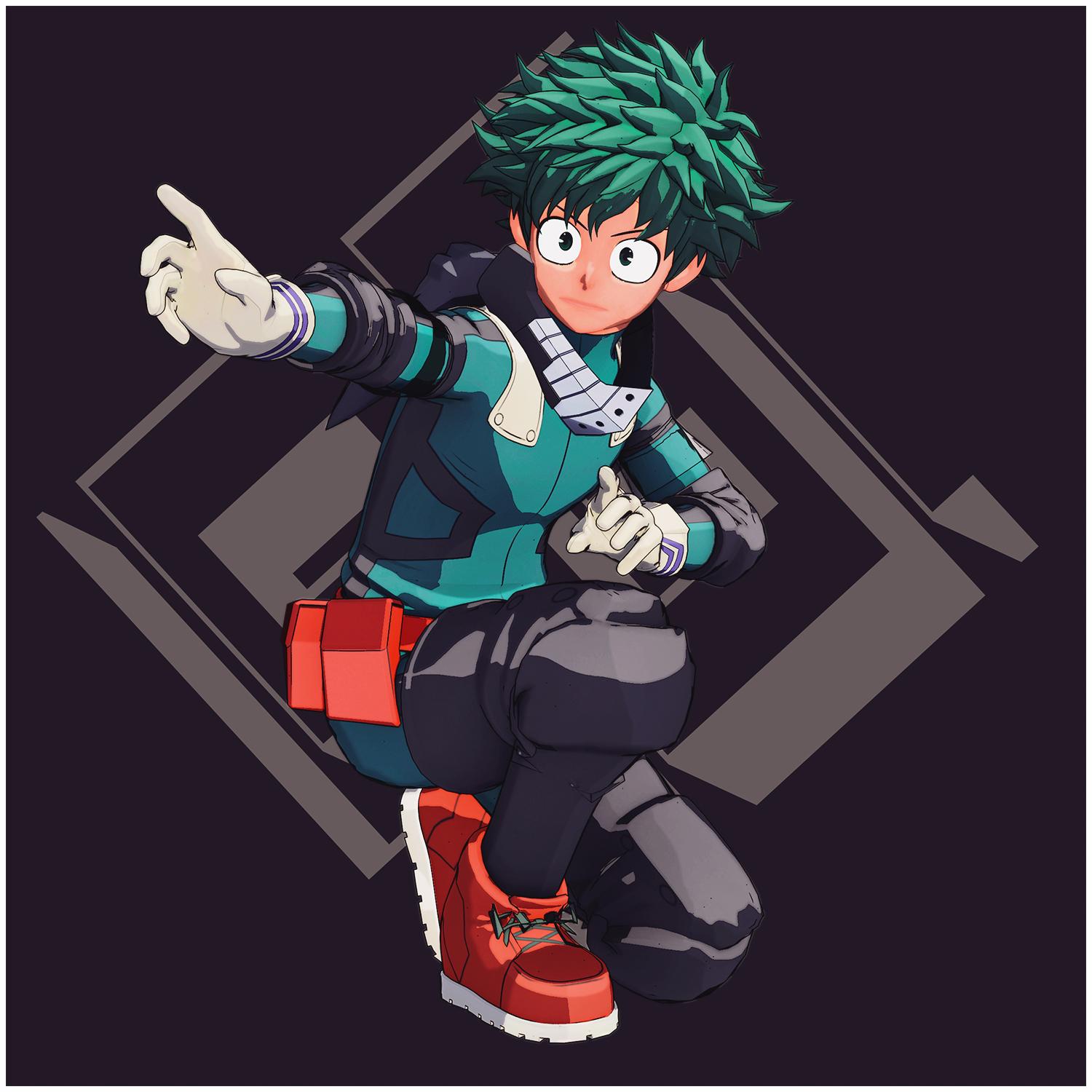
Revisit my old pwToon Multipass preset (JS Multipass) .Skin still not quite right though
Amazing work. But yeah, the skin isn't right. Also, I think you need to manually put a line on the nose to give it definition.
Have you tried to create a page of comics using this technique? That would be very telling to see if you can replicate the outcome enough to go from panel-to-panel and keep it looking similar enough in terms of consistency in line width and colors.
More Non-photorealisitic Renders (NPR II)Artini said:
juvesatriani said:
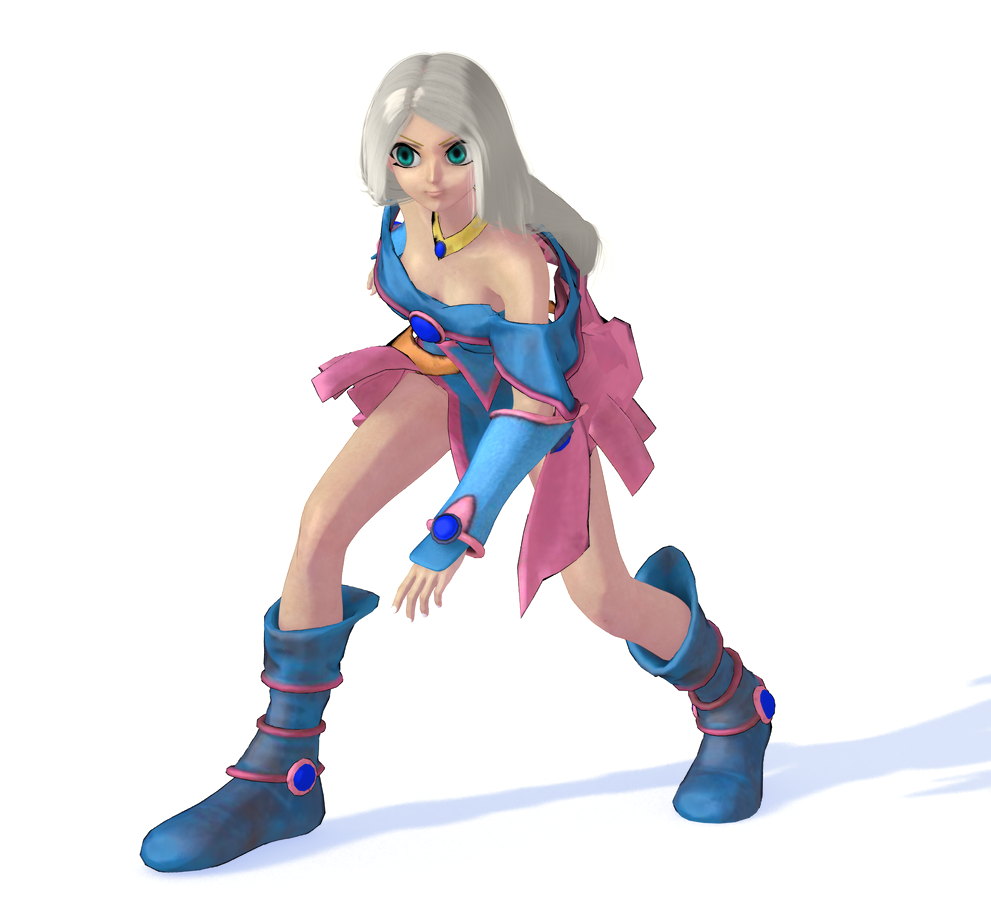
Guys this is Straight Render from DAZ studio using pwToon ( No Postwork) . This will be my next Freebie and this will be simpler than my old Multipass technique because you can get this style using only one pass .
Although Multipass technique offer more control about how things blend ( Shadow - AO - FLAT color etc) but I know some people prefer simpler solution
I`ll be sharing some presets after testing with normal figures and textures . I`m also including sample from Photoshop action companion
Looks very interesting. Wish I have some idea, how to use tools in Photoshop or Gimp to achieve results, like you got.
Despite using Photoshop and Gimp for a very long time, I still have no idea, how to achieve results, I want.
Hi @Artini , First image direct render from DAZ and PwToon so you dont need to open photoshop or 2D graphic editor at all .
The second image result after running custom photoshop action so.. in theory you just need click and click ;)
I`ll be make my upcoming pwToon preset and photoshop companion as simple as possible . SO everyone can use it
More Non-photorealisitic Renders (NPR II)juvesatriani said:
Guys this is Straight Render from DAZ studio using pwToon ( No Postwork) . This will be my next Freebie and this will be simpler than my old Multipass technique because you can get this style using only one pass .
Although Multipass technique offer more control about how things blend ( Shadow - AO - FLAT color etc) but I know some people prefer simpler solution
I`ll be sharing some presets after testing with normal figures and textures . I`m also including sample from Photoshop action companion
Looks very interesting. Wish I have some idea, how to use tools in Photoshop or Gimp to achieve results, like you got.
Despite using Photoshop and Gimp for a very long time, I still have no idea, how to achieve results, I want.
More Non-photorealisitic Renders (NPR II)Guys this is Straight Render from DAZ studio using pwToon ( No Postwork) . This will be my next Freebie and this will be simpler than my old Multipass technique because you can get this style using only one pass .
Although Multipass technique offer more control about how things blend ( Shadow - AO - FLAT color etc) but I know some people prefer simpler solution
I`ll be sharing some presets after testing with normal figures and textures . I`m also including sample from Photoshop action companion
Welcome to Hatsune Miku Anime Manga Cafe ☕Space Jingoroh said:

Flight_maneuver Test01.mp4 Movie
This Movie was rendered using "pwToon SKU:7253" and 3Delight.Very nice homage to classic mecha!
More Non-photorealisitic Renders (NPR II)juvesatriani said:
agree with you all . This thread really awesome and helpful
Here another pwToon and ( over processed) photoshop attempt to create style inspired by you @Headwax
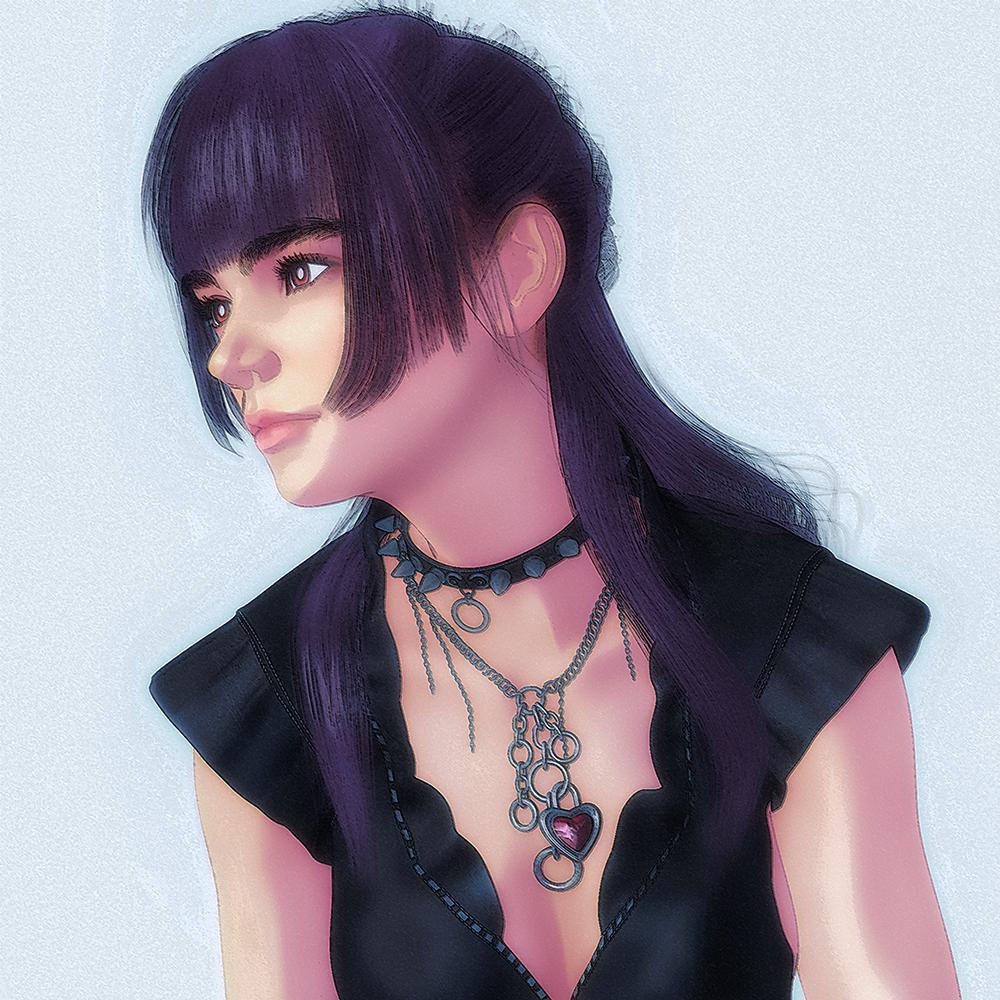
Very, very nice.
More Non-photorealisitic Renders (NPR II)juvesatriani said:
agree with you all . This thread really awesome and helpful
Here another pwToon and ( over processed) photoshop attempt to create style inspired by you @Headwax
Very nice!
More Non-photorealisitic Renders (NPR II)juvesatriani said:
agree with you all . This thread really awesome and helpful
Here another pwToon and ( over processed) photoshop attempt to create style inspired by you @Headwax
wow that's very kind. Beautiful image - it has a lovely soft glow - the edge of the hair and the shadows are 'just right'.
More Non-photorealisitic Renders (NPR II)agree with you all . This thread really awesome and helpful
Here another pwToon and ( over processed) photoshop attempt to create style inspired by you @Headwax
More Non-photorealisitic Renders (NPR II)juvesatriani said:
Vyusur said:
This one is perfect on my taste!
Thanks !! Here another experiment with pwToon and bunch of LUT and color shift in Photoshop .
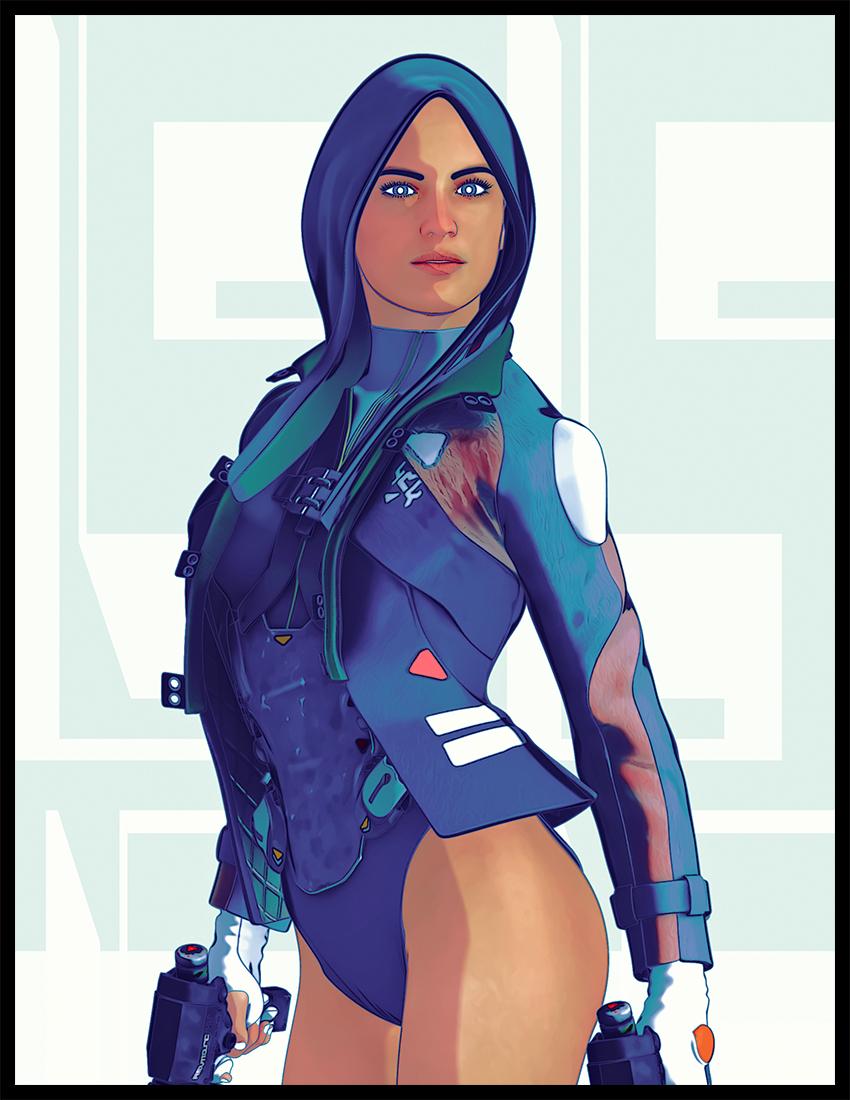
loveley smooth colour transitions
More Non-photorealisitic Renders (NPR II)Vyusur said:
This one is perfect on my taste!
Thanks !! Here another experiment with pwToon and bunch of LUT and color shift in Photoshop .
How can I get anime styles for clothes and props?AlmightyQUEST said:
In case you already have it, https://www.daz3d.com/map-manager has utilities that will let you copy maps from one channel to another. Basically when you do the Ctrl+click method, if the preset calls on another shader, the maps will be copied to the "equivalent" channel (I don't know how what is equivalent is determined). But this means something like diffuse is only going to get copied to one new channel. PWtoon also has light and shade channels, so I've used this product a lot to copy maps to the shade channel instead.As a note, the reason I recommend this if you're going to use this shader like this a lot is because you can select multiple surfaces on different objects that use different maps, and do the process of copying each surfaces maps to the other channel. Huge time saver if you have a lot of surfaces with different maps.I wonder about pwToon and other toon shader which have shade channels. is better to have image map in those channel or just "keep" use diffuse ones and let shade color dictate the rest?
I`m asking because I believe most of images used in DAZ diffuse channel doesnt have distinct information to make shading behave differently just like what used in specular - bum or displacement map .
The exception maybe BW version of it . But who knows ?
How can I get anime styles for clothes and props?In case you already have it, https://www.daz3d.com/map-manager has utilities that will let you copy maps from one channel to another. Basically when you do the Ctrl+click method, if the preset calls on another shader, the maps will be copied to the "equivalent" channel (I don't know how what is equivalent is determined). But this means something like diffuse is only going to get copied to one new channel. PWtoon also has light and shade channels, so I've used this product a lot to copy maps to the shade channel instead.As a note, the reason I recommend this if you're going to use this shader like this a lot is because you can select multiple surfaces on different objects that use different maps, and do the process of copying each surfaces maps to the other channel. Huge time saver if you have a lot of surfaces with different maps.More Non-photorealisitic Renders (NPR II)juvesatriani said:
Strangefate said:
juvesatriani said:
Revisit my old pwToon Multipass preset (JS Multipass) .Skin still not quite right though
That's looking pretty solid !
Thanks !! This is another mix and match up shadow pass and masking in several area
This one is perfect on my taste!
More Non-photorealisitic Renders (NPR II)Strangefate said:
juvesatriani said:
Revisit my old pwToon Multipass preset (JS Multipass) .Skin still not quite right though
That's looking pretty solid !
Thanks !! This is another mix and match up shadow pass and masking in several area
More Non-photorealisitic Renders (NPR II)juvesatriani said:
Revisit my old pwToon Multipass preset (JS Multipass) .Skin still not quite right though
That's looking pretty solid !
More Non-photorealisitic Renders (NPR II)Revisit my old pwToon Multipass preset (JS Multipass) .Skin still not quite right though
Daz Studio 5 development updateWhile exciting to see what is coming, I am in the wait and see camp before I get too over hyped about DS5.. One interesting thing is how we have news now about DS5, not long after the announcement of Win11 as well, even though the info so far is about Mac..
juvesatriani said:
Great news . I hope DAZ studio does not abandon 3Delight.
Yeah .. I think I`m more of pwToon - AoA light and 3Delight Ouline rendering fanboy than IRAY :)
Hopefully they don't as 3Delight can do things that iRay can't do..
shadowhawk1 said:
Here are a few things that I saw in the announcement that concern me and haven’t been properly addressed yet:
No backwards compatibility… Is this just for the add ons or will this also mean that all products going forward will be 5.0 only?
Cost/Subscription… In this world of cloud based software subscriptions is 5.0 going to remain free, or will daz be following the market trend and going cloud based subscription as well?
If it is going to be a cloud based subscription, will there be a free version that has reduced abilities and a Pro or subscription version that gives you full access to the program?
Core support… Currently Studio only uses the first core and the more advanced the cores like the i9 are actually slower than the i7, will this be addressed in 5.0?
Hopefully they don't go that direction, was not so long ago that Daz Studio was a paid for software package that came in two flavours Advanced and Pro if I remember right.. The problem was is that it was expensive and clunky, and was trying to compete with Poser.. Where Poser stood out was that it had options such as dynamics and many other things, that Studio at the time did not have..
Anyway we will see what comes of DS5 hopefully it is good..
Daz Studio 5 development updateGreat news . I hope DAZ studio does not abandon 3Delight.
Yeah .. I think I`m more of pwToon - AoA light and 3Delight Ouline rendering fanboy than IRAY :)
Daz 3D is part of

Connect
DAZ Productions, Inc.
7533 S Center View Ct #4664
West Jordan, UT 84084Licensing Agreement | Terms of Service | Privacy Policy | EULA
© 2026 Daz Productions Inc. All Rights Reserved.