-
September 2019 - Daz 3D New User Challenge - Depth of Field
@katedelongwriter. I think the mist thing was something to do with how the wall was constructed ( I know nothing about making assets!) as the mist has never appeared before with Depth Shader. It could also be the HDR - Erupiter by Orestes, my absolute fave at the minute for everything! The Depth Shaders are good. I've had to play about with them, but the best thing has simply been lowering gloss on background props.
Oh, and I'm with you and am a Photoshop tinkerer to the nth degree! :)
I don't have the shaders, so I'm only guessing, but it looks to me as though the shader you used added the mist. Maybe a map in the glossy reflectivity parameter… something that can vary depending on the light. In your second image, the mist appears to be on the back wall, but not the pillar. It also looks like you used a touch of bloom. It that wasn't postwork, using the Bloom Filter might have brought out the mist more.
I find your second image more interesting because your character is actively doing something. Although I'd never heard of using color to create DOF, it certainly is working in this image. The eye is drawn to the character, her face and her hands, with the background staying in the background.
In the first image with the centaur, she is very lovely and the pose is very feminine and shows off the lines of her human and equine bodies very well. But I don't know why she's there, or why she's gesturing behind her. The story behind the pose is unclear. Is she indicating the castle? Or perhaps the archers protecting her from the castle crenelations? And who is she "talking" with that she'd be making such a gesture? I'd really love to see more of the story in this image.
Thank you for the indepth comments, L'Adair. :)
Image2 : I rarely use bloom, so it could be a Ps filter. I've been working on other things since, so the specifics of that image have gone <--so bad at recalling anything right now! lol It was fun to make and I may return to it on a larger scale as it's a character ref for a book I should be writing.
Image1: Tbh, I don't know why she's there, either. I love centaurs, but I never know what to do with them! I think I've fallen again into the trap of pondering book cover or narrative, mixed it, and come away with neither. I originally fell into Daz with the idea of using it for cover work (and became addicted!).
Same here. My fledgling career as an author got derailed. I'm having so much more fun creating 3D art.
Use your storytellling ability to let the scene tell a story. As with writing, allow the character to tell you what they're going to do. (It's weird, I guess, but the characters "talk" to me, and I follow their lead…) But back to the challenge…

So as one writer turned Daz Studio addict to another, I "challenge" you to rework either image, (or something similar to either one,) in the HD format, 16:9 ratio. That should pull your mindset away from book covers, and give you the room to include both a protaganist and an antagonist in the scene. (The challenge is optional, of course. Just trying to inspire you to think "scene" instead of "cover".)
Kaye Kaye - Learning Through Play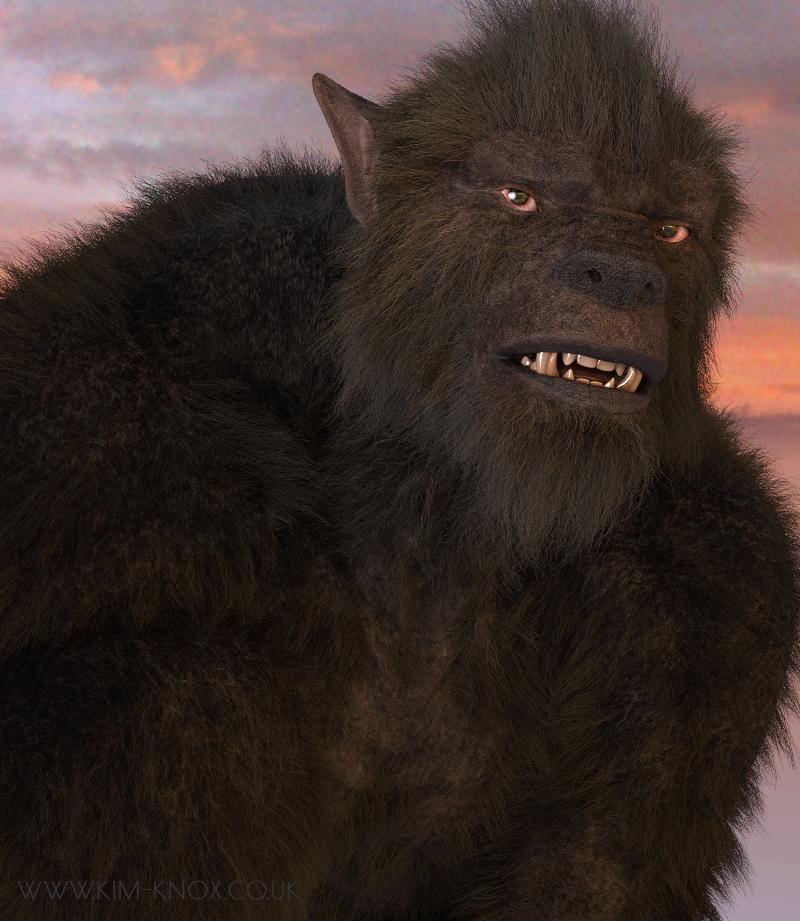
And I wanted to see what RawArt's Wolfman looked like, as I couldn't see the fur/hair till it was rendered. So something simple...and I like him!
Orestes HDR and a right eye specular spotlight, for when I forget... ;-)
OMG there is my hubby lolz!!!
But seriously what a great render!!!
lol, thank you! :)
September 2019 - Daz 3D New User Challenge - Depth of Field@katedelongwriter. I think the mist thing was something to do with how the wall was constructed ( I know nothing about making assets!) as the mist has never appeared before with Depth Shader. It could also be the HDR - Erupiter by Orestes, my absolute fave at the minute for everything! The Depth Shaders are good. I've had to play about with them, but the best thing has simply been lowering gloss on background props.
Oh, and I'm with you and am a Photoshop tinkerer to the nth degree! :)
I don't have the shaders, so I'm only guessing, but it looks to me as though the shader you used added the mist. Maybe a map in the glossy reflectivity parameter… something that can vary depending on the light. In your second image, the mist appears to be on the back wall, but not the pillar. It also looks like you used a touch of bloom. It that wasn't postwork, using the Bloom Filter might have brought out the mist more.
I find your second image more interesting because your character is actively doing something. Although I'd never heard of using color to create DOF, it certainly is working in this image. The eye is drawn to the character, her face and her hands, with the background staying in the background.
In the first image with the centaur, she is very lovely and the pose is very feminine and shows off the lines of her human and equine bodies very well. But I don't know why she's there, or why she's gesturing behind her. The story behind the pose is unclear. Is she indicating the castle? Or perhaps the archers protecting her from the castle crenelations? And who is she "talking" with that she'd be making such a gesture? I'd really love to see more of the story in this image.
Thank you for the indepth comments, L'Adair. :)
Image2 : I rarely use bloom, so it could be a Ps filter. I've been working on other things since, so the specifics of that image have gone <--so bad at recalling anything right now! lol It was fun to make and I may return to it on a larger scale as it's a character ref for a book I should be writing.
Image1: Tbh, I don't know why she's there, either. I love centaurs, but I never know what to do with them! I think I've fallen again into the trap of pondering book cover or narrative, mixed it, and come away with neither. I originally fell into Daz with the idea of using it for cover work (and became addicted!).
SkydomesI’ve figured out ways to make use of skydomes in Iray... but honestly I would invest in hdris. Many of them work way better and more easily (for sky backdrops I would avoid hdris that include terrain and a lot of ‘close’ detail).
Orestes and DimensionTheory in particular have s lot of great sets.
I am leary about purchasing another skydome of any kind mostly due to the fact that there is no up-to-date tutorial on how to use them. The earliest one on Youtube is dated back in 2014 and the guy talks as if you already know how to use them. Everyone I've purchased renders black. No matter what light or what I read to light them. Black... always black... Only one skydome works in my library and it's just a blue color sky... nothing dramatic and I don't even understand why that one works.
Before I drop even one more penny on yet another skydome set I'd like to find out the issue of why -- no matter what I do -- my renders are just black.
The camera is not out of bounds, I can use a camera or perspective view and the results are always the same. Take away the skydome and it renders out nicely. My main issue is that I can't find a "From the start" tutorial.
I do find it odd that the makers of skydomes do not make one with settings that automatically load when you load a skydome. It's like buying a car and you don't get the keys...
Kaye Kaye - Learning Through PlayAnd I wanted to see what RawArt's Wolfman looked like, as I couldn't see the fur/hair till it was rendered. So something simple...and I like him!
Orestes HDR and a right eye specular spotlight, for when I forget... ;-)
OMG there is my hubby lolz!!!
But seriously what a great render!!!
September 2019 - Daz 3D New User Challenge - Depth of Field@katedelongwriter. I think the mist thing was something to do with how the wall was constructed ( I know nothing about making assets!) as the mist has never appeared before with Depth Shader. It could also be the HDR - Erupiter by Orestes, my absolute fave at the minute for everything! The Depth Shaders are good. I've had to play about with them, but the best thing has simply been lowering gloss on background props.
Oh, and I'm with you and am a Photoshop tinkerer to the nth degree! :)
I don't have the shaders, so I'm only guessing, but it looks to me as though the shader you used added the mist. Maybe a map in the glossy reflectivity parameter… something that can vary depending on the light. In your second image, the mist appears to be on the back wall, but not the pillar. It also looks like you used a touch of bloom. It that wasn't postwork, using the Bloom Filter might have brought out the mist more.
I find your second image more interesting because your character is actively doing something. Although I'd never heard of using color to create DOF, it certainly is working in this image. The eye is drawn to the character, her face and her hands, with the background staying in the background.
In the first image with the centaur, she is very lovely and the pose is very feminine and shows off the lines of her human and equine bodies very well. But I don't know why she's there, or why she's gesturing behind her. The story behind the pose is unclear. Is she indicating the castle? Or perhaps the archers protecting her from the castle crenelations? And who is she "talking" with that she'd be making such a gesture? I'd really love to see more of the story in this image.
Kaye Kaye - Learning Through PlayAnd I wanted to see what RawArt's Wolfman looked like, as I couldn't see the fur/hair till it was rendered. So something simple...and I like him!
Orestes HDR and a right eye specular spotlight, for when I forget... ;-)
September 2019 - Daz 3D New User Challenge - Depth of Field@katedelongwriter. I think the mist thing was something to do with how the wall was constructed ( I know nothing about making assets!) as the mist has never appeared before with Depth Shader. It could also be the HDR - Erupiter by Orestes, my absolute fave at the minute for everything! The Depth Shaders are good. I've had to play about with them, but the best thing has simply been lowering gloss on background props.
Oh, and I'm with you and am a Photoshop tinkerer to the nth degree! :)
FeralFey's Thread of Thrills * FF Insouciant Beauty LIVE in Store * [Commercial]Yep, except that it doesn't seem to have e.g. holding a wine glass preset. There is one for a coffee mug :)
I'll see what I can do for you, Doctor Jellybean. Since there are so many different wine glasses available, do you have a particular model you would like the hand to fit to?
Great to see these. I was literally thinking "I haven't heard much from FeralFey lately..."
Funny you should mention it. I've been around, building sets for the PC+ mostly. But I've had a lot of RL issues that have gotten in the way of building sets specifically for my catalog. I'm hoping things have settled down enough that I can get back to some semblance of productivity. Right now I have the Cat Fight poses for Genesis 8 Female poised for release. I finished up a set for the PC+ that I think is a lot of fun. I'm working on a second PC+ pose set now that should be ready by the end of the weekend. I've got a set for my catalog waiting for me to finish up some props and all the artwork for it. No. I lied, I have two sets like that. And a third where I just need to finish the poses to go with a project that Orestes Studios and I are working on together. Not to mention another hair model in the works. Oh, and possibly another collab with Lyrra. And then there's the other assorted products in development. Unfortunately, I don't have much to share on any of my catalog products in development and I certainly can't share anything about the PC+ stuff becasue of the NDA. But when I get closer to getting these catalog products submitted to the store, I'll post sneak peeks here.
So watch this space. FeralFey is STILL in the store. ;)
SkydomesI’ve figured out ways to make use of skydomes in Iray... but honestly I would invest in hdris. Many of them work way better and more easily (for sky backdrops I would avoid hdris that include terrain and a lot of ‘close’ detail).
Orestes and DimensionTheory in particular have s lot of great sets.
Kaye Kaye - Learning Through PlayAnd I finally found out why my brushes and styles disappear every time I close Photoshop : size. Brushes, at least, only has a 2gb limit...and I have too many Ron's and Orestes brushes. *sigh*
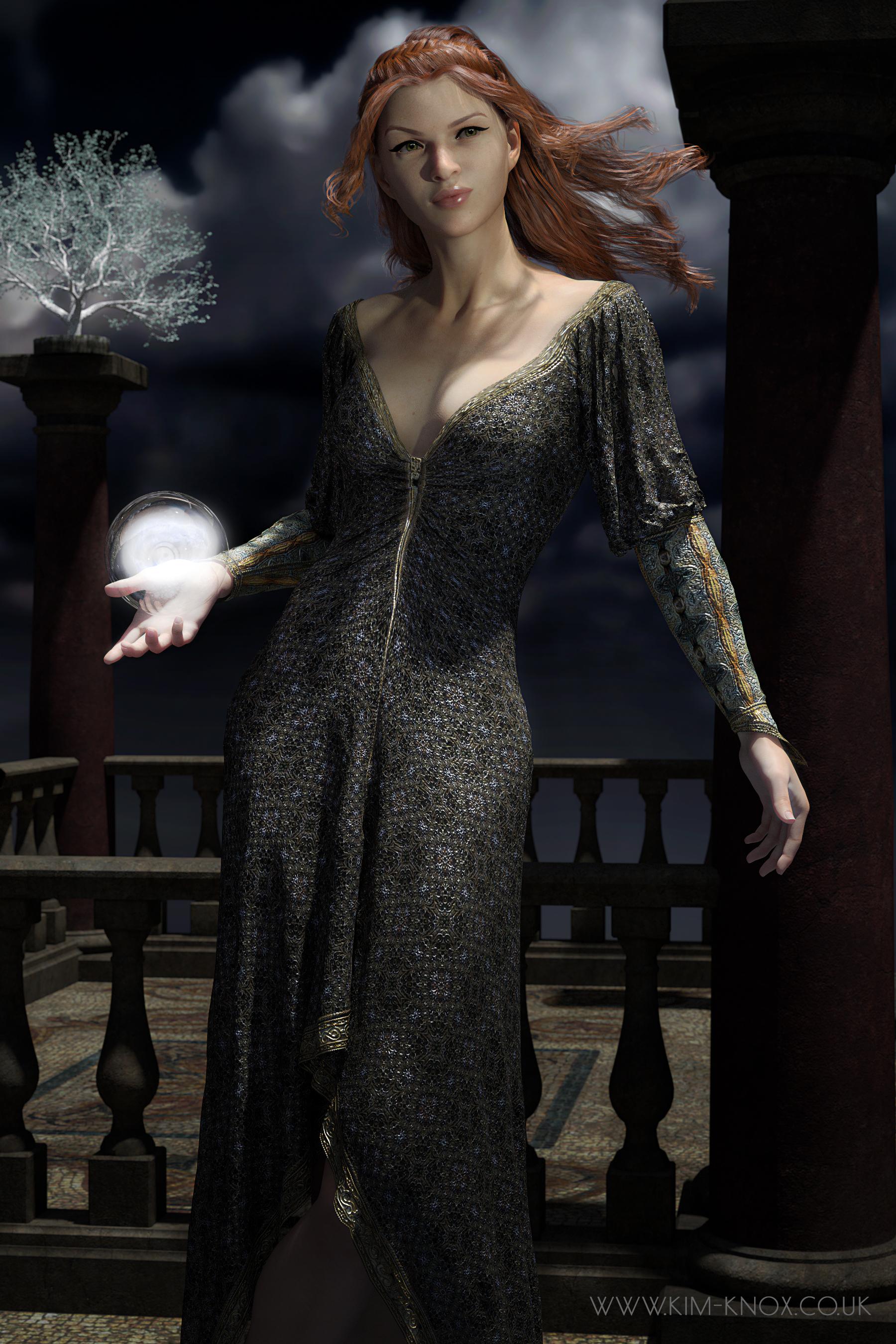
This image feels like the start of something bookish...
Looking at her again, I think I may have to dial back on the diffuse filter!
 Kaye Kaye - Learning Through Play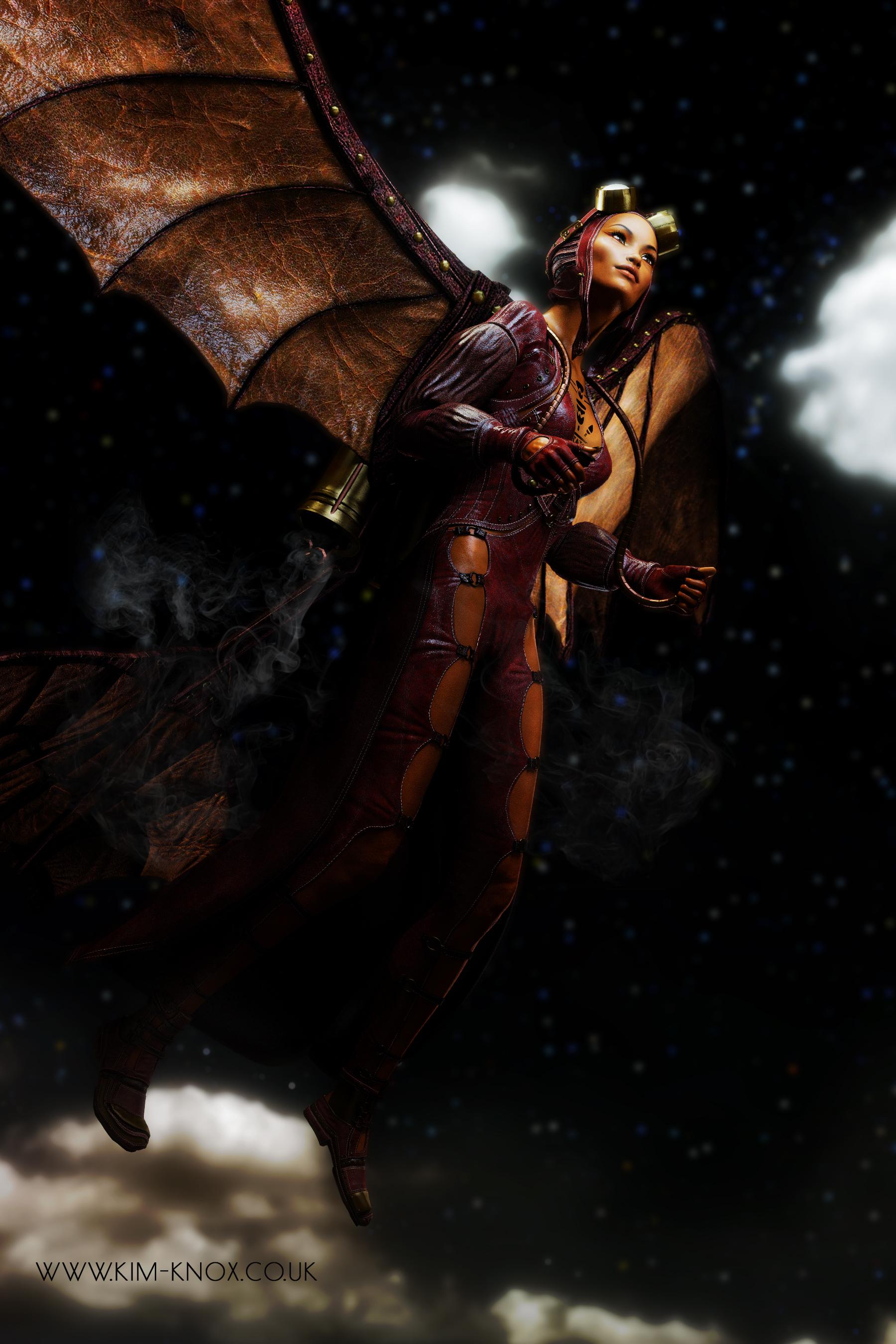
I am loving the Erupiter HDRIs from Orestes. The light quality from them is lovely.
Novica & Forum Members Tips & Product Reviews Pt 12Okay, not a glitch- with the new GIMME-MY-FIFTY, if you go to the Bohemian Chic Sale and put any new release in the cart (ANY) the featured stores go 50% off, then buy at least 3 things from those stores to get an additional 20%, then with the code, THINGS GO TO EIGHTY PERCENT OFF. 80% !!!!!! Remember the limit is 10 things. I don't remember if that's 10 things in the cart or 10 things discounted- does it include your new release in the cart?
Shopping Cart

DGV Outdoor Planters $14.95 $2.99
80%

$22.95 $4.59 80%

The Giger Wastes $24.95 $4.99 80%

The Venulcan Plains $24.95 $4.99 80%

Orestes Iray HDRI Environment - Four Seasons Field $24.95 $4.99 80%

DGV Palm Resortnew $21.95 $15.37 30% This was my new release- athough it's only 30% I really love this set from the first impression of it, and with these other prices going 80% off, I splurged on this one. You do NOT have to buy a new release from today, it's ANY new release to get the stores to go 50% (the featured ones)

ZaraBeth for Genesis 8 Female $18.95 $3.79 80%

Sam Hair for Genesis 3 and 8 Female(s) $23.95 $4.79 80%

Orestes Iray HDRI Skydomes - Hazy Afternoon $20.95 $4.19 80%

Orestes Iray HDRI Skydomes - Witches Twilight $20.95 $4.19 80%
Remember, "There's Always Another Sale™" (Report sales errors here.)Cris- it's not working. I've tried Orestes products, and a few of these. Not more than four or five in the cart (didn't exceed the limit in other words) I'm just putzing around with different vendors, testing. DG Vertex stuff isn't working either.
https://www.daz3d.com/zarabeth-for-genesis-8-female
https://www.daz3d.com/sam-hair-for-genesis-3-and-8-females
https://www.daz3d.com/orestes-iray-hdri-skydomes--hazy-afternoon
It just worked on mine, make sure none are new. Do all the troubleshooting steps, starting with relog.
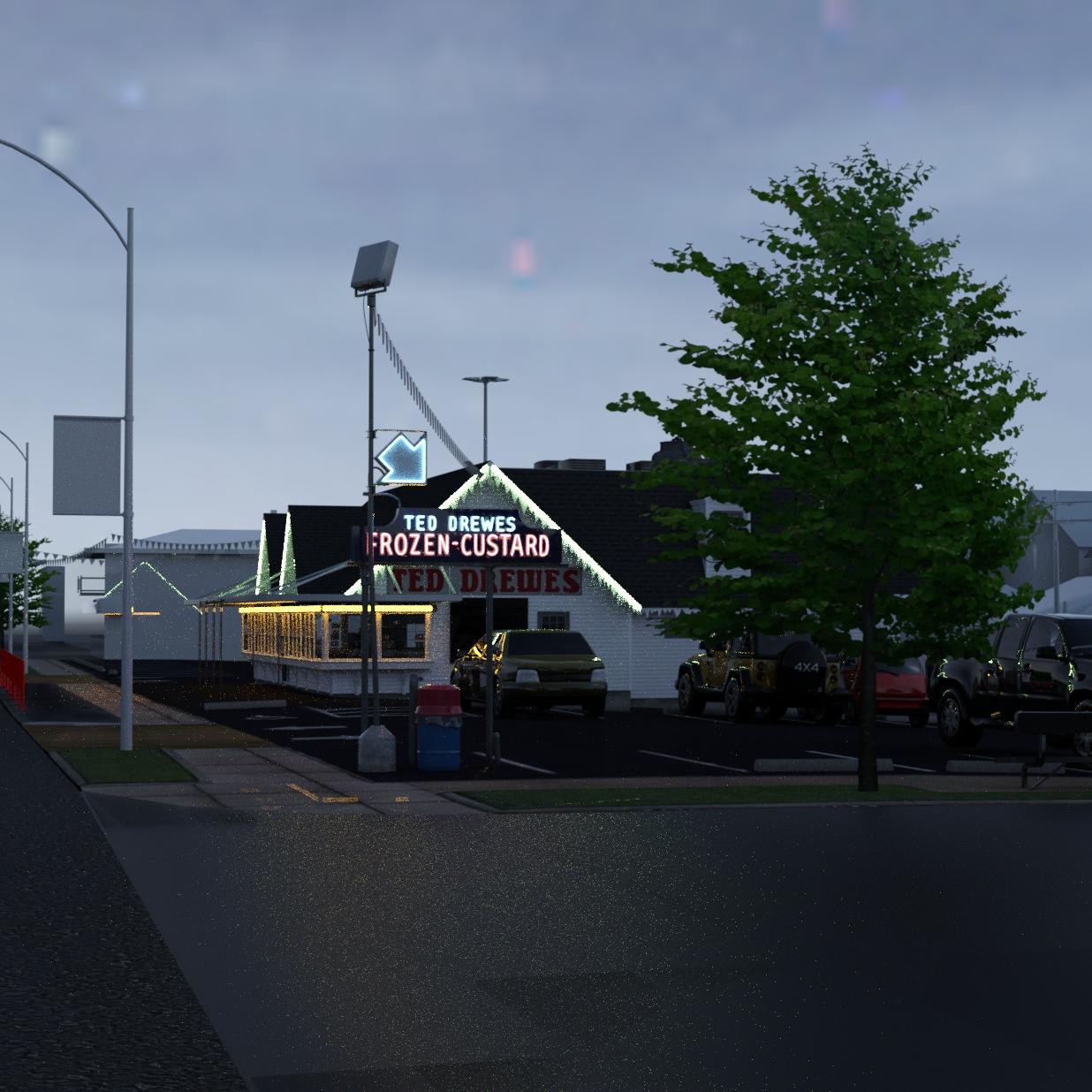
My Projects in 3D Digital RenderingHere is a test render
I have to put some texture on the buildings and simulate some architecture in the far distance as well as coloring up the signage. Nevertheless, it is getting excitingly close to completion.
This project has gone on for a little while and quite a but of effort has went into it.
Coming up soon will be the peopling of the scene. This will include figures inside and outside the restaurant. Inside I will turn the lights on and have the workers working, This stage is quite exciting as it seems things are coming together really well.
Update:
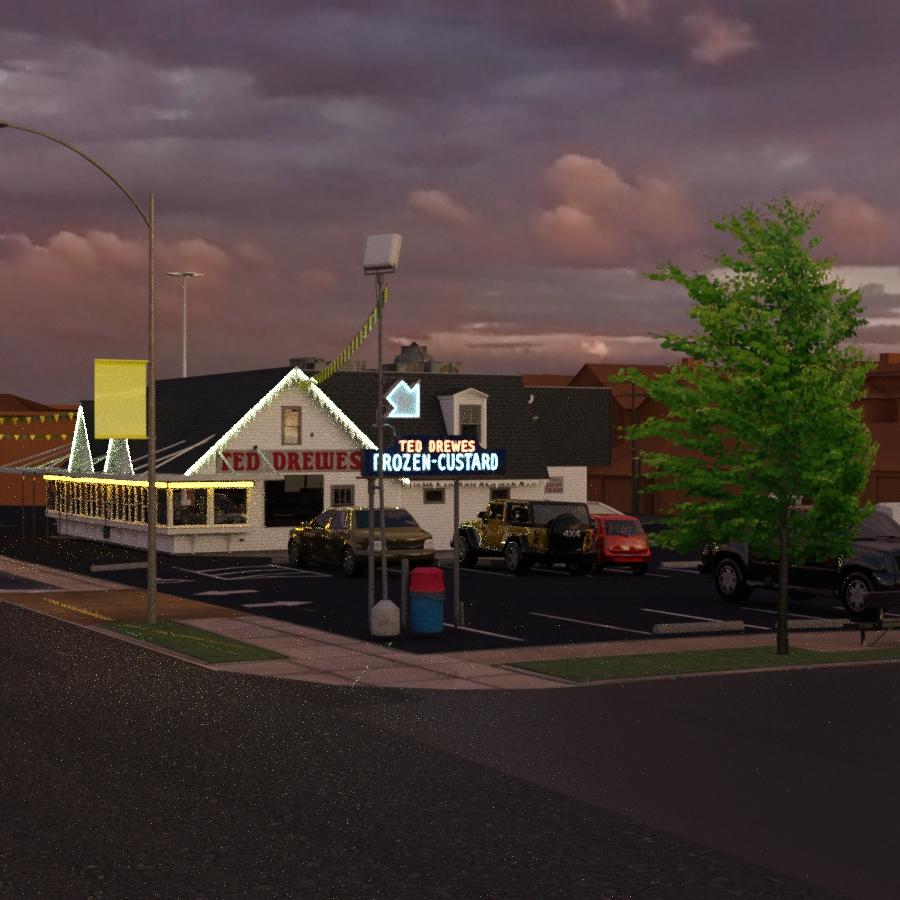
I saw a new product Orestes Iray HDRI Skydomes - Vanilla Evening by Orestes come out and I had to snap it up because it would enhance this project so perfectly!
Also notable, I used Forests Trees and Grass World Building Set, but not right our of the box. I had to go into Hexagon to isolate individual trees. It would be super if the package allowed you to just load one tree at a time.
 AIUTO...CHI CONOSCE L’ITALIANO? PARTE DODICI
In genere si, ma ci sono PA con i quali vado a colpo sicuro come LadyLittleFox, RareStone, Zev0 o Muscleman (
), insieme ad alcun altri.
Per tutti quegli autori che conosco bene compro senza leggere nulla, come te mi basta il promo.
Per gli altri invece tendo a leggere un pò di più, ma come avrai visto, anche io ogni tanto ricevo corpi spugnosi fortemente irrorati di sangue in locazioni anatomiche destinate alla eliminazione di rifiuti organici derivanti dalla digestione del cibo...
 Non ci si può far nulla!
Zev0 e RareStone sono anche nella mia safe list :)
Insieme a Syckleyield, i13 e RiverSoftArt, Orestes quello degli HDRI e quell'altro delle luci belle. Poi Mousso e outoftouch.
Conosco PrefoX e fa delle scarpe meravigliose.Quando scelgo un prodotto anche io leggo tutto. Con l'estensione Daz Deals vado a vedermi tutte le volte che ne hanno parlato e la galleria dove è stato usato.
Poi non mi faccio problemi a chiedere rimborsi se il prodotto non è all'altezza delle aspettative.Ho calcolato oggi che da Novembre, in cui ho iniziato, ho speso più di 2200€ fra prodotti e hardware :/
Spero dal mese prossimo inizi la fase di recupero spese e finisca quella di perdita xDJune 2019 - Daz 3D New User Challenge - Scenes and Landscapesariochsnowpaw, that scene is looking really good. The additional elements of the birds and sailboat along with the tone mapping changes are great.
Here is my next go at the Moonlight Kiss scene. I changed some of the tone mapping and environment settings (see attached details), added a bit of DOF (I don't want to lose the sharpness in the moon). As Linwelly and Scott Livingston noted, I have used different terrains (mountains, hills, and water's edge) in a semi circle layout for the scene. I was able to eliminate two of the hill terrain props by moving the big tree that is scene left a little more into the scene to block that area. The dock is made of cylinders and cubes resized with a simple color texture map added to fake the wood look. I did not add any normal map as the scene is dark enough that I think those details would be lost. The light pole I created from cylinders and a cube as I did not have that prop and positioned a spot light for the accent light on the couple. I used a cylinder to create the volumetric lighting effect. I have attached some details regarding how I did that for those that are interested. The moon sky is Orestes Iray HDRI Skydomes - Fantasy Moon, https://www.daz3d.com/orestes-iray-hdri-skydomes--fantasy-moon.
I think I need to do some postwork where the water plane meets the shoreline by the dock to take off some of that hard edge. I missed that on this go around as it is something I always need to look at where the planes intersect.
Who Are Some of Your Favorite PA's?PW Productions and Polish - Jaw dropping attention to detail in your boats, yachts, planes... ElianeCK - A fantastic talented artist who makes the best asian characters. Your promo pics are so unique and well composed and often I spend days trying to hunt down the outfits and accessories used. iSourceTextures - Gorgeous female characters. Gotta get them all. SickleYield/V3digitimes - Awesome, can't-live-without utilities and tutorials. i13 - Your stuff is just way too cool. I think I own your entire store. Orestes - Love your HDRI skies!A lightweight night skydome? (Iray)Maybe time to upgrade since in my experience the HDRIs from Orestes are fairly lightweight already. I can't think of any HDRIs that are even lower resolution than those. You could try compositing the image in photoshop
A lightweight night skydome? (Iray)I would need a night background for a scene, but background pictures generally don't look great and there's the problem of shadows being cast, and while I have some of Orestes HDRI, my modest computer seems unable to handle both one of his skydomes and the rest of the scene, it just freezes.
So, do you know of a lightweight night HDRI/skydome/environment/background?
Daz 3D is part of

Connect
DAZ Productions, Inc.
7533 S Center View Ct #4664
West Jordan, UT 84084Licensing Agreement | Terms of Service | Privacy Policy | EULA
© 2026 Daz Productions Inc. All Rights Reserved.