-
[Released] Character Converter from Genesis 8 Male to Genesis 3 Male [Commercial]
Hi RiverSoftArts, I followed the pdf instructions explicitly, but I got an Error Reading File three times in a row (I closed Studio, and started over each time). I was only converting one morph. I used the Custom Character script. Any guidance is appreciated. Here's the log file:
2020-04-23 22:41:00.846 Loading script: F:/My DAZ 3D Library/scripts/riversoft art/character converter/convert custom character g8m to g3m.dse
2020-04-23 22:41:00.859 DEBUG: Found: F:/My DAZ 3D Library/data/RiverSoft Art/Common/RSConstants.dsa
2020-04-23 22:41:00.861 DEBUG: Found: F:/My DAZ 3D Library/data/RiverSoft Art/Common/RSG8G3CharacterConversionConstants.dsa
2020-04-23 22:41:00.870 DEBUG: Found: F:/My DAZ 3D Library/data/RiverSoft Art/Common/RSBuildPanels.dsa
2020-04-23 22:41:00.879 DEBUG: Found: F:/My DAZ 3D Library/data/RiverSoft Art/Common/RSHelperFunctions.dse
2020-04-23 22:41:00.890 DEBUG: Found: F:/My DAZ 3D Library/data/RiverSoft Art/Common/RS2019HelperFunctions.dse
2020-04-23 22:41:00.895 DEBUG: Found: F:/My DAZ 3D Library/data/RiverSoft Art/Common/RSG8G3CharacterConversionFunctions.dse
2020-04-23 22:41:00.908 WARNING: libpng warning: iCCP: known incorrect sRGB profile
2020-04-23 22:46:02.978 DEBUG: DoConvertSceneCharacter Genesis8Male Genesis3Male EJ Genesis 8 Male for Genesis 3 Male EJFM Lower Lip Define 0.05999999865889549 Overwrite Morphs=false Convert JCMs=false Hide Eyes=true Use Legacy Conversion Process=false Convert true
2020-04-23 22:46:02.978 Converting Character: Genesis 8 Male
2020-04-23 22:46:02.978 DEBUG: GetUsedMorphs Genesis8Male
2020-04-23 22:46:04.104 DEBUG: /Actor/Head/Face/Mouth/Real World/EJ Face Morphs/EJFM Lip Lower Definition false
2020-04-23 22:46:05.005 DEBUG: RemoveExistingMorphs Genesis3Male nameList EJFM Lip Lower Definition overwriteList
2020-04-23 22:46:05.007 DEBUG: EJFM Lip Lower Definition
2020-04-23 22:46:05.274 DEBUG: Setting Scale to 1 BEFORE, raw=1, value=1
2020-04-23 22:46:05.349 DEBUG: Setting Scale to 1 AFTER, raw=1, value=1
2020-04-23 22:46:05.349 Converting Morphs: EJFM Lip Lower Definition
2020-04-23 22:46:05.351 DEBUG: Trigger Action DzZeroFigureShapeAction
2020-04-23 22:46:11.128 DEBUG: Triggered Action DzZeroFigureShapeAction
2020-04-23 22:46:11.642 DEBUG: Transfer Item, Source is Genesis 8 Male, Target is Genesis 3 Male
2020-04-23 22:46:11.642 Transferring Morphs from Genesis 8 Male to Genesis 3 Male
2020-04-23 22:46:11.643 WARNING: Script Error: Line 2514
2020-04-23 22:46:11.643 WARNING: TypeError: Result of expression 'transfer.setDistanceSquaredTolerance' [undefined] is not a function.
2020-04-23 22:46:11.643 WARNING: Stack Trace:
<anonymous>()@F:/My DAZ 3D Library/data/RiverSoft Art/Common/RSG8G3CharacterConversionFunctions.dse:2514
2020-04-23 22:46:11.659 Error in script execution: F:/My DAZ 3D Library/scripts/riversoft art/character converter/convert custom character g8m to g3m.dse
2020-04-23 22:46:12.316 Loaded Morph Deltas in 0 min 0.0 sec.
2020-04-23 22:46:12.316 Loaded file: pJCMShldrUp_90_L.dsf
2020-04-23 22:46:12.328 Loaded Morph Deltas in 0 min 0.0 sec.
2020-04-23 22:46:12.328 Loaded file: pJCMShldrUp_90_R.dsf
Are you using an old version of DS? The SetDistanceSquaredTolerance function was added in 4.10.0.50.
Aaah! Thanks. I've been delaying my upgrade, but the time has truly come. Thanks for bothering with this, and sorry for wasting your time.
No, not at all. Sorry for pushing you to upgrade
 Ridiculously long loading time........
I'd be running process monitor or something to find out which files are being accessed, then delete the ones causing the problem, this shouldn't be happening.
Could be a HD morph or 2 that have default values greater than 0, a vendor mistake or something you have done, but even then the load time is still over the top, only time something like that happened to me is loading a character which set the render subD to 5 and preview subD to 4, more than my machine likes to handle.
Gen 8 Morph Bundle vs ParametersREPLY TO SEVRIN'S COMMENT#1:
Hi Sevrin, thank you for the response.
Oh yes, I'm definately watching the sales... I identified high cost items (relevant to my purpose) last week that were 81% off, then applied the EXTRA-50 coupon, and recieved tremendous deals.
-
But back to the original inquiry, yes you are correct I selected the head to illustrate the parameters there and show that they [seem to be] comparable to what you get in these packages given in the URLs (very little added value).=>May I pick your brain a bit further as to what are the best morph packages to buy for Gen 8 (e.g. based on your research or experience)?
Blender Sculpting DAZ Characters help?If your aim is to make a morph that will smooth out some part of a figure, then the Multires modifier is not going to help you.
You need to smooth (or grab, inflate/deflate etc.) the geometry at base resolution. If you add a Multires modifier, then do some smoothing and Apply the modifier (different from Apply Base), either in the Modifiers panel or using the Apply Modifiers option on export from Blender, you have changed the geometry and won't be able to create the morph in DS. When you use the Apply Base option, as the tooltip describes this modifies the underlying geometry to match the displaced geometry i.e. the geometry as modified by the Multires. This is bound to look less smooth because there is only the base geometry to work with. I'm not sure whether this Apply Base option changes vertex order or not: if it does, then again you won't be able to create your morph in DS from the modified geometry even if you don't apply the Multires.
In some situations, it can be easier to use the Smooth Vertices option in the Vertex menu in Edit mode.
TL;DR - don't try to use the Multires modifier to sculpt morphs, but to make normal maps it's OK.
Gen 8 Morph Bundle vs ParametersQUESTION-1:What is the difference between using morphs from these two packages above "genesis-8-female-head-morphs" and "genesis-8-female-body-morphs" vs. just using the parameters?
The morphs show up as parameters — you don't get them until after you buy and install the morph packs. The parameters don't exist in the base G8F/G8M figure.
QUESTION-2:
Is there any bundle options (what is the best way to get the most morphs)?=>I would really love to get these two (above URL's) in a bigger bundle of 4 (Gen 8 male and female head and body morphs), but found nothing.
You just missed it; all four of these morph sets were on sale recently in one of the big DAZ event sales (in this case, March Madness, which lasted well into this month). Shouldn't be too long before something similar happens again. They also occasionally show up in a "buy both, save $$$" deal for each figure. Put them into your wishlist, and keep an eye out for sale banners.
Blender Sculpting DAZ Characters help?Hi! I use obj import/export even with subdivision for this exactly reason. The subD step has to always be done in Daz Studio for it to work out right for me - I've never gotten a good result out of letting Zbrush or Blender do the subdivision itself when it's a morph (it's been fine when subdividing for normal maps).
I have a tutorial on making morphs in Blender for DS:
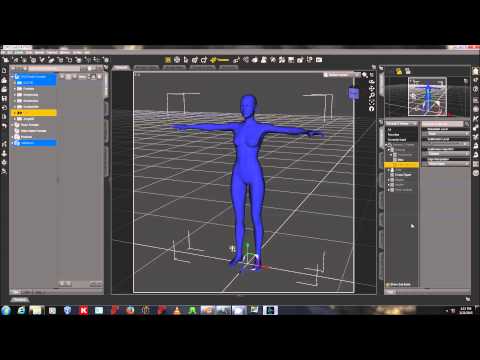
Can you expound on the "obj import/export even with subdivision"? In the video, you export at base without subdivision.
(Also, thank you for the time both in making tutorials and replying!)April 2020 - Daz 3D New User Challenge - Open Render Challenge@L'Adair Is there a way for me to move hairs which have morphs to move but they don't have what I want. I mean I am doing a render where the guy is upside down but now I want his hairs falling down but there aren't morph to do that. I don't have mesh grabber. What do i do? Should I try applying dforce on it to see how it goes? I will try that for now.
This is not for this challenge but it might help me in future render or when i make another entry. Picture for reference.
You should go for it.
ifn it doesn't fall off well enough, maybe you also need to weightmap paint it, to decide which pieces of hair to fall more than others.
In this picture, this hair didn't have the morphs I wanted, nor was it dForce, but I converted it to have the ponytail naturally fall off: https://www.daz3d.com/forums/uploads/FileUpload/40/5971f0020d0a4bda0e9f0666870e18.png .
April 2020 - Daz 3D New User Challenge - Open Render Challenge@L'Adair Is there a way for me to move hairs which have morphs to move but they don't have what I want. I mean I am doing a render where the guy is upside down but now I want his hairs falling down but there aren't morph to do that. I don't have mesh grabber. What do i do? Should I try applying dforce on it to see how it goes? I will try that for now.
This is not for this challenge but it might help me in future render or when i make another entry. Picture for reference.
New Bluejaunte character alert - Ensley HDHmmm... just loaded Kala 8 and she's 97.6% scale and that is set through the main Kala 8 control morph. So it looks I've been doing this correctly with previous characters. So yeah I think that is probably the best solution and very little hassle for existing renders. Dial spun characters won't change either except in total size a little, but it won't influence the look in any way. And only if you actually mixed with the main BJ Ensley morph, if you just spun head or body morphs you won't see a difference.
Blender Sculpting DAZ Characters help?Hi! I use obj import/export even with subdivision for this exactly reason. The subD step has to always be done in Daz Studio for it to work out right for me - I've never gotten a good result out of letting Zbrush or Blender do the subdivision itself when it's a morph (it's been fine when subdividing for normal maps).
I have a tutorial on making morphs in Blender for DS:
Ridiculously long loading time........I am guessing the latency is due to DS trying to find and read the metadata for any relevant morph across all content libraries while loading a new character. By metadata I mean stuff like morph name, associated icon, default values, min and max range, step size which can be obtained only by reading each of the individual morph files. This operation may take more time for characters since their filesize is large. So the effect of having many characters installed is more pronounced.
I wish Daz made it a mandatory practice to implement inject and remove morphs for characters and expressions instead of making everyting available upfront. Atleast some vendors at renderosity still follow that good old practice of inj and rem even for new characters.
How to make Eyelashes as a Partial Head Morph?Hello,
I am making a head morph and I want, when I dial it, to load with longer eyelashes.
I can see there are longer eyelashes as a head morph in the DAZ head morphs, but I haven't figured out
how I can make it happen (since the eyelashes are a seperate mesh).
Can you please help me?
I checked the data folder and I see there are eyelashes morphs in the Genesis8/Female Eyelashes folder,
but there are also in the Genesis8/Female. So how I create them for the head and not for the eyelashes?Blender Sculpting DAZ Characters help?I use about 10 or so tools, but as I said, if select Dynotopology, it will cause issues; actually it will stop you being able to use the model as a morph as it triangulates the model, so even without using a tool the model becomes worthless as a morph object; although if you have other plans, such as creating a high polly model, then it might not be an issue.
[Released] Character Converter from Genesis 8 Male to Genesis 3 Male [Commercial]Hi RiverSoftArts, I followed the pdf instructions explicitly, but I got an Error Reading File three times in a row (I closed Studio, and started over each time). I was only converting one morph. I used the Custom Character script. Any guidance is appreciated. Here's the log file:
2020-04-23 22:41:00.846 Loading script: F:/My DAZ 3D Library/scripts/riversoft art/character converter/convert custom character g8m to g3m.dse
2020-04-23 22:41:00.859 DEBUG: Found: F:/My DAZ 3D Library/data/RiverSoft Art/Common/RSConstants.dsa
2020-04-23 22:41:00.861 DEBUG: Found: F:/My DAZ 3D Library/data/RiverSoft Art/Common/RSG8G3CharacterConversionConstants.dsa
2020-04-23 22:41:00.870 DEBUG: Found: F:/My DAZ 3D Library/data/RiverSoft Art/Common/RSBuildPanels.dsa
2020-04-23 22:41:00.879 DEBUG: Found: F:/My DAZ 3D Library/data/RiverSoft Art/Common/RSHelperFunctions.dse
2020-04-23 22:41:00.890 DEBUG: Found: F:/My DAZ 3D Library/data/RiverSoft Art/Common/RS2019HelperFunctions.dse
2020-04-23 22:41:00.895 DEBUG: Found: F:/My DAZ 3D Library/data/RiverSoft Art/Common/RSG8G3CharacterConversionFunctions.dse
2020-04-23 22:41:00.908 WARNING: libpng warning: iCCP: known incorrect sRGB profile
2020-04-23 22:46:02.978 DEBUG: DoConvertSceneCharacter Genesis8Male Genesis3Male EJ Genesis 8 Male for Genesis 3 Male EJFM Lower Lip Define 0.05999999865889549 Overwrite Morphs=false Convert JCMs=false Hide Eyes=true Use Legacy Conversion Process=false Convert true
2020-04-23 22:46:02.978 Converting Character: Genesis 8 Male
2020-04-23 22:46:02.978 DEBUG: GetUsedMorphs Genesis8Male
2020-04-23 22:46:04.104 DEBUG: /Actor/Head/Face/Mouth/Real World/EJ Face Morphs/EJFM Lip Lower Definition false
2020-04-23 22:46:05.005 DEBUG: RemoveExistingMorphs Genesis3Male nameList EJFM Lip Lower Definition overwriteList
2020-04-23 22:46:05.007 DEBUG: EJFM Lip Lower Definition
2020-04-23 22:46:05.274 DEBUG: Setting Scale to 1 BEFORE, raw=1, value=1
2020-04-23 22:46:05.349 DEBUG: Setting Scale to 1 AFTER, raw=1, value=1
2020-04-23 22:46:05.349 Converting Morphs: EJFM Lip Lower Definition
2020-04-23 22:46:05.351 DEBUG: Trigger Action DzZeroFigureShapeAction
2020-04-23 22:46:11.128 DEBUG: Triggered Action DzZeroFigureShapeAction
2020-04-23 22:46:11.642 DEBUG: Transfer Item, Source is Genesis 8 Male, Target is Genesis 3 Male
2020-04-23 22:46:11.642 Transferring Morphs from Genesis 8 Male to Genesis 3 Male
2020-04-23 22:46:11.643 WARNING: Script Error: Line 2514
2020-04-23 22:46:11.643 WARNING: TypeError: Result of expression 'transfer.setDistanceSquaredTolerance' [undefined] is not a function.
2020-04-23 22:46:11.643 WARNING: Stack Trace:
<anonymous>()@F:/My DAZ 3D Library/data/RiverSoft Art/Common/RSG8G3CharacterConversionFunctions.dse:2514
2020-04-23 22:46:11.659 Error in script execution: F:/My DAZ 3D Library/scripts/riversoft art/character converter/convert custom character g8m to g3m.dse
2020-04-23 22:46:12.316 Loaded Morph Deltas in 0 min 0.0 sec.
2020-04-23 22:46:12.316 Loaded file: pJCMShldrUp_90_L.dsf
2020-04-23 22:46:12.328 Loaded Morph Deltas in 0 min 0.0 sec.
2020-04-23 22:46:12.328 Loaded file: pJCMShldrUp_90_R.dsf
Are you using an old version of DS? The SetDistanceSquaredTolerance function was added in 4.10.0.50.
Aaah! Thanks. I've been delaying my upgrade, but the time has truly come. Thanks for bothering with this, and sorry for wasting your time.
Star Trek Builders Unite 8: THE REBOOTThe antennae are separate, this could make a for a decent Andorian: https://www.daz3d.com/planetary-smuggler-hd-for-genesis-8-male
Unfortunatley not seperate and no pose controls, I've done a comparison between my hand crafted Andorian, i do like the Smuggler but leaning towards my own for more morph options
Actually they are. They're located under G8 male Anatomy Planetary Smuggler and have a bend, twist, and side to side parameter
Blender Sculpting DAZ Characters help?Hi :) I'm not sure I understand or explain correctly because I use a translator,
I'm not sure about the technique I rarely use blender, try this with a quick sculpting, use the "multiresolution" modifier, make your "sculpt" as you wish once done, apply the "apply base" option in the multiresolution modifier, then delete the "multiresolution" modifier, import in daz your morph and apply change the resolution of the character
When I hit "apply base", it makes the object all spiky, not smooth.
Hopefully these images come through in order. Slightly crumply ear is what I get in DAZ. Smooth side of the head is the Sculpt, and the weirdo spiky geometry is after hitting "Apply Base"Exploding Mesh When creating a morphhi ;)
I used blender 2.79, my options for exporting from blender a morph to daz was this one
selection only,apply modifiers, include edges, write normal, include uv, write material, poly group, keep vertex order
also change the property group for your morph, dont save under morph/morph loader ;)
edit : when you import in blender, under geometry you need to check poly group under "keep vertex order"
Star Trek Builders Unite 8: THE REBOOTThe antennae are separate, this could make a for a decent Andorian: https://www.daz3d.com/planetary-smuggler-hd-for-genesis-8-male
Unfortunatley not seperate and no pose controls, I've done a comparison between my hand crafted Andorian, i do like the Smuggler but leaning towards my own for more morph options
Will There Never Be a Way to Transfer HD Morphs?I think @Ellessarr 's demo is quite interesting. There is more than one way to get a desired result.
yeah at first i also was disappointed after learn about the "hd" stuffs which you can't export hd levels and only base outside daz, it make me angry at first because some of mine wanted and purchuased morphs were "hd", but then i remembered about the "bake process" which i've learned at my game design school, then after tried it and get the positive results i've wanted i get happy, to be fair it's not perfect and a really big close-up can make the "illusion" disappear but only if you want like to stared at the "pores of the skin in your face it not a big deal for any animation or game design they are perfect and even render if again is not about a super close-up and if you are really good with working on material and know how to work with tesselation you can even "fix" this issue using tesselation to make a even more perfect illusion but it's need a really deep knowledge and work time to achiev that level one thing which i really don't have and have much time to study about since i've already have too much things to improve and work in game design then i can only go further enough to have the detail level good enough for a good game.
Ofcource my experience is outside daz in my case inside unreal, when come to daz i really don't know the full process in how to improve it, but if it's about a single normal map then bake can do the job.
Another good exemple would be the "age morph" from zevo you can use almost the same process to "export" the age morph it would take just few more steps if you want to have "outside control over the morph otherwise you can just follow the normal steps and just use the morphed mesh, because you need to export the model one time with the dial morph applied to create the bake then a second time to "export" the character with the "morph dial" to be applied outside daz in case you want to have the "not modified base mesh" and be able to "control" when it will "age", then you can make a blueprint to "when apply the dial morph in the mesh it also will applie the "baked age Normal" too, just some tricks to work around the issue.
any question feel free to ask maybe here or maybe in pm, to be fair and clear i'm not the best and ultra knowledge in all of those things then don't expect me know and answer everything, i can´t full help with any question but the ones i can i will try to help.
Ofcourse bake process is not perfect and in some cases it can be possible to not achieve the "desired results for you, based on the complexibility of the model but overal can still work pretty well in most of the cases.
Blender Sculpting DAZ Characters help?Hi :) I'm not sure I understand or explain correctly because I use a translator,
I'm not sure about the technique I rarely use blender, try this with a quick sculpting, use the "multiresolution" modifier, make your "sculpt" as you wish once done, apply the "apply base" option in the multiresolution modifier, then delete the "multiresolution" modifier, import in daz your morph and apply change the resolution of the character
Daz 3D is part of

Connect
DAZ Productions, Inc.
7533 S Center View Ct #4664
West Jordan, UT 84084Licensing Agreement | Terms of Service | Privacy Policy | EULA
© 2026 Daz Productions Inc. All Rights Reserved.