-
Always use reverse deformation morph loader pro?
I have been doing morphs for genesis for some time now and using the reverse deformation in morph loader pro when finetuning an already made morph.
But would there actually be any diffrence using reversed deformation on a new morph loader pro when importing a new morph for genesis 8 base compared to not use it?
Cromwell the Barbarian for G8M [commercial]Cromwell the Barbarian for G8M
https://www.daz3d.com/cromwell-for-genesis-8-male-with-dforce-hair
Bring your Barbarian fantasies to life with this mighty warrior. Cromwell is an older warrior who has seen many battles and his scars tell his tales. Life is hard, but the strong survive.
A powerfully sculpted High Definition morph is accented with detailed textures with many variations. Dirtied arms and legs, multiple tattoo options, and many facial hair styles and colours, with different eye colors a bonus set of Gold Jewelry, because every barbarian needs his bling.
The set comes complete with custom crafted High Definition Morphs, and texture sets, suitable for Iray
- Product Includes
- One Cromwell Character Preset
- One Cromwell Shaping Preset
- One D-Force Beard Figure
- One D-Force Eyebrow Figure
- One D-Force Body Hair Figure
- One Full Body Texture Material Preset with anatomical elements
- Three Face Material Presets
- Two Lip Material Presets
- Two Chest Material Presets
- Two Leg Material Presets
- Three Arm Material Presets
- Five Eye Material Presets
- Five Beard Style Variations Material Presets
- Five Beard and Brow Colour Variations Material Presets
- Includes only Iray Material Presets
- BONUS Earring, Armband, and Thumb Ring props


 AIUTO...CHI CONOSCE L’ITALIANO? PARTE DODICI
L'ho visto anch'io. Il loro desiderio è farci usare tutti lo stesso metodo.
Ma fra installazione personalizzata, DIM, Connect, Central... stanno facendo un po' di casino. Spero almeno che Central per loro sia quello definitivo.
Comunque ho capito perché ci metteva generazioni a caricare figure G8F/M: più morph package e figure sono installati, e più tempo ci metterà a caricarli, in maniera direttamente proporzionale e quasi lineare.
Questo è dovuto al fatto che, anche se non stai usando un morph, Daz costruisce i rapporti fra tutti i morph disponibili installati per quel personaggio, ogni singola volta.
Mi è bastato disistallare un terzo delle G8F, e una ventina di morph package che non usavo spesso, e i tempi di caricamento si sono ridotti di più del 65%. Ma è sempre più di un minuto e mezzo.Non resta che fare un bell'upgrade di hardware, e ho cose interessanti in cantiere, vi dirò quando saranno montate nel PC! :D
Io spero di no, Central è terribile! Mancano un mucchio di funzioni del DIM tipo il link alle cartelle di installazione, export delle liste, verifica del tipo di installazione e via dicendo... Capisco che un buon 90% degli utenti di non vanno oltre il carica la figura nuda-metti la parrucca-metti la mutanda-applica una posa a caso-renderizza col primo set in lista.... Ma c'è anche gente che certa una certa professionalità.
Quanto ai morph, altro motivo per non usare G8 e amici belli, almeno fino a che non si decidono a sistemarlo un poco di più. Io ho qualcosa come 4000 e passa morph installati per G1, tra commerciali e custom, e il tempo di caricamento non cambia se aggiungo o rimuovo un pò di quei morph. Anche quando carico una figura con molti morph applicati non ci mette di più.
Lo avevo letto un paio di mesi fa sul forum e ho fatto una prova, il mio Genesis impiega quattro/sei secondi a caricare sulla scena sia con tutti i morph che totalmente senza. Oltretutto ha pure rallentato ulteriormente con l'ultimo aggiornamento per usare quel accrocchio di Face Transfer.
Più vanno avanti peggio fanno...

Sono funzioni di DIM che non ho mai usato, ma certamente meglio più funzioni che meno.
La mia intera libreria è basata su G8, sarebbe troppo un casino usare altro.
Poi non so nemmeno per quanto tempo ancora potrò continuare questo lavoretto part-time. Per ora va bene così.Peccato che abbiano cambiato sistema di gestione Morph rispetto a Genesis 1 allora. Mi piacerebbe molto riuscire a caricare i miei personaggi custom in 4 secondi.
AIUTO...CHI CONOSCE L’ITALIANO? PARTE DODICIL'ho visto anch'io. Il loro desiderio è farci usare tutti lo stesso metodo.
Ma fra installazione personalizzata, DIM, Connect, Central... stanno facendo un po' di casino. Spero almeno che Central per loro sia quello definitivo.
Comunque ho capito perché ci metteva generazioni a caricare figure G8F/M: più morph package e figure sono installati, e più tempo ci metterà a caricarli, in maniera direttamente proporzionale e quasi lineare.
Questo è dovuto al fatto che, anche se non stai usando un morph, Daz costruisce i rapporti fra tutti i morph disponibili installati per quel personaggio, ogni singola volta.
Mi è bastato disistallare un terzo delle G8F, e una ventina di morph package che non usavo spesso, e i tempi di caricamento si sono ridotti di più del 65%. Ma è sempre più di un minuto e mezzo.Non resta che fare un bell'upgrade di hardware, e ho cose interessanti in cantiere, vi dirò quando saranno montate nel PC! :D
Io spero di no, Central è terribile! Mancano un mucchio di funzioni del DIM tipo il link alle cartelle di installazione, export delle liste, verifica del tipo di installazione e via dicendo... Capisco che un buon 90% degli utenti di non vanno oltre il carica la figura nuda-metti la parrucca-metti la mutanda-applica una posa a caso-renderizza col primo set in lista.... Ma c'è anche gente che certa una certa professionalità.
Quanto ai morph, altro motivo per non usare G8 e amici belli, almeno fino a che non si decidono a sistemarlo un poco di più. Io ho qualcosa come 4000 e passa morph installati per G1, tra commerciali e custom, e il tempo di caricamento non cambia se aggiungo o rimuovo un pò di quei morph. Anche quando carico una figura con molti morph applicati non ci mette di più.
Lo avevo letto un paio di mesi fa sul forum e ho fatto una prova, il mio Genesis impiega quattro/sei secondi a caricare sulla scena sia con tutti i morph che totalmente senza. Oltretutto ha pure rallentato ulteriormente con l'ultimo aggiornamento per usare quel accrocchio di Face Transfer.
Più vanno avanti peggio fanno...
Star Wars - Falleen RaceI will admit I haven't done any deep sea Google searching, but I haven't been able to find any characters or character morphs for Star Wars. I've seen the Twi'lek lekkuian morph, but one that I would like to find or learn how to make is for the Falleen race. They're more or less Human with some facial ridges on their head and a spinal ridge down their back. I would like to focus on the facial ridges because the spinal ridge can be covered up with clothing. Does anyone have a resource for this or know where I can look to learn how to make these ridges in the Genesis 8 Male?
I've attahed an example of what I am looking to make.
AIUTO...CHI CONOSCE L’ITALIANO? PARTE DODICIL'ho visto anch'io. Il loro desiderio è farci usare tutti lo stesso metodo.
Ma fra installazione personalizzata, DIM, Connect, Central... stanno facendo un po' di casino. Spero almeno che Central per loro sia quello definitivo.
Comunque ho capito perché ci metteva generazioni a caricare figure G8F/M: più morph package e figure sono installati, e più tempo ci metterà a caricarli, in maniera direttamente proporzionale e quasi lineare.
Questo è dovuto al fatto che, anche se non stai usando un morph, Daz costruisce i rapporti fra tutti i morph disponibili installati per quel personaggio, ogni singola volta.
Mi è bastato disistallare un terzo delle G8F, e una ventina di morph package che non usavo spesso, e i tempi di caricamento si sono ridotti di più del 65%. Ma è sempre più di un minuto e mezzo.Non resta che fare un bell'upgrade di hardware, e ho cose interessanti in cantiere, vi dirò quando saranno montate nel PC! :D
Multiple collision object for DAZ figuresTransfer utility -> Weight Maps -> Merge Hierarchies = combines two figures as one, keeping both rigs
Or Geometry Tool -> Geometry Edit -> Merge Fitted Figure's Geometry = best used for geografts, when merging it combines the 2 geometries as one, also keeping the vert order, also merging common vertices together
Sorry, I just can't get your first option to work. Nothing is changing,
and I just cannot find your second option.
How do I package up all contents to move to another computer?I've created a scene and its got lots of tiny elements, textures, objects, etc.. from all over the place on my computer. ( Bad file management by me but im only new and learning )
I have a new computer and want to transfer the scene. Is there a way I can create a folder, and package up all the bits in the Daz scene so I can transfer it to my pther computer? Thank you
Welcome Biscuits to Daz!We certainly need a new PA on the level of Linday when it comes to simulated hairs. The new product looks pretty great, hope to get it soon. Perhaps someone can say for certain if there is a side part morph?
Hey hfilb, the actual part is in the middle, but there are flip to side presets, so the hair can morph over the head to the other side. :)
Thanks for letting me know. Looks great! :)
Carrara Challenge # 52 - Carrara Cryptids WIP thread--Entries EndedThanks for the thumbs up, ed3D.
And here is a Who female. Not a true morph, but related. Took an intermediate stage Grinch mesh, made changes, and attached the Grinch skeleton. Rigged, but needs the weightmaps adjusted. See under the armpits.
OK, so I've got a Grinch, his dog, and a Who couple. Can I assemble a scene by tomorrow night?

Yes - they can make the deadline !!!
she's giving me nightmares already :)
Welcome Biscuits to Daz!We certainly need a new PA on the level of Linday when it comes to simulated hairs. The new product looks pretty great, hope to get it soon. Perhaps someone can say for certain if there is a side part morph?
Hey hfilb, the actual part is in the middle, but there are flip to side presets, so the hair can morph over the head to the other side. :)
[Released] Character Converter from Genesis 2 Female to Genesis 8 Female [Commercial]I'm having trouble with the eyes. I tried converting Callie 6 three times but her eyes always end up really elongated and oval. I tried to convert Keiko 6 and the same issue arises - the very elongated eyes. I tried following the process laid out here: https://www.daz3d.com/forums/discussion/comment/5403631/#Comment_5403631 and set the tolerance to .02. But that didn't help. I'm still getting the long oval eyes. Does anyone have any suggestions or a fix?
I'm using "Conversion Process 2020 Method" if that makes a difference? Should I be using a different setting?
Nothing like the eyes in that post? Have you converted a lot of other G2F characters? Perhaps if you temporarily move the other morphs to another location and try again (unchecking the convert JCMs though, that takes way too long).
Another thought, did the eyes change at all between your two conversions? If not, CC may not have actually done a new morph for the head. You need to delete the head morph between tries.
I've only tried converting Callie and Keiko so far.
I deleted the morphs for Callie between tries (it took me a while to find them, they where in a folder labelled "3D Universe,DAZ 3D,Heysun Oh" in the data folder under the Genesis 8 Female morphs. Very weird.
I'll keep trying and maybe I can get it to work. I see that the eyes look good at the link I posted, so there has to be a way to get them to look like that. I'll try again.
Sounds like you did everything right. If you only delete the FHM morph and you set the script so it doesn't overwrite morphs, it will be faster in your attempts. Please post a log of the conversion. I want to make sure that it is actually using the 2020 method. If for some reason, the script cannot find a FHM morph (or whatever prefix you specify), it will fall back to the 2019 methods.
I finally figured out the issue. User error, of course - apparently I had done an earlier attempt at transferring Callie 6 but in a different Daz Studio Directory on a different hard drive. So I wasn't finding ALL the Callie 6 morphs when I was deleting them between tries. After tracking down the morphs on the other drive and deleting them, I tried the method outlined by Brugan again. This time it worked much better.
There was still some slight "oval" effect on the iris as well as some minor warping of the eyelids, but I added a smoothing modifier to the figure and that fixed the eyelids. For the slight oval iris I added J Cade's Sakura Iris Oval morph at a negative value: https://www.daz3d.com/forums/discussion/comment/3179366/#Comment_3179366
I also added ArkadySkies' G2F morph: https://www.daz3d.com/forums/discussion/comment/3179366/#Comment_3179366
I think after those minor adjustments she came out great!


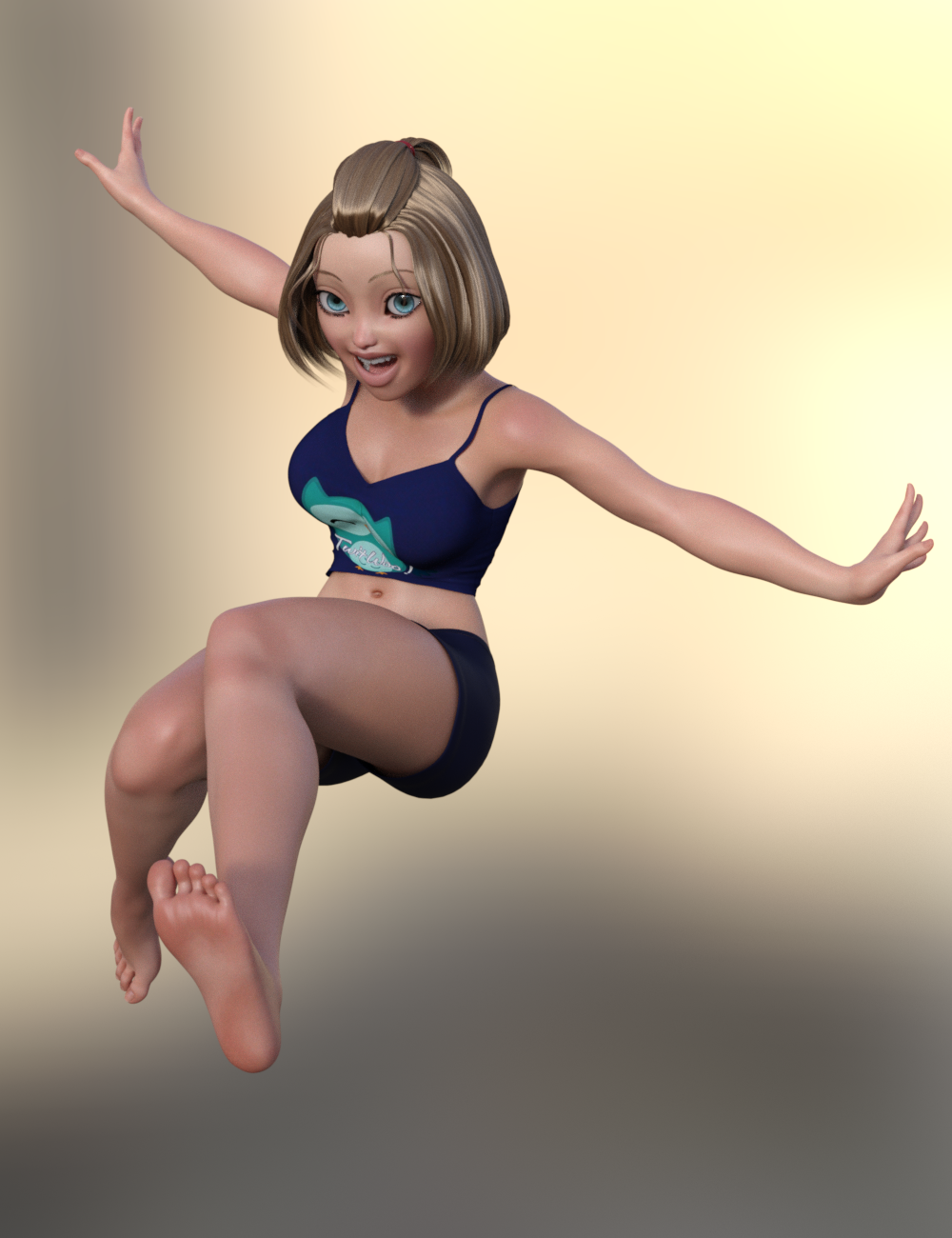

The skin and hair from Toon Generations Essentials works great with her, imo.
It turned out really great! I am glad you got it working.
Thank you! And thank you for such great products! I've been longing to have my G2F characters brought up to G8F! :D I'm looking forward to trying it with my custom G2F characters. I'm really glad you made this!
Generation 3 Aiko and Hiro Appreciation Thread..yes GenX2 can transfer shapes and morphs to G3. I use it a fair amount when building custom characters.
How to convert any Genesis Clothings (G1,G2,G3 and G8) for Figures?You might try Parenting Blue 2.0's head to the body of a Genesis figure (hiding all of Blue except his head and hiding the Genesis figure's head, eyes, ears, and mouth) and use some of the genesis morphs to approximate the look of the Blue 2.0 body. You could then, of course, use the Genesis clothing on the figure. It wouldn't be exactly Blue, but you might be able to get close if you have a good amount of morphs for your Genesis figure (or own a similar Alien, Goblin, or similarly shaped figure to start with).
I did a test of that idea and it seems to work decently:

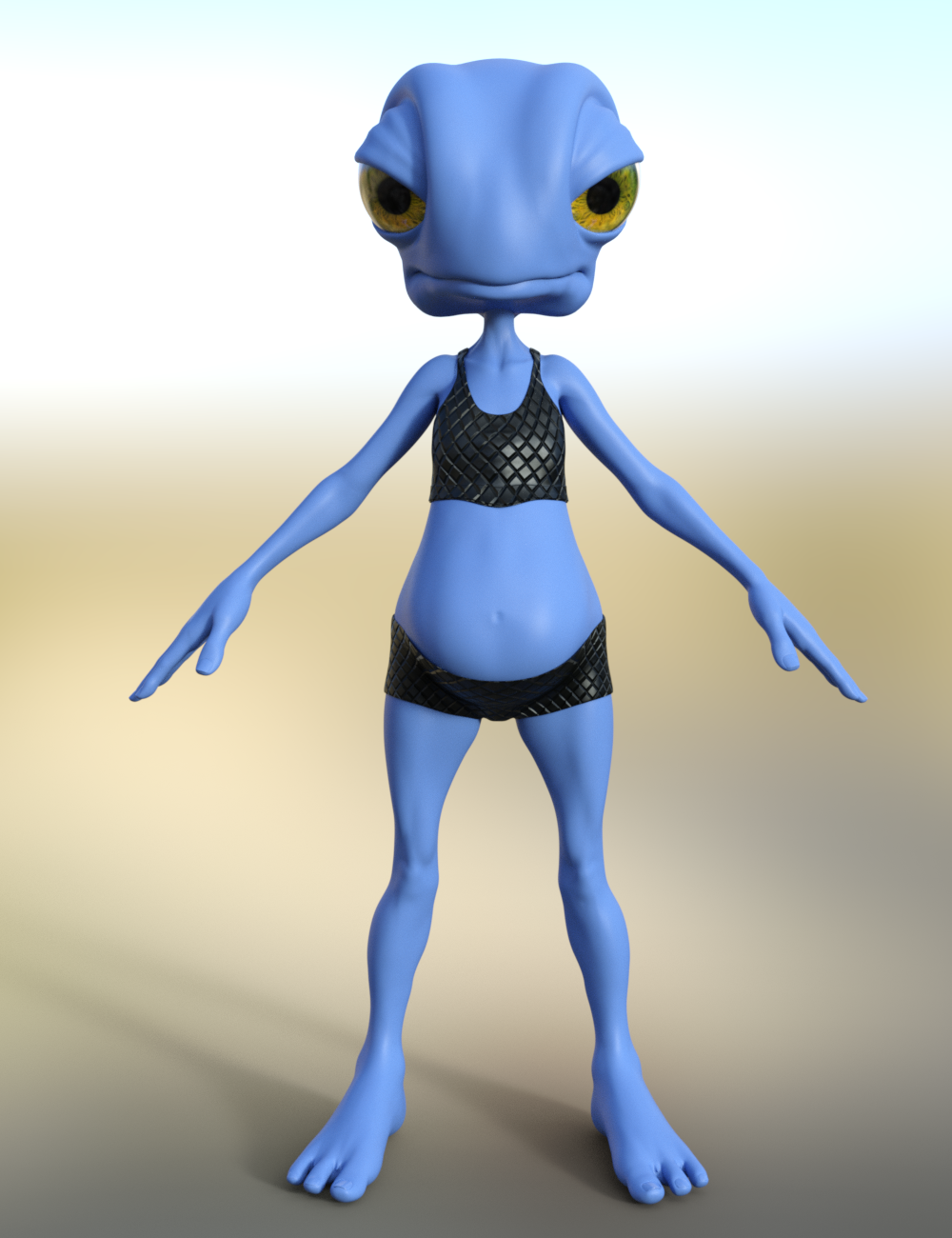
I used HFS Ultimate Shapes, Genesis 8 Female Body Morphs, and of course Blue 2.0.
If you have those and want the Scene Subset let me know and I can attach
THAT'S IT!!! You are awesome!! I was thinking about doing that but I was hoping if can parent the body of the genesis 8 to Blue 2.0 would work. And it did work with a little help with the Mesh Grabber but unforunately the when I tried to move the arm and the leg the clothes just stay put. So I will do your way @Divamakeup and thank you for this great help!!! I really appreciate it.
Ok, here's the scene subset if you want it: https://www.dropbox.com/s/0goxcehsyfifjrw/G8F with Blue 2 Head.zip?dl=0
If you don't have some of the assets I used (like it might ask for Toon Generations Mats since I used that when setting up the skin) you'll probably get Missing File error messages when you load it - but you can ignore it. It shouldn't affect the overall look of the figure. As long as you have the morph packs I listed above it should end up looking similar to the above renders.
If that doesn't work, let me know - I can send a regular scene file instead if that would work better.
Generation 3 Aiko and Hiro Appreciation ThreadThe legacy shape of A3 is avaialble (among others) for G1. Can't use the maps, but the shape transferes over reasonably well. GenX is able to transfer character morphs which had been made for the A3 shape over to G1 as well. Later versions of GenX2 may be able to move them further. Up to G3 I am pretty sure. I'm not sure, but check legacy shapes in the store. There may have also been a morph pack which made the A3shape available for G2F as well.
In any case, it would take rather a lot of work and add-ons, but one could use GenX2 to port the shape from G1 to G3F, and then try Zev0's character transfer (or Riversoft Art's) to get it from G3 to G8.
[Released] Character Converter from Genesis 2 Female to Genesis 8 Female [Commercial]I'm having trouble with the eyes. I tried converting Callie 6 three times but her eyes always end up really elongated and oval. I tried to convert Keiko 6 and the same issue arises - the very elongated eyes. I tried following the process laid out here: https://www.daz3d.com/forums/discussion/comment/5403631/#Comment_5403631 and set the tolerance to .02. But that didn't help. I'm still getting the long oval eyes. Does anyone have any suggestions or a fix?
I'm using "Conversion Process 2020 Method" if that makes a difference? Should I be using a different setting?
Nothing like the eyes in that post? Have you converted a lot of other G2F characters? Perhaps if you temporarily move the other morphs to another location and try again (unchecking the convert JCMs though, that takes way too long).
Another thought, did the eyes change at all between your two conversions? If not, CC may not have actually done a new morph for the head. You need to delete the head morph between tries.
I've only tried converting Callie and Keiko so far.
I deleted the morphs for Callie between tries (it took me a while to find them, they where in a folder labelled "3D Universe,DAZ 3D,Heysun Oh" in the data folder under the Genesis 8 Female morphs. Very weird.
I'll keep trying and maybe I can get it to work. I see that the eyes look good at the link I posted, so there has to be a way to get them to look like that. I'll try again.
Sounds like you did everything right. If you only delete the FHM morph and you set the script so it doesn't overwrite morphs, it will be faster in your attempts. Please post a log of the conversion. I want to make sure that it is actually using the 2020 method. If for some reason, the script cannot find a FHM morph (or whatever prefix you specify), it will fall back to the 2019 methods.
I finally figured out the issue. User error, of course - apparently I had done an earlier attempt at transferring Callie 6 but in a different Daz Studio Directory on a different hard drive. So I wasn't finding ALL the Callie 6 morphs when I was deleting them between tries. After tracking down the morphs on the other drive and deleting them, I tried the method outlined by Brugan again. This time it worked much better.
There was still some slight "oval" effect on the iris as well as some minor warping of the eyelids, but I added a smoothing modifier to the figure and that fixed the eyelids. For the slight oval iris I added J Cade's Sakura Iris Oval morph at a negative value: https://www.daz3d.com/forums/discussion/comment/3179366/#Comment_3179366
I also added ArkadySkies' G2F morph: https://www.daz3d.com/forums/discussion/comment/3179366/#Comment_3179366
I think after those minor adjustments she came out great!
The skin and hair from Toon Generations Essentials works great with her, imo.
It turned out really great! I am glad you got it working.
[Released] Character Converter from Genesis 2 Female to Genesis 8 Female [Commercial]I'm having trouble with the eyes. I tried converting Callie 6 three times but her eyes always end up really elongated and oval. I tried to convert Keiko 6 and the same issue arises - the very elongated eyes. I tried following the process laid out here: https://www.daz3d.com/forums/discussion/comment/5403631/#Comment_5403631 and set the tolerance to .02. But that didn't help. I'm still getting the long oval eyes. Does anyone have any suggestions or a fix?
I'm using "Conversion Process 2020 Method" if that makes a difference? Should I be using a different setting?
Nothing like the eyes in that post? Have you converted a lot of other G2F characters? Perhaps if you temporarily move the other morphs to another location and try again (unchecking the convert JCMs though, that takes way too long).
Another thought, did the eyes change at all between your two conversions? If not, CC may not have actually done a new morph for the head. You need to delete the head morph between tries.
I've only tried converting Callie and Keiko so far.
I deleted the morphs for Callie between tries (it took me a while to find them, they where in a folder labelled "3D Universe,DAZ 3D,Heysun Oh" in the data folder under the Genesis 8 Female morphs. Very weird.
I'll keep trying and maybe I can get it to work. I see that the eyes look good at the link I posted, so there has to be a way to get them to look like that. I'll try again.
Sounds like you did everything right. If you only delete the FHM morph and you set the script so it doesn't overwrite morphs, it will be faster in your attempts. Please post a log of the conversion. I want to make sure that it is actually using the 2020 method. If for some reason, the script cannot find a FHM morph (or whatever prefix you specify), it will fall back to the 2019 methods.
I finally figured out the issue. User error, of course - apparently I had done an earlier attempt at transferring Callie 6 but in a different Daz Studio Directory on a different hard drive. So I wasn't finding ALL the Callie 6 morphs when I was deleting them between tries. After tracking down the morphs on the other drive and deleting them, I tried the method outlined by Brugan again. This time it worked much better.
There was still some slight "oval" effect on the iris as well as some minor warping of the eyelids, but I added a smoothing modifier to the figure and that fixed the eyelids. For the slight oval iris I added J Cade's Sakura Iris Oval morph at a negative value: https://www.daz3d.com/forums/discussion/comment/3179366/#Comment_3179366
I also added ArkadySkies' G2F morph: https://www.daz3d.com/forums/discussion/comment/3179366/#Comment_3179366
I think after those minor adjustments she came out great!
The skin and hair from Toon Generations Essentials works great with her, imo.
Character Dial-Spinning Best PracticesYou could also try using Shape Splitter (formerly X-Morphs) to split specific parts of a morph from another. If you like a certain's character's nose, for example, you could totally use Shape Splitter to make a morph of just that nose and add it to your morph library. Its also great for splitting those characters that have head and body as a single morph (which I detest but thankfully is rare now). Its a very cool product to play with.
But yeah, like Diva said there is no right or wrong way to do anything, as long as you get to what you want it doesn't matter how you get there. I don't think there is any faster way if that is what you are looking for. I do think Rarestone's 200 shaping morphs are awesome. She made one each for male and female and they have a lot of unique and very specific morphs that nobody else has.
There is also a randomizer script product too. I do not have this myself, but it could be a fun thing to play with when you have no idea of what you want. It has some options in how you set it up.
Applying Poses is taking way way way too long.I switched to a new character (Young Minto) and messed around some more...
I've tried a pose with NO JCMs or shape from default pose. I loaded half the items on the yVas Belt. The pose was fast ish at 30 seconds (and no shape). Heaven forbid that was a complicated morph to work with. Next I added the other half of the belt items.. zerod all the JCMs on the belt, and it took just over 1 minute.
From that position... I simply applied a new pose without zeroing JCMs and that took 2 minutes and 20 seconds.
This is pretty far from a useful work flow. I'm doing this under controlled circumstances with nothing else there, and only playing with one piece of clothing with its requisit props. Heaven forbid I should have a vaguely complicated situation like a real render. My mouse slips, or I do an undo.. and Daz is in the weeds. For a fully loaded scene and more props, this becomes way way way slower.
Daz Studio 4.12 Pro, General Release! (*UPDATED*)hey all,
So im trying to save an animation with some morphs, one is called " open wide" what ever i do, it wont save the keys on the timeline when i use this morph.
Is there som workarround for this? It really disrupts my work now and i cant figure out where it goes wrong.
Allready searched the forums and it seems to be a problem in general, but maybe there is a workaround?I happen to have this morph. If you could please tell me what you are trying to achieve, I can try it on my system. If you could supply the scene, that would help.
Daz 3D is part of

Connect
DAZ Productions, Inc.
7533 S Center View Ct #4664
West Jordan, UT 84084Licensing Agreement | Terms of Service | Privacy Policy | EULA
© 2026 Daz Productions Inc. All Rights Reserved.