-
Will There Never Be a Way to Transfer HD Morphs?
Here is an example of using Normals vs. HD morph.
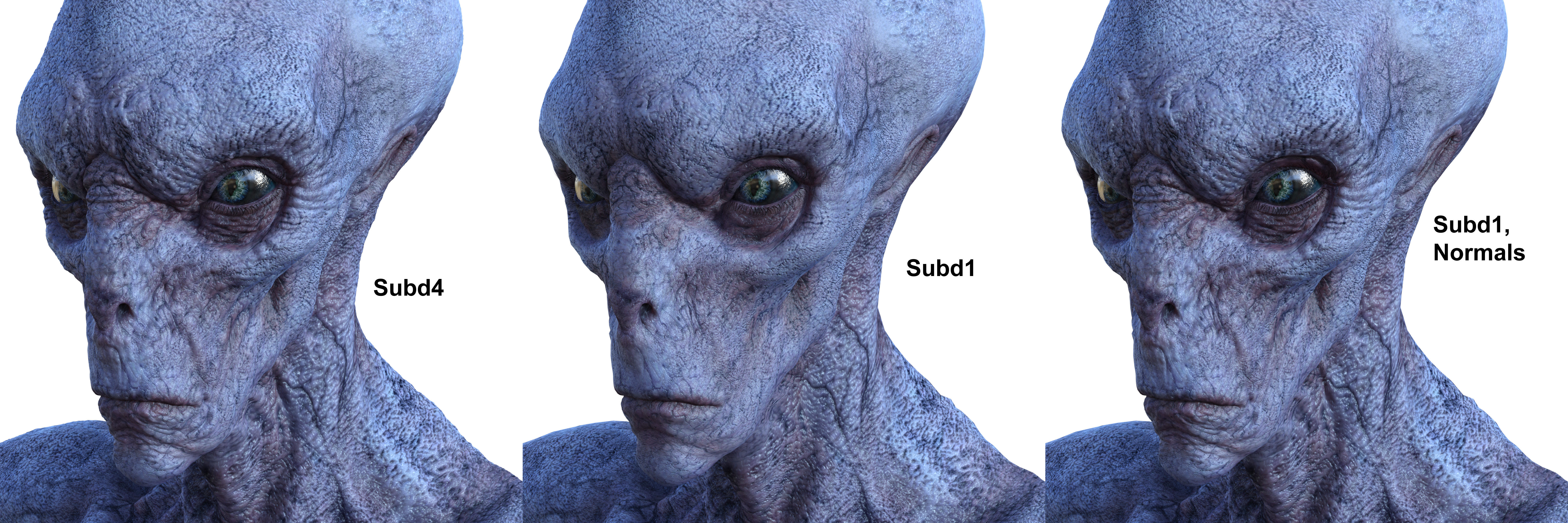
The first image is Exile with 4 levels of subdivision and the HD morph. The second is the same figure at 1 level of subdivision. The third is 1 level of subdivision plus Normal maps baked from the SubD4 HD morphs.
Yes, there is a slight difference, but I doubt most people would notice under anything but 'zoomed right up to his eye' renders.
(click to get new window with full resolution)
see that is the thing unless you are a "super perfeccionist and use super duper close-ups you can't notice too many differences between hd and normal baked, the same goes for displacement/tesselation, they can do the job pretty well overal, specially for games, while i don't know how much someone need a super perfect hd resolution render, for game and even animation using baked normals, displacement or tesselation can do the trick pretty well unless you are going do a super zoom.
I can undestand the argument about not giving us access to tools for importing 4 subdivided HD morphs. If Daz wants to keep that proprietary for vendors fine.
What I wish they would give us is just subdivided 1. The base mesh now is so low poly that trying to make your own jcm's or corrective morphs is incredibly hard to do with certain parts of the body. I'm left in a constant state of sculpting in base, import, subdivide it back to 3 and then see that my moving the 3 polygons in the trap/delt area of the base mesh did not do what it looked like it would do.
Since genesis 1, Subdivided 1 has been the "base rez" of all characters loaded. I don't see why we can't have that level of detail to import. It's not like we can make custom hd characters with it, but it would definitely give us more polys to better make corrections and small morphs with.
well the genesis 1 and genesis 2 used to have "more polygons" than genesis 3 and 8, genesis 1 have 19296k vertices and 2 have 21556k vertices while g3 female have 17418k vertices and male have 17246k vertices and g8 male and female are between 16k to 17k vertices, which means g1 and g2 have more polygons to work and "round more things", it's not just about "hd" it's about the base polycount difference between the "2 old genesis figures" from the others 2 more "new ones" which have less.
Bluejaunte appreciationCan we get your foot morphs somewhere by the way?
Hey Bluejaunte, I never really put them up for sale. I would have to bone up on properly creating the morph in DAZ as a slider you can include in a figure. I just Goz and morph away. I then just import the morph via morph loader pro and set to 100%. The nice thing about your characters is you can set the foot morph to neutral and apply my morph. Saves me the trouble of having to do that myself in Zbrush. My hats off to the PA's because its not just creating assets its also supporting them plus answering issues some may arise with a product. I would imagine a morph would be something easy.
Hmm yeah if you wanted to sell some you'd have to make them into a full product with all the hassle that comes with it. Unless you put them on some third party site like Gumroad. Maybe I could buy some off you for use in my characters though?
Bluejaunte appreciationCan we get your foot morphs somewhere by the way?
Hey Bluejaunte, I never really put them up for sale. I would have to bone up on properly creating the morph in DAZ as a slider you can include in a figure. I just Goz and morph away. I then just import the morph via morph loader pro and set to 100%. The nice thing about your characters is you can set the foot morph to neutral and apply my morph. Saves me the trouble of having to do that myself in Zbrush. My hats off to the PA's because its not just creating assets its also supporting them plus answering issues some may arise with a product. I would imagine a morph would be something easy.
Will There Never Be a Way to Transfer HD Morphs?Here is an example of using Normals vs. HD morph.
The first image is Exile with 4 levels of subdivision and the HD morph. The second is the same figure at 1 level of subdivision. The third is 1 level of subdivision plus Normal maps baked from the SubD4 HD morphs.
Yes, there is a slight difference, but I doubt most people would notice under anything but 'zoomed right up to his eye' renders.
(click to get new window with full resolution)
Hey! Yeah, I saw you post this on another thread with regards to this topic, and this is a fantastic example of what Normals are capable of. There certainly is a place for this in our toolbag, and it's an added bonus that it is more lightweight than brute-force geometry. Inside a vaccume, this looks like a silver bullet, but it starts to fall apart for me when I start interacting with other objects and figures. For instance, say this dude was wearing a spandex suit (which would look hilarious)... you wouldn't be able to get DForce, or even the autofit, to properly conform to the underlying mesh. For details like you have here on the face, maybe this isn't a problem, but the same example holds true when you start dealing with larger and more drastic changes to the mesh.
I guess poke-through is really my biggest issue here.
I LOVE using normals, and your example here is a perfect image to show that for many, many cases NORMALS are perfectly fine, but it's only one tool in my bag that I wish would include the ability to modify HD topology.
I'm sorry for spamming this thread, I'll step out now. I'm not trying to be argumennitive, but I saw the conversation going in the direction with regards to the validity of wanting HD morphs, and I'm not interested in defending my workflow. I know why I want it, and it's a shame we don't have it, but we make do with what we do have :)
G8F ChimpI need a G8F chimp. (Not a female morph for a G8 male chimp.) This new chimp character should be able to make use of all the existing G8 female morphs.
Will There Never Be a Way to Transfer HD Morphs?Here is an example of using Normals vs. HD morph.
The first image is Exile with 4 levels of subdivision and the HD morph. The second is the same figure at 1 level of subdivision. The third is 1 level of subdivision plus Normal maps baked from the SubD4 HD morphs.
Yes, there is a slight difference, but I doubt most people would notice under anything but 'zoomed right up to his eye' renders.
(click to get new window with full resolution)
Will There Never Be a Way to Transfer HD Morphs?It might be the same kind of "precision" problem as with the black eyes: as it's far from center the number of decimals Iray can use to compute the position of the surface is limited (it uses more "number slots" for the non-decimal part), so there are artifacts, for example where surfaces which should be distinct with enough precision end up in the same location due to number rounding (for the black eyes it's usually the cornea and sclera "colliding").
I'm not sure a HD morph would work much better in that case though, you'd still need the precise data after all...
You're probably right! I'm not super technical, but it makes sense to me! I like to use displacement for things like scars, cracks, scratches... those kinds of things. When this happens it looks like a black "tear", if that makes sense. Doing what I mentioned above about exporting it out at a high SD level, and then re-importing, re-texturing, and then morphing via ZBrush in HD always fixes it. I think that it's something to do with the interlopation (like what you mentioned) that occurs at render time, vs real geometry which just acts physically like it should with no additional stuff needed during render time.
Obviously, my argument for allowing for HD morphs is that I could eliminate a bunch of steps from my own workflow in those instances and just use HD, but I also realize I'm a single user with a single use case and so I totally get that I'm the one that needs to find solutions...
Thanks for the background on what could be wrong, though... it always makes me feel better to know that the issue isn't just me being dumb, and that it's just something I need to work around :)
Will There Never Be a Way to Transfer HD Morphs?There's also weird issues with displacement that appear when far from world center, almost like the black eye thing. Sometimes changing that render optimization setting fixes it, but sometimes you have contradictory issues like male black eye that needs "speed" selected and weird displacement issue that requires "memory" to be selected.
It might be the same kind of "precision" problem as with the black eyes: as it's far from center the number of decimals Iray can use to compute the position of the surface is limited (it uses more "number slots" for the non-decimal part), so there are artifacts, for example where surfaces which should be distinct with enough precision end up in the same location due to number rounding (for the black eyes it's usually the cornea and sclera "colliding").
I'm not sure a HD morph would work much better in that case though, you'd still need the precise data after all...
Ridiculously long loading time........If you really want to use a "cleaner" G8 with injection-like behavior, it is possible to do manually. Set up a library with just what you consider bare essentials g8 stuff installed, probably be a good idea to keep "base pro characters" installed in there. Create and map another "temporary" library, and drag drop the morph sets you want to use from the product zip for the current artwork into there before openning DS and starting to work. The problem with that system, is you would have to know or make note of what to reinstall in the "temporary library" if you wish to revisit an old scene you set up. Perhaps a notepad file kept with the saved scene listing what is needed. I do this method, but with props, scenery, vehicles etc etc.
G3 to G8 Morph Transfer DistortionThat looks backwards - as I recall you need to bake the rotations into the soruce figure, Genesis 3 Female, not apply them (unbaked) to the Target (Genesis 8 Female). I'm not sure what the initial step is meant to d at all - all you are doing is creating a morph with the mionor chnages from the morphs that load non-zero, if you do thats tep at all you should pose the Genesis 3 figure t match the Genesis 8, export as OBJ, load as morph - but you could also just pose and bake rotations (from the Joint Editor option menu) without creating any morphs.
New Bluejaunte character alert - Ensley HDI'm not understanding the theory of how characters are scaled. I don't own Ensley, but I do have Nadya. If I load a G8F base character and dial in BJ Nadya Head, the head gets quite small. I expected it to just change her features to be Nadya, not to make the head small, so that surprised me.
Even more mysterious is that if I first pose the G8F sitting on the floor and then decide to dial in BJ Nadya Head, the body also changes. Why does the head morph affect the body? See how the hands are not embedded into the legs after just dialing in BJ Nadya Head. (The sitting pose I used is Elegant Attitude Base Female Sitting 002.duf.)
BJ Noemi Head also shrinks G8F head quite a bit, but doesn't affect the body of the sitting character. BJ Amira Head doesn't affect the body either. The performance of Nadya seems inconsistent with Noemi, Amira and Daz core characters. What is the proper way for me to change the G8F head to Nadya, without changing the body?
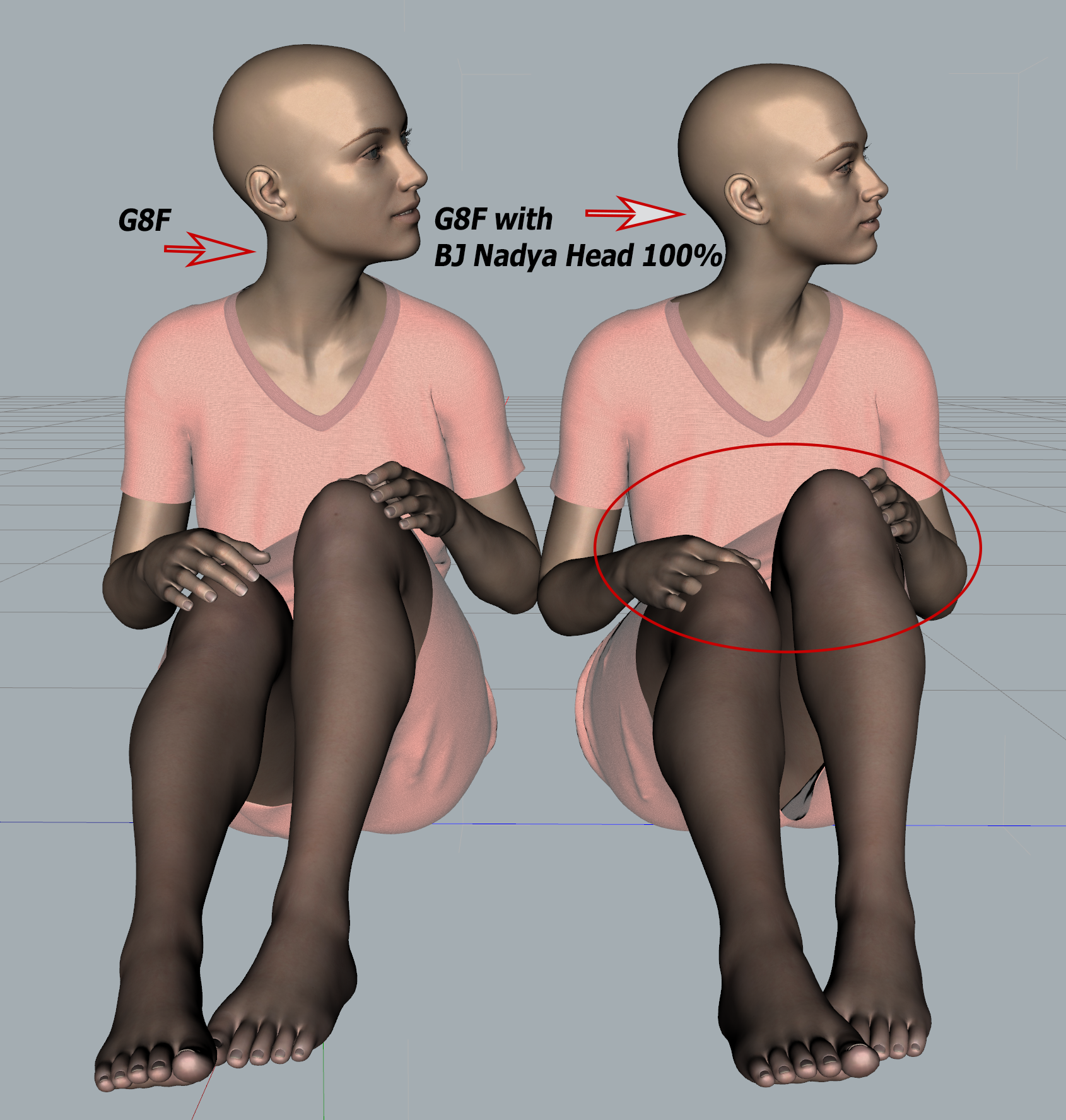
Looks like you identified a bug with Nadya head. I looked at the rigging and it seems like the pelvis and joints upwards to neck are moving a bit when the head is dialed in. There's no reason as far as I can tell that this should happen. I'm a bit confused though because the shoulder and arm joints aren't moving at all, so I'm not entirely positive why the arms would be moving with the head. Rigging is finnicky stuff for sure. One of a million things that can go wrong that customers luckily never have to bother with.
I'm not gonna fix that so long after release of course, this would screw with all the posed Nadya's out there. And people are used to having to reposition arms anyway, it's just a given if the body changes, if shoulders are wider, arms longer, or even just a hand size varies, you will need to adjust the pose if you want the hand to exactly touch something. Unless we had a full IK system where the pose can somehow tell the hand that the finger tips are touching these points on the thigh or something.
As for Nadya's head getting smaller. If I want the head to be smaller in relation to the body (because she's tall), there are really only two ways to do that. Make the head smaller or the body bigger. And then shrink or enlarge the whole figure accordingly to compensate.There's no rule for Daz content production that I'm aware of which of the two to use, so I think the tool I used probably resulted in the head getting smaller and the body only changing in shape. And both need to move in releation to the neck position so that people can mix and match. But that may move the feet off the ground, so then we ERC Freeze the adjusted hip position into the body dial so the feet remain on the ground. In the past I thought this hip adjustment had to go into the main control dial though, and QA never told me otherwise until fairly recently, so you'll probably find that in my older characters.
TL;DR A whole bunch of annoying stuff and tons more where that came from.
Render ProblemThere is a morph within the Sven hair to increase "forhead depth".
Whilst the Sven hair needs a lot of 'cap' size adjustments to stop those render squiggles it comes with the morphs to fix it. With other hairs, they don't always come with fix morphs. For those you would need a body morph pack with cranium size adjustments, adjust a % on the character to 'pass-on' to the hair to adjust more.
I don't always know if products with fix morphs is a good thing as it increases load times, but some products really need them. And for some people purchasing products may not have all the body morph stuff yet.
HD navel morphs?Looking desperatley for a HD navel morph and cannot find one.
[Released] Character Converter from Genesis 8 Male to Genesis 3 Male [Commercial]Upgraded (after some hiccups of the installer not being able to find the file?) and the morph conversion worked EXACTLY as the PDF led me to expect. Thanks for another great product! Now to use your G3toG8 product to get the Genesis 3 Core guys and Slosh's Genesis 2 Legacy into G8M. I'm more of a gardener than anything.
Awesome! I am glad it is working now for you.
[Released] Character Converter from Genesis 8 Male to Genesis 3 Male [Commercial]Upgraded (after some hiccups of the installer not being able to find the file?) and the morph conversion worked EXACTLY as the PDF led me to expect. Thanks for another great product! Now to use your G3toG8 product to get the Genesis 3 Core guys and Slosh's Genesis 2 Legacy into G8M. I'm more of a gardener than anything.
New Bluejaunte character alert - Ensley HDI'm not understanding the theory of how characters are scaled. I don't own Ensley, but I do have Nadya. If I load a G8F base character and dial in BJ Nadya Head, the head gets quite small. I expected it to just change her features to be Nadya, not to make the head small, so that surprised me.
Even more mysterious is that if I first pose the G8F sitting on the floor and then decide to dial in BJ Nadya Head, the body also changes. Why does the head morph affect the body? See how the hands are not embedded into the legs after just dialing in BJ Nadya Head. (The sitting pose I used is Elegant Attitude Base Female Sitting 002.duf.)
BJ Noemi Head also shrinks G8F head quite a bit, but doesn't affect the body of the sitting character. BJ Amira Head doesn't affect the body either. The performance of Nadya seems inconsistent with Noemi, Amira and Daz core characters. What is the proper way for me to change the G8F head to Nadya, without changing the body?
Will There Never Be a Way to Transfer HD Morphs?DAZ develops a tool to ensure that their store has the highest quality characters. So the characters in their store can have details that far surpass any other stores figures out there.
Why should they give that away?
It is something they worked hard on, spent countless hours developing and then they are expected to give it away an have their hard work now benefiting other stores?
That is a very Ayn Rand type of scenerio, atlas has not shrugged that far.
If other places or people want to develop a tool to do a similar type of thing, then that is always open for them to do so. But you cannot really expect Daz to simply give it away (or sell it) like that. If you want to be the best, you build the path for yourself to do so.
I never actually said they had to give it away. Daz has a EULA and legal documentation which we all must abide by whether we are a PA or not. That EULA already includes language to prevent anyone from selling HD content outside of the Daz store. After all...what is preventing the hundreds of PAs who have access to HD from going 'rogue' and doing that right now? The EULA, that's what. All people are asking for is to be treated equally, not for Daz to upend its business. Why is that so difficult to understand?
So they can still provide access to the tools so that users can create their art, while still maintaining their market advantage. What's the problem with that?
Thus saying that this would destroy Daz's advantage over other stores is completely invalid. The contracts ALREADY prevent this. So no, this doesn't mean that people can start selling HD content at Renderosity or elsewhere.
Yeah, just think If the Colonel hadn't had a secret recipe would he ever have sold as much chicken as he did?
[snip]And that is how Daz makes money. Anybody can create and render 3D models, but Daz Studio is the Jiffy Lube of 3D. The paint by numbers, ect. Just like millions of people don't wont to bother with oil changes, many people don't want to bother building everything in 3D. So Daz offers just about everything in a premade state for customers.
And that is why blocking access to HD for non PAs makes no sense. Opening it up would not cause some wild floodgate of people to stop buying content from Daz. If anything it could actually improve sales because think of all the new HD transfer products that could be sold. HD might attract more artists to Daz, like those who balk at the super low poly models offered here.Good points, except for one thing. By limiting the HD access to Daz PAs only, they are able to also require that all products made using the HD tools can only be sold at Daz. JiffyLube does not want their special tools to be used for products sold at Valvoline.
To repeat, what I said does not mean Daz has to allow people to sell HD content at other sites. So when you say Jiffylube does not want their special tools used by others, that still applies here.
The legal documentation for everything already exists. Nobody can sell HD in other stores. That does not change. But if Daz is truly serious about allowing its users to "Create their own universe with Daz Studio", then at some point in the future will have to actually allow their users the ability to do that because the base resolution of Genesis is simply not good enough in 2020.
G3 to G8 Morph Transfer DistortionI haven't seen a prior discussion that answers this adequately.
I have used SickleYield's Morph Transfer method for G2>G3 successfully, but when I attempt it for G3>G8 I get distortions, at the fingers and shoulders variously for different FBMs. Yes, I know about the Riversoft product; I purchased it and it works fine, though SY's method gives a more exact result.
This is the procedure as I know it:
Load G3 in zero pose, set Mesh Resolution to Base, Level 0, Scale 100%. Export as obj file. Load G3 base figure, go to Edit > Morph LoaderPro > Choose Morph File: select obj file. Accept. Here I switch to Joint editor tool and go into the tool setting window >Edit > adjust rigging to shape. Then, save as File > Support Asset > Morph Asset. In the Parameter Tab add the Morph Slider to Favorites.
Load G8 base figure in zero pose. Match the G3 figure's arms and legs pose to the G8 figure's at -50% and 6% Up/Down respectively. In the Scene Tab go to Options (little upper right arrow thing) > Assets > Transfer Utility. Select the G3 figure as Source, the G8 as Target, item shape as Current. In General Options select Morph Targets only; right click this to open Extended Options; select From Source Favorites, deselect everything else in General, Extended and Post Transfer Options. Accept.
Test the morph slider and if everything is good, joint editor again and save as a morph asset. So, my question is, what am I doing wrong/missing? Whether the rigging is adjusted or not seems to make no difference as to these distortions. Can anyone help?
[Released] Character Converter from Genesis 8 Male to Genesis 3 Male [Commercial]Hi RiverSoftArts, I followed the pdf instructions explicitly, but I got an Error Reading File three times in a row (I closed Studio, and started over each time). I was only converting one morph. I used the Custom Character script. Any guidance is appreciated. Here's the log file:
2020-04-23 22:41:00.846 Loading script: F:/My DAZ 3D Library/scripts/riversoft art/character converter/convert custom character g8m to g3m.dse
2020-04-23 22:41:00.859 DEBUG: Found: F:/My DAZ 3D Library/data/RiverSoft Art/Common/RSConstants.dsa
2020-04-23 22:41:00.861 DEBUG: Found: F:/My DAZ 3D Library/data/RiverSoft Art/Common/RSG8G3CharacterConversionConstants.dsa
2020-04-23 22:41:00.870 DEBUG: Found: F:/My DAZ 3D Library/data/RiverSoft Art/Common/RSBuildPanels.dsa
2020-04-23 22:41:00.879 DEBUG: Found: F:/My DAZ 3D Library/data/RiverSoft Art/Common/RSHelperFunctions.dse
2020-04-23 22:41:00.890 DEBUG: Found: F:/My DAZ 3D Library/data/RiverSoft Art/Common/RS2019HelperFunctions.dse
2020-04-23 22:41:00.895 DEBUG: Found: F:/My DAZ 3D Library/data/RiverSoft Art/Common/RSG8G3CharacterConversionFunctions.dse
2020-04-23 22:41:00.908 WARNING: libpng warning: iCCP: known incorrect sRGB profile
2020-04-23 22:46:02.978 DEBUG: DoConvertSceneCharacter Genesis8Male Genesis3Male EJ Genesis 8 Male for Genesis 3 Male EJFM Lower Lip Define 0.05999999865889549 Overwrite Morphs=false Convert JCMs=false Hide Eyes=true Use Legacy Conversion Process=false Convert true
2020-04-23 22:46:02.978 Converting Character: Genesis 8 Male
2020-04-23 22:46:02.978 DEBUG: GetUsedMorphs Genesis8Male
2020-04-23 22:46:04.104 DEBUG: /Actor/Head/Face/Mouth/Real World/EJ Face Morphs/EJFM Lip Lower Definition false
2020-04-23 22:46:05.005 DEBUG: RemoveExistingMorphs Genesis3Male nameList EJFM Lip Lower Definition overwriteList
2020-04-23 22:46:05.007 DEBUG: EJFM Lip Lower Definition
2020-04-23 22:46:05.274 DEBUG: Setting Scale to 1 BEFORE, raw=1, value=1
2020-04-23 22:46:05.349 DEBUG: Setting Scale to 1 AFTER, raw=1, value=1
2020-04-23 22:46:05.349 Converting Morphs: EJFM Lip Lower Definition
2020-04-23 22:46:05.351 DEBUG: Trigger Action DzZeroFigureShapeAction
2020-04-23 22:46:11.128 DEBUG: Triggered Action DzZeroFigureShapeAction
2020-04-23 22:46:11.642 DEBUG: Transfer Item, Source is Genesis 8 Male, Target is Genesis 3 Male
2020-04-23 22:46:11.642 Transferring Morphs from Genesis 8 Male to Genesis 3 Male
2020-04-23 22:46:11.643 WARNING: Script Error: Line 2514
2020-04-23 22:46:11.643 WARNING: TypeError: Result of expression 'transfer.setDistanceSquaredTolerance' [undefined] is not a function.
2020-04-23 22:46:11.643 WARNING: Stack Trace:
<anonymous>()@F:/My DAZ 3D Library/data/RiverSoft Art/Common/RSG8G3CharacterConversionFunctions.dse:2514
2020-04-23 22:46:11.659 Error in script execution: F:/My DAZ 3D Library/scripts/riversoft art/character converter/convert custom character g8m to g3m.dse
2020-04-23 22:46:12.316 Loaded Morph Deltas in 0 min 0.0 sec.
2020-04-23 22:46:12.316 Loaded file: pJCMShldrUp_90_L.dsf
2020-04-23 22:46:12.328 Loaded Morph Deltas in 0 min 0.0 sec.
2020-04-23 22:46:12.328 Loaded file: pJCMShldrUp_90_R.dsf
Are you using an old version of DS? The SetDistanceSquaredTolerance function was added in 4.10.0.50.
Aaah! Thanks. I've been delaying my upgrade, but the time has truly come. Thanks for bothering with this, and sorry for wasting your time.
No, not at all. Sorry for pushing you to upgrade
 Ridiculously long loading time........
I'd be running process monitor or something to find out which files are being accessed, then delete the ones causing the problem, this shouldn't be happening.
Could be a HD morph or 2 that have default values greater than 0, a vendor mistake or something you have done, but even then the load time is still over the top, only time something like that happened to me is loading a character which set the render subD to 5 and preview subD to 4, more than my machine likes to handle.
Daz 3D is part of

Connect
DAZ Productions, Inc.
7533 S Center View Ct #4664
West Jordan, UT 84084Licensing Agreement | Terms of Service | Privacy Policy | EULA
© 2026 Daz Productions Inc. All Rights Reserved.