-
How to save poses when using dials from different packages
Well, damn, I thought it worked for a moment -- I tried to use Morph Loader Pro for this to import a changed figure back as a morph (btw, I thought it was for official artists only, how do I have it?) following the advice in this thread: How to properly load a morph using only DAZ? : r/Daz3D
1. Applied a bunch of different dials from different products to change a base Genesis 9 to a new pose
2. Saved this pose as a regular pose preset, i.e. with dials (this is the step that I thought might allow to get around the problem).
3. Saved the figure as .obj at base resolution
4. Imported the figure back using Morph Loader Pro => select the .obj from step 3, set Reverse Deformations to yes, then set the pose (suboption under Reverse Deformations) to the one in Step 2. My logic was that if DAZ is able to match a base figure to a morphed one using a pose as a guide, it might use that to calculate the transforms needed to match the two, and then that would be the answer.
5. For a moment I thought the magic happened -- the morphed figure appeared perfectly. Unfortunately, when I went to check, it turned out that somehow all the changes were copied as dial control values, so I guess the Morph Loader saw the morph completely match a pose with dials, and decided "I'm done, no need to calculate any actual transform values, here are your dial values back" :) Or something like that.
How to save poses when using dials from different packagescrosswind said:
malswansky said:
This question is about how to save poses in a way that doesn't depend on a specific package of (purchased) pose morphs/dials.
When I use "native" pose controls dials, I've been using "Bake to Transforms" (and then save as Pose Preset), and it looks like it accomplishes the task of saving the pose with "zeroed" dials.
Then I've bought a different pose-control package (3DU Pose Architect), which has it's own "Extract Pose" script that does the same thing when using Pose Architect's pose dials.
However, the two don't seem to "understand" each other, i.e. "Back to Transforms" (when applied to Property Path: Pose Controls/3DU Pose Architect) can't save the exact pose created by the Pose Architect dial, and vice versa, Pose Architect's "Extract Pose" script can't save a pose created by a "native" Pose Control dial. In both case, they curiously save something resembling the "other's" pose, but not nearly close enough.
I couldn't reproduce the issues you mentioned. Though they use different techniques... but should give you the same result. In terms of "baking result", they both get values on Joint Rotations ERC Freezed by their Controllers, i.e. Pose Controls properties , zero Pose Controls, then write back the values to Joints Rotation properties. Difference is: Bake to Transforms mainly uses ERC Bake function while 3DU's script directly get non-default rotation values from root/child bones ~~
So, I'm confused about what the workflow is supposed to be if I have multiple pose manipulation packages each with their own set of dials, when the goal is to end up with a "pure" pose that's dial- and package- independent. Is it expected that each time I use a pose-dial from a particular package, I have to "bake" in the pose using that package's tools, before I can continue modifying a pose dial from another package? Or can that logic even change based on each specific package? That would seem incredibly inconvenient... Is there a way to just use pose dials from different packages in any sequence (as one would want), but thenstill somehow save/bake/whatever the whole thing as a "pure" pose that can be used in the future by anybody (that doesn't have any packages)?
Still strongly suggest you use 3DU's Extract Pose script because it's much much faster than using Bake to Transforms ~~ and you shouldn't have to do any "sequential process" by using Pose Controls from whatever packages.
Overall, under the hood, it would seem like the final product (of various pose alterations) on some level should just be the combination of all "deltas" of all the bones of a given model... so there's got to be some simple way to save "all the deltas" as a new pose, no? If that's not so, I'm very curious as to why, as I clearly don't yet seem to understand the logic behind how morphs function.
Thank you!
Edit: If you still get any issue, name the package / Pose Control properties you used that brought you unexpected / wrong results, we may help with checking.
First of all, I definitely appreciate your feedback, it helps a lot with getting a more complete picture of what's going on.
As for a specific use case, I did this --
1. Start with Genesis 9 base figure
2. Apply: Pose Controls > Legs Spread dial (=10%; at this point when selecting Left Thigh body part directly, its Side-Side parameter has value = 9.0)
3. Run: Pose Architect/3DU Extract Pose script (hopefully this is the same 3DU's Extract Pose that you were referring to)
The result (tested twice), in my case, is that the legs for some reason get spread further apart (Left Thigh's Side-Side value = 18.0), but the Legs Spread dial control value in Pose Controls is not zeroed out and remains at 10%. So the 3DU Extract Pose script is unable to properly bake in a change in a Pose Control dial -- not only does it get the wrong joint values, but also it doesn't reset the Pose Control dial itself. FWIW, I have DS 4.23.0.1, 3D Universe's Pose Architect for Genesis 9.
Now, what I am able to do, is for example:
1-2. Same as above, i.e. apply a change via Pose Control dials to base Genesis 9
3. Bake in that change using DS's native "Bake To Transforms"
4. Now apply another change via 3DU Pose Architect's dials
5. Bake that in using Pose Architect's own baking script, i.e. Extract Pose
6. Keep going
Interestingly, I've tried this with yet another product (V3Digitimes Ultimate Pose Mixer Pro), which has its own baking scripts (e.g. "Bake All Except Face"). Now this script does better, e.g. in the examples I tried, it can bake in the Pose Control dials properly, but it still doesn't quite work with the 3DU Pose Architect's dials (although it seems to set the joint values correctly, it doesn't zero out the dial itself).
So basically my impression so far is that if one wants to end up with transforms-only pose presets, then even though each product seems to provide this ability for its own dials, there's no universal way of baking them all. Which means that if one wants to use these different products (and Pose Controls too) together and still end up with a transforms-only pose preset, one has to follow a pretty tiresome routine -- i.e. after making any changes using a given product's dials, one has to immediately bake in these changes using this product's own Bake To Transforms equivalent, before making changes using any other product's dials (and then you have to use that product's own baking script, etc). Otherwise, if you ever use two different products' dials in succession, you're likely to end up with a "mixed" pose that no script can apparently bake in reliably.
Or, I guess one can forget this, just use dials, save pose presets with pose controls, but then to use these poses, one must always have installed all the packages whose dials were ever used, and they can never be saved as transforms-only.
However, could there be another alternative -- what if one exports a figure (after various dials are applied) as an .obj, then import it back, could one then somehow save that object-figure as a pure-transform morph of the original?
Morph Master@matew Even though I have set my export scaling to 100% in the preferences, Morph Master continues to export at 1%.
Renaming and relocating morphs without savingIf you mean rename the Path of the morph properties, you can do it in the above way in DS, but then you always have to Save Modified Asset... or Save Morph Asset(s) ( Modifier Asset(s) with DS 4.23+ ).
Alternatively, you can Batch Open the morph files (*.DSF) in target data folder with Notepad++, and Batch Replace the line of "group" , then Batch Save.
If you mean physically relocate the morph files in data folder, e.g. from /data/Daz 3D/Genesis 8/Female/Morphs/XXX/123 to /data/Daz 3D/Genesis 8/Female/Morphs/XXX/456, you need to Save Morph Asset(s) to a new sub-folder (or move them in File Browser), then delete the old morph files in data folder.
Renaming and relocating morphs without savingThere's a way to renaming and relocating morphs, without saving the modified morph? Or there's a script or similar that can relocate the morph automatically?
I need it because, i've a lot of MR Morphs, and would move them under a determined Label.
Lucas 9!OrangeFalcon said:
tsroemi said:
Seconding all of the examples above, plus adding feminine-oriented gay men, plus fashion-conscious hipsters, plus men in many fotoshoots, etc. Really, there's so much diversity today in real life, and we explicitly got Gen9 because it's such a diverse figure, the textures should reflect that. But I quite like them otherwise!
One thing that bothers me a bit though, there's some kind of mean or arrogant streak in his general expression that I don't like, and I can't seem to get rid of it. It's mostly coming from the eyes I think, the lower lids seem t be tightened a little, as if he was just going, 'Oh really?!'. Has anyone played with the morph in that respect already and could give recommendations on how to fix that?
I agree Lucas has a kind of rebellious look, situated mostly in his eyes. The more I look at him, the more of a 1960s British feel I get from him. I was able to fix that a bit by Asymmetry Eyelid Lower to relax the lower lids. A slight change but makes a noticable difference, and I think it looks better. Attached are before and after pictures. And then, of course, I had to do the same to my female version of him (I'll call her Lucia, she's his twin sister).
Lucas Before:
 After:
 Lucia Before:
 Lucia After:
Great results, thank you so much for posting! I was fiddling around with some of the other lower eyelid dials, I think from the 200 morphs pack. But this sounds much simpler, and I really like what you've done here! Will try for myself as well.
Yeah, I'm also getting the 'rebel Brit youngster' vibe a lot, which is really cool. Can't remember seeing anything quite like him in the store before.
Face Transfer 2 - a trial version?I purchased Face Transfer 2, but when I went back and looked closer at the promo page I see that It says:
"What’s Included and features
Trial version
Three transfers (the watermark is removed when saved)
After the three saves, a watermark is no longer removed
Watermarked Preview”
So did I buy a trial version?
Lucas 9!tsroemi said:
Seconding all of the examples above, plus adding feminine-oriented gay men, plus fashion-conscious hipsters, plus men in many fotoshoots, etc. Really, there's so much diversity today in real life, and we explicitly got Gen9 because it's such a diverse figure, the textures should reflect that. But I quite like them otherwise!
One thing that bothers me a bit though, there's some kind of mean or arrogant streak in his general expression that I don't like, and I can't seem to get rid of it. It's mostly coming from the eyes I think, the lower lids seem t be tightened a little, as if he was just going, 'Oh really?!'. Has anyone played with the morph in that respect already and could give recommendations on how to fix that?
I agree Lucas has a kind of rebellious look, situated mostly in his eyes. The more I look at him, the more of a 1960s British feel I get from him. I was able to fix that a bit by Asymmetry Eyelid Lower to relax the lower lids. A slight change but makes a noticable difference, and I think it looks better. Attached are before and after pictures. And then, of course, I had to do the same to my female version of him (I'll call her Lucia, she's his twin sister).
Lucas Before:
After:Lucia Before:Lucia After:Daz 4.23: force change character appearance?Scenes in DS are basically just a big list of references. When you load a saved scene, it re-applies all the references to geometry, textures, morphs, etc. If morphs have been uninstalled or are otherwise not immediately available to the program, it will load without that morph applied; if, on the other hand, a new morph has been improperly saved with a default non-zero value, it will apply that morph to all characters of the same figure. Load a default (or preferably dev load, if available) of whichever figure you're using, go to the Currently Used heading in the Parameters pane, and look for anything that shouldn't be there.
Lucas 9!nemesis10 said:
tsroemi said:
Seconding all of the examples above, plus adding feminine-oriented gay men, plus fashion-conscious hipsters, plus men in many fotoshoots, etc. Really, there's so much diversity today in real life, and we explicitly got Gen9 because it's such a diverse figure, the textures should reflect that. But I quite like them otherwise!
One thing that bothers me a bit though, there's some kind of mean or arrogant streak in his general expression that I don't like, and I can't seem to get rid of it. It's mostly coming from the eyes I think, the lower lids seem to be tightened a little, as if he was just going, 'Oh really?!'. Has anyone played with the morph in that respect already and could give recommendations on how to fix that?
I would suggest Googling "Dylan O'Brien smiling" and take cues from the images you find. He can look a touch smirky but when he laughs, he opens his eyes a bit wider and raises his eye brows.
Thanks, that's really helpful! I'm just thinking he reminds me a tiny bit of River Phoenix as well, no?
Lucas 9!tsroemi said:
Seconding all of the examples above, plus adding feminine-oriented gay men, plus fashion-conscious hipsters, plus men in many fotoshoots, etc. Really, there's so much diversity today in real life, and we explicitly got Gen9 because it's such a diverse figure, the textures should reflect that. But I quite like them otherwise!
One thing that bothers me a bit though, there's some kind of mean or arrogant streak in his general expression that I don't like, and I can't seem to get rid of it. It's mostly coming from the eyes I think, the lower lids seem to be tightened a little, as if he was just going, 'Oh really?!'. Has anyone played with the morph in that respect already and could give recommendations on how to fix that?
I would suggest Googling "Dylan O'Brien smiling" and take cues from the images you find. He can look a touch smirky but when he laughs, he opens his eyes a bit wider and raises his eye brows.
Lucas 9!Seconding all of the examples above, plus adding feminine-oriented gay men, plus fashion-conscious hipsters, plus men in many fotoshoots, etc. Really, there's so much diversity today in real life, and we explicitly got Gen9 because it's such a diverse figure, the textures should reflect that. But I quite like them otherwise!
One thing that bothers me a bit though, there's some kind of mean or arrogant streak in his general expression that I don't like, and I can't seem to get rid of it. It's mostly coming from the eyes I think, the lower lids seem to be tightened a little, as if he was just going, 'Oh really?!'. Has anyone played with the morph in that respect already and could give recommendations on how to fix that?
Recreating Viconia DeVir from BG2 as G8F based on a 2D portraitI used Nylyssa as the base morph. I think most of the other morphs are from Genesis 8 Female Head Morphs, but I also used a couple from 200 Plus Head and Face Morphs for Genesis 8 Female(s) for the nostril shape. I didn't add eyebrows since I don't have any that look like the ones in the picture. None of the brows I have seemed to look right. I was mostly focused on the face shape. I'm sure there is a much better texture that could be used, but I just used a pale one from my library so I could get close to the color by simply changing the different surface colors. Hopefully this can be a good starting point. I'll share the dial settings if there's interest.
Recreating Viconia DeVir from BG2 as G8F based on a 2D portrait^Good effort - definitely looks close. You even got the mole in the right place. Does she not have eyebrows?
I think as far as the morph goes, it's right. I'd say with a slightly different texture, this'd be even better - a darker base with more highlights perhaps. And the lipstick is a slightly darker red (kind of muddy red?). feldarzt did say they weren't worried about the texture, so those are just my random thoughts.
What did you use for the morph (mix of characters / dial-spun from the morph pack(s) / custom sculpt)?
Export from Daz with multiple UV setsIt's actually as simple as creating a template that includes both head and body. Here is base 8.1M with Conrad's tattoos.

Here are the Map Transfer settings with head and body in a single template. Make sure Target UV is set to "base male" on at least the head surface.
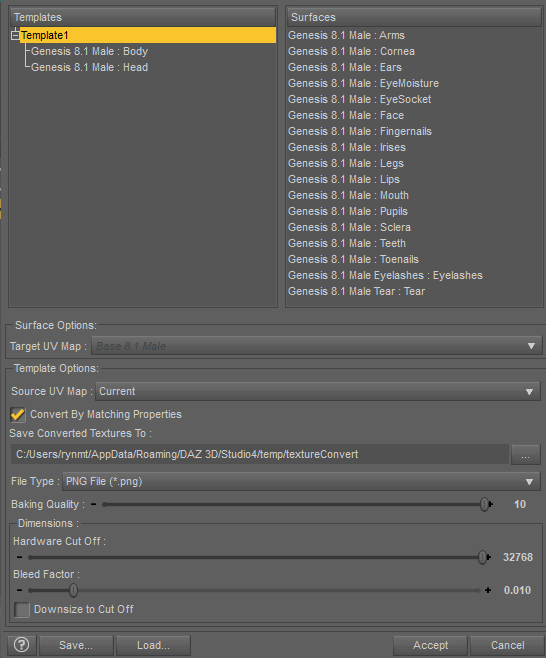
If you switch to base G8M textures and reapply Conrad's tattoos, the neck one doesn't apply (and there might be some issues with the chest tattoo, I haven't looked super close).

But if you replace the textures with the ones you just Map Transferred....
 (Solved) Closeup 1920x1920 px portrait takes so long to render (on a 4090)
Thanks, felis. I've tried looking at the top in wire texture shaded view. One thing that I've noticed is that the material of the top is quite thick in some areas, namely the straps. Other than that, I haven't seen anything that looks wrong. So I've opted for not modifying anything. With the smoothing modifier, one morph for the straps included with the top and a little bit of Mesh grabber were the strap clipped through the Genesis 8 figure's skin, I've done what I've been able to.
I've also used a different hair in the end for the model, short this time, that being SBH, I've converted to the Omni shader for the render.
The truth is that the top's straps still look kind of ugly now. Perhaps increasing the smoothing iterations would help. I'll try that.
Export from Daz with multiple UV setsGordig said:
crosswind said:
Yep, Map Transfer is just the tool you wanted if G8 >> G8.1.... but it doesn't work if vice versa.

It does. I've been buiding all my characters on 8.1, which requires me to map transfer in either direction depending on which skin I'm using and what I'm trying to add to it.
Ah... ? You can merge separate Head and Body texture maps from G8.1 as one Torso map for G8.0 ? How to do that, pls ? I ever did that in Blender and FaceForm wrap but failed with Map Transfer.
Export from Daz with multiple UV setscrosswind said:
Yep, Map Transfer is just the tool you wanted if G8 >> G8.1.... but it doesn't work if vice versa.
It does. I've been buiding all my characters on 8.1, which requires me to map transfer in either direction depending on which skin I'm using and what I'm trying to add to it.
Export from Daz with multiple UV setscrosswind said:
Yep, Map Transfer is just the tool you wanted if G8 >> G8.1.... but it doesn't work if vice versa.
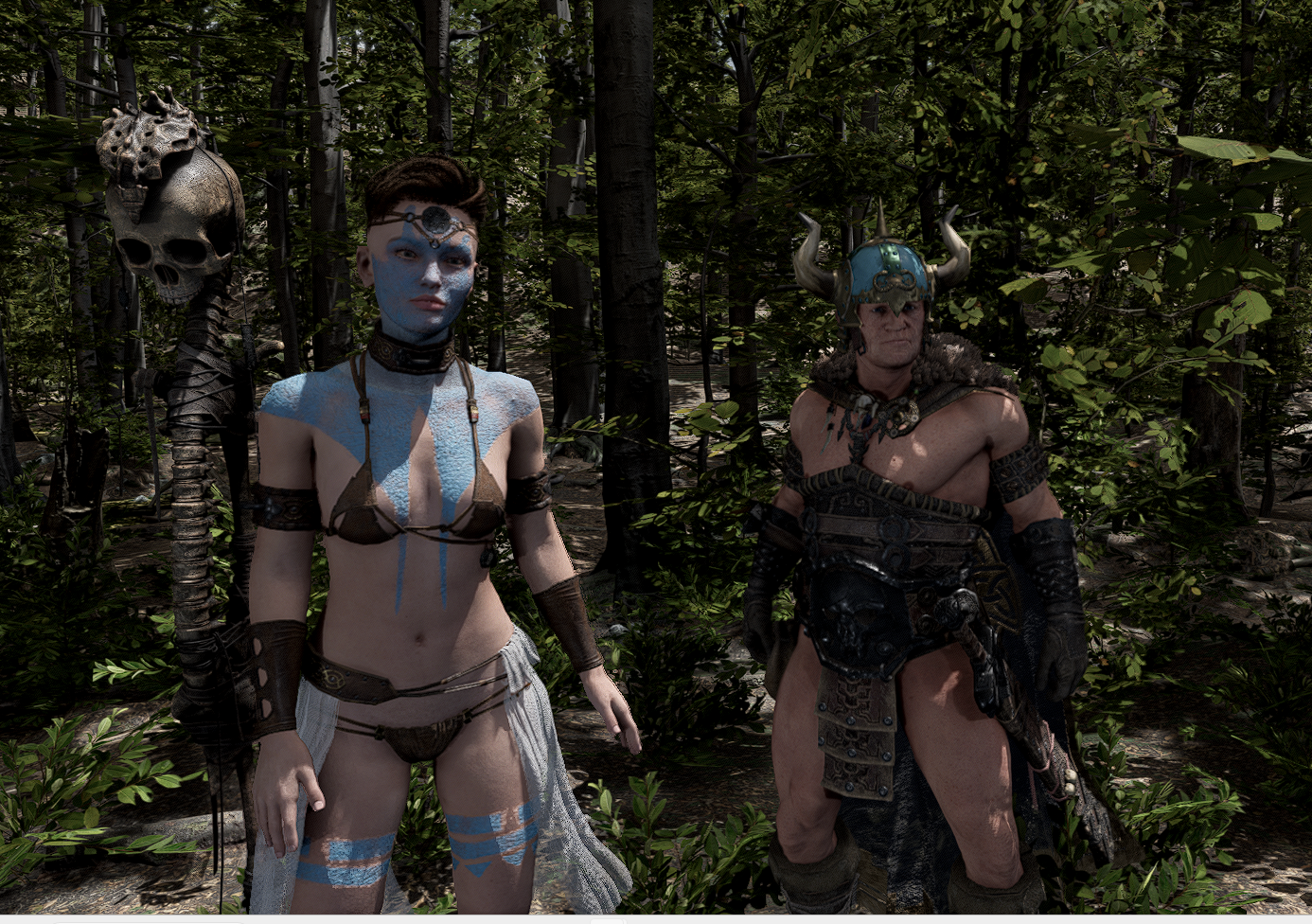
Thanks crosswind, finally got the results I've wanted
 in Unity/Unreal
 Export from Daz with multiple UV sets
Yep, Map Transfer is just the tool you wanted if G8 >> G8.1.... but it doesn't work if vice versa.
Daz 3D is part of

Connect
DAZ Productions, Inc.
7533 S Center View Ct #4664
West Jordan, UT 84084Licensing Agreement | Terms of Service | Privacy Policy | EULA
© 2026 Daz Productions Inc. All Rights Reserved.