-
Not happy with G 8.1 Skin - Issue in 4.15 ?
Zilvergrafix said:
xyer0 said:
8.0 ubershader? How do I get that? Do I just copy the shader settings from G8F?
the infamous "Daz PBR Skin shader" is only is a wide and broad expansion of parameters for the usual iRayUber shader, with AO and Detail channels.
is something when I did my own filament shaders and named like "Zilvergrafix Ultimate Champion Edition Magnificent FIlament Shaders"...and really nope.
It is a separate shader, not the Iray Uber Base.
Not happy with G 8.1 Skin - Issue in 4.15 ?xyer0 said:
8.0 ubershader? How do I get that? Do I just copy the shader settings from G8F?
the infamous "Daz PBR Skin shader" is only is a wide and broad expansion of parameters for the usual iRayUber shader, with AO and Detail channels.
is something when I did my own filament shaders and named like "Zilvergrafix Ultimate Champion Edition Magnificent FIlament Shaders"...and really nope.
Runtime Re-orgSci Fi Funk on Youtube said:
@WendyLuvsCatz ok - actually to be fair I find a low-rez M2 to be very useful for additional "cheap" characters, if no lorenzo or lorrreta will do.
I recently polypainted a bunch of rendered on tposed Genesis 8 in iray second skins using spotlight projection in Zbrush on my M2's
OK so this was D|S Filament but certainly can use them in Carrara too
 3D Print Questions - Differences in slicer software, cost of printer.
Marcus Severus said:
@ Daveso this is a belated thanks for replying to me a while back. At that point I was going to finally build my printer before getting back to you. Then one day passed and one more etc.
Anyway I built the Ender 3 Pro on Saturday and only today got to try my very first print. I'm amazed at how well it turned out but disappointed that the white filament fails to show it well in the pictures I'm attaching.
Although there are many videos online showing the same test models printed over and over again, I took the plunge and tried printing something I downloaded a long time ago - from Sketchfab, I think. I had found it zipped up on my hard drive recently and had tried it out in Carrara.
I'm showing two pictures of it from Carrara (where the light shows the detail - it isn't a huge detailed mesh, however) and two pictures of the print with a drinks can to show the scale. I took minimum time over setting up the model (slicing, etc.) because I was certain I was only setting out on a path of many failures. I'm still surprised that it came out OK.
Thanks. I'm really happy this is working for you. I need to ocncentrate more and getting this to work with every model. My last print wasn;t too bad. I did it myself with Meshmixer. I also sent the same model to Gameprint, but I have not printed the gameprint STL yet. Will do that. This guy is 3-1/2 inches high. You can see the swirls. I printed in 0.20 layer. I think it needs to be finer and also printed standing up. Pretty good weight balance though.
I think grey shows the detail better than most filament colors.Genesis 8.1 / Victoria 8.1Skyewolf said:
JB007 said:
A little update .. so maybe somebody who knows more about this than me can have some more ideas ..
Iray .. no highlights but, at start of render, I get white dots / fireflies where you would expect highlights to be .. but then they diminish as the render continues and just become skin colour in time .. reflectivity slider has no effect
fillament .. there are highlights .. ok, it's filament, it looks like a dogs breakfast .. but the highlights are there .. reflectivity slider DOES work ..
So I'm wondering if it's something else in Daz / the Shader that's stopping the highlights coming through in Iray ..
Try lowering your roughness sliders?
Hey Skyewolfe - every roughness slider has been at nigh on every value between 0 and 1 .. nothing changes .. as I mentioned above .. the Reflectivity slider doesn't do anything in Iray (althugh it does in Filament) and because the Reflectivity doesn't do anything it matters not one jot what the roughness sliders are ..
Could there be some setting somewhere else in a) The Shader (unlikely) .. or b) Daz itself that's playing up .. ??
From an installtion perspective to make sure I'm covered ..- Version : Daz 4.15.02
- IM00042071-01_Genesis8FemaleStarterEssentials.zip ... Installed
- IM00042071-01_Genesis8MaleStarterEssentials.zip ... Installed
- Default Resources For Daz Studio 4.15+ .... Installed
Is there anything else that should have been installed?
Genesis 8.1 / Victoria 8.1JB007 said:
A little update .. so maybe somebody who knows more about this than me can have some more ideas ..
Iray .. no highlights but, at start of render, I get white dots / fireflies where you would expect highlights to be .. but then they diminish as the render continues and just become skin colour in time .. reflectivity slider has no effect
fillament .. there are highlights .. ok, it's filament, it looks like a dogs breakfast .. but the highlights are there .. reflectivity slider DOES work ..
So I'm wondering if it's something else in Daz / the Shader that's stopping the highlights coming through in Iray ..
Try lowering your roughness sliders?
Genesis 8.1 / Victoria 8.1A little update .. so maybe somebody who knows more about this than me can have some more ideas ..
Iray .. no highlights but, at start of render, I get white dots / fireflies where you would expect highlights to be .. but then they diminish as the render continues and just become skin colour in time .. reflectivity slider has no effect
fillament .. there are highlights .. ok, it's filament, it looks like a dogs breakfast .. but the highlights are there .. reflectivity slider DOES work ..
So I'm wondering if it's something else in Daz / the Shader that's stopping the highlights coming through in Iray ..
Michael 8.1nemesis10 said:
The hair on the head is still filament hair by RedzStudio.
I think you mean this hair: dForce Electro Hair for Genesis 3 and 8 | 3D Models and 3D Software by Daz 3D
3D Print Questions - Differences in slicer software, cost of printer.Marcus Severus said:
In spite of leap-frogging over your post, AnotherUserName, I have to say that I'm following your progress with interest. The model I made had support structures between the base at the back of the dress but none at the front. The structures snapped off very easily and left little sign of having been there. Where there were no structures at the front, the extruder dropped a few 'hairs' of filament which I removed with a craft knife.
Your model has a pose with much more need for support stuctures and I don't think (from my position of total inexperience) that you can overdo it. Your print will take several hours, depending on its size, so it's right to give it a fighting chance in my opinion.
I bought 3d Coat to learn to sculpt and print the results, so I'm perhaps less likely to need to prepare DAZ models. I did trysculpting, though on a Poser figure, building both clothes and hair on the bare figure. The results are pathetic but I'll show a picture to illustrate a possible way to add hair to a (bald) figure. Just sculpt - but take a great deal more care to do it well than I did. (You can sculpt in Blender or Sculptris for free).
Hey Marcus,
I actually like the hair that you made. I think that with a good paint job it would look really great.
MimicMolly's Renders & WIPsEDIT: I was finally able to adjust the crop on the thumbnail, so I went ahead and finally posted this one to the DAZ Galleries [x].
Today, I tried a different HDRI and lights, to render my attempt at recreating Glamorous Vicki with G8F (G8.1F, specifically.) This particular shape used Mei Lin 8 as a base. I think she was a bit bustier than the V3 character, but it was close-enough. The outfit was originally supposed to be from dForce LavieByCk Summer Essentials, but I wasn't happy with how the bikini bottoms looked. So I used the ones from Twilight Sorceress. Then I used two random scarves (Rocabillly Outfit for G8F and dForce Salwar Kameez) and shoes from Slinky Dress for G8F, with the Summer Essentials "shader" which was just me copying materials and placing it on the other outfits so they'd match.
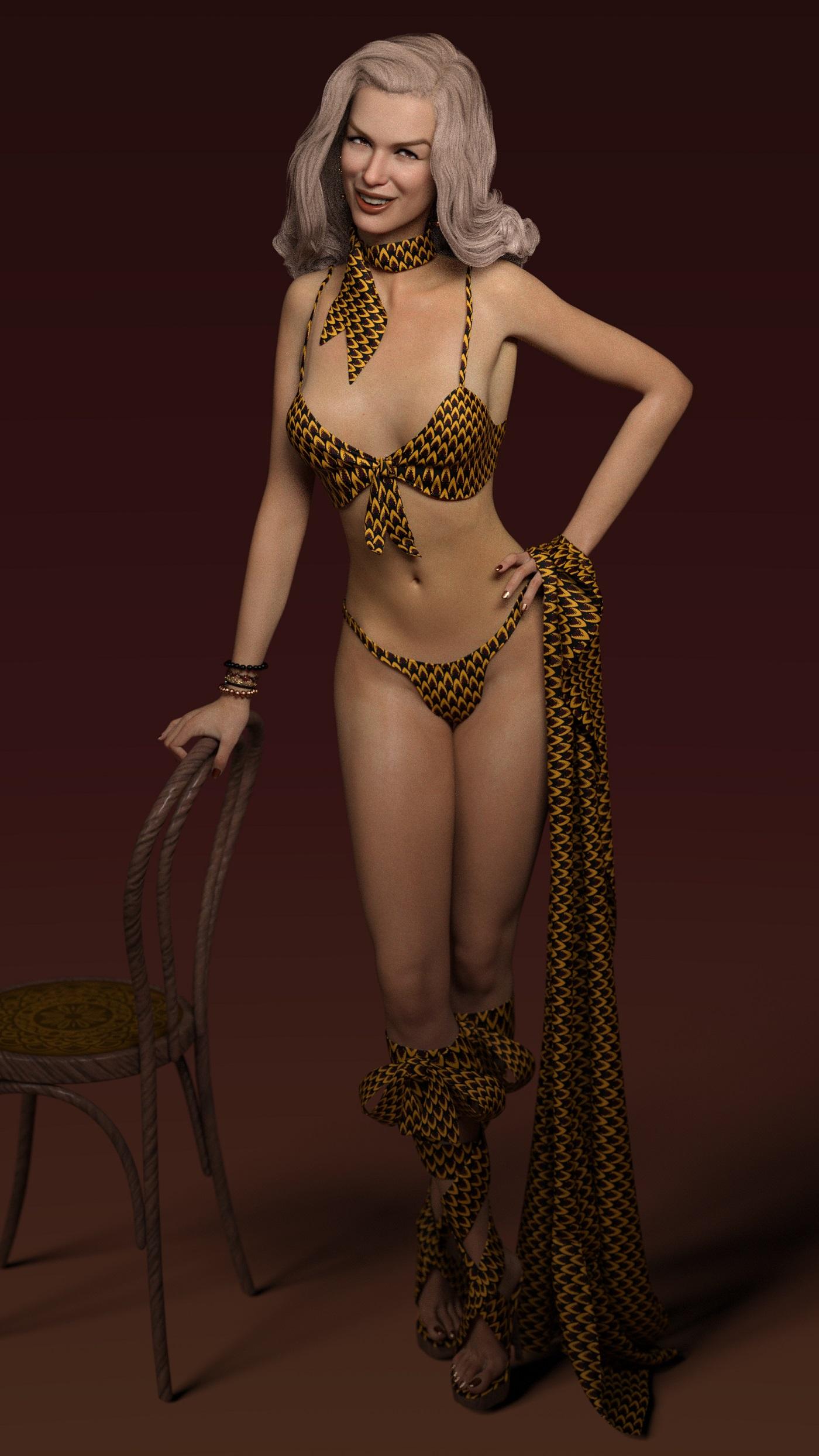
I don't like Penny 8's skin. It is my least favorite skin. So I mostly unistalled it with DIM by manually copy-pasted the head and body shapes elsewhere and then moving back to the correct folder after the unistallation was finished. (I got her because her Starter Bundle was free or deeply discounted once and I liked the items in it.) I like her shape a lot, so it wasn't much of a big loss. Here, I used Mousso's Chanel's skin. I think she looks a bit like Nicole Kidman here and that wasn't my intention.
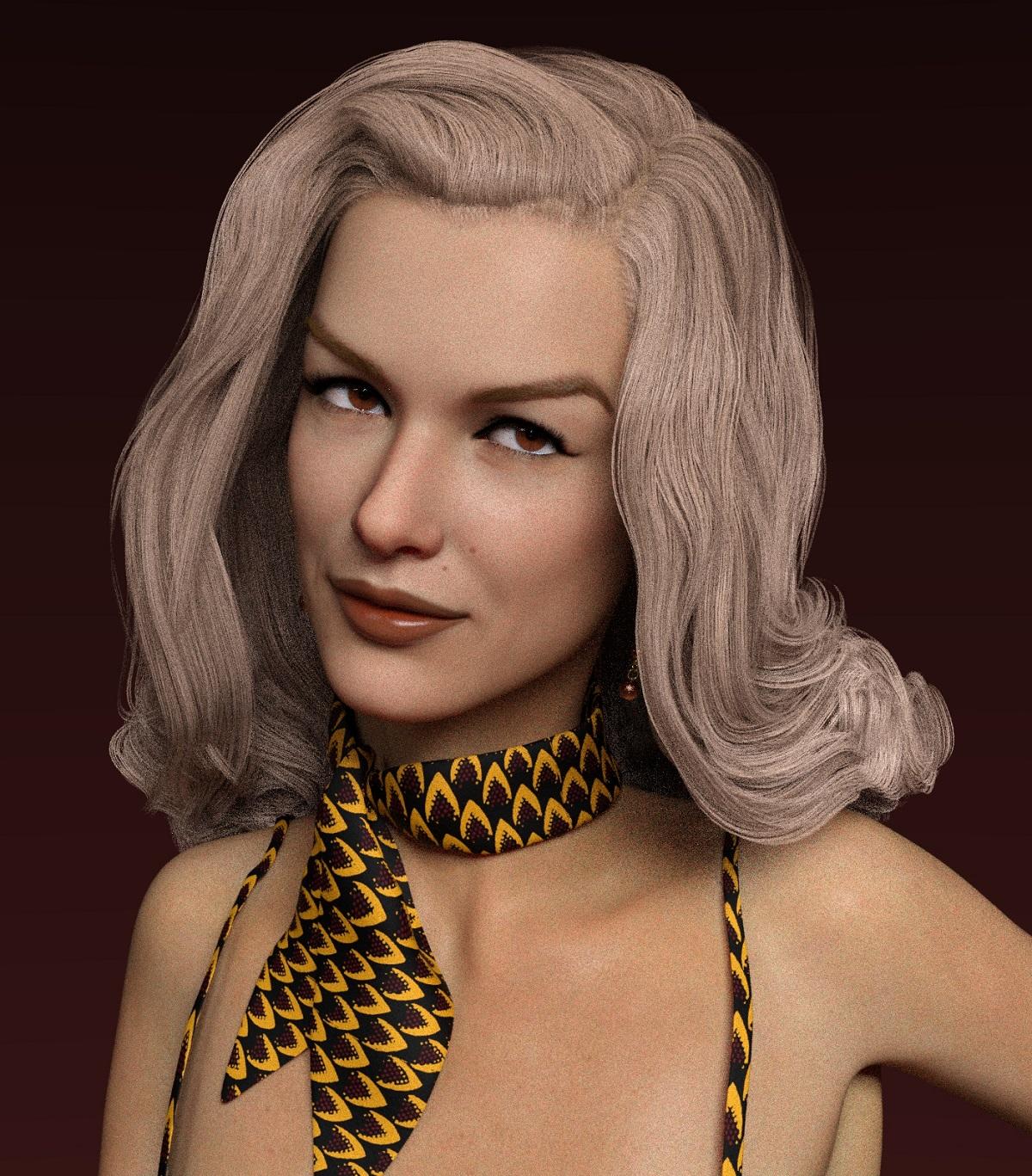
These were Chanel's skin + 4.15 PBR Iray skin shaders. I don't think I used them right but it's understandable, because I don't know what I'm doing. (I still don't understand Filament.) But it doesn't matter as long as the results look nice to me.
Hair is Fane Hair for G8F. I just decided to move it back so y'all could see her face better.
Crashes Due to FilamentThe crash window link hasn't worked for ages. Tickets can be submitted here:
Daz 3D | 3D Models and 3D Software by Daz 3D
I disabled Filament to avoid switching to it accidentally and crashing DS after experiencing that a few times, since I don't do animations and my machine is good enough for most Iray renders.
Michael 8.1nemesis10 said:
The hair on the head is still filament hair by RedzStudio.
I don't see any hair by that name by Redz in the shop. Do you mean Electro hair?
*edit* Nevermind, I see it is Electro hair. Thanks!
RSSY 3Delight And Iray To Filament - dForce Hair?Okay. I haven't picked up RSSY 3Delight And Iray To Filament yet because I'm waiting for it to go on sale. But I did have a question before I plunked down any money for it.
Now I'm not gonna lie; I love Filament and its speedy renders, but the way it makes a hash of certain shaders is something I would love to correct. That being said, I've learned the hard way that dForce hair and fur...really doesn't render well when put through Filament. So does RSSY 3Delight And Iray to Filament correct that? Or is that something I'll have to fix manually? And while we're on that topic; how do I fix that manually?
Michael 8.1melissastjames said:
nemesis10 said:
The hair is 8.1 body hair and vellum hair, filament hair and miles beard.
I meant the hair on his head.
Looks to me like redzStudio's Electro hair https://www.daz3d.com/dforce-electro-hair-for-genesis-3-and-8 with an alternate Hairshader.
Ciao
TD
Michael 8.1The hair on the head is still filament hair by RedzStudio.
Michael 8.1nemesis10 said:
The hair is 8.1 body hair and vellum hair, filament hair and miles beard.
I meant the hair on his head.
Crashes Due to FilamentI'm seeing some Daz Studio crashes with certain products when the viewport is set to Filament. Happens when I load the set and then switch to Filament or if I have the viewport set to Filament before I load the set.
Anyone else experiencing this?
And, sidenote, where can we submit bugs now? The link from the bug window when DS crashes no longer works.
Tim
Michael 8.1melissastjames said:
nemesis10 said:
I decided to try a quick render of Michael 8.1 HD with some Redz hair and a little muscle and vein supplied by AME:
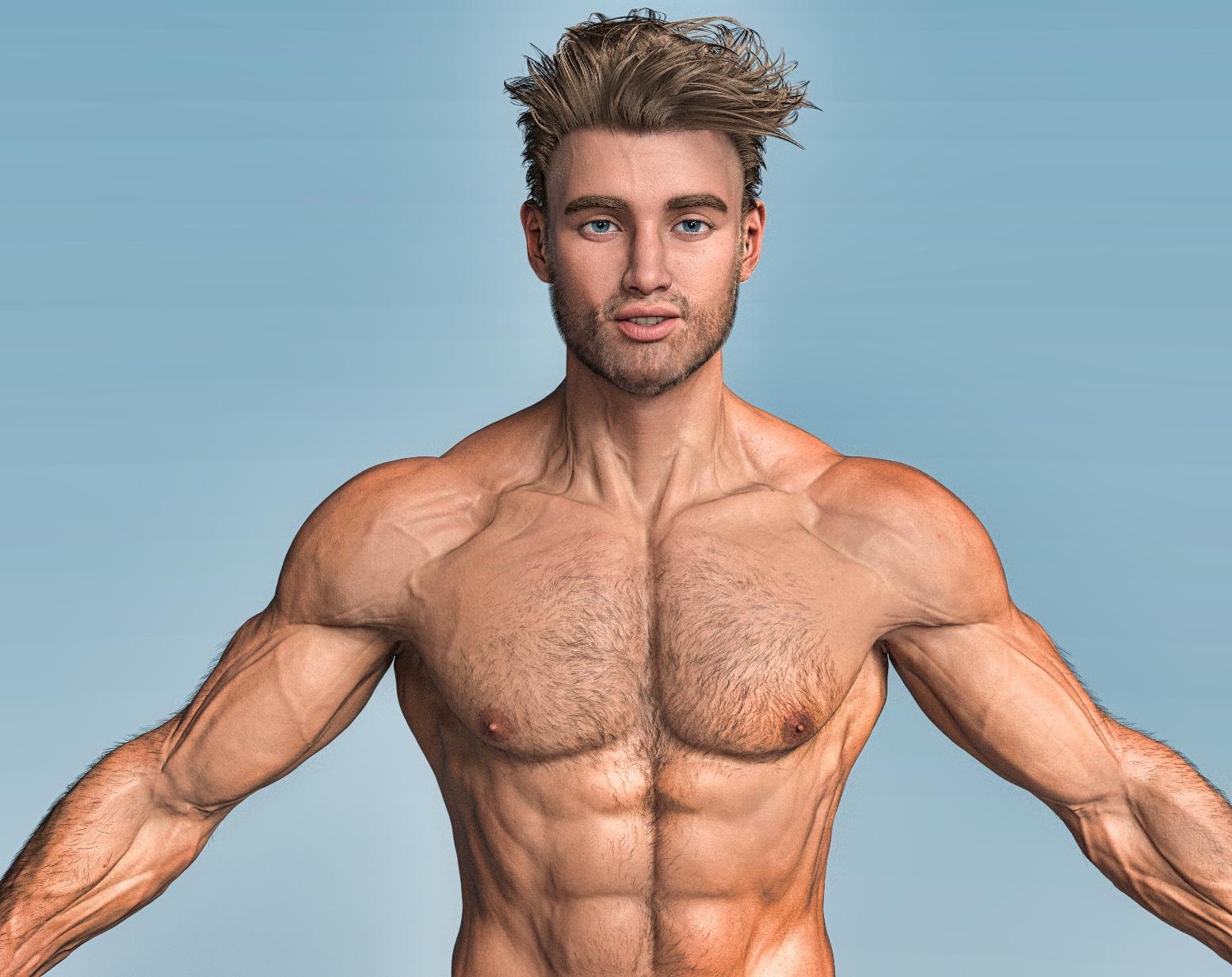
Can I ask what hair that is?
The hair is 8.1 body hair and vellum hair, filament hair and miles beard.
Daz 4.14 grrrrrrrr!alx said:
The nodes will be created when you render or use Iray drawstyle. You can also create a scene with the Singletons and use Edit>Preferences>Scene (Daz Studio>Preferences>Scene for Macs) to tell DS to load it when creating a new scene.
That's as maybe Richard, but it seems a very slow and complecated method compared to how simple it was before they changed everything.
that's the price we sometimes pay for progress. filament is totally worth it, if you ask me
Filament is worth [very little] to me. But thats just me. To each their own
Rendering hair timesThere is no surprise that hair takes so long to render as character geometry contains 20 000 polygons and some average hair contains 200 000 polygons with lots of transparency and reflections. putting one hair in the scene is comparable to putting few Genesis 8 figures.
Older hairs from victoria4 models render much faster since it usually uses a different kind of geometry
3delight rendering speed greatly depends on the lighting. more light sources means slower rendering. I don't use 3delight anymore so can't tell more details, but I think at this time you can just use filament instead of 3delight.
hwgs1971 said:
I'm no expert, but I recently figured out dForce hair takes much longer to render than non-dFroce hair. So when I am setting up a scene I use non-dForce, then when I am ready for the final print I replace the hair with dForce. Some dForce hair, like Rockz, takes a lot longer than other dForce hair, like dForce Side Bob. Also Jam hair times can vary wildly depending on the pose. And I have a Corsair One with a 2080ti and struggle with these times. I don't know if a 30xx series card is worth it because I've only seen 20% increase in render times in reviews. 30 minutes, 24 minutes,...what's the difference, not enough to justify an expense like that.
You probably used incorrect terminology here, as it is not dForce hair but strand based hair. that kind of hair has just a ridiculous amount of geometry as it models every hair strand. but it looks pretty realistic
dForce can be applied to any hair. just like it can be applied to any item
content designers unfortunately do not give a shit about optimization but I think it may be a good idea to mix strand based hairs with normal old-style hair as strand hair is pretty good for bangs but not that much use for the other places
Daz 3D is part of

Connect
DAZ Productions, Inc.
7533 S Center View Ct #4664
West Jordan, UT 84084Licensing Agreement | Terms of Service | Privacy Policy | EULA
© 2026 Daz Productions Inc. All Rights Reserved.