-
Stop genesis from loading morphs
Create two versions of your genesis X figure. One for setup of new characters, and one for posing and using it. The creation one can be the default one and stay as it is, and you just setup characters with it. And when you saved a character with it, simply copy the used morphs to your new lighter figures morph data folder.
The lighter one should only contain pose related morphs and joint controlled fix morphs, and the morphs that you actually use on your custom character(s). You can create such a custom figure by selecting "File > Save As > Support Asset > Figure/Prop Asset.
Make sure to strip out all the morphs from that figures data folder that you do not need. I would recommend taking out all those hd shapes especially since they take alot of time to load and several can really lead to insane loading times. My default g3 - g8 runtimes are massive, several gigs of morph data from stuff I bought over the years and my own morphs, so I usually look at loading times of several minutes if I would use the default figure for my characters... I could not suffer this anymore, so this is a workaround that indeed works well.
I still would like to see some system by DAZ so you can manage which morphs the figure should skip loading by default, perhaps on a global level or even per file. That way you could really get away from those insane load times once your runtime starts filling up. It is not just loading times, it also makes pose loading and saving slower, especially when youre working with the excellent puppeteer pane.
Novica & Forum Members Tips & Product Reviews Pt 13Thanks, I opened my computer and looked at my character file and G8M are divided at 264 like you noted. 1 - 264, 265 - 398. But it only seems to break them up in the picture pane to the right of the file listing. G8F is 1 - 264 and 265 - 791. I think I buy a bit too many characters. And I have more in the cart right now.
I certainly have too many characters ... Addicts are us...
I am the opposite. I have too many clothes. I need more characters as I'm invariably too lazy to use the head & body morph products I've bought.
XTransfer Module 1- Genesis 3 to Genesis 8 Morph Converter (Commercial)I've had a few issues with morph dials that when transfered cause duplicate ID errors in Genesis 8. Zevo sorted me out. He told me to export the Genesis 3 dialed morph, re-import the morph to Genesis 3, adjust rigging, and save as a 'clean' Genesis 3 morph. I could then transfer those 'clean' morphs to Genesis 8 safely. (I then removed my 'clean' genesis 3 dials from my library.) I can't stress enough that it helps to do all this work in a test library directory before moving it to your final library.
1) New Project, and load Genesis 3, then set it to base resolution.
2) Dial up the shape you want to transfer, fully dialed with all the morphs you want to use will become a single morph representing a complete shape.
2a) export this shape as a wavefront obj. Choose names that are different from the originals.
2b) You may want to repeat this a few times since for instance you may want to dial up face versus body morphs separately. Elf ears etc.
3) New Project, and load Genesis 3, then set it to base resolution.
4) Edit->Figure->Morph Loader Pro
5) Select convert to Daz from Daz, Vertex Only, and choose all your saved objs. And these objs will now be morphs you can dial.
6) Edit the parameters for all those dials. For instance you might want to set them from 0 to 100%, rather than the default -100 to 100%. Change colors or whatever you want.
7) Select Tools->Joint Editor, so you can see the bones rigging your character. (You can see that if you dial the original morph, the bones adjust, but your new one, simply does not.)
8) For each imported morph, dial, and rig the morph by;
8a) dial the imported morph
8b) Edit->Figure->Rigging->Adjust Rigging To Shape, and make sure only the regions you want adjusted are selected. For instance... head morphs might be just the head bones and face rigging. (Don't do 'adjust orientation', that rotates the bones.. not good.) Hit accept. (Your morph should still be dialed for this.)
8c) On the morph dial, select Edit Mode.
8d) On the morph dial, select, ERC Freeze.
8e) On the morph dial, select Edit Mode (turning edit mode off).
8f) You now have a morph which you can dial that adjusts your rigging as you dial it. Play with it and see how the rigging adjusts. Dial this morph off, and do the next morph shape you want. (Back to step 8a.)
9) After you have set up all the morph dials you want (body and head?) you need to save it with File->Save As->Support Asset->Morph Asset(s)...
10) Select an Asset Directory that makes sense. This important, since if you screw up, its easier to wipe a test library than clean up your real library, and you probably don't want to keep your new dials anyways. I normally keep a My Test Library to test products from Daz. (I've had enough errors over the years that I do this religiously missing textures, or other assets. I test it everything I buy.)
11) Select a Vendor Name, and a Product Name that makes sense to you.
12) Select each of the dials you created, and save it.
13) Start a new project, and load Genesis 3.
14) You can find your morphs under the Parameters tab, Genesis 3/Morphs/Morph Loader. (You can dial it now.. and if the Joint Editor tool is running you should see the rigging adjust with your morph dial.)
15) Favorite those morphs, and use XTransfer to move them to Genesis 8.
This might seem like a lot, but its really quite easy and straight forward. This is also probabaly what you'd need to do for figures which are really just a pile of dials and morphs. I havea a few from Daz that are like that.
Just to clarify the solution I gave was because the source product on G3 was created and saved out with issues. There was nothing XTransfer could do to help, hense the solution of merging as one morph was recommended. I just need to specify this because I do not want people thinking this is a workflow that is required before using XTransfer. This was a once off issue regarding that character product. Also step 7 to 12 you can do with 2 clicks using Shape Rigger:)
Auto Muscle Enhancer HD [Commercial]Render with Marmoset..I have no time to render in DAZ.
What is Marmoset?
Ciao
TD
Well, thank you this looks really interesting. I didn't even know it existed. Is anyone here using this on a Macintosh? Also, big question: How well do the iRay Shaders transfer over to Marmoset? Is is quite a job to get skin to look correct?
Bluejaunte appreciationThis mixed morph character uses Noemi's skin with freckles. I think the freckles look very realistic. I dialed down some of the bump, normal, and roughness settings, because the defauls were stronger than I wanted for this close portrait.

just curious, is this rendered in blender? it doesn't look like a daz render.
No, it is Daz Studio Iray.Excellent freckles, excellent render!
Is it possible to move Daz studio itself to a portable driveI do not have a very good computer. 8 gb of ram and only 250 gb of storage, however it does decently enough rendering iray as long as I stick to few figures and a well lit background.
I recently found out information that when the system runs low on Ram the computer will resort to the extra memory to give rendering a boost. For this reason I bought an external hard drive and I was wondering if rather than having daz on my computer can I put it on the drive instead which has more memory? I have quite a number of DSaz assets, would I have to move them individually to the external drive? Can I move the folders to my external drive or do I have to install Daz from scratch on said drive? Will I be able to transfer all of my assets to the external drive?n Is it even possible to do that?
You can esily run DAZ Studio from an external drive. However, given the specs of your computer and the fact that you're not simply opting to increase your memory, I'm going to assume that it's an older model with USB 1 or USB 2 ports, both of which are slower than the internal SATA connections. Also, the majority of external drives are also slower than their internally mounted counterparts... though you do see the slower 5800rpm drives in lower priced systems. Since a system is only as good as its weakest link, the odds are that you'll have more data storage but actually run slower using an typical external drive.
Carrara Challenge # 52 - Carrara Cryptids WIP thread--Entries EndedHere is the latest progress on the Woofus. I had a couple of my usual false starts. Currently I'm experimenting with strips of polygons in curls for his fur. Still a total WIP.
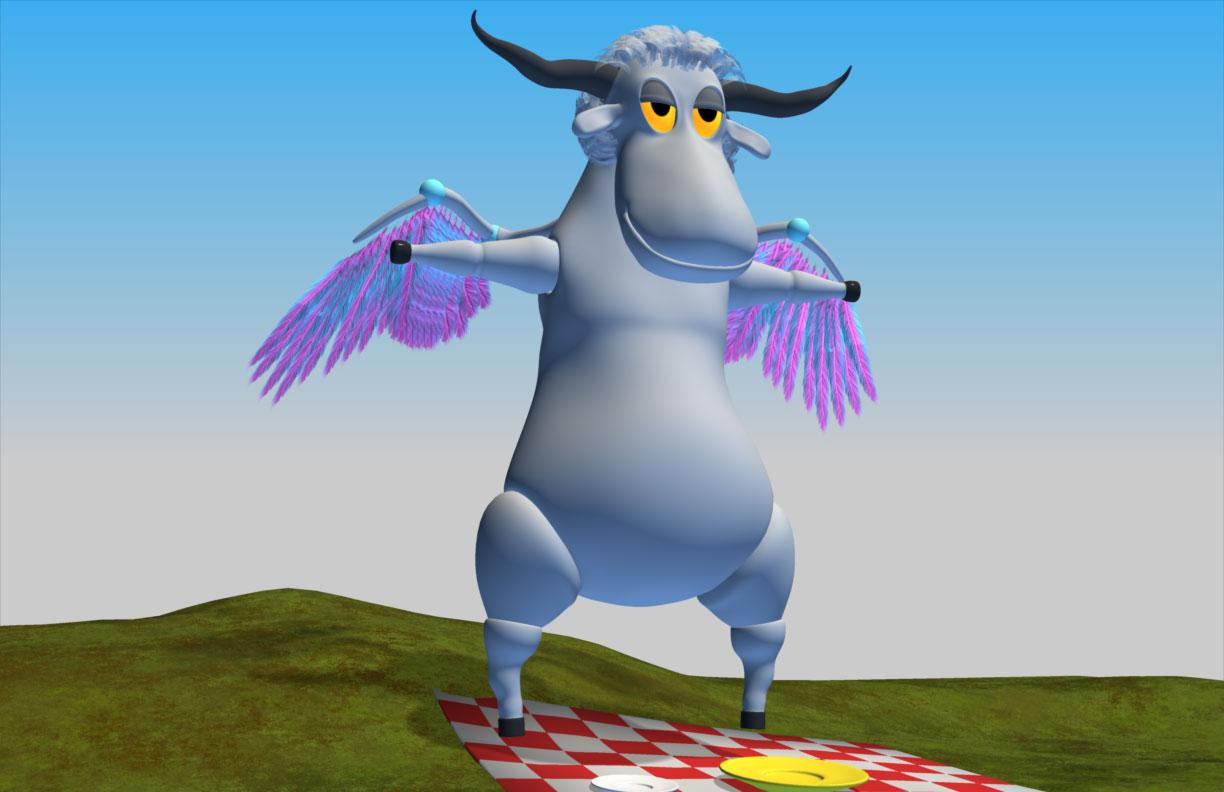
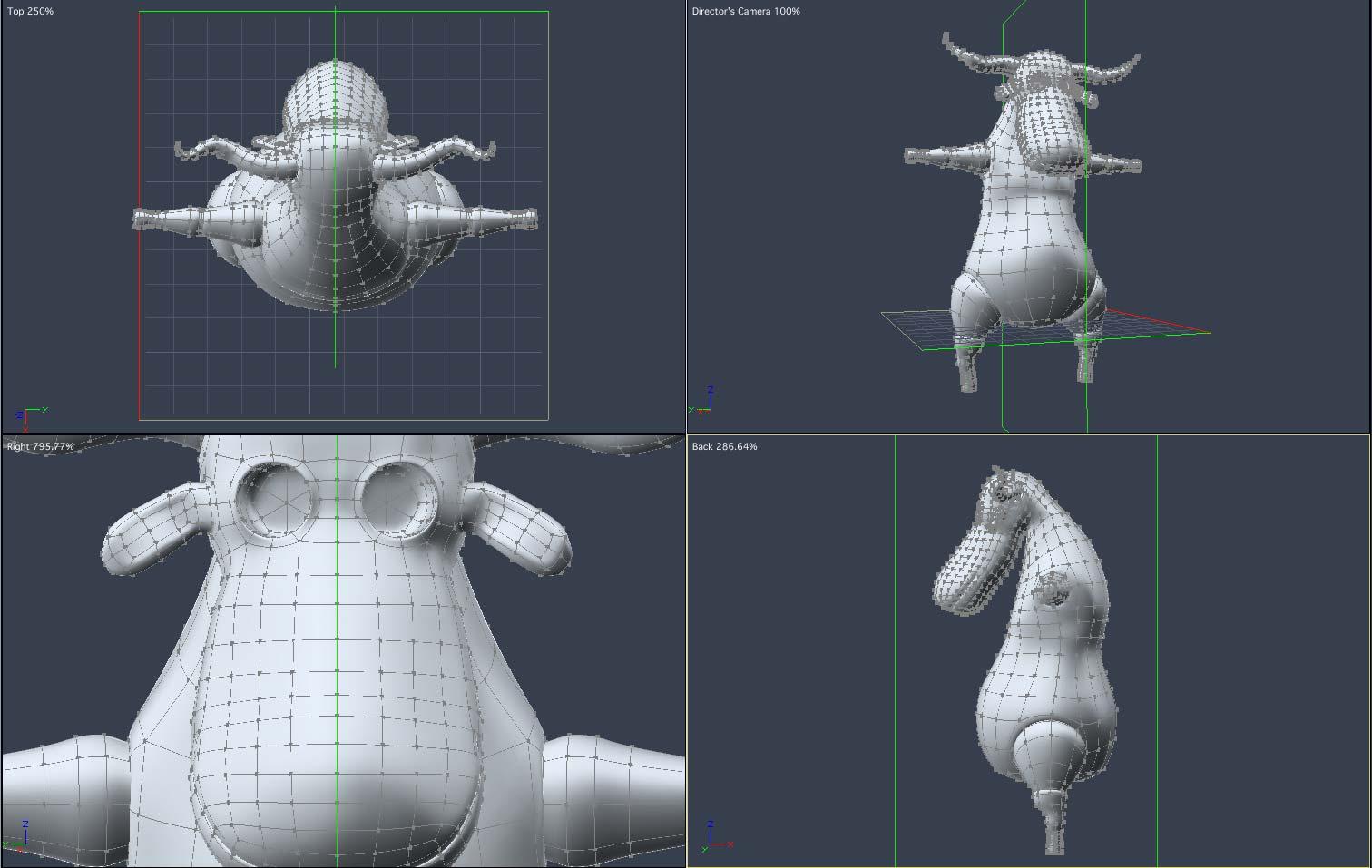
Last few days were spent trying to understand how bird wings close up and fold under. Finally got it to work, I think, though this is bare bones example:
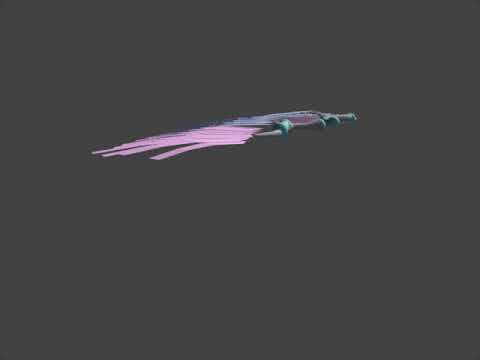
Wish it was an elegent setup but the feathers folding up are 'brute forced' rotated indivudually.
 Not so difficult, there aren't that many. I'll provide an explanation later how it all fits together. Feathers on the model are just a quick temporary texture, they will be replaced so as not to be all stretched out. Also, he's missing the rest of the feathers - they're coming.
Eyeballs and lids were all modeled circular and spherical. I then created a morph for the eyesockets and stretched them on the z axis and tilted them slightly inward at each other (for more goofiness). The eyeballs and lids are separate objects, grouped, and stretched along the z axis to match the empty morphed sockets. By creating a Group for the eyeball and lids, one can stretch the object and when rotates it behaves as if it is spherical and won't tumble' from end to end.Scene is still evolving but probably gonna be a picnic / tea party deep in the forest.
Can Dformers be used to flatten or smooth mesh?I agree, in this situation, it would be blender immediatly for me. Export, smooth, import as morph. Because with deformers it seems extremly difficult, if not impossible...
Is it possible to move Daz studio itself to a portable driveI do not have a very good computer. 8 gb of ram and only 250 gb of storage, however it does decently enough rendering iray as long as I stick to few figures and a well lit background.
I recently found out information that when the system runs low on Ram the computer will resort to the extra memory to give rendering a boost. For this reason I bought an external hard drive and I was wondering if rather than having daz on my computer can I put it on the drive instead which has more memory? I have quite a number of DSaz assets, would I have to move them individually to the external drive? Can I move the folders to my external drive or do I have to install Daz from scratch on said drive? Will I be able to transfer all of my assets to the external drive?n Is it even possible to do that?
[Released] Advanced Collective Transform Tools (Commercial)Thanks a lot, again, for the answers.
I have many of such tools available in Unity, so another dream would be to have utility
to transfer positions of objects and its instances from Unity to Daz Studio.
I can quite easily transfer Collada or OBJ from Unity to Daz Studio,
but have not succeded to keep instances in Daz Studio - they just become normal objects.
Arg I don't know unity, so I won't be able to help you.. But I have the same problem with Blender, and I have ideas on how to solve this on Blender (just have to learn a bit more of python).
[Released] Advanced Collective Transform Tools (Commercial)Thanks a lot, again, for the answers.
I have many of such tools available in Unity, so another dream would be to have utility
to transfer positions of objects and its instances from Unity to Daz Studio.
I can quite easily transfer Collada or OBJ from Unity to Daz Studio,
but have not succeded to keep instances in Daz Studio - they just become normal objects.
XTransfer Module 1- Genesis 3 to Genesis 8 Morph Converter (Commercial)I've had a few issues with morph dials that when transfered cause duplicate ID errors in Genesis 8. Zevo sorted me out. He told me to export the Genesis 3 dialed morph, re-import the morph to Genesis 3, adjust rigging, and save as a 'clean' Genesis 3 morph. I could then transfer those 'clean' morphs to Genesis 8 safely. (I then removed my 'clean' genesis 3 dials from my library.) I can't stress enough that it helps to do all this work in a test library directory before moving it to your final library.
1) New Project, and load Genesis 3, then set it to base resolution.
2) Dial up the shape you want to transfer, fully dialed with all the morphs you want to use will become a single morph representing a complete shape.
2a) export this shape as a wavefront obj. Choose names that are different from the originals.
2b) You may want to repeat this a few times since for instance you may want to dial up face versus body morphs separately. Elf ears etc.
3) New Project, and load Genesis 3, then set it to base resolution.
4) Edit->Figure->Morph Loader Pro
5) Select convert to Daz from Daz, Vertex Only, and choose all your saved objs. And these objs will now be morphs you can dial.
6) Edit the parameters for all those dials. For instance you might want to set them from 0 to 100%, rather than the default -100 to 100%. Change colors or whatever you want.
7) Select Tools->Joint Editor, so you can see the bones rigging your character. (You can see that if you dial the original morph, the bones adjust, but your new one, simply does not.)
8) For each imported morph, dial, and rig the morph by;
8a) dial the imported morph
8b) Edit->Figure->Rigging->Adjust Rigging To Shape, and make sure only the regions you want adjusted are selected. For instance... head morphs might be just the head bones and face rigging. (Don't do 'adjust orientation', that rotates the bones.. not good.) Hit accept. (Your morph should still be dialed for this.)
8c) On the morph dial, select Edit Mode.
8d) On the morph dial, select, ERC Freeze.
8e) On the morph dial, select Edit Mode (turning edit mode off).
8f) You now have a morph which you can dial that adjusts your rigging as you dial it. Play with it and see how the rigging adjusts. Dial this morph off, and do the next morph shape you want. (Back to step 8a.)
9) After you have set up all the morph dials you want (body and head?) you need to save it with File->Save As->Support Asset->Morph Asset(s)...
10) Select an Asset Directory that makes sense. This important, since if you screw up, its easier to wipe a test library than clean up your real library, and you probably don't want to keep your new dials anyways. I normally keep a My Test Library to test products from Daz. (I've had enough errors over the years that I do this religiously missing textures, or other assets. I test it everything I buy.)
11) Select a Vendor Name, and a Product Name that makes sense to you.
12) Select each of the dials you created, and save it.
13) Start a new project, and load Genesis 3.
14) You can find your morphs under the Parameters tab, Genesis 3/Morphs/Morph Loader. (You can dial it now.. and if the Joint Editor tool is running you should see the rigging adjust with your morph dial.)
15) Favorite those morphs, and use XTransfer to move them to Genesis 8.
This might seem like a lot, but its really quite easy and straight forward. This is also probabaly what you'd need to do for figures which are really just a pile of dials and morphs. I havea a few from Daz that are like that.
How to fill the gap? (breast bridging)Thank you Loony and Sven Dullah for trying to help.
1) I am well aware of the Meshgrabber workaround. I just happen to do it in Blender with the Grab function.
2) dformers involve a lot of fiddling and DForce is not the appropriate tool since the problem is not about gravity but stretching/pulling the fabric away from the cleavage area...
These solutions involve working on the cloth itself, so it has to be done every time you change clothes... :-(
The solution I am suggesting would be, in my sense, a more elegant and practical way of adressing the bridging problem. By making a projection morph for a particular character there would be no need to tweak clothes every time you change them...
I know this can be done technically since universal tools do exist. I would like to use the same principles but for a given character. I just don't know how to do it...
I'm trying to convert an object to a prop or clothing item without the transfer utility?If you want to fit you really need to use the Transfer utility. You can then edit the weight maps or add extra bones for posign the hair if desired. Trying to get an item to fit manually is going to be a pain, at best.
I'm trying to convert an object to a prop or clothing item without the transfer utility?Another thing you can try
is to load the hair but don't move it
Load your character,
then adjust the character (scale them up or down using the scale-x, scale-y, scale-z) so they line up with the un-moved hair
Parent the hair to the figure and try the transfer that way
Fully functional DAZ3D Characters in Unreal EngineI've been trying to import the standard gen 8 character as fbx into ue4 for some time now, but I don't see any jcms there, although the box "morph" is checked". As of yet it never has worked for me, so I'm asking if it is possible at all? Or do I have to do something with the morph export rules?
P.S.: Works now, but how to export into blender. The bones look strange in blender. Is this something with the bone orientation or is fbx not the right format for blender?
Mousso did a man and I love him ;)I was finally able to finish my render of Ashur and paired him with Romina

Thrilling render!
Armand and Asher - couldn't afford the DO base Valentino so Armand here without that morph base
Dragon Boys
https://www.daz3d.com/gallery/#images/994471

Made with...
- DAZ Dragon 3 Pro Bundle
- Through the Woods
- Morley Hair for Genesis 3 & 8 Male(s)
- Beast Master Outfit for Genesis 8 Male(s)
- Vinnuth Kriegor Battle Mega Armor for Genesis 8 Male(s)
- dForce Iron-Fire Outfit and Weapons for Genesis 8 Male(s)
- Clifford Hair for Genesis 8 Male(s)
- Asher HD for Genesis 8 Male
- Armand HD for Genesis 8 Male and Valentino 8
I hope that dragon don't sneeze!
genesis-generation-x2 not working - always spits an error messageI try to get my Vic 4 Characters to Genesis 3. I read the menual and watched several tutorials, but somehow this tool won't work. I'm getting this error:
GenX - Transferring morphs. Creating clone morph ... Loading figure ... E:/DAZ Studio/My Library/data/DAZ 3D/Genesis 3/Female/Genesis3Female.dsf Creating intermediate clone morph ... Loading figure ... C:/Users/chris/OneDrive/Dokumente/DAZ 3D/Studio/My Daz Connect Library/data/cloud/1_16280/data/DAZ 3D/Genesis 2/Female/Genesis2Female.dsf Creating intermediate clone morph ... Loading figure ... C:/Users/chris/OneDrive/Dokumente/DAZ 3D/Studio/My Daz Connect Library/data/cloud/1_16280/data/DAZ 3D/Genesis 2/Female/Genesis2Female.dsf Loading figure ... Error loading figure. Error creating intermediate morph from clone. Error creating intermediate morph from clone. Error creating morph from clone.Does anyone else have this problem?It logs you out when you change IP. I have a dynamic IP that changes when I lose power, etc., but I stay logged in until that time. If logged in via a VPN, you'll change IP constantly, so that might be a cause. On my tablet, using Wifi, I always have to log back in. Not a hardship since I let the browser remember my login.
NB: Maybe use a more descriptive subject line in future? I had no idea if this was about a morph issue or ED.
is there a Face Transfer threadwhenever i apply skin 8 skin after face transfer face does not look same is there any solution i only wanted to look model more realistic.
Daz 3D is part of

Connect
DAZ Productions, Inc.
7533 S Center View Ct #4664
West Jordan, UT 84084Licensing Agreement | Terms of Service | Privacy Policy | EULA
© 2026 Daz Productions Inc. All Rights Reserved.