-
IRAY Photorealism?
Daz PBR Skin on Filament.

 PBR rendering. Reduce Brightness.
I had this problem solution was posted on the filament thread.
You have to create ->new filament draw options node
and there you will be able to adjust tone mapping.
for some reason, it does not copy proper options from Iray
Buying a CPU for 3DelightOutrider are you talking about the Filament that came with DS 4.14, or is there a seperate Filament plugin for purchase that needs to be installed. I did in fact make some attemps to use filament and I just was not satisfied with the results. In paticular I could not find any hair that worked at all. But I agree, it was lightning fast. I attached a couple of photos of renders I made with 3DL and I am still not totally satisfied with the looks of the character's skin, but I was able to add an environmet with mutiple lights with tons of translucency effects and geometry and the scene rendered in 10 seconds. If I can get 6 frames per minute that makes animation some what feasable. I have not seen the latest updates to filament so I would not rule it out (if they fix the hair thing).
Richard, I think I have the info I need to make my decision on getting a multiple core Ryzen, I am absolutely going to do it thanks for the feedback you and everybody here helped me decide.
Now I just need to start learning all the ins and outs of 3DL lighting, shaders and materials. Thats is already a pain, since I have the Advance Spot Light but get a completely dark character with only the cornea illuminating slightly even if I turn light intensity all the way up. Any ideas why???
MetaHuman Creator - an Insane Level of Competition...WendyLuvsCatz said:
but other's here believe the DAZ users will be falling over themselves to use it when D|S cannot even import a rigged FBX file from most apps

and I don't see the vast majority of DAZ users using anything but studio let alone Unreal Engine

most cannot even import an objnot counting the active forum users and Premier Artists in that judgement we are the 1%

I'm a DAZ user for 15+ years and I would love to be able to do with the MH figures what I can do with DAZ figures - and do even more, actually. I'd love to see high quality real-time rendering (rather than the poor show we have with Filament), better animation tools, better cloth sim and soft body physics. Somehow I don't see that happening with MetaHuman - at least for some considerable time. I don't think it is aimed at the same market.
Yes, I'm one of those who like to "dress up dollies" although I would describe it more like putting appropriately dressed (or undressed) characters in scenes which tell a story. I'm not a content creator or a movie producer. I don't play PC games so have no interest in run/crouch/jump/shoot animation blocks (which seem to be the basis of most game animations). Nor do I have much interest (yet) in characters that speak to camera. Nor in mocap. But a better designed animation timeline would be very welcome and a few aniblock type motions would certainly be helpful.
So what I'm trying to say is that there is distance between what I like to do in DAZ Studio and what seems to be the purpose of these new MetaHumans. I may well have misunderstood that purpose or the direction and possibilities, however.
Buying a CPU for 3DelightIf you want to do animation, have you looked at the new Filament plugin? That could be a better option for you, after all it can render in near real time like a video game even at higher resolutions.
And there is no issue with having RTX installed. 3Delight simply doesn't use a GPU, whether you have one or not.
Daz Studio Pro BETA - version 4.15.0.30! (*UPDATED*)johndoe_36eb90b0 said:
@DoctorJellybean Hmm... what is the Geometry mesh offset?
I presume it must be considerably larger than 0.010-0.020 since it is supposed to appear over instead of on skin.
Do you happen to have any others that sit closer to the figure (perhaps wet skin or dirt geoshell)?
Also, can you please test with negative Xtrans?
Somewhere, maybe in the 4.14 threads, an issue was reported whereby geoshells at sufficient distance show this effect. Some work may have been done to fix it but it is easy to produce an example of the same effect

That's G8 basic female at -8000 from a camera at (0,120,120) Y rotated 89.15 degrees. The G8F has an Iray "flat paint" shader in red and the geoshell the same in green. The mesh offset is .01. It's a Filament render, the effect does not show up in an Iray render with those settings. Minor movements shift the polygons massively, changes in the drawing algorithm do to; this is texture shaded:

My impression was that the original report would repro even if the camera was close to the figure, just so long as they were at a large scene offset. The effect disappears if the camera is axis aligned, it also disappears for me at a focal length of around 250mm; i.e. if I viewport-zoom the camera in and decrease the focal length appropriately (it starts out as 10000mm) the effect in texture-shaded disappears then. It disappears earlier in Filament and I can't repro it with Iray. The math accuracy requirement in the first shot is .01/10000, i.e. 1E-6, the math accuracy of IEEE FP16 is about 6E-7. It isn't dependent on positive or negative X but may depend on a camera/viewport transform that has to do math on (x,y,z). It's difficult to fix this kind of thing, the work round is to either remove the geoshell or increase the mesh offset.
UPDATE: I can get it to happen in the Iray viewport with a geoshell offset of 0.001 and in an actual render with an offset of 0.0001, but it may actually be some subsurface details of the shader I used:
 [Released] MARSA Anaglyph3D [Commercial]
 It's time to have some fun and make your renders really pop! MARSA Anaglyph3D easily creates anaglyph renders from your Daz Studio scenes with no external applications needed! Anaglyphs are those popular red-blue, stereoscopic 3D images from images and videos on the web, movies, and even comics! Combining a red and cyan filtered render into one 3D image, anaglyphs are incredibly cool and fun, and easy to do now in Daz Studio!
MARSA Anaglyph3D supports using Iray, Filament, and 3Delight to create anaglyphs.
Red-Cyan 3D Glasses are required to properly view the Anaglyphs.
A 360 Spherical lens camera is included so you can create 3D images for VR, import into 360 viewers, or create HDRIs!
https://momento360.com/e/u/8056d6a703ca4ff09e6321e5fe305df3
https://momento360.com/e/u/93233fbd90c145e180e28eebfb73ca11
What's Included and Features
- MARSA Anaglyph3D
- MARSA Anaglyph3D Script
- Spherical Camera
- Detailed Manual
MetaHuman Creator - an Insane Level of Competition...Daz3D has already made some smart moves, they're positioned in the Unreal Market, they have avatar stuff likeTafi, if they're able to make their clothing work with something like Metahuman it would be a big deal. (I don't know if there's a "standard human rig" for UE)
Just don't understand why they've implemented a low level real time renderer like Filament (which was originally meant to work on smartphones), on the other hand, I have no idea what is possible with Filament.
Maybe one day there'll be a version which has the quality of an Unreal or Eevee renderer...
Thanks Daz3d!Wow. Just perusing these pages again (yeah.. rendering on my real machine) I had forgotten that I got so much stuff over the past several holidays.
It's funny how many of these things I had already opened and optimized for use in Carrara, but have just been so busy since, that I forgot how many Cool freaking things I've added to my runtimes!
I was wondering what I was going to watch tonight on TV before I crash, and these pages answered that for me: Carrara TV, hosted by Phil Wilkes!

A little animation theory and technique is absolutely Perfect for the heavy lifting I'm doing in animation right now. I gotta say, Rosie 5.5 is an absolute joy to work with! Rosie 5 is too, but she has some difficulties with her that are just absent from the new one.
I also saw Phil's Luxus Kit in here. I have to fire Luxrender up again and try it out with this new pack. I had a lot of fun testing it before, and I feel so much more confident at using other render engines now.
Wow... All This Stuff!!!

I'm in a place where I need to start building up some new scenes to animate into. just using the things I've been seeing in these pages is enough to do nearly everything on my docket, including a lot of the cast that goes with them.
I just made that Legacy Fun thread, and this thread has a good amount of legacy and new.
Seeing those old TheAntFarm Movie Stands reminds me of how wonderful those things are to play with. Put anything on or in them and render. And in Carrara we have such power to make them look any way we want them to - even just using the preset shaders that come with Carrara!
Well, Rosie's running from a xxxxxxxxx (oops... almost spoiled it!) which will take most of the rest of the night to render, so since the real Rosie just fixed me up with popcorn and a soda, I'm off to watch some incredible lessons on animating in Carrara
Oh... speaking of which, my little foray into Daz Studio:
It was a mention of Filament (near real-time PBR render engine) that got me to try DS as a render studio just to see what it was all about. Well then it turned out that the beta was now a General Release, which also included some features of GraphMate, by GoFigure, so I decided to try my hand at animating in DS. I didn't like it to the point that I gave up all of it almost immediately.
An e-mail from Daz regarding the ORK (Octane Render Kit) got me to take another look. So this time I typed a few of my issues into Google (forum search is like... what forum search?) and found a Lot of answers that got me to investigate a lot deeper. The funny thing is - it was Wendy answering almost All of them! LOL Hi Wendy!
So now that I've unlocked a lot of the secrets behind animating in Daz Studio, I'll likely be writing some articles and making some videos about it. To do things in DS even close to the way I can in Carrara requires a certain workflow - but using that makes it failrly bearable - but nowhere Near as wonderful as our good friend Carrara!
If I was CEO of Daz 3D, I'd put more chips into the Carrara basket and push this bad boy forward, like it should! Funny how a neglected 'legacy' app can be so powerful in all of its realms after so many years with no developmental lovin' from its parents!
Blown out colors in viewportPerhaps your preview is in filament mode?
Combining several animation/video files/transition visibleFishtales said:
@Sven Dullah
Rendering to a video isn't recommended in Studio as it can corrupt and you lose the video and have to start again. With an image series if some of them are corrupt, or you see poke through that you missed or one object passing through another, you can render only those images instead of the whole thing.
I understand. Just saying I've done (keyframed) animation in DS for about 10 years and never had a problem with corrupt frames. So I will continue to render to movie as it works well for what I'm doing. And I testrender in Open GL to avoid things like objects passing through eachother;) Must have been lucky, or maybe 3DL is more stable than IRay?
This is Filament, which rendered much faster.
...which was exactly my point...
Combining several animation/video files/transition visible@Sven Dullah
Rendering to a video isn't recommended in Studio as it can corrupt and you lose the video and have to start again. With an image series if some of them are corrupt, or you see poke through that you missed or one object passing through another, you can render only those images instead of the whole thing.
I have used Filament once to test it and it is fast and looks alright.
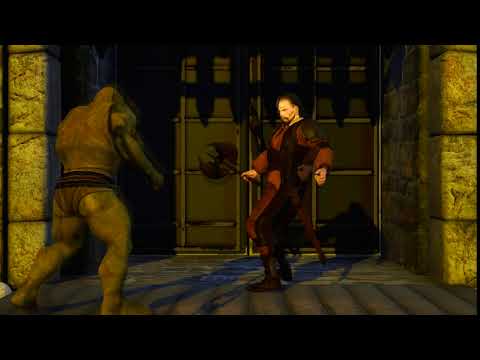
This is Iray.
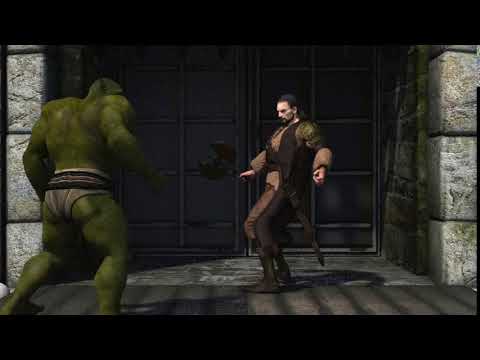
This is Filament, which rendered much faster.
 Combining several animation/video files/transition visible
Why offer advice on rendering speed and suggesting rendering to an image sequense when this has no impact on the motion of the animation? Why not instead offer some tips on successfully joining aniblocks together, as this is most likely the issue here? In my book it would be the wisest thing to first set up the complete animation so it works properly, and use OpenGL or filament to testrender and check that the motion is ok. Then it shouldn't matter how many parts the OP chooses to render it out in. Rendering to an image series has some advantages but also adds additional steps to stiching things together, but that should be a different story.
Daz Studio Pro BETA - version 4.15.0.30! (*UPDATED*)johndoe_36eb90b0 said:
Richard Haseltine said:
fatimaroncally said:
I closed the background thread at least 50 times without any drawbacks or damages. By the way I do use the scrit to open several instances. This script also only works when the background thread has been closed.
Use the script to create one or more additional DS instance shortcuts, so they are ready for use.
What is the point of launching another instance of DAZ Studio when the previous instance is still using both VRAM and system RAM until it exits?
I run multiple instances at once. No problem so long as I don't do dForce or Iray rendering in more than one at once. I avoid leaving the viewport in Iray mode and before I do this while another instance Iray rendering I check that the GPU has enough memory (VRAM) spare. Some of my scenes run to 15GByte of DRAM and I quite deliberately don't have a swap partition but I consider those big scenes; no more than two at once. With those scenes I will sometimes end-process DAZStudio because simply deleting everything in the scene (the fast way to exit) takes several minutes.
Filament helps a lot. Now that I've worked out how to tweak the "Filament Draw Options" settings to match the Iray preview I can use Filament to do expressions and, now the scaling bug has been fixed, set up HDRI backgrounds; both impossible in the Texture viewport mode.
My typical DRAM usage for a simple scene maxes out at 8GByte, roughtly 2GByte per character plus whatever the scene requires. Strand based hair in close-up maxes out my GPU (12GByte) so that is an unfortunate limit; I would be better off from every point of view with two 3070's rather than one TitanXP (which is what I have), but I'm not going to do that until the 3070's start getting sold for the NVidia list price!
So far as process exit is concerned normally I do delete everything in the scene before closing DAZStudio. I don't re-use DAZStudio instances for different scenes, it's a waste of time; I delete everything in the scene, close DAZStudio and open a new instance. Scene load time is so long that by the time I've loaded a new scene the old instance has exited. An exiting DAZStudio holds 2GByte of VRAM for a while (if Iray has been used in the instance) but it is released early in the close-down. DRAM usage decreases linearly with time and so long as the scene was empty it is quite fast, faster than loading an existing scene. (Often I open a new scene before closing others because of this...)
I've become very careful about leaving "Render To Window" windows open; the GPU memory is not released until the window is closed or saved. Sometimes I'm rendering iteratively while trying to work out a good Render Quality setting (I often start off at 0.1 - that was my default for a while), but I save the renders by copying r.png and, if required, the canvases from the temporary directory then resuming the render at a modified Render Quality and just work with one window at once.
Next instance is going to have less resources to work with, it's a workaround, not a fix for the problem with slow GUI element list traversal and destruction which I documented in the thread already with VTune Profiler.
We know a lot more about the load (scene and character) issues, see:
In fact the CMS work rounds in there do also benefit the DAZStudio close time, but I haven't measured by how much. My test scene towards the end of that comment series is a 15GByte scene. I've yet to time a "raw" close, where I do not delete the entire scene first, but I know that even deleting everything in that scene takes a long time, unacceptably long for me.
DAZ Studio developers should really sit down, do some code profiling on their own, and don't do any other changes on the code until they fix this -- it is embarrasing to have such an issue for so many versions already.
Some efforts have clearly been made; there are extra time logging messages in 4.14/4.15. Unfortunately it is a memory-thrasher as you established; close down time is critically dependent on the order in which items are freed, as clearly demonstrated by the delete-the-scene workround. I've had Intel engineers staring over my shoulder trying to work out why on earth a program faulted at a particular place, those guys drove back down to San Jose with VTune profiles akimbo but they still couldn't help; these problems are really hard. This is why I keep suggesting the Doctor's Solution; rather than trying to fix something avoid doing the thing that causes it ;-)
Combining several animation/video files/transition visibleCan you post your video?, I assume you are using iRay at 3840x2160K? one second 5 hours?, are you doing 60fps? Rendering as Raw video Unprocessed and not H264 or NV codec?
Had you tried animating using Filament Engine inside DazStudio?, my examples below, they were processed in less than 5 minutes.
 Possibility to lower the dome?
Wait, so you are using filament and not iray?
You should have told that earlier because we all assumed that you are using iRay like everyone else.
As I see filament has many problems and this function is not working for me as well. You just managed to find one more of its bugs.
Looks like Filament does not support finite domes at all and it does not draw ground either
Iray is working all properly
Daz Studio crashes on launch on macOS Big Sur beta 9dcmaia said:
Has anyone tried using the Win version of Daz on a Mac using CrossOver? I might give that a try.
Yup, it works nicely. However, Dforce will not work as it doesn't have any 'opencl cores' to work with and I can't filament to work properly. Other than that it works fine. Even Iray CPU rendering works nicely and reasonably fast.
Bump and Normal Maps for Character Skinszombiewhacker said:
@Zilvergrafix - I wasn't debating anything. I'm completely new to the subject, which is why I'm asking questions.
It would helpful if some character PAs could chime in with their perspectives. If you routinely create both bumps and normals for your characters, do you believe that the respective maps complement each other in any way?
probably a PA needs to create both maps because their product can be used on 3Delight, Filament and iRay, and now with external bridges the possibilities are bigger, and now more with AO, Roughness, Dual Lobe and Detail maps
Possibility to lower the dome?I am using 4.14 Pro, dome is set to both infinite and finite, with and w/o ground.
Testing: Infinite Sphere, Environment map "DTHDR Ruins", Ground Origin Y 50.000, Ground Origin Y -50.000 no change
Testing: Finite Sphere, ", Ground Origin 0, Ground Origin Y -500 there is a change but not in Filament, just in render and the horizont is distorted, arched. But at least it's doing something.
Now, when I think of a dome and raise myself lets say 50m my horizon moves up and it still runs... horizontally and does not bend. I don't think that observers in a crow's nest got their horizon bend on the edges... something's still wrong.
 Bump and Normal Maps for Character Skins
Roman_K2 said:
(Duh...) Is this why when I try altering BUMP settings while rendering in Iray, nothing seems to happen?
iRay works with both maps but is more sensible to Normal maps than bump maps (that is why I only choose one).
Bump maps on iRay rendering are more viewable when you offset the value more than 1.0 but doing that (useless in my opinion) when a Normal is applied too will be a conflict on your figure geometry affecting the vertex displacement INXS and leading to some optical effects like Moire and many others.
that is why the "feeling" of bump maps effects are pretty low on iRay, but on Filament the only King is Bump, not Normals.
Daz 3D is part of

Connect
DAZ Productions, Inc.
7533 S Center View Ct #4664
West Jordan, UT 84084Licensing Agreement | Terms of Service | Privacy Policy | EULA
© 2026 Daz Productions Inc. All Rights Reserved.