-
Novica & Forum Members Tips & Product Reviews Pt 13
I rendered out an image series of the morph between adult and child, and it's interesting how you see the sides of that hair gradually fade out of existence Marty McFly style. I didn't have time to convert them into a gif before work, but I'll do it when I get home.
[Released] Character Converter from Genesis 3 Female to Genesis 8 Female(Now Conv JCMs) [Commercial]I think it's this new "DAZ Central" thing. I recently upgraded to it and found that morphs I had before installation of DC, afterwards weren't there. It was very noticeable on Genesis 8 starter stuff. I had to go back and manually install (after downloading the zip from my product page) for the starter pack morphs to work again. It was weird when you go to raise the eyebrow of your Genesis 8 Female, only to discover that the morph didn't appear in the parameters panel. Not exactly sure as to why DC did that.
Huh. I have not tried it yet as I don't like to mix install methods. Thanks for sharing.
[Released] Character Converter from Genesis 3 Female to Genesis 8 Female(Now Conv JCMs) [Commercial]I think it's this new "DAZ Central" thing. I recently upgraded to it and found that morphs I had before installation of DC, afterwards weren't there. It was very noticeable on Genesis 8 starter stuff. I had to go back and manually install (after downloading the zip from my product page) for the starter pack morphs to work again. It was weird when you go to raise the eyebrow of your Genesis 8 Female, only to discover that the morph didn't appear in the parameters panel. Not exactly sure as to why DC did that.
XTransfer Module 1- Genesis 3 to Genesis 8 Morph Converter (Commercial)I managed to transfer Aiko 3 to G3.
Didn't realise I had Aiko 3 untill I saw the thread about the character on Sunday.
Seems to have transferred well, X transfer from G3 to G8 after using
Model Morph HelpHey everyone,
I am very new to DAZ Studio and downloaded it last weekend. I've just been playing around and buying a bunch of ready-made models for me to play around with and I was wondering if anyone can help me out with something.
When I bought the models Dain 8 and Michael 7 , I somehow managed to have both of them apply to my existing Genesis 8 Male figure I have been working on. Not sure how or what it's called but it's really helped out with morphing it with the right balance (Having a little bit of Dain and Michael in varying levels of the head/face and the body build.) You can see a bit of it in the screenshot (Screenshot 1)
Now, I am wanting to get a third figure in the mix, Scott 6 (mainly because I do prefer his body sculpt more) but still wanting to keep my progress with the model that I just did (Dain + Michael morph). So I was just wondering, how do I add a Scott 6 body morph slider within my existing model? Is this something that's possible? I wasn't quite sure how to ask as I am not sure what the feature/technique is called.
Thanks!
Is there a thread about "character bloat"?Let me inject some history into this discussion, as the people who designed the way morphs are loaded on the Genesis figures had already been through all the previous iterations and designed it with the knowledge of what the pros and cons of the earlier systems were.
The "Millennium Woman" and "Millennium Man" (Vicky 1, Mike 1, and their cohorts) were before my time, but my understanding was that they pretty much had no morphs.
V2 and M2 were the same .obj files as their predecessors, but with morphs built into the .cr2 file (Poser-format character or figure). You couldn't add new morphs -- if you wanted them to have more morphs you needed a new .cr2 file. So when you loaded the figure, the morphs were loaded too -- not just the name of the morph so you could display the dial, but all the morph data (the delta for every vertex on the figure).
On the 3rd generation figures, they took advantage of a kludge using .pz2 files (Poser-format poses) to inject morphs into a figure. The .cr2 had to have the morph channels, but the vertex deltas were in separate .pz2 files. There was typically an inject and remove .pz2 for each morph, plus ones that loaded multiple morphs -- all head, all body, all arm, all leg, etc. So the .cr2 didn't take as long to load, but you had to inject the morphs you needed. However, you were still limited to the morph channels in the .cr2 -- there were channels for each of the Daz3D morphs, and some extra channels (I think 30?) for 3rd-party morphs. So you had an extremely limited number of morph channels you could use, and if a 3rd-party product used community-channel 23, you couldn't combine it with another 3rd-party product that used that particular channel. The channel to use was hard-coded into the .pz2, so it couldn't just use whatever channel was available. If you wanted to add a lot of morphs, you again had to make a new .cr2.
(Consider, by the way, that we're talking about a small number of total morphs -- maybe 100-200 Daz3D morph channels plus 30 extra channels -- not the thousands of morphs we're talking about here.)
So for the 4th generation figures, Daz3D developed the "Extensible Parameters" (ExP) system, so that you weren't limited by the morph channels built into the figure. When there was a new product, it could add as many morphs as it needed, and they weren't sharing 30 pre-existing slots. However, it had a couple of complications: When you added a new product you needed to "initialize" Vicky or Mike with the new morph channels. This set up the channels, so the dials were loaded with the figure, as they do with the Genesis figures. However, you still needed to use a .pz2 file to inject or remove the morph deltas. If you made a character and then you bought a new set of morphs, you couldn't easily add the new morphs to the character the way you can with the Genesis system. If you tried to make V4 load faster by leaving out some of the morph packs, and then you decided you needed them after all, you were out of luck, You needed to save a .pz2 with the morphs you used, then re-initialize V4 with the extra morphs, then go through the whole process of loading a new V4, injecting the morphs, and then applying the .pz2 you had saved.
To make things easier, Daz3D developed the Powerloader. When you wanted to load V4, the Powerloader would pop up, and you could select which morph packs or individual morphs you wanted to inject. You could even tell the Powerloader to do the "initialize" step, with either all the morphs or just the ones you had asked it to load. This made things a whole lot easier, with much less risk of forgetting to do something. However, even with the Powerloader, it took a long time for the figure to load.
So Daz3D developed a new system for Genesis, with most of the pros and few of the cons of the previous systems. Genesis 1 loads much faster than V4, even when you have lots of morphs. You don't need to initialize the figure every time you add a new morph pack, you can still have an unlimited number of morphs, morph deltas load automatically when you move the dial so you don't have to inject them manually, and the whole process is much faster.
So what's happened since then? I don't know what Daz3D has been doing behind the scenes to speed up the process, as it's all done automatically, unlike the pre-Genesis days. As you can see from the history, Daz3D does care about improving the way morphs are handled, and is keenly aware that customers want the process to be easy and fast. There are a couple of technology changes since then, and I don't know how each one factors into the time required to load the figure:
1) Switch from Triax to Dual-Quaternion weight-mapping
2) Switch from morphs to rigged bones for facial expressions
3) Addition of HD morphs
4) Much larger textures and more complicated materials
Now, I have no idea what Daz3D is working on to speed up the loading process, but based on history they probably are.
Thank you, @Fixmypcmike
Is there a thread about "character bloat"?I found that having characters converted from previous generations GREATLY slowed down my loading of G8.
Yeah, this is when I started seeing the giant slowdowns...when the RSSY converters came out for G3 to G8. I also have XTransfer but I had issues with it so it's been uninstalled. I honestly would ditch the G3 to G8 converter entirely, but I have a few "main" characters that have been converted and I don't want to lose them...and their emoting with G8 is *so* much better so staying with G3 just wasn't an option. There's no way I can reproduce them with just dial-spinning G8 as the 3rd party morph packs I used to create them are different.
I'm not blaming the converters...I just think it's the nature of the beast.
Creating a created character as a dialable morph....somebody wither here or on DA asked me if I had a full morph of one of my characters. So this is how it's done. Will have to play with it a little later.
[Released] Character Converter from Genesis 3 Female to Genesis 8 Female(Now Conv JCMs) [Commercial]Okay so I just got this product and it seems to convert from the neck down fairly well. But the face seems to remain the default Genesis 8. It seems to not transfer the G3 face shape at all. I've mainly tried with the scene converter but also tried once with the regular converter and every time, it just transferred the shape of the body but not the face. Is this normal? Does it have something to do with HD morphs being inaccessible or something?
No, it should just work. If you search for the head morph, is it there and just not turned on? If you go to the morphs directory, (data/DAZ 3D/Genesis 8/Female/Morphs/VENDOR under the FIRST directory for Daz Studio Formats specified in the Content Directory Manager), is there a FHM morph there? What does the log say during conversion?
Well I eventually came to the conclusion that the morphs installed through DAZ Connect didn't work with this product, but the rest did. I uninstalled them all and reinstalled them all through the DAZ Install Manager, and then the character converter successfully converted the characters. And this isn't the first product I've had go from not working to working just because of DAZ Connect. At this point, I'm just going to pretend DAZ Connect doesn't exist.
Weird, I followed the coding conventions so it would work properly with Daz Connect. However, I do not Daz Connect so it is not the most tested code
 Creating a created character as a dialable morph.
You should be able to set up a morph control slider that will dial in all the morphs you've added. Try this tutorial: http://www.digi-dotz.com/index.php/tutorials/daz-studio-tutorials/193-create-single-dial-morph-control-in-daz-studio-4-9
Generation 3 Aiko and Hiro Appreciation ThreadUnfortunately the Morph Expansion & Horn Pack was retired.
Creating a created character as a dialable morph.Sure. The basic way is to export your morph as an Object file (.obj) - be sure to give it the name that you want to use for your slider. Then, load a new, unmorphed copy of the base figure, open Morph Loader Pro and specify the .obj file you saved as the source, and it will then create a morph slider for your morph. You can then adjust the parameters for the slider (colour, min/max, icon are the basics). Now simply save your new slider as Support - Morph Asset. It will now load, along with all the others that you have for the figure whenever a copy of that figure is loaded. This will only save the morph - no textures, hair, etc.
Is there a thread about "character bloat"?Let me inject some history into this discussion, as the people who designed the way morphs are loaded on the Genesis figures had already been through all the previous iterations and designed it with the knowledge of what the pros and cons of the earlier systems were.
The "Millennium Woman" and "Millennium Man" (Vicky 1, Mike 1, and their cohorts) were before my time, but my understanding was that they pretty much had no morphs.
V2 and M2 were the same .obj files as their predecessors, but with morphs built into the .cr2 file (Poser-format character or figure). You couldn't add new morphs -- if you wanted them to have more morphs you needed a new .cr2 file. So when you loaded the figure, the morphs were loaded too -- not just the name of the morph so you could display the dial, but all the morph data (the delta for every vertex on the figure).
On the 3rd generation figures, they took advantage of a kludge using .pz2 files (Poser-format poses) to inject morphs into a figure. The .cr2 had to have the morph channels, but the vertex deltas were in separate .pz2 files. There was typically an inject and remove .pz2 for each morph, plus ones that loaded multiple morphs -- all head, all body, all arm, all leg, etc. So the .cr2 didn't take as long to load, but you had to inject the morphs you needed. However, you were still limited to the morph channels in the .cr2 -- there were channels for each of the Daz3D morphs, and some extra channels (I think 30?) for 3rd-party morphs. So you had an extremely limited number of morph channels you could use, and if a 3rd-party product used community-channel 23, you couldn't combine it with another 3rd-party product that used that particular channel. The channel to use was hard-coded into the .pz2, so it couldn't just use whatever channel was available. If you wanted to add a lot of morphs, you again had to make a new .cr2.
(Consider, by the way, that we're talking about a small number of total morphs -- maybe 100-200 Daz3D morph channels plus 30 extra channels -- not the thousands of morphs we're talking about here.)
So for the 4th generation figures, Daz3D developed the "Extensible Parameters" (ExP) system, so that you weren't limited by the morph channels built into the figure. When there was a new product, it could add as many morphs as it needed, and they weren't sharing 30 pre-existing slots. However, it had a couple of complications: When you added a new product you needed to "initialize" Vicky or Mike with the new morph channels. This set up the channels, so the dials were loaded with the figure, as they do with the Genesis figures. However, you still needed to use a .pz2 file to inject or remove the morph deltas. If you made a character and then you bought a new set of morphs, you couldn't easily add the new morphs to the character the way you can with the Genesis system. If you tried to make V4 load faster by leaving out some of the morph packs, and then you decided you needed them after all, you were out of luck, You needed to save a .pz2 with the morphs you used, then re-initialize V4 with the extra morphs, then go through the whole process of loading a new V4, injecting the morphs, and then applying the .pz2 you had saved.
To make things easier, Daz3D developed the Powerloader. When you wanted to load V4, the Powerloader would pop up, and you could select which morph packs or individual morphs you wanted to inject. You could even tell the Powerloader to do the "initialize" step, with either all the morphs or just the ones you had asked it to load. This made things a whole lot easier, with much less risk of forgetting to do something. However, even with the Powerloader, it took a long time for the figure to load.
So Daz3D developed a new system for Genesis, with most of the pros and few of the cons of the previous systems. Genesis 1 loads much faster than V4, even when you have lots of morphs. You don't need to initialize the figure every time you add a new morph pack, you can still have an unlimited number of morphs, morph deltas load automatically when you move the dial so you don't have to inject them manually, and the whole process is much faster.
So what's happened since then? I don't know what Daz3D has been doing behind the scenes to speed up the process, as it's all done automatically, unlike the pre-Genesis days. As you can see from the history, Daz3D does care about improving the way morphs are handled, and is keenly aware that customers want the process to be easy and fast. There are a couple of technology changes since then, and I don't know how each one factors into the time required to load the figure:
1) Switch from Triax to Dual-Quaternion weight-mapping
2) Switch from morphs to rigged bones for facial expressions
3) Addition of HD morphs
4) Much larger textures and more complicated materials
Now, I have no idea what Daz3D is working on to speed up the loading process, but based on history they probably are.
Angharad 8Not a huge fan of the character, but the outfits are great and it's nice to see they took a break from the high-heels for one bundle.I wish all* footwear with high heels came with a flats morph, but whaddaya? High heels are great when you're only going for sexy but I just can't buy them for action themes, at all.
It seems like a hard problem to solve: the authors aren't financially motivated to make them, so what's the next artist going to do? Offer morphs for every pair of high-heeled boots for $0.25 apiece? Make a ton of freebies?
* not literally "all," I mean normal real-world stuff doesn't need it, but, you know what I mean - fantasy and action-movie type stuff.
There are a few free 3D sculpting programs. Morphing the high heels into flatter heels might be an option. Doing simple morphs can be a lot of fun too. :)
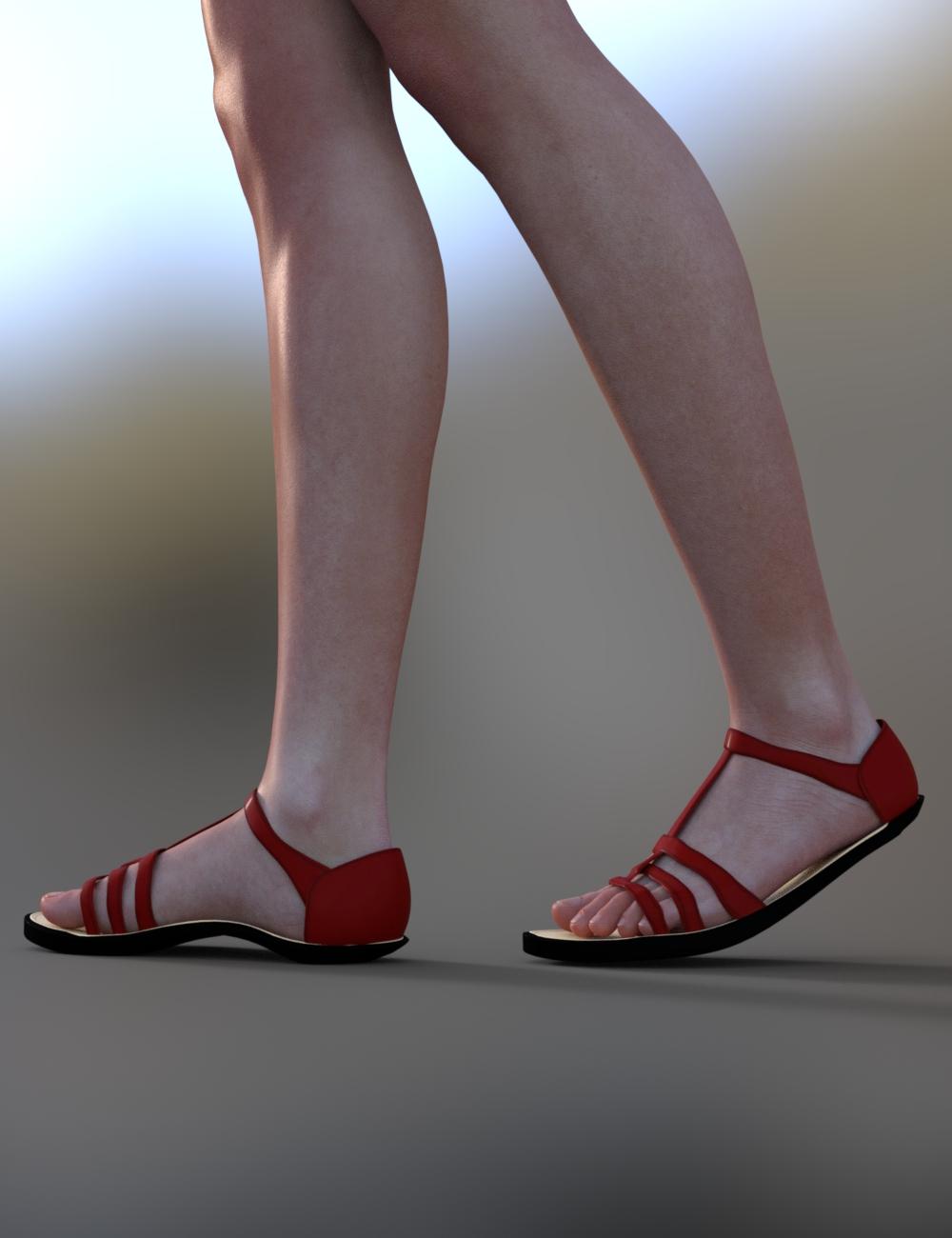
*Edit - I just had an idea that actually kind of worked! I used Mesh Grabber to grab the base of the heel and just dragged it up and into the sole of the shoe:
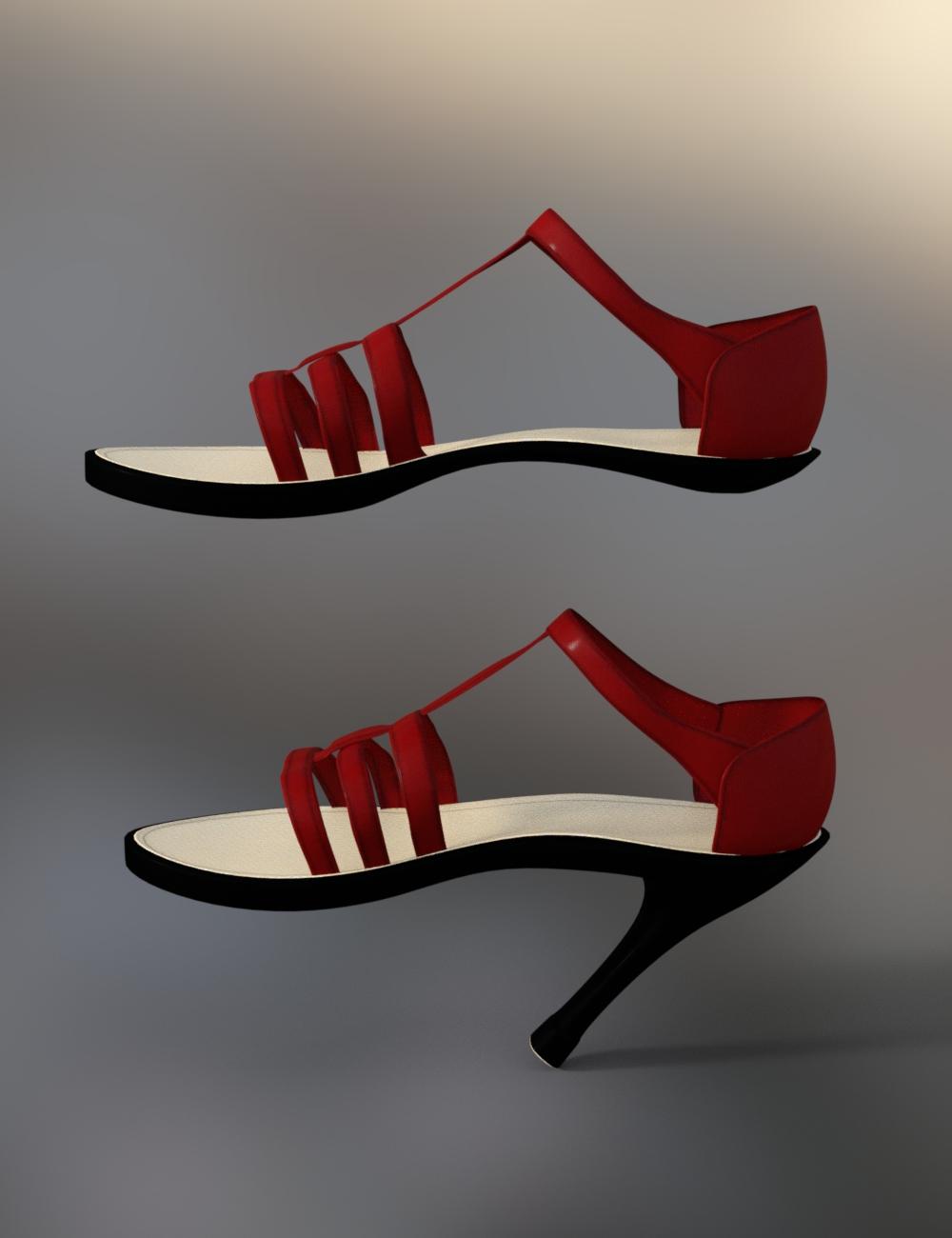
It's not perfect but it works in a pinch. :) Mesh Grabber is kind of amazing!

ROFL! Make sure it's consensual first. :P
I love that graphic, too cute!
[Released] Character Converter from Genesis 3 Female to Genesis 8 Female(Now Conv JCMs) [Commercial]Okay so I just got this product and it seems to convert from the neck down fairly well. But the face seems to remain the default Genesis 8. It seems to not transfer the G3 face shape at all. I've mainly tried with the scene converter but also tried once with the regular converter and every time, it just transferred the shape of the body but not the face. Is this normal? Does it have something to do with HD morphs being inaccessible or something?
No, it should just work. If you search for the head morph, is it there and just not turned on? If you go to the morphs directory, (data/DAZ 3D/Genesis 8/Female/Morphs/VENDOR under the FIRST directory for Daz Studio Formats specified in the Content Directory Manager), is there a FHM morph there? What does the log say during conversion?
Well I eventually came to the conclusion that the morphs installed through DAZ Connect didn't work with this product, but the rest did. I uninstalled them all and reinstalled them all through the DAZ Install Manager, and then the character converter successfully converted the characters. And this isn't the first product I've had go from not working to working just because of DAZ Connect. At this point, I'm just going to pretend DAZ Connect doesn't exist.
Morphs exaggerated on Character Presets and ActorsUnfortunately, I have found that the morphs in question are being loaded from files I located manually, meaning they did not use DAZ install files. This in turn means I have to find them and delete them manually. Which folder would they be in, because it isn't simply about going into the people folder and deleting every instance of genesis 8? I'm thinking somewhere in the data or runtime directory in My Daz 3d Library Directory, please correct me if I'm wrong.
You can use the File List for "SC Lucy for Teen Josie 8" as a reference to find the figure's morph in the data folder. If you don't mind losing the character to fix your base G8F's corruption, you'll want to delete the data folder for the character:
- /data/DAZ 3D/Genesis 8/Female/Morphs/second circle/SC Lucy for Teen Josie/SC Lucy Body.dhdm
- /data/DAZ 3D/Genesis 8/Female/Morphs/second circle/SC Lucy for Teen Josie/SC Lucy Body.dsf
- /data/DAZ 3D/Genesis 8/Female/Morphs/second circle/SC Lucy for Teen Josie/SC Lucy Body.png
- /data/DAZ 3D/Genesis 8/Female/Morphs/second circle/SC Lucy for Teen Josie/SC Lucy Head.dhdm
- /data/DAZ 3D/Genesis 8/Female/Morphs/second circle/SC Lucy for Teen Josie/SC Lucy Head.dsf
- /data/DAZ 3D/Genesis 8/Female/Morphs/second circle/SC Lucy for Teen Josie/SC Lucy Head.png
- /data/DAZ 3D/Genesis 8/Female/Morphs/second circle/SC Lucy/SC Lucy Lash.dsf
- /data/DAZ 3D/Genesis 8/Female/Morphs/second circle/SC Lucy/SC Lucy.dsf
- /data/DAZ 3D/Genesis 8/Female/Morphs/second circle/SC Lucy/SC Lucy.png
Or you could edit the .dsf file following TheKD's advice and:
You can go into the offending morph inside the data file, using a text editor(i use notepad++ but I think any will do), scroll down, look for any "value" : 1 lines, change that to 0. Everytime I had to fix it, I have found the offending "value" : 1 always under the channel section, so it has never been a long scroll lol. After you change the to 0, save the file and it should load without the morph dialed in. I find the tex editor method a lot easier than the do it inside DS method personally.
If the morph file opened in text file is straight up jibberish, it means it's compressed. Inside DS go to window > panes > batch convert, then choose the file you want to edit and apply.
Legacy T-poses for Genesis clones?I'm trying to put a G2F figure into a Victoria 4 T-pose. The shapes match after applying the hidden clone morph, but the pose doesn't.
I did notice if I turned on the Joint Editor, the skeleton bones don't move when I slide on the hidden morph. This might cause some misalignment when posing the morphed shape. Oh well, nevermind then.
Is there a thread about "character bloat"?
Unless you like dial spinning characters, then you needed to remember what specific morphs you used and make sure they loaded before you could load a preset.In the old days, way back at generation 3 - M3 and V3, you had to option to only load the morphs you wanted or need to the base, and you could apply or remove said morph at any time. Thems were the days.
DS (Not Responding) when Loading AssetsUpdate... Should have done it sooner, but just looked at the Product pages to see the file locations...
I understand a little more now where all of the file locations are, though they do all seem to reside in My Daz 3D Library, so still not sure why these Morph packs would react differently than all other Package types as far as DIM is concerned...
But I'm guessing it's ok to find all of the file locations for each Morph Package and delete them manually in Windows Explorer to see if I can get back to a state where DS and DIM agree with each other about whether they're installed or not?
Is there a thread about "character bloat"?In the old days, way back at generation 3 - M3 and V3, you had to option to only load the morphs you wanted or need to the base, and you could apply or remove said morph at any time. Thems were the days.
Daz 3D is part of

Connect
DAZ Productions, Inc.
7533 S Center View Ct #4664
West Jordan, UT 84084Licensing Agreement | Terms of Service | Privacy Policy | EULA
© 2026 Daz Productions Inc. All Rights Reserved.