-
Daz Studio Pro BETA - version 4.15.0.30! (*UPDATED*)
Make a backup before installing 4.15.12 (I didn't, of course).
For me, it's the worst crash bug I've ever seen in a DAZ beta. Wont run for longer than a minute max. Looks like something around nVidia (neuray), updated to the latest Studio driver, no change.
Load a figure, it shows and renders. Apply a pose, then the grayscale preview has the new pose, but iRay still uses the old pose. Rendered figure keeps disappearing and coming back. 100% CPU load, and soon a crash.
This *may* have started after I applied PBRSkin for the first time, but it now happens with any figure (curiously, plain G8F is the worst, it crashes immediately on first render).
Update: Seeing a lot of this in the log:
2021-02-19 22:21:52.697 WARNING: ..\..\..\..\..\src\pluginsource\DzIrayRender\dzneuraymgr.cpp(359): Iray [ERROR] - API:DATABASE :: 1.0 API db error: DB element "DS_the_draw_scene_11" is still referenced while transaction 444 is committed.
2021-02-19 22:21:52.697 WARNING: ..\..\..\..\..\src\pluginsource\DzIrayRender\dzneuraymgr.cpp(359): Iray [ERROR] - DB:DATABASE :: 1.0 DB db error: Finishing edit after the transaction was committed or aborted.
2021-02-19 22:21:52.705 Iray [INFO] - IRAY:RENDER :: 1.0 IRAY rend progr: Received update to 00097 iterations after 2.933s.
2021-02-19 22:21:52.814 Iray [INFO] - IRAY:RENDER :: 1.0 IRAY rend info : Updating geometry.
2021-02-19 22:21:52.815 WARNING: ..\..\..\..\..\src\pluginsource\DzIrayRender\dzneuraymgr.cpp(359): Iray [ERROR] - API:DATABASE :: 1.0 API db error: DB element "DS_the_draw_scene_11" is still referenced while transaction 446 is committed.
2021-02-19 22:21:52.815 WARNING: ..\..\..\..\..\src\pluginsource\DzIrayRender\dzneuraymgr.cpp(359): Iray [ERROR] - DB:DATABASE :: 1.0 DB db error: Finishing edit after the transaction was committed or aborted.Update: workaround for now is to switch to Filament and back to iRay after every geometry change; this seems to force an update of the iRay state.
Playing with the Shaders seems stable, as long as the geo is not altered.
StrangeFate's stuff: Argentheart Crowns promos.@WendyLuvsCatz - I did my best to make sure things looked decent in Filament. It can be tricky because some of the settings that look nice in Iray will ruin the brightness/contrast in Filament.
The floors and walls (interior and exterior) will be shiny in Filament and will lose the texture blending they have. I believe it's because the 4 layer Iray shader it's not supported properly in Filament yet.
If you apply the Hierarchical 'Simple Material Preset' that's included to the whole scene, it will replace those 4 layer materials with regular Iray materials that have all the detail baked in, that should make all the walls and floor look much better, and not shiny.StrangeFate's stuff: Argentheart Crowns promos.I must say it looks good in Filament too, the transmap issues many things suffer don't seem to be a problem
I did need to apply a less shiny shader to the floor though and replace it with the maps because I couldn't figure out how to make it less shiny for filament
it is a complicated shader and reducing glossy reflectivity had no effect
My wizard is shiny in comparison though
 just rendering a quick animation[Released] MARSA Anaglyph3D [Commercial]
Dim Reaper said:
I'm very much enjoying this product and experimenting with the filament renderer but I have one minor issue - on the Options tab, if I select Very Large (1024x1024) then the bottom of the window disappears off the bottom of my 1920x1080 screen and there is no way of resizing the window. On loading again, the top of the window was missing.Going back to the 512x512 preview does not resize the window - you have to close the plugin after changing the preview size back down, then resize the window once it reappears showing the bottom. Not a biggie, but if in a future update a zoom could be added to enable us to have 1024x1024 preview at say 85% then that would be very useful. Or maybe I need to buy one of those UHD monitors...
I am glad you like it!
I haven't been able to figure out a way to allow resizing below a minimum constrained by the image. That is the reason I added the choice, so you can choose what works best for your monitor (and for your patience as the filtering can be a little slow on the big preview).
[Released] MARSA Anaglyph3D [Commercial]I'm very much enjoying this product and experimenting with the filament renderer but I have one minor issue - on the Options tab, if I select Very Large (1024x1024) then the bottom of the window disappears off the bottom of my 1920x1080 screen and there is no way of resizing the window. On loading again, the top of the window was missing.Going back to the 512x512 preview does not resize the window - you have to close the plugin after changing the preview size back down, then resize the window once it reappears showing the bottom. Not a biggie, but if in a future update a zoom could be added to enable us to have 1024x1024 preview at say 85% then that would be very useful. Or maybe I need to buy one of those UHD monitors...
Portrait - Basic Lights Auto Set up [Commercial]The “Portrait - Basic Lights Auto Set up” script uses all the best features of the “Histogram” plug in and the “Orbital Lights” plug in, to set up the lights, for any portrait of Genesis in Iray of Filament modes. The script will set up 3 lights rig, (key light, fill light and rim light) to match the pattern (Split, Loop, Rembrandt and Butterfly are the supported patterns) and the style (Broad or Short style) of your choice. You don’t have to struggle with the different light’s patterns and styles, the angles and the luminosity of each light. The script will set up the lighting for you and it will calculate the luminosity of each light with just few clicks. It also gives you the possibility to set up a new camera in Profile, 2/3, 3/4, or Full-Face view. If you have already made a light rig using the script, it finds the lights from the previous set up giving you the possibility for fine tuning. A preset tab is available for you, if you want to save the current set up for future use. You will need to have installed the “Histogram” plug-in and the “Orbital Lights” plug-in in your DAZ Studio for the script to work.
Rendering Speed in DS 4.12 compared to DS4.14...yeah I have no use for the filament render engine as I only do single frame illustrations and it's viewport based only. Does it use the GPU?
I've usually held back on releases of new versions because of bugs and instabilities. The first 4.12 General Release had serious issues so they resumed the Beta track. Same for version 4.14. Now it appears there's a new Public Beta (4.15.0.9). that supersedes the General Release 4.15 .0.2 .
After 4,12.0.47 I fell out of the beta track because I was having serious issues with the Install Manager which caused me to resort to manual downloads for a good part of last year Hence I missed a lot of development. I've never seen a Beta or General release as stable as the one I've been using.
Rendering Speed in DS 4.12 compared to DS4.14Yea I've been reading about the problems people have been dealing with. I wonder how much is the user and how much is the app though. I would like to try to use Filament. But not at the expense of making my GTX gpu's becoming a preverbal brick
Is an update from daz-studio 4.14 to 4.15 advisable?WendyLuvsCatz said:
I just wish they wouldn't update both beta and release simultaneously, it kind of defeats the purpose, I made that mistake without a backup with 4.11 of assuming if the beta works the next release build would the same but no they introduced a new "bug" feature for me animating the inability to disable Optix in both with 4.12, now know the term beta for DAZ is arbitrary.
That is one of the only reason I never moved on from daz 4.12.0.86. plus I rolled back my NVIDIA driver back 436.30. Because that was the last version you could actually turn off/on the opitex prime acceleration and if you use GTX GPU's that is a pretty important feature to get the most of your GTX gpu.
The Daz Studio releases after the 4.12.0.86 and drivers newer than 438.70 all have opitex prime on by default which absolutely kills the vram in the gtx gpu. Wich makes the GTX gpu's unbearably useless for daz studio iray rendering with out drop to cpu issues.
Frankly I really been enjoying using the 4.12 versions its quick for iray renders, one of the faster iray renderers dazz had put out. I'm getting around 12 seconds a key frame. Deforce is stable and I hardly if ever get any crashes if i do its usually becaise i did something to create it.
. I have tried upgrading to 4.14 to try filament. but soon relies this issue with the opitex prime accelerator always being on and rolled back to daz 4.12 .. am still using 2 gtx 1080ti 11 gig gpu's and have no plans on upgrading them until they have died. they just cost to much to keep swapping out hardware for every new daz version. and seeming my rendering system is never online the driver updates for security is not a issue. so with 2 great working version of daz studio Beta 4.12.0.85 and public build 4.12.0.86 is as far as I am going until this render rig no longer runs. I have priorities for where my monies going right now. the pandemic has not been kind to my disposable income.
[Released] RSSY 3Delight And Iray To Filament [Commercial]Battleboy said:
OK. Did all of that...and now this...
2021-02-14 17:10:12.519 Could not open file : /Scripts/RiverSoft Art/RSSY 3Delight And Iray To Filament/RSSY 3DL and Iray to Filament.dse
File does not exist.Strange installation
 I assume you are double clicking the icon in Smart Content? That path is not a valid absolute path and is not a valid relative path. Of course, it cannot be found. Try starting it from Content Library.rendering difference
vshyman002_5e5365036b said:
yes i was saying that in viewport the white dots eventually disapear but as for the real render they are not, i guess i need the render to go for longer, can you tell me exactly which setting i should use for that and what value to experiment with, thanks
I never go more than 1200 iterations and depends so much from the figure nearest on camera takes all that iterations, the same if is an interior scene, I only go higher if renders are client's comissions, for just ilustration tests or post on galleries is not necessary so much iterations. one tip is using denoiser and verify what iterations suffices your visual perspective as a render done, and low that value as a maximum. with denoiser you can get full renders with less than 500 iterations, depends so much of what you want to offer to the internet, I published a realistic image using filament and got ignored,, nobody asked for my settings so...due to that I promised never got so far for nothing. I can assure when a famous artist do the same as me they will ask for settings and parameters, always the fame, duh...
Animation issues a general problem?You are welcome. The user here to check for is Ivy, she has done many animations with mainly DS. Wolf359 has done much but his are more involved and he now uses other software mostly. Bennie Woodell also is familiar with DS and blender. Bryan Steagall, Joe Pingleton, Auroratrek, WendyLuvsCatz, Dartanbeck are just a few of the others who have posted work. You can find some help https://www.daz3d.com/forums/discussion/358051/the-animators-assemble-thread-for-daz-animation-wips-clips-and-tips/p1 I was busier at it before my stroke in June 2019. Trying to do it again with my left hand since the right can only do a little as I recover.
Since you have a PC, too, you can try Filament for much faster renders that look better than OpenGL. There are faster render tricks for Iray if you have an Nvidia card that Solomon Jagwe and Free Nomon have written about and shown on their YouTube channels. Check their comment sections. Not as fast as Filament, but better quality. They crank out a frame in about 30 seconds using lower samples and the denoiser.
[Released] RSSY 3Delight And Iray To Filament [Commercial]OK. Did all of that...and now this...
2021-02-14 17:10:12.519 Could not open file : /Scripts/RiverSoft Art/RSSY 3Delight And Iray To Filament/RSSY 3DL and Iray to Filament.dse
File does not exist.[Released] RSSY 3Delight And Iray To Filament [Commercial]Battleboy said:
Latest try. /Data/DAZ 3D/My DAZ 3D Library/data/cloud/1_80055/scripts/riversoft art/rssy 3delight and iray to filament/rssy 3dl and iray to filament.dse.enc
2021-02-14 12:24:40.504 Failed to load script: f:/Documents/New folder/DAZ 202 F drive/Applications/Data/DAZ 3D/My DAZ 3D Library/data/cloud/1_80055/scripts/riversoft art/rssy 3delight and iray to filament/rssy 3dl and iray to filament.dse.encugh.
Still not working.
Yup, it is not installed properly. I have no idea what rssy 3dl and iray to filament.dse.enc even is. It should be rssy 3dl and iray to filament.dse.
It is best if you uninstalled it, deleted all files in f:/Documents/New folder/DAZ 202 F drive/Applications/Data/DAZ 3D/My DAZ 3D Library/data/cloud/1_80055, and then installed via DIM. BTW, What version of DS are you?
[Released] RSSY 3Delight And Iray To Filament [Commercial]Latest try. /Data/DAZ 3D/My DAZ 3D Library/data/cloud/1_80055/scripts/riversoft art/rssy 3delight and iray to filament/rssy 3dl and iray to filament.dse.enc
2021-02-14 12:24:40.504 Failed to load script: f:/Documents/New folder/DAZ 202 F drive/Applications/Data/DAZ 3D/My DAZ 3D Library/data/cloud/1_80055/scripts/riversoft art/rssy 3delight and iray to filament/rssy 3dl and iray to filament.dse.encugh.
Still not working.
The Official aweSurface Test Trackwowie said:
Sven Dullah said:
So I sound like a broken record but keep coming back to highlights. Let me just say that I'm having massive problems with the current build. Overexposed highlights, specular noise, jagged edges, you get the drift...
And I'll say it again.
- HDRI (or using AWE Environment Sphere in general). Use solely AWE AreaPT on your lights and any emissives and simply accept the added render time penalty. You will always have noise when using AWE Environment Sphere as light(s) because they're not properly sampled.
- Normal mapping. This is broken, simply don't use it. Even if I can match the output of other shaders (dsDefaultMaterial, UberSurface), normal mapping (and anisotropy) simply don't work properly in DS regardless of renderer. Just try applying anisotropy on figures in Filament or iray. The highlights have problems with/across UV seams.
This is the first time I've seen a mentioning of anisotropy issues. I've noticed some strange things about it but I've only used it on floors and similar surfaces, never on skin. So you're saying not to use that?
Show me the problems you're seeing in an example scene without those two used anywhere.
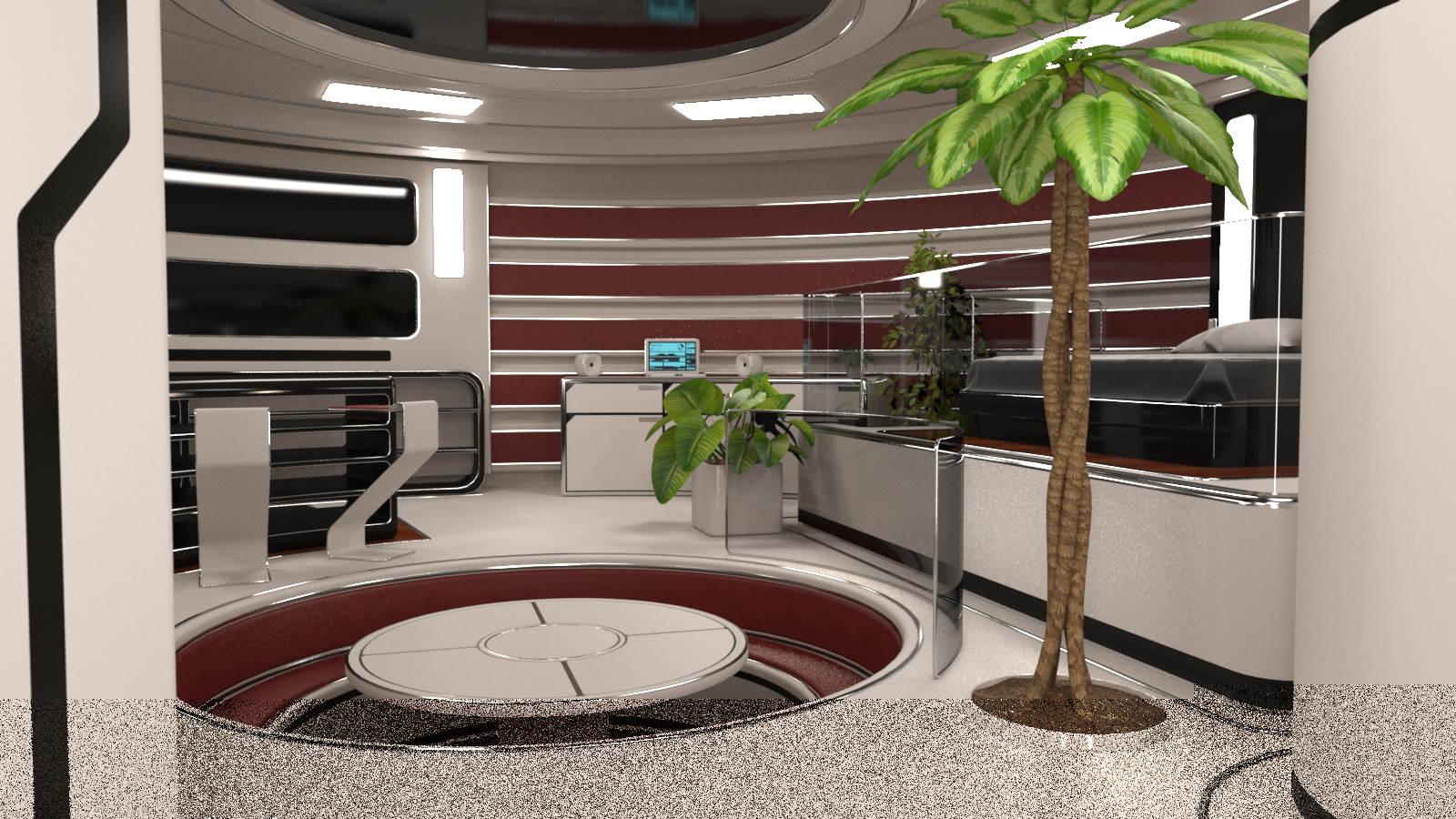
Right, here are two test conversions of Mely 3D's SF appartment. The first one is aborted, I knew it was going to take a while so did an overnight render, came back after 15h and it was at 80% or so, so cancelled and started looking for reasons. I initially tried the easy way of simply applying the PT arealight shader to the light panels but, as expected, rendering times seemed to be skyrocketing, so positioned emissive planes to match the panels, turned off illumination for the panels but with lights on and visible to the camera. I thought they would behave just like the environmental shader but I was wrong, so learned a lesson. First render and some settings used: ( No I did not use normal maps or environment light, there are 8 emissive 1 poly planes for the ceiling lights and six for the wall lights. And yes I had some anisotropy on the white pvc surface...floor, walls).
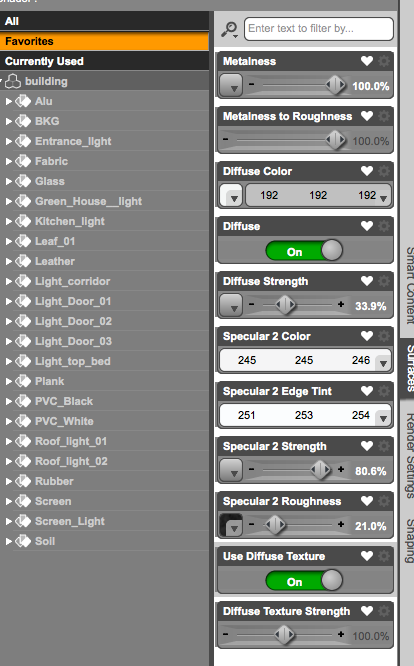
metal (alu)
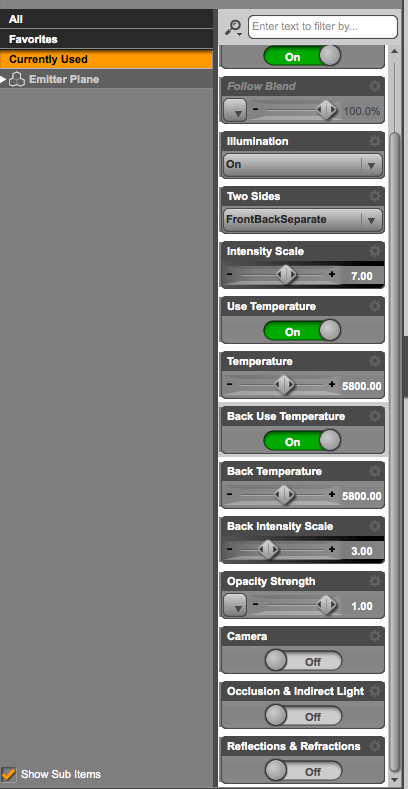
Emitter planes, same settings used on all of them.
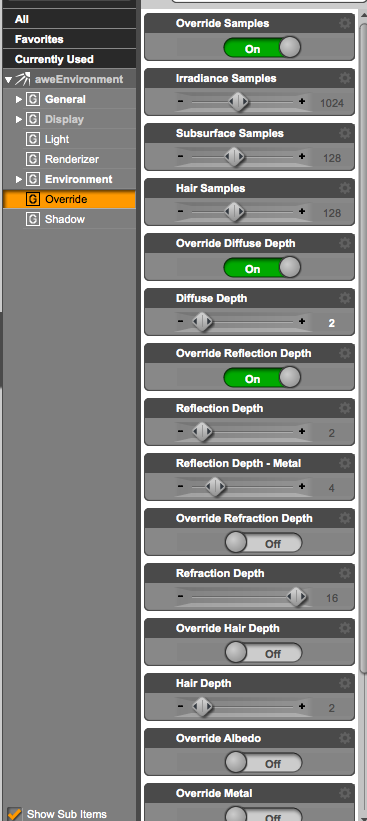
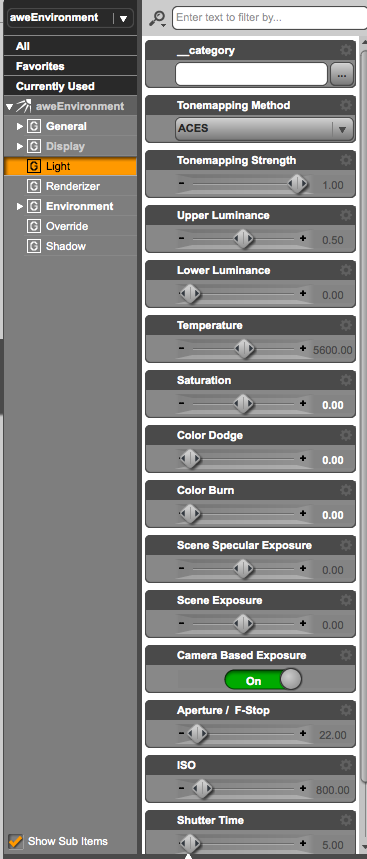
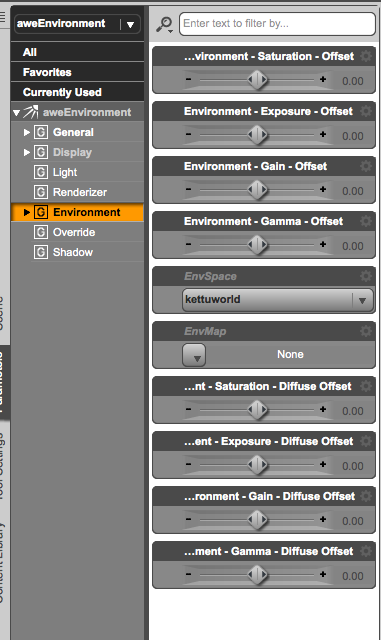
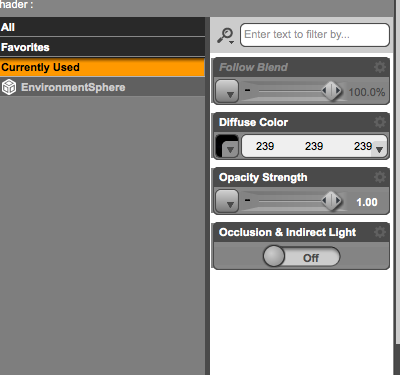
So I selected the lightpanels and applied the enviromental shader with only visible to the camera. Made some other tweaks like lowering the ceiling emitters a bit, reducing intensity on all emitters by 0,5 EV, reduced displacement by half on the white pvc, for the "alu" metal reduced metalness to 80, turned off diffuse strength and "use diffuse texture", reduced specular2 strength by 20, added some roughness. May have forgotten something but that's basically it, new render, 5h:
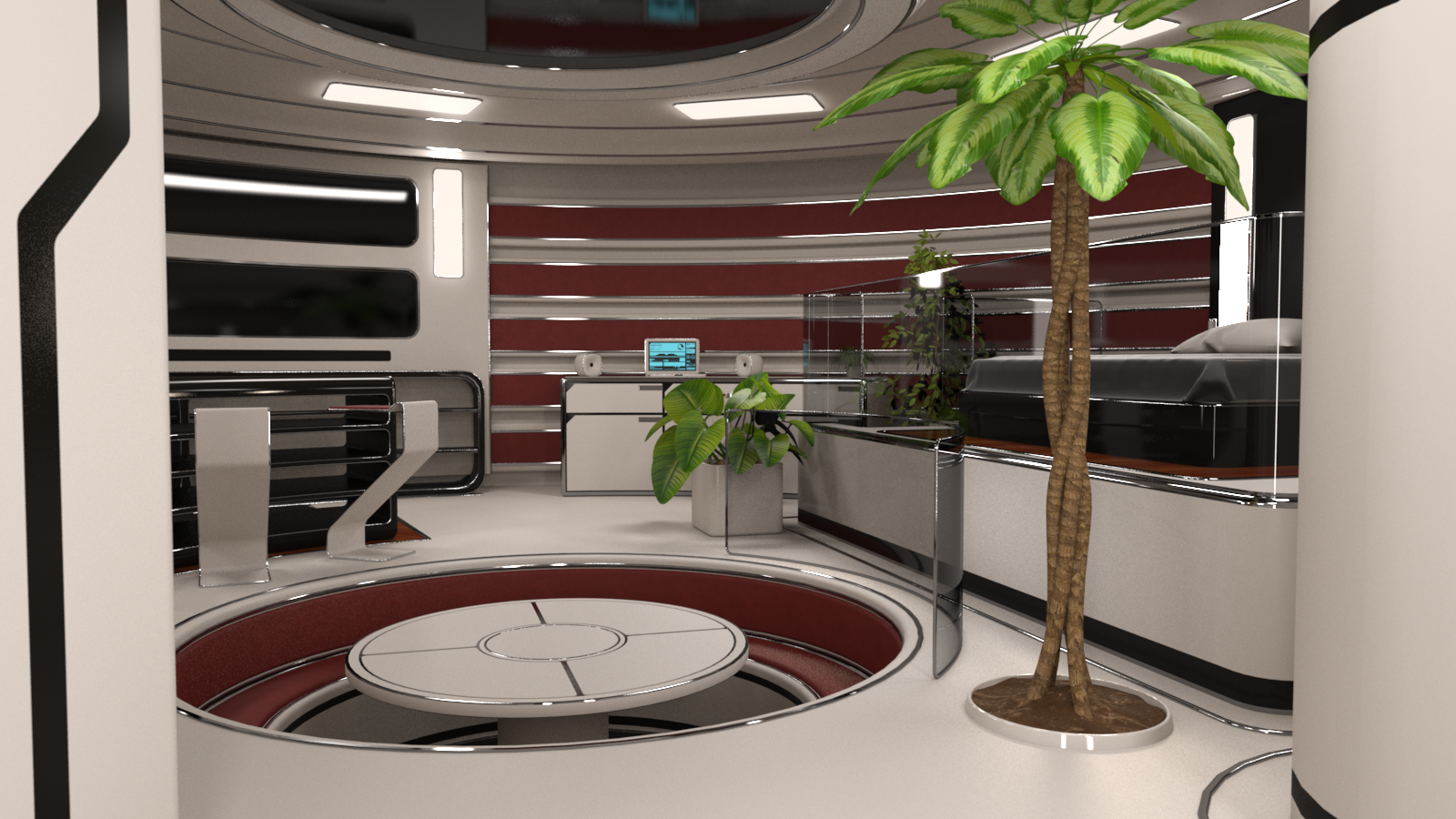
Both renders using raytracer final 8x8 ps, non progressive through a camera with DoF on.
Orbital Lights Plug in for DAZ Studio (PC) [Commercial]The Orbital Lights plug-in will add a new pane in DAZ Studio that will allow you to move any node that has a ‘Point at’ item, around this item, with the use of a horizontal angle slider, a vertical angle slider and a distance slider, without the need to manually adjust the x, y, z translations and the x, y and z rotations of the node. The plug-in was originally designed for Distance Lights, Point Lights, Linear Point Lights and Spotlights, but it was expanded for any node that have a ‘Point at’ item. It is the absolute companion for your DAZ lights’ adjustments (Distance Lights, Point Lights, Linear Point Lights and Spotlights) and a valuable tool if you want any node to orbit around another node.
This plug-in does not cancel the translation and rotation movements of any node and it is 100% compatible with any previous scene you have made. It doesn’t alter your workflow, but it gives you some new handier tools to make your scene’s lighting. Stop struggle adjusting the position and the luminosity of the DAZ lights. Make your work, lighting a scene, faster and easier.
The “Point at” area will help you as a shortcut to set the point at node of your current selection, without the need of using the parameters’ tab and the “Stops” area will give you a group of buttons to instantly change the current light luminosity in 1/3 and 1/2 steps from the current value, without the need to make your own math calculations.
The “Calculate Luminous Flux from Histogram” feature is a unique tool (requires the “Histogram” plug-in) that will auto calculate the luminosity of your current light, for the Iray or the Filament modes, based on the values it takes from the Histogram plug-in for the whole image or just for a spot area. You just set the desirable lightness you want your image (or the selected spot) to have, and the plug-in will auto calculate the light’s luminosity that will achieve the chosen lightness to your scene. This mode will also create a dedicated photometric camera that will monitor the selected light’s lightness, from a chosen distance, so you don’t have to alter the viewport between all lights’ view again.
The product’s manual includes the scripting documentation if you want to use the Orbital Lights pane in your scripts.
Beware: The plugin needs activation after installation. You can find the serial number, when you log in into DAZ page, under your “Account/Serial Numbers” (see attachment). Copy the serial number and paste it into DAZ Studio in the popup dialog under the menu “Help/About Installed Plugins” (see attachment).
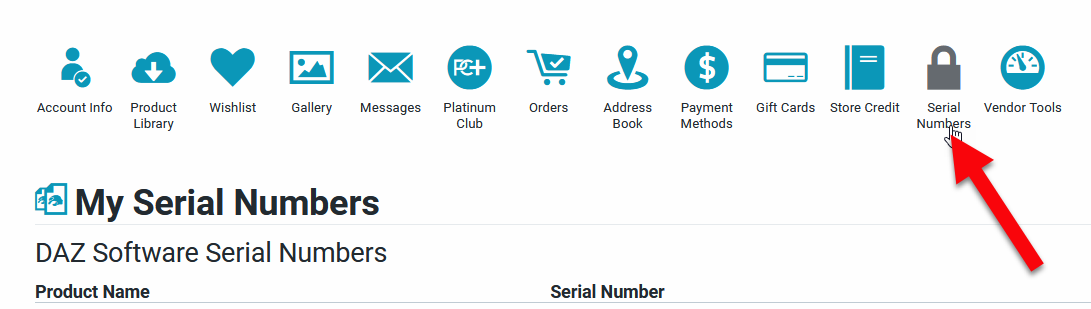

See the presentation video by clicking the next image
If the video link in the image is not working try here!
This is a link to the Histogram Plugin needed for the auto luminous function, if you want more information.
The Official aweSurface Test TrackSven Dullah said:
So I sound like a broken record but keep coming back to highlights. Let me just say that I'm having massive problems with the current build. Overexposed highlights, specular noise, jagged edges, you get the drift...
And I'll say it again.
- HDRI (or using AWE Environment Sphere in general). Use solely AWE AreaPT on your lights and any emissives and simply accept the added render time penalty. You will always have noise when using AWE Environment Sphere as light(s) because they're not properly sampled.
- Normal mapping. This is broken, simply don't use it. Even if I can match the output of other shaders (dsDefaultMaterial, UberSurface), normal mapping (and anisotropy) simply don't work properly in DS regardless of renderer. Just try applying anisotropy on figures in Filament or iray. The highlights have problems with/across UV seams.
Show me the problems you're seeing in an example scene without those two used anywhere.
[Released] MARSA Anaglyph3D [Commercial]Hi Artini. I tried this and it works. To create an HDRI you'll need to bring the red and cyan images into photoshop (or similar), use layer blend mode Lighten on the top layer (it doesn't matter if the red or cyan is on top), flatten layers, convert image/mode to 32bit and save. You can add a strong light source if you want with the brush tool setting the intensity for the color picker at +8 stops or so. Let me know if you have more questions.
Artini said:
RiverSoftArt said:
It's time to have some fun and make your renders really pop! MARSA Anaglyph3D easily creates anaglyph renders from your Daz Studio scenes with no external applications needed! Anaglyphs are those popular red-blue, stereoscopic 3D images from images and videos on the web, movies, and even comics! Combining a red and cyan filtered render into one 3D image, anaglyphs are incredibly cool and fun, and easy to do now in Daz Studio!
MARSA Anaglyph3D supports using Iray, Filament, and 3Delight to create anaglyphs.
Red-Cyan 3D Glasses are required to properly view the Anaglyphs.
A 360 Spherical lens camera is included so you can create 3D images for VR, import into 360 viewers, or create HDRIs!
https://momento360.com/e/u/8056d6a703ca4ff09e6321e5fe305df3
https://momento360.com/e/u/93233fbd90c145e180e28eebfb73ca11
What's Included and Features
- MARSA Anaglyph3D
- MARSA Anaglyph3D Script
- Spherical Camera
- Detailed Manual
Have you actually succeded to create HDRIs, that provide the light to the scenes in Daz Studio?
If that is the case, I am interested.
Will be nice, if you could post the example of such HDRI.
Canceling a Filament or OpenGL RenderCanceling a Filament or OpenGL Render
Hello everyone!
I'm relatively new to DAZ Studio. I've been using it extensively for an ongoing project over the last 4 months.
I've been lurking these forums an they're great! I've found a ton of very useful and helpful information. :).
What I'm trying to figure out is if there is a way to Cancel a Filament or OpenGL render once started. Unlike IRay rendering there is no dialog box available to cancel the render. I just have to let it run to completion. I tried Ctrl + Q while DAZ Studio had focus. This brings up the save changes dialog box. I was able to cancel the render 1 time doing this by clicking Cancel on that dialog box, but every time I've tried after that the dialog box was unresponsive and just paused rendering until I pressed X to close.
Sometimes I make a mistake I don't realize until after I've started the render and then it's to late. I have to wait or kill DAZ Studio using Task Manager.
I'm sorry if this is not the right place to post this question. I couldn't find an answer to this anywhere on the forums.
Thank you for any help you're able to provide. :)
Daz 3D is part of

Connect
DAZ Productions, Inc.
7533 S Center View Ct #4664
West Jordan, UT 84084Licensing Agreement | Terms of Service | Privacy Policy | EULA
© 2026 Daz Productions Inc. All Rights Reserved.