-
Legalese of cross-usage and modification / usage by others
Fot the last question, the animation is yours, but you cannot redistribute any part of the original mesh or textures, even if modofied. that is considered a derivitive work. the only way you could create a license to grant to anyone else is if you created everything from scratch.
The best way to do what you want, is to create a morph for your part and then you can share the morph for the other users who have Daz Studio and the genesis 8 and they can then apply the morph.
HeadShop 13 with LoveChildI tried out headshop 13 two times. My first effort was a failed Barbara Eden, but the source picture was not great and I wasn’t expecting it to work.
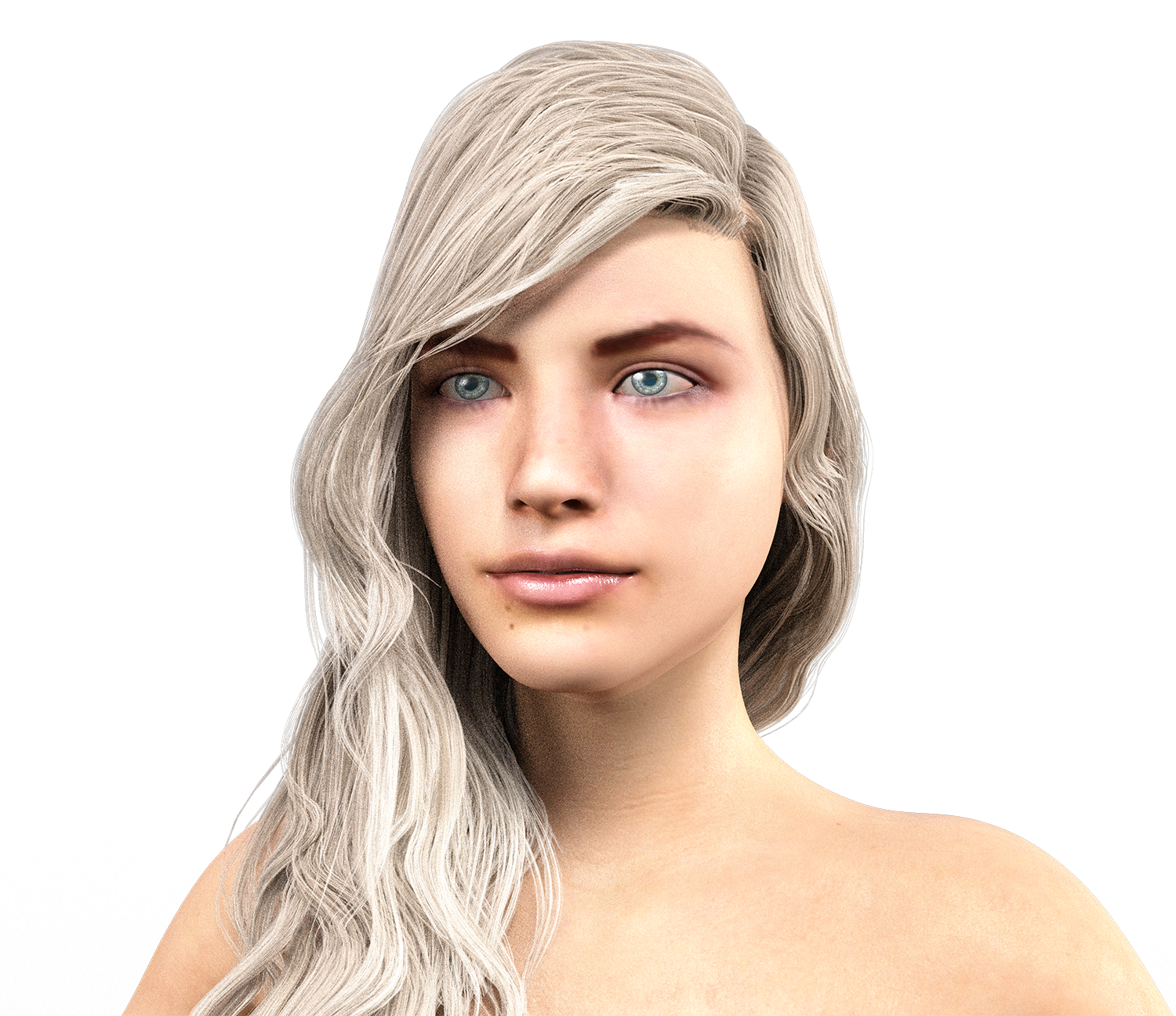
This is my second effort using an image off the internet (I don’t know the model). I found that in headshop, the model comes out ok/close, especially the eyes. However, when transferred to Daz Studio, the eye shape became more generic. The iris, however, was quite accurate.
One frustration I had is that I could not load any nice eyelashes onto the model. The lashes kept getting applied to the middle of the eyes. I don’t know what the problem might be – it could be user error. I did give up.
Attached, in order, are:
The original model I tried to create using headshop.
The model when in headshop.
The model as transferred to Daz Studio.
The model’s skin edited using Altern8 no maps Charlotte.
The model using Albany Hd materials.
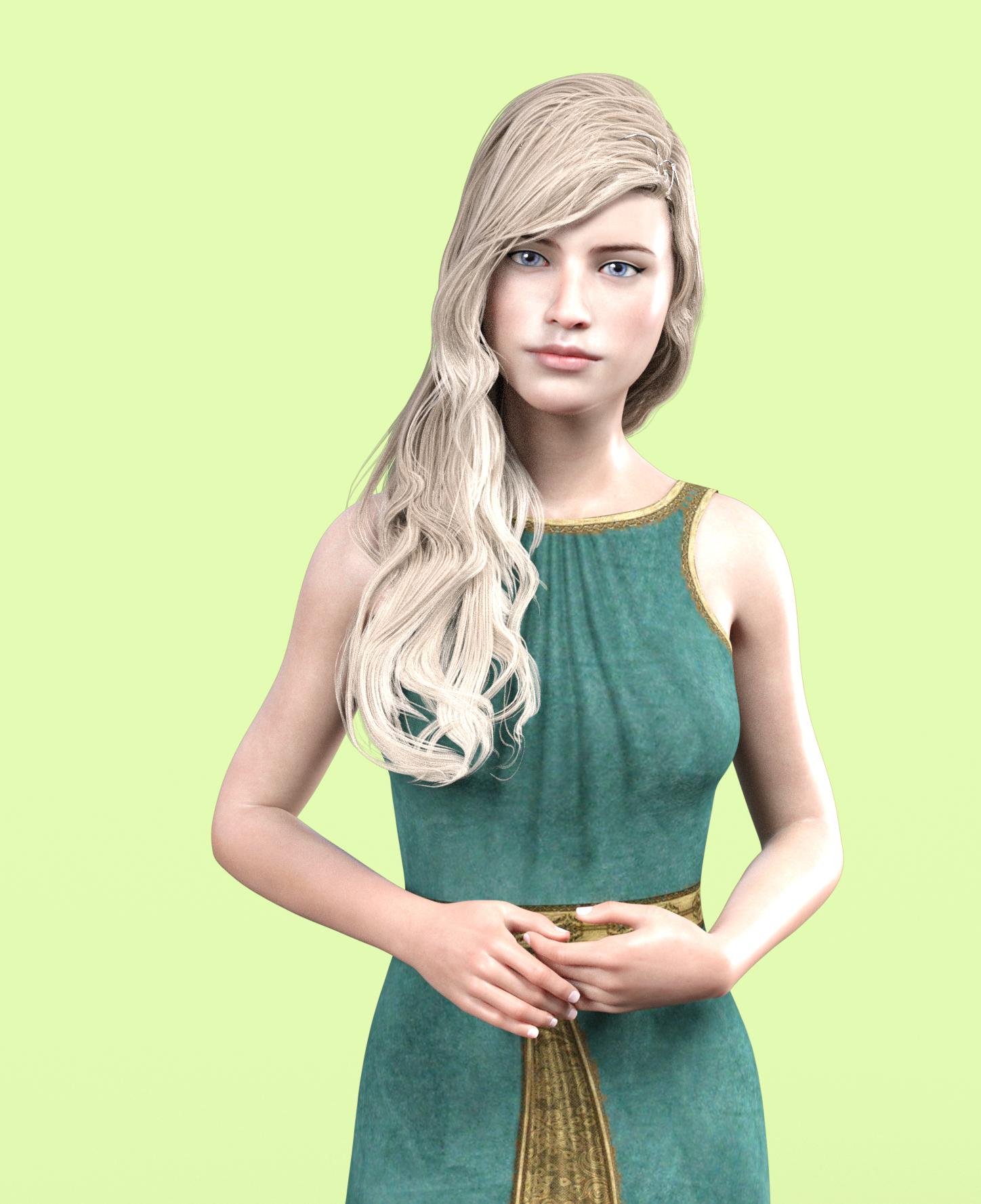
Finally, the model using Albany materials, make up and posed.
Conclusions - I did not achieve a good likeness of the original model (although I have done so in headshop 12). The process is hit and miss, just like all of the other similar tools (face gen, face transfer). Sometimes using several of the tools gets you closer to the original. All that said, using another character’s materials, I think I got a pretty nice new model.
Within the post, I am showing the model rendered (not fully) in Daz Studio, after transfer from Headshop. The second image is the same character/final character but with materials changed.
 How To Backup Your Custom Characters?
Hi everyone! :D
I use Daz Studio to make comics.
That means that I often use characters after years. Probably on different hardware, with a formatted Operative System.
Needless to say, I often lose a lot of data, and I have to recreate my custom characters, at least in part.With the years, I've learned to use mostly content from Daz Studio, so that it will tell me what's lacking, and install it.
But other times I need to create something myself, or to use other sources.
Plus, I've recently cleaned up my library, to make G8 figures load faster, and I don't want to slowly re-install everything as I check older characters where I've used that sclera or that morph.So, what's the proper way to backup custom characters?
Is it enough to save the
- Character as a scene
- Shaping preset
- Material preset?
But I have the impression that those save files only work if you already have the related assets installed.
Does the scene file contain all those three data already?What if I use Skin Builder 8 to backup the skin? What do I need to save exactly? Is the Full Body option enough?
(Of course it's for personal use only, and with assets I've bought).Thank you in advance!
Legalese of cross-usage and modification / usage by othersHi,
This is a 2 parts question. I understand that the interactive license allows me to use models for interactive 3d application, while non-license allows me to use models for images, renders and animations.
Question 1: Am I legally allowed to mess around with mix-and-match between models? Recently, I had a Daz original model with messed up teeth. I don't know why, and I don't care. It is too bothersome to ask support and wait for a potentially bizarre reply, so I just hacked the teeth from Genesis 8, and exchanged it with the teeth of this model. It sounds intuitively obvious, but is it fine to mix and match and mess around with multiple models, all of which are interactive licensed, and then use it for a game?
Question 2: I transfer DAZ models to other 3d softwares, mainly to produce animations. I'm still fighting the f*** of it cause I want to modify them. I don't like DAZ's eyes, so I modify a lot of what I get, mess with rigs, eyes, etc. If I had an interactive license, am I allowed to use modified model produced by DAZ, modify it, fix it, rig it, add to it, and then sell it as a rigged animated model on 3d model sites?
For example, Libby for Genesis 8, not much modification to the actual face, but fixing some stuff, modify eyes, hair, etc.
I know this is a grey area, and it isn't something I'm planning to do anyway! But honestly, I spent over a week trying to figure out a reasonable workflow to get this done, and I assume there's market for it, provided I don't preach any copy right.
Let's say I can't just use ready models. What if I use the Genesis 8 as a base, modify it myself manually *either in 3d software, or using morphs*, create the hair myslef *as opposed to getting a ready made hair for gen 8*, create the clothes myself, and then produce it as a usable rigged characted in 3d marketplace. Would that clear me out, or am I still in the mud ?
Question 3: This is a REAL question, the previous ones I'm curious about, and they potentially could get me something. But This question is where it is at.
I'm serious about animation and producing content. So, I hire voice actors to voice my characters. I understand that I own the right to the animation I made, and can show it whenever. Granted, I can't give an interactive experience of the models themselves, I don't own them and I can't give them away. (Does that include ones I create based on Gen 8, but messed with morphs and almost looks nothing like gen 8 ?) However; does this give me a license to license it to others ? More practically, let's say the voice actor wants to use it in their reel, and want to include footage of the animation that was created. Is it legal for me to allow the voice actor to use this animation in their reel, or is it still a limited animation license to me, and I can't license it for others?
Legalese, I don't myself understand most of what I wrote .. lol
Please advice, Thanks,
Which software for making clothing and architecture?I'm learning Blender because it does pretty much everything- but as a result, the learning curve is steep. On the other hand, it's free. The big problem with it at this point is that it does not love all features of Daz, so you are limited to .OBJ or .FBX format to transfer files, and the FBX end- which can include clothes, poses, and animations- seems to have rigging issues, especially with G8. There is a free add-on, Diffeomorphic, which is supposed to translate everything from Daz to Blender, but I've been trying to make it work for the last 48 hours without success, so there's that.
If you're making clothes, though, that shouldn't be an issue- send an OBJ of your morphed character into Blender, make the clothes there- it has a clothing tool that works pretty well, though not as hot as Marvelous Designer (but again- free), and then you can send the clothing back as an OBJ into Daz. Making the clothing autofit might be more challenging, I haven't tried it.
Unfortunately, I want to render in Blender, because I can build everything there and it has beautiful, and fast, rendering, but apparently I won't be able to bring along the rigging or poses from Daz and will have to rebuild all that in Blender. So Diffeomorphic is making me cry...
[Released] Bone Breaker Fantasy Armor for Genesis 8 Males [Commercial]@watchdog79 "Perhaps it is going to work better on core characters containing the Genesis 3 clones? As soon as I learn what that actually means"
I've been working with Studio for 15 years and I don't know what you mean, particularly about containg G3F clones. Nevertheless ths attached is LY Arden with Kadis.
This is a quote from the description of just about any core Genesis 8 figure I can think of:
Backward Compatibility (Read More)
The most backward compatibility ever, through included clones for Genesis, Genesis 2, & Genesis 3.
There are no "Core character who contain clones", the clones are part of the base figure. That promo line applies to G8, not to the specific character.
A clone is a special type of morph used by autofit to convert clothes from a source figure to the figure which has the clone. DS uses it to compute how to adjust the mesh of the clothes so they fit the target figure.
Thank you.
The Kadis armour fits Genesis 8 quite fine, but the problem with the product is, that some parts of it simply do not work with Genesis 8, such as the poses, which is a real pity.
I would really love to see it remade to prtoperly work for Genesis 8.
Not to take anything away from the Bone Breaker Fantasy Armor - which looks great and which I am excited for - but I, too, would really love to see a version of Kadis Armor for Genesis 8 at some point - was one of my favorite outfits for Gen3 and I have been missing it sorely for my Genesis 8 scenes ^^;
No matter environments or outfits, your stuff is always quite amazing!
ExP FilesExp files are files used by the morph system for figures like M4 and V4.
Anything specific you need to know about them?Importing .OBJ as Head MorphThe OBJ needs to have been created by moving existng vertices of the Daz Studio figure at Base resolution. You cannot import just any arbitrary OBJ file as a Daz Studio character morph. You cannot add or delete vertices. You cannot change the order of vertices. You cannot start with a High Resolution vertex set.
Daz Studio Iray - Rendering Hardware BenchmarkingAHh glad its not just me or something wrong with my new GPU then. I've asked Daz for version 4.12.0.86 as that is what's currently on my old PC and doesn't have the newly introduced animation bugs but I can't find a way to transfer it to my new PC, I unfortunately had "delete package" ticked on DIM when I initially installed it. Its been nearly a week and no response from them yet though.
Go to "C:\Program Files\DAZ 3D" on the machine with the older relase and copy the folder "DAZStudio4" onto a flash drive (I suggest also compressing/backing it up to a more permanent location with a name like "DAZ Studio Pro 4.12.0.086.zip" or something for future use.) Plug the flash drive into the machine with the newer relase and overwrite the "DAZStudio4" folder found in the same place with the folder copy you just made.
Alternatively, you can also just copy that folder to any location on the other machine and run the previous DS version simply by double-clicking "DAZStudio.exe" found inside the folder. That way you don't have to worry about possibly breaking the newer installation or DIM overwriting it without your knowledge.
Sorry I missed this, didn't get a notification for some reason. I ended up getting an earlier version of Daz but I've been in Blender so much recently I haven't even installed it, that E-Cycles render engine leaves iray for dead.
Importing .OBJ as Head MorphHi,
I am new to DAZ so please bear with me. I am trying to save a .obj file as a head morph but I recieve the response of "Warning: Geometry did not match, failed to create morph."
I was able to save as a shape preset but ithe figure fails to apply to the head.
How can I go about putting this .obj head on a figure in DAZ?
Thanks in advance,
HeadShop 13 with LoveChildFacegen and face transfer both look better to me, and they both provide demos so I actually know what kind of results I can get
Here's a White Paper about the pros and cons of three face software products: https://printahead.net/white-paper-working-difficult-photos-daz-studio/
I've seen that, but it doesn't tell you which software achieved which result. It doesn't even tell you which version of Genesis was used. Which one is head shop? It also isn't updated for the most recent version.
It's not very exhaustive either, just based on one photo. If I'm potentially dropping $60+ I would like some ability to try the software a bit (with a watermark on both the mesh and texture like facegen does makes sense), or at least see a good amount of video footage showing off the performance and workflow.
I feel bad because you keep putting me in a position to further bash your product, which I haven't even used. Seriously, you're designing software for artists. Please hire an artist to help you bridge the gap between developer brain and the interests and needs of end users.
HeadShop 13 with LoveChildFacegen and face transfer both look better to me, and they both provide demos so I actually know what kind of results I can get
Here's a White Paper about the pros and cons of three face software products: https://printahead.net/white-paper-working-difficult-photos-daz-studio/
what the secret to making a best selling?Think of stuff you like but doesn't seem to be much of. Like think of really cool creatures and humanoids especially with great texture packs so if you use an alien morph don't have to use a leather shader on them
Also think about what there seems very little of especially if you want it like specific city aesthetics like parts of Shibuya or Tokyo in general with walkable overpasses and trees. The cyberpunk cities we have are great and seem covered pretty well. While there are lots of really cool robots there's still so much potential there too. I'll recommend searching for futuristic, Singapore, sustainable, organic, or blob architecture on pinterest and google images since there's so much to be inspired by
For clothes customization options like different lengths or necklines and underrepresented styles
Promo art's very important too especially for a character. Have at least one pic with turn arounds in a bathing suit (goes for men too) in the same lighting and for environments at least one overhead. And of course include the character with great hair and clothes too and model the character without using sliders unless they come with them. Something optional but helpful is showing how the character mixes with other characters like character's head 100% with another character's head at 50% or whatever.
For an example of great promo art here's one
https://www.daz3d.com/stepanida-hd-for-genesis-8-female
And this too
https://www.daz3d.com/young-minto-and-dforce-minto-outfit-for-genesis-8-females
I say all this as a buyer I don't make anything
HeadShop 13 with LoveChildTo be honest I can't imagine ever paying even the sale price for what it appears to offer, considering there are already other apps that seem to work better.
In every single one of their promo images you can see misaligned nostrils and areas of hair that didn't blend out properly and one very odd instance of an african face projected onto a white texture map (do they not offer different skin tones?).

It's really bad when the makers of the product can't even reach acceptable results.
Having never used any previous version of HeadShop, am I missing something? I'm geniunely wondering because this seems like it should be a $20 plug-in at full price at best.
what are the better working apps? I need to check them out. thanks
Facegen and face transfer both look better to me, and they both provide demos so I actually know what kind of results I can get
HeadShop 13 with LoveChildTo be honest I can't imagine ever paying even the sale price for what it appears to offer, considering there are already other apps that seem to work better.
In every single one of their promo images you can see misaligned nostrils and areas of hair that didn't blend out properly and one very odd instance of an african face projected onto a white texture map (do they not offer different skin tones?).
It's really bad when the makers of the product can't even reach acceptable results.
Having never used any previous version of HeadShop, am I missing something? I'm geniunely wondering because this seems like it should be a $20 plug-in at full price at best.
I think the misunderstanding is that these images are NOT rendered but RAW screen captures (notice the DAZ grid behind the promo image). We decided to capture promotional images raw, as they are handed from HeadShop to Studio BEFORE RENDERING. We did this for two reason: because this represents a starting point after which artists would add lights, set up skins and other things that are outside the scope of what we deliver - and because as software developers we don't posses the rending skills that many DAZ artists have.
I mean, it's quite obvious these aren't rendered. That isn't the issue. You can see multiple instanced where the texture and the morph do not line up. You weren't able to capture a-single transfer where the nostrils (both inside and the outer crevice) are lined up to the texture, and there are some shots that show hair artifacts that haven't blended out. In a promo you typically want to show off the full capabilities of your software. I'm not trying to be rude, this is just the truth. And considering the price point here, you should be able to afford to hire an artist who can show off the capabilities in a way that will be interesting for the end user, even if they are still just viewport screenshots you clearly need someone with a more artistic eye. That said, you've obviously been at this for a while, so you probably know your market better than I do, but for me personally this is not an appealing product based on the presentation.
edit: I just want to quickly add as a piece of advice, you really should hire an artist to work on your advertising for you. I can guarantee that if this is a product that artists can make good work with, the amount of additional revenue you'll make from sales will far exceed the cost of hiring an artist.
a using DAZ content in UE4 threadThe glitch looks like in the attachment: (standard gen 8 character with jcms, skin material just color, arms up pose)
Left image: with support compute skincache
Right image: without support compute skincache
The problem lies clearly with Unreal Engine as it became even buggier with the new official 4.25.1 update.
Has anyone found any workarounds to remove this shading/seam glitch, because aby new update will take several months?
are you using the "dual quartenion" version of unreal??? if yes try to test the same with a "normal version" non dual quartenion", the jcm still "works" because it's is a morph", the bend not gonna just work good as if it have the "DQ" but gonna still work, if you are not using the DQ then it could be really related to daz, you have all the "maps" proper applied, i means, normal, Ambient occlusion and Specular map" normally they are the ones to deal with the "light" then you also have the rebuild the light, because i's seens related to some "light configurations".
HeadShop 13 with LoveChildI know there is a lot of discussion on the textures, have the morphs that are generated been improved over previous versions of HeadShop or the morph quality is the same?
Why Does It Take So Long To Load Figures? ("Solved", with GUIDE)FINAL CONSIDERATIONS ON FIGURES LOADING TIMES
Why are figures loading times important?
Your Daz3D library is installed on an SSD, so you load entire apartments in less than 10 seconds, and poses in a fraction of a second, but loading a single G8F takes an eternity? And even deleting the scene makes you want to switch to cave painting? Then you have the same problem I had, when waiting for figures to load, or for a scene to clear, used to take a huge part of my workflow.
What influences loading times?
- The most important factor, by a long mile, is the number of the morphs you have installed. A G8 figure, indeed, has those morphs loaded all the time, and it has to build the relationship between those morphs, even if they're not currently used, and so each morph slows down both the loading and the clearing times.
- Morph Packages: you probably found yet another morph package for $1.99, that you've never used. Uninstall it. Many morph packages have hundreds of morphs, so they're way worse than single characters.
- HD morphs: I think they're worse, regarding loading times, than standard morphs.
- Characters: don't buy figures that are similar to other ones you already have. Most of the time t's not even worth keeping them installed for hair, dresses or tattoos that come with them.
- CPU and RAM. They work together, so I don't know what had the biggest impact. But I have seen a 25% improvement in loading times, with a 50% improvement in CPU performance.
- Storage. It's fundamental. Whether to navigate your content faster, to apply poses, or to load either figures or environments/props. The difference between SSD and HDD is huge. There is yet another difference between NVME and SATA SSDs, but it's not as big as the previous one.
Was I able to improve loading times?
In my tests, I've gone from 136 seconds of loading time for the basic Genesis 8 Female figure, down to 29 seconds (-79%).
I hadn't tested that, but the 136s already were with an SSD, they were surely even slower with an HDD. Probably almost double than that.
So I'd say I reduced the loading times by around 90%.What have I changed to get that improvement?
- I have uninstalled almost 2/3 of my figures, and the vast majority of my morph packages.
I know, it hurts a lot to let products you have bought take dust, but, if you don't desperately need them, having them installed is a huge malus for how Daz works.
(Some people install the products they need each time they need them. That's not viable for my workflow, because I make comics with Daz, and so I need a dynamic creative process that's not compatible with browsing DIM every time I need to do anything). - I have upgraded my PC, from a Ryzen 5 1600 with 16GB of 2400MHz RAM, to an overclocked Ryzen 5 3600 with 32GB of 3800MHz RAM.
- I have upgraded my storage first from HDD to SATA III SSD, then to an NVME SSD PCIe 3.0. They got really cheap these days, and, since once installed your library you won't touch it much, for this use cheap QLC will do the trick.
This has been a month-long experience, that has taught me a lot, and that has changed my style of purchasing: now, in order for me to buy a morph package/figure, it must be really worth it.
Here is the discussion with the whole experience, step-by-step: https://www.daz3d.com/forums/discussion/411446/why-does-it-take-so-long-to-load-figures/p1I hope my experience will be helpful to you!
LenioTG.AIUTO...CHI CONOSCE L’ITALIANO? PARTE DODICIVi faccio una domanda strana, devo fare n fiore che sorride, con gli occhi e la bocca insomma. Avevo pensato di fare in questi due modi;
1 modo: Disegno occhi e bocca sul petalo del fiore, ma non mi convince tanto eprchè con il 3D si vedrebbe la differenza
2 modo: Metto solo una faccia di un character che attraversa il petalo, e uso la stessa texture e shader per petalo e faccia, cosi posso usare anche i morph.
Secondo voi quale andrebbe meglio?
Metodo 2, Crios. Ma assicurati che la texture del fiore sia pari a quella applicata alla faccia.
Per farlo ti consiglio di creare le texture Ad Hoc, magari con Blender che è gratuito e hanno fatto un bel balzo in avanti con la sua interfaccia. AIUTO...CHI CONOSCE L’ITALIANO? PARTE DODICI
Vi faccio una domanda strana, devo fare n fiore che sorride, con gli occhi e la bocca insomma. Avevo pensato di fare in questi due modi;
1 modo: Disegno occhi e bocca sul petalo del fiore, ma non mi convince tanto eprchè con il 3D si vedrebbe la differenza
2 modo: Metto solo una faccia di un character che attraversa il petalo, e uso la stessa texture e shader per petalo e faccia, cosi posso usare anche i morph.
Secondo voi quale andrebbe meglio?
Io la butto lì..se fai il fiore col geo-grafting ?
https://www.youtube.com/watch?v=_O8qL_BIQxYOppure lo potresti trattare come un cloth (un cappello per il character).
Daz 3D is part of

Connect
DAZ Productions, Inc.
7533 S Center View Ct #4664
West Jordan, UT 84084Licensing Agreement | Terms of Service | Privacy Policy | EULA
© 2026 Daz Productions Inc. All Rights Reserved.