-
How to export my house model from Blender to DAZ?
When you import into DS it will always import as one object.
So if you want it as seperate objects they should be exported as seperate.
There is no solid way to transfer materials (textures) between applications. You can usually get base texture and thats it. So I never bother, and just apply my materials in DS.
Re-install of DAZ content library questionWhen DIM installs something it creates a "manifest" file, stored in its "Manifest Archive" folder, which records "this was installed there on that date". That's what tells it what was installed, not the files in your content library or metadata.
If the Manifest Archive was cleared it's normal that DIM doesn't see anything as installed.
If you have a backup of that folder you could restore it, and then DIM would see whatever has a manifest file there as installed.
Re-install of DAZ content library questionHello
So I deleted the content of my DAZ library folder to manually replace it with a save that I had made of a previous install, but despite updating metadata, DIM won't recognize the stuff I have installed (it only shows DAZ studio software and that PostGreSQL thing. Is it normal and is there a way to update it so it sees what I have installed as DAZ content ?
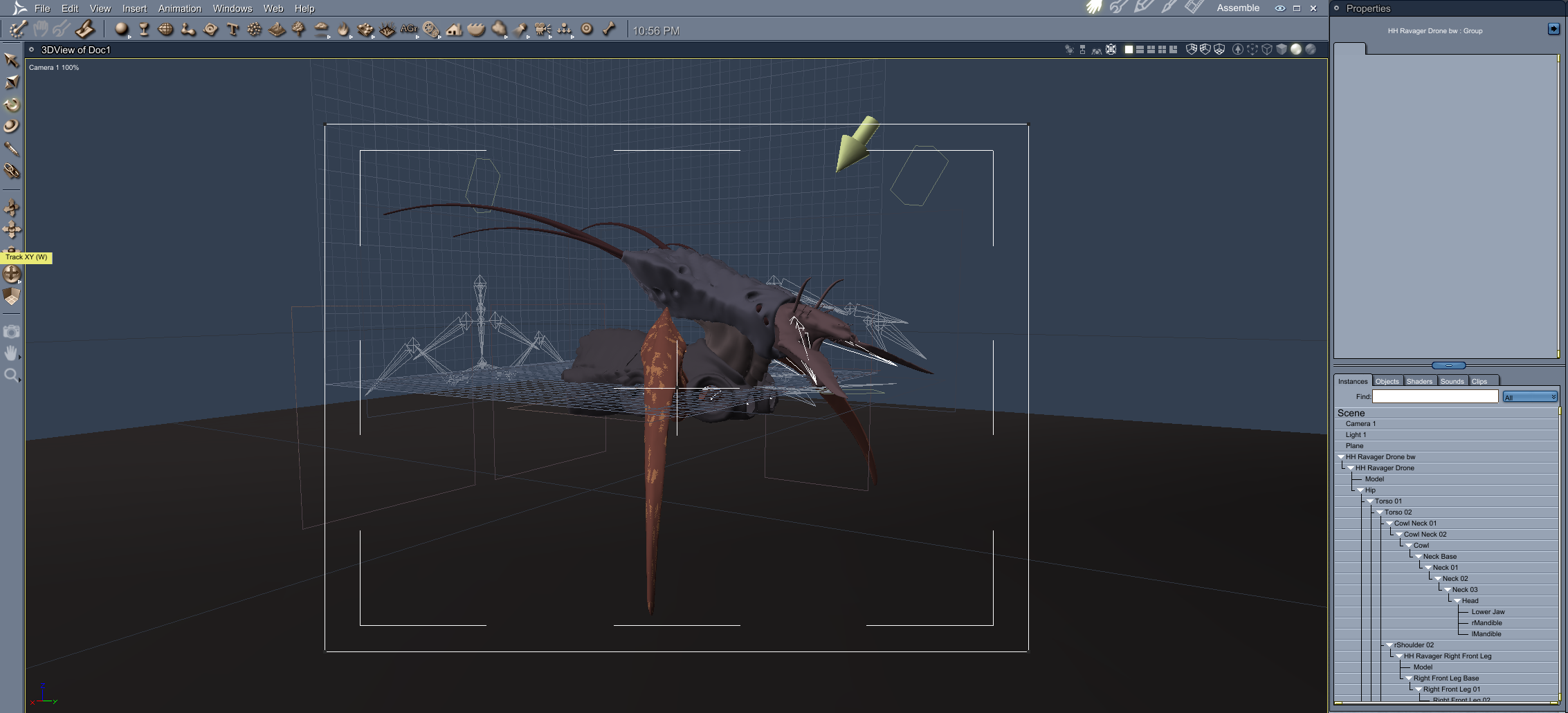
Buy Something That Doesn't Work in Carrara? Post your Questions and Workarounds here. (please)HH Ravager Drone - https://www.daz3d.com/hh-ravager-drone
Has one limb each side with the other limbs per side also in that position.
Again tried Blended Weight, with same result.
Looks like another obj export/import job !
 TX Madison for G9/8/8.1 Premium Bundle : Question
Or you could create your own, and even share it with others. I would suggest creating a "stoe" for this so you can keep it separate from the Daz metadata, for example by using http://docs.daz3d.com/doku.php/public/software/dazstudio/4/referenceguide/scripting/api_reference/samples/metadata/add_store_id/start and chnaging the last line to something like
} )( "Daz 3D Temporary Metadata", "http://docs.daz3d.com/doku.php/public/read_me/index/@/start", "@", true );
which will, if you enter the SKU as the token for the product, allow the More Information command to open the readme. If/when Daz does an official update you can just delete the Daz 3D Temporary Metadata store item for that product.
Help on Save and Save As path...barbult said:
I have had a similar issue with the Export command not remembering the last path I exported to. It is very frustrating. After some experimentation, it looks like Export defaults to the last I used path for Import, not the last path I used path for export. I wonder if Save and Open work that way. You might try opening an old scene from the new Save location and see if Save remembers that path the next time.
Yes, thanks barbult. Seems like it is the way to solve the problem, so far I tried to open some scene and scene subset, now the save as scene or scene subset shows D: path correctly, but those save as xxxx preset still shows E: path, later I will try to find and open/save more presets with D: path, gosh...
Shoe distortion issueLeana said:
If you mean to remove the autofollow, you would be modifying the morph you used on the figure. "Autofollow" checked means that shoes or other conforming items will morph automatically to follow the figure's morph.
Ok, but where I find the autofollow? In shoe? I have to import the shoe without parent with figure?
TX Madison for G9/8/8.1 Premium Bundle : QuestionUntil it does get metadata, you can find all your content thru the content library
Help on Save and Save As path...I have had a similar issue with the Export command not remembering the last path I exported to. It is very frustrating. After some experimentation, it looks like Export defaults to the last I used path for Import, not the last path I used path for export. I wonder if Save and Open work that way. You might try opening an old scene from the new Save location and see if Save remembers that path the next time.
TX Madison for G9/8/8.1 Premium Bundle : QuestionI see. Thank you for the information.
So, are there plans for this specific product (TX Madison for G9/8/8.1 Premium Bundle) to get the metadata update?
It would be nice to know!Fabiana Appreciation ThreadSeeker Stock Art said:
Elor said:
Seeker Stock Art said:
Do you know of a good tutorial anywhere on that?
If you're still looking for one, quoting @memcneil70 from another recent thread about metadata:
memcneil70 said:
The best metadata tutorial I found that managed to get through to my brain was by SloshWerks, https://www.youtube.com/watch?app=desktop&v=FQQ9uLhMSKQ. It is older and if you search on the web for 'how to install metadata in DAZ3d' you can come up with a variety of other offerings, some newer that I haven't looked at. They might be more relevant for you now.
Thank you @Elor! Appreciate it.
\This is a good start, But it could use an update and I cannot get things that are parts of other things to work.
For example, making the cufflinks work with the cuffs.
Separate by Loose parts/Surfaces in Daz StudioUnless a similar feature already exists that I am not aware offf, it would save a whole lot of time for us if we didn't have to go back and forth to Blender having to import and export props and figures, copy and paste surfaces each time we need to transform different surfaces into separate props.
Custom MorphThe import and export options in Blender have a setting to preserve vertex order - make sure that is on.
When you load an OBJ file as a new morph DS matches the list of vertices in that against the list of vertices in the base model, and takes the difference in position as the change made byu the morph. If the order is not preserved then the vertices will move to the location intended for a different vertex, so the outline will be correct but the surface will be warped into a spiky mess instead of a smooth skin.
Question about moving library files aroundThe "has no corresponding file" warning in the logfile relates to the .dsx ContentType tag. This one eluded me for a while since the way it's phrased makes it sound like it can't find a file stored somewhere on your hard drive, rather than just a missing or incorrect attribute in the metadata.
This warning can be resolved:
The following actions will make changes to the product's metadata .dsx file located in /runtime/support. You should backup metadata files you intend to edit first, before attempting to make changes.
The following steps assume you use DIM as an installer and sandbox DS away from the internet so it's unable to ET phone home and synchronize its metadata.
- Find offending product in Smart Content pane.
- Right click product's icon and select Edit Metadata.
- At the top of Content DB Editor, click Assets tab.
- Find file(s) causing the warning, refer to your log.
- Highlight file(s) by left clicking (you can select multiple files, but they should all be of the same Type).
- In the middle of the Content DB Editor there is a box which says Type and has a pulldown menu to the side of it, use the pulldown menu to select the Type which should correspond with the actual type of file it is.
- Example a character would be Actor/Character (or maybe just Actor), clothing might be Follower/Wardrobe/Full-Body (or Dress, Footwear, etc). If in doubt look at examples of other similar products you own, though that is not always a perfect guide to go by.
- After you've finished editing, click Accept and overwrite the exisiting metadata.
- Profit.
This can also be fixed by hand, directly editing the .dsx file to add or edit ContentType tags if you can read xml. In doing so you will have to perform ContentDB maintenance for any changes made to be pushed into Postgres and DS.
This will only fix "no corresponding file" warnings, if your product has multiple warnings or errors, this won't fix anything else wrong with the product. It won't make an unworking product work, in other words.
You can update the DIM install .zip with the new metadata if you wish to retain your changes if you ever have to reinstall the product (assuming you keep backups of the installer .zips, and know how to work with .zip files).
If Daz3d performs any update, or your DIM is sandboxed like DS and you manually install an update to the product, your edits will be overwritten and you'll have to perform these steps again.
I'm sure there's probably an easier way to go about this, this is merely the way I've gone about solving this particular annoying warning.
Feel free to add anything I might've forgotten or missed.
Seeking Guidance on Creating Custom 'Cyber Arms' Outfit for Genesis ModelIf replacing the body part, yes, the geo-graft should be way that you go for. Check the basic tutorial from Josh Darling - https://www.youtube.com/watch?v=_O8qL_BIQxY as well the ones from Sickleyield - https://www.youtube.com/@SickleYield/videos You can also find some good tuts if you search "Daz geo-graft" on youtube.
For hiding the underlying arms, just use the standard function of "Set Graft Faces for Attachment..." in DS. Check the above tutorial.
For rigging, check - https://youtu.be/Zm-QCFKowCw?si=MUVnjAqe1MbA93kG
There's no completely end-to-end tutorial of making complex geo-grafts on the youtube, there're a couple of tutorial products in the store but not so up-to-date... A couple of tools and techniques will be used but in general, the primary workflow is as below:
- Cut and export partial body part of Genesis figure with Base Resolution. Retop and model / sculpt in Blender, export to OBJ.
- Import OBJ into DS, rig it onto Geneisis figure with Transfer Utility. Set Graft Faces for Attachment... Save the figure asset.
- Create custom bones as needed with Joint Editor then go for rigging as well as tweaking the weight map.
- Create morphs as needed with Blender / DS.
- Texturize the grafts in Blender or Substance Painter and configure the mat. presets in DS.
- Save the figure assets as well as all needed presets.
- Final test.Fabiana Appreciation ThreadElor said:
Seeker Stock Art said:
Do you know of a good tutorial anywhere on that?
If you're still looking for one, quoting @memcneil70 from another recent thread about metadata:
memcneil70 said:
The best metadata tutorial I found that managed to get through to my brain was by SloshWerks, https://www.youtube.com/watch?app=desktop&v=FQQ9uLhMSKQ. It is older and if you search on the web for 'how to install metadata in DAZ3d' you can come up with a variety of other offerings, some newer that I haven't looked at. They might be more relevant for you now.
Thank you @Elor! Appreciate it.
'Medieval Battlefield Kit'? (Solved)@WendyLuvsCats, thanks again, yes, I know how to import OBJ at least, so this would work for sure, though it's always a hassle with the textures. Really interesting what you said about posing and such in Blender! I just learned that Blender now has an asset library as well, so maybe it's really high time to get more into it. What scares me off most is the lighting, I'm so terrible with this and I happily use all the kits I can get in DS for that.
@Gordig, of course, you're totally right, it's a MASSIVE set, so it's not expensive per se - and even on sale atm. It's just a high price for me right now, mainly because I had a cruel car repair bill this month already and fell for basically all the traps DAZ set for me during March Madness and beyond ;-) So I'm kind of reluctant to splurge so much. Especially when, looking at the single assets I keep seeing things that I basically own already in DS. But yeah, the sets are really really cool ...
'Medieval Battlefield Kit'? (Solved)I have an idea Unity versions are easier to get into DAZ than Unreal ones
I just never really figured out how to use Unity but the base meshes are usually FBX, it's the textures and materials that are tricky to bring pver
Getting stuff from Unreal into D|S is a lot of work but I do do it, exporting a gltf or glb file gets a lot of stuff textured into Blender as an intermediary which helps
the latest D|S beta has improved FBX import some things import with an animation take, however posing stuff manually doesn't work well, the bones end up weirdly pivoted
The kits you linked have obj, FBX and Blend files so should be easier to get into DAZ studio
you might be able to autofit the clothes if you scale the figures to match Genesis figures
you could pose and do this in Blender
Fabiana Appreciation ThreadSeeker Stock Art said:
Do you know of a good tutorial anywhere on that?
If you're still looking for one, quoting @memcneil70 from another recent thread about metadata:
memcneil70 said:
The best metadata tutorial I found that managed to get through to my brain was by SloshWerks, https://www.youtube.com/watch?app=desktop&v=FQQ9uLhMSKQ. It is older and if you search on the web for 'how to install metadata in DAZ3d' you can come up with a variety of other offerings, some newer that I haven't looked at. They might be more relevant for you now.
Avoiding duplicate purchasesAs of now I run everything past my possible purchases past my list of purchased items before any purchase.
Noting that that process is a Pain in the Lower Backside, It would be nice to have a way to Mark those things I have purchased at the other sites, so they areasbrainiac_d0d9ea3447 said:
Also, is there any way to grab the metadata, etc. for them so they show up in my smart assets?
The issue with the MetaData is that it has to be exact.
Did the Content Creator copy the files directly from the other site and hand them to Daz 3D unchanged?
OR
Did the Content Creator go back to their working copy, load it up so they could cleanup on folder and file structure (so the product adheared to the Daz 3D folder and file structure standard) and export a new product folder, before submitting the product to Daz 3D and their QC team.If the Former the metadata will work splendedly... But if the Latter the metadata will be broken and there is enough broken Metadate out their already we don't need to add to the problem.
This why I've always advocated for a User Base MetaData team, with a QC Team, and a repository for Product Metadata files.
Daz 3D is part of

Connect
DAZ Productions, Inc.
7533 S Center View Ct #4664
West Jordan, UT 84084Licensing Agreement | Terms of Service | Privacy Policy | EULA
© 2026 Daz Productions Inc. All Rights Reserved.