-
DAZ is losing me
Ivy said:
certaintree38 said:
Serene Night said:
For me it is the increasing hardware demand. I was excited to get genesis 8.1 since I tend to be an early adopter. But 4.15 requires too much gpu and with nvidia driving the bus I fear I can't even render two figures in a scene without dropping.
So sadly, iam not buying g8.1 or anything that requires 4.15
I am going back to 4.11 which is much less intensive for my gpu. I can't afford a new gpu to run 4.15. Not when 4.11 works fine and runs what I need. I don't want to play the nvidia upgrade game, it's too expensive for me as a hobbyist.
I have 4.15 installed right now, but I have seen my renders dropping to cpu constantly lately. So I just went through my old hard drive and found I have several older versions of Daz kicking around. Now to see if I can have two versions installed at once! I wish Daz made older versions of the program more readably available. I don't see how it could harm their bottom line.
If you have a GTX gpu and not a RTX gpu you will experience that drop tp cpu issues is because of the NVIDIA driver after 436.7 have the Opitex prime accelerator always on by default to compensate for the Raytrace values in RTX cards so if you have a GTX Opitex prime uses more vram . in the older versions of daz before 4.12.0.86 you could turn off opitex prime as a option in the render settings . But my understanding is the NVIDIA driver has as more to do with the opitex prime accelerator being the major issue and that not daz fault .. Maybe why Daz Studio has started adding Filament as a Renderer because a lot of people can get access to daz studio But can't get a graphics card . But yeah if you got aa GTX GPU I would suspect its the opitex prime making your renders throw to CPU , other wise if you want to use a RTX card you got have at least 8gigs of vrams to use iray in 4.15
I'm on 4.15 with a GTX 1080TI and the most recent NVIDIA driver and don't have any more issues with dropping to CPU than I did on 4.12 or 4.14. I've never really had renders dropping to CPU while baking. Sometimes I can't get a large scene to fit right at the start, but then Scene Optimizer generally takes care of that. But once I'm able to get it onto the GPU, I've never had problems with it staying there. I think with 4.11, I was able to fit more into a scene before it hit that threshold of not fitting on the card, and yeah that is annoying. Thankfully, my scenes these days pretty much consist of only one character, so I haven't had many instances where the lower ceiling gets hit.
That being said, I'm on the lookout for the 3080TI when it comes out...so hopefully sometime this year I'll have a new system.
DAZ is losing meIvy said:
If you have a GTX gpu and not a RTX gpu you will experience that drop tp cpu issues is because of the NVIDIA driver after 436.7 have the Opitex prime accelerator always on by default to compensate for the Raytrace values in RTX cards so if you have a GTX Opitex prime uses more vram . in the older versions of daz before 4.12.0.86 you could turn off opitex prime as a option in the render settings . But my understanding is the NVIDIA driver has as more to do with the opitex prime accelerator being the major issue and that not daz fault .. Maybe why Daz Studio has started adding Filament as a Renderer because a lot of people can get access to daz studio But can't get a graphics card . But yeah if you got aa GTX GPU I would suspect its the opitex prime making your renders throw to CPU , other wise if you want to use a RTX card you got have at least 8gigs of vrams to use iray in 4.15
...aother reason I am staying with the 4.12.0.47 Beta.
NVidia Alternatives?We have a very detailed benchmark thread in the forums that can help you determine exactly what you want speed wise. You can download the test scene for yourself and run it. Then you can compare your render times to that of others. If you have a Mac, you are CPU rendering, so I can pretty much guarantee you will see all the times posted in that thread will be much faster.
https://www.daz3d.com/forums/discussion/341041/daz-studio-iray-rendering-hardware-benchmarking/p1
There is some good info here, and it is indeed true that what you need for yourself just depends on what on you want to do. But I will add to this.
I will not talk about Mac, because what I would say is not very nice.
People love to say rendering speed will not make you a better artist. That is true...but not really true. What? It is like this, most people get better through repetition, correct? With pretty much any task you want to learn, we all get better with experience. Experience means you have to actually be doing that task. But if you have to wait for many hours just see a basic result of your image, then YES you are at a disadvantage against someone who can have a similar render in a few minutes. Because that person can quickly see what they did wrong in that render, make adjustments, and render again. And again. And again. And again.
They can do this many times over, while the other person might still be waiting on that one single image to render. I might make LOTS of test renders. Testing skin settings, light settings, does this pose clip, did dforce work, does expression 21 look better than expression 15? I might make dozens of renders for testing. Isn't that part of creativity? Being able to experiment and see the results? It would really, really suck if the test renders took hours, because I just wouldn't be able to do these tests as often, or at all. I have a full time job and family, I can't spend all that time waiting on my computer to render a single image. I might not even get an hour to sit down with Daz. I would never get anything done. I wouldn't even be here, I would have quit long ago. I started as a gamer, but as time went on I started upgrading for Daz Iray more than games. I actually owned a ATI GPU when I first started using Daz. And I felt the impact of not having a Nvidia card right away. So I jumped to ebay and bought a 670...this was when Iray first came out for Daz. I didn't have much money, and a 670 was an upgrade. Then I got a 970, and then I made the big move to a 1080ti. And then I got...another 1080ti, LOL.
Well that escalated quickly. But I bought every one of those used for far less than their original cost. I timed my 2nd 1080ti perfectly, when the 2018 crypto boom crashed. I got it for $450.
Are you really going to tell me that the person who has to wait for that image so long can improve at the same rate as the person with the faster computer? If we assume they have similar talent, hell no. Not even close. Don't even pretend they are the same. Imagine going to school and the history teacher can only give you a few sentences out the history book every day because the book cannot download fast enough. Sure...you can still learn the history but it is going to take a while. Meanwhile a classmate got to read the whole chapter, and tomorrow is a quiz! How is that fair? It is not, and neither is rendering.
This might sound extreme, but this is kind of an extreme field. The whole reason this field is so niche is because of how demanding it is on time and hardware. This field is absolutely not for the faint of heart. Daz can help make things pretty easy to get started, but it still requires a long learning curve. It is very hard to learn if you spend all your time waiting for the image to render.
Now, with that fun rant out of the way, you do have two considerations if you get a Nvidia GPU. Render speed is the obvious, but VRAM is the other. If your scene is larger than the VRAM, your GPU will do exactly NOTHING. While NOTHING might sound kind of metal, it is not so good for rendering. So how much VRAM you have is an absolute limit on what you can do. While some people have mentioned how many characters they can fit in a render, did they mention how large of a render they were making? Because that is a pretty major factor in VRAM, too. The higher the resolution of your render, the more VRAM needed. So if you desire making nice high resolution images, you might want more VRAM. Honestly, it is really hard to gauge just how much VRAM you will need. You might be able to guess by monitoring your CPU render scenes RAM usage. But how much RAM you use is not equal to how much VRAM you use. Iray actually compresses data when it sends it to VRAM, so your actual VRAM use will never match how much RAM you use. How much it is compressed can vary as well, depending on the scene, and Iray settings.
However, as you may have noticed, the prices of GPUs are high. In fact right now is the probably the worst time ever to be buying a GPU. I am not exaggerating when I say that. The market has never been like this. We have had crypto booms before, but not like this, and not during the perfect storm of COVID and supply shortages that rocked 2020. Not only are new GPUs highly inflated, but even old GPUs in the used market are absurdly inflated. The prices of many Pascal 1000 series cards, cards from 4 years ago, are higher than they were when they launched on ebay! If not higher, they are right at their launch price, when in normal times a 4 year old GPU that is 2 generations old should be at least half its original price at the very most. I don't know when this is going to end. You just have to hope the mining boom dies soon, and I don't see that happening. Of course I would love to be wrong!
So unfortunately I don't really have any good advice for you when it comes to Iray. It might be better to try using a different render engine. Daz includes 3Delight and Filament, which do not require Nvidia GPUs. You can also export to other applications now, like Blender. So you could export to Blender and use one of its render engines. Now do note that for any of these different engines you will need to adjust the shaders, and they are all different. Plus the very fast render engines are fast because they are less physically accurate than Iray, but maybe that is OK for you. So you do have some options. But just know that any render engine that uses CUDA and OptiX will require Nvidia because those are owned by Nvidia.
DAZ is losing meIvy said:
certaintree38 said:
Serene Night said:
For me it is the increasing hardware demand. I was excited to get genesis 8.1 since I tend to be an early adopter. But 4.15 requires too much gpu and with nvidia driving the bus I fear I can't even render two figures in a scene without dropping.
So sadly, iam not buying g8.1 or anything that requires 4.15
I am going back to 4.11 which is much less intensive for my gpu. I can't afford a new gpu to run 4.15. Not when 4.11 works fine and runs what I need. I don't want to play the nvidia upgrade game, it's too expensive for me as a hobbyist.
I have 4.15 installed right now, but I have seen my renders dropping to cpu constantly lately. So I just went through my old hard drive and found I have several older versions of Daz kicking around. Now to see if I can have two versions installed at once! I wish Daz made older versions of the program more readably available. I don't see how it could harm their bottom line.
If you have a GTX gpu and not a RTX gpu you will experience that drop tp cpu issues is because of the NVIDIA driver after 436.7 have the Opitex prime accelerator always on by default to compensate for the Raytrace values in RTX cards so if you have a GTX Opitex prime uses more vram . in the older versions of daz before 4.12.0.86 you could turn off opitex prime as a option in the render settings . But my understanding is the NVIDIA driver has as more to do with the opitex prime accelerator being the major issue and that not daz fault .. Maybe why Daz Studio has started adding Filament as a Renderer because a lot of people can get access to daz studio But can't get a graphics card . But yeah if you got aa GTX GPU I would suspect its the opitex prime making your renders throw to CPU , other wise if you want to use a RTX card you got have at least 8gigs of vrams to use iray in 4.15
This has been my experience, which is why 4.11 works well for me. I am surprised that DAZ STore could not work with Nvidia to resolve this issue though. This is going to impact their customer base.
DAZ is losing mecertaintree38 said:
Serene Night said:
For me it is the increasing hardware demand. I was excited to get genesis 8.1 since I tend to be an early adopter. But 4.15 requires too much gpu and with nvidia driving the bus I fear I can't even render two figures in a scene without dropping.
So sadly, iam not buying g8.1 or anything that requires 4.15
I am going back to 4.11 which is much less intensive for my gpu. I can't afford a new gpu to run 4.15. Not when 4.11 works fine and runs what I need. I don't want to play the nvidia upgrade game, it's too expensive for me as a hobbyist.
I have 4.15 installed right now, but I have seen my renders dropping to cpu constantly lately. So I just went through my old hard drive and found I have several older versions of Daz kicking around. Now to see if I can have two versions installed at once! I wish Daz made older versions of the program more readably available. I don't see how it could harm their bottom line.
If you have a GTX gpu and not a RTX gpu you will experience that drop tp cpu issues is because of the NVIDIA driver after 436.7 have the Opitex prime accelerator always on by default to compensate for the Raytrace values in RTX cards so if you have a GTX Opitex prime uses more vram . in the older versions of daz before 4.12.0.86 you could turn off opitex prime as a option in the render settings . But my understanding is the NVIDIA driver has as more to do with the opitex prime accelerator being the major issue and that not daz fault .. Maybe why Daz Studio has started adding Filament as a Renderer because a lot of people can get access to daz studio But can't get a graphics card . But yeah if you got aa GTX GPU I would suspect its the opitex prime making your renders throw to CPU , other wise if you want to use a RTX card you got have at least 8gigs of vrams to use iray in 4.15
Daz Studio 4.16[.0.x] Pro, General Release! (*UPDATED*)jbowler said:
dawnblade said:
The Defaults render settings button doesn't revert the render settings to default. I can create a new scene to do it if I've just gotten started on the scene.
Go to the Scene tab, select the "Environment Options" and "Tonemapper Options" nodes and delete them. While you are at it you might also want to delete the "Filament Draw Options" node, if it is there.
It would be incredibly annoying if that button did the same thing.
Thank you @jbowler, that is a good workaround. I disagree and would be ok if the button did what you just described, because it would be doing what it is supposed to do. But I don't want to make this a point of contention. Thank you again for your workaround!
Daz Studio 4.16[.0.x] Pro, General Release! (*UPDATED*)dawnblade said:
The Defaults render settings button doesn't revert the render settings to default. I can create a new scene to do it if I've just gotten started on the scene.
Go to the Scene tab, select the "Environment Options" and "Tonemapper Options" nodes and delete them. While you are at it you might also want to delete the "Filament Draw Options" node, if it is there.
It would be incredibly annoying if that button did the same thing.
New beta available: PBR, microfacets, Disney, Fresnel and tutti quantichickenman said:
Would you be interested in trying to create a bridge from Carrara to Filament to provide us this new PBR render engine?
Now tht DAZ is supporting Filament in Studio and the fact that it it is free found here https://google.github.io/filament/
Then we would be able to utilize any of the filiment shaders with out any hassles..
IMO this is pointless.
Carrara native engine runs absolue rings around Filament which handles transmaps and shadows so badly.
I use Filament a lot in DAZ studio because it is better than OpenGL which I used to use a lot because the alternatives IE iray and 3Delight are so incredibly slow and resource demanding on my hardware
but
given the option I prefer Carrara native any day
that said for speed and PBR Octane is my choice but obviously not affordable to everyone (including me if I didn't already own it)
now if one was looking at integrating Cycles and Eevee I would say please go for it!
adding I can render Carrara at less than one frame a second if transmapping and raytraced shadows is totally avoided, my only problem is my CPU gets too hot!
DAZ is losing meGreebo said:
Serene Night said:
Where daz loses me, is actually more in the hardware requirements to use the software, rather than in the content. I just can't keep up with the video card requirements to run the latest stuff.
Yup. That's bang on.
I was looking for this thread - or maybe one like it.
I have been hobbyist using DAZ Studio for about seven years. (I started with Blender, moved to Poser and then to DS. I still use Blender and find that and my Poser experience were a good foundation; but, I no longer pay for Poser licenses and my version no longer works: something to do with Adobe and my contnet library and the support desk offered fix not working. ...And being told the version I was using was no longer supported .. . ) I mention this because I am increasingly frustrated with my ability to produce anything. There are a couple of sides to this and I will try to explain.
1. Content seems to be getting more expensive, more and more requires dForce simulation, and sometimes that's because it is really cool and sometimes it is really bad and tries to use dForce to overcome a lack of shaping/fitting morphs.
2. I run 4.15 on a W10, 64 bit, i7 4790, 32 GB RAM, with a GTX 660TI (3GB) and an RTX 2070 (8GB) video cards. Until 4.15, both video cards supported rendering: now only the RTX. But I didn't understand that until after I upgraded so as to use filament.,. 8.1 . . . . . .
So What! Well, 4.15 crashes almost every second render. I have learned (almost) to save prior to any rendering but even though that has reduced some frustration I still endure the restart and reload experience (many many minutes typically) far too frequently. Posing (forget pupetteer or the new face rig thing) has always been a system load, but when you combine that with the need to simulate clothing and hair, perhaps on a timeline, to get it to work at all in some cases . . . . .Simulations take forever. And take loads of tries to get right.
Perhaps the answer is a new system. I think it was another thread here that shamed a comment someone made about needing a high end video card for this to be worth while as a hobby. Then there was a shark attack about 'what do you want to do' and all the options and work arounds. I am not inviting that. But I don't know what a new system might look like. It used to be if you wanted to render nice images, fast, you needed a large NVidia GPU (with current CUDA version it turns out). I think that is still basically true but large is getting larger. And there are other options for a little lower quality (octane (plug in)), or simulations (filament?). Maybe you want two video cards - that dictates a certain mother board. Lots of RAM is good. Some have said 32 GB is the minimum. I have 32 GB and, while watching Task Manager, see it all used very regularly. There are so many aspects of DS that also use the CPU (and in many/most/all? cases are single processor) I often think that is the bottleneck as I watch it max out the one core it is using while watching Task Manager. So a good CPU??? And then there's the ton of storage... Add this up and we are not talking an inexpensive system. And with every significant DS upgrade there is more hardware that needs to be replaced (in my case anyways).
Or maybe the answer is to cast off older content, and avoid new content, reducing storage and system load. I have started that; but, it is disappointing to not be able to use Auto Face Enhancer (after purchasing) as an example because it creates too much load, or some of the new hair because it needs to be simulated or to have retired characters to try to conserve resources.
This all seems quite counter to the idea of selling content as a business model. Not me to say. But it's no good if you cannot use it. So I will need to be far more selective. And I find that unconstrained content creation/design/implementation (from the perspective of system size or system resource requirements) is putting me out of the game. I am not looking to rock the world - but producing only one nice render a day is much less than I was able to do five years ago. . .
It's a ramble I know. Rant ends.
Skin Builder 8 Merchant Resource for Genesis 8 Female (Commercial)The Filament update is live already. Updating to 8.1 means the UV's need to be changed to 8.1. That is a huge task. Sure we can make it compatible with 8.1 where it will work and still be using standard 8 UV, BUT people will expect it to be 8.1 UV, hense why we are not making it compatible with 8.1 until we know exactly what approach to take.
Skin Builder 8 Merchant Resource for Genesis 8 Female (Commercial)Zev0 said:
No it is not g8.1 compatible. A lot of people had issues using this on 8.1 hense why 8.1 is disabled.
Main changes in this version 1.1 is
Added fix for when viewport is in Filament preview which it is not designed for and causes issues. Script now auto changes to Iray preview while skin building process occurs if viewport was in Filament preview.
Updated MR agreement
Out of curiosity, is it safe to assume that once the errors are understood and corrected, that it will be updated for 8.1?
Thank you. :)New beta available: PBR, microfacets, Disney, Fresnel and tutti quantiWould you be interested in trying to create a bridge from Carrara to Filament to provide us this new PBR render engine?
Now tht DAZ is supporting Filament in Studio and the fact that it it is free found here https://google.github.io/filament/
Then we would be able to utilize any of the filiment shaders with out any hassles..
SereneNight’s Sci-Fi Fun Thread 3Still haven't done any autofits in 4.15, but I haven't had that lights problem at all. Is it saving the environment and tonemapper settings with the scene? (Those two new things that now appear in the scene tab. They're necessary for Filament, but Daz decided to use them to save that information with scenes whether or not you're using Filament.)
Layered texture changes via script don't update in IrayHi!
I'm trying to make a simple code which loads an image in a layer of a layered texture. It does work so far with the Filament viewport renderer, but Iray simply ignores the new maps. CTRL-I doesn't help, changing the viewport render and go back to iray neither. I have to open the LIE and click accept. However, the small property icon changes instantly to the new map after running the script.
Can someone please help me to make this work?
var ContentMgr = App.getContentMgr();
var ImgMgr = App.getImageMgr();

var node = Scene.getPrimarySelection();

var Properties = ["Tip Transmission Color", "Root Transmission Color", "Hair Root Color", "Hair Tip Color"];

var Color01_Path = ContentMgr.getAbsolutePath("./Runtime/Textures/Color01.jpg", true);


for(i = 0; i <= 3; i++) {

	var LayeredImg = node.getObject().getCurrentShape().findMaterial("default").findProperty(Properties[i]).getMapValue();
	LayeredImg.getLayer(0).imageFile = Color01_Path;
	LayeredImg.refeshLayeredTexture();
}
thank you very much!
[Released] ROG Fantasy Home: Entrance + Furniture Set Products [Commercial]Artini said:
I have bought only the props, but some of them are really heavy on my computer.
It significantly slows down the operation of Daz Studio, but I still like them.
Make sure you're not using a wireframe viewport mode in Daz. Modes showing wireframes in Daz are super slow. Texture shaded or filament would be preferable.
Most props are made in SubD with the average polycount of props in a 10 year old game, so lowering the 'View SubD level' under Parameters > Mesh resolution to 0 tto each prop, or those that bother you should do wonders to viewport performance.
If you leave the 'Render SubD level' at 2, then they'll still render normally as they should in Iray.NVidia Alternatives?Faeryl Womyn said:
Anyone who says you can't render the new G8.1 with 4 gigs of ram might want to retract that. I have a 15 yr old computer with an ATI Radeon HD 3400 series graphics card and 4 gig's of ram and can render any of the models currently out.
Also why is no one mentioning Filament and Octane which are suppose to help speed up render times.
I think Filament is still Windows only but is looking more viable with RSSY's and Dreamlight's support for it - but not for Mac unless I've missed a big announcement
NVidia Alternatives?Anyone who says you can't render the new G8.1 with 4 gigs of ram might want to retract that. I have a 15 yr old computer with an ATI Radeon HD 3400 series graphics card and 4 gig's of ram and can render any of the models currently out.
Also why is no one mentioning Filament and Octane which are suppose to help speed up render times.
Daz Studio Pro BETA - version 4.15.0.30! (*UPDATED*)RayDAnt said:
- Having a camera shooting a distant figure/object at a very high (zoomed in) focal length.
While I could repro the artefacts with a 1000mm camera 80m distant from a G8 figure in 4.15.0.9 with 4.15.0.12 I cannot. I do see artefacts if I rotate the figure in Iray preview but they disappear as soon as I stop rotation. I'm using exactly the same test scene I used before (I remembered to save it this time :-) There are no artefacts when the scene is rendered. I saw brief artefacts with Filament but none in a Filament render. I haven't tried camera rotation in Iray preview, only figure rotation; camera rotation is rather pointless in my test scene and I have another Iray render running in parallel using 4.15.0.12 and I don't want to damage it (it is at 94.69%...)
I did discover a "hang" bug that happened on a completely new scene without even touching Iray. I had loaded the Mad Lab scene +broomall and prop +ctableall. I deleted the table lights and rotated the scene then got this hang:
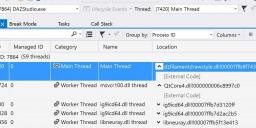
I don't know if this is related to the changes.
The Change Log certainly does not say how the "scene shift" is actually set. The obvious way is to set it to the center of all the close objects for some definition of close. Certainly using the camera origin is inappropriate; at least the scene shift should be such that the closeest vertex visible in the camera frame is close to the scene origin and, realistically, the scene origin should be somewhere beyond that. It looks like the origin is somewhere close to the figure in my simple test scene, but my camera focus was also set correctly (that's how I know the figure is 80m from the camera!)
Visible skin seams in Unity after import.Some G8F characters have visible skin seams in Unity after import.
It kinda looks like what people are talking about here: https://www.daz3d.com/forums/discussion/450151/character-skin-seams
(I have the same issue in the Filament viewport).
I tried with a new HDRP template / demo project, some figures had lines others did not.
- Daz Studio v 4.15
- Unity 2019.4 various versions
I tried to disable the mip map for torso and legs, but the seams were still visible, from certain angles / distances.
Any help or something would be cool, but this is not urgent.
interpolation options greyed outI discovered my woes in DAZ studio that makes me loath it are caused by TCB interpolation.
However linear and constant is greyed out, I cannot find how to enable them Google search or otherwise.
Pretty sure this doesn't happen in 4.11 before the improved timeline Keymate didn't do it
(seems I was optimistically mistaken) it explains so very much
Any documentation suggests they are not greyed out for others.
I am going bonkers trying to drive around a scene as the camera arcs in bezier curves between points over the footpath across houses even parenting it to a null.
I have never experienced such a thing in iClone, Carrara, Unreal, Poser, Twinmotion, Blender, Bryce or anything else, even Particle Illusion if Bezier is not applied to a keyframe.
I am using the 4.15 beta but I am about to open my scene in 4.11 and hope 4.15 doesn't bork it reloading as I want to use Filament
Daz 3D is part of

Connect
DAZ Productions, Inc.
7533 S Center View Ct #4664
West Jordan, UT 84084Licensing Agreement | Terms of Service | Privacy Policy | EULA
© 2026 Daz Productions Inc. All Rights Reserved.