-
Beta for DazCentral, your new Content Manager
When I used Daz Connect, I found that I couldn't download the files on one PC, and then transfer them later onto my main PC, which meant that I couldn't create a backup of all my products. (I'm on a 2mb line so downloading takes forever,)
Does DazCentral allow you to simply move your entire library around, backup, restore, move it onto an external hard drive if you start running out of space, move it to another PC, when you upgrade etc like you can with files downloaded through DIM?
I guess this answers my question. it looks like we have to redownload our entire library. It seems like just another form of DRM to be honest.
Can I copy products installed using Daz Connect from one computer to another?
The preferred workflow is to log in to each computer and install the desired products using Daz Connect
I like to move files around on disk to organize them differently. Can I still do that?
You cannot move files around for products installed through Daz Connect. You can change the drive and/or path to which products are installed using Daz Connect, but you cannot manually re-organize the files within the product.
The FAQ entries relate to Daz Connect (the Install pane etc. in DS), not Daz Central. (And the Connect files are not encrypted, so you can back them up - but they will not load correctly through CMS-based views if you move them.)
Specific expression packs question.The generic G8F morphs are adaptations of the morph expressions for Babina. 2 morphs are being applied, not just one ;-)
Face Transfer...could be worse
My first Face Transfer fail/
Is that a fail? I immediately recognized her.
Beta for DazCentral, your new Content ManagerWhen I used Daz Connect, I found that I couldn't download the files on one PC, and then transfer them later onto my main PC, which meant that I couldn't create a backup of all my products. (I'm on a 2mb line so downloading takes forever,)
Does DazCentral allow you to simply move your entire library around, backup, restore, move it onto an external hard drive if you start running out of space, move it to another PC, when you upgrade etc like you can with files downloaded through DIM?
I guess this answers my question. it looks like we have to redownload our entire library. It seems like just another form of DRM to be honest.
Can I copy products installed using Daz Connect from one computer to another?
The preferred workflow is to log in to each computer and install the desired products using Daz Connect
I like to move files around on disk to organize them differently. Can I still do that?
You cannot move files around for products installed through Daz Connect. You can change the drive and/or path to which products are installed using Daz Connect, but you cannot manually re-organize the files within the product.
Who want's a broken nose?For which figure? Genesis 8 female has a few morphs for asymmetrical adjustments to the nose, though they are all - as far as I can see - pasrts of larger morph sets. The base head morphs have a NoseSkewed.
Genesis 8 Alive IssueI know this is an old post but might help as I have just had the same problem,
the morph dials needed for genesis 8 alive to work are in the Daz add on, Genesis 8 female body morphs , I have just installed them and genesis 8 alive is working perfectly now.
When I want to use them, my character changes its location! what's the problem?
SereneNight's Sci-Fi Fun Thread 2hmm. Now that I look at it... The gen bulge morph is doing something odd with the elements region.
For what it's worth, I think the issue is that they're very low-hanging loose pants, where most Daz pants have a higher crotch and closer fit. The bulge morphs are trying to work with a place that isn't quite what they were designed for. (I was able to fit the pants over the elements with Fit Control. The results are ... amusing.)
Boys/Men like Yuzuru 8?If we had a Guy 8 it would help as dialing him in would give a more animated look as I dial Girl 8 into every female I render and it works wonderfully.
XTransfer or RiverSoft’s G3M-G8M converter can get you there. I XTransferred Guy 7 and have been using him quite a bit lately. If you need his materials, you can either Map Transfer them or get Legacy UVs. Boyfriend might also serve your purposes.
None of this helps the OP, though. I have some freebie morphs that I’ll look up when I get home.
Beta for DazCentral, your new Content ManagerWhen I used Daz Connect, I found that I couldn't download the files on one PC, and then transfer them later onto my main PC, which meant that I couldn't create a backup of all my products. (I'm on a 2mb line so downloading takes forever,)
Does DazCentral allow you to simply move your entire library around, backup, restore, move it onto an external hard drive if you start running out of space, move it to another PC, when you upgrade etc like you can with files downloaded through DIM?
No one asked me - Diomede screenshots on whatever - Warning AI Discussion OKCustom Figure
(Fan Art) Rigged in Studio for Use in Carrara (and Studio)
The Grinch
For this month's challenge, I modeled fanart Grinch and his dog Max. I've rigged and weightmapped them both using Carrara's native tools. However, I've decided to rig the Grinch using Studio's tools because I want to be able to make a variety of "Who" morphs and clothes. The transfer utility in Studio can be a big help.
Part 1 - Preparing a Carrara Mesh for Daz Studio Rigging
- modeled the Grinch in Carrara's vertex modeler
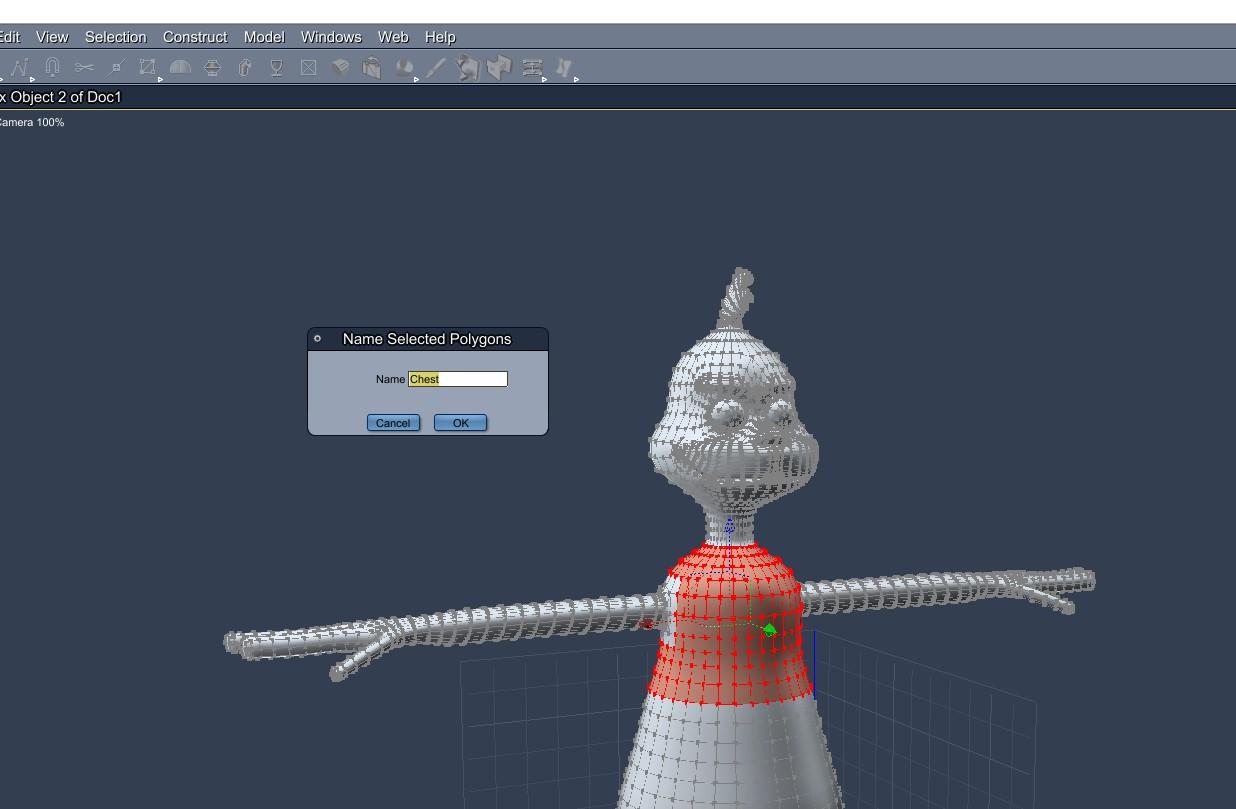
- using the Selection : by Name : by Polygons menu, I created groups and named them for the entire Grinch mesh. One named group for each bodypart.
- I tried to prevent unnamed polygons by sequentially selecting by each group and then inverting. If nothing selected, then all polygons are in a group.
- I exported the Grinch obj in the preset for Daz Studio : Full Scene.
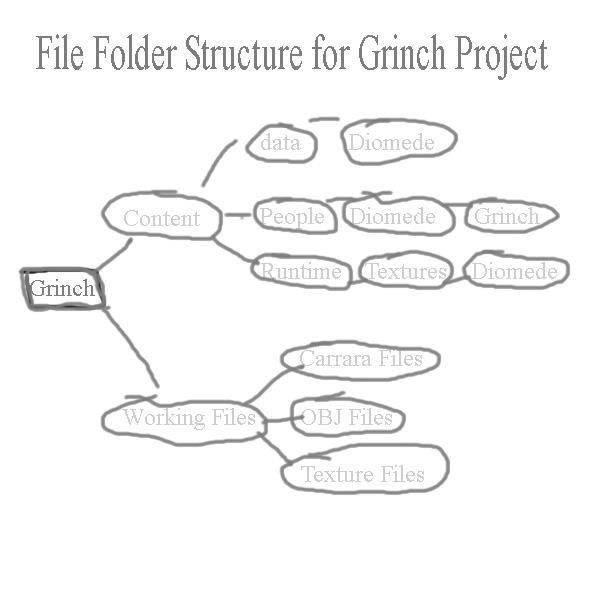
- I created a file structure based on some advice by Mark Olsen, MDO2010, but I'm not sure what forum name he goes by now.
- I have a base project file with two main subsets, the Content Files, and my Working Files. Only the Content files would ever be shared
- The content file has a folder for the data files that Studio will create when the completed figure is rigged and saved as a support asset. This project also requires a place to put the custom figure so I chose People. It is also customary to place material and texture files in a Runtime : Textures folder within the content folder.
- Separate from the content folder, I have a working files folder. I have subfolders for my Carrara files, for OBJs (base figure and morphs), and for anything I use to help with textures (including references). I do not share the working files folder.
 [Released!] Kingston for Genesis 8 Male [Commercial]
Oh I see. So the Kingston genitalia preset is just a morph for the G8 genitalia attachment that comes only in the pro bundle of any G8 figure. I guess I will just have to be creative with my poses then because those bundles are not cheap. It's strange that the body, head and nipple presets don't appear to work for me, but it's not a problem as the parameter sliders work just fine. Thanks for the explanation, Faber. Much appreciated!
Novica & Forum Members Tips & Product Reviews Pt 13Thank you for the review of my Natty hair Novica! Much appreciated and love the images you made with it the girl looks really awesome! Just wanted to chime in and say, about that parting between the dreads setting the smoothing on the Cap to ON may help as well (it's added to the cap but it defaults on OFF), I may be wrong but it seems like the hair may have fallen a bit thorugh the scalp, it's not supposed to be that wide/noticable :) I put in a few morphs in both the Cap and the Top that may help with adjustments, especially for characters with slightly bigger heads. Postwork works great too though ;)
V.I don't understand the logic behind adding a Smoothing Modifier but defaulting it to OFF. Is there a reason? Or is the default value an error? Defaulting to off seems like it would just lead to the kind of problems Novica had.
To my understanding it shouldn't be a practice for wearable items to have a smoothing automatically activated on load when making clothes and hair :) Morphs included need to be capable to fix all and any distortions with custom characters and with the base shape of genesis there shouldn't be fitting issues at all to begin with, smoothing modifier is easier though even if it's not always needed/wanted ;)
Thank you for the review of my Natty hair Novica! Much appreciated and love the images you made with it the girl looks really awesome! Just wanted to chime in and say, about that parting between the dreads setting the smoothing on the Cap to ON may help as well (it's added to the cap but it defaults on OFF), I may be wrong but it seems like the hair may have fallen a bit thorugh the scalp, it's not supposed to be that wide/noticable :) I put in a few morphs in both the Cap and the Top that may help with adjustments, especially for characters with slightly bigger heads. Postwork works great too though ;)
V.Ah, that smoothing of the cap nestled things a lot closer. Would you like to show more renders of the hair? My studio is extremely laggy for some reason, and when I do the morph sliders it takes so long to move the strands, I can't tell if what I did is better or worse. :( Also, anything else you'd like to discuss about the hair? I have a question, what is line tessellation?
Preview hairs tend to hog down the adjustments (on all dForce hair), having preview hairs off doesn't give the clearest picture of how it's gonna look in the render tho, so yes I see how that can get bothersome. It took me a while but I got to like strand based hair (making and using it), it has it's downsides but results are rewardng in the end :) I should have some time soon so I can do some more renders no problem, what would you like to see, morphs/moves in action and such?
GoZ ZBrush and nonstandard polygons....There has for some time been an issue with some clothing items not being compatible with the process of sending them from DS to Zbrush using GoZ. Namely that when the clothing item is sent to ZBrush and back to DS (via GoZ) an error is reported that the topology of the item has changed and consquently this method can not be used for making morphs (usually corrections to autofit) to those clothing items.
I discovered that when importing the clothing item in to ZBrush, it requires you to convert polygons which have more than 4 sides into triangles or quads and triangles. Thus the topology changes. However when the import to ZBrush is done from DS via GoZ, it does not tell you that this change has been made, it just does it automatically. Thus, if an item has non standard polygons, though DS can cope with this, Zbrush can't and GoZ doesn't tell you that it has to change the topology.
How many hours of work has that cost me and others over the years??
Now the question is; is there a way to get Zbrush to change the topology back to what it was originally, so that the item can be sent back to DS via GoZ (or another way) in order to be used as a morph?
Of course, all this palaver would be competely unnecessary if DS had some simple Smooth, Move, Push and Pull brushes that could be used directly on the mesh in real time. (the D-Former magnets are, to say the least, blunt tools)
Assistance Request: Stretching Super Villain RenderWell, you could do the rerig into multiple bones in DS and pose like that, but I don't think there's a simpler approach other than individually sculpting each step of the process. In principle you could make a set of GeoGraft limbs to replace the defaults, which would at least leave the rest of the figure unchanged (for morph and clothing compatibility) - but I think you are going to end up cursing your character-design decision whatever you do.
I seriously just asked myself "but how do they make that rotobot stand up"And turning would be an interesting exercise with one flat cross section wheel. Unicycles can turn due to CG transfer and a curved cross section wheel. I suppose it could be done with a torque reaction internal gyro, but there are easier ways of doing it. I have precisely the same reservations about the Segway; An exceedingly clever, high tech, energy intensive, design intensive, resource intensive solution solving a problem a bicycle solved 150 years ago with virtually no technology, little resources, small design effort and zero non-renewable energy input. In my view, the Segway is a solution still looking for a problem that hasn't yet been solved.
[Released] Rotations Add-On for ManFriday's Mesh Grabber [Commercial]I used it for this:
https://www.daz3d.com/dforce-city-limits-outfit-for-genesis-8-female-s
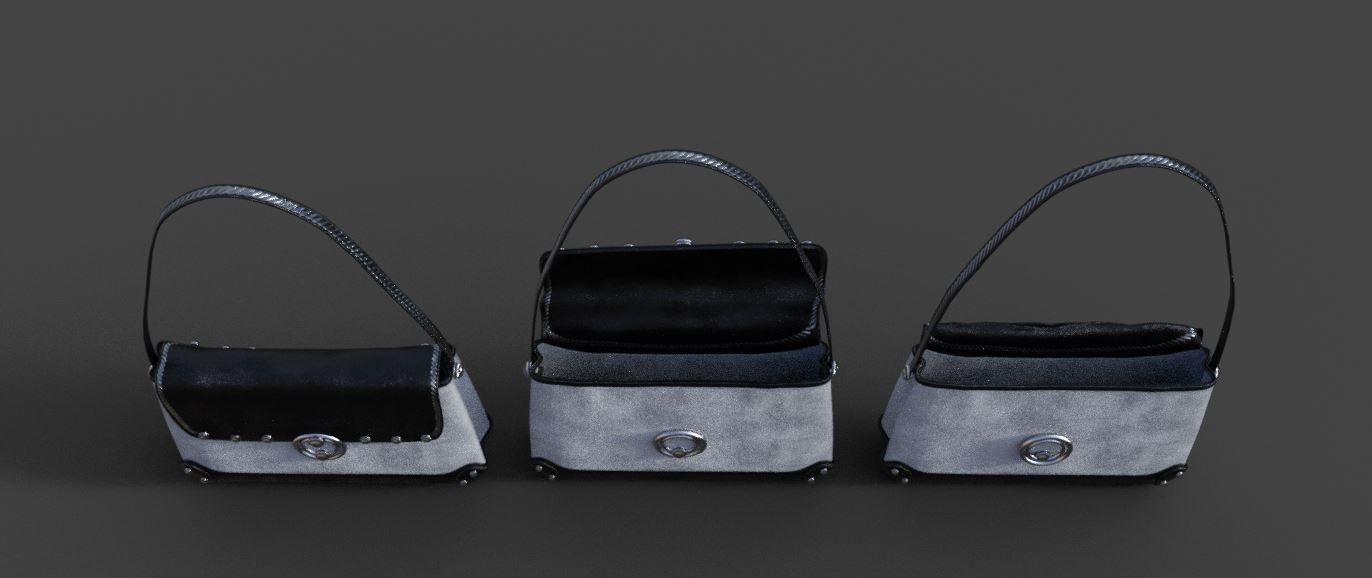
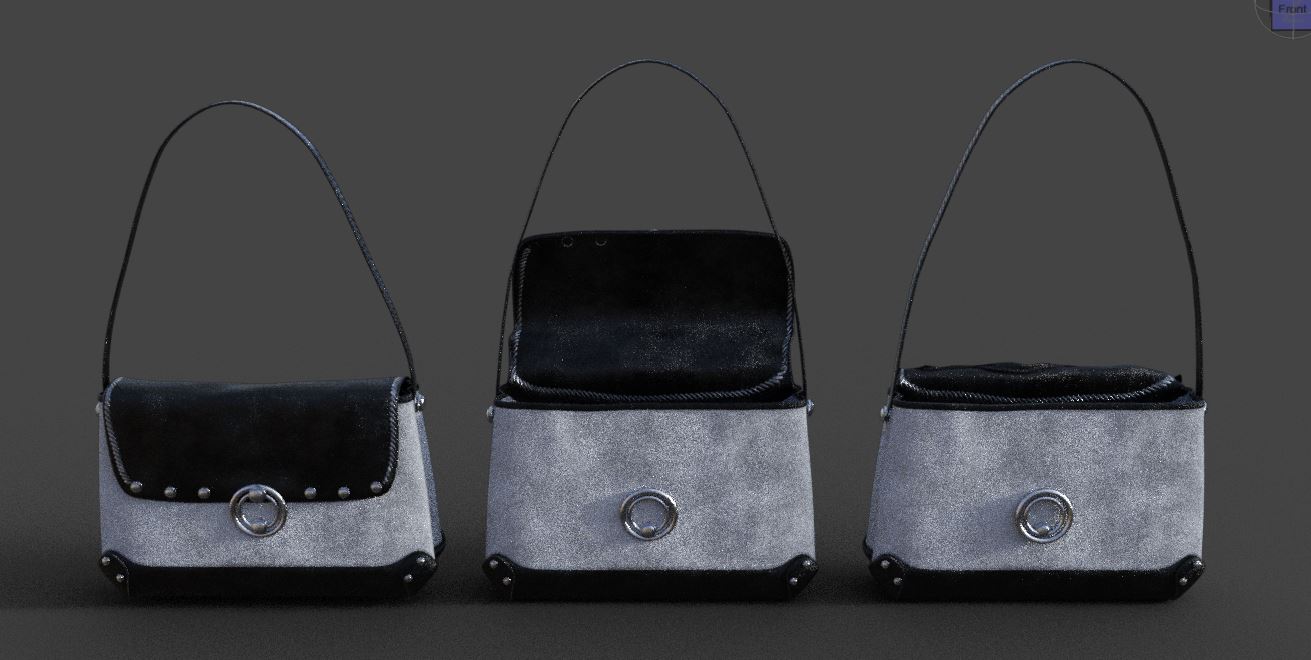
1. is it possible to make a morph out of the 2 modded versions, so it can open via a morphslider?
2. can I share the morph free and if yes HOW? I am really a noob :D but... well I would be happy if I can share it ^_^
WishingI wish DAZ re-create V4-M4 fugure with Morph on Duf files format . To quit using poser files .
people still use V4-M4 .
The base figures wouldn't be the only ones requiring conversion, all morphs packs and custom characters from Daz and other vendors would have to be updated with DS-format files too, as the poser version wouldn't work with the new figure. And if morphs are updated, people will expect materials updates too.
Clothes, poses and all other content would also need to be updated if the plan is to quit using poser files.
Besides, a lot of people who still use V4 use her in Poser, and that version wouldn't work in Poser. So vendors would have to create their new products in both formats if they want to sell them to all V4/M4 users.
Basically, not a chance. Way too much work involved for very little return.
not need to update clothes and poses . we used in poser format . just we only figure and all morph .
Except that to save the figure in .duf format they would proably need to convert the figure to weightmapping.
WishingI wish DAZ re-create V4-M4 fugure with Morph on Duf files format . To quit using poser files .
people still use V4-M4 .
The base figures wouldn't be the only ones requiring conversion, all morphs packs and custom characters from Daz and other vendors would have to be updated with DS-format files too, as the poser version wouldn't work with the new figure. And if morphs are updated, people will expect materials updates too.
Clothes, poses and all other content would also need to be updated if the plan is to quit using poser files.
Besides, a lot of people who still use V4 use her in Poser, and that version wouldn't work in Poser. So vendors would have to create their new products in both formats if they want to sell them to all V4/M4 users.
Basically, not a chance. Way too much work involved for very little return.
not need to update clothes and poses . we used in poser format . just we only figure and all morph .
Introduce Yourself, Hello, my name is.....Hello I am Simona..Just got started with Daz. I always wanted to play with the huge library and figures available here since a long time. I have no particular cause of using Daz but just love to play with options, drag morph sliders, and create new characters. I mainly love to design female characters and toon characters.. Got some males as well but use them rarely..
I would love to learn DAZ better from here like good yet quick render settings without freezes and lags. My laptop is good but not a super high featured machine to use the best render setting.Also I got a very little idea about animating in Daz on which I want to work better.. I also do not want to use a lot of props or environments around my models. I just love to make full body or half-bust portrait kinda renders so I would love to learn about better light and camera views rather than using only presets made by other creators which I do right now..
So here is the big story about me. Nice to meet all of you and I hope to fit well here..✌️????️
here is my very 1st character created with Daz as an attachment..
Regarding Geografting...(Quad-thumb hands)Why not morph the little finger to look like a thumb?
Daz 3D is part of

Connect
DAZ Productions, Inc.
7533 S Center View Ct #4664
West Jordan, UT 84084Licensing Agreement | Terms of Service | Privacy Policy | EULA
© 2026 Daz Productions Inc. All Rights Reserved.