-
pJCM Poses - For Clothing Creators - Questions
that vendor has some tutorials on the rigging of jcms in their marvelous designer tutorials, but i havent watched them so i dont know to what extent they cover that.
Yup, I was missing some extra steps. His YT vid didn't have the extra steps. It was in the mp4 per the install.
I got it working now, however, the results weren't what I expected and now my worrisome question has been answered from my first post. Since I'm using MD to sim the shirt for the morphs when I apply them to specfic arm/leg pose, it does affect the entire OUTFIT if both poses are used at the same time. Might have to return it now :(
Guess Im back to square zero again.
Glad to hear that there was more information in the mp4 in the product.
He was not suggesting that one use a sim to make the adjustment morphs. From what the YouTube video was showing, one could shoot the models over the bridge to Hexagon and simply smooth the one joint, make that one morph. Save that one morph. Then repose the figure and clothing and make the next pose. The ONLY thing to be morphed per joint fix, is that area of the concerned joint, not the entire garment ;-)
Thank you Littlefox!+1 singing Littlefoxes praises, also her topology is real good and always has been. I've been converting and dforcing some of her stuff going back to some a3 products and they look fantastic
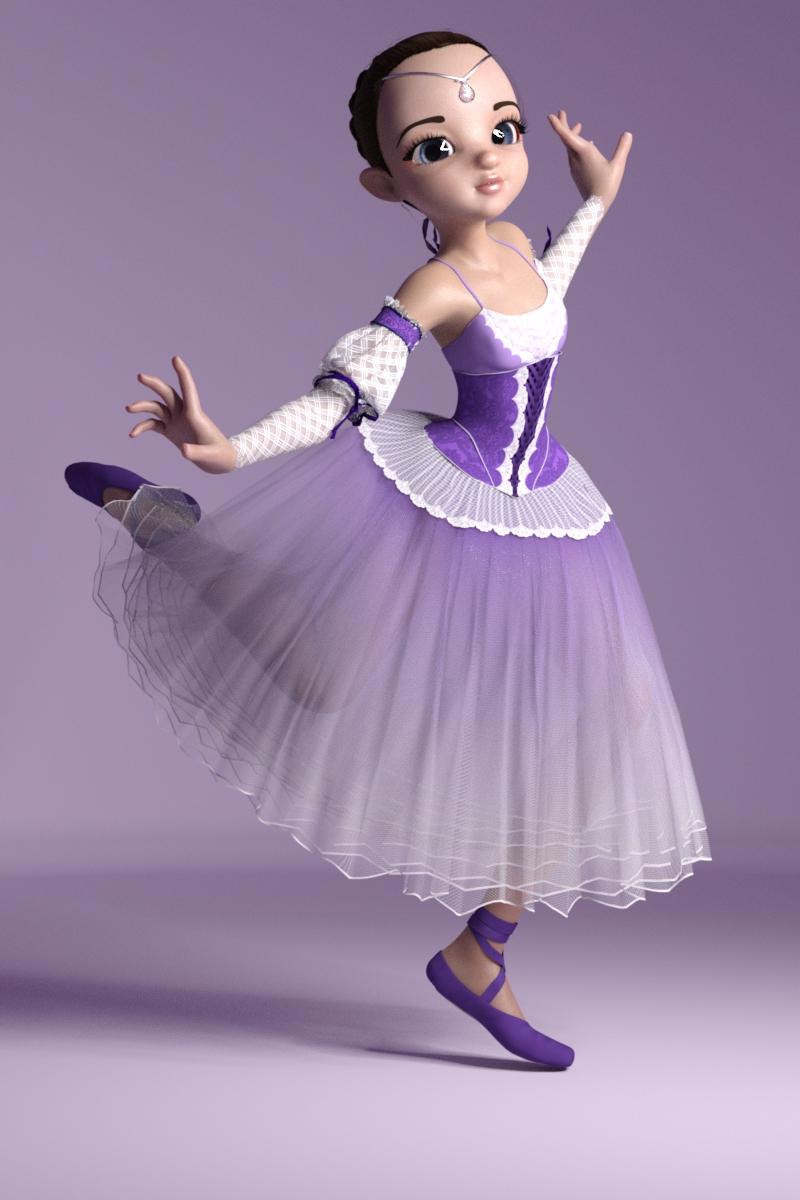
I need to set up better dforce maps on the sleeves tho
*fwiw I dont actually use the transfer utility to transfer clothes like this I scale and pose them and then manually morph them in blender reimport them as objects and then use the transfer utility, more effort but no weird cracks etc in skirts
Angharad 8Daenestra's elf ears morph seems to be missing
I just downloaded the zip file to check and they are in there, it looks like i just forgot to include an apply/remove preset :) If you type in Daenestra in the paramaters tab they should pull up. Sorry about that!
Morphs exaggerated on Character Presets and Actors
I think you may be getting a character morph applied (one that may not have been saved correctly). Load the G8 base female and in parameters, check under currently used if morphs are being applied. I dug out an old thread with a similar problem, as several solutions were offered which will help you figure out which morph is corrupting your runtime: https://www.daz3d.com/forums/discussion/comment/5326661/#Comment_5326661I was using the regular viewport to render, not a camera. The exaggeration appears on other characters too, and angles have no effect. Even outside the render, the view in the regular viewport appears to exxagerate lip size. It has nothing to do with the camera or render. On some other characters whose default morphs have different lip shapes (corners pointing down for example), some load with their mouth slightly open, though that is not their default morph in all the thumbnails, unless certain parameters were amplified. The morphs are legitimately messed up, not the focal length.
Morphs exaggerated on Character Presets and ActorsI was using the regular viewport to render, not a camera. The exaggeration appears on other characters too, and angles have no effect. Even outside the render, the view in the regular viewport appears to exxagerate lip size. It has nothing to do with the camera or render. On some other characters whose default morphs have different lip shapes (corners pointing down for example), some load with their mouth slightly open, though that is not their default morph in all the thumbnails, unless certain parameters were amplified. The morphs are legitimately messed up, not the focal length.
Looking for a Fit girl daz figureThis outfit comes pretty close;
https://www.daz3d.com/velocity-outfit-for-genesis-8-female-s
In regard to the body morph I suggest you take a look at TritiumCG's creations on deviantart.
For example the morph of Anna Nystrom might be what you are looking for.
The DAZ girls Victoria 8 and CJ-8 are pretty toned, too.
But I suggest to first get the body morphs for Genesis 8 - that way you customize the figure further to your liking.
*Released dforce Sea Salt* CommercialWould anyone mind showing the hair directly from the side? In the promo shots it looks like the back goes up but I don't see that happening in other people's images. I'm hoping that the back is even with the rest of the head.
There is a bump. There is also a morph to shrink it :)
Simulating the hair will also reduce it and make it look more natural.
Edited. I lied. There is a morph that can make it larger.
oof, the hair looks amazing but I didn't like the look of bump when it's visible. :(
Would setting the enlarge morph into the negatives basically elliminate it or would that make it clip and go wonky?
There is a "Crown Larger" morph and dialling it in at -100% reduces the bump quite a bit:
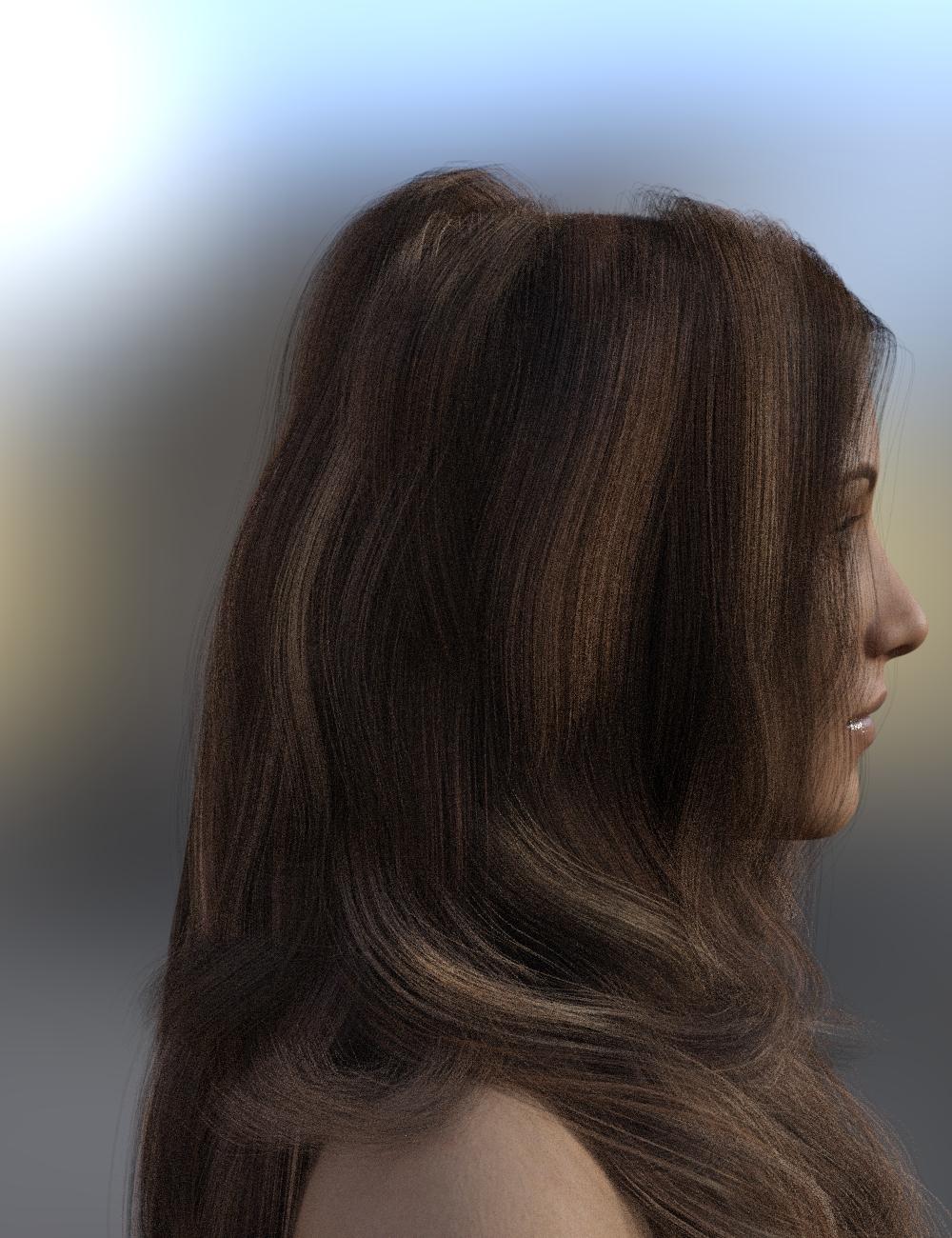
Here's the hair before dialling in the "Crown Larger" morph:
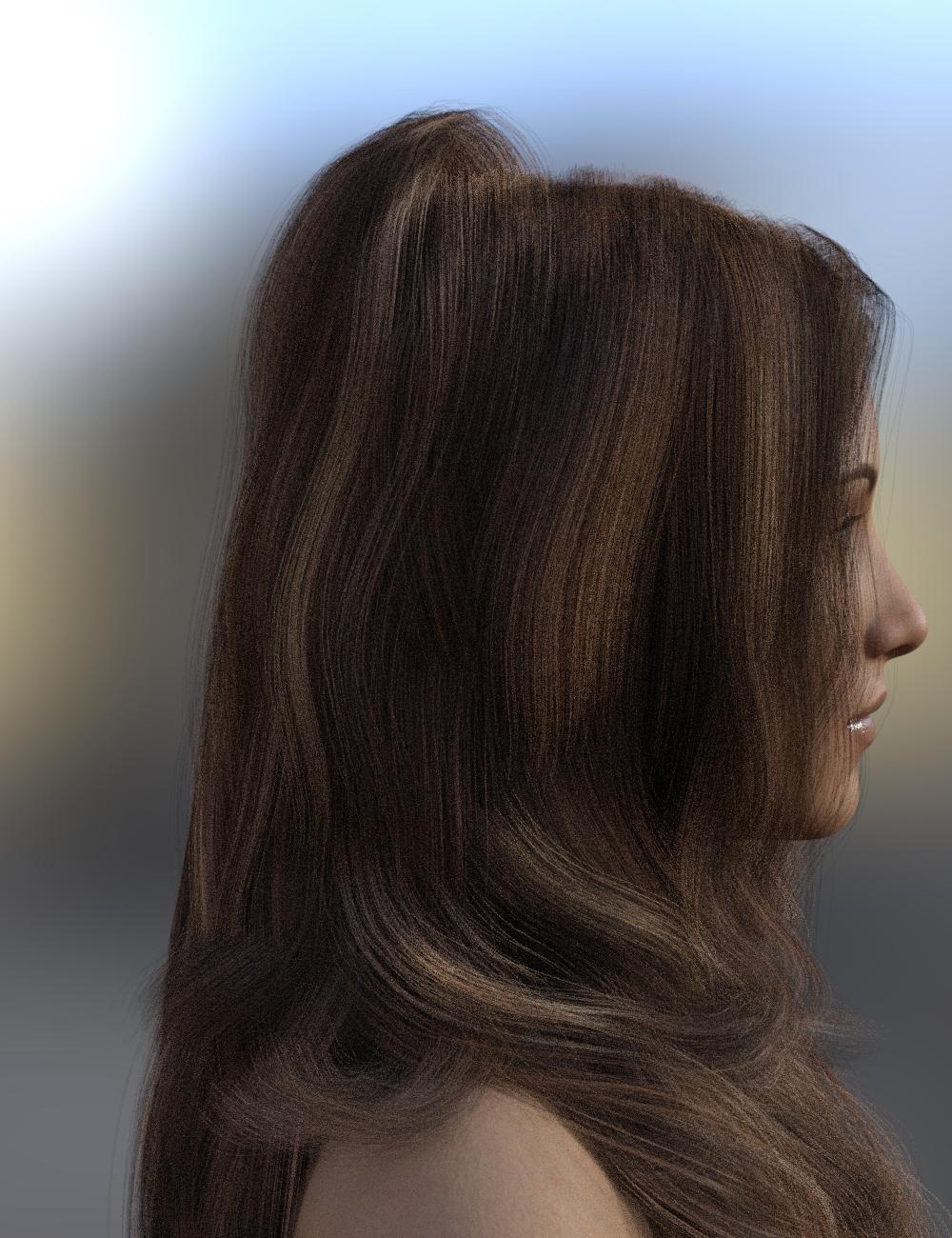
Both of these are of the hair after simulation. If you're not going to simulate the hair you can still use the morph to reduce the bump. However, if you're going to simulate it I highly recommend adding the "Crown Larger" morph only after simulation. Appling it before simulation can cause slight flyaways of some of the hair on top.
off topic threadshe is cute, what movie?
i was looking up personal massagers on amazon. they make them with memory nows. lol what is there to remember?
and usb rechargeable
Alita Battle Angel - Best Movie Ever!!!

I gotta agree - I watched it this weekend - (ETA: not sure if best ever - Blade Runner still has my vote) - but it's a pretty solid, well-rounded action adventure story in a post-apocalyptic-big-war world - well-done all the way around. There are some comic-book-y elements to the plot (no spoilers), but the character interactions are fun and the CG and world they've created is top-notch and is so well done you quickly 'immerse' and live there once it starts.
Yah, no wonder you always add smiley's when you speak of it!
FWIW, it's kind of a 'terminator' like action movie - if you like those sorts of movies, but the character discussed above is a charming (and capable) protagonist.
cheers,
--ms
BEST MOVIE EVER!!!
I like saying that about Alita Battle Angel!
OK, to my eye, Alita's *much* cuter than Harrison Ford, but Sean Harris and Darryl Hannah were both well-cast for their roles.
Blade Runner was arguably darker (or not?), but the underlying plot *premise* was a better mind-bender from my frame-of-reference.
But it's OK - an excuse to watch both again, just to compare notes :)
--ms
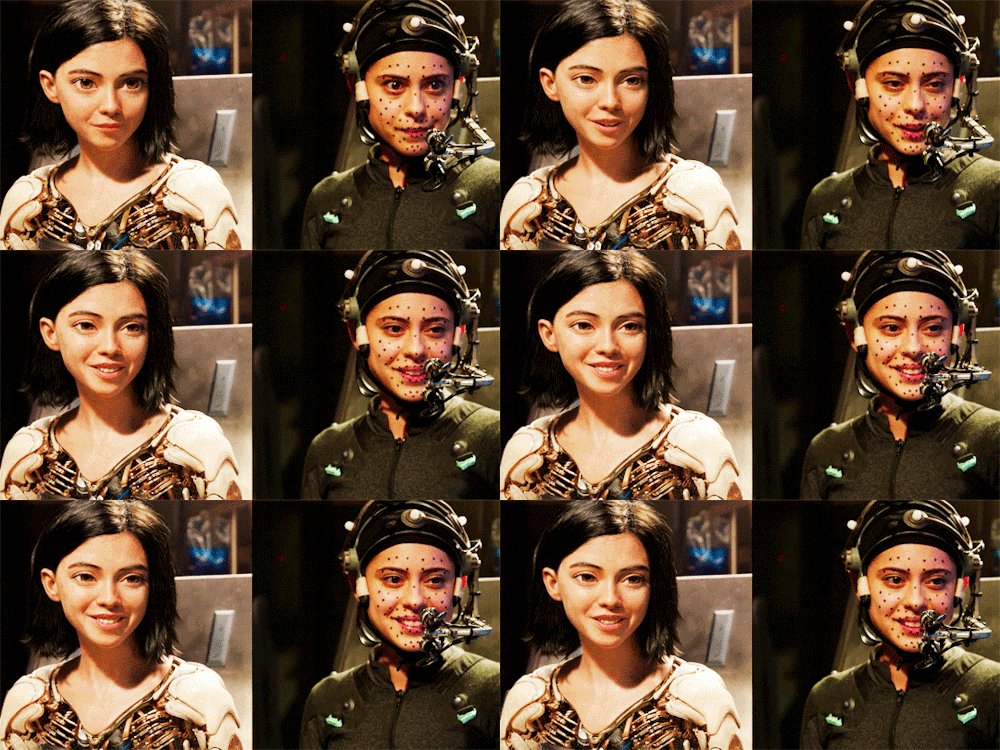
...but Alita Battle Angel has... Alita!!! Just look at the SSS on the fingers when she first wakes up! But then when she (finally) gets kissed!!! OMG, the lighting threw me straight out of my seat!!!

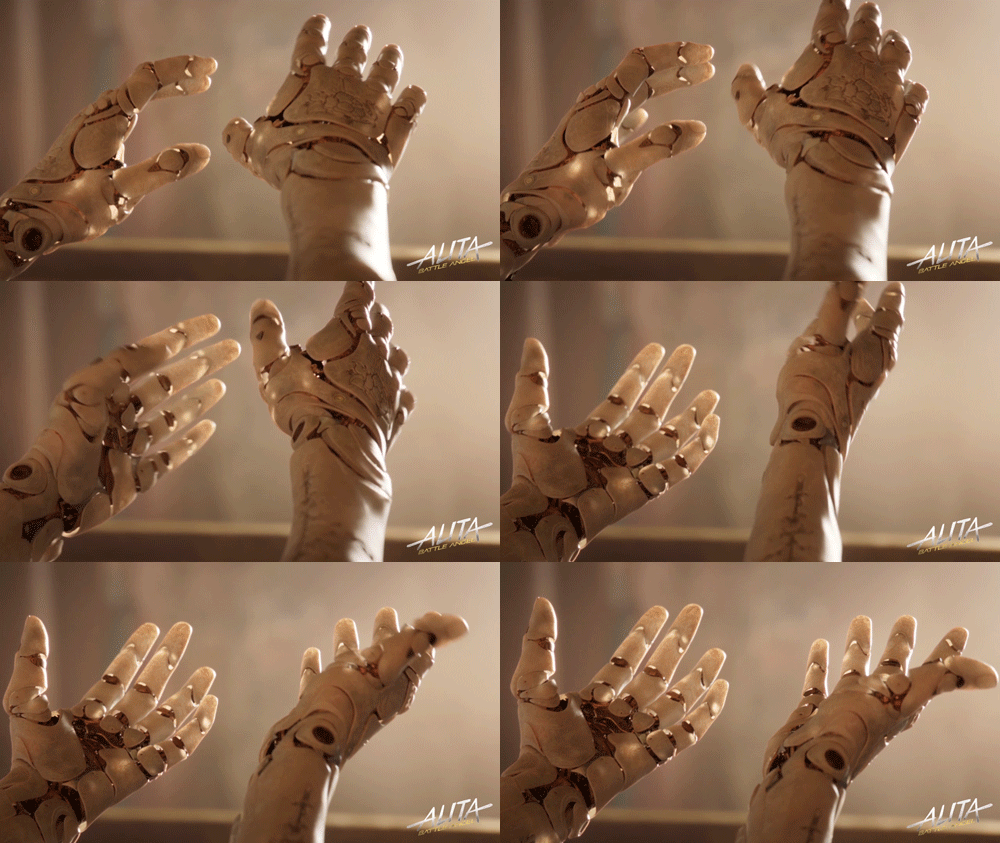
By the time this (Spoiler Alert) sequence occurs, we've already forgotten that she's CG, except that us CG artists are in such a state of awe.
Just watch, unless you don't like Spoilers

In the behind the scenes material, they show how they did the 'performance capture'. But capturing all those little dots on her face was truly only the beginning. The two HD cameras mounted on a boom pointing at Rosa's (Alita Actress) face filmed everything. Animators then combined morph adjustments with the performance capture data to truly make Rosa's performance breathe into the CG Alita. Just check out even the timing of how her mouth moves as she talks. Her gestures and how her facial muscles land differently after certain gestures... it's all stuff I'm taking into consideration for animating my favorite hero! :)
But my favorite part has to be the one allowed F-bomb in a PG flick - and not the F-bomb itself, but how Grewishka's scream ends just as she lets out another one of her ever-so-awesome battle growls. So well timed and, for such a little thing she has such an amazing growl!
 Best way to build custom characters
But yes, a morph built off of V8 as a base, will still work on G8F. It will still work, but it will not "look as intended" because the deltas will be off. Again, the morph will still function.
Thank you very much for your replies, lilweep and Gordig ! Sorry, what are "the deltas"?
sorry was just a complex way of saying it. Was just referring to the change (delta=change) in the morphology between morphs.
*Released dforce Sea Salt* CommercialWould anyone mind showing the hair directly from the side? In the promo shots it looks like the back goes up but I don't see that happening in other people's images. I'm hoping that the back is even with the rest of the head.
There is a bump. There is also a morph to shrink it :)
Simulating the hair will also reduce it and make it look more natural.
Edited. I lied. There is a morph that can make it larger.
oof, the hair looks amazing but I didn't like the look of bump when it's visible. :(
Would setting the enlarge morph into the negatives basically elliminate it or would that make it clip and go wonky?
Mine can reduce the size no problem. I do not have a clean install though. So if any one else out there can check.. would be greatly appreciated :)
*Released dforce Sea Salt* CommercialWould anyone mind showing the hair directly from the side? In the promo shots it looks like the back goes up but I don't see that happening in other people's images. I'm hoping that the back is even with the rest of the head.
There is a bump. There is also a morph to shrink it :)
Simulating the hair will also reduce it and make it look more natural.
Edited. I lied. There is a morph that can make it larger.
oof, the hair looks amazing but I didn't like the look of bump when it's visible. :(
Would setting the enlarge morph into the negatives basically elliminate it or would that make it clip and go wonky?
Any reason to bother with V4 any longer?I was an avid Aiko 3 user for 9 years. Loved working with the figure. But that is old technology that cannot compare in ability or quality to newer stuff, in general. I do wish some of the A3 clothing could be moved forward to newer generations. The ability to mix morphs and fit clothing to all the various characters in the store are two of the biggest strengths of the Genesis figures and the vast compatability between Genesis 3 & 8 makes it even more compelling to buy into other generations that you dont normally use.
For the A3 clothing, you can make a clone. I made an A3 clone and a V4 clone for G8F following this tutorial: https://www.daz3d.com/forums/discussion/193296/freebie-how-to-create-a-v4-clone-and-transfer-other-figures-for-g8f-now-with-video/p1
It's really fun to be able to use older clothing sets on newer figures. Some do not transfer well, but many do. :)
Edit - If you don't want to make one yourself you can always use the Wear Them All Expansion to save the wearable to G3 then fit it to G8.
I think I need to learn how to do this soon (avoiding it for the obvious reasons - lots of steps, new ideas, etc.). Thanks for that link.
One other option when using non-targeted-figure-specific meshes is to use VWD for the dynamics to reshape and save a mesh - so shape the base figure as closely (or smaller) to the intended clothing figure (e.g. set V8 to just smaller than V4 for a V4 outfit), don't fit-to, but rather just load the outfit like a prop. Fit it manually... Then animate the target figure into the intended shape and pose - over 15-30 frames in DS (it will ignore the clothes and blow right through them in DS...), then use VWD, import the figure/clothes, run an animated sim for the 30 frames, and save it back to DS. You may need to do this over 60/100 ... frames to get the sim to flow better. If the mesh is pretty regular, this works pretty well. VWD can be fickle for complex things, but pretty simple for re-fitting clothes that have decent/regular mesh-density. Many older meshes/hairs do not, though, so it's not always an option. I think the demo at rendo freebies lets you do everything but save to DS, so you can at least see if the idea and meshes seem like they'll work.
This is a lot like what some of the workflows do with exporting the figure and outfit to MD as OBJs and draping on the 'avatar' (G8, etc.) over there, then pulling the result into the 3D app of choice.
YMMV,
--ms
*Released dforce Sea Salt* CommercialWould anyone mind showing the hair directly from the side? In the promo shots it looks like the back goes up but I don't see that happening in other people's images. I'm hoping that the back is even with the rest of the head.
There is a bump. There is also a morph to shrink it :)
Simulating the hair will also reduce it and make it look more natural.
Edited. I lied. There is a morph that can make it larger.
*Released dforce Sea Salt* Commercial(dForced out of shape, intentionally. Boring scene, but this needed to be a salt water beach; and at this angle the hair looks best in this scene)
Spent a lot of time trying to improve on this, to get a flawless side shot. Timeline trickery with invisible objects etc., but no joy. One of my usual dForce problems is that hair does not want to fall down, then gently curve to lie flat on the ground. It's either too stiff, or the scalp area detoriates, or it bends in sharp 90° angles when it hits the ground. C'est la vie...
"Save as OBJ, then load morph": Linday explained how it works with his hair, it's very useful. Couldn't get it to work on other hair. Has anyone tried with Salty hair? The big one for me is that with a timeline, I end up with 1500 MB scene files and no way to remove frames; Linday's trick solves that.
Note on product docs: well, developers and documentation, fire and ice... but IMO just paste the first post into a PDF and that's already way way better than nothing at all. Would be nice if PAs would spend an hour or two on it, it's so valuable to get tips from the makers. Like, there's a 100 dials and you already figured out which ones are worth exploring.
Q: in that scene, is there a trick to get the hair behind the left hand, without using the timeline?
The product docs.. I have just gotten some info on how I can provide it.. so future products will be able to access these particular threads. I have a bunch of reasons for not wanting to book this information . There is a lot of it ( I already have 4 threads on this stuff I think? ) Each hair is different and has it's own limitations. So many questions, troubles etc arise that I find it best if I can keep all the info in one public place where others can search and find the answer they are looking for. Another reason; New users. People can become easily frustrated. This info can complicate and overwhelm the new users experience. I want everyone to have a good experience using this tech, and a good experience using my products. I have been asked to keep it simple ;)
For that particular image you are doing.. here's what I would do:
Use the "Sim Most" option
In the scene tab select the dforce sea salt and expand it
Click on the Sea Salt
In the parameters tab:
Select Wind Right. id try dialing it up to only like 35 percent and see how it would drape.
Then hit the simulate button. I do not use the timeline at al, but maybe another customer can offer some
If the hair hasn't settled enough or shows a bunch of pulling, you will have to increase the pose transition time under the simulation tab.
I would also suggest maybe adjusingt her pose so that her upper body is closer to the ground and the hair has more length to perform a puddle on the ground.
Celebrity Look-a-Likes for 3D figures Part 2I think the Louisa morph from P3D's Latonya morphs package is a closer resemblance:
 Morphs exaggerated on Character Presets and Actors
I have noticed recently that the characters (Genesis 8) I'm working with in DAZ Studio 4.12 have characteristics that don't seem to match the promotion/thumbnail image, the most obvious thing to me being that the eyes and mouth/lips seem exaggerated (sometimes the whole face in some cases, maybe all cases if it's too subtle to detect sometimes). I am working with Genesis 8 characters. I also think this exaggeration even applies to my base Genesis 8 Actor as well, but I can't be sure. For reference, I am posting the image of a character's face in a button thumbnail, and a render of the face after loading it into a scene. I might be wrong about the eyes being exaggerated, but I'm absolutely certain the lips are. Also, a while back, for extra customization, I installed a large amount of content that gave more morphs to customize things like lips among other things. I looked into the parameters and shaping controls, but didn't find any morph dialed up that shouldn't have been. It is almost like default morph settings of characters have been overwritten or had certain parts scaled up. The render I posted is of the character that is generated from clicking on the thumbnail I posted. I didn't change any morphs, but did apply textures that are not the same as in the thumbnail, and the hair is not the same either, but I tried to closely replicate what is in the thumbnail, minus the angle of the head tilt, without changing the morphs.
Anyway, how can I get the character's features to not be exaggerated like they are being when I load them? I think I have all the morph files I need, but could it be I also have too many morph files (and the extra morph files overwrote the ones I need, or are being loaded in addition to the ones that are supposed to be used)? Or perhaps I am putting them in the wrong place (I don't always use the DAZ installer but put stuff in the neccessarry directories sometimes manually, usually because some of it doesn't use the daz installer), though I don't think I am getting the directories wrong (a lot of other things wouldn't work I would think).
*Released dforce Sea Salt* Commercial(dForced out of shape, intentionally. Boring scene, but this needed to be a salt water beach; and at this angle the hair looks best in this scene)
Spent a lot of time trying to improve on this, to get a flawless side shot. Timeline trickery with invisible objects etc., but no joy. One of my usual dForce problems is that hair does not want to fall down, then gently curve to lie flat on the ground. It's either too stiff, or the scalp area detoriates, or it bends in sharp 90° angles when it hits the ground. C'est la vie...
"Save as OBJ, then load morph": Linday explained how it works with his hair, it's very useful. Couldn't get it to work on other hair. Has anyone tried with Salty hair? The big one for me is that with a timeline, I end up with 1500 MB scene files and no way to remove frames; Linday's trick solves that.
Note on product docs: well, developers and documentation, fire and ice... but IMO just paste the first post into a PDF and that's already way way better than nothing at all. Would be nice if PAs would spend an hour or two on it, it's so valuable to get tips from the makers. Like, there's a 100 dials and you already figured out which ones are worth exploring.
Q: in that scene, is there a trick to get the hair behind the left hand, without using the timeline?
Any reason to bother with V4 any longer?I was an avid Aiko 3 user for 9 years. Loved working with the figure. But that is old technology that cannot compare in ability or quality to newer stuff, in general. I do wish some of the A3 clothing could be moved forward to newer generations. The ability to mix morphs and fit clothing to all the various characters in the store are two of the biggest strengths of the Genesis figures and the vast compatability between Genesis 3 & 8 makes it even more compelling to buy into other generations that you dont normally use.
For the A3 clothing, you can make a clone. I made an A3 clone and a V4 clone for G8F following this tutorial: https://www.daz3d.com/forums/discussion/193296/freebie-how-to-create-a-v4-clone-and-transfer-other-figures-for-g8f-now-with-video/p1
It's really fun to be able to use older clothing sets on newer figures. Some do not transfer well, but many do. :)
Edit - If you don't want to make one yourself you can always use the Wear Them All Expansion to save the wearable to G3 then fit it to G8.
Angharad 8Daenestra's elf ears morph seems to be missing
Any reason to bother with V4 any longer?After reading the next set of posts, I forgot to mention that, yes, I am Iray only. I have only tried 3Delight Twice and on both occasions, the render was dog-@$$ slow and it crashed and didn't finish...another popular four letter word came out of my mouth and I stuck with Iray.
As Mindsong said above, I still do find Genesis intriguing mainly because of the unisex feature. Money was saved in having one hair set and one clothing set for both Male and Female. But I see why that idea was quickly shot down in subsequent Geneis figures as there is more money to be made in separating the sexes. However, I have used clothing cross gender of the same figure type with really no ill effects.
But as with Genesis 3, Genesis (1), had quite a few nice clothing items and further, things such as swimsuits and bodysuits seem to transfer well to Genesis 8.
But as many indicated above, coming into Daz Studio at the time I did, it was wise to go down the Genesis 8 path, even though it certainly has proven to be rather expensive. And like with most that have come on board early on, many early purchasing mistakes were made. I had noted that there wasn't a decent manual for Daz Studio and, again, the reason for that is money again as there is a push to buy the tutorials. But me, I just asked a bunch of questions here. I have not bought many tutorials unless it was one that was deemed worthwhile.
So once again, thank you for the input.
Geo
Daz 3D is part of

Connect
DAZ Productions, Inc.
7533 S Center View Ct #4664
West Jordan, UT 84084Licensing Agreement | Terms of Service | Privacy Policy | EULA
© 2026 Daz Productions Inc. All Rights Reserved.