-
Report sales errors here: "There's Always Another Sale™"
It's weird. Yesterday it was a skin without a morph (Anise), and today there's a single morph without a skin (Bianca). I mean, whatever, but it's weird for Daz. That's the kind of stuff you usually see at DA. At least Thrace includes both a morph and a skin. and costs less than the one without the skin.
Bianca is sold with a "chair" that's a stool, and 10 expressions that are all the same except for the eyes. She looks like she's following a fly around the room while waiting for the novocaine to wear off.
Bianca comes with a head and body morph, 25 poses, 10 expressions, and a chair with 4 textures, plus, it says a scene with cameras and render settings. It's also, as far as I can tell, the first time that PA has released a character morph, so maybe you're being a little harsh? I think the morph is quite lovely. She has a very pretty pin-up style to her, imo. :)
peopel are intitled to their opinion, and I don't feel calling them out on it is particularly fair. Personally I agree with Sevrin the expression look the same except for the eyes which due to to the layout of the images look rather weird.
But this usually is "no criticism - all be nice, colourful unicorns" country... all be nice to each other and only give positive feedback. No "that looks like s**t" but "It might look better if..."
So maybe it would be better to say: "The expressions probably wouldn't look all the same if there were more differences than just the eye positions..."
For me, apart from that, the set looks quite nice, but on the other hand not nice enough to buy it unless heavily reduced in price... but that is true for me for at least 80% of the stuff in the shop :)
Report sales errors here: "There's Always Another Sale™"It's weird. Yesterday it was a skin without a morph (Anise), and today there's a single morph without a skin (Bianca). I mean, whatever, but it's weird for Daz. That's the kind of stuff you usually see at DA. At least Thrace includes both a morph and a skin. and costs less than the one without the skin.
Bianca is sold with a "chair" that's a stool, and 10 expressions that are all the same except for the eyes. She looks like she's following a fly around the room while waiting for the novocaine to wear off.
Bianca comes with a head and body morph, 25 poses, 10 expressions, and a chair with 4 textures, plus, it says a scene with cameras and render settings. It's also, as far as I can tell, the first time that PA has released a character morph, so maybe you're being a little harsh? I think the morph is quite lovely. She has a very pretty pin-up style to her, imo. :)
peopel are intitled to their opinion, and I don't feel calling them out on it is particularly fair. Personally I agree with Sevrin the expression look the same except for the eyes which due to to the layout of the images look rather weird.
Report sales errors here: "There's Always Another Sale™"It's weird. Yesterday it was a skin without a morph (Anise), and today there's a single morph without a skin (Bianca). I mean, whatever, but it's weird for Daz. That's the kind of stuff you usually see at DA. At least Thrace includes both a morph and a skin. and costs less than the one without the skin.
Bianca is sold with a "chair" that's a stool, and 10 expressions that are all the same except for the eyes. She looks like she's following a fly around the room while waiting for the novocaine to wear off.
Bianca comes with a head and body morph, 25 poses, 10 expressions, and a chair with 4 textures, plus, it says a scene with cameras and render settings. It's also, as far as I can tell, the first time that PA has released a character morph, so maybe you're being a little harsh? I think the morph is quite lovely. She has a very pretty pin-up style to her, imo. :)
Report sales errors here: "There's Always Another Sale™"It's weird. Yesterday it was a skin without a morph (Anise), and today there's a single morph without a skin (Bianca). I mean, whatever, but it's weird for Daz. That's the kind of stuff you usually see at DA. At least Thrace includes both a morph and a skin. and costs less than the one without the skin.
Bianca is sold with a "chair" that's a stool, and 10 expressions that are all the same except for the eyes. She looks like she's following a fly around the room while waiting for the novocaine to wear off.
Undress AnimationsWell the undress morphs and animations would be specific to character and garment.
You can try to aim for garments that have exposure morphs included. Theres an Fit Control product that has morphing transfer across garments that may help. You can use model software like Blender to help aid your morph creation. Theres the Mesh Grabber Tool product that may be of assistance as well. I imagine it to be an easier task with single cloth garments (blouses / nightys) you could dforce more easily as well.
I fear your really talking about morphing every frame though and that would again be very specific to the clothing item type, specific product, and characters fit.
Highly custom and complex requiring very high skill level and time intensive.
If you are creating a scene you might want to really consider tricking the audience around it with camera cutaways or close ups of falling cloth in front of a figure or dforced animated cloth landing at figures feet or on other room props. Perhaps use the old "Let me slip into something more comfortable" method using a cut or occuled divider.
Is there any way to omit ears from the morphs that hair follows?turn on 'Show hidden' in the parameters pane, right click on the tab or use the menu button.If you're running the latest version it's under the "preferences section".
Find the particular morph and dial it back to zero.
It won't be a perfect solution as most hair isn't modeled around those types of morphs.
To make it look better you'll either need to completely remodel/rerig it or play with d-formers or mesh grabber to fix it.
Is there any way to omit ears from the morphs that hair follows?So many characters that have long, pointed ears built in screw up hair that is fitted to the figure - grow the ear, and the hair follows them out. This is not natural. Either characters need to separate the ear morphs from the rest of the head, or there needs to be a way to override it in the deformation of the hair. I've tried Sickleyield's Hair and Hat helper, but the ear morph controls in it aren't sufficient to return the hair to the head without peaking back along the ears or pressing the sides inside the character's head.. Any other suggestions?
MOCAP translator- What do you think? - Any coders around?I am getting off topic but I am in awe of this C4D user who does not do Hula Animations but uses DAZ content
https://www.youtube.com/channel/UCGKAzm4mEysP2a-H-LNCe0Q
I could easily find more examples but not really interested in arguing about this senseless subject
it is is the same as those who don't want landscape capabilities in DAZ studio yet UltraScenery sells
or a morph brush but Mesh Grabber sells
for every additional feature someone doesn't want there are people who will joyfully buy it
point in case a game engine render option that TMITP doesn't want but many including me do because render times in DAZ studio is a big part of wny I dislike it, I actually use the OpenGL if I can
Best way to build custom characters...I tend to have a large stable of basic character shapes to build off of as well as library of morph utilities, add on content and GenX2 for bringing older characters and morphs into the mix. I dial spin all my custom characters, doing a lot of "gene pool mixing" to create as unique a character as I can. I also have become fairly skilled with dFormers which I find are also very useful tools in certain instances.
As I become more skilled with Blender (8.2 finally gave us a pointer driven UI along with an icon/tabs structure which is a lot easier to work with than past versions) I will look into using its sculpting tools as Zbrush is way out of my budget..
ZBrush just released a free version with limited tools, but enough to make morphs with as far as I can tell, and is a lot more intuitive. https://zbrushcore.com/mini/
edit: I just double checked and it doesn't allow imports, but ZBrushCore definitely would work and is somewhat more affordable at $10/mo, but blender is free and also a really good option.
boob problemIs it all breast morphs that are doing that?
And which character, and which morph is it you are applying?
Hello, This happens to the genesis 8 female model and all the other models I own. It's not a single morph. Every morph that increases the boob size does this (if they are small it's ok).
Best way to build custom characters...I tend to have a large stable of basic character shapes to build off of as well as library of morph utilities, add on content and GenX2 for bringing older characters and morphs into the mix. I dial spin all my custom characters, doing a lot of "gene pool mixing" to create as unique a character as I can. I also have become fairly skilled with dFormers which I find are also very useful tools in certain instances.
As I become more skilled with Blender (8.2 finally gave us a pointer driven UI along with an icon/tabs structure which is a lot easier to work with than past versions) I will look into using its sculpting tools as Zbrush is way out of my budget..
Weird stuff behind the knee...Looks like a corrective morph that should be tied to a shape kicking in when it shouldn't. Apply the minimum pose required to show the issue, probably just a knee bend. In the Parameters pane make sure that Show Hidden Parameters is on in the option menu >Preferences (the lined button in the top corner, or right-click the tab) and go through the Currently Used group to see which active slider is causing this. What is/are the slider(s)' names?
AIUTO...CHI CONOSCE L’ITALIANO? PARTE DODICIBenvenuto, Jon! Fa sempre piacere conoscere qui nuovi connazionali.
I consigli che ti hanno già dato i ragazzi sono senz'altro utilissimi. Te ne aggiungo qualcuno mio:
per quanto riguarda le figure, non sono così tanto d'accordo con Lenio; è vero che se hai tanti morphs puoi fare un po' di tutto tu, ma se hai già un'idea e non vuoi perderci troppo tempo, partire da una di quella tipologia e poi personalizzarla può velocizzarti le cose. Senza contare che per cose un po' estreme non è detto che ci siano morph specifici nei vari pacchetti.
Una buona strategia può essere quella di prendere almeno le figure base quando vengono messe in sconto nei fast grab o abbinate a qualche offerta particolare.
Poi, i vari character che escono per le singole figure possono essere utili soprattutto per i materiali da riciclare magari su altri personaggi, se non hai troppa pratica nel crearti le tue textures.
Ti segnalo, nel caso ti fosse sfuggito, che per i avere i genitali, se ti servono, devi comprare almeno un pro bundle per genere di personaggi adulti, non sono inclusi nelle mesh base come morphs, da Genesis 1 in poi sono Geografts; se vuoi farci cose particolari devi cercare morphs per quelli di Daz, o direttamente altri add-ons, su siti esterni
Non disdegnare roba vecchia scontata o gratis, soprattutto come props e ambientazioni: con gli shader giusti, può essere riportata a nuova vita. E le figure più vecchie possono venir buone per personaggi di sfondo su cui non hai bisogno di alta qualità delle textures.
In tema di immagini, hai qualche genere favorito?
Grazie e ricambio i saluti!

Io sono all'inizio e non sono in grado di fare caratteri da zero. Cercherò di usarne il meno possibile (per una questione economica innanzitutto!) e di seguire anche i tuoi consigli!

In tema di immagini, mi piacciono le modelle, perché sono affascinato dal fotoritratto e mi piacerebbe riuscire ad avvicinarmi alla realtà nei miei rendering. Ma non credo sia affatto cosa semplice
 Any reason to bother with V4 any longer?
If space is an issue, then yeah, I'd say not to bother with the V4 stuff. However, if you have space and like a challenge, then V4 stuff can be pretty fun. I really enjoy working with older content and polishing it up for Iray. The before and after conversations can be really cool. :) Again though, if space is a real issue, you might just stick to the newest generation products. :)
I was an avid Aiko 3 user for 9 years. Loved working with the figure. But that is old technology that cannot compare in ability or quality to newer stuff, in general. I do wish some of the A3 clothing could be moved forward to newer generations. The ability to mix morphs and fit clothing to all the various characters in the store are two of the biggest strengths of the Genesis figures and the vast compatability between Genesis 3 & 8 makes it even more compelling to buy into other generations that you dont normally use.
For the A3 clothing, you can make a clone. I made an A3 clone and a V4 clone for G8F following this tutorial: https://www.daz3d.com/forums/discussion/193296/freebie-how-to-create-a-v4-clone-and-transfer-other-figures-for-g8f-now-with-video/p1
It's really fun to be able to use older clothing sets on newer figures. Some do not transfer well, but many do. :)
Edit - If you don't want to make one yourself you can always use the Wear Them All Expansion to save the wearable to G3 then fit it to G8.
If you have read any of my other posts here in the forum, you will quickly see I am not one for hoop jumping. For me it is a struggle enough to attempt to get non Genesis 8 outfits to work on Gen 8, which is supposed to be backward compatible. I found out the hard way that it is not. At least not fully. So when I was having issues with V4 outfits not comforming right, I just figured I would stay with the Genesis series of figures. I started with Genesis 8 and for the most part I stayed there. However, I did add Genesis 3 since many items I have had figures, clothing, hair meant for both figures. I bought into Genesis mainly because it being able to do both male and female genders. It is also lower on system resources and setting the sub-d to 1 really resulted in fast rendering characters. This was perfect for me to create background characters with. Further, many of the close fitting outfits actually work well on Genesis 8 figures too.
Speaking of challanges...I have many when it comes to lighting. I am always trying to figure out the best ways to use lighting in Daz Studio to get the best look out of my characters. That is plenty challenge enough for me.
Thanks for the input though!
Geo
Head and Body morph FF XVAnyone know where I can find/download head & body morph FF XV ? especially ignis and Noctis
AIUTO...CHI CONOSCE L’ITALIANO? PARTE DODICIBenvenuto, Jon! Fa sempre piacere conoscere qui nuovi connazionali.
I consigli che ti hanno già dato i ragazzi sono senz'altro utilissimi. Te ne aggiungo qualcuno mio:
per quanto riguarda le figure, non sono così tanto d'accordo con Lenio; è vero che se hai tanti morphs puoi fare un po' di tutto tu, ma se hai già un'idea e non vuoi perderci troppo tempo, partire da una di quella tipologia e poi personalizzarla può velocizzarti le cose. Senza contare che per cose un po' estreme non è detto che ci siano morph specifici nei vari pacchetti.
Una buona strategia può essere quella di prendere almeno le figure base quando vengono messe in sconto nei fast grab o abbinate a qualche offerta particolare.
Poi, i vari character che escono per le singole figure possono essere utili soprattutto per i materiali da riciclare magari su altri personaggi, se non hai troppa pratica nel crearti le tue textures.
Ti segnalo, nel caso ti fosse sfuggito, che per i avere i genitali, se ti servono, devi comprare almeno un pro bundle per genere di personaggi adulti, non sono inclusi nelle mesh base come morphs, da Genesis 1 in poi sono Geografts; se vuoi farci cose particolari devi cercare morphs per quelli di Daz, o direttamente altri add-ons, su siti esterni
Non disdegnare roba vecchia scontata o gratis, soprattutto come props e ambientazioni: con gli shader giusti, può essere riportata a nuova vita. E le figure più vecchie possono venir buone per personaggi di sfondo su cui non hai bisogno di alta qualità delle textures.
In tema di immagini, hai qualche genere favorito?
AIUTO...CHI CONOSCE L’ITALIANO? PARTE DODICIAccidenti quante cose! Grazie mille per le dritte davvero! Hai fatto bene a mettermi in guardia dal comprare qua e là, anche se comunque tendo a essere parsimonioso di mio...
Interessantissima la parte delle utility: penso che partirò da lì, con i "must have". Ovviamente mi piacerebbe skin builder, ma credo sia un po' prematuro, perché di sicuro non riuscirò ad utilizzarlo!
Mi spiegheresti meglio delle figure? Ovviamente sono le cose che più attraggono l'attenzione del newbie, anche perché io non sono capace a personalizzare i caratteri, un po' per pigrizia, e molto per scarsa attitudine
 Cosa vuol dire che più ne hai e più ci sta a caricarsi, e soprattutto se le ho usate in una storia non si possono più cancellare??? Nemmeno togliendole con DIM???
Figurati :)
Sì sì le puoi disinstallare tranquillamente! Però se poi vorrai usare lo stesso personaggio, ti chiederà di reinstallarle, oppure non sembrerà più lo stesso.
Ogni volta che carichi una figura Genesis 8, Daz carica ogni singolo morph che hai installato, anche se non li stai usando. Ci mette frazioni di secondo per ogni morph, ma è facile arrivare a migliaia, e in quel caso il caricamento aumenta di minuti. Succede sia con le figure che con i pacchetti di morph.
Quindi semplicemente magari evita di prendere due figure molto simili o dei pacchetti di morph che non useresti.Quindi se vai nel Pane "Shaping", selezionando una figura Genesis 8, troverai tutti i tuoi morph relativi.
All'inizio ne hai pochissimi.I più importanti sono proprio quelli della Daz stessa (io li presi a 5$, sono scesi fino a 3.5$, lascia perdere il prezzo di oggi. Tra l'altro Daz Deals può anche mandarti una mail quando scende al prezzo che desideri):
https://www.daz3d.com/genesis-8-male-body-morphs
https://www.daz3d.com/genesis-8-female-body-morphs
https://www.daz3d.com/genesis-8-male-head-morphs
https://www.daz3d.com/genesis-8-female-head-morphs
Sono importanti perché i morph degli altri si basano spesso su di loro.Poi ci sono i pacchetti di Zev0 (quelli per la faccia che ho linkato prima) e di Rarestone:
https://www.daz3d.com/rarestone-s-face-morphs-collection-for-genesis-8-female
https://www.daz3d.com/rarestone-s-face-morphs-collection-for-genesis-8-maleGià solo con questi morph puoi realizzare praticamente qualsiasi personaggio tu voglia, con molti aspetti diversi.
Poi se hai qualche figura, puoi mescolare anche gli slider a essa appartenenti.Infine, se vuoi fare persone vecchie/giovani, ci sono dei prodotti del buon vecchio Zev0:
https://www.daz3d.com/aging-morphs-bundle-for-genesis-8-female-s-and-male-s
https://www.daz3d.com/growing-up-bundle-for-genesis-8-female-s-and-male-s
All'inizio pensavo dovessi partire da una figura anziana, ma sarebbero soldi un po' buttati.Poi inutile dire che i "Pro Bundle" sono solo trovate pubblicitarie.
Ma sono l'unico modo se vuoi gli "Anatomical Elements" made in Daz.Welcome to Hatsune Miku Anime Manga Cafe ☕The top girl is crazy cute, @Ethin! :D
I can't take all the credit, Pazu was a big help.
I figured out how to convert Aiko 3 to Genesis 8. It's not perfect but I think she's cute. :)

Looking good! What was the prosses?
hahah Well she looks good at a distance anyway. Close-ups are pretty iffy. lol The process involves fitting one figure to another and then dialling in the morph. You can pretty much only do it for the base Aiko 3 and you have to have that figure's clone for one of the Genesis figures. And the transfer is far from perfect, you get some slight iris and eyelid warping, but that can be minimized with adding smoothing. Still, it was a fun "discovery" and it's nice having Aiko 3's base shape available on G8F. :)
Of course there's always the old school parenting A3's head to Gen8's body, also a cheap and dirt way of fitting Genesis clothing to Aiko.

ROFL True! It's a technique I did for Blue 2.0. I "approximated" his body shape with G8F morphs and then parented his head to G8F's head:
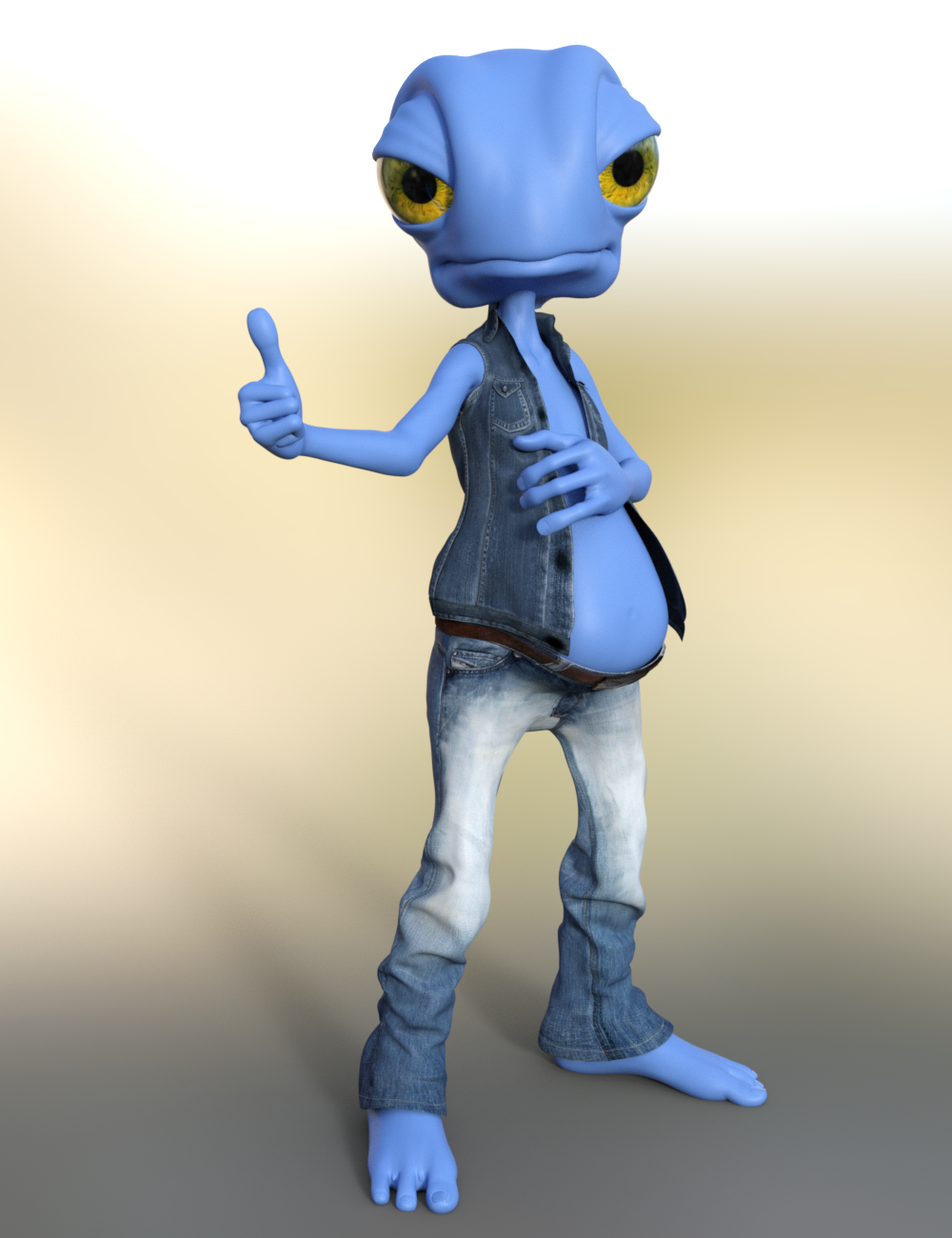
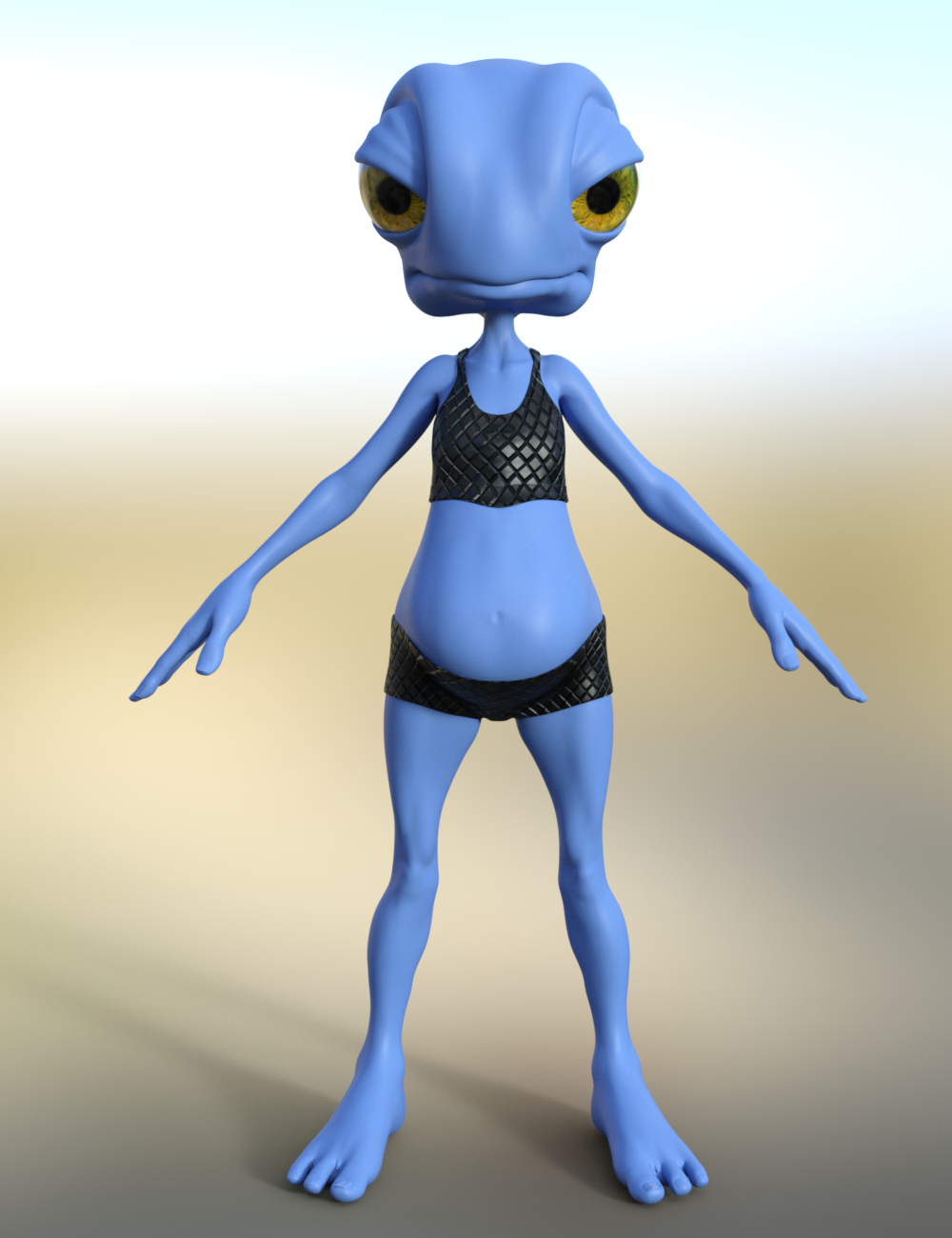
I haven't tried it for human figures though. Doing that for A3 characters might be fun! :) And it would allow one, as you said, to use G8F clothing with "Aiko 3". heheh I might just have to try that with Aiko 3 characters. I wonder if it would be super hard to get the skin to match up though.
Yep, did that with Krystal and Aiko/Hiro.

Awww Cute! How did you get the skin to match?
I've had lots of practice working with gen3 textures. I used Krystal's original texture to get the colors right and for some detail inspiration, the fur texture and bump came from Gen4's Cat World converted to Gen3 with Texture Converter 2.
While we're on the subject vVv I'm really happy with how the red one turned out.


 Facial Hair / Beard Morphs FBX Export
It seems that if you have a seperate beard mesh, and you export a figure with this it will create morphs identical to the face morphs you export. The issue with this, is that in any other program you now have 2 seperate morphs to deal with, one for the beard, one for the face. If you move part of the face .35 then you must move the beard .35 as well or they don't match.
Daz does not obey export rules here, so it does not appear as though you can say: don't export these morphs and bake the beard into figure.
What is interesting is that I have duplicates of the face morphs so the some of the face morphs (ones that start with head.something) seem to work as expected, where they and the beard work as one.
My question is, how can you tell Daz to use another morph like head.something so it too will be one with the beard?
So really what is the difference between Genesis8male.brows_up and head.brows_up?
Hylas' corner
Current freebie Brock for F4. Head morph and skin converted to G8.
I still don't know how to convert pre-G3 bodies to G8 without screwing up the posing, so the body morph here is just from SWOLE 8.
Shorts by RenderGuyNY: https://www.sharecg.com/v/90066/gallery/21/DAZ-Studio/G8M-Clubbing
HDRI by zbyg: https://www.deviantart.com/zbyg/art/HDRi-Pack-2-103458406Daz 3D is part of

Connect
DAZ Productions, Inc.
7533 S Center View Ct #4664
West Jordan, UT 84084Licensing Agreement | Terms of Service | Privacy Policy | EULA
© 2026 Daz Productions Inc. All Rights Reserved.