-
Saving morph assets in Studio 4.23/4.24 [Solved]
Well, maybe dont select every single morph to resave with your product
Sometimes morphs dont show up for me either in that window when trying to save, and Im not sure why. I think save/reload of scene usually makes them appear. It happened to me a few times. (I cant rule out that I was just being blind)Saving morph assets in Studio 4.23/4.24 [Solved]vwrangler said:
So for whatever reason, Daz decided to deprecate the "Save / Morph Asset" option in Studio 4.23/4.24,
lol what a baffling change

e: it took me a minute to remember where it actually saves to but yes this works OK with Save As/Support Asset/Modifier Asset, I strongly recommend you only ever do this sort of thing on a dev kit version of the figure to make sure you have all the internal names correct:

 Saving morph assets in Studio 4.23/4.24 [Solved]You have to drill down in the tree and check ONLY your new morph. I don't know why you could not find it in the tree. It would be in the path that you specified, like Actor/Head/... or just Morph Loader by default perhaps. Are you sure you selected G8M before saving modifier Assets and that the morph actually is present in the Parameters pane when he is selected?Saving morph assets in Studio 4.23/4.24 [Solved]
So for whatever reason, Daz decided to deprecate the "Save / Morph Asset" option in Studio 4.23/4.24, and "Save Modifier Asset" seems to work very differently than what I remember, although it has been quite a while since I needed to use that.
I transferred one single head morph from G8F to G8M using the Transfer Utility and the process described here https://www.daz3d.com/forums/discussion/comment/1866876/#Comment_1866876
As suggested, at the end of the process, I tried to save the morph/modifier asset. It wound up showing me the entire property tree, and all the morphs in the tree, none of which was the morph I was trying to save. So I named the morph asset the way the window seemed to be suggesting, clicked Accept ... and it saved a duplicate of EVERY SINGLE HEAD MORPH into the directory that it had created. Or rather, it tried to; I wound up having to kill the Studio process when it got stuck on a particular character. Thankfully, it does seem to have been doing duplicates and the currently installed characters seem to be OK, so I was able to delete that directory. The one thing it did NOT do was to save the morph that I'd created.
That cannot possibly be the way saving morphs is meant to work.
So once you've actually created the morph, what is the process for saving just that morph and only that morph so that it can be used?
Any information or assistance will be greatly appreciated.
data- file corruptedHi, this became super annoying, for I'm struggeling with this for years now, and I cannot solve it.
I have saved a scene file. Nothing special, but the problem is, as I delete it, the basicGenesis 8 Female file loaded with an error message, that this (deleted) file is missing.
Somewhere must be a reference hidden my morph assets, but I just can't find it.
Are there any advanced tools or methodes to track down that scene file reference?
Mis-sized bones from Daz -> Diffeomorphic -> BlenderThat is not possible if you use dbz. It happens if you apply a ERC morph without fitting the armature. You have to enable "ERC as armature" in the global settings, then use "morph armature" in the morphs panel. Or provide exact steps to reproduce the issue.
https://diffeomorphic.blogspot.com/2021/09/morphing-armatures.html
Genesis 9 FACS – How do you drive hundreds of DAZ morphs with a 2-D facial board in Blender?Setup
-
Blender 4.1 (Win11)
-
Diffeomorphic dev 4.4 + MHX RTS 4.4
-
Genesis 9 figure imported with JCMs + FACS + Head (no Face Units).
-
Converted to MHX. All sliders work; JCMs bend nicely; FACS react in DAZ > Morphs.
What I’m missing
Scrolling through 300 + morph sliders is painful.
I’d rather have a 2-D facial control board (eyebrow row, eye row, mouth row, etc.) or at least a compact multi-column GUI—similar to what Faceit or ARP-Face shows in their demos, but linked to the existing DAZ FACS/JCM shape-keys, not regenerated poses.
I'm looking for something like Metahuman Rig.My questions
-
Has anyone successfully driven DAZ Genesis 9 FACS (or Expression) morphs through a 2-D board—Faceit, ARP-Face, Rigify-Face, or a home-made widget rig?
-
If yes, what workflow did you follow to map the board controls back to the existing shape-keys (drivers, scripts, add-ons)?
-
Are there open-source templates or scripts that already pair the 63 AU names to common boards?
-
In your experience, does baking corrective JCMs (Baked Correctives ON) affect any driver linkage?
Thanks a lot!
Vampire Arm WingsThere's this: https://www.daz3d.com/werebat-hd-for-genesis-81-male but I don't own it so I don't know if you can just dial in the arms part of the morph.
Render is PixelatedFace Transfer 2 (for Genesis 9) is more sophisticated than version 1 (for Genesis 8.1).
How to Achieve the Squeezing/Pinching Morph Effect Shown in the Image?sucan2015 said:
lilweep said:
if subdvision wasnt high enough, you can increase subdivision...
if you cant load hd morphs, then you dont need to, you dont need a poseable figure for a static render. you can just use your subdivided figure as a static mesh.
Do you mean I should increase subdivisions in ZBrush and then export to DAZ?
Zbrush is an example of a sculpting software where you would do this yes
If so, would I lose all the materials and textures in the process?
Well, they wouldnt be "lost" you just need to transfer them. Obviously this process below assumes your method for exporting and importing a sculpt doesnt remove the Surfaces.
Steps:1. Import your subdivided and sculpted obj file from Zbrush (or whatever software you suclpted it in)
2. In the surfaces tab for the imported sculpt, add the same shader that was used on your original figure (e.g., Iray Uber, or PBR Skin, etc)
3. Hide the original figure
.4. Copy the surfaces from the original figure to the imported figure. (Right click and copy in surfaces tab of original figure, paste in surfaces tab for imported figure)
Alternatively for making HD morphs there are options on youtube.
Render is PixelatedThanks for your response. I will try letting it run longer and see if that works. Also, I have another question. I'd like to use my renders for book covers but cannot so far because the face transfer is not picking up enough detail from the original photo which I've attached so you can take a look. Are there extra settings which need adjusting or am I using the right face transfer version. I've looked at book covers made by daz3d and the faces are much clearer than mine which is why i'm wondering if it could be my computer. (I hope not I just purchased a new one - it has an 8GB video card, 32 gb of ram and it's an i9 processor). Any help would be appreciated.
How to Achieve the Squeezing/Pinching Morph Effect Shown in the Image?As shown in the attached image (cropped to avoid potential content issues), the hand squeezing the hip creates a very pronounced morph effect. Is it possible to achieve this directly in DAZ? If so, how?
I’ve tried sculpting similar morphs in ZBrush, but the subdivision wasn’t high enough, and the result looked rough. Could Photoshop post-processing be used to enhance this morph effect as seen in the image? Any tips or workflows would be appreciated!
How should I solve this problem?coolcool0131_eea6a807 said:
It's a g3m outfit on my character in g8.1. My armpits are very unnatural, how do I fix this?
Create a fixing morph target with two semetrical deformers.
Window => Panes => DForm
Spawn morph => your label
Sve As => Support Asset => Modifier Asset
Your User name
Your Morph folder
Down to your created Morph Targets in the list
SaveThe Mac FAQHmm I assumed it just ran slower since Blender works on macs, forgot that blender doesnt use Iray :( sad. On that note does daz lag/stutter alot when in viewport? Thinking might get a 16gb model to make scenes when out and about then transfer to the nvidia laptop for render time. Tho I guess going with more ram version I could use blender to render out the scene.Let's appreciate/discuss today's new releases - more ongoinger threadfelis said:
Attached is a zip with 2 morphs for the belt for genesis 8. One the above image and one the below.
I tried to match the belt to the 2 more open pants, but it seemed not realistic. In one there wasn't enogh place under the beltstrap, and in the most open there wasn't really room for the belt, so I would have to have morphed the pants as well. So I ended up with shape 1, and even that was way harder than the 1st morph.
I am doing my modelling in blender. Doing simple morphs is easy.
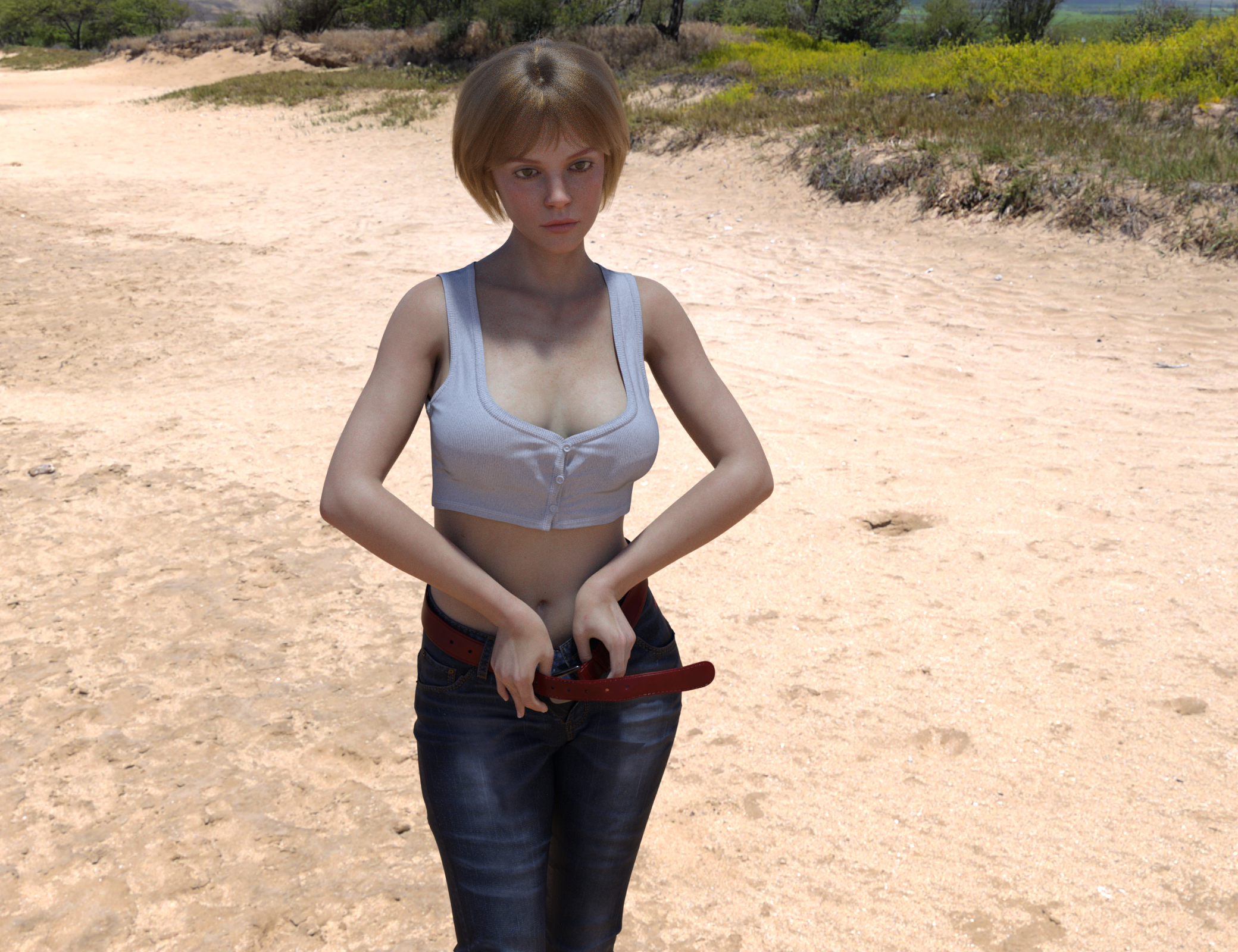
Thank you kindly!
Long nail bedsI don't think I've seen a morph set that changes the shape and size of the nail bed before. They seem to focus on the length and shape of the end of the fingernail. I have some that extend more than the end of the nail, but I don't like to use them for unpainted nails because they stretch the texture with the pink part of the nail bed past the tip of the finger. That doesn't look natural lol. It would be interesting if a nail product included nail bed shaping morphs though.
Let's appreciate/discuss today's new releases - more ongoinger threadfelis said:
Attached is a zip with 2 morphs for the belt for genesis 8. One the above image and one the below.
I tried to match the belt to the 2 more open pants, but it seemed not realistic. In one there wasn't enogh place under the beltstrap, and in the most open there wasn't really room for the belt, so I would have to have morphed the pants as well. So I ended up with shape 1, and even that was way harder than the 1st morph.
I am doing my modelling in blender. Doing simple morphs is easy.
That's really kind of you, thanks! One can probably make the long loose end come down with dForce, just making it rather stiff so it won't droop like a wet noodle. - I didn't know you could use Blender this way, pulling the belt out of the buckle, this is way nice!
Import material Daz to blendercrosswind said:
chrisvn said:
crosswind said:
You bought the product from Renderosity.com ... The vendors there usually have to split the product into multiple ZIP packages, like the one in your ss4, from 01 to 06. You need to put those six ZIP files into a folder, and unzip all of them. Then you'll got the sub-folders: data, People, Runtime.
Then copy them into the root directory of your Daz Library !
I looked at the installation note and on the manual the instructions were to unzip the folders directly into the Library, so I did that, I was able to use the cropped hoodies except one where I don't see the US colors and there are edges that interact with the character's skin and also when you move it the hoodie goes through the skin (screen_V1), I think it's more a settings thing, but I'm new to this is there a tutorial for that?
You either can unzip the package file one by one or holistically unzip them into a temp folder and copy them to the library all together. I always install 3rd-party product with Content Wizard, so I always make a one package without any garbage folders / files (e.g. Documents... etc.)
Short Hoodie 10 material preset is with "US textures"... though I never use it ~~
The issue you had is because of the character's shape is Sakura 8 but the vendor didn't give a FULL HEAD MORPH for it on the hoodie. You can follow this tutorial to fix the FHM... https://youtu.be/HLt0jpxQA20?si=UeJ67vXsv0k2HCg1
The tutorial from Mada is for fixing FULL BODY MORPH (FBM) but you can follow it similarly to fix FHM for the hoodie. I fixed it by using Blender. (ss1) If you don't know Blender or ZBrush but have Mesh Grabber, you also can fix it...
I noticed that to change the hoodie material at first it didn't work, then clicking on the eye deactivated it then reactivating it by clicking on the hoodie for example I changed it and it's the same for the rest this is correct way (screen_V2) ?
The material presets work for me. I couldn't reproduce any issue with them. Maybe it was a glitch on your side....
Hello, maybe you didn't get my post? I'll resend it to you. Thanks.
Yes, in the end, so since I unzipped it, it went well, I unzipped it directly into the library the necessary files...
But I have the colors with the same hoodie selection as you, however in fit to I don't have sakura 8 but genesis 8 and yet I have the same selection as you! I don't understand because we have to put the genesis 8 female body first..(screen V1 et V2 )
Regarding the video link, it's too advanced for me, I don't even know how to go into editor mode!!! If it worked for you, it will work for me too!
And for the clothes that pass through the body when the character moves, do you think it is necessary to save the body in collisions? I have not tried in blender, I will have to try
Face Transfer Confusioncheard said:
Hello all! I am a bit confused by Face Transfer — or maybe not. Is the following correct?
- There is a free version built into Daz Studio that allows you to save up to 3 face transfers without a watermark.
- You use Face Transfer (1) for Genesis 8 and Face Transfer 2 for Genesis 9.
- The paid versions in the store are exactly the same but remove the 3-figure save cap.
Is that right?
Yes
 Let's appreciate/discuss today's new releases - more ongoinger thread
Attached is a zip with 2 morphs for the belt for genesis 8. One the above image and one the below.
I tried to match the belt to the 2 more open pants, but it seemed not realistic. In one there wasn't enogh place under the beltstrap, and in the most open there wasn't really room for the belt, so I would have to have morphed the pants as well. So I ended up with shape 1, and even that was way harder than the 1st morph.
I am doing my modelling in blender. Doing simple morphs is easy.
Daz 3D is part of

Connect
DAZ Productions, Inc.
7533 S Center View Ct #4664
West Jordan, UT 84084Licensing Agreement | Terms of Service | Privacy Policy | EULA
© 2026 Daz Productions Inc. All Rights Reserved.