-
Just cannot get face transfer utility to work
Face transfer doesn't work for me either. "Face Transfer failed to create. Please try another source image." I get an error message. I’ve read a lot here and see that it’s not just with me. Experiencing this, I don’t think I would buy the full version for the money!
Need some help Baking my SquirrelI've been having really great luck converting & exporting via FBX furred, LAMH animals until I tried this older one with the European Grey Squirrel, or rather the Rodent Polymorph. The end result is the base figure isn't fitting to the fur items. Its some sort of morph or transformation issue though that just isn't getting baked, in that the result is the base rodent & not the breed initially selected. Figure is zero posed with the exception of the Jaw opened 1/2 range. OBJ export works fine in retaining the shape.
Here's a screen grab: OBJ in black wires, the FBX result in White.
It's not just a scaling factor; there are subtle morphs to a given breed as well. I'm not exporting any morphs though (can't use them), only baking. Wish I could use the OBJ but they have no weight map info as the FBX does.
In DS, I've tried every combo of selecting, baking, memorizing, etc. but doesn't seen to have any affect in this case as it has before. Not having proper docs for the process of course certainly doesn't help so flaying around with with trial & error.
Hoping someone might know what I'm missing here.
AIUTO...CHI CONOSCE L’ITALIANO? PARTE DODICISi puoi farlo, ma devi anche correggere i percorsi del DIM e di DAZ Studio, altrimenti non li trovi nei Tab Content e Smart Content. Ricordati anche di reimportare i metadata alla nuova posizione dal Content Management.
Tuttavia, dovrai correggere tutte quelle scene che contengono cose create da te, tipo textures o morphs. Quelle cose non sono integrate nei metadata e il loro percorso viene salvato all'interno della scena.
Se la scena è abbastanza recente non avrai bisogno di correggere i percorsi delle geometrie, in quanto vengono salvate all'interno della scena stessa (occhio quando condividi le scene!) a meno che tu non le abbia salvate nelle tue librerie creando una voce Metadata.Grazie!
Non ho mai creato metadata per nulla.
Devo lo stesso fare queste operazioni coi metadata? I prodotti Daz non li hanno già integrati, ovunque io li installi?Sì lo so dei percorsi.
Si, sono intergrati e in genere dopo aver corretto i percorsi funzionano senza problemi, ma alcuni prodotti come plugin, addon e in alcuni casi morph, hanno necessità di reimportare i metadata. E a volte anche riattivati tramite seriale.
Quanto a quelli "user" vengono salvati in automatico quando, per esempio, salvi come Asset una maglia o un morph. Anche quelli vanno reimportati in certi casi.Attenzione, lo dico da utilizzatore di Merchant Resource, molto spesso chi vende o regala le Merchant, dice esplicitamente di non creare freebiees con quelle. Io ho un intera parte della mia wishlist piena di Merchant dela DAZ, ma nessuno permette di fare freebiees, solo prodotti da vendere.
Quello è uno dei motivi per i quali evito le Merchant Resources, sia commerciali che gratuite. Non sai mai cosa puoi farci, specia quando rimandano a licenze confusionarie o incomplete.
Molto meglio fare da sè e disegnarsi le risorse da sè o generarle con i programmi appositi.

E visto che si parla di mercato, uno di voi PA mi potrebbe togliere una curiosità? Vedo un sacco di bravissimi artisti "relegati" su altri store, spesso mescolati a robaccia per Poser, senza traccia di loro su DAZ... Voglio dire, con quella qualità, per quale motivo non vendono (anche) qui "da noi"? Avrebbero parecchia più visibilità e un bacino di clienti molto più ampio, almeno credo.

Appunto ti dicevo, io al momento ho solo Merchant Resource della DAZ, o di qualche creator con cui ho parlato direttamente e a chi ho chiesto, licenza alla mano, cosa si poteva e non poteva fare. Per il discorso dei creatori che sono strafighi e non stanno qui sulla DAZ, è perchè magari non vogliono sottostare ai dettami della DAZ, che sono più restrittivi degli altr store se non sbaglio. Ma dovremo chiedere lumi a @muscleman o @maclean
Ma io non parlo di artisti "bollenti"!
Che restrinzioni possono esserci su un morph di una bambina o sul modello di una maglia?Dipende dal PA in realtà, io voglio lavorare per i migliori in questo campo, e i migliori è la DAZ, e mi sta bene l'esclusività dei prodotti che posto qui, non ci stanno frottole. Mentre altri preferiscono fare diversamente
plug in for weight arrays?after studying the difference between general and triax weights.
general uses 1 array of weights
the triax weight method duplicates that 1 array 5 times. x{}, y{},z{}, scale{}is it posssible to make a script to duplicate that 1 array to the absent 4?
if we could do this, we wouldnt need to convert and save in external plugin.
also, looking for a way to add verts to a morph area after a figure with morphs is loaded into carrara. was thinking script or a preset .cbr file
Thanks
 looking for this hat and hair - can pay to create
I added a photo showing the goggles from the Front View
These Goggles have a similar shape...
Motorcycle Helmet and Goggles by colt359 (at TurboSquid)
https://www.turbosquid.com/3d-models/motorcycle-helmet-goggles-3d-model/321017Japanese Riding Cap...
You might be able to morph this cap into the same shape:
Soldat Outfit for Genesis 8 Male(s)
https://www.daz3d.com/soldat-outfit-for-genesis-8-males
https://www.daz3d.com/soldat-outfit-textures (cap black texture)Is there a thread about "character bloat"?I would think the whole file would be read in (presumably it just reads in the whole thing and uses the JSON parser on the resullt) but the detas are jettisoned until needed.I'm fairly certain this is what is going on.
I have a fast computer and all content on an internal SSD, but I also have hundreds of characters. Daz Studio was great when I initially tried it out, and then I spent lots of money buying characters from multiple sites and when I started trying to use them seriously I realized load time made Daz Studio basically unusable for my purposes.
It's definitely the morphs, as I moved them in and out of the data folder to test performance.
I ran a whole bunch of timing tests to see what mattered, e.g. JCMs and pose morphs vs. character morphs, creating new morphs consisting of body & head morphs merged. The main determiner seems to be the size of the morphs; a bunch of small body part morphs load as fast as a single character morph. Replacing one morph for body & head instead of two morphs doesn't help at all. So to a first approximation the size of the file (though compressed vs. uncompressed made no meaningful difference on my machine) is the main issue, so I would bet it's just the cost of loading & parsing the JSON files.
It seems like it could improved straightforwardly if anyone cared; for example, the overhead due to having more morphs available for a scene with 4 G8F characters requires 4 times as long to load as one with a single G8F, so it seems like it's loading and throwing away this data over and over during a scene load. Since the only purpose seems to be to be able to display the dials, it would make a lot more sense to me to cache that data (in memory, or better yet to disk). I realize that each character stores their own copy (since each can have different morphs loaded dynamically), but the issue here is just reading the ones on disk to populate the character--just putting a cache between this 'load the dials' reader and the actual morph files.
I've done a few things to deal with this:
1. I split all my morphs up into dozens of content libraries and only keep a couple loaded at a time
2. I mainly use purchased characters for their skins, and I use dial-spun characters with those skins 95% of the time.
But I'm still not happy. It's really tedious to map and unmap content libraries; it's still slower to load than it should be; and I wasted a lot of money on character morphs I will never use unless this gets fixed.
I noticed a problem like your's with some of my scenes with Victoria4. It seems that the problem comes from certain morphs. Each time I reworked a scene, it takes more and more time to load.
There is an option in the scene pannel that shows the hidden nodes. I try that and discovered thousends of identical morphs. They all were non parented and have absolutely no action ! I discovered one of my scenes containing 20.000 such morphs ! Each time the reworked scene is saved, DAZ seems to add dupicates of those morphs.
Since they have no action, I deleted them and saved the new scene. And the load time comes back to normal. I don't know the reason why DAZ decides to add such parasit hidden morphs and I have no solution to prevent that. But simply making them visible and deleting them from the scene solved my problem.
Those are not morphs, morphs don't appear as nodes in the scene. What you had was some kind of object, probably created by a third-party plug-in that you had installed or that was installed on the system in which some of your content files were created.
AIUTO...CHI CONOSCE L’ITALIANO? PARTE DODICISi puoi farlo, ma devi anche correggere i percorsi del DIM e di DAZ Studio, altrimenti non li trovi nei Tab Content e Smart Content. Ricordati anche di reimportare i metadata alla nuova posizione dal Content Management.
Tuttavia, dovrai correggere tutte quelle scene che contengono cose create da te, tipo textures o morphs. Quelle cose non sono integrate nei metadata e il loro percorso viene salvato all'interno della scena.
Se la scena è abbastanza recente non avrai bisogno di correggere i percorsi delle geometrie, in quanto vengono salvate all'interno della scena stessa (occhio quando condividi le scene!) a meno che tu non le abbia salvate nelle tue librerie creando una voce Metadata.Grazie!
Non ho mai creato metadata per nulla.
Devo lo stesso fare queste operazioni coi metadata? I prodotti Daz non li hanno già integrati, ovunque io li installi?Sì lo so dei percorsi.
Si, sono intergrati e in genere dopo aver corretto i percorsi funzionano senza problemi, ma alcuni prodotti come plugin, addon e in alcuni casi morph, hanno necessità di reimportare i metadata. E a volte anche riattivati tramite seriale.
Quanto a quelli "user" vengono salvati in automatico quando, per esempio, salvi come Asset una maglia o un morph. Anche quelli vanno reimportati in certi casi.Attenzione, lo dico da utilizzatore di Merchant Resource, molto spesso chi vende o regala le Merchant, dice esplicitamente di non creare freebiees con quelle. Io ho un intera parte della mia wishlist piena di Merchant dela DAZ, ma nessuno permette di fare freebiees, solo prodotti da vendere.
Quello è uno dei motivi per i quali evito le Merchant Resources, sia commerciali che gratuite. Non sai mai cosa puoi farci, specia quando rimandano a licenze confusionarie o incomplete.
Molto meglio fare da sè e disegnarsi le risorse da sè o generarle con i programmi appositi.
E visto che si parla di mercato, uno di voi PA mi potrebbe togliere una curiosità? Vedo un sacco di bravissimi artisti "relegati" su altri store, spesso mescolati a robaccia per Poser, senza traccia di loro su DAZ... Voglio dire, con quella qualità, per quale motivo non vendono (anche) qui "da noi"? Avrebbero parecchia più visibilità e un bacino di clienti molto più ampio, almeno credo.
Appunto ti dicevo, io al momento ho solo Merchant Resource della DAZ, o di qualche creator con cui ho parlato direttamente e a chi ho chiesto, licenza alla mano, cosa si poteva e non poteva fare. Per il discorso dei creatori che sono strafighi e non stanno qui sulla DAZ, è perchè magari non vogliono sottostare ai dettami della DAZ, che sono più restrittivi degli altr store se non sbaglio. Ma dovremo chiedere lumi a @muscleman o @maclean
Ma io non parlo di artisti "bollenti"!
Che restrinzioni possono esserci su un morph di una bambina o sul modello di una maglia?My first two stumbling blocksAs for the overbite, looks like you have a morph that is constantly loaded which happens something. Select the figure and then in the parameters tab check the currently uses section at the top and see what morphs are loaded and zero them out, make note of the one that caused this and send in a support ticket so it can be fixed.
As for the hair it loads fine for me, have you tried applying any of the 18 textures it comes with? Also make sure you have everything installed. Unlike here, renderosity likes to break up the files in multiple zips.
Is there a thread about "character bloat"?I would think the whole file would be read in (presumably it just reads in the whole thing and uses the JSON parser on the resullt) but the detas are jettisoned until needed.I'm fairly certain this is what is going on.
I have a fast computer and all content on an internal SSD, but I also have hundreds of characters. Daz Studio was great when I initially tried it out, and then I spent lots of money buying characters from multiple sites and when I started trying to use them seriously I realized load time made Daz Studio basically unusable for my purposes.
It's definitely the morphs, as I moved them in and out of the data folder to test performance.
I ran a whole bunch of timing tests to see what mattered, e.g. JCMs and pose morphs vs. character morphs, creating new morphs consisting of body & head morphs merged. The main determiner seems to be the size of the morphs; a bunch of small body part morphs load as fast as a single character morph. Replacing one morph for body & head instead of two morphs doesn't help at all. So to a first approximation the size of the file (though compressed vs. uncompressed made no meaningful difference on my machine) is the main issue, so I would bet it's just the cost of loading & parsing the JSON files.
It seems like it could improved straightforwardly if anyone cared; for example, the overhead due to having more morphs available for a scene with 4 G8F characters requires 4 times as long to load as one with a single G8F, so it seems like it's loading and throwing away this data over and over during a scene load. Since the only purpose seems to be to be able to display the dials, it would make a lot more sense to me to cache that data (in memory, or better yet to disk). I realize that each character stores their own copy (since each can have different morphs loaded dynamically), but the issue here is just reading the ones on disk to populate the character--just putting a cache between this 'load the dials' reader and the actual morph files.
I've done a few things to deal with this:
1. I split all my morphs up into dozens of content libraries and only keep a couple loaded at a time
2. I mainly use purchased characters for their skins, and I use dial-spun characters with those skins 95% of the time.
But I'm still not happy. It's really tedious to map and unmap content libraries; it's still slower to load than it should be; and I wasted a lot of money on character morphs I will never use unless this gets fixed.
I noticed a problem like your's with some of my scenes with Victoria4. It seems that the problem comes from certain morphs. Each time I reworked a scene, it takes more and more time to load.
There is an option in the scene pannel that shows the hidden nodes. I try that and discovered thousends of identical morphs. They all were non parented and have absolutely no action ! I discovered one of my scenes containing 20.000 such morphs ! Each time the reworked scene is saved, DAZ seems to add dupicates of those morphs.
Since they have no action, I deleted them and saved the new scene. And the load time comes back to normal. I don't know the reason why DAZ decides to add such parasit hidden morphs and I have no solution to prevent that. But simply making them visible and deleting them from the scene solved my problem.
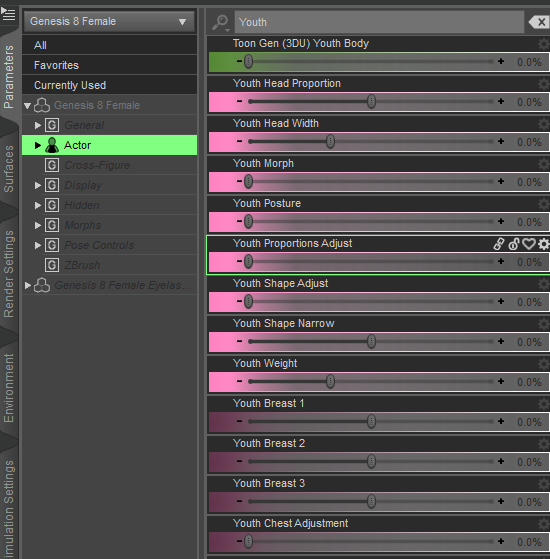
How can I use this file "(Growing Up Bundle for Genesis 8 Female (s) and Male (s)"With a Genesis 8 character loaded: select actor on the parameters tab. Type youth in the search bar and the morph sliders are easily found.
 Why does this happen when I make a custom morph?
hi :)
Sorry to repeat what has been said but there are some changes to be made.
for export and import, the important thing is to export and import in the same way, if you export with blender settings you must import with blender settings.
personally I import and export with the daz settings, I just change the clip end in blender to see correctly.for import in blender "split by object" don't need to be touched, on the other hand in "keep vertex order" you have to check "poly groups".
for export to daz you have to check "keep vertex order" in blender.
in daz, in morph loader pro, you have to change "property group" and assign the morph to another category, for example "actor" then choose yes for "reverse deformation".
in blender you can also use edit mode to modify the mesh, the only important thing is not to change the number of verticeto finish you can create morphs for everything... character, clothing, hair, furniture etc...
I have never had any problem with this method with the g3 and g8 versions, the only problem I have encountered is to modify the clothes of the versions v4...
Have a nice day ;)
edit : if you have problem with rigging there this product : https://www.daz3d.com/shape-rigger-plus who adjust rig to the shape
Genesis 9 delayed until at least 2020. Will you be buying it?I will purchase it only if G9 male is a standalone morph of Female.
I mean the morphs work on both like Genesis 1 in order to be able to use HD female cyborg details with any male characters. No Male-to-Female conversion required.
Interestingly Rendo tried exactly that with L'Homme, before quickly abandoning the idea and making him his own figure. I am not sure of all the reasons for this, but I think there was some that felt he did not look very masculine.
I mean something like Millennium 3 , standalone figures sharing the same base.
For example you can add Victory 3 OBJ as a new UV set for Michael 3, you can't do that with Genesis 8.
L'Homme and La Femme share the same base, the morphs can be transferred.
UltraScenery [Commercial]I've mostly tinkered with USC, but I finally have a first true scene using the script. This Ultrascene was created with Lake 3 and Oaks 11. The mountains in the background are the BZone prop from TerraDome 3 with a Mountains morph applied. The prop is significantly further back than the default load. I used the SS Sun Node for lighting, assigned to a camera I created just for the purpose, (as recommended somewhere else in the forums.) I then rendered with Draw Dome off and added the sky and clouds in Photoshop. (I also tinkered with levels…)

The full-size image is 2000 pixels wide, and can be viewed from the Gallery page here.
Beautiful scene! Love the colors and bzone. Was wondering how TD3 might be used with USC, and this is a great example!
Also, regarding your render settings script, I suggested in this forum if Howie could just flip optimization to memory when the Build button is clicked. That way we don't have to remember to do it, and it would be even more helpful when switching to another HDRI that might set it back to Speed. He hasn't replied yet (understandable given all the add-on etc.) but hopefully it is easy enough to do.
This is a fantastic scene. The mountains really add something to the scene.
Cheers,
Alex.
Why does this happen when I make a custom morph?Although I've ran into another problem. I want to export my model with all the changes I made with slider morphs, export that, and make one slider morph, so that I can easily turn everything down. Whenever I do this and import to the standard G8F, everything looks and works fine at first, but when I apply a pose the hand rigging, eye rigging and general body is messed up. Anyone know why? Not a massive deal but I'd just like to use one slider instead of 80 or so.
Did you "adjust rigging to shape" before saving the morph? This is the tutorial I used to get the hang of it.
Genesis 9 delayed until at least 2020. Will you be buying it?I will purchase it only if G9 male is a standalone morph of Female.
I mean the morphs work on both like Genesis 1 in order to be able to use HD female cyborg details with any male characters. No Male-to-Female conversion required.
This don't work. Breast differences is a big problem. From genesis to genesis 2 it led to a separated base figures, from genesis 2 to genesis 3 it led to a different count of points in the meshes.
Face morphs not working on new computerI'm going to let others with better knowledge guide you on getting this part fixed. The message, to me, means the morphs' data folders are missing.
Did you end up putting your content library on your hard drive or only your zips?
I do have my content libary on an external HD and my program on my computer. Then, no matter how many times I change computers, as long as I put Daz Studio on the computer and give it the path to Content Library, that's all I need to do.
Everything was on an external hard drive but the external is only 300GB whereas my actual content library is over 1TB of data.
The morph data folders are definitely there and can be utilized after I load the figure. They are there and working correctly and I can change the morphs on the characters, but when DAZ is loading said characters, they're missing in that file. They were installed in the same location on both, so I'm extremely confused.
I will definitely be getting a 4 TB external after this, though.
Face morphs not working on new computerHey all,
To start with, I have had to transfer my entire My Library onto several different computers over the course of ten years with DAZ when one would break down. Last week, my power chord on my primary laptop (that had all of my DAZ content) quit working completely so I had to redownload all of my things onto another laptop I had (I couldn't just transfer like I usually did because my laptop wouldn't stay charged long enough for the 1TB transfer). I thought everything was working great until I transfered my saved files over and went to open them only to get this image repeatedly. All of these morphs files have been installed on the new computer and are in the correct folder. They're all showing up in Parameters and Shaping, but DAZ is not recognizing them for my figures. DAZ is also not recognizing some the People I have used morphs from, either (Salvator, by Darwin's Mishap, as an example), even though they are also installed properly and showing up in the correct folders. I can click and drag on their parameters with no issues, as well.
I'm really frustrated and not sure what is going on. I have never had this issue before.
Please, someone have a solution. I had so much work I needed to complete and needed to do things with my own character that is now...not my character. Literally looks nothing like any of them. And it is any of the files I open--this is happening.
Why does this happen when I make a custom morph?Although I've ran into another problem. I want to export my model with all the changes I made with slider morphs, export that, and make one slider morph, so that I can easily turn everything down. Whenever I do this and import to the standard G8F, everything looks and works fine at first, but when I apply a pose the hand rigging, eye rigging and general body is messed up. Anyone know why? Not a massive deal but I'd just like to use one slider instead of 80 or so.
Why does this happen when I make a custom morph?got it working! thanks for all the help guys
@klubbvisuals Can you explain what was happening, and what you did to resolve it? Others may find it helpful in the future.
1. Use genesis 8 female
2. Delete eyelashes
3. Turn navel slider down
4. Use the base mesh resolution
5. Export with poser setting as .obj
6. Import into blender, untick split by object in the geometry setting
7. make changes in sculpt mode
8. export.
9. use morph loader pro to import with same POSER SETTING
voila!
Creating a created character as a dialable morph.You should be able to set up a morph control slider that will dial in all the morphs you've added. Try this tutorial: http://www.digi-dotz.com/index.php/tutorials/daz-studio-tutorials/193-create-single-dial-morph-control-in-daz-studio-4-9
I tried this out and after a couple crashes because I didn't have the head and body separated right in terms of the parameter selections, I DID manage to get it to work. However, I didn't try it on Anna yet, but on another Genesis 8 character, thus the end results were pretty strange. When I dialed down to "0", I was expecting to get the Genesis 8 base character shape back, but surprise! I used a different base for the body and head and I got the base figure I used back. So it looks like I have to give this another go using solely the Genesis 8 base figure from the start. I will give it a go on Anna as I know she was created solely from the base Genesis 8 figure. So it should work with her. So I'll be back!
Thanks for that link, BTW. It certainly is a lot simpler than trying to do it from the Morph Loader.
Geo
I think you can probably save the morphs that are dialled in as a Shaping Preset. Loading that Shaping Preset onto a fresh Genesis 8 Female might yield better results. I hope that you're able to get it to work for your Anna. I think Digi-Dotz does a good job of doing step-by-step tutorials. It's super generous of them to post their tutorials publically (and they also have some nice freebies as well!). That site is a treasure trove of great information. :)
Daz 3D is part of

Connect
DAZ Productions, Inc.
7533 S Center View Ct #4664
West Jordan, UT 84084Licensing Agreement | Terms of Service | Privacy Policy | EULA
© 2026 Daz Productions Inc. All Rights Reserved.