-
HeadShop 13 with LoveChild
To be honest I can't imagine ever paying even the sale price for what it appears to offer, considering there are already other apps that seem to work better.
In every single one of their promo images you can see misaligned nostrils and areas of hair that didn't blend out properly and one very odd instance of an african face projected onto a white texture map (do they not offer different skin tones?).

It's really bad when the makers of the product can't even reach acceptable results.
Having never used any previous version of HeadShop, am I missing something? I'm geniunely wondering because this seems like it should be a $20 plug-in at full price at best.
I think the misunderstanding is that these images are NOT rendered but RAW screen captures (notice the DAZ grid behind the promo image). We decided to capture promotional images raw, as they are handed from HeadShop to Studio BEFORE RENDERING. We did this for two reason: because this represents a starting point after which artists would add lights, set up skins and other things that are outside the scope of what we deliver - and because as software developers we don't posses the rending skills that many DAZ artists have.
I mean, it's quite obvious these aren't rendered. That isn't the issue. You can see multiple instanced where the texture and the morph do not line up. You weren't able to capture a-single transfer where the nostrils (both inside and the outer crevice) are lined up to the texture, and there are some shots that show hair artifacts that haven't blended out. In a promo you typically want to show off the full capabilities of your software. I'm not trying to be rude, this is just the truth. And considering the price point here, you should be able to afford to hire an artist who can show off the capabilities in a way that will be interesting for the end user, even if they are still just viewport screenshots you clearly need someone with a more artistic eye. That said, you've obviously been at this for a while, so you probably know your market better than I do, but for me personally this is not an appealing product based on the presentation.
edit: I just want to quickly add as a piece of advice, you really should hire an artist to work on your advertising for you. I can guarantee that if this is a product that artists can make good work with, the amount of additional revenue you'll make from sales will far exceed the cost of hiring an artist.
a using DAZ content in UE4 threadThe glitch looks like in the attachment: (standard gen 8 character with jcms, skin material just color, arms up pose)
Left image: with support compute skincache
Right image: without support compute skincache
The problem lies clearly with Unreal Engine as it became even buggier with the new official 4.25.1 update.
Has anyone found any workarounds to remove this shading/seam glitch, because aby new update will take several months?
are you using the "dual quartenion" version of unreal??? if yes try to test the same with a "normal version" non dual quartenion", the jcm still "works" because it's is a morph", the bend not gonna just work good as if it have the "DQ" but gonna still work, if you are not using the DQ then it could be really related to daz, you have all the "maps" proper applied, i means, normal, Ambient occlusion and Specular map" normally they are the ones to deal with the "light" then you also have the rebuild the light, because i's seens related to some "light configurations".
HeadShop 13 with LoveChildI know there is a lot of discussion on the textures, have the morphs that are generated been improved over previous versions of HeadShop or the morph quality is the same?
Why Does It Take So Long To Load Figures? ("Solved", with GUIDE)FINAL CONSIDERATIONS ON FIGURES LOADING TIMES
Why are figures loading times important?
Your Daz3D library is installed on an SSD, so you load entire apartments in less than 10 seconds, and poses in a fraction of a second, but loading a single G8F takes an eternity? And even deleting the scene makes you want to switch to cave painting? Then you have the same problem I had, when waiting for figures to load, or for a scene to clear, used to take a huge part of my workflow.
What influences loading times?
- The most important factor, by a long mile, is the number of the morphs you have installed. A G8 figure, indeed, has those morphs loaded all the time, and it has to build the relationship between those morphs, even if they're not currently used, and so each morph slows down both the loading and the clearing times.
- Morph Packages: you probably found yet another morph package for $1.99, that you've never used. Uninstall it. Many morph packages have hundreds of morphs, so they're way worse than single characters.
- HD morphs: I think they're worse, regarding loading times, than standard morphs.
- Characters: don't buy figures that are similar to other ones you already have. Most of the time t's not even worth keeping them installed for hair, dresses or tattoos that come with them.
- CPU and RAM. They work together, so I don't know what had the biggest impact. But I have seen a 25% improvement in loading times, with a 50% improvement in CPU performance.
- Storage. It's fundamental. Whether to navigate your content faster, to apply poses, or to load either figures or environments/props. The difference between SSD and HDD is huge. There is yet another difference between NVME and SATA SSDs, but it's not as big as the previous one.
Was I able to improve loading times?
In my tests, I've gone from 136 seconds of loading time for the basic Genesis 8 Female figure, down to 29 seconds (-79%).
I hadn't tested that, but the 136s already were with an SSD, they were surely even slower with an HDD. Probably almost double than that.
So I'd say I reduced the loading times by around 90%.What have I changed to get that improvement?
- I have uninstalled almost 2/3 of my figures, and the vast majority of my morph packages.
I know, it hurts a lot to let products you have bought take dust, but, if you don't desperately need them, having them installed is a huge malus for how Daz works.
(Some people install the products they need each time they need them. That's not viable for my workflow, because I make comics with Daz, and so I need a dynamic creative process that's not compatible with browsing DIM every time I need to do anything). - I have upgraded my PC, from a Ryzen 5 1600 with 16GB of 2400MHz RAM, to an overclocked Ryzen 5 3600 with 32GB of 3800MHz RAM.
- I have upgraded my storage first from HDD to SATA III SSD, then to an NVME SSD PCIe 3.0. They got really cheap these days, and, since once installed your library you won't touch it much, for this use cheap QLC will do the trick.
This has been a month-long experience, that has taught me a lot, and that has changed my style of purchasing: now, in order for me to buy a morph package/figure, it must be really worth it.
Here is the discussion with the whole experience, step-by-step: https://www.daz3d.com/forums/discussion/411446/why-does-it-take-so-long-to-load-figures/p1I hope my experience will be helpful to you!
LenioTG.AIUTO...CHI CONOSCE L’ITALIANO? PARTE DODICIVi faccio una domanda strana, devo fare n fiore che sorride, con gli occhi e la bocca insomma. Avevo pensato di fare in questi due modi;
1 modo: Disegno occhi e bocca sul petalo del fiore, ma non mi convince tanto eprchè con il 3D si vedrebbe la differenza
2 modo: Metto solo una faccia di un character che attraversa il petalo, e uso la stessa texture e shader per petalo e faccia, cosi posso usare anche i morph.
Secondo voi quale andrebbe meglio?
Metodo 2, Crios. Ma assicurati che la texture del fiore sia pari a quella applicata alla faccia.
Per farlo ti consiglio di creare le texture Ad Hoc, magari con Blender che è gratuito e hanno fatto un bel balzo in avanti con la sua interfaccia. AIUTO...CHI CONOSCE L’ITALIANO? PARTE DODICI
Vi faccio una domanda strana, devo fare n fiore che sorride, con gli occhi e la bocca insomma. Avevo pensato di fare in questi due modi;
1 modo: Disegno occhi e bocca sul petalo del fiore, ma non mi convince tanto eprchè con il 3D si vedrebbe la differenza
2 modo: Metto solo una faccia di un character che attraversa il petalo, e uso la stessa texture e shader per petalo e faccia, cosi posso usare anche i morph.
Secondo voi quale andrebbe meglio?
Io la butto lì..se fai il fiore col geo-grafting ?
https://www.youtube.com/watch?v=_O8qL_BIQxYOppure lo potresti trattare come un cloth (un cappello per il character).
AIUTO...CHI CONOSCE L’ITALIANO? PARTE DODICIVi faccio una domanda strana, devo fare n fiore che sorride, con gli occhi e la bocca insomma. Avevo pensato di fare in questi due modi;
1 modo: Disegno occhi e bocca sul petalo del fiore, ma non mi convince tanto eprchè con il 3D si vedrebbe la differenza
2 modo: Metto solo una faccia di un character che attraversa il petalo, e uso la stessa texture e shader per petalo e faccia, cosi posso usare anche i morph.
Secondo voi quale andrebbe meglio?
[Released] Flower Family for Daisy 8 [Commercial]My first character morph set just went live today: https://www.daz3d.com/sbibb-flower-family-for-daisy-8
I had a lot of fun creating different characters based on Daisy 8. :-D They each have a make-up themed on a different flower (Azalea, Belladonna, Bluebell, Carnation, Chrysanthemum, Foxglove, Hydrangea, Lachenalia, Monkshood, Oleander, Orchid, Violet, and Daisy).
This does require Genesis 8 Female Body Morphs and Genesis 8 Female Head Morphs to work right, as well as Daisy 8 (or a character with a similar shape and size)
.


I tried to give them a variety of ages, so that they're not all the same age. :-)


I hope you enjoy them. :-)HeadShop 13 with LoveChildI went ahead and bought the upgrade version of HS 13 and found may be a small bug. When I use it to load an obj that I created with HS 13 in a previous session of DS it displays an error message that says I am attempting to load an object not created in HeadShop. If I load the morph anyway it does seem to work OK; BUT the message is a bit disconcerting
Scenes with non-interactive props/partsVenetian blinds could faiirly easily be given morphs for different tilts, but trying to transition from one angle to another would produce a noticeable narrowing and then widening of the slats
I have to disagree, Richard. I've made both Raise and Tilt morphs for every venetian blind I've ever made (Room Creator, Home One, and a few other packs), and any distortion in the Tilt is barely noticeable. I'm looking at one now in DS, and I see almost no distortion. In addition, the vertical cords (which run through the slats) move with those slats and it all looks fine.
With the Raise morph, not only do the blinds go up/down, but the controlling cords too. It's really not that difficult.
I'm the exact opposite of FMSCDesigns. I would definitely expect all those things in a product.
AIUTO...CHI CONOSCE L’ITALIANO? PARTE DODICIOggi ci sono offerte da capogiro!!!
Date un'occhiata alla sezione PC+ da 1.99, c'è bella roba.Raga mi sono imbarcato in un'impresa estenuante.Sto esaminando uno ad uno ogni singolo prodotto che ho, e ne sto disistallando una quantità assurda.
Voglio rendere la libreria più leggera.
Non ce la faccio più ad avere tempi di caricamento delle figure lunghissimi, oppure a perdere minuti a trovare una posa decente, perché fra quelle installate c'è molto rumore.Un po' piange il cuore a dire "non userò mai questo prodotto che ho pagato"...ma bisogna pensare alla funzionalità di oggi, non agli acquisti fatti quando non si sapeva nemmeno la differenza fra una texture e uno shader.
Tra l'altro ho notato che spesso ho comprato prodotti solo perché avevano un buon prezzo, e poi mi ritrovo tipo 10 figure identiche dello stesso autore, solo con nomi diversi.E quanti prodotti buggati!!!
Ad esempio ho finalmente trovato un prodotto di pose che mi deformava permanentemente i personaggi. Le pose erano carine, ma quando applicate avevano anche espressioni, che non sparivano mai del tutto.Come ti ho ripetuto tante volte, nuovo non significa meglio.
 Genesis8 è un omicidio vero e proprio, anche se hanno dato una sistemata al suo rig, resta sempre una figura atroce da usare.
Ma poi, scusa... Le pose le puoi fare tu, non hai bisogno di nulla di pronto.
Non conoscendo la differenza, non so dirti, non parlo di Genesis 8 in generale, è tutto quello che ho (anzi, ho disintallato la stragrande maggioranza delle cose che avevo per altre generazioni adesso).
Più che altro non avevo idea del fatto che i morph rallentassero i tempi di caricamento.
Ad esempio, che me ne devo fare del controllo di ogni dente?
Avevo comprato i prodotti solo perché erano a buon prezzo, "e magari un giorno mi servirà".
Ma se in 2 anni non l'ho mai usati, e mi danneggia averli, perché devo spendere soldi in SSD e perché mi rallenta i caricamenti, beh, meglio toglierli.Ho rimosso anche tutto ciò che non aveva metadati di default.
Parliamoci chiaro, per il mio workflow, se non hanno metadata nemmeno li vedo, e chi si ricorda tutto quello che ho nella libreria. Quindi è inutile che occupino spazio. Di certo non mi metto a fabbricarli io i metadata.E che dire dei prodotti, magari anche utili, ma che pesano 3GB e non hai mai usato?
A volte i PA si dovrebbero dare una regolata con queste texture :(
Fosse per me, rimuoverei le texture di tutti i capelli, e userei ColorWerks a oltranza.Inoltre, quando cerchi un prop, o una posa, vuoi levare di torno tutto il "rumore", e avere solo quelle di qualità fra cui scegliere. Tanto sono molte lo stesso.
Ho tolto quasi tutte le pose da modella ecc., perché quando cerchi pose by function standing, escono a palate, ed è difficile trovare quelle normali.Non ho il tempo di farmele tutte da solo, devo partire da qualcosa. Considera che questo mese pubblico 100 pagine, quello scorso 150...e ho gente che mi dice "mi sono disiscritto perché non pubblichi abbastanza". La concorrenza dà anche 20 pagine al giorno, ma in molti casi di storie copia-incolla, con personaggi default, pose default e tutto default.
Io a volte sto settimane solo a pensare alla trama.
La storia su cui sto lavorando ora la definirei addirittura dolorosa...è brutto accompagnare un personaggio alla sua morte, oltre che un po' complesso. Ma vedremo cosa riuscirò a combinare.Comunque il copia e incolla della libreria funziona, ma mi ha sfasato qualcosa che non afferro.
Se disinstallo, non cancella i file dal nuovo drive. E i caricamenti sono rallentati.
Probabilmente ha a che fare coi manifest o qualcosa del genere, perché non li ho toccati, ma i percorsi di installazione sono ora diversi.
Per l'ennesima volta, disinstallo e reinstallo tutto! Ci sono abituato ormai xD
Almeno sugli SSD impiega una frazione del tempo che ci metterebbe su un HDD.I can't find the Geometry List in the Figure Setup PaneHello Everybody,
I wanted to learn how to rig in daz studio, I opened a tutorial, well, its written, I've provided the image below.
The tutorial says, in the Figure Setup Pane, right click anywhere on the geometry list, and click on "Add Geometry".
When I open my figure setup pane, there is no geometry list... I've provided that image down below too.... Its probably a silly question but, I'm new to daz, especially the rigging part, so I don't know how to add geometry such that it shows up in the geometry list of the figure setup pane.
This probably is because of the update and that the tutorial should be an older version, but even if so, How can I add geometry to the geometry list so that I can later transfer it into the relationships section of the figure setup pane?
Any help would be really appreciated, Thanks.Report sales errors here: "There's Always Another Sale™"Face Transfer Unlimited is no longer at $1.99 ...
Daventaki's Den-Renders and ReviewsTaking a peak back in this thread I remind myself I haven not finished that image! Goodness.
Review:
Daenestra by Jessaii- Is just beautiful. Shes got a darker skin tone that renders wonderfully and several make up options. She comes with fibermesh eyebrows with a couple of color options but I found it really easy to quickly match the hair color (see close up). She also comes with elf ears and nail color options. I love her freckles. She comes with a no makeup option and it does not have any kind of blush on it; she has two blush options available though I did not try them out.
Noa Hair by Biscuits- This is a great hair to add to your runtime. It drapes with with multiple options to get to lay the way you want. It has multiple morphs to style and adjust if needed. The hair comes with multiple color options and it also comes with multiple transparencys that will also give different looks to the hair. My only issue with the hair was on this pose trying to do the curls did not look right no matter what I did. The curls made random hair ends go in strange positions.
Gown of Fantasy by OOT- I will say I was on the fence about this one. I don't particularly care for the collar on it although I did try to leave it for this render but the hair just fell through it instead of laying on it so I turned it off via the surface tab. The textures are gorgeous and high detail. When I originally tried to use the dress I did have some issues see this thread but I think some of it was because I was in to much hurry. I really like the way it drapped in this image although I was going for a more trailing look like she had taken a step, I didn't rerun the sim because I liked how it draped. the only adjust I had to make was the bust was poking through the lace on the neck collar easily fixed with the adj chest morph on the collar.
Daenestra for Angharad 8 Biscuits Noa Hair Gown of Fantasy for G8F

 HeadShop 13 submitted to DAZ (Commercial)
Since I already owned HS12, I bought and installed the upgrade version of HS 13. There may be a small bug. When I use it to load an obj that I created with HS 13 in a previous session of DS it displays an error message that says I am attempting to load an object not created in HeadShop. If I load the morph anyway it does seem to work OK; BUT the message is a bit disconcerting
what the secret to making a best selling?I don't know the answer but here are a few of my best guesses:
1. Take everything that everybody complains there is too much of and make more of that. Take everything people say they wish you would make, and make none of that.
2. If you have the most beautiful female figure ever made, use it in all of your promo pictures and never reveal any detail about the character, so people will relentlessly link to your products just to ask who the girl is.
3. If your friend has the most beautiful female figure ever made, get the friend to add 1% of your figure's morph to their female figure and list your character as a required product.
4. Create promo pictures that can only be reproduced with Maya, Blender, Photoshop, and a PlayStation 6. List only the items used in the promo that nobody cares about.
5. Enlist fellow published artists to declare that you've released another masterpiece regardless of the bug where clicking on your presets makes the computer explode. Most people will have the product more than 30 days before they click on it.
Why do the models all look fake?..some think it is just load the character in push a few sliders and that's it. if you are into creating custom and very personalised or unique characters, it can still be a lot of work (with a heavier investment in resource rather than character content).
Yes the "Genesis concept" makes some things a bit easier than they were say a dozen years ago. Crikey I remember trying to create a viable teen and child character when all we had was Mike 3 and Vicky 4.(clothing fits were an absolute pain as we had no autofit or morph following). Until one enterprising person developed a flat chest morph freebie, creating a female child was next to impossible. The NPMs and Steph4 made it better for creating teen girls. For young/teen males it was worse as M4 had baked in chest/body hair.and there was not as much third party head/face morph or body shape content as for his female counterpart (I usually would resort to fey characters by Thorne for creating male teens).
Even with many of the utilities like the Growing Up Morphs, Skin Builder2, Anigenesis2, GenX2, various morph/shape resource kits, and all, it still can take a good deal of time and effort to design an original character who doesn't look like a base figure with a couple morphs applied..
I tend to feel as with lighting, hair and the way clothing drapes can also be a giveaway. Most hair content is transmapped sometimes having baked in texture highlights, and frequently provides a limited set of shaping and movement morphs which preclude using it with a wide range of poses (some hair content only works well in fairly basic standing poses as I occasionally find out after thinking, "that would be great hair for 'this' character" and purchasing it). I have gone to working with the Strand Based Hair generator (have worked previously with it's predecessor Garibaldi Express) to try and get around this The trouble is it needs to be re-styled with each and every different pose, and when using it in layers to create thicker body, that can become a very complex task.
For clothing I don't use dForce much because of the heavy drain it places on system resources (older hardware here), As I primarily use G3 as my character base, I really appreciate (and wish there was more) clothing content by PAs like Aave Nainen who's G2/G3 clothing often has a many extra morphs and bones to make it drape and "move" better with with poses.
The "Powered by Hot Pockets" Complaint ThreadA little research on the Internet reveals that NikonTransfer has not been updated since 2015 so I'm not surprised it has finally fallen over the edge.
I really don't know why I use the Nikon software for image transfer from camera to computer. My camera doesn't do RAW images and I don't really need any fancy editing features specific to a top-end Nikon camera. I can transfer images from the camera via USB or even directly from the SD card with other apps like Photoshop. I just used NikonTransfer for getting the images from the camera and putting them into an automatically named folder. Almost any other image accumulation software product can do that.
HOWEVER, I did find out that Nikon now has a newer free product called "ViewNX-i" as part of a suite of products that are approved for use under Windows10. The suite includes "NikonTransfer-2". So, I've downloaded it and will install it. If it works, fine. If not, then OK, I'll just find some other way.
Edited to add: New Nikon app. suite installed after uninstalling the old NikonTransfer. Transfering images from camera now works OK (Yay!)
Suite includes:"NikonTransfer-2" for getting images from selected Nikon cameras. (this is what I was after)
"ViewNX-i" for browsing & editing images. (this seems to be faster loading than the default Microsoft viewing tools)
"Capture-NX-D" Not sure what it does but it looks like a more sophisticated browsing and editing app.
"Picture Control Utility-2" Which looks like a lazy person's image editor to achieve various moods. Several built-in filters.
What Nikon camera do you have, LG?
I have an old D7000. It's still a nice camera, but I'm kind of looking for a new camera that will use my Nikon mount lenses. But my non-starteer is that I'm not willing to buy a camera if it doesn't have a feature to track it and disable it remotely. I'm tired of theft. I want better security for all of my expensive technology, including a kill switch, like my iPad and iPhone have.
Scenes with non-interactive props/partsReally? You wouldn't expect to be able to open a door, or a drawer? Or to have a character pick up the phone?
The blinds don't need to be rigged, just a switching morph or two to open/close and raise/lower. Such things used to be the norm on a great many products I've purchased over the years. And opening doors and drawers isn't really rigging, it's just making separate objects with pivot points and limits in the right places.
I once made a solar panel object in Hexagon, years ago. It was simple, had the panel, and 4 legs that would pivot in the right spots, with nuts and bolts, so one could put it at different angles, or hide the legs and place it flat on something. I gave it away as a freebie, and that was when I didn't know what I was doing. Don't know whatever happened to it.
I also made a metal hatch, like one might find in a submarine or industrial complex. Pivot at the main hinge, locking lugs that also pivot at the right spot. Gave that away too, it's still on Renderosity. Doesn't tell me when I posted it, but it's got to be close to 10 years ago.
My point is that I know many of these things aren't difficult to do, so I wonder why they don't get done.
HeadShop 13 with LoveChildBe careful when making a purchase ... there are 2 types, one is an upgrade, the other is the full product.
Thanks for your replies
I already own Headshop 12 with Love Cjild. What I really was asking is: Is HeadShop 13 enough of an improvement to, especially in texture blending, to justify upgrading from HS 12?
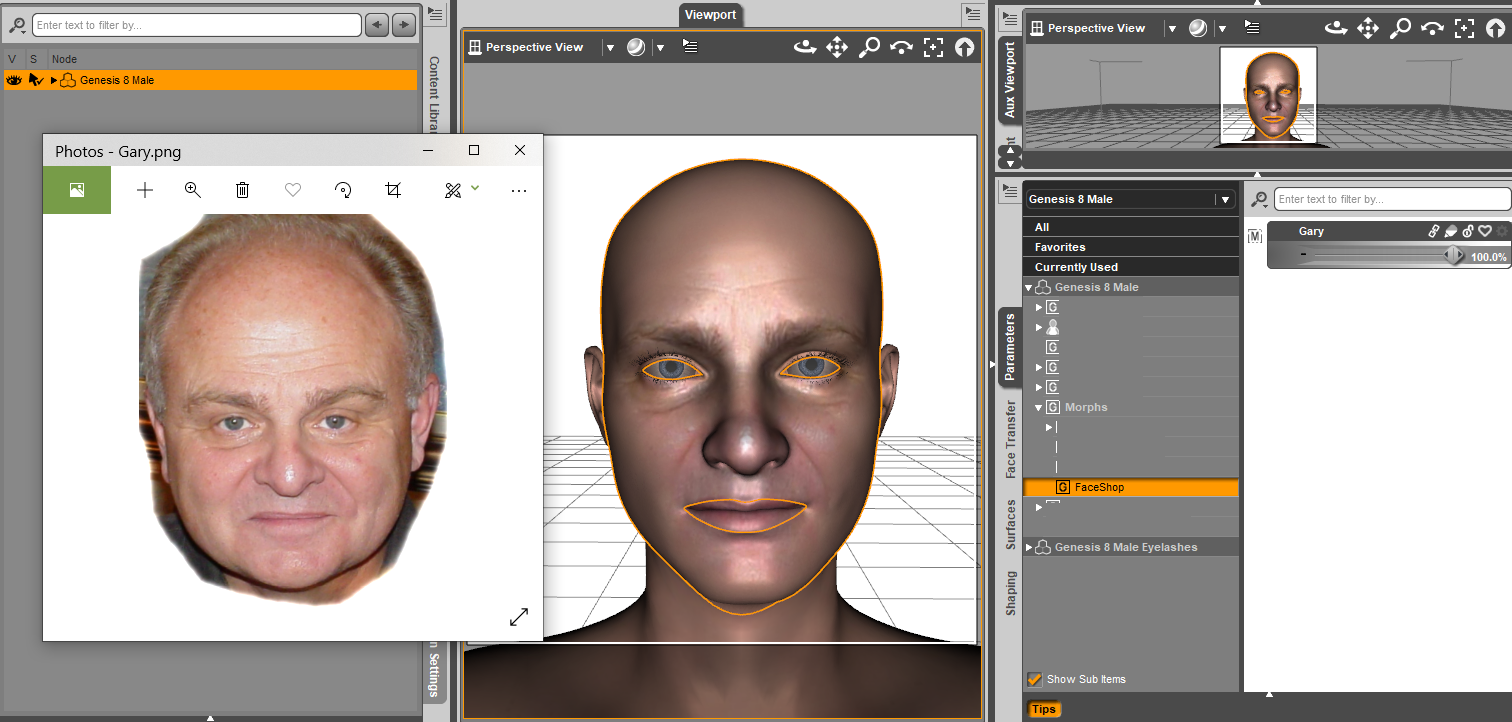
You're welcome. I don't know as I don't have Headshop 12 with Love Child. So I'm showing some of the images and hope it answers your question.
Of the 2 face textures it makes, the one with the photo merged to it, needs some work on the seam allowance but the seams are just fine on the 2nd face image.
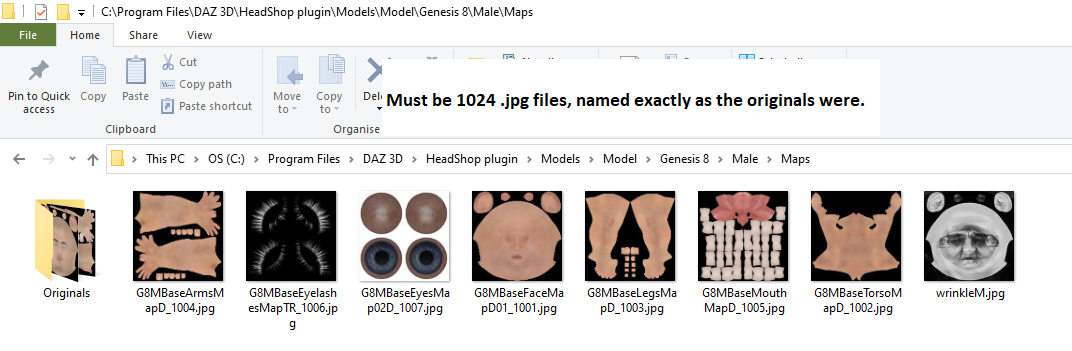
If one uses the 'blank MR' images not on templates, the end result is not desired. Whichever texture image one uses while running the program, it will have information 'stamped' on it from the images in the program's folder. {which is why I changed them because nobody wants 500 editions that look alike of anybody}.
Now if you also have Face Transfer, that does a beautiful job IMHO of matching the skin's hues TO the photo being used. {but switching out the original figure's textures for MRs is a bit of a task, I have a tutorial for that in my tutorial thread.} However Face Transfer's morphs 'need help' if wanting side renders and so the additional morph package for that utility was made [and appreciated] but those additional morphs are not MR of course.
Daz 3D is part of

Connect
DAZ Productions, Inc.
7533 S Center View Ct #4664
West Jordan, UT 84084Licensing Agreement | Terms of Service | Privacy Policy | EULA
© 2026 Daz Productions Inc. All Rights Reserved.