-
Read Me's - don't Exist anymore????
hjake said:
frank0314 said:
Do you use DIM at all? If so, you can get to the README from there, if there is one. Some older products don't have one, and a lot of products that came from other stores don't have them either. If the product is in your product library, you can do a search for it there and get to the README from there as well. The README page has always been the way it is now with the SKU range.
My favorite is whole products index pages missing. This has gone on for a long time.

It was there for me, yesterday. However, the server is down (503 Service Unavailable) right now.
Help DAZ Studio doesn't show on my programs list. SolvedRichard Haseltine said:
Silent Winter said:
The alpha made a shortcut for me, and it shows up when I type "Studio" into the Windows search bar (it's just not showing up under 'installed apps')
It should be added to the Start menu (Windows logo menu) but it won't appear under the uninstall/update list since DIM manages the installation.
Ah, that makes sense. Cheers :)
not getting emails againAnother whole day has gone by. This is still 100% broken. I only get sales emails now. I do not get any notifications of forum postings anymore.
Some FilaToon QuestionsNo, Rim is not the outline, The outlines are created by using a Geoshell. There are render settings for filament. Shadows can be adjusted in the Filament Render Settings node, but are sometimes difficult to control. There are several threads in the forum dedicated to FilaToon. Please take a look at those, so we don't have to repeat everything here. Also, Jay Versluis has a video. Daz3D has a video tutorial. There are a couple useful product in the store for converting objects with Iray shaders to Filatoon. V3D FilaToon Converter, Manager and Tools and Easy FilaToon. Each of those products has a forum thread to help uses with it, too.
Carrara Community Art Gallery - Show us your Renders!!!3deedlin said:
Stezza said:
Bunyip02 said:
Steve K said:
Bunyip02 said:
Very nice. I did a quick search, is that a CAC Wirraway?
Thanks ! Yes it is a Wirraway, 3D model created by briney, was available at ShareCG but alas that is now closed down. Briney also did an excellent Boomerang.
Very nice model. I keep an eye on aircraft models and have never seen that one, but I did not frequent ShareCG. Now I see why people did.

In addition to aircraft made by Briney there were also aircraft made by Neil Wilson, and Pedro Caparros, big shoes to fill and unfortunately Neil has passed away ....
wow @bunyip02

you're gonna need a bigga SSD!
 Just got myself a large TB drive, realizing Ima gonna need it. Lol
I was thinking the same the other day..

I have 4 drives installed ( 3 x SSD and 1 x HDD ) and was thinking the HDD may need replacing, so I checked my space left and all seems to be ok for the time being.
 strange "brighter" line at top of backdrop?
I rendered that same 2000 by 2000 image to 80 by 80 pixels. I saved it as BMP. The rendered image has an obvious pixel value error along each side, this time 1 pixel wide on the small render.
I guess the forum doesn't allow uploading BMP images. I get "No file selected". I rendered again and saved as PNG. It is easy enough to reproduce this problem, so you should be able to replicate it.Read Me's - don't Exist anymore????frank0314 said:
Do you use DIM at all? If so, you can get to the README from there, if there is one. Some older products don't have one, and a lot of products that came from other stores don't have them either. If the product is in your product library, you can do a search for it there and get to the README from there as well. The README page has always been the way it is now with the SKU range.
My favorite is whole products index pages missing. This has gone on for a long time.
Daz Studio 4.23[.0.x], General Release!3deedlin said:
FrankTheTank said:
Skin Builder 8 Seems to be broken in 4.23. It will run initiailly but then I get errors whenever I do any task, for example, just trying to add eyebrows to a figure, I will get errors that it cannot locate files. I am unable to find the files they want manually, and so I have to hit skip. And then I am forced to quit Daz to get out because it just hang after that. Then after force quiting, in task manager Daz will still be running. so I have to force quit there as well. This was not a problem until 4.23. I can't find the commercial thread for Skin Builder 8, if there is one. the search function for the forums is useless. The search brings up nothing. This is a serious issue though, I use Skin Builder 8 for nearly every character this needs to be fixed. I can't beleive no one else is complaining about this yet.
Did you check these vids out regarding paths and installation? Did you use DIM?
https://www.daz3d.com/help/download-content
I use another search engine to search the forums. The one here doesn't seem to work well. I don't have the product so can't check further.
There is a little search program for windows called everything. It is really fast for finding files.I found the commercial thread and saw that several other people have made the same complaint about using SB8 with DS4.23, but there has been no response by the PA to anyone in that thread going back to Dec 2024, when the first complaint was made, so I opened a ticket. It is definitely broken in 4.23, anyone who owns it and is running DS 4.23 can easily verify this.
Daeshim (G8M) missing eye bump?Ok, so here's the quirk. I use Daeshim for my G8m base character frequently and every time I load him, I get an error about DaeshimEyesB_1006 cannot be found. The thing is, it's right in the Daeshim texture folder where it says it cannot find it. When I get the error message I do a search for it and it finds it exactly in the folder it's supposed to be in, but the call file to bring the character into scene is blind to it. In other words, it's not mis-labeled or mis-placed, it's labeled exactly as it wants it, and it's exactly where it's supposed to look. (Note; out of curiousity I just checked the file type; all the other Daeshim B = bump files are .jpg files.
I've tried reinstalling him several times, nada. Same problem over and over.
So anyone got an idea (that a software n00b) can do to fix this?
The "Animators Assemble!" thread for Daz animation WIPs, clips, and tipswolf359 said:
Imago said:
wolf359 said:
Mimic is officially dead
Just keep a backup of any DAZ Studio 4 32bit version and you will be OK.
I hope they will make a new version of it in the 6 version.
I am mostly doing 2D animation these days
But I still have the old Mimic3 pro studio on
one of my old laptops.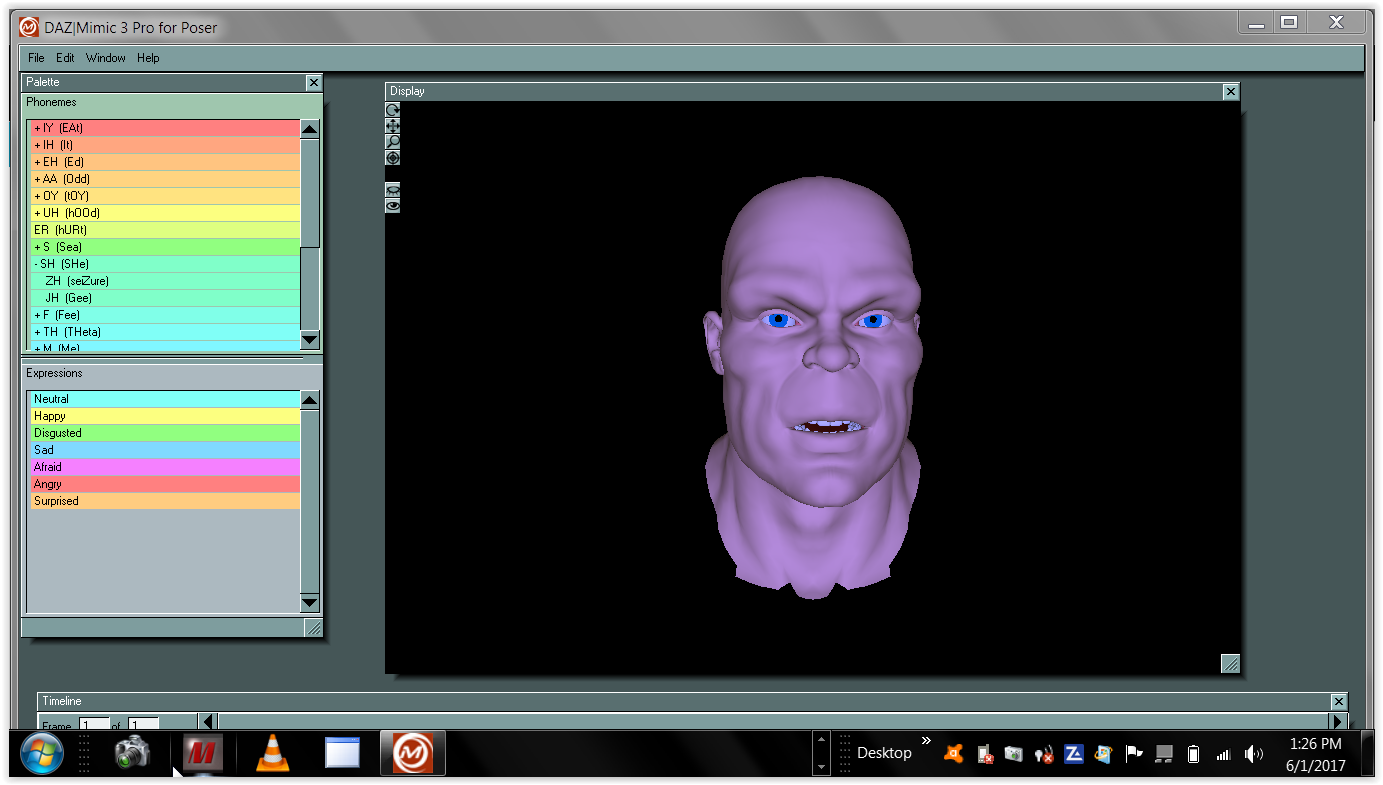
I'd be glad to pay a couple of hundred books to have it built into a 64-bit version of DAZ Studio. I still haven't seen anything as good for what it does.
The 32 bit mimic software was licensed from another
long dead company with no license provision to recompile it for 64 bit according to a Daz forum mod.
so unless Daz creates a new 64 bit audio based lipsinc feature themselves
you will have to continue to use the old 32 bit under DS 4.X
or wait for some third party Like Dobit ( Anilip 3)
to create some new option compatible with DS 2025Thanks for the extra info, much appreciated. I am -- as always, these days -- mildy confused; I assumed it was DAZ who used the code to make the Carrara and Lightwave 64-bit plug-ins, but those were from the same era of Mimic itself so it may have been the owner, but they also made the 64-bit Mimic Live years later.
It's more than a little frustrating that they *didn't* license it for 64-bit DAZ Studio when the chance was available, but such is life.
Thanks again, for all your help and info.
Daz Studio 4.23 or 4.24 and nVidia driver versionWell, the day before a new Studio version drops was the perfect time to post this, wasn't it?
That said, the changelog says absolutely nothing about the current minimum driver version -- there's something about that in the earliest 4.23 version, but that's been struck through, and the driver was never mentioned again. So heaven only knows if 4.24 fixes the driver issue, or if it's still stranded on a version of Iray that requires us to use the insecure drivers.
The forum threads are nicely circular -- the new release version thread refers you to the highlights thread (and the changelog) which refers you to the new release thread, and neither of them say all that much that's useful.
Ethin's Art and ... stuff.It's the skull of a styracosaurus, or at least that was what it was suppose to be, without any shading or detail it kinda just looks like a spiky green blob, or like you said "Tomas the Terminator Engine".
I won't say what I used to think yours was
 , my brain is good at seeing things that aren't there.
Psychiatrist tacking notes: " sees things that are not there"
Me: "that's not how I meant that"
lol
Carrara Community Art Gallery - Show us your Renders!!!
Just got myself a large TB drive, realizing Ima gonna need it. LolStezza said:Bunyip02 said:
Steve K said:
Bunyip02 said:
Very nice. I did a quick search, is that a CAC Wirraway?
Thanks ! Yes it is a Wirraway, 3D model created by briney, was available at ShareCG but alas that is now closed down. Briney also did an excellent Boomerang.
Very nice model. I keep an eye on aircraft models and have never seen that one, but I did not frequent ShareCG. Now I see why people did.
In addition to aircraft made by Briney there were also aircraft made by Neil Wilson, and Pedro Caparros, big shoes to fill and unfortunately Neil has passed away ....
wow @bunyip02
you're gonna need a bigga SSD!
Daz Studio 4.23[.0.x], General Release!
Did you check these vids out regarding paths and installation? Did you use DIM?FrankTheTank said:Skin Builder 8 Seems to be broken in 4.23. It will run initiailly but then I get errors whenever I do any task, for example, just trying to add eyebrows to a figure, I will get errors that it cannot locate files. I am unable to find the files they want manually, and so I have to hit skip. And then I am forced to quit Daz to get out because it just hang after that. Then after force quiting, in task manager Daz will still be running. so I have to force quit there as well. This was not a problem until 4.23. I can't find the commercial thread for Skin Builder 8, if there is one. the search function for the forums is useless. The search brings up nothing. This is a serious issue though, I use Skin Builder 8 for nearly every character this needs to be fixed. I can't beleive no one else is complaining about this yet.
https://www.daz3d.com/help/download-content
I use another search engine to search the forums. The one here doesn't seem to work well. I don't have the product so can't check further.
There is a little search program for windows called everything. It is really fast for finding files.Help DAZ Studio doesn't show on my programs list. SolvedSilent Winter said:
The alpha made a shortcut for me, and it shows up when I type "Studio" into the Windows search bar (it's just not showing up under 'installed apps')
It should be added to the Start menu (Windows logo menu) but it won't appear under the uninstall/update list since DIM manages the installation.
Daz Studio 4.23[.0.x], General Release!Skin Builder 8 Seems to be broken in 4.23. It will run initiailly but then I get errors whenever I do any task, for example, just trying to add eyebrows to a figure, I will get errors that it cannot locate files. I am unable to find the files they want manually, and so I have to hit skip. And then I am forced to quit Daz to get out because it just hang after that. Then after force quiting, in task manager Daz will still be running. so I have to force quit there as well. This was not a problem until 4.23. I can't find the commercial thread for Skin Builder 8, if there is one. the search function for the forums is useless. The search brings up nothing. This is a serious issue though, I use Skin Builder 8 for nearly every character this needs to be fixed. I can't beleive no one else is complaining about this yet.
Daz Studio 6 Beta - version 6.26.2026.26903! (Updated September 29, 2026)Richard Haseltine said:
Totte said:
Richard Haseltine said:
Totte said:
memcneil70 said:
Totte said:
memcneil70 said:
I was finally able to download DS 2025 on my Win11. I had to open DIM, untick the items necessary items needed for download and then tick them again and refresh DIM. The downloads then appeared. I did have to search for the sku 109051, but it was there also now.
I have been working back on 4.23 on my MacMini and I have noticed its performance has degraded. Is there an expected impact of the DS 6 on DS 4? I have started working on updating my Poser/3DL products to .duf/Iray so I won't lose some of my favorite older products when DS 6 goes fully live. Thank you to Code66, RiversoftArt and SickleYield for their work over the past few years.
What exactly is slower in DS 6? I see uo to a three times speed boost with some of my scripts on DS vs. DS4 when it comes to loading stuff (but that did require updating them for DS 6)
It wasn't scripts but when I was adding additional categories for Smart Content to products I had installed from my existing library of products. I have categories that help me find items more easily and that seemed to lag when I was adding them. Or just looking at the product to ensure it had the correct category or where it was located. Sometimes I am able to recall the image better than a name, and having an idea where an obscure item is located helps me save time. And sometimes a character is not assigned the correct category in Smart Content. They may only have 'Figures' but nothing after, or be Male, when they are Female, or a Creatures when they are a Dog and should be an Animal. And as I pause between work, I find the swirly gets longer. I also found with the scripts I did have to reboot my MacMini M4, DS 4.23.1.47 locked up. I had just used it too long. Need to add in a reboot in long sessions of work.
The CMSDB (Postgres databse) sometimes gets really screwed up if it has crashed too many times ( A database is a system that sooner or later will corrupt the data you store there / old djungle maxim )
I sometimes reset the cms 8 by exporting user data then reminit it and reimport metadata), then it usually gets fast and snippy again.Not an option, however, if one installs with Connect.
Are these options not available when installing through connect, or is the metadata not available for reimport when installed through connect?
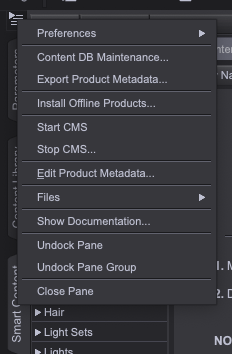
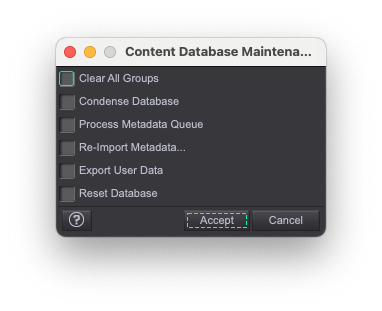
The products certainly aren't available for reimport, they have to be reinstalled (though the system should spot that the ones on disc match the ones on the servers and so not actaully download them, assumning the destination directory is unchanged).
I should add that I only use DIM or Content Wizard to install products into Daz Studio. I generally 'export user data' each day I am in D|S. Of course, with Macs, crashes are expected. It generally takes four crashes when D|S or a opening a script to get D|S stable and then I am good to go in the Beta. It is better than it used to be. But I try to never log into DAZ. It messes everything up.
Help DAZ Studio doesn't show on my programs list. SolvedThe alpha made a shortcut for me, and it shows up when I type "Studio" into the Windows search bar (it's just not showing up under 'installed apps')
I'm re-organizing my DAZ installs, againIf i can make a suggestion, I would suggest a different approach. The problem isn't that the products are in the wrong place; the problem is that you don't know what is there and how to find it i.e. an inventory problem rather than a storage problem. If it is an inventory problem, then the solution is to create an inventory. You have either a Mac and Pc and every product whether Poser or Daz Studio has a thumbnail so you can create a spreadsheet in Microsoft Exel or Apple Numbers, a massive multipage catalog in Microsoft Word or Apple Pages that contain the product's true name, a thumbnail which you can copy from the product, when you bought it, what figure it is for, color, historical period, any unusual attributes you care about, folder location, etc. Then you can use the computer to search for them. The process of goin through each product will reacquaint you with the products, allow you figure out which ones are out of date or worth refurbishing, you can use the info to update smart content (I can poin you to tutorials on how to edit smart content, you still get updates and smart content will bring up things like textures when you select the product.
Here is a primitive example of an entry for a product I bought recently to give you ideas: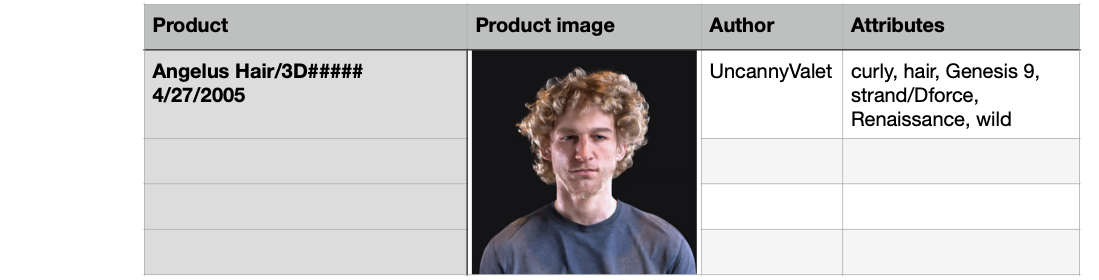 Carrara Community Art Gallery - Show us your Renders!!!
Bunyip02 said:
Steve K said:
Bunyip02 said:
Very nice. I did a quick search, is that a CAC Wirraway?
Thanks ! Yes it is a Wirraway, 3D model created by briney, was available at ShareCG but alas that is now closed down. Briney also did an excellent Boomerang.
Very nice model. I keep an eye on aircraft models and have never seen that one, but I did not frequent ShareCG. Now I see why people did.
In addition to aircraft made by Briney there were also aircraft made by Neil Wilson, and Pedro Caparros, big shoes to fill and unfortunately Neil has passed away ....
wow @bunyip02
you're gonna need a bigga SSD!
Daz 3D is part of

Connect
DAZ Productions, Inc.
7533 S Center View Ct #4664
West Jordan, UT 84084Licensing Agreement | Terms of Service | Privacy Policy | EULA
© 2026 Daz Productions Inc. All Rights Reserved.