-
HeadShop OneClick 2021 plugin problem - "Daz Model not Found"
100% of the time issue is that HeadShop is not installed in the correct DAZ 3D folder. Unfortunately we so far do not have a DAZ Install Manager (DIM) installer (which we hope will change soon).
The enclosed video shows you a step-by-step how to ensure that you install your HeadShop product right using the HeadShop installer.
HeadShop OneClick 2021 plugin problem - "Daz Model not Found"Hello people,
I recently purchased the HeadShop OneClick 2021 plugin and after installing it had the following problem :
Daz model not found.
Attached a pic with this message. Please help.
AIUTO...CHI CONOSCE L’ITALIANO? PARTE TREDICIAlessandro Mastronardi said:
Anfy said:
Eccomi di nuovo.
Sto imparando, da arruffone quale sono, a usare il programma a un livello elementare. Sto però cercando di dominare - si fa per dire - l'illuminazione, la mia dannazione, anche perché ho preso delle belle luci che simulano quelle di uno studio fotografico, e funzionano bene per quel che le ho provate (di base sarei un fotografo).
Due domande (se son fuori luogo nel presente topic mi scuso e fate finta che non le abbia poste):
1) faccio girare Daz Studio su una vecchia macchina, addirittura con poverssore... processore AMD Phenom II X4 940 di una dozzina d'anni fa, gloriosi 8 Gb di RAM, a cui ho affiancato, da molto tempo, una NVIDIA 970 con 4 Gb di RAM (che mi salvano un poco).
Ho però preso gli eccellenti Scimpanzé e Orango di AM (Alessandro Mastronardi) che mi han fatto capire che con il mio attuale computer non posso illudermi di andare troppo lontano.
Ora, se dovessi acquistare un PC nuovo, ovvio che un AMD Ryzen di fascia altissima, con 128 Gb di RAM e una NVIDIA 3090 sarebbe una bella scelta, ma occorrono veramente specifiche così alte, visto anche che allo stato non faccio animazioni?
I rendering di scene non troppo complesse variano attualmente, con Iray, dai 10 minuti alle 2 ore circa;
2) ho provato Face Transfer, e mi pare funzioni bene. Non sono tuttavia stato in grado di ottenere gli stessi risultati con HeadShop One Click 2021, nonostante dicano che dovrebbe esser migliore. Sbaglierò io qualcosa?
Questi programmi sono dei giocattoli che al di là di un possibile effetto "wow!" servono a poco?
O si possono usare con profitto?
Grazie!
Mia personalissima opinione, ma le specifiche che hai elencato mi sembrano altissime. Con un PC AMD Ryzen (o intel) di fascia medio-alta, RAM 64GB e scheda video Geforce 2070 8GB (se poi riesci a trovare la serie 3xxx meglio anche se al momento sembra tutto deserto), hai già un sistema di ottime caratteristiche senza dover spendere un budget esagerato.
Purtroppo quello è il minimo per Iray.
 Con meno non finisci mai di renderizzare.
Io davvero non capisco per quale motivo la gente preferisca spendere 5000 euro piuttosto che imparare ad usare le luci e gli shader di 3Delight o spingere di più su Filament.
 AIUTO...CHI CONOSCE L’ITALIANO? PARTE TREDICI
Anfy said:
Eccomi di nuovo.
Sto imparando, da arruffone quale sono, a usare il programma a un livello elementare. Sto però cercando di dominare - si fa per dire - l'illuminazione, la mia dannazione, anche perché ho preso delle belle luci che simulano quelle di uno studio fotografico, e funzionano bene per quel che le ho provate (di base sarei un fotografo).
Due domande (se son fuori luogo nel presente topic mi scuso e fate finta che non le abbia poste):
1) faccio girare Daz Studio su una vecchia macchina, addirittura con poverssore... processore AMD Phenom II X4 940 di una dozzina d'anni fa, gloriosi 8 Gb di RAM, a cui ho affiancato, da molto tempo, una NVIDIA 970 con 4 Gb di RAM (che mi salvano un poco).
Ho però preso gli eccellenti Scimpanzé e Orango di AM (Alessandro Mastronardi) che mi han fatto capire che con il mio attuale computer non posso illudermi di andare troppo lontano.
Ora, se dovessi acquistare un PC nuovo, ovvio che un AMD Ryzen di fascia altissima, con 128 Gb di RAM e una NVIDIA 3090 sarebbe una bella scelta, ma occorrono veramente specifiche così alte, visto anche che allo stato non faccio animazioni?
I rendering di scene non troppo complesse variano attualmente, con Iray, dai 10 minuti alle 2 ore circa;
2) ho provato Face Transfer, e mi pare funzioni bene. Non sono tuttavia stato in grado di ottenere gli stessi risultati con HeadShop One Click 2021, nonostante dicano che dovrebbe esser migliore. Sbaglierò io qualcosa?
Questi programmi sono dei giocattoli che al di là di un possibile effetto "wow!" servono a poco?
O si possono usare con profitto?
Grazie!
Mia personalissima opinione, ma le specifiche che hai elencato mi sembrano altissime. Con un PC AMD Ryzen (o intel) di fascia medio-alta, RAM 64GB e scheda video Geforce 2070 8GB (se poi riesci a trovare la serie 3xxx meglio anche se al momento sembra tutto deserto), hai già un sistema di ottime caratteristiche senza dover spendere un budget esagerato.
AIUTO...CHI CONOSCE L’ITALIANO? PARTE TREDICIEccomi di nuovo.
Sto imparando, da arruffone quale sono, a usare il programma a un livello elementare. Sto però cercando di dominare - si fa per dire - l'illuminazione, la mia dannazione, anche perché ho preso delle belle luci che simulano quelle di uno studio fotografico, e funzionano bene per quel che le ho provate (di base sarei un fotografo).
Due domande (se son fuori luogo nel presente topic mi scuso e fate finta che non le abbia poste):
1) faccio girare Daz Studio su una vecchia macchina, addirittura con poverssore... processore AMD Phenom II X4 940 di una dozzina d'anni fa, gloriosi 8 Gb di RAM, a cui ho affiancato, da molto tempo, una NVIDIA 970 con 4 Gb di RAM (che mi salvano un poco).
Ho però preso gli eccellenti Scimpanzé e Orango di AM (Alessandro Mastronardi) che mi han fatto capire che con il mio attuale computer non posso illudermi di andare troppo lontano.
Ora, se dovessi acquistare un PC nuovo, ovvio che un AMD Ryzen di fascia altissima, con 128 Gb di RAM e una NVIDIA 3090 sarebbe una bella scelta, ma occorrono veramente specifiche così alte, visto anche che allo stato non faccio animazioni?
I rendering di scene non troppo complesse variano attualmente, con Iray, dai 10 minuti alle 2 ore circa;
2) ho provato Face Transfer, e mi pare funzioni bene. Non sono tuttavia stato in grado di ottenere gli stessi risultati con HeadShop One Click 2021, nonostante dicano che dovrebbe esser migliore. Sbaglierò io qualcosa?
Questi programmi sono dei giocattoli che al di là di un possibile effetto "wow!" servono a poco?
O si possono usare con profitto?
Grazie!
HeadShop OneClick2021 and Daz BridgesCan models altered by HeadShop OneClick2021 by exported by any of the bridges? They are based Genesis 3 & 8 models but I just want to be sure I can export them.
Thanks
HeadShop products DO NOT use DAZ Central or DIM installers, new how-to video posted.It also seems that some people have an issue with "nested folders". HeadShop is a DAZ plugin and needs to be installed in a folder that is:
1. Named DAZ 3D, which is the standard way DAZ installs DAZ Studio. The actual Studio app is located thus: DAZ 3D/DAZStudio4/DAZStudio app.
2. Some users have Studio in a "nested folder" like: "e:/DAZ 3D/ Application/My DAZ/DAZ 3D/DAZStudio4/DAZStudio app" or similar
The question is: what is the destination folder you need to install HeadShop?
Answer:
a. e:/DAZ 3D/ Application/My DAZ/DAZ 3D/
b. e:/DAZ 3D
(The correct answer is "a". It needs to be installed in the folder that directly contains DAZStudio4 with the working DAZ Studio app inside.)
HeadShop OneClick2021 now at DAZ! (Commercial)It also seems that some people have an issue with "nested folders". HeadShop is a DAZ plugin and needs to be installed in a folder that is:
1. Named DAZ 3D, which is the standard way DAZ installs DAZ Studio. The actual Studio app is located thus: DAZ 3D/DAZStudio4/DAZStudio app.
2. Some users have Studio in a "nested folder" like: "e:/DAZ 3D/ Application/My DAZ/DAZ 3D/DAZStudio4/DAZStudio app" or similar
The question is: what is the destination folder you need to install HeadShop?
Answer:
a. e:/DAZ 3D/ Application/My DAZ/DAZ 3D/
b. e:/DAZ 3D
(The correct answer is "a". It needs to be installed in the folder that directly contains DAZStudio4 with the working DAZ Studio app inside.)
HeadShop OneClick2021 now at DAZ! (Commercial)Twilight2Shadow12 said:
I got Headshop Oneclick2021, but so far it has been a disaster. I unzip it and run the installer. It crashes and deletes it's self. I then find that my anti-virus software has declared it to be a virus. I break it out of impound and try again. Crashes again saying it can't find VISETUP.INF. Checking in the 2 very much hidden directories the installer is looking in to find the said file, I conclude that no such file exists on my computer. I have about the same issue when I got the headshop before this one. It is getting far too frustrating! I already have a tech support ticket in, but doubt they will get back to me any time soon. Have searched and I seem to be the only person with this issue. I normal installer like DAZ Central would likely help, but who knows.
Seems like such a great and useful product, but i greatly doubt I will ever get to use it.
We added a new video "How-to Install" here:
 HeadShop products DO NOT use DAZ Central or DIM installers, new how-to video posted.
We would like to clear up some confusion. The DAZ product page of OneClick2021 erroneously states that OneCkick2021 uses DAZ Central installers. That is explicitly not true.
HeadShop products come with their own installers and a README document that explains the simple install process.
We have attached a version of the README to this article. Once installed, HeadShop launches directly from DAZ Studio under the Edit menu.
Other links: How-to video: https://www.youtube.com/watch?v=FSGRVQn8upc
Manual: https://printahead.net/wp-content/uploads/OC2021-Manual.pdf
Thanks for your support!
HeadShop OneClick2021 now at DAZ! (Commercial)Voxxa said:
I purchased Headshop OneClick 2021. Can't even find where to start it. It's in the list of plugins, yes, but can't find a way to even start it. Shouldn't it be included som kinde of instruction to that as well, except for the install instructions??
There's a README file included for installation. There's a full video under the Help menu:
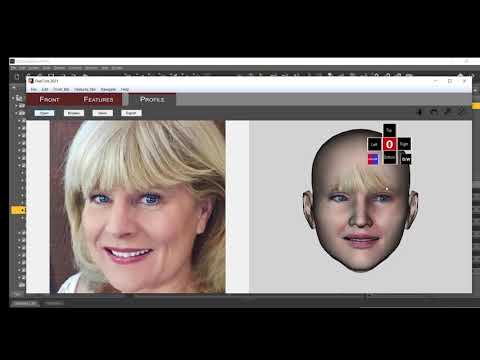
Detailed Manual under the Help menu: https://printahead.net/wp-content/uploads/OC2021-Manual.pdf
HeadShop OneClick2021 now at DAZ! (Commercial)I purchased Headshop OneClick 2021. Can't even find where to start it. It's in the list of plugins, yes, but can't find a way to even start it. Shouldn't it be included som kinde of instruction to that as well, except for the install instructions??
HeadShop OneClick2021 now at DAZ! (Commercial)Hotsauce said:
I just bought this and installed it with Daz Install Manager. Where do I find it on the DAZ Studio interface?
I don't think Install Manager can install OneClick2021. Please read README and follow steps. Make sure you choose the correct destination ("DAZ 3D" with working DAZ Studio).
Once installed, you will find "Start HeadShop" in the Edit menu of Studio.
HeadShop OneClick2021 now at DAZ! (Commercial)Twilight2Shadow12 said:
I got Headshop Oneclick2021, but so far it has been a disaster. I unzip it and run the installer. It crashes and deletes it's self. I then find that my anti-virus software has declared it to be a virus. I break it out of impound and try again. Crashes again saying it can't find VISETUP.INF. Checking in the 2 very much hidden directories the installer is looking in to find the said file, I conclude that no such file exists on my computer. I have about the same issue when I got the headshop before this one. It is getting far too frustrating! I already have a tech support ticket in, but doubt they will get back to me any time soon. Have searched and I seem to be the only person with this issue. I normal installer like DAZ Central would likely help, but who knows.
Seems like such a great and useful product, but i greatly doubt I will ever get to use it.
Did you read tghe README file? HeadShop DOES NOT install with DIM or DAZ Central. It has its own installer.
I am happy to help: please email to [email protected] or invite me on skype: lasloves is the skype name.
HeadShop OneClick2021 now at DAZ! (Commercial)I got Headshop Oneclick2021, but so far it has been a disaster. I unzip it and run the installer. It crashes and deletes it's self. I then find that my anti-virus software has declared it to be a virus. I break it out of impound and try again. Crashes again saying it can't find VISETUP.INF. Checking in the 2 very much hidden directories the installer is looking in to find the said file, I conclude that no such file exists on my computer. I have about the same issue when I got the headshop before this one. It is getting far too frustrating! I already have a tech support ticket in, but doubt they will get back to me any time soon. Have searched and I seem to be the only person with this issue. I normal installer like DAZ Central would likely help, but who knows.
Seems like such a great and useful product, but i greatly doubt I will ever get to use it.
HeadShop OneClick2021 now at DAZ! (Commercial)I bought me the Headshop OneClick2021 today..... got it installed, but.... after i draged a Image into the field, and click to apply to next step...
I get a 2 times Alert Message, something with "Parameters Zero" and since that only the "Please Wait" Screen with the background of Front, Features and Profile....
Just waiting now since 45 minutes, but no Image of my Portrait comes in and it says still "Please wait"
Can you help me with it?
What exactly are Headshop, Face Gen and Face Transfer?Misumu said:
Thanks, I was a fraid that if I created a face, a texture would just erase it.
I watched that. It was what raised the question in the first place. Headshop's textures in the video looked like they would clash with any scene the figure was in (especially the hair).
Texture and morph are applied to "head" not hair. So, no clash.
What exactly are Headshop, Face Gen and Face Transfer?Thanks, I was a fraid that if I created a face, a texture would just erase it.
I watched that. It was what raised the question in the first place. Headshop's textures in the video looked like they would clash with any scene the figure was in (especially the hair).
What exactly are Headshop, Face Gen and Face Transfer?Misumu said:
info_b3470fa520 said:
Misumu said:
So then you can use a texture, and it does not change the shape of the face?
HeadShop changes both the shape and the texture and does this automatically inside DAZ Studio. It really is a one-step operation (but you can also use custom features such as age, weight, smile or custom nose shapes).
Thanks, I was a fraid that if I created a face, a texture would just erase it.
What exactly are Headshop, Face Gen and Face Transfer?info_b3470fa520 said:
Misumu said:
So then you can use a texture, and it does not change the shape of the face?
HeadShop changes both the shape and the texture and does this automatically inside DAZ Studio. It really is a one-step operation (but you can also use custom features such as age, weight, smile or custom nose shapes).
Thanks, I was a fraid that if I created a face, a texture would just erase it.
Daz 3D is part of

Connect
DAZ Productions, Inc.
7533 S Center View Ct #4664
West Jordan, UT 84084Licensing Agreement | Terms of Service | Privacy Policy | EULA
© 2026 Daz Productions Inc. All Rights Reserved.