-
Dartanbeck's Journey - CG Filmmaking
Wow. I just realized how much I've got done in this site since it's been up. A Lot of hours spent when I should be sleeping. Here's a list of articles and such I have so far. Some of them have only been started so that I don't lose sight on what I want to do next, but then I've been filling in more blanks than I seem to recall. It's growing!
Home Page has tidbits in collapsible text - I might do away with collapsible though. Too easy to breeze right on past... but that was the point at first. That and to see what Collapsible Text is! LOL
Carrara Zone
Carrara Info (when the title is a link, it has it's own article(s))
 Cripeman Memorial
- Installing Carrara
- Creating a Custom Browser
- Carrara Information Manual
- Carrara Cafe
- Carrara Plugins
- Alvin Bémar's Plugins
- Daz 3D Plugins for Carrara
- Digital Carver's Guild
- Fenric
- Frederic Rible
- Inagoni
- Philemo
- Sparrowhawke
- VWD
- Dartanbeck's Articles
- Finding Carrara - My Story
Carrara CG Workshop (when the title is a link, it has it's own article(s))
- Story
- Pacing and Rendering
- Kitbash - Marcoor FG Hunter Space Craft
- Hybrid AniMation
- aniMate 2
- Scene Setup - Volumetric Lighting - Basic Interior
- Introducing Rosie 5
- Making Rosie 5
- Using Genesis in Carrara
- Genesis Morph Reduction
- Dynamic Hair
- EYEdeas 3+
- Millennium Teeth
- Character Transfer using NLA Pose
Daz Zone (when the title is a link, it has it's own article(s))
Do It In Post
- Videos
- Still Images (I'm waiting to make new renders for this page)
- Inspiration
- Inspiration from Star Wars
- Downloads
- Starry Sky for Carrara
- Carrara EnvironKits
- Woodlands
- Underwater Realms
- Badlands
- Base Scene Download
3D Art Freebie Challenge-June 2020 - "A Day At..." - Main Thread Only3D Art Freebie Challenge June 2020 "A Day At..."
I actually planned to skip a month or two but... In June 2017 I made "A Day At The Spa" and "A Day At The Beach" and so I had to think of something else, about a week ago this idea popped up in my brain and finaly I decided to give it a go... (I have been eager for a long time to make a living room that didn't look like a showroom.)
Thank you very much DollyGirl for keeping it going!
[Best watched at full size for details.]"A Day At... Large. Another day at home..."
Starring: Linda
The tale:
It was just an ordinary day, Linda just got herself a fresh cup of coffee and placed it on the table and wanted to continue reading her book, when suddenly the doorbell rang. She hardly received any visitors and therefore expected no one and she wondered who it could be ...
Soundtrack:
Logic - Ordinary Day ft. Hailee Steinfeld (©2018)
https://www.youtube.com/watch?v=lTUEPwGG5XwCOUNTABLE FREEBIES: (Alphabetic order)
#01! 20-Page Poseable Book by Jim Farris (Xaa)
https://www.sharecg.com/v/66786/gallery/11/Poser/20-Page-Poseable-Book **#02! 3 cute Textures for YashiroAmamiya's Cute Underware by BBarbs
https://www.renderosity.com/mod/freestuff/3-cute-textures-for-yashiroamamiyas-cute-underware/85431 **#03! Blazer Uniform Set for G8F by yomiuri
https://sharecg.com/v/94694/browse/21/DAZ-Studio/Blazer-Uniform-Set-for-G8F **#04! Bonsai Stand by 3Zi
http://sanzisannzi.blog83.fc2.com/blog-category-6-12.html (Scroll down to '3Zi_BonsaiStand.zipDownload')#05! Books by CGAxis
https://free.cgaxis.com/product/3d-books-free/ *1#06! Bubbling's Navel Piercing by Fabiana
https://www.renderosity.com/mod/freestuff/bubblings-navel-piercing/69231 **#07! Denim Shorts for G8F by AdamThwaites (Most-Digital-Creations)
https://www.most-digital-creations.com/g8f_denim_shorts.htm#08! dForceCuteUnderwareSet01 by yashiro_amamiya
https://www.renderosity.com/mod/freestuff/dforcecuteunderwareset01/85411 **#09! Eyeglass Case by Fisty
https://www.sharecg.com/v/79852/gallery/21/DAZ-Studio/Eyeglass-Case-DAZ-Studio-4.5+ **#10! Eyes Dilate for Genesis 8 Female by felldude
https://www.renderosity.com/mod/freestuff/eyes-dilate-for-genesis-8-female/82869 **#11! Frame DIN-A by klausdbg
https://www.sharecg.com/v/66868/gallery/5/3D-Model/Frame-DIN-A **#12! Free 3D Models Set 2017 by CGAxis
https://cgaxis.com/product/free-3d-models-set-2017/
[Books Set used]#13! Furniture Set 4 - Bookcase & Books by Wilmap's Digital Creations
https://www.wilmapsdigitalcreations.co.uk/view_product.php?id=214 **
[Book6 used, retextured]#14! iPhone X by klausdbg
https://www.sharecg.com/v/89747/gallery/5/3D-Model/iPhone-X **#15! Iray car related shader presets 'megapack' by Tom2099
https://www.deviantart.com/tom2099/art/Iray-car-related-shader-presets-megapack-539622361#16! Iray Jewelry Shaders by AllenArt

https://sharecg.com/v/95893/gallery/21/DAZ-Studio/Iray-Jewelry-Shaders **#17! Iris Amicitia Outfit (Genesis 3) by SaintsGringo
https://www.deviantart.com/saintsgringo/art/FREEBIE-Iris-Amicitia-Outfit-Genesis-3-789681699 **
[Hair used, also check out the other outfit!]#18! Kristen Stewart - Head and Body Morphs for G8F by TritiumCG
https://www.deviantart.com/tritiumcg/art/Kristen-Stewart-Head-and-Body-Morphs-for-G8F-841957993 **#19! Lace Choker for G8F by Lexbaird
https://sharecg.com/v/95856/browse/21/DAZ-Studio/Lace-Choker-for-G8F **#20! Large Asian-style Lamps by AllenArt
https://sharecg.com/v/95938/gallery/21/DAZ-Studio/Large-Asian-style-lamps **#21! Lights for Daz Studio w/ Iray by DrBoots
https://www.deviantart.com/drboots/art/Freebie-Lights-for-Daz-Studio-w-Iray-579993105#22! Linda - Character for G3F with texture maps by Edelzwicker
https://www.sharecg.com/v/89731/related/21/DAZ-Studio/Linda-Character-for-G3F-with-texture-maps **#23! LouderPhones by insane_machine
https://www.renderosity.com/mod/freestuff/louderphones/64153 **#24! Media Remotes by TruForm
https://www.renderosity.com/mod/freestuff/media-remotes/74431 **#25! Mic Cable by MDP
https://sites.google.com/site/mdp6gdl/ (item 11)#26! My personal tableware sets by cabcab
https://www.renderosity.com/mod/freestuff/my-personal-tableware-sets/84851 **
[Coffee Mug and Coaster used]#27! Orchid Flower in Hexagonal Pot by CGAxis
https://free.cgaxis.com/product/3d-orchid-flower-in-hexagonal-pot/ *1#28! Post-It by apcgraficos
https://www.renderosity.com/mod/freestuff/post-it/76560 **#29! Rectangular Wooden Coffee Table by CGAxis
https://free.cgaxis.com/product/rectangular-wooden-coffee-table/ *1#30! RGB HDRi Soft Lights for Daz Studio - Iray by VAlzheimer *1
https://gumroad.com/valzheimer (4th item)#31! Rusty junk set 2 by DryJack
https://sharecg.com/v/53408/gallery/21/DAZ-Studio/Rusty-junk-set-2 **
[Storage rack used]#32! Shiny Wood Tiles Free PBR Texture by CGAxis
https://free.cgaxis.com/product/shiny-wood-tiles-free-pbr-texture/ *1#33! Simple Glasses for Genesis 8 Male/Female by GEOmetalics
https://www.renderosity.com/mod/freestuff/simple-glasses-for-genesis-8-male-female/85459 **#34! Small Plant in Round Pot by CGAxis
https://free.cgaxis.com/product/3d-small-plant-round-pot/ **#35! Speakers by Digi-Dotz
http://www.digi-dotz.com/index.php/free-poses/props/243-speakers-prop-for-daz-studio#36! Switch, Cord, Rotary, V1 by Luqu
https://www.deviantart.com/luqu/art/Switch-Cord-Rotary-V1-776211983 **#37! SY 200 Morphs for Genesis 8 Head and Body by SickleYield
https://sharecg.com/v/91888/view/21/DAZ-Studio/SY-200-Morphs-for-Genesis-8-Head-and-Body **#38! The Last Of Us - Ellie Head Morph for G8F by TritiumCG
https://www.deviantart.com/tritiumcg/art/The-Last-Of-Us-Ellie-Head-Morph-for-G8F-828813864 **
NO-COUNT ITEMS:--- Couch and Coffee Table Props by Arryn Onnel (The Holiday Loyalty Sale 2019 Free Item)
--- Nose Ring 01 for G2F, G3F and/or G8F by AllenArt
PURCHASED/PAID FOR ITEMS: none 100% Freebies*1 E-mail address required
** Registration required
#x! Countable Items (Bold ones are used by me for the first time I think.)
--- No longer available freebies
++ Free with DAZ Studio (or the Essentials)
$x. Purchased/Paid For Item
Rendered with DAZ Studio 4.10.0.123 (nVidia Iray)Other free software used: GIMP v2.10.18 and Irfanview 4.54
Postwork: used the AltaLux Image Enhancement Filter (Effect) by Stefano Tommesani that comes with Irfanview and some filters (oa) that come with GIMP.
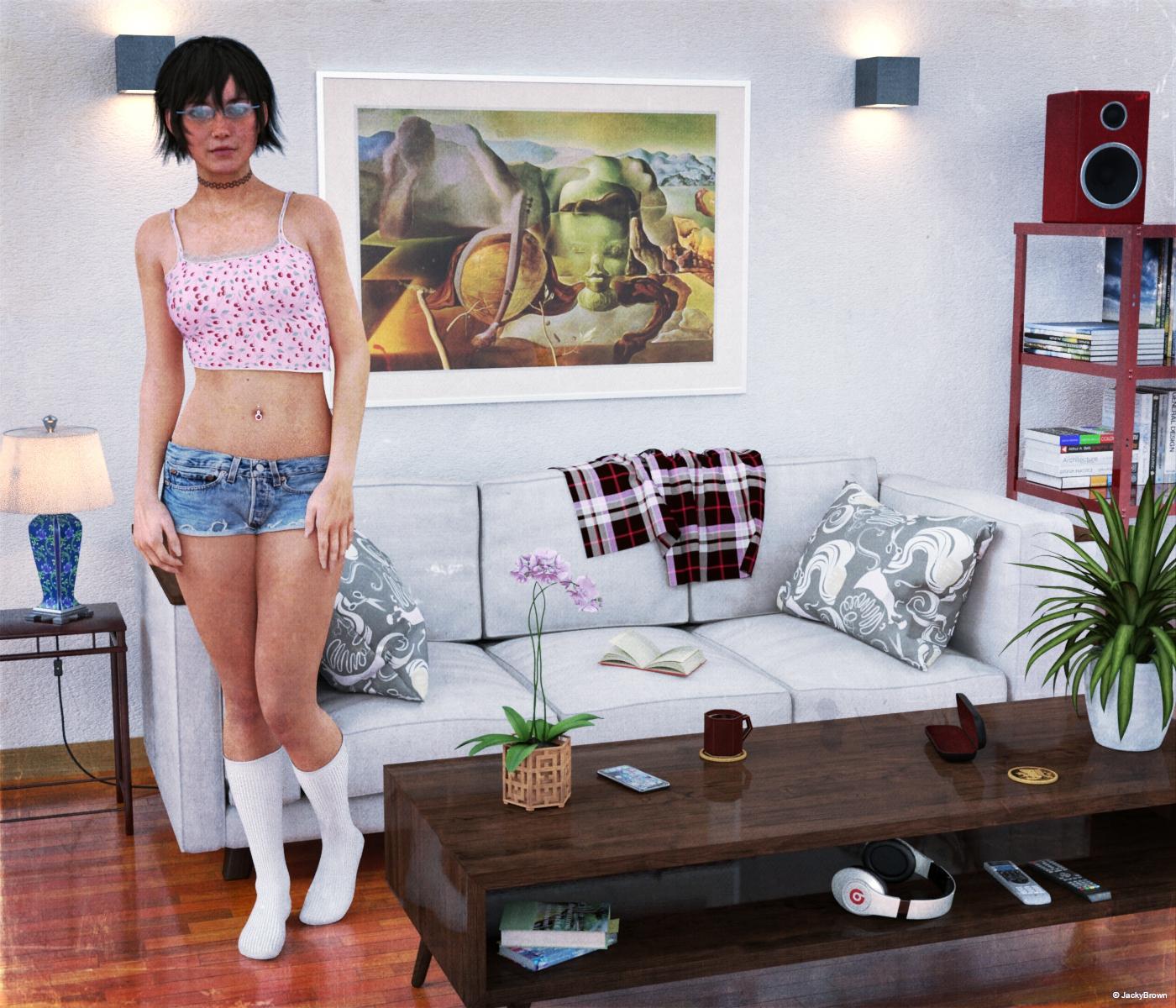
"A Day At... Large. Another day at home..."
Goth/horror beauty in gift card promo?It's from the Gallery: https://www.daz3d.com/gallery/#images/1014816/
The artist is Morris (the PA who created Daisy 8's textures). In the description, she says "This is a 1/2D8 and 1/2V8 morph", so 1/2 Daisy 8 and 1/2 Victoria 8.
She credits this as well, so it's probably where the rings come from: https://www.daz3d.com/hand-salon--fake-nails-and-jewelry
That "1/2D8 and 1/2V8" part really confused the heck out of me at first. I thought it was some fancy 3d term I'd not encountered before; God knows there's enough of them! Then I realized what it actually stood for /facepalm
And that is a beautiful render @JeniMorris!
Zev0 Glute Control for Genesis 8 Female Error (SOLVED)Hello,
The Glute control will not load with the G8F figure and gives an error:
"An error occurred while reading the file, see the log file for more details"
Here are the details:
2020-06-30 15:57:33.750 Loading script: /Users/Computer/Documents/DAZ 3D/Studio/My Daz Connect Library/data/cloud/1_46011/people/genesis 8 female/poses/glute control pose & puppeteer/g8f glute control product support.dsa
2020-06-30 15:57:33.751 WARNING: Script Error: Line 1
2020-06-30 15:57:33.751 WARNING: SyntaxError: Parse error
2020-06-30 15:57:33.751 WARNING: Stack Trace:
<anonymous>()@/Users/Computer/Documents/DAZ 3D/Studio/My Daz Connect Library/data/cloud/1_46011/people/genesis 8 female/poses/glute control pose & puppeteer/g8f glute control product support.dsa:1
2020-06-30 15:57:33.751 Error in script execution: /Users/Computer/Documents/DAZ 3D/Studio/My Daz Connect Library/data/cloud/1_46011/people/genesis 8 female/poses/glute control pose & puppeteer/g8f glute control product support.dsa
There is an exclamation mark in the thumbnail library.I have installed the product via the internal DAZ Smart Content tab.
All other Zev0 morph packs install and work as advertised.
DazStudio 4.10.0.123
Mac OS 10.13.6Is this fixable?
Thanks
Goth/horror beauty in gift card promo?Thank you Divamakeup! ;-)
It's from the Gallery: https://www.daz3d.com/gallery/#images/1014816/
The artist is Morris (the PA who created Daisy 8's textures). In the description, she says "This is a 1/2D8 and 1/2V8 morph", so 1/2 Daisy 8 and 1/2 Victoria 8.
She credits this as well, so it's probably where the rings come from: https://www.daz3d.com/hand-salon--fake-nails-and-jewelry
Bullwarg & NyorozoI couldn't wait for Josh Crockett to make a female companion... though I really hope he does!
Until then, I fumbled through an attempt.
Bullargina?
Was that the new transgender morph?
Hair Problem [reopened]Hiya!
That is the skullcap of the hair poking through the forehead. You can get this with unsupported morphs on the base figure. To correct it you can use a forehead expand morph if one is included in the hair or you can just scale the hair up to 100.1% and that should take care of it for you!
ElliDaz Studio - Suggestions for useabilityI recently decided to jump on the DAZ Studio bandwagon, and for the most part I've been pretty happy with the resuts I've gotten.
Having been a Poser user for the last 20+ Years I found it a dificult transition, mostly because of all the annoying things you have to get used to, [read "Put up with"]
Still overall its a decent product and I applaud your efforts in keeping it a viable app for 3D.
In the spirit of making it an even better product, here's some feasible suggestions you should consider.1.) 0.5 to 1 Second delay for selection highlight (TO ALLEVIATE) blinding flashes.
Possible Epilepsy episodes could be avoided simply by putting a one second or even a half-second delay on the mouse cursor as it passes by objects in the scene.
Trying to get my mouse from one side of the frame to another, should not cause me to reach for a headache pain reliever.
Why does it have to "FLASH" on absolutely everything as it passes by?
Half a second delay - that's all I ask. This would be a wonderful fix I'm sure many people would appreciate.2.) Get rid of clicking on tabs to hide panels.
The little arrows do a fine job of hiding the panels. Granted they are still too tiny to be of any real use, but still.
I hate it when I'm trying to get something done and I click on a tab and all the panels disappear. WHY DO WE NEED THIS ?
It's a useless annoying feature - dump it.3.) Search Box - Search Block!
For the most part I LOVE that you can search almost any panel to find something.
I HATE it when you are trying to find something, either an object or a morph and can't because you just realized that stupid couple of letters in the search bar is stopping you from finding it.
A perfect fix would be to make it so the program only holds the input from the search bar till you hit <enter> then erases it! GOD! Would that ever be a welcome relief!4.) CPU, GPU or BOTH?
Why is it there is virtually no information on what these tick boxes ACTUALLY do? I originally thought that having both boxes ticked would be the best of both worlds, but apparently that's not so.
Doing some test renders on a Victoria 8 (with Monika Hair) I only noticed a few seconds difference on my stopwatch between the three options (CPU, GPU, Both) What's the deal here?
Can't you get the program to render using BOTH? Of course that would require you to have decent coding engineers, so maybe not.5.) FIT Camera Mounted Headlamps with GELS or Trans Maps.
As a videographer, I sometimes use LED lights mounted on my camera to throw some light on a subject in places where there are low or non-existent lighting.
The use of these on the user created cameras in DAZ is a nice touch, at least we can turn them OFF or DOWN. But why can't they act like real lights?
What would be ideal is if you could arrange it so that there was a dropdown menu next to the "HEADLAMP" where we could load either gels or trans-maps to create an effect.
This should be pretty easy to accomplish and I think it would make a lot of people happy.6.) Why Can't I save an AREA RENDER!
Sometimes I need something fast that's only part of the picture. I might do an area render and it comes out just the way I like it - perfect! Except DS doesn't allow me to save it!
WTF? I mean it took a long time to do this area render and its exactly what I need - why can't I save it? To make things worse If I accidentally touch it - it GOES AWAY!
This could mean hours of wasted time! That area render process needs a SERIOUS re-think!7.) No UNDO for adding content - BAD!
This is a huge time waster. I can't believe that there's no undo for adding something to the scene.
Half the time it’s the wrong prop or texture, then I have to go hunt it down in scene hierarchy (because a lot of time its not easily clickable in the scene) and then delete it.
When Poser first added multiple "undos" to their app it was one of the best things they ever did. There's also a HUGE amount of things that definitely NEED to be in UNDO.
(see #13 Prefs Menu)8.) Reparenting in the Hierarchy Menu - Too wonky to work, too important to die!
Why is it when I want to reparent something in the Scene tab it goes haywire. Once I grab the item and try to move it, nested sections that normally require stupid amounts of clicking,
suddenly start opening all over the place and make it very hard to put the item where you want it. Is there any way to stop this? Oh and of course there's NO UNDO for that either.
In fact there is a HUGE amount of things that don't fall under the UNDO category. Another problem with the Hierarchy menu is that clicking on something in the posing or surfaces menu
opens up EVERYTHING in the Hierarchy menu. Scrolling all the way up to collapse these menus takes even more time, exascerbated by the infinitesimally small size of the scroll bars,
and I'm using a 50" 4K TV as a monitor!9.)What? No Autosave?
And here you thought those crashes were infrequent! - RIGHT!
I've had to set a timer on my phone for every 5 minutes to save this thing so I don't lose hours of time. FIX THIS!10.) Symmetry Keys Screwed up.
Why is it you have to literally POUND the keyboard buttons to make Symmetry pop up? What's wrong with that??
And why is it that popup - more often than not CRASHES the app? It doesn't know when it's toggled, and as a result tries to put up 2 at once - which crashes the app.
Same thing happens with the save command if I accidentally press 2 keys at once.11.) What is with this parenting problem?
I don't understand why creating a group and putting people in it prevents you from selecting anything in it other than through the scene tab.
It also creates massive problems with shells. Can't this be fixed?12.) Options (Preference Menu) Update
As an Adobe user, I get used to having control of what's going on in my app, like how many "Load Previous Scene" listings I get to see.
The "options" menu that's currently avbailable is almost useless for user interopoerability.13.) Posing options (By Model)
Its bad enough that most vendors still have no idea how to ZERO the hip joint before committing the pose, But having all these V4 poses, and unusable V5 poses taking up all the screen real estate is too annoying for words. Can't we just have another category "by Model" added to "By Region" or "by Function"? How amazing would that be. Another time waster put out to pasture.
And why is it that even when I "Lock" a figure's SCALE, everytime I add a new pose it changes the scale back to 100%. Can't this be fixed?
Why bother having the "lock" function if it doesn't work?That's all for now. I will continue to update this post as I find more things that need to be addressed. Hopefully somebody from the DAZ Dev team will look in on this and respond and I can enjoy the same repore I have with Poser in the suggestions area.
Cannot locate Steph 3 morphsI wanted to revisit an old figure of mine and decided to reinstall Steph 3, but I cannot locate my morph install files anywhere and they aren't showing up on DAZ. I do a search and nothing shows up in the results and when I search the internet, I find the links, but all I get is a 404 error on DAZ. What's the deal?
I have Steph in my product library and have it installed, but no morphs can be found anywhere.
And to be clear, I have my reasons for using this figure, I don't want to hear any "why are you using that?" or "you should be doing this instead" bs. Please stay on topic.
Daz Studio 4.12 Pro, General Release! (*UPDATED*).
hey all,
So im trying to save an animation with some morphs, one is called " open wide" what ever i do, it wont save the keys on the timeline when i use this morph.
Is there som workarround for this? It really disrupts my work now and i cant figure out where it goes wrong.
Allready searched the forums and it seems to be a problem in general, but maybe there is a workaround?Did you try baking the studio keyframes to the timeline?
I know I asked this so many times I'm starting to sound dumb... But what's the state of the animation tools?
The timeline is still broken? What about the unmovable keyframes? Copy-paste them still breaks the whole scene? What about the unregistered movements/morphs?I'm still stuck on 4.12.0.86.
I'm using the same version. for animation as well.
FaceGen Exporting formatsThank you, I'm new to the software... how do I dial the morph?
How to save character to archiveMorphs are my self-made saved in support asset / morph asset to \data\DAZ 3D\Genesis 8\Female\Morphs\UGAROMIX\Ellie
Goth/horror beauty in gift card promo?It's from the Gallery: https://www.daz3d.com/gallery/#images/1014816/
The artist is Morris (the PA who created Daisy 8's textures). In the description, she says "This is a 1/2D8 and 1/2V8 morph", so 1/2 Daisy 8 and 1/2 Victoria 8.
She credits this as well, so it's probably where the rings come from: https://www.daz3d.com/hand-salon--fake-nails-and-jewelry
Non-PC User needs helpA second GPU won't speed up loading times. That is due to one of a number of issues
1) You have duplicate formulas or some other errors that slow loading.
2) You have a lot of morphs etc. for G3 or G8 or whatever. Whenever you load a figure all the morphs have to be looked up, by opening all the files, reading them and then adding the morph to the figure.
3) The external HDD could be slowing down for any number of mechanical reasons.
Check the log after loading a figure that takes longer than you like. If it shows lots and lots of errors/warnings that could be the issue.
If there is none of that you need to check the health of the HDD. Look up CHKDSK and then use it.
If its #2 your primary solution is to reduce the number of morphs installed.
The Doctor Appreciation thread
It is in fact supposed to be eskelson . I do believe that the expression changes the way the face looks a bit and it's the best I could come to actually getting a resemblance while twiddling dials from the plus plus morph pack . when I get a moment I will do another render with out a expression and you can see what I had intendedi dont discount the solution they came up with for william heartnell , it might be that they can find an actor of sufficiant look and talent to step into the role . or they could reserect him with deep fake cgi
Is that Eccleston, or Hartnell with a shave, dressed up like Eccleston? Because the body says 9 but the face is #1.
Uploading SickleYield's 200 Free Morphs to Daz 3D On OSXHello! New to Daz 3D, so I'm attempting to explore the free assets before I begin investing in the program. I am attempting to load these morphs into Daz so that whenever I load a new Genesis 8 Character, they appear. I think they would appear under the Actor tab? Where do I go to install these files? I have attempted using the DIM, RendoInstall, Uploading them to Daz Studio Format Folders, and using Morph Installer Pro. I think at this point I am just lost. Does anyone know how to install these morphs on OSX specifically? Tutorials for this are seldom seen, it seems.
Thank you!
I may be wrong because I didn't installed those but they should be on the Parameters and/or Shaping tabs. Main figure needs to be selected in the Scene.. you should also be able to apply them over the genesis 8 figure once you find them in Content Library, you need to browse Genesis 8/Characters etc starting from the folder where you installed them (since I'm assuming they don't have metadata, so no Smart Content shortcut).I currently have them installed to My Library under the Content Library. As I attempt to select the morphs, They are greyed and with a caution sign. No error message though. When I double click them, I see no changes or morph dials to the program. Any help?
It would appear that you did not install them correctly. Remove that batch. The supplied "data" folder is merged together with the already existing "data" folder found under My Library. There is ONLY one. End results do not show in the Content Library.
Product Cross Gender/Transgender -Transfer morphs (feature suggestions)I also notice that the G3 F/M UV transfer doesn't always work with every character skin. Really wish there was a Skin Builder utility for male characters. .
For reasons other than the fact that G3 was just lousy with custom UVs?
Product Cross Gender/Transgender -Transfer morphs (feature suggestions)...that is what I usually do between generations. However, I would think that within the same generation (G3) it should work on either gender. apparently that is not the case (Sorrow Hair is for G3F and the character was G3M)
I also notice that the G3 F/M UV transfer doesn't always work with every character skin. Really wish there was a Skin Builder utility for male characters. .
FaceGen Exporting formatsIf you just want to export it as an OBJ, just make sure the FaceGen morph is dialled in then go to File >> Export and you can export the figure as an OBJ.
Edit - If you're going to use it as a base for a Morph, then you'll want to make sure the figure's Mesh Resolution is set to "Base" first before exporting it as an OBJ. (Parameter's Tab >> Mesh Resolution >> Resolution Level >> Base)
Uploading SickleYield's 200 Free Morphs to Daz 3D On OSX(you can spot them easily since Sickleyield has made the morph sliders a distinctive bright blue.
I installed them just to check.. they are mostly in Parameters (a few are in Shaping too), for me are bright green.. ;)
Daz 3D is part of

Connect
DAZ Productions, Inc.
7533 S Center View Ct #4664
West Jordan, UT 84084Licensing Agreement | Terms of Service | Privacy Policy | EULA
© 2026 Daz Productions Inc. All Rights Reserved.