-
(Released) JW Breast Control Expansion for Genesis 9
JW Breast Control Expansion for Genesis 9 brings you a huge pack of morphs to modify the breasts of your genesis 9 characters.
This pack includes:
*Full breast morphs to use quickly on a character, getting varied kind of shapes.
*Movement morphs to simulate gravity and swing including Up, In, Out, down and front controls (each breast has his own morph).
*Expanding morphs to get bigger parts separately, left, down, right and front Morphs (Each breast has his own morph).
* Press morphs to simulate pressure on different parts (Each breast has his own morph).
Do not miss this pack of breast morphs! Get a more customizable and natural shape for your characters in any scene!
https://www.daz3d.com/jw-breast-control-expansion-for-genesis-9
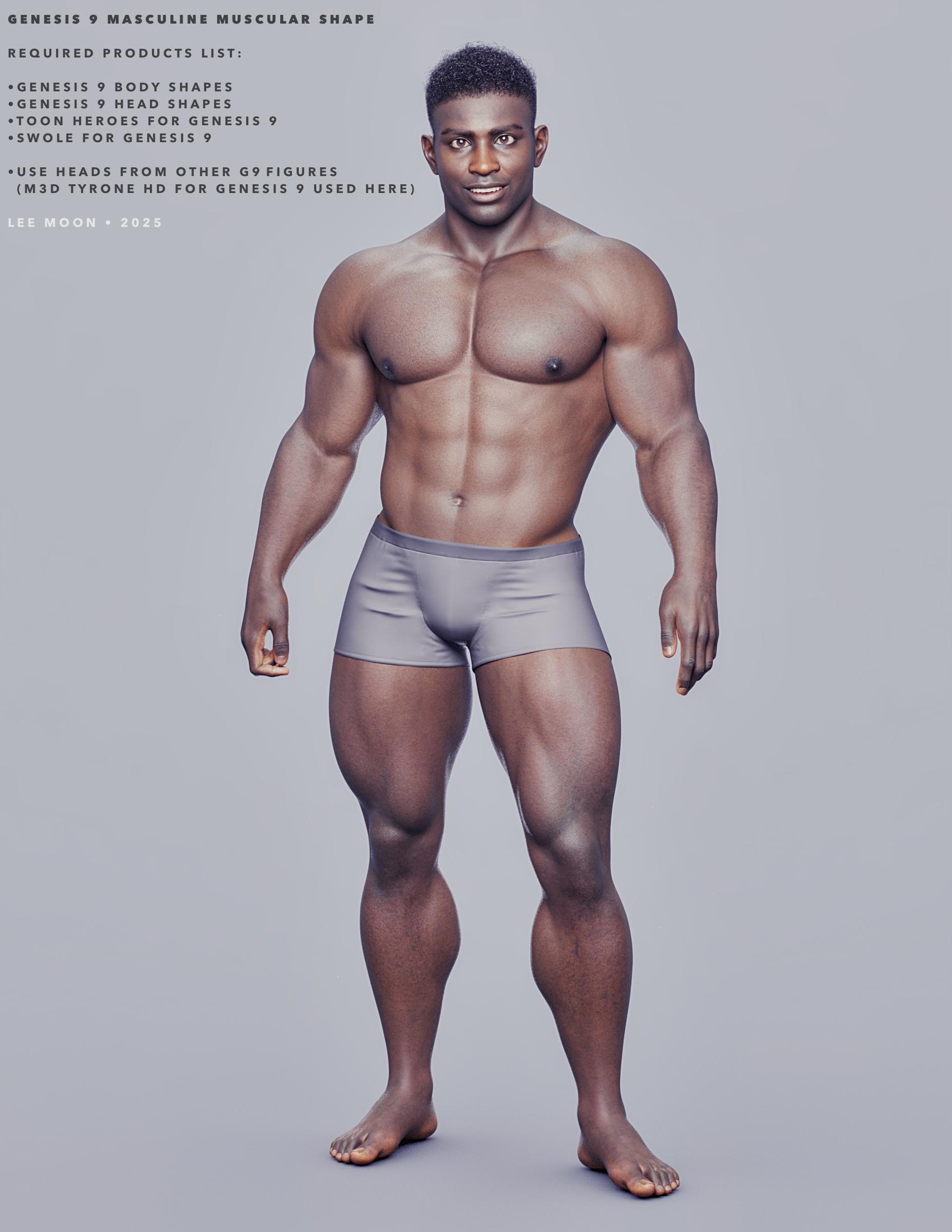
Free Toon Characters coming July 1st, early download available nowPoses: If you wish, and I get my DAZ PC working (now that's the biggest problem) I could write a G8 to your character pose transfer script to convert G8 poses to your new character. I've done scripts to transfer from V3 to G8F - it's not hugely difficult to get poses to work with different rigging. PM me if you're interested. Regards, Richard.G9 Shape Preset for SWOLE Garrick mixI've purchased a lot of add-on morph/shaping products for Genesis 9 and tend to make use of a fair number of them with my shaping presets.
This time I really tried to reduce the number of products used to create one of my usual muscular male shapes for G9.
The shape preset has a rather generic head allowing you to dial in another character's head as needed. I find using head shapes dialed in from 10% to 35% work well in my limited testing. And I also combine head shapes (Zack + Dain for instance) with some success.
This basic preset provides a starting point for you to modify/add on to suit your style.
Still working on creating the preset file and some additional renders.
Will post it here if anyone's interested. I know my freebies have a limited/niche audience. :)
Have a great day and don't forget to hug a loved one!
Lee
 [Released] Hat Check for Genesis 9 [Commercial]
Platnumk said:
DoctorJellybean said:
Platnumk said:
Can't get it to work at all, No morph is ever created
2025-05-10 14:46:14.867 [DEBUG] :: Importing /Volumes/Private/My Daz3D Library2/data/RiverSoft Art/Data/G9HatCheckHigh.obj
2025-05-10 14:46:14.867 [WARNING] :: /src/sdksource/fileinput/dzimporter.cpp(227): Undo stack left open for file import - it will be closed to avoid errors
2025-05-10 14:46:14.867 [INFO] :: Importing File...
2025-05-10 14:46:15.192 [INFO] :: Importing: G9HatCheckHigh.obj...
2025-05-10 14:46:15.948 [INFO] :: Imported Wavefront Object: G9HatCheckHigh.obj
2025-05-10 14:46:15.965 [INFO] :: Imported file in: 0.1 sec (1097.54 ms)
2025-05-10 14:46:15.965 [INFO] :: Imported file: /Volumes/Private/My Daz3D Library2/data/RiverSoft Art/Data/G9HatCheckHigh.obj
2025-05-10 14:46:15.965 [DEBUG] :: Mask G9HatCheckHigh
2025-05-10 14:46:15.966 [DEBUG] :: Create Hair Morph RS Hat_2289 LayeredWinterStyleHair_195795 pCube(10q0000)20 2 0 true true false [object Object] 0
2025-05-10 14:46:16.229 [DEBUG] :: Num of Vertices 195795
2025-05-10 14:46:16.229 [DEBUG] :: Num of Facets 93692
2025-05-10 14:46:16.235 [WARNING] :: Script Error: Line 140
2025-05-10 14:46:16.235 [WARNING] :: TypeError: Result of expression 'oNode.inherits' [undefined] is not a function.
2025-05-10 14:46:16.235 [WARNING] :: Stack Trace:
<anonymous>()@/Volumes/Private/My Daz3D Library2/data/RiverSoft Art/Common/RSHatCheckFunctions.dse:140
2025-05-10 14:46:16.240 [WARNING] :: /src/sdksource/general/dzundostack.cpp(590): Call to DzUndoStack::cancel() with no matching beginHold()Which OS and DS version?
Daz 4.24, OS: MacOS 15.4.1.
Can I see the entire log for the script? I should be seeing what common functions it is pulling in. The snippet you posted indicates that it is getting a wrong node and then cannot find the function it needs. At a guess, did you install via Daz Connect?
[Released] Hat Check for Genesis 9 [Commercial]DoctorJellybean said:
Platnumk said:
Can't get it to work at all, No morph is ever created
2025-05-10 14:46:14.867 [DEBUG] :: Importing /Volumes/Private/My Daz3D Library2/data/RiverSoft Art/Data/G9HatCheckHigh.obj
2025-05-10 14:46:14.867 [WARNING] :: /src/sdksource/fileinput/dzimporter.cpp(227): Undo stack left open for file import - it will be closed to avoid errors
2025-05-10 14:46:14.867 [INFO] :: Importing File...
2025-05-10 14:46:15.192 [INFO] :: Importing: G9HatCheckHigh.obj...
2025-05-10 14:46:15.948 [INFO] :: Imported Wavefront Object: G9HatCheckHigh.obj
2025-05-10 14:46:15.965 [INFO] :: Imported file in: 0.1 sec (1097.54 ms)
2025-05-10 14:46:15.965 [INFO] :: Imported file: /Volumes/Private/My Daz3D Library2/data/RiverSoft Art/Data/G9HatCheckHigh.obj
2025-05-10 14:46:15.965 [DEBUG] :: Mask G9HatCheckHigh
2025-05-10 14:46:15.966 [DEBUG] :: Create Hair Morph RS Hat_2289 LayeredWinterStyleHair_195795 pCube(10q0000)20 2 0 true true false [object Object] 0
2025-05-10 14:46:16.229 [DEBUG] :: Num of Vertices 195795
2025-05-10 14:46:16.229 [DEBUG] :: Num of Facets 93692
2025-05-10 14:46:16.235 [WARNING] :: Script Error: Line 140
2025-05-10 14:46:16.235 [WARNING] :: TypeError: Result of expression 'oNode.inherits' [undefined] is not a function.
2025-05-10 14:46:16.235 [WARNING] :: Stack Trace:
<anonymous>()@/Volumes/Private/My Daz3D Library2/data/RiverSoft Art/Common/RSHatCheckFunctions.dse:140
2025-05-10 14:46:16.240 [WARNING] :: /src/sdksource/general/dzundostack.cpp(590): Call to DzUndoStack::cancel() with no matching beginHold()Which OS and DS version?
Daz 4.24, OS: MacOS 15.4.1.
[Released] Hat Check for Genesis 9 [Commercial]Platnumk said:
Can't get it to work at all, No morph is ever created
2025-05-10 14:46:14.867 [DEBUG] :: Importing /Volumes/Private/My Daz3D Library2/data/RiverSoft Art/Data/G9HatCheckHigh.obj
2025-05-10 14:46:14.867 [WARNING] :: /src/sdksource/fileinput/dzimporter.cpp(227): Undo stack left open for file import - it will be closed to avoid errors
2025-05-10 14:46:14.867 [INFO] :: Importing File...
2025-05-10 14:46:15.192 [INFO] :: Importing: G9HatCheckHigh.obj...
2025-05-10 14:46:15.948 [INFO] :: Imported Wavefront Object: G9HatCheckHigh.obj
2025-05-10 14:46:15.965 [INFO] :: Imported file in: 0.1 sec (1097.54 ms)
2025-05-10 14:46:15.965 [INFO] :: Imported file: /Volumes/Private/My Daz3D Library2/data/RiverSoft Art/Data/G9HatCheckHigh.obj
2025-05-10 14:46:15.965 [DEBUG] :: Mask G9HatCheckHigh
2025-05-10 14:46:15.966 [DEBUG] :: Create Hair Morph RS Hat_2289 LayeredWinterStyleHair_195795 pCube(10q0000)20 2 0 true true false [object Object] 0
2025-05-10 14:46:16.229 [DEBUG] :: Num of Vertices 195795
2025-05-10 14:46:16.229 [DEBUG] :: Num of Facets 93692
2025-05-10 14:46:16.235 [WARNING] :: Script Error: Line 140
2025-05-10 14:46:16.235 [WARNING] :: TypeError: Result of expression 'oNode.inherits' [undefined] is not a function.
2025-05-10 14:46:16.235 [WARNING] :: Stack Trace:
<anonymous>()@/Volumes/Private/My Daz3D Library2/data/RiverSoft Art/Common/RSHatCheckFunctions.dse:140
2025-05-10 14:46:16.240 [WARNING] :: /src/sdksource/general/dzundostack.cpp(590): Call to DzUndoStack::cancel() with no matching beginHold()Which OS and DS version?
[Released] Hat Check for Genesis 9 [Commercial]Can't get it to work at all, No morph is ever created
2025-05-10 14:46:14.867 [DEBUG] :: Importing /Volumes/Private/My Daz3D Library2/data/RiverSoft Art/Data/G9HatCheckHigh.obj
2025-05-10 14:46:14.867 [WARNING] :: /src/sdksource/fileinput/dzimporter.cpp(227): Undo stack left open for file import - it will be closed to avoid errors
2025-05-10 14:46:14.867 [INFO] :: Importing File...
2025-05-10 14:46:15.192 [INFO] :: Importing: G9HatCheckHigh.obj...
2025-05-10 14:46:15.948 [INFO] :: Imported Wavefront Object: G9HatCheckHigh.obj
2025-05-10 14:46:15.965 [INFO] :: Imported file in: 0.1 sec (1097.54 ms)
2025-05-10 14:46:15.965 [INFO] :: Imported file: /Volumes/Private/My Daz3D Library2/data/RiverSoft Art/Data/G9HatCheckHigh.obj
2025-05-10 14:46:15.965 [DEBUG] :: Mask G9HatCheckHigh
2025-05-10 14:46:15.966 [DEBUG] :: Create Hair Morph RS Hat_2289 LayeredWinterStyleHair_195795 pCube(10q0000)20 2 0 true true false [object Object] 0
2025-05-10 14:46:16.229 [DEBUG] :: Num of Vertices 195795
2025-05-10 14:46:16.229 [DEBUG] :: Num of Facets 93692
2025-05-10 14:46:16.235 [WARNING] :: Script Error: Line 140
2025-05-10 14:46:16.235 [WARNING] :: TypeError: Result of expression 'oNode.inherits' [undefined] is not a function.
2025-05-10 14:46:16.235 [WARNING] :: Stack Trace:
<anonymous>()@/Volumes/Private/My Daz3D Library2/data/RiverSoft Art/Common/RSHatCheckFunctions.dse:140
2025-05-10 14:46:16.240 [WARNING] :: /src/sdksource/general/dzundostack.cpp(590): Call to DzUndoStack::cancel() with no matching beginHold()Freebie Challenge May 2025 - "To Be Beautiful" - Main ThreadTo Be Beautiful
To be loved is to be beautiful.
Zinsha [on the viewer's left] and Peony [on the viewer's right] both have physical attributes that have been called ugly by those around them.
Zinsha has phocomelia, a rare congenital limb difference, that causes her to have extremely short and small arms and hands. She also has polycystic ovarian syndrome, a condition that can lead to hormonal imbalances and excessive body hair.
Peony has alopecia totalis, a complete absence of body hair. She's also fat.
Both Zinsha and Peony have tried to make their appearances societally acceptable, as represented by the props on their respective sides of the heart. Zinsha has tried many methods of hair removal, even some questionable pills.
Peony has tried to disguise her baldness with wigs. She has been through an endless number of diets and weight-loss products, also including some questionable pills.
They have both turned away from all of these props, however, and toward each other. As you can tell by their relaxed, joyful expressions, they each accept the other as she is, body hair [or lack thereof], body shape, and all.
--
No count:
Genesis 2 Female, G2F body morphs, Philip G2M texture, G2F Basic Wear top for Zinsha
Genesis 3 Female for Peony, G3F body morphs, Jeane G3F texture for Peony
--
Freebies:
Zinsha:
--Hawthorn Hair by goldtassel https://www.daz3d.com/hawthorn-hair [Daz biweekly freebie]
--Top texture from Bloody Rags for Ghastly's Gen1 Basic Set by ModernWizard https://www.renderosity.com/freestuff/items/75992/bloody-rags-for-ghastlys-gen1-basic-set
--Kora and Wurdy morphs from Free Faces for Victoria 3 by Aery Soul https://web.archive.org/web/20110102025536/http://www.aerysoul.com/downloads/AS-FreeFaces.zip
--Phocomelia Very Short Arms Morph for G2F by ModernWizard https://www.renderhub.com/modernwizard/phocomelia-very-short-arms-morph-for-g2f
--SickleYield Free Leggings Genesis by SickleYield https://www.renderosity.com/freestuff/items/67501/sickleyield-free-leggings-genesis
Peony:
--Ghavandyn from 9 Custom Head Morphs for G3F -- no other morph packs needed! by ModernWizard https://www.renderosity.com/freestuff/items/75672/9-custom-head-morphs-for-g3f-no-other-morph-packs-needed
--Ghastly's Basic Set Genesis 1 by GhastlyH for pants https://www.renderosity.com/freestuff/items/75030/ghasltys-basic-set-genesis-1
--Bloody Rags for Ghastly's Gen1 Basic Set by ModernWizard for pants texture
--Ghastly's Loose and Casual Genesis 1 by GhastlyH for shirt https://www.renderosity.com/freestuff/items/74676/ghastlys-loose-and-casual-genesis-1
Other:--Style Eyes: 17 Stylized Irises for G3F and G3M by ModernWizard for irises on both https://www.renderosity.com/freestuff/items/76086/style-eyes-17-stylized-irises-for-g3f-and-g3m
--Small Things by Aery Soul for the heart https://web.archive.org/web/20110102025536/http://www.aerysoul.com/downloads/AS-SmallThings.zip
--Easy Pose Tentacle by BionicRooster for the shaving cream trail https://www.renderosity.com/freestuff/items/69086/easypose-tentacle
--DY My Place Dressing Area by DiYanira for the wig stands https://www.renderosity.com/freestuff/items/66928/dy-my-place-dressing-area
--Bethiah on blue wig stand from 1820s Women's Hairstyles Bundle for G2F by ModernWizard https://www.renderosity.com/freestuff/items/75571/1820s-womens-hairstyles-bundle-for-g2f
--Beileag on red wig stand from Women's 1820s G2F Hair Bundle 2 by ModernWizard [part 1: https://www.renderosity.com/freestuff/items/75904/1820s-g2f-hair-bundle-2-part-1] [part 2: https://www.renderosity.com/freestuff/items/75905/1820s-g2f-hair-bundle-2-part-2]
--Rococo Hair for G8F on yellow wig stand from Rococo Hair for G8 by Mysticartdesign https://3dshards.com/product/rococ-hair-for-genesis-8/
--Clever Book by geralday for diet book https://www.renderosity.com/freestuff/items/60997/clever-book
--Cereal box from Boxes by geralday for 'Stache B-Gone https://fast3d.co.uk/kathindex.htm
--Bathroom Scale / Pese Personne by guy91600 https://www.renderosity.com/freestuff/items/87108/bathroom-scale-pese-personne
--Picture of feet on scale from clipart included with Canva https://www.canva.com/
--Medicine Tablets by pr-bermod for pill bottles and pills https://www.renderhub.com/pr-bermod/medicine-tablets-brmd
--Disposable razor and shaving cream bottle from Toiletries by Hippostance https://www.cgtrader.com/free-3d-models/household/other/toiletries-479f7ef8-9d53-46eb-ac8b-9c00553c081b
--Razor Vintage 3D by lean-azuos https://www.cgtrader.com/free-3d-models/household/other/razor-vintage-3d-f75e8e94-5a79-4062-b86a-a73978204122
--Shaving Brush Simple Prop by ModernWizard https://www.renderhub.com/modernwizard/shaving-brush-simple-prop-for-daz-studio
--Modern Shaver by alejocreativoo https://www.cgtrader.com/free-3d-models/electronics/other/modern-shaver
--Postwork background from Bokehground Expansion Seamless Tile Shaders DS 4.5+ only by ModernWizard https://www.renderosity.com/freestuff/items/74665/bokehground-expansion-seamless-tile-shaders-ds-45-only
--
Paid:
--Temptation and Drama for Genesis 2 Females by AlFan and smay for Zinsha and Peony's expressions https://www.daz3d.com/temptation-and-drama-for-genesis-2-female-s
--Pose based on one from Relax and Sleep II Poses by MattyManx and Muscleman https://www.daz3d.com/relax-sleep-ii
How do you get the Genesis 9 Male character to Smile?Honestly, I've felt that the smiles on DAZ figures have gotten increasingly creepier with each generation since Genesis 8, and it's always been more extreme on the male figures... With Genesis 3, the expressions were primarily morph-driven, which made for very smooth facial flow but could leave one unable to get a really extreme expression, whereas beginning with G8, the basic problem became that while the "bones" allow for greater and more varied movement, they're ultimately a compromise as real expresions don't really work the same way the DAZ face is being manipulated and the more extreme the expression is, the more obvious the "bending points" become. My solution, such as it is, is to keep every expression a bit on the muted side, and if I want to make them a bit broader, to fix it in post by copying out the area right around the mouth into a separate layer in photoshop, nudging the shape of the mouth ever slightly using the puppert warp tool, and then blending parts of that back in carefully so that it fills in the harsher bends.
Well, that, or just make all my males from Star Trek's evil universe and giving all of those characters moustaches or beards. :)
How to create a "squeeze" effect on breasts and buttocksThere are a number of products at Renderotica that handle these tasks, and many of them work quite well. Just go to their store catalog and look under "Naughty Bits"... but be aware that the site and many of the products sold are extremely adult in nature and the promtional images are VERY NSFW. As to how they work, some are specifically crafted morph sets, while others are geografts that can be set to collide and deform against the hands of a figure or other items, and some of the products combine both systems and may have even more useful features. Lately I've been using a product by Meipe called Breastacular which falls in to the latter camp, as it includes such bonus features as a wide variety of unique nipple morphs, conforming to the rigging of the original figure, and a selection of custom body piercings and dedicated gravity morphs.
Let's appreciate/discuss today's new releases - more ongoinger threadI'd wishlisted Grazia for G8 at the R place and there is no mention there of the morph either. The chest area is crumpling the clothing a bit on that version too.
Free Toon Characters coming July 1st, early download available nowrichardandtracy said:
Can I suggest a work-around for the clothing clone problem? It's a work-around I have followed myself to create a G8F/M clone for V3.
If you use DS itself to modify the shape of your character to moderately closely match G8 using bend, twist side-side and scale-x/y/z to match the surface of the character as well as is reasonable, then that shape will be close, but not a copy of the G8 shape. This posed shape could then be used as a close-enough clone to function as an auto-fit clone without being a copy. You should be able to get the clone surface within 2mm or so over the body simply by posing this way - and where it's difficult, pose your character so it's slightly inside a superimposed G8 as that'll reduce the chance of poke-through.
Now, that shape could be used as the clone, and I think you should be safe distributing it because it's only a loose representation of G8. BUT, if you're feeling terminally cautious, you could supply a script which the user would run to apply that pose to your character, save an obj, re-import the obj and turn it into a clone (I will confess the script is beyond me at the moment, but as there is a deformation to morph script product in the shop, it's possible). Then the only material being distributed is a pose and a script, both of which are your copyright and neither is an infringement of DAZ copyright.
I hope this contribution is helpful. If not that, I hope that it's not unhelpful.
Regards,
Richard
If you are trying to match the shape of another figure then you are creating a derivative and the issue still remains.
Applying anatomy morphs not working in 4.24?OK, the base figure doesn't have anatomical elements (or, for gensis 9, eyes, teeth, lashes or brows). All of those are additional parts that "graft" to the figure, joining seamlessly. The base load 9and most characters, if you use their Character preset to load them as a new figure) already have most of the add-ons in place since they are supplied as part of the free Starter Essentials, but the Anatomical Elements are not auto-matically loaded in most cases - you need to find them in the Anatomy category, or in People/Genesis 9/Anatomy/Daz Oringals/Base Anatomy/ in the Content Library under Daz Studio formats. Once loaded they will appear on the model, and will be listed as a child of the model in the Scene pane - you may need to select them there to see the morph sliders in the Parameters or Shaping panes, or it may be enough to select the base figure (I don't have the product to check).
Note that the elements will not automatically take the textures applied to the base figure - assuming you are using a character/material that has support for the anatomical elements (the base materials from Starter Essentials don't) then you will either need to reapply the materials or you will need to seelct the anatomical elements and apply a specific preset for them.
Applying anatomy morphs not working in 4.24?I am sorry, what excatly do you mean with load Anatomical Elements? i am very new to daz, but technically i thought that having morph presets should just change the model appearance when you double click on it. I do not have the geometry tool active and i do not see any parameters for ex. T3d Orchid that i can control. Sorry again, I am new to daz, but i do have pretty good understadning how morphs work in general. I just wonder if i am missing some setting or expansion in daz or if really is a bug in 4.24..?
Thanks for all help.
how add muscle and tone? warning, nuditydondraw I don't know what you are doing now.
If you have Face Transfer then your job would be more different, your character can go back to the Time Tunnel with the aid of an Add-on for Face Transfer 2.
I don't have the name handy at the moment, I believe is frrom Jwolf.
Also if you want more than what you ask, look at this product
https://www.daz3d.com/massive-morphs-for-genesis-9
Good luck!
How to create a "squeeze" effect on breasts and buttocksThinking about it. Using the smoothing modifier is possible. Shrink clothes onto the figure and convert to morph, then have an internal torus or similar modelled shape grow bigger inside the character for the bulgy bits with a smoothing modifier applied to the character to deform the character outward. It may be useful to create a copy of the clothing with a suitable torus built in to do the bulge and squeeze with the smoothing modifier at the same time, convert to morph and then render with the torus free clothing . Regards, Richard.Free Toon Characters coming July 1st, early download available nowrichardandtracy said:
Can I suggest a work-around for the clothing clone problem? It's a work-around I have followed myself to create a G8F/M clone for V3.
If you use DS itself to modify the shape of your character to moderately closely match G8 using bend, twist side-side and scale-x/y/z to match the surface of the character as well as is reasonable, then that shape will be close, but not a copy of the G8 shape. This posed shape could then be used as a close-enough clone to function as an auto-fit clone without being a copy. You should be able to get the clone surface within 2mm or so over the body simply by posing this way - and where it's difficult, pose your character so it's slightly inside a superimposed G8 as that'll reduce the chance of poke-through.
Now, that shape could be used as the clone, and I think you should be safe distributing it because it's only a loose representation of G8. BUT, if you're feeling terminally cautious, you could supply a script which the user would run to apply that pose to your character, save an obj, re-import the obj and turn it into a clone (I will confess the script is beyond me at the moment, but as there is a deformation to morph script product in the shop, it's possible). Then the only material being distributed is a pose and a script, both of which are your copyright and neither is an infringement of DAZ copyright.
I hope this contribution is helpful. If not that, I hope that it's not unhelpful.
Regards,
Richard
Thanks for the suggestion, it's much appreciated.
Currently, I have the four clones (Genesis 3 and Geneis 8 for male and female Omnitoons) and I *think* I have a workaround. As Richard has stated, we're allowed to use DAZ shapes to make clothing, since those are add-ons, not standalone figures.
My current plan is to remove the clones, but to include the Omnitoon meshes used to create the clones as Genesis 3 and 8 clothing. The users would get (probably pretty poor-quality) bodysuits for Gen3/8 that they could also use to create their own clothing clones fairly simply.
How to create a "squeeze" effect on breasts and buttocks
For more complex situations, the solution seems to be to learn how to use other software to create more advanced things. Exporting a 3D model from Daz to Blender (or another 3D software), making morph adjustments there and re-exporting it to Daz, sounds like a better option for more advanced details, but that's the thing: if you don't have the knowledge, you'll be more limited and may need to learn some tutorials to master another software or a certain feature of it.Squishy said:Magic Dragon 3D said:
Squishy said:
Imo you are much better off altering the geometry by hand, looking at references (if you have boobs of your own, that is super convenient). Mesh Grabber can do this, sculpting tools are much better (part of Premier subscription version).
It seems that Daz is not very perfect for simulating pressure and tightness in soft areas of the body from what I've heard. Apparently, the result would be better if done in other softwares like Blender.
It's very complex to simulate with physics and imo you will spend a huge amount of time learning the prerequisite import/export stuff and the blender specific "how do I make this hard mesh behave like a boob with physical accuracy" and setting up the collision and animating that. Whatever works best for you I can't say but I know from experience that's a huge set of prerequisites even when you already know what they are and where to go learn them.
Free Toon Characters coming July 1st, early download available nowCan I suggest a work-around for the clothing clone problem? It's a work-around I have followed myself to create a G8F/M clone for V3.
If you use DS itself to modify the shape of your character to moderately closely match G8 using bend, twist side-side and scale-x/y/z to match the surface of the character as well as is reasonable, then that shape will be close, but not a copy of the G8 shape. This posed shape could then be used as a close-enough clone to function as an auto-fit clone without being a copy. You should be able to get the clone surface within 2mm or so over the body simply by posing this way - and where it's difficult, pose your character so it's slightly inside a superimposed G8 as that'll reduce the chance of poke-through.
Now, that shape could be used as the clone, and I think you should be safe distributing it because it's only a loose representation of G8. BUT, if you're feeling terminally cautious, you could supply a script which the user would run to apply that pose to your character, save an obj, re-import the obj and turn it into a clone (I will confess the script is beyond me at the moment, but as there is a deformation to morph script product in the shop, it's possible). Then the only material being distributed is a pose and a script, both of which are your copyright and neither is an infringement of DAZ copyright.
I hope this contribution is helpful. If not that, I hope that it's not unhelpful.
Regards,
Richard
Folded Clothes Optionmjc1016 said:
It's up...
https://www.sharecg.com/v/86616/view/21/DAZ-Studio/Clothes-Hanging-Morph
FYI Share CG.com is no more.
Daz 3D is part of

Connect
DAZ Productions, Inc.
7533 S Center View Ct #4664
West Jordan, UT 84084Licensing Agreement | Terms of Service | Privacy Policy | EULA
© 2026 Daz Productions Inc. All Rights Reserved.