-
OS Big Sur and the M1 chip
deeahr2169 said:
I thought that would be the case except I dont know enough about the release notes and stuff to follow the threads. I would imagine that upgrading to the M1 chip is a huge job and who knows if it will be, as Apple seems to think, the way things will go in the future, so its a question of hurrying up and waiting.
Thanks Lee
Upgrading to the m1 chip hasn't actually been mentioned, I don't believe (if they did, I missed it, but it woudl be nice to be wrong); they're upgrading it to run under Big Sur and by doing so (via updating to a newer qt) also giving us Filament. If it can run under Big Sur, the m1 should run under Rosetta (other 3D software already does); if they actually make it m1-native, that would be icing on the cake.
-- Walt Sterdan
Daz On Surface Pro XHi all!
I want to use Daz Studio's Filament to make comics on my Surface Pro X.
At first it was greyed out, but then I got a plugin from the MS store and now it isn't.
But...
It's still not rendering properly both in the viewport and in resultant renders with viewport selected.
Any ideas/advice?
Close scene before starting a new one?NO! You don't have to wait, I kill my instances in task manager as soon as I'm done saving them. I don't even bother to close it. Never ever have had any problems doing this. I usually run 6 instances at once of Daz, but that's with 128GB Desktop RAM a RTX 2080ti for display and Quadro 8k strictly for rendering.
I also save every scene, uncompressed and synced to dropbox, which allows me to rollback easily if I accidently mess something up or save a scene over another by mistake.
The newer NVIDIA drivers prevent you from rendering multiples at once, you can roll back drivers to get multiple renderins pumping at once, but it's not really any faster then just queing them. But sometimesI may want to make several test sample shots at once.
The only thing I have found is "sometimes" an issue is switching to NVIDIA Iray view in viewport, I never allow more then one instance to be in that mode at a time and not while rendering more then 1 thing at a time, that can cause issues for some reason. But except for texture or light sampling you don't want to be in NVIDIA Iray mode anyway.
I use mainly texture shaded.
However Smooth Shaded is excellent for finding shell conflicts and fixing cracking.
I don not use or plan to use filament except for occasional HDRI map light sampling.
EDIT: However I also never leave anything in the TMP directory or rely on it. If I'm using a script that creates TMPS I pull them out immediatly and store them in a project folder on dropbox and reassign them to the shaders and then resave my scene.
Why 8-9 months for a Big Sur update?There appears to be a common misconception that "DAZ Studio" = "iRay". This is wrong.
Yesterday I loaded a scene with 20 Genesis 3 characters, all with hair and a minimum of 3 pieces of clothing each, with a single Uberenvironment light and I then rendered 30 frames of 1080p animation in 1 minute and 39.37 seconds.
I did this on a 2012 iMac, a 3.4 GHz Intel Core i7 with 32 GB 0f 1600 MHz DDR3 RAM.
To the best of my knowledge, taking a comparable Windows laptop (4-core i7 with 32 GB) and throwing a $1000 NVidea card in won't impact my 3DL renders in any major way, but please correct me if I"m wrong about that. If I'm right, then GPUs aren't reallly imprtant at all, unless you're doing iRay, and even then it's not GPUs, it's NVidia GPUs, as even a $1000 Radion graphics card isn't going to help with either 3DL or iRay.
But again, "DAZ Studio" isn't the same as "iRay".
I suspect that once Studio is able to run Big Sur (and, hopefully, whatever they're going to call OS12) that I'll see better times on my work even via Rosetta if I bump up to Apple Silicon. If they actually are able to make Studio m1-native (and, hopefully, that'll be enough for m1x or m2 as well) that I'll see even more speed increase.
If they go whole hog and adapt the software to access the GPUs, I'll be ecstatic. Again, doubtful, but you can dream. I mean, they can always go way, way out on a limb and implement the Metal API (with the Windows tools for Metal avaliable) and add another render engine for both platforms, but, again, I highly doubt it. I don't think it would make financial sense for them to invest time and resources in the apparently-tiny portion of users who use Macs, and I'm okay with that.
Still, I'm using 3DL, OpenGL and occasionially Filament now (mostly for testing and preparing my scenes for more Filament usage once it's available under MacOS) and that's all I need for the next decade or so.
My system -- 9 years old -- still does a little more than "struggle to run if it can run at all" for me and what I want to do and I see things only getting better with the new chips. Will an m1/mx/m2 ever suddenly scream through iRay renders? I very, very much doubt it, but my DAZ Studio doesn't have to; even if it could, I'm still not a fan of iRay, as I don't normally do photorealistic. When DAZ introduced it, my iMac's NVidea card actually supported it at the time but the tests I did back then didn't do much for me because, again, I'm not doing that style of render. The people who we see using iRay, though, are freaking awesome and their work is often nothing less than jaw-dropping -- even just flipping through the store promo shots is a joy to me most days, like browsing free art books, and are occaionslly inspireing. But it's not what *I* enjoy doing.
What we are seeing in real world examples, though, is that 3D programs like C4D, Blender and Poser are all running on the m1 chip and most of them are reporting speed increases over prevous Mac generations without being native or accessing the GPUs for rendering. None of them, so far, are "struggling to run if they can run at all". We're just not seeing that, and I sure don't expect DAZ to do so much worse than the others have.
Rendering engines like Octane and Redstift are running on m1 and as more companies optmize for m1 we may see some impressive stuff, and maybe not, but it's important to remember that this is still Apple's first-gen Apple Silicon for laptops and desktops, and they're not standing still.
With the lack of updates from DAZ, I'm still hoping to see DAZ Studio running under Big Sur with Filament in two or three months. Even if they don't go any further than that, I'll be happy and will probably puchase a new iMac for playing with DAZ (I use a much more powerful iMac for "work" for both MacOS and Windows -- I spend about 40 hours or so a week using Windows -- but I enjoy using DAZ Studio on my ancient iMac and a more recent MacBook Air, both testing Filament).
For the record, as well, my 2020 MacBook Air is currently running DAZ Studio even though it only has Intel Iris Plus Graphics 1536 MB graphics -- it runs roughly the same speed as my iMac with it's NVidea card (some things slilghtly faster, some slightly slower) and it doesn't "stuggle to run" DAZ Studio (which actually surprised me, based on what I'd heard here in the forms). I'm sure it's possible to create large iRay scenes that could kill it outright, but then, I'm sure I could assemble a scene capable of crippling a high-end workstation built to run iRay as well.
-- Walt Sterdan
JUST TRYING TO KEEP UP!I can almost guarantee this thread is going to get deleted lol.
You don't need to utilize every feature DAZ offers. You don't have to use Genesis 8.1 if you don't want to. You don't have to use Filament if you don't want to. If you don't like 3Delight, use Iray, or plugin renderers. You do not need converters for Genesis 8 to Genesis 8.1. It was on the Daz blog (which I'm aware you missed) when Genesis 8.1 was introduced that most Genesis 8 stuff like poses, clothing, etc. will work on Genesis 8.1 with no extra work, however, Genesis 8.1 products to Genesis 8 will require some more work.
No, it's not the end of the world because Daz updated. Daz Studio hasn't changed that much. The version numbers on DAZ aren't just random, it's standard software versioning. The format is major, minor, patch. So, from 4.12 to 4.15, there have been 3 minor updates to Daz. Most of which are just bug fixes and small improvements to animation or whatnot.
You do not need to be a technology enthusiast to understand how Daz Studio works. However, having some intermediate knowledge about computer graphics or technology in general may help you understand how to utilize what's in front of you. There are YouTube videos, forums, etc to help you out. No, it may not have the pitch-perfect solution to your problem, that's where your creativity or problem-solving comes into play. To be honest, I wouldn't even be here if it wasn't for some of these YouTube videos providing usual tips and tricks for Daz Studio. I do wish in the future that Daz themselves continue to make their application easier, improve documentation, and add tutorials. Daz Studio application can be great and easy but is very difficult if no one knows how to use their product.
Also, the "coding" you mention, is because people posted a question in the wrong section.
Help with required Video CardAn Nvidia RTX video card is the best idea for Daz Studio Iray rendering., but not important if you want to render in DS 3DL or Filament. You don't mention which way you want to render. VRAM also not so important for 3DL rendering because it won't be using you GPU. DS's Ddelight render engine is simple to use and much faster than Iray, but unlike Iray produces arguably less realistic images. Which is fine depending on what you plan for your art.
The story gets much sadder if you intend to use Iray for rendering. Sadder in terms of money. You'll need something like a RTX 3060 as minimum and at least 16GB of sysRam for starters. So sorry we're talking about big bucks for entry level.... $1500 or more for GPU + RAM, and a MB and CPU that won't bottleneck the GPU. And probably an upgraded power supply. First work out what type of artwork you would like to make so you won't waste money on hardware you may not need. There's a comparison and review here about 3DL and Iray.
PS... I forgot to mention that Nvidia GPUs are very hard to obtain right now and massively overpriced if you can get your hands on one.
JUST TRYING TO KEEP UP!I am forced to write this discussion. I have been a member of DAZ since 2014 and thought I had found my interest and growing talent. I purchased assets and watched videos to learn this craft. I was so inspired by DAZ that I went to Art Institute of Technology and got a B.S. in Game Art and Design. Daz and Second Life was my inspiration. I enjoyed many opportunities to see and use other designer works. Creating renders became a passion. I hungered for more skills. I upgrade my PC and laptops to support my desires and honor the upgrades to DAZ that up until 2020 made sense.
I am a front line medical worker that got thrown into the Pandemic of Covid working tirelessly to do my job. My only escape was DAZ. But what I am seeing and dealing with causes me to believe that you need to be a Tech Support, Software Developer, Photographer and more in order to just get a render. I have spent countless money on hardware to support Daz changes and have over 5,000 assets I have purchased.
What I am experiencing now is DAZ is eating up 2-4Trilibite of memory, not giving me assets that represent Genesis/Genesis 2 without Software skills of re-mapping. New Genesis 8.1 Models that are clearly made for Animation that require you to wait on supporting assets: Clothing, Poses, Animation to utilize because...Well! Sorry! there is just no crossover built in yet for Genesis 8 to Genesis 8.1. As if I needed a newer version when I have an extensive library of Genesis 8/3/2. I was happy using version 4.12 Pro but when I got a new laptop or PC was forced to download 4.15. In walks Filament to make my day even more challenging when all I wanted to do was graduate to animating my already existing models. I thought being able to use the Simulation feature for Dforce was such an accomplishment, never mind I had to wait based on software/hardware 3mins for the hem of a dress to fall in place. I thought I was keeping up. Still feeling proud I had found DAZ.
Really! it is now getting ridiculous to use this product. I am reading the discussion in the forum and it sounds like I am not the only one having issues. But the advice provided is starting to read like coding. I wonder if I am the only one getting lost in DAZ, losing that creative edge and excitement when my Genesis 3 Characters look like x-rays on 4.15 until I discovered I have to switch to "Textured Shaded" to see their skin is realistic normal. I must play with NVDIA Iray render lighting often because designers are adding their own lighting. Or dare I say Filament is best. I just want to understand why we are being forced to use some upgraded features and why we are doing our own mapping of older products. Has everyone exhausted all the features of 4.12 Pro except me. Am I so behind that I need to go back to school for a different type of degree? My B.S is my second degree and yet who needs storage when math may be that class that helps you with nodes/pixels.
I'm sorry you had to read this but who else would understand outside of DAZ why my downtime from the Hospital is stressing me more. I will now go back to trying to find out why my Daz Central is not loading my newly bought assets into version 4.15 on my new purchased Desktop and then find out why the mapping is off on my 4.12 version of Daz on my 1 year old laptop for assets purchased from 2016-2018. Hopefully, I will have the opportunity to create some animations before Filament becomes obsolete. Wish! me Luck! I am just trying to keep up.
JoeQuick appreciation - simply the best.I loved Drago, but i really wanted he do like he fall in a poll of wax in Filament... Really, he shines a lot and that's a problem for me, because my PC now is having a "Windows 10 killed my Iray render" and i using Filament a lot now.
But in ohter news, any change of we getting a "Western Drago Morphs"?
Iray render crashing in nvoptix.dllStill crashes on NVIDIA GeForce drivers 456.38. Both interactive and renders. If I disable the graphics card in advanced and only render with CPU, no crashes. Only if the graphics card is enabled does it crash.
I've reinstalled DS, rebooted many times, manually deleted nvoptix.dll and let the driver restore it. I have no idea what to do at this point other than wipe my hard drive and build everything up from scratch... which I'm in no hurry to do.
(Thought I'd give Filament a try while waiting to figure this out, and that crashed after half an hour in the filament dll.)
Why 8-9 months for a Big Sur update?I am truly an idiot for wasting more time on this, I admit that freely.
Still, you're technically sking for clarification, not actually arguing, and you did say "pleae" so I'll do my best to, as you ask, explain.
I will go over both our sets of statements and interpret them as how I understood them, if I'm wrong on any of these statements, feel free to point where I have made a mistake and then we can both move on.
I believe my "apples to oranges: comparison is more "fruit to fruit".
2D audio/video animation requires math calculations.
3d video animation requires even more math calculations, generally; I can create a very simple 3D render that requires less calculations than a very complex video especially with complex, 3D audio, but that's splitting hairs, and I agree with you that 3D -- in the vast majority of examples -- requires more math calculation.
So far, I will assume that we agree.
For "apples" and "oranges", I will just say that both are "fruits" that have a common requirement for math, and it's that common ground that I'm basing my comparisons.
A better or faster CPU will help those math calculations -- both of them -- go faster.
If you're able to access any or more GPU cores, this might help them go even faster.
I'm not sure where my logic if flawed, but you appear to disagree with that?
More importantly I said:"Since I'm comfortable with the number of triangles I'm using on my 9-year old iMac, I have no doubt that I'll be just as comfortable for the triangle speed on a machine that clocks in at twice as fast as the one I'm using"
Translation: I'm happy rendering without a GPU, as I have been for a number of years, but that I would be at least as happy with a faster machine. If I wasn't happy wihtout a GPU I've have quit or gotten a Windows machine with an NVidia card.
Disagree if you like, but I'm standing solid on that statement.
"... judging by how large video files are being handled in m1-native software (as well as the betas of Premiere Pro and After Effects) I suspect that an m1-native version of D|S might not be all that disappointing, at least not to me."
Translation: Large 2D image manipulation (and occasionally 3D as well, After Effects actually contains C4D Lite for handling 3D effects and such) seem to benefit from making the software m1-native, I suspect that if DAZ were to be that I will not be disappointed.
Disagree if you like, but I'm standing solid that I will not be disappointed if they make their software m1-native and I have an m1 iMac. I doubt I'd be disappoined if they just got D|S working on an m1 iMac and let me use filament. I even said so, farily plainly.
"I'd be happy just to be able to run it on a new machine and OS with filament. "
Disagree if you like, but I'm currently using Filament on two of my Macs using VM Fusion and Windows ten and while I can do it, I would be happier to do it on a new m1 iMac, whether it's m1-native or not.
You replied:
"The programs and operations you mentioned are 2D which are or can be handled by the CPU."
I agree with that, and I'd like to point out that even 3D "can be handled by the CPU", adding that a faster CPU will help 3D run faster, even without a GPU.
"Studio is 3D therefore needs a good GPU."
You and I not only disagree here, but you're clearly wrong. I'm currently running DAZ Studio without a GPU, and have been for many years.
3D DOES NOT NEDD A GOOD GPU. Period. It helps, it even makes it more pleasurable and far more efficient, but "needs" is wrong. Again, I'm creating 3D images and animations without a GPU.
Not everyone wants or needs iRay or photorealism. DAZ Studio doesn't "need" a GPU. I would be absolutely thrilled if D|S couldsimply render an OpenGL image that matched the texture-based preview's transparancies, almost ecstatic, because that's what I really need right now, and I'm falling back to Filament in a Windows partition to get my job done. Give me the best GPU in the world and it's not going to help me.
If you want to continue to argue with my statements, please feel free, but you'll need to find a new partner.
-- Walt Sterdan
The new Mac with super fast M1 processorCobra Blade said:
Sven Dullah said:
I'm currently on a 2015 IMac and was about to get a Mac Pro to speed up CPU rendering, does this M1 thingy mean that is old news already?
That's what I was using, a late 2015 27-inch iMac.
Have been super happy with the switch to a M1 Mac mini. It's like magic in comparison. Even for intel based programs like Poser, they still run a lot faster even through its Rosetta 2 emulation. With programs actually made for the M1, even better.I've read that the latest version of Poser runs a little quicker on the m1 Macs, and that they're working on making an Apple Silicon-native version, it'll be interesting to see how that works out. DAZ is still working on getting it running with Big Sur, and hopefully with Filament support, but I haven't seen any word on if they're even considering making D|S native (it would be fantastic if they did, but doubtful).
We'll see who's where in another month or two, it might be time to upgrade my Poser.
-- Walt Sterdan
More Non-photorealisitic Renders (NPR II)juvesatriani said:
pavsikakyj said:
juvesatriani said:
Artini said:
juvesatriani said:
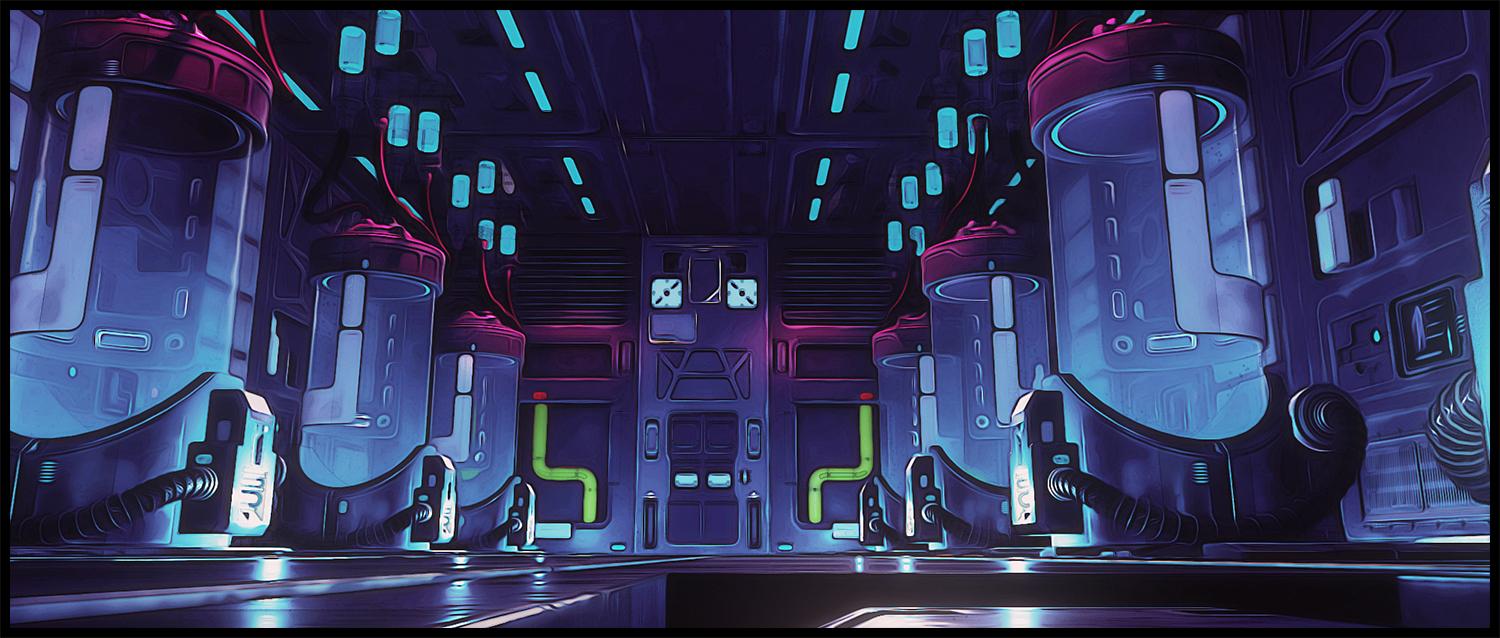
Trying Filament as base render and give color shift+boost in photoshop
Very nice and Filament is very fast to render. Please make more Filament based images. How to deal with Genesis 8 characters in Filament?
Will do in next experiment !! Meanwhile I`m uploading simple video how to getting same fx using my photoshop action ( which I`m also including in link below ) so you can get the base idea. Of course that not the only way to doing it . it just how my way to get out as posible from 3D apps and toying with 2d image or video editors LOL
https://drive.google.com/drive/folders/1_P-1Sob2UXDE3PVP0EV-M1_W-2DsU2km?usp=sharing
EDIT : TO use my action you need to have Free GreyCstoration plugin ( to replace oil painting) . You can get from here
Great look. Care to answer some questions on Filament? What shaders and lights did you use? Is it possible to render in Filament with CPU? How fast rendering is?
I`m just loading the set and playing with Filament draw option via Menu>Create>New Filament Draw option node. Usually I set ISO to 0,25 and play with another setting . There is no additional shader . This set already have plenty of point and distant lights so it I just need to boost light scale in Filament Draw option . If yours doesnt come with plenty light you need to add manually by yourself.
Filament use render preview so it should be pretty fast . Not sure how GPU have impact in here . My laptop only have 4GB VRAM ( GTX 860) so its should ok using Filament with modest specs. Dont forget to set your render engine to viewport
Thanks! Will try myself. How about shadows in Filament?
May 2021 - Daz 3D New User Challenge - Using Props and Push Modifiers/Deformersperlk said:
Here's my modification after DAZ_ann's helpful hints... No PW. I think it looks way better. Thank you so much!!!
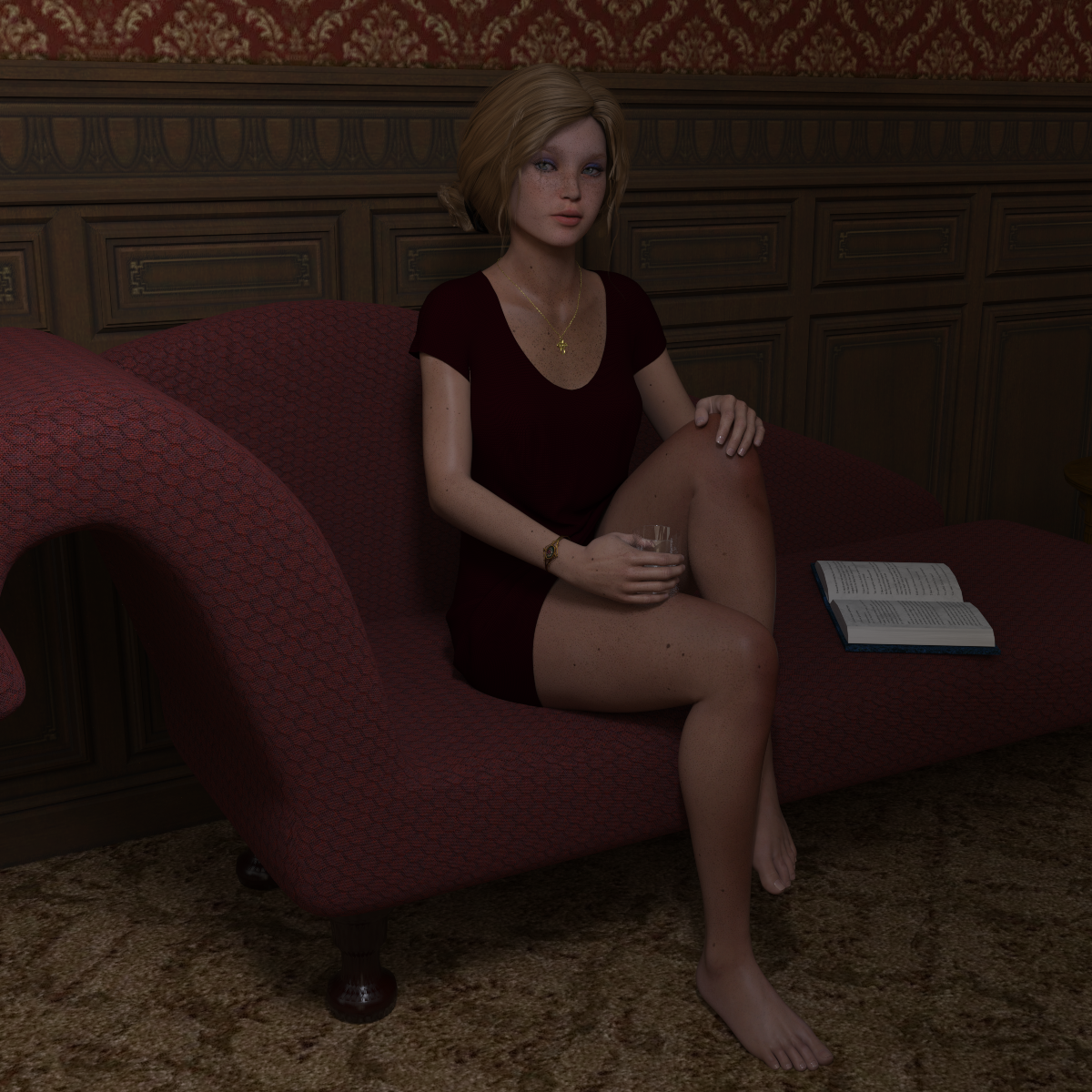
Very nice. I see you got the thumb changed and the gloss off places where you didn't want it.
The only additional suggestion I would give is to maybe add a soft spotlight aimed at her face. Just to make her pop just a tinge. When you add a spotlight, if you look at your camera views, you will see one listed as spotlight. You can use that to help you direct and aim it at the exact area you want to point at and then adjust the Spread Angle under the Lights Tab and/or the Luminous Flux (Lumen) to soften it a bit. Granted, its not necessary just something you may want to play with depending on what you want the feeling of the render to be.
Sometimes moving in iRay Preview mode can be tough when doing Spotlight view so if you run into trouble, try using Texture Shaded or the Filament PBR view while you adjust the lights. Also, when aiming pay special attention to where the middle circle is pointed as that will be the area receiving the most light. The outside circle shows how far it will taper off so to speak.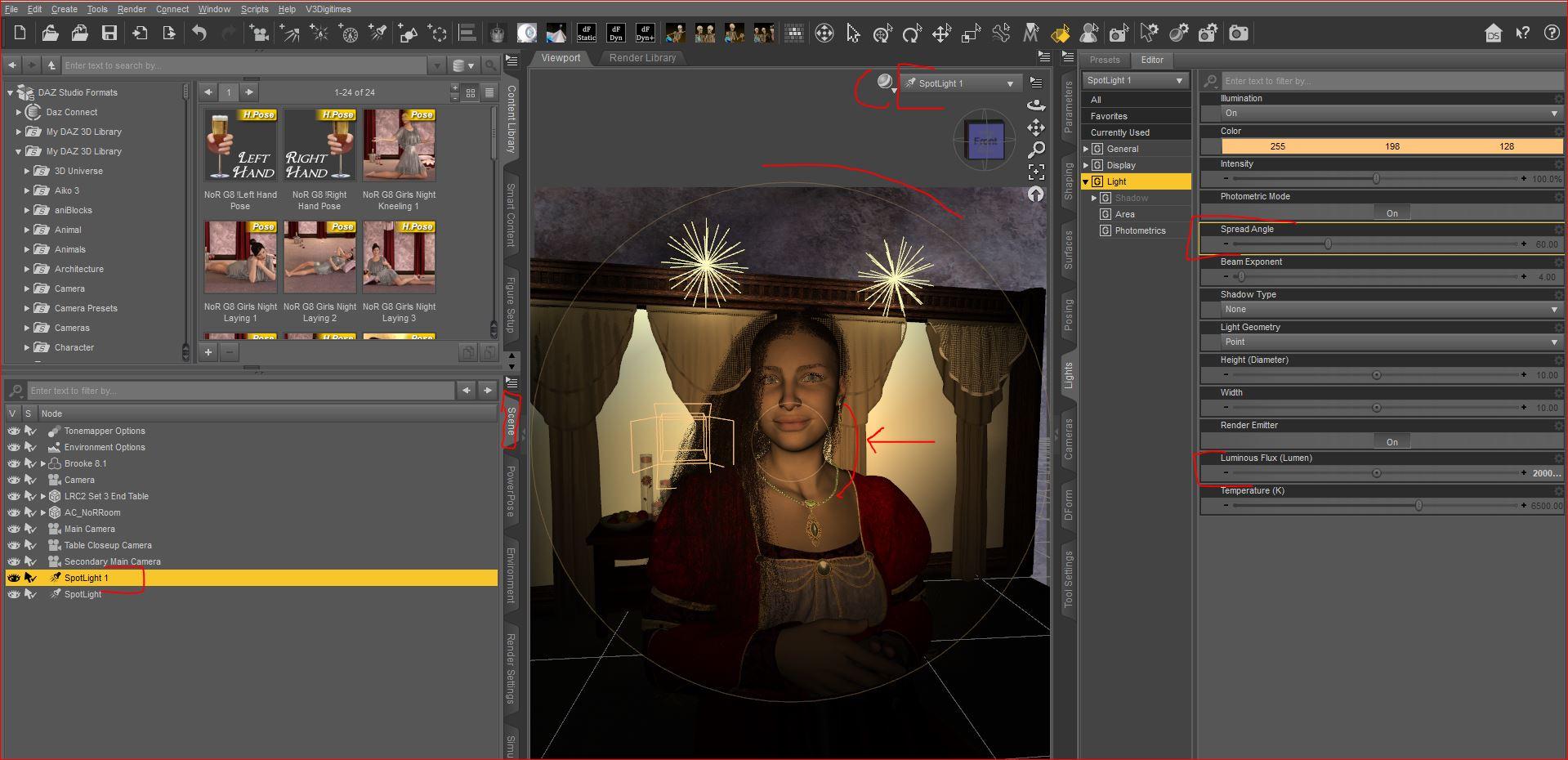 White in IRAY
Tone mapping would be the starting point, which can be accessed once the scene has a Tonemapper Settings object (from the Create menu, though one will be added if you use Iray or Filament).
More Non-photorealisitic Renders (NPR II)pavsikakyj said:
juvesatriani said:
Artini said:
juvesatriani said:
Trying Filament as base render and give color shift+boost in photoshop
Very nice and Filament is very fast to render. Please make more Filament based images. How to deal with Genesis 8 characters in Filament?
Will do in next experiment !! Meanwhile I`m uploading simple video how to getting same fx using my photoshop action ( which I`m also including in link below ) so you can get the base idea. Of course that not the only way to doing it . it just how my way to get out as posible from 3D apps and toying with 2d image or video editors LOL
https://drive.google.com/drive/folders/1_P-1Sob2UXDE3PVP0EV-M1_W-2DsU2km?usp=sharing
EDIT : TO use my action you need to have Free GreyCstoration plugin ( to replace oil painting) . You can get from here
Great look. Care to answer some questions on Filament? What shaders and lights did you use? Is it possible to render in Filament with CPU? How fast rendering is?
I`m just loading the set and playing with Filament draw option via Menu>Create>New Filament Draw option node. Usually I set ISO to 0,25 and play with another setting . There is no additional shader . This set already have plenty of point and distant lights so it I just need to boost light scale in Filament Draw option . If yours doesnt come with plenty light you need to add manually by yourself.
Filament use render preview so it should be pretty fast . Not sure how GPU have impact in here . My laptop only have 4GB VRAM ( GTX 860) so its should ok using Filament with modest specs. Dont forget to set your render engine to viewport
More Non-photorealisitic Renders (NPR II)juvesatriani said:
Artini said:
juvesatriani said:
Trying Filament as base render and give color shift+boost in photoshop
Very nice and Filament is very fast to render. Please make more Filament based images. How to deal with Genesis 8 characters in Filament?
Will do in next experiment !! Meanwhile I`m uploading simple video how to getting same fx using my photoshop action ( which I`m also including in link below ) so you can get the base idea. Of course that not the only way to doing it . it just how my way to get out as posible from 3D apps and toying with 2d image or video editors LOL
https://drive.google.com/drive/folders/1_P-1Sob2UXDE3PVP0EV-M1_W-2DsU2km?usp=sharing
EDIT : TO use my action you need to have Free GreyCstoration plugin ( to replace oil painting) . You can get from here
Great look. Care to answer some questions on Filament? What shaders and lights did you use? Is it possible to render in Filament with CPU? How fast rendering is?
More Non-photorealisitic Renders (NPR II)Artini said:
juvesatriani said:
Trying Filament as base render and give color shift+boost in photoshop
Very nice and Filament is very fast to render. Please make more Filament based images. How to deal with Genesis 8 characters in Filament?
Will do in next experiment !! Meanwhile I`m uploading simple video how to getting same fx using my photoshop action ( which I`m also including in link below ) so you can get the base idea. Of course that not the only way to doing it . it just how my way to get out as posible from 3D apps and toying with 2d image or video editors LOL
https://drive.google.com/drive/folders/1_P-1Sob2UXDE3PVP0EV-M1_W-2DsU2km?usp=sharing
EDIT : TO use my action you need to have Free GreyCstoration plugin ( to replace oil painting) . You can get from here
BLACK render - DigiVault StardomesDaz Studio has, to date, three possible render engines: Iray, 3delight and Filament. Since 4.15 is the most current version of Daz Studio all the products in the shop show that as the compatable software. 3delight items CAN be used with the Iray render engine they just require tweaking.
3delight currently still exists, as a render engine, in Daz Studio 4.15, therefore 3delight items are compatable with that, the most current version, of the software.
More Non-photorealisitic Renders (NPR II)juvesatriani said:
Trying Filament as base render and give color shift+boost in photoshop
Very nice and Filament is very fast to render. Please make more Filament based images. How to deal with Genesis 8 characters in Filament?
Why 8-9 months for a Big Sur update?Since I'm comfortable with the number of triangles I'm using on my 9-year old iMac, I have no doubt that I'll be just as comfortable for the triangle speed on a machine that clocks in at twice as fast as the one I'm using, and judging by how large video files are being handled in m1-native software (as well as the betas of Premiere Pro and After Effects) I suspect that an m1-native version of D|S might not be all that disappointing, at least not to me.
I'd be happy just to be able to run it on a new machine and OS with filament.
-- Walt Sterdan
Daz 3D is part of

Connect
DAZ Productions, Inc.
7533 S Center View Ct #4664
West Jordan, UT 84084Licensing Agreement | Terms of Service | Privacy Policy | EULA
© 2026 Daz Productions Inc. All Rights Reserved.