-
(Solved, hidden morphs OP) Models having weird looking mouths
Usually that means a morph is applying when it shouldn't - does this happen with the base figure too (in which case it's probably a property with a non-zero default value) or only when certain shapes are set (in which case it's probably a corrective morph with an ERC link that is tied to only one controller instead of two and so applies at the wrong time)?
Mesh Question - double layer selection issues [solved]I haven't used Hexagon for a while,m or Blender at all, but if you can move polygons along their normals one option (assuming the inner surface's normals point inwards) might to to use that to move the two layers apart, with luck that would stop selection grabbing both layers. You could do the same with a Push Modifier in DS, then reverse the process. In Blender you might be abel to do it as a morph (shape key?) and then, having made the selection etc., you coudl reverse the morph to put the remaining polygons back where they started.
New Parameter Property"any and all answers" ... what if I'm wrong? [I hope not]
... number 2. Will I be doing this for both the Male and Female or will it be fine to CREATE under one and SAVE as both?
The morphs are made for the wings. IF you are putting the exact same figure on the male as on the female, then a normal saved morph would still work on either 'cause it's the same wing. But control morphs are different.
Safest bet would be to create 2 wing sets. One for the female and one for the male. Then make the control morphs for one of the figures and save the morphs. While making those morphs keep aside the .obj used for creating the morphs. When done with the wings on one figure; work on the next figure loading their wings on. Make the control morphs for that figure [whether or not the previous .obj for morphs will be adequate or not you'll soon enough find out].
{disclaimer: I have not created ERCs since ever learning enough about them to know that if one doesn't know what they're doing one [as in me] could really mess up their figures [and I don't want to do that].} [I'm working on a project now bravely hoping to get a handle on making pJCMs]eta: VERY important if saving the same model [i.e. the wings] for two different figures, save them to DIFFERENT data folders or one will overwrite the other.
((I somehow complete messed up this thread))
So a part b question to this is:
If I create the morphs for the individual wing, not as part of the figure, does this also create issue for the Data folder re: G3/8/M/F?Converting Michael 4 to Genesis 8 Problems and HurdlesIf fingers don't pose correctly it means that rigging needs to be adjusted for the morph using the "adjust rigging to shape" command.
Hm, I might give this a try sometime.
It will be quite a while until I have time to try it, though, so don't expect me to report back anytime soon...
But thanks for the hint!
New Parameter Property"any and all answers" ... what if I'm wrong? [I hope not]
... number 2. Will I be doing this for both the Male and Female or will it be fine to CREATE under one and SAVE as both?
The morphs are made for the wings. IF you are putting the exact same figure on the male as on the female, then a normal saved morph would still work on either 'cause it's the same wing. But control morphs are different.
Safest bet would be to create 2 wing sets. One for the female and one for the male. Then make the control morphs for one of the figures and save the morphs. While making those morphs keep aside the .obj used for creating the morphs. When done with the wings on one figure; work on the next figure loading their wings on. Make the control morphs for that figure [whether or not the previous .obj for morphs will be adequate or not you'll soon enough find out].
{disclaimer: I have not created ERCs since ever learning enough about them to know that if one doesn't know what they're doing one [as in me] could really mess up their figures [and I don't want to do that].} [I'm working on a project now bravely hoping to get a handle on making pJCMs]eta: VERY important if saving the same model [i.e. the wings] for two different figures, save them to DIFFERENT data folders or one will overwrite the other.
((I somehow complete messed up this thread))
I'm pretty sure there was a thank you here, and some other things, but somehow managed to overwrite instead of quote.
Very tired.New Parameter Property"any and all answers" ... what if I'm wrong? [I hope not]
... number 2. Will I be doing this for both the Male and Female or will it be fine to CREATE under one and SAVE as both?
The morphs are made for the wings. IF you are putting the exact same figure on the male as on the female, then a normal saved morph would still work on either 'cause it's the same wing. But control morphs are different.
Safest bet would be to create 2 wing sets. One for the female and one for the male. Then make the control morphs for one of the figures and save the morphs. While making those morphs keep aside the .obj used for creating the morphs. When done with the wings on one figure; work on the next figure loading their wings on. Make the control morphs for that figure [whether or not the previous .obj for morphs will be adequate or not you'll soon enough find out].
{disclaimer: I have not created ERCs since ever learning enough about them to know that if one doesn't know what they're doing one [as in me] could really mess up their figures [and I don't want to do that].} [I'm working on a project now bravely hoping to get a handle on making pJCMs]eta: VERY important if saving the same model [i.e. the wings] for two different figures, save them to DIFFERENT data folders or one will overwrite the other.
Anne for Caryn 8 (clothing costume added by elleque sep 27)Thank you for saying so. But, I forgot to include "Hat" morph of the hairstyle. Incidentally I corrected the spelling, and re-uploaded the zip now. Please re-download
 New Parameter Property
I have a few questions about my 'brand new', not yet saved, parameter controls.
Background:
3 Sets of wings
Left and Right
Saved as Anatomy
Total: 6 Individual Items
G8 and G3
Wearables Preset is working great for both.
As I was about to save my 24 brand new controls, a few questions came up:
1. Should I be creating my ERCs under the G8 figure as an OVERALL set of morphs or Under EACH Item as an individual morph?
Right now, the morphs are under the G8 figure as an overall.
2. Will I be doing this for both the Male and Female or will it be fine to CREATE under one and SAVE as both?
3. Will I have to also recreate the morphs for G3, or can I change the environment and figure and re-export the morphs to the correct folders?
I probably should have started with just 1 morph to answer all the questions but, now that I have 24, I'm afraid to let my computer go to sleep.
Any and all answers welcome.
Bonus Points:
4. Is it possible to create a New Group for the parameters so that the 60+ controls planned for posing the wings aren't lumped in with everything else and overpower the brain?Possible to save/transfer surface selection over similar items?Do all the props in that product have the same geometry?
If they do, you might be able to export the product's props as Objs and then transfer them as morphs to your own re-surfaced garment by using Morph Loader pro.
YAY! It's laundry day!I would love when Esha will continue making addons for this product, new Textures or new pieces :)
Like rolled up socks (thats how I sort my socks^^ roll 2 together to a bundle).

Also maybe better ways to change borders like here:
It is a great product, which could/should be continued with addons :)
Iris Concave morph G8F; Anybody knows?Your morphs in shareCG was what I needed, thanks j cade
G3F with and without
I still would love to know who did Iris concave for G8F, lol, out of pure curiosity
I think it's part of the Aging Morphs for Genesis 8 Female package by Zev0. I have the morph listed in the DAZ data folder under "/data/DAZ 3D/Genesis 8/Female/Morphs/Zev0/Aging Morphs 8/Iris Concave.dsf"
Possible to save/transfer surface selection over similar items?Hi,
I love to use the Laundry presets to simulate that my char did take off the clothes.
bad thing: all presets are ONE surface, so when I wanna change trims or waistbands or just the edges, it need to be created with new surfaces or with gimp.
I made now this:

All tanktop presets are using the same UV/Surface.

But, its all a own prop.
So, is there a way to transfer my new created surface to all of them or to create a uv or I dont know... that I can change these trims in the future easy again.

I hope someone knows that, would be cool :)
https://www.daz3d.com/messy-laundry-mega-set
That is the product.
Final result:

right, original, left Laundry prop :)
Edit:
Maybe something like this?

But I am not sure how to use this tool and if it can be "danger" destroying stuff :o
I assume the Nr. 1 checkbox could help, but well I am afraid, I hope someone can help me.
Converting Michael 4 to Genesis 8 Problems and HurdlesIf fingers don't pose correctly it means that rigging needs to be adjusted for the morph using the "adjust rigging to shape" command.
Converting Michael 4 to Genesis 8 Problems and HurdlesI use the GenX products to get characters from Gen4 to G3, then I use XTransfer to get them up to G8.
It's an imperfect solution. The face always comes out slightly off. I use dials to try and shift everything back into place, but it can be rather cumbersome. It seems that some sculpting details will always get lost in the transfer, likely because of the drop in poly count from Gen4 to G8, as vwrangler mentiones.
I don't even bother transferring the body shape anymore. Perhaps I'm doing something wrong, but transferred bodies always come out weird for me, with fingers that don't pose correctly and other issues. I have given up on that. For me it's mostly about the faces anyway.
The materials should be less of a problem. Cayman's Legacy UV products work well, eventhogh they're a little cumbersome. For IRAY conversion I use the products by V3Digitimes but that's only one of many options. I hear Anagenessis is very popular, I haven't tried it myself.
Problems Adjusting Rig Bones On a Custom FigureI've made a prop that has dangling parts, so I converted it to a figure and added bones to rig them. I also made morphs for it, which need rig adjustment. Automatic Adjustment messed up the rig completely, so I try to do it manually.
One problem that persists is that after adjusting and performing ERC freeze, when I return the morph slider back to its default 0% position, bones go all over the place.
Here's the method I follow -
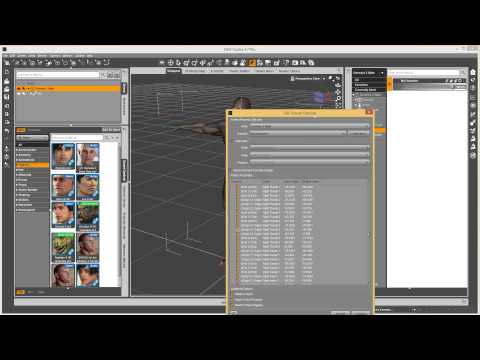
I've tried following other tutorials too, thinking some detail might have been different, but they didn't help. It's worth noting that I tested my adjustment method(s) on Gen 8 model, with 3D party morphs as well as my own ones. It worked each time flawlessly, but not with a figure I've made.
Here are a few screenshots for a better idea what's going on:
Image 1 - No morph applied, three bones that control the way the gem is hanging are indicated. Note that there are two more such gems, one on each side, they're not in the view, but you can see the hierarchy of the figure bones on the right.
Image 2 - The morph slider moved to 100%, it moves the front part, the bones stay behind in their original position
Image 3 - I've moved the three bones of this one gem to their new position, only the Y axis position has been altered
Image 4 - ERC Freeze settings
Image 5 - Immediately after ERC freeze, I haven't touched anything else yet, just accepted the freeze settings, everything looks fine
Image 6 - The rig goes crazy. The bones I adjusted don't return to their original position, instead they move to compeltely new places, the other bones that I didn't even touch move to new plaes too.
Does anyone know what might be causing this? Thanks in advance!
I can not find 'pose morgh tag' in C4DDo you get a pose morph tag if you do a FBX export/import?
Welcome to Hatsune Miku Anime Manga Cafe ☕
Himeko, Aiko, Kururu, Mizuho, BelBel, DeCoCoAyako A4 custom anime morph available upon request.
Emi A3 custom by me available upon request.
Shukky Cy-coSera
Kioki A3
Welcome to Anime Manga Cafe ☕
Welcome to Hatsune Miku Anime Manga Cafe ☕Genesis also has legacy morph packs for Hiro and Aiko 3 and 4. I use these in conjunction with Hiro 5 and Hitomi quite often. The number combinations you can create are staggering. This is why I see Genesis 1 as a kind of one stop shop for anime characters. Best part, is because its several generations behind the current stuff, you can pick up all the goodies on the cheap.
https://www.daz3d.com/a4-and-h4-for-genesis
https://www.daz3d.com/a3-and-h3-shapes-for-genesis
(First Clothing Attempt) Bikini BottomsThey look nice, but there is a gap between them and the body. That kills believability imo; ok for a distant shot, but it doesn't need to be that close to tell.
I'd add a morph - if you don't want to make them fit closer - that the user can use to dial closer or further away.
It's great that they have depth - cloth does - which is missing from many bought products.
A morph is a great idea. I'll see if I can figure out how to do that :-D
SereneNight's Sci-Fi Fun Thread 2@vwrangler The most recent and TOS-friendly one is here: https://www.daz3d.com/gallery/#images/252901/
Amara braids look like they might be suitable, they're certainly the right length and the front part of the head/hairline is closer than any of the others. I also have Evelyn Hair for the G3/G8 females and it looks very good except it has no long braids, just the ponytail. As for Blue Soul, I have that one too and it's another no-go. Even on my M4 version in Poser, I don't recognize him when I use it. :sigh: Maybe I'll have to figure out a way to kitbash what I do have that will work. He also looks pretty good in the G3 Kylan hair, but again, no braids.
The only other things I can think of are either parenting Vidal Braids to his head (https://www.daz3d.com/vidal-braids-for-genesis-2-male-s - I think almost every transfer method would break the braids), or some of the hairstyles by Samsil at Renderosity -- you could try cross-figuring his Senegalese Twist and Braided Ponytail, and then see if there's a male or other hair with the big poof front that you want that will work (they cross-figure well, but I haven't tried autofit, since that tends to break long braids and tails -- also be warned that they are both incredibly heavyweight in scene and can take a while to load). And given the way that Drake Huntress looks ... I do think kitbashing is probably the only way you're going to approach that look, or anything remotely close.
There's also https://www.daz3d.com/mrl-warrior-hair-for-genesis-8-female but that only has two small braids at each side. Might work for the volume on top of the head that you need, though. (That said ... be warned that it is INSANE. Lots of different parts that aren't combined into a group or parented together. I don't entirely understand why it was put together that way.)
For what it's worth, I tried combining Amara and Kylan, just to see what happened (you have to parent Amara or use Scene Identification to change its base, or it breaks), but Kylan has a LOT of volume everywhere, and the braids get buried.
I think the length is going to be a really big issue; almost all the long(ish) braided styles end around shoulder length or just a bit longer, and the style you're looking for seems to go down to the base of his spine. And tedious as it might be, Serene's solution of a bunch of wee primitives for the braids might be the best solution. Once you get something you like, at least you can save it as a wearable, so you only have to do it once. I hope.
Daz 3D is part of

Connect
DAZ Productions, Inc.
7533 S Center View Ct #4664
West Jordan, UT 84084Licensing Agreement | Terms of Service | Privacy Policy | EULA
© 2026 Daz Productions Inc. All Rights Reserved.