-
A Few Questions about "Star!"
So it seems like Daz has been leaning heavily on the legacy content sales lately. Since 99.9% of my work is done with Genesis 8, that's fine by me--my wallet needs a break.
 The one thing I am interested in is LittleLadyfox/RuntimeDNA's character models, because photorealism doesn't seem to matter as much when it's an animu character with eyes the size of dinnerplates.
I have Star 2.0 for G3, but I'm wondering how compatible the older Star clothing is. The Star 2.0 page says there's a "Star Clone Data Tool", but does anybody have firsthand experience with its effectiveness?
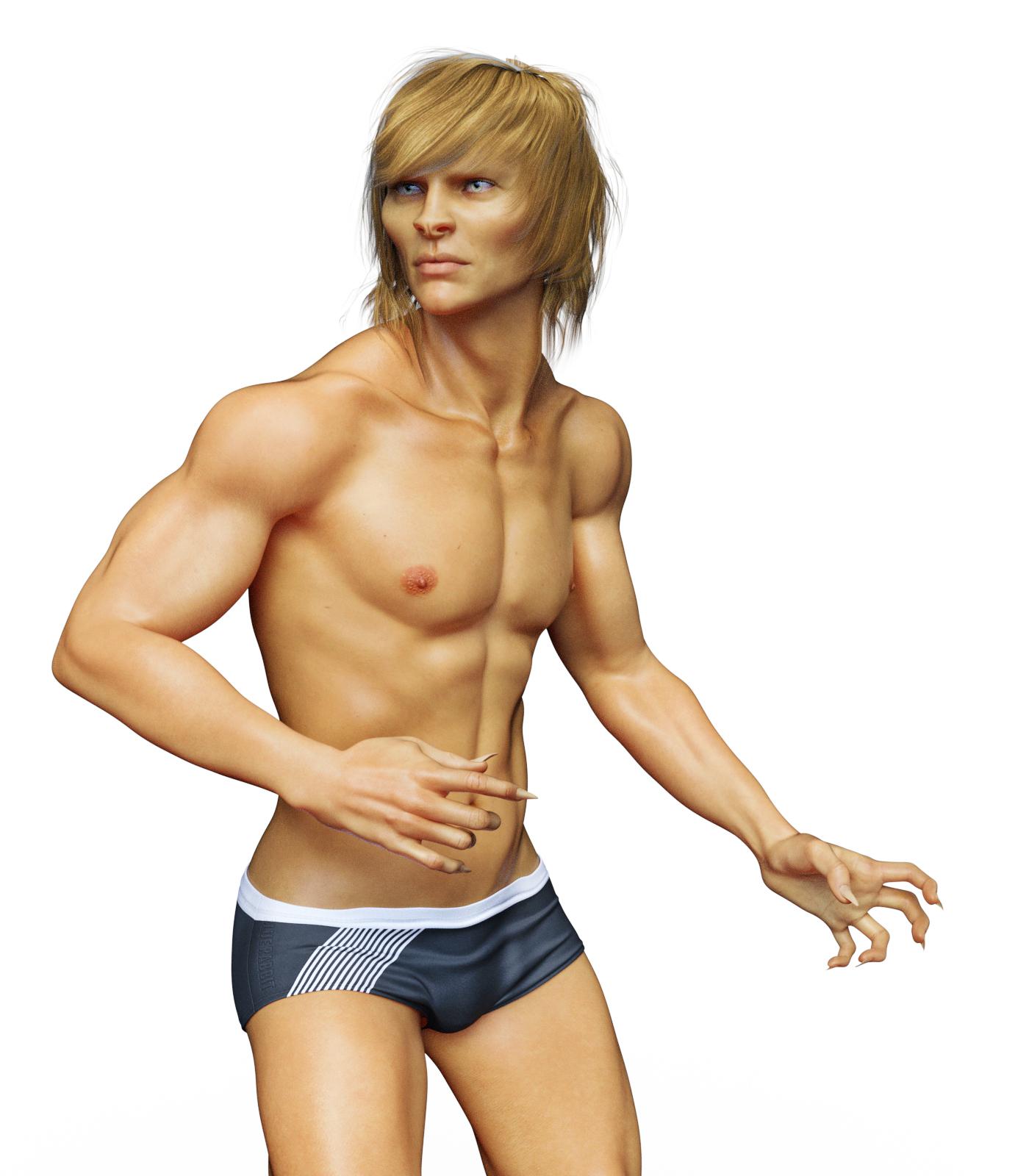
Also, I didn't see a male equivalent. Is there one? Or, if not, is there something I can do to fake it?
The Genesis 3 Cross Figure Resource Kit includes a Genesis 3 female "Transfer To: Genesis3Male" morph you can dial in, results shown in the attached picture. If you have GenX2 with the G3 addon, you can transfer the Genesis 3 Male body morph to Genesis 3 Female and get similar results.
Star 2.0 does include an auto-fit clone to fit the original Star clothing to Star 2.0 !
Your Mister Star looks pretty cool!
Character conversion: copyright issuesNo, it would still be a derivative of the original morphs but would not require them to work so it is not covered by the license terms. The only way to share a character shape using third-party morphs such as these is as a shaping preset, which of course works only on the original figure with the morph set(s) installed (Merchant resource sets are a partial exception, but they usually have limitations on the way they can be used).
Character conversion: copyright issuesHi, I would like to know if I created an original character on Genesis using the DAZ Evolution Morphs, and then transfer the character to G2 and G3 by GenX2, and then G3 to G8 by RiverSoft Character Converter (or G1 to G2 by GenX2, and then G2 to G8 and then G8 to G3 by Riversoft/RSSY Character Converter), can I redistribute the character without copyright issues? Thanks a lot!Purchases not appearing in my install managerDownload the files manually into the folder you use for DIM. Start or refresh DIM when finished. They will appear in the list and you can install as ususal.
This hasn't worked for me
Not worked for me either... i click on the download and install tab on the "my orders" page and DIM opens automatically but the product isn't there.
My only access to the files is via the zip folder but when i extract and transfer them to my Daz 3D library they only appear in the content library and not the smart content library.
Smart Content is dependent on the metadata, which gets pulled in when you install the product. Copying the contents into the library folders does not accomplish that.
The "Download and Install" button in the Product Library just does the same as opening DIM and filtering by product number, so not really doing anything different. To download manually, use the "Download zip" button in the "Manual Install" column. Save the files to the folder you normally use with DIM. Start or refresh DIM. (Offline or not, I don't think it makes a difference, but Offline will not get the order ID, date purchased, or any other info that comes from your account on site).
This will (should) create a .dsx file in the same folder that DIM will use to identify the product and, hopefully, list it in the "Ready to Install" tab. If it does not, something is seriously broken. If the .dsx is there, check your download filters to include all versions of DAZ Studio, Poser, or any other software that you are using.
How to add Wrist Straps (Gen3)I made two wrist straps in maya for a Gen3 character.
Imported them to daz as obj , they fit perectly..
However applying "Transfer Utility" causes them to change location in the scene. so they apprer floating by the hips..
( moving the arm I can see they are indeed rigged, but just in the wrong place )
Using a morph loader pro with " Reverse Deformations" set to YES will reposition wrist straps . however If I move the arms now they geo warps horriblly into a mess..
Basically my question is.. If I made wrist straps in maya how to I attach them to a gen3 character so when they arms move they move with it and morph accordingly.. its pretty simple but cannot find one video no youtuve that explains this.
Thanks !Purchases not appearing in my install managerDownload the files manually into the folder you use for DIM. Start or refresh DIM when finished. They will appear in the list and you can install as ususal.
This hasn't worked for me
Not worked for me either... i click on the download and install tab on the "my orders" page and DIM opens automatically but the product isn't there.
My only access to the files is via the zip folder but when i extract and transfer them to my Daz 3D library they only appear in the content library and not the smart content library.
A Few Questions about "Star!"
Thanks for the heads up. I buy G8 almost exclusively, but that cute little banshee won me over, so I bought the original Star! base and LL's outfits since this sale offers such good prices. The larger Star 2.0 bundle is on my wishlist, but it's very much a "nice-to-have", and I haven't bought it (yet). I'll be goofing around with the original figure for now but might upgrade in the future, so I was curious whether the items would transfer easily.I ask because I'm leaning toward buying the hairs, too (already bought the outfits). Twelve anime hairs for less than $10 - thinking maybe I should go ahead and grab them.
If you're just looking for assets to transfer to Star 2.0, there's an updated version of the Violet Hair made specifically for G3F with full Iray support. It's full price ATM, but it's in both of the Star 2.0 bundles and they're half-off right now.
A Few Questions about "Star!"I ask because I'm leaning toward buying the hairs, too (already bought the outfits). Twelve anime hairs for less than $10 - thinking maybe I should go ahead and grab them.
If you're just looking for assets to transfer to Star 2.0, there's an updated version of the Violet Hair made specifically for G3F with full Iray support. It's full price ATM, but it's in both of the Star 2.0 bundles and they're half-off right now.
The Genesis 3 Cross Figure Resource Kit includes a Genesis 3 female "Transfer To: Genesis3Male" morph you can dial in, results shown in the attached picture.
That does look pretty good, but I'm not sure I'll buy enough Genesis 3 male content to justify the purchase. I think I can get more utility out of buying face & body morphs and trying to fake it.
DA-15Y Lvl 4 HD Morph - Addon for bellyHi,
@daveyabbo or other Artists, is it possible to load this figure:
https://www.daz3d.com/da-15y-lvl-4-hd-morph-for-genesis-8-females
without that "weird" belly? I love the complete model, but the Belly is ugly for me :( Is it possible that someone can create an addon for it or the original PA makes an alternate version where you can use a different version?
Just with plates on the front/back.
before:

After:

I created the plates by hand in Gimp, not perfect just to show an example.
Show Us Your Iray Renders. Part VIINice everyone. My whole rendering shtick as always been Land Of The Giants. I got a kick when Leo Dicaprio says as fictional actor Rick Dalton in Once Upon a Time In Hollywood that one of his acting credits was on LOTG. I found the actual fictional credit and produced a render. All characters are face genned. They did come out better then face transfer.
that's a good job
Cookie Dough product range? Is it an early version of Aiko, etc?If you had a choice as a totally new collector of LittleFox's products, and based on most stuff being now at $1, would you go with Cookie or Star 1.0? For a female toon I am on the fence but for a male there's no other option but Chip.
There is a free morph for Star to turn her into a male figure:
https://poserdazfreebies.miraheze.org/wiki/Star!/Faces_and_Morphs
Runtime DNA Products sale - What are people buying from it?I'm really doing a terrible job at this "spending less" thing, aren't I? I've somehow added another $20 or so to my cart AND there's that clearance sale Elsewhere (plus half off certain software)! But it sounds like a lot of what I want are things that honestly might not ever hit that 30-40 cent range, and $1 is hardly a bad price.@CoreRegina I feel your pain... the problem is I am sure that we ALL already have waaaaay too much stuff that we have never used hahaha this "I will use it some day" thing is being stretched so thinly... I would need 3 lifetimes to use all my purchases! But you are probably right... most of the stuff that go in the 8@$2.99 promo were DO's and not PA items like Cookie. ps. don't spend too much now just prior to PA/PC sales!! :P
The Vintage Boxing set is indeed for G2M... I like the shiny textures and look very much, even much more than the recent Boxing Pro Bundle I purchased. I know I could wait out for it to go for less than a buck or even as a freebie but at $2, I decided to "splurge" :P I actually joined Daz3D more than 15 years ago and only came back this March and only now started learning DS in all earnesty.. so I have mostly G8 figures and a couple of G7 but I shall go take a look at Gianni 6. My all time favorite though is hands down M4 - that fella gets to me every time I come across him (which explains why I have 45 M4-related $1 stuff sitting in my cart right now) hahaha
@DMax I'll hit 60 product library pages if I buy all of this stuff, and it blows me away that this is a modest collection by forum standards. I can't even imagine beginning to use all of it, there are so many "this may be useful" and "I'll probably never use this but it's too good a deal to pass up just in case" purchases, which is why Cookie and Chip are in my cart. They're great characters and Lady Littlefox does such great toons that for a couple of bucks, I can't not buy them. Who knows, after all! RDNA had so much amazing stuff, and while I wish they'd remained independent I'm glad that lots of the products and PAs are still around. (And that I backed up those purchases because not all are...)
I'm going to spend way too much before the sales, and then way too much during the sales. Especially with PP11 being half off right now, it's the perfect time to upgrade that and also take advantage of all the RDNA Poser goodies on sale over here. I've invested very heavily in DS lately and want to begin doing proper artistic renders with it, not just conceptual stuff for other projects, but sometimes I also just want to sink into the warm, familiar, sometimes frustrating embrace of the Cloth Room. Oh hey, look at that dynamic Arki stuff on sale...!
I have two early-generation loves. The first is D3, who got quite the workout with me and deserved a better successor than he got (though at least we have the D3 Genesis shape), and the second is M4. I have a bunch of gorgeous things for him, lots of Xurge3D armor and the like. M3 was my first Michael, I bought him and V3 on sale back in 2006. The next day I bought a bunch more stuff full-priced because I was hooked and impatient, lol. But M4 was much more fun to work with and I built some of my favorite characters with D3, ones I'm still in love with and am currently recreating with G8M.
Gianni 6 (the Vintage Boxing Outfit guy) was the first core character who really made my head whip around all on his own, which surprised me because I'm not usually into pure beefcake. There's just something about his face that gets me every time, though. The first promo for the Darkwoods Hero outfit may be my favorite promo shot of all time, and the ones for Fighting Monk are also up there. I'm almost exclusively G8M these days, but he's the G2M boy I'll never be able to shelve. I have the Genesis 2 Legacies morph that I can transfer to G8M but honestly it doesn't look as good as the G2M version. Part of that is the skin, I'm sure (and thank heavens for IG's Iray conversion), but I'd love to have a proper HD Gianni 6 morph for G8M that looks as good as the original.
SereneNight's Sci-Fi Fun Thread 2Here is MST Felix. With Felix head dialed out at 70% and Maxx's HD nipples Dialed in, and the head propagation dialed down 1 percent. He is wearing Brendan hair from Genesis 3 Male, which I converted.
I have a lot of history with cat people. Spent a lot of time drawing them in College, not particularly by choice, I liked Elves, but my friend liked cat people so I drew them. I admit to preferring him mostly human, to the furry end of the scale.
At 100 Percent Felix head, I felt the morph begins to scrunch up and he looked more like a vampire from buffy which I thought was overkill. Dialing it down makes him a little less scrunchy and I like this. I added nipples.
He included some metallic spots, but... I confess to not liking them. I would prefer realistic spots. I did try the facial makeup, that gave him catlike nose and eyeliner... But it looked weird to me and not natural. He includes a white/pink skinned human version as well...
While the morph looks good, I felt the skin is very plain. He lacks details, and sometimes looks waxy. He comes with cat nails, and various options which can be dialed out. He doesn't have brows.
Overall, I like him, once I realized dialing his head down a bit, appealed to me.
 A Few Questions about "Star!"
So it seems like Daz has been leaning heavily on the legacy content sales lately. Since 99.9% of my work is done with Genesis 8, that's fine by me--my wallet needs a break.
The one thing I am interested in is LittleLadyfox/RuntimeDNA's character models, because photorealism doesn't seem to matter as much when it's an animu character with eyes the size of dinnerplates.I have Star 2.0 for G3, but I'm wondering how compatible the older Star clothing is. The Star 2.0 page says there's a "Star Clone Data Tool", but does anybody have firsthand experience with its effectiveness?
Also, I didn't see a male equivalent. Is there one? Or, if not, is there something I can do to fake it?
The Genesis 3 Cross Figure Resource Kit includes a Genesis 3 female "Transfer To: Genesis3Male" morph you can dial in, results shown in the attached picture. If you have GenX2 with the G3 addon, you can transfer the Genesis 3 Male body morph to Genesis 3 Female and get similar results.
Star 2.0 does include an auto-fit clone to fit the original Star clothing to Star 2.0 !
Daz3D unusable Viewport performanceSo, i have been searching around and just can't find any real solid information on view port performance. I'm only posting here because I'm just tired of searching . I have played with just about all the settings I can find in Daz, and in the nVIdia Control pannel. Even with the veiwport in bounding box mode rotating a character takes 4-5 seconds. Drivers and Software are up to date.
System specs are...
Ryzen 9 3950x
32GB of Ram @ 3200
RTX 2070 & GTX970
How big is your content library? The bigger the library, the slower Daz becomes, especially when it comes to posing & morphing.
(sidenote: A really useful feature would be some sort of "remove dependencies" or "freeze scene" function. i.e., The ability to temporarily remove all unused morph sliders from a scene to improve performance.)
Show Us Your Iray Renders. Part VIINice everyone. My whole rendering shtick as always been Land Of The Giants. I got a kick when Leo Dicaprio says as fictional actor Rick Dalton in Once Upon a Time In Hollywood that one of his acting credits was on LOTG. I found the actual fictional credit and produced a render. All characters are face genned. They did come out better then face transfer.
A Few Questions about "Star!"Parenting the hair also keeps all the bones and morphs intact, so it's usually a good idea to parent hair between figures rather than "fit to". Here I parented the Ruby Red hair to Star 2.0:

The Ruby Red outfit fits pretty well for Star 2.0 but the long skirt fringe does weird things when you pose with the legs up - so I turned down the opacity strength of the skirt fringe to 0. The shoes didn't transfer well (shoes RARELY transfer between figures very well at all, so that was to be expected). So I used the boots from the Annika Storm outfit instead of the shoes from the Ruby Red outfit.
Measure Metrics Not ConsistentI have a question about using measure metrics (https://www.daz3d.com/measure-metrics-for-daz-studio) in general. I am using the standard measurements that come with the plugin and I have assigned the morphs for each measurement I want to change. However each time I change one measurement, apply and then I lock that morph. When I open the measure metrics again I notice that the measurement I entered has changed, sometimes by as much as an inch. Basically it doesn't seem to be stable. I also get different percentage result for the associated morph even if I enter in the exact same measurement value. For for a bust circumference I got -0.8%, 0.053% and then 0.48%. These were consecutive tries. I need this to be consistent for a project I am working on that involves having the morph percentages equal a specific body measurement. Can you help?
Holt 8: The West Gone Wild / WeirdI wasn't going to pickup more Holt 8 stuff. To be honest, the morph is really mundane, but CC Jack is an excellent character... Nice skin, and tons of options.


And the vamp option:
I'm thinking of picking up Carrara - What are the Must Have Carrara Products?Here are some links to free resources
CarraraCafe - has lots and lots of goodies and articles. Here is a page specific to plugins. https://carraracafe.com/category/plugins/
DCG plugins made free and open source - thread has link and more info - https://www.daz3d.com/forums/discussion/266831/digital-carvers-guild-going-open-source/p1
DCG was Digital Carvers Guild and their plugins added amazing options to Carrara. This included additional options to render in Toon styles, Noir lighting and styles, Using actual geologic data to create real world landscapes, and so much more. One of the Carrara monthly challenges was devoted to DCG plugins so there are more examples there.
Philemo free plugins - website has downloads - https://sourceforge.net/projects/carrara-time-savers/
Philemo is a very generous plugin creator. I use his plugin to convert Carrara's strand based hair to mesh all the time. It preserves vertex nmber and order even after simulation so morphs can be made for styling, wind force, etc. PhilW has used the plugin to make hair products used in Studio and sold through the Daz store. Philemo also made a plugin to allow Carrara to access HD morph information, which officially would be listed as something not supported.
Cripeman - 16 pages of links to free short tutorials on various topics by the late, great Cripeman - https://carraracafe.com/tag/cripeman/
Misty - (pay for) Genesis 3 Carrara character - Can't link to it because it is for sale at Renderosity.
Misty - (free) Genesis 8 Carrara character. Genesis 8 version but there are some toe morph issues, so if you have a foot fetish (no judgment) that could be an problem.
Misty's character presets allow a blended weight version of Genesis 3/8 to be loaded in Carrara and used with Genesis 3/8 clothing/hair, etc in blended weight mode. Note - this is NOT a morph to make the shape of Genesis 2 look like Genesis 3. It is the actual mesh, bones, adjustment morphs, etc of Genesis 3/8 to work in Carrara. What it is missing is some of the weighting and weight adjustment that differs between Genesis 3 default rigging and blended weight rigging. MistyLauraPrincess - @Misty - is the brilliant Carrara user who identified the bug (Mods - look up definition of bug before deleting) that caused Carrara to shut down when using rigging for Genesis 3 and Genesis 8 figures loaded in Carrara. Wishing you well, @Misty!
Alvin Bemar - Fluidos - This thread has the info for the free version of Fluidos. https://www.daz3d.com/forums/discussion/220631/fluidos-plugin-for-carrara I still need to recreate the evil villain opening sequence of the Flint movies in which the baddies break the dam and flood the valley. Bwahahahah.
SparrowHawke - free plugin extensions - http://www.sparrowhawke3d.com/ One of the best allows the user to customize shaders for individual instances within a replicator. Carrara's built in replicator function is very powerful, and this makes it that much better.
I'm afraid some of the best plugins were sold through the Daz store and may not be available now that the authors are no longer vendors. One of the plugins I used was shader baker but I don't know if it still exists without the Daz3D store. Fenric - https://carraracafe.com/fenrics-plugins-now-free/
Note on Compatibility -
- One Carrara user named SteveK uses legacy figures to compete in the annual 24-hour film festival. Much of that stuff goes on deep, deep, discounts. So what can be used?
- Carrara can natively read rigging for the original Poser format. This includes the Daz3D figures contemporaneous with generations for Victoria 1-4. So, the original Star figure loads natively in Carrara, as do Chip, Gramps, the FairyTale toon bears, wolf, and pigs, the original The Girl, original The Freak, and their V4 shape morphs. On the Poser side, this corresponds to Poser figures that came with Poser 1-8 or so. Yes to Poser Simon and Sydney, and Miki 3, but no to Dawn or Miki 4. Carrara's surface structure (shader/texture room) has slightly different channels than Poser or Daz Studio so some tweaking is typically desirable and should be saved after first use so future loads can have a one click adjustment.
- Carrara can natively read the rigging for Daz3D Genesis 1&2 rigging. Geografts screw up the UVMapping so require work arounds (loading two versions and manipulating visibility...). Personally, when I use human characters that I did not model myself, I use Genesis 2. The aforementioned SteveK uses Victoria 4 and Michael 4. @Dartanbeck mentioned by @MelanieL recently converted from Victoria 4 to Genesis 1. The same shader tweak issues exist as for Victoria 4.
- Carrara can use blended weight versions of Daz3D Genesis 3&8 figures with Misty's character presets. Same shader issues. Carrara will crash if Genesis 3 or 8 are loaded without Misty's character preset.
- Carrara does not do well interpreting Poser's newer rigging. An example would be the Dawn character,
- Plugin for shader issues - See the Philemo link referenced above for a plugin focused on shaders.
I repeat the disclaimer.
*** - feel an obligation to alert visitors to the thread that Daz3D has stated in replies to support tickets that they are not continuing support tech maintenance or development of Carrara at this time.
Daz 3D is part of

Connect
DAZ Productions, Inc.
7533 S Center View Ct #4664
West Jordan, UT 84084Licensing Agreement | Terms of Service | Privacy Policy | EULA
© 2026 Daz Productions Inc. All Rights Reserved.