-
Shape Splitter - Divide, Combine and Save (The new version is already available. 1.2.1)[Commercial]
What's the best way of splitting in morph where the two figures are different heights.
E.g., Sasquatch is a lot taller than G8M, so when morphs load in they are slightly higher up.
When two figures are too different in size, I adjust the scale size, and create a new morph using the combine tab.
And now if I can divide the parts I want.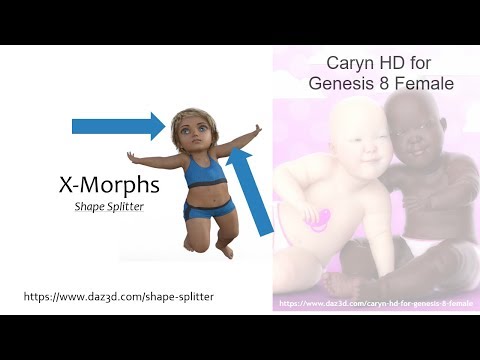
And using negative morphs, I can remove certain parts, and retain the HD detail of a figure.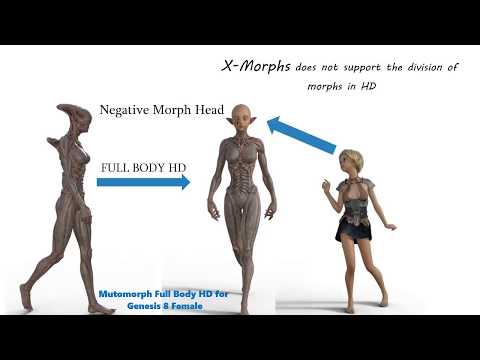 XTransfer Module 1- Genesis 3 to Genesis 8 Morph Converter (Commercial)
Worked fine for me (see attachment). Also there is no need to favourite the head and body if you favourite the main character dial. They will automatically be added. Also things like navel and nipple are transferred if the character or body dial uses those morphs. You can manually unselect them in the linked morphs list.
I might not have explained it very clearly...
When I transferred this character, it created the usual folder + morphs, exactly the same as in your screenshot. But it also created an additional top level folder as shown in my screenshot. I've transferred several characters before (and a few since) and this character is the only one that creates/uses this additional top level folder.
I understand that navel/nipple might be linked and can be deselected. However, the character in question is not just linking to a navel/nipple, it's linking to dozens of other (completely unrelated) character's nipples etc - there are so many of them that I don't really know which should be deselected. None of the other transfers have done this either.
And I have another character that gives the warning "Error moving morph file, exiting", which closes down the script.
Character conversion: copyright issues
Hi Richard, actually I already have done as you said. I own all DAZ Originsl head morph sets for Genesis, G2M, G3M and G8M. I do find most of the morphs are the same across different Genesis generations. However, as the basic shape of Genesis, G2M and G3M are so different (to me G3M and G8M basically have the same shape) I cannot achieve the same shape across different Genesis generations. What I want to achieve is: the same character shape for Genesis, G2M, G3M and G8M, and redistributable without copyright issues. Please help. Thanks!Hi Richard, thanks for your reply! Do you mean that if the character is created through merchant resources like those by Handspan Studios and Thorne, then the redistribution related copyright issues would be cleared? Thanks!I don't think even a merchant resource would be allowed for this use. Most of the Evolution Morphs do have equivalents in the basic head and body morph sets for the later figures, so often you should be able to achieve the same result and just save a Shaping preset.
Daz3d to Unreal Engine Bridgemy materials are usually as simple as possible
the iray uber one you created and is populated by export is pretty cool but honestly with my limited hardware my 3DX6 FBX exports with reduced as well as less maps are a lot less demanding, I set my lighting to medium too never Epic!
I am certainly liking the plugin for the more realistic DAZ player but my extras for my videos will probably still be also iClone6 & CC2 (I am behind), Mixamo, Fuse and Anima folk I cannot even do via D|S anway.
for rendering detailed animated DAZ people though it will rock

There's many different ways to setup a render pipeline. Games get even more complicated. There's always going to be people who have a different method they prefer and there's nothing wrong with that :)
If you already have your own Unreal materials you like, you can setup named parameters in them and attach them to the plugin. Then it will use your materials during the transfer. http://davidvodhanel.com/working-with-materials-in-daz-to-unreal/
Arnold Support to Bridge / Error in the transfer as wellFirst, thank you for the great plugin, it's really a delight to have such a tool in our arsenal.
The first issue I noticed with the bridge, when i try to export some characters, their face changes, so I believe some morphs can't be exported ?!
And so far, I only see Vray, redshift, octane as supported renderers, while ARNOLD is the industry standard for production, Would love to have that!
Thank you very much!Is it possible to transfer a rig from one item to another?You would need the OBJ to fit onto the base figure without adjustment, which might involve some fiddling with transforms and dForms followed by export to OBJ and reimport, but the donor for the Transfer Utility can be anything (Edit>Figure>Transfer Utility, set the Source to the figure you want to use and the Target to your OBJ). Of course if you used another clothing set as the Source you could not share the result with anyone, or use it as part of a product, and you should expect to need to add morph morphs and adjust the weight maps before the target item was done.
Character conversion: copyright issuesHi Richard, thanks for your reply! Do you mean that if the character is created through merchant resources like those by Handspan Studios and Thorne, then the redistribution related copyright issues would be cleared? Thanks!I don't think even a merchant resource would be allowed for this use. Most of the Evolution Morphs do have equivalents in the basic head and body morph sets for the later figures, so often you should be able to achieve the same result and just save a Shaping preset.
Possible Breakthrough!? (Genesis 8 figures not transferring)So for the last month, I've been having issues with my Genesis 8 library. Nothing from the G8 line will work with the bridge, yet genesis 7, 6 along with objects and props transfer no problem.
Today, I loaded a naked genesis 8 figure (no clothing or hair) and it transferred just fine and in only a couple of minutes. I then added some clothing and the transfer to the bridge took nearly a half an hour and then didn't import into C4D at all. I believe what's happening is all the genesis 8 morphs are being applied to every piece of clothing hair that has been attached to the figure, thus adding 20 plus minutes to the transfer, and then, breaking the bridge.
Is there ANY way to get the bridge to stop applying the morphs to the clothing?
Is it possible to transfer a rig from one item to another?Hi,
is it possible to transfer riggings from one item to another?
Example: https://www.daz3d.com/catalog/product/view/id/46153
I load that Jeans, could I transfer it to this:
https://www.cgtrader.com/3d-models/character/clothing/jeans-trousers-medium-length-pants
when I load it as simple .obj prop.
To make it easy rigged to Genesis 8?
AND is there a option to create some auto rigging? That the engine can try to autorig it?
What the hell is Gordig doing now?On a whim, I loaded G8F into a scene, and dialed EVERY toon morph I had up to 100%. This is the result of that:
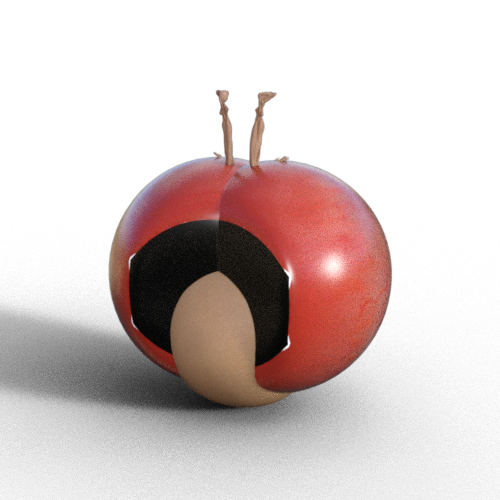
It shrank down to almost nothing, even going through the floor because the combined morphs threw the scale below 0. This is technically a nude render, but anything that would need to be covered up is inside whatever those big red structures are (inverted eye sockets?).
Hahahaha...priceless!!
Scale & Move Daz Character Imported Into Maya?Hi,
I am not very sure this can be done today, but what you can do is from Daz3d you can play with the "Height" morph before you export using the daz2maya plugin. That is what I use because it is difficult to scale in Maya.
Regards,
JCJ/JCM to Maya?Is there a way to transfer JCJ's or JCM from a Genesis 8 figure to Maya?
Exporting it as an FBX or using the Daz to Maya bridge does not work.
Daz Speech Salad - ANIBLOCKS Talking LipSync System / Conversation generator - Enjoy :)Thanks for the feedback! And wow at your 13K posts here, you're a like a Triple O.G. :).
Your project idea sounds both awesome and very deep. After studying all the aspects I could re how the current scripts and audio file to visemes translation works, I kind of understand why the tools are incapable of perfect translation and why all the end results I get are totally mismatched from the audio, and the text file, and the variations never really matter (I've been producing music/audio engineering for 25yrs, so well versed with the ways I can try to manipulate the translators through EQ changes, frequency focus, levels, voice types, speeds, gating vs non, mouth smacks and lip/tongue/moisture sound interruption, etc.).
I say all that to say - we all have different voices, pronounciation, speed of speech, pitch, tone, even saliva distro.. there is no script that could catch all that efficiently in my opinion. Couple that with all the things necessary to make speech look realistic outside the head, and although not impossible, I think such scripts could cap out quick or just give warbled results like the current ones do.
I can envision a timeline editor similar to animate2 where you control each important component for speech for the head/face on sliders so that you can morph quick tweens while viewing .wav data file under it (I really wish DAZ implemented a simple way to see the wav. I currently take my logicX and position it under daz with the audio lined up to the timeline for quick reference sometimes - mind you now I won't really have to). But yeah so far this randomizing of ANIblocks to match speech is great - and more importantly imo = Giving users full control of speed, individual shapes/words/etc and maximizing animate2 use efficiently is a good catch all without having to go heavy into a full scripting language.
My mind was racing as I deved this out on how/what to do for a 2.0 version and I have some cool 'add-ons' I'll probably make for this to enable more interaction between characters (fight scene generator, aniblock a jump, choose from 10 kicks while in the air, combine with some spins, voila.. ). So I guess in a way I'm doing a manual version of the concept, automating/scripting it more does sound fun.
It's ambitious, I encourage you to keep exploring ways to try a trial run through it - I have been through a few long term project cycles and currently love to create, hate to maintain/long-term-build :).
Runtime DNA Products sale - What are people buying from it?Yeah I'm letting my cart marinate for a few hours, then I'll go back and see what I might want to prune.
I want to see how well this outfit will transfer over to G3F via Star 2.0. Has anyone else tried it?
https://www.daz3d.com/ruby-red-for-star
Lady Littlefox is a savant of many things cute. As in too cute!
I'm trying to avoid getting sucked down the Cookie rabbit hole, but there is just soooooo much cute Cookie stuff! I wish it would autofit easily to say Genesis...
I do have Cookie btw, and added Chip to my cart finally so that Cookie doesn't feel all alone. I tend to focus on more realistic characters, but those two make me want to venture into toon land!
Not Genesis but you can use Evil Innocence's Cross Dresser to convert it to other pre-Genesis figures such as V4 and M4.
Genesis 8 and Carrara?Example 2 - using Carrara to create a conforming tank top which can then be converted to conforming item using Daz Studio's transfer utility, and then used in Daz Studio or Carrara.
Genesis 8 and Carrara?Because of Misty's presets, there are quite a few ways to use G8M and G8F in Carrara, ways to use Daz Studio as a useful free plugin for Carrara, and ways to use Carrara as a useful tool for Daz Studio. I've put together a couple of examples.
Example 1 - using Carrara to create a morph for G8M, which can then be used in either Daz Studio or Carrara (with Misty's preset).
Cookie Dough product range? Is it an early version of Aiko, etc?If you had a choice as a totally new collector of LittleFox's products, and based on most stuff being now at $1, would you go with Cookie or Star 1.0? For a female toon I am on the fence but for a male there's no other option but Chip.
I love Star! but I end up using Star 2.0 more often because she's compatible with other Genesis 3 poses, clothing, hair, etc. The stand alone "Star!" isn't and has to have her own poses and what not. Aeridis over at ShareCG made some clones for her though: https://www.sharecg.com/pf/full_uploads.php?pf_user_name=aeridis
There's one of G1, G2, Aiko 3, and Victoria 4 - so that Star! can wear clothing made for Genesis 1, Genesis 2, Aiko 3, and Victoria 4. Aeridis also made some nice face and body morphs for her as well.
These are really old renders but here's 1) the Aeridis Comet morph for Star! and wearing a Genesis outfit via the G1 clone; 2) Star! wearing an Aiko 3 outfit (there's some deformation in that one due to Star's extreme body style); 3) a V4 outfit; 4) a Genesis outfit (some parts parented rather than autofitted), and 5) a G2F outfit.
Also, Cookie and Chip have separate heads so you can use them on other figures -- you'd just have to use diffuse colors for skin or a toon skin shader product. This render was Cookie and Chip heads on Hiro 4 and Aiko 4 bodies.
Daz Studio Pro BETA - version 4.12.2.60! (*UPDATED*)Hi all, any news on DAZ bug fix for daz NOT saving any morph animations? :) This has be very frustrating bug that is hindering my work tremendously..
If anyone has an older version of DAZ 4.12.0.8xx that can post for people to download and install untill this bug is fixed, that would be wonderful. That version used to save morph animations fine..
help... :)
Does KeyMate still save the animation morphs? I like the direction of the new DS timeline, but it's still buggy, I agree not saving the morph animation is a show stopper, but it's better to discover the problems during Beta's. I find It's difficult to do keyframe animation in DS using the standard DS timeline, without KeyMate 2 (the paid version). I would continue to use keyMate until the bugs are worked out of the new timeline. I'm glad to see DAZ is finally addressing the DS animation capabilities.
My two cents worth...
How to fix when you put in a bad path on install?I had to manually update my DIM installation for some reason but after doing so the Unity & Unreal Engine options were available.
Does it mean we have also Daz to Unity bridge?
No,. not yet but they added the option already in DIM.
I am waiting for Daz to Unity bridge with great hope.
After over 19 hours of downloads of UE 4.25.3, I have managed to transfer my first character from Daz Studio to Unreal Engine.
It works and without so much work it already looks nicely in Unreal Engine.
Purchases not appearing in my install managerDownload the files manually into the folder you use for DIM. Start or refresh DIM when finished. They will appear in the list and you can install as ususal.
This hasn't worked for me
Not worked for me either... i click on the download and install tab on the "my orders" page and DIM opens automatically but the product isn't there.
My only access to the files is via the zip folder but when i extract and transfer them to my Daz 3D library they only appear in the content library and not the smart content library.
Smart Content is dependent on the metadata, which gets pulled in when you install the product. Copying the contents into the library folders does not accomplish that.
The "Download and Install" button in the Product Library just does the same as opening DIM and filtering by product number, so not really doing anything different. To download manually, use the "Download zip" button in the "Manual Install" column. Save the files to the folder you normally use with DIM. Start or refresh DIM. (Offline or not, I don't think it makes a difference, but Offline will not get the order ID, date purchased, or any other info that comes from your account on site).
This will (should) create a .dsx file in the same folder that DIM will use to identify the product and, hopefully, list it in the "Ready to Install" tab. If it does not, something is seriously broken. If the .dsx is there, check your download filters to include all versions of DAZ Studio, Poser, or any other software that you are using.
Thank you for this... i was getting snagged up on my understanding of DIM's download folder, once i understood and then located it it was plain sailing.
Daz 3D is part of

Connect
DAZ Productions, Inc.
7533 S Center View Ct #4664
West Jordan, UT 84084Licensing Agreement | Terms of Service | Privacy Policy | EULA
© 2026 Daz Productions Inc. All Rights Reserved.