-
3ds Max bridge doesn't transfer JCMs.....right?
Yeah, none of the bridge plugins seem to transfer JCM.
what is the hardest part about creating quality characters for G3/G8?1) An actual personality. Far too may items have generic and bland looks, with zero personality to them. A huge part of this leads to...
2) The face. Give the poor girl a memorable face. Don't just go for the typical BS button-nosed and high-cheekboned doxie - give the character a bit of a big/prominent honker, or a serious overbite, or somewhat bigger-than-usual ears... nothing that makes it plug-ugly, but just enough to make it stand out. The Goal is to rig it so that the individual components are a touch out-of-beauty-standard, but when combined makes for something very pretty. Finally, make sure that the face and personality match the texture! Spend the vast majority of your time on this part of the body if you're serious.
3) Asymmetry. Very few human beings on this planet have perfectly symmetrical eyes, boobs, nostrils (seriously!), ears, etc. Kick parts of the face and body just a hair off-kilter, like make one eye 0.1 - 0.5 higher than the other. Make one boob a half cup-size smaller than the other and hike it up a centimeter or so on the chest in relation to the other. Oh, and speakin' of mammaries...
4) Mammaries Based In Reality. Real women do not have massive balloon-like breasts that defy gravity and logic. Make the 'girls' *normal* sized, or explore making them smaller-than-usual, like a B-cup or A-cup.
5) Proportions. Most women are shorter than most dudes, so shove in a default G8 Male to compare against there. Give the girl a few pounds here and there, depending on what the character is and does. Don't be afraid to get a small/reasonable muffin-top action going if you're handy with making morphs by hand. Most women won't admit it, but unless your character is a teenaged girl fresh out of puberty (or some angular-as-hell hardbodied triathlete, or a scrawny transsexual person), there's gonna be a bit of belly there. Part of what makes most women... a woman. Oh, and leave at least some waist there, please? Oh, and it wouldn't hurt to shrink the chest and/or monkey with the shoulder width... the 80's shoulder-pad era is dead, and should stay that way. Finally, the head needs to be in proportion woth the body, and not that tiny alien-head that the defaul Genesis 8 character comes with, so don't be afraid to scale it up a touch.
6) A Damned Solid Skin. Seriously, this is where a lot fo characters fall mega-short. The texture (and any/all makeup and eye-color options!) should match the personality of the character you're building. I don't mean the obvious stuff like slapping a freckled Irish girl's tecture on a Korean girl's head-mesh... I'm talking the subtleties. If your character is tomboy-ish, then the makeup options should be either very sparse or very over-done (or how about both options? Oh, and don't forget an option with no makeup.) Dig into (or discover!) the ethnic makeup of your character, then go look at photos of real people with the same ethnicity - and get the entire range so you know where your boundaries are. This works even in mixed-race folks. For instance, if, say, my character is half-Black and half-Latina, then I gotta dig into the facial structures for both, blend them in a way that makes sense, but then I dig into the skin tones and find one that makes sense, blend them in a way, ensure the eye color makes sense (yeah, no baby-blue eyes here by default, folks!), and etc. Now for the technicals: Make triple-certain that your skin will show well in a wide range of lighting circumstances - for both 3DL and Iray versions. I've lost count of the texture kits that look like utter garbage in anything other than the default DS Skydome lighting. Don't get stupid with the pores - I don't need a close-up of her face to resemble a close-up photo of the Moon's surface, and over-poring (is that a word?) tends to exaggerate texture deformation when a joint bends. Don't get stupid with the rez - you do not need a 12,288px x 12,288px shader set. Unless there is a sudden spike in users who play with DS on 84" 8k UltraHD television sets, 2048x2048 will work just fine for most users, and maybe put in an HD option with 4096x4096 if you want to futre-proof things.6a) Don't 'Help' The Skin! What I mean is, don't put in genital textures, don't put in knee wrinkles, don't put in the creases between butt-cheeks and legs, and in general don't paint on anything extra to simulate what movement should be simulating. This actually helps photorealism, because you're not seeing an out-of-place butt-crease on a bent-up thigh, or knee skin wrinkles on a knee that's fully bent, or under-boob lines on a breast that's streched upwards (hey, some folks do nudes, go figure, right?) Point is, don't 'help' the user/customer out. It only leads to headaches.
7) Get to Know The Personlet You're Creating. The whole process of building a character is like getting to know someone. The deeper you get into the details, the more you come up with and 'discover' about the little person-ish thing that you're building. My favorite way to do this is to build something that sort of stands out, then invent a whole backstory about that person. Then I go back in and tweak it. Then I fill out more details... then go back in again if needed.
8) Leave Room For Change. If you're making something for yourself you can ignore this, but if you're making something for sale, you need to take this into account. Once you're done making something, toy with it a big - make it fat, make it skinny, make it pregnant (not like that you perv!), make it a midget, make it a giantess, make it a child, make it an old woman, etc... if you make a character morph too rigid, then changes made by a customer will be disappointing to say the least, so do some testing on that beforehand.
Gone on too long here, but hopefully this helps a bit.
Cheers!I disagree with lots of this, but that is key to what rawart posted, everyone has their own ideas. One of the great things about DS is you can change what you want with other morphs, textures, hair, etc, so no need to strive for perfection since it technically doesn't exist. I never use any body morph that comes with any character I have purchased since I have my own that i have developed and prefer.
BTW as for number 4 on your list, more than half the women I interact with in my life have implants, including my GF and my sister. Some are more pronounced, some are more subtle. the point is, they do exist in real life, just maybe not where you live.
I assume the OP was talking about PAs and what aspect is the hardest. I would think the skin since there are more than enough morphs to go around and access to apps like zbrush is more wdiespread than ever, but creating a quality skin from scratch has got to be one of the more difficult tasks around having tried it a few times myself
Help with body injection morphs for Kids 4Thank you, I'll try that. The only control I saw was one that said "realistic" and I tried moving that but it didn't change the body. I'll try it again, though.
Morph dials created to be used in Poser sometimes behave a bit oddly in DAZ|Studio. Are you looking in the Posing pane, Shaping pane, or Parameters pane?
One common situation is that a morph dial may only be visible in the Parameters pane, if you click on the "General" section.
Sukai 8Sukai... in villain mode. Morph is mostly 65% Sukai, 35% Kayo, but I am borrowing from multiple Base figures and pro bundles here.
 Auto-Fit / auto-follow tutorial or documentation?
in your case you may want to look at geografts instead, the autofit could work if you want it to fit over the top of part of the limb, and making one is pretty much a case of creating it in the correct place and then using the transfer utility with the figure as source and the wound prop as target (this will create a wound figure that fits to G8, but doesn't hide any of the G8 mesh)
but again I would suggest looking for tutorials on making geografts, as the geograft will let you replace part of the limb geometry with your wound graft.
Help with body injection morphs for Kids 4This specific morph shows a potbelly, but the morph is applied to the full body. There still is only the slider for "realistic," and no other sliders (and none on specific body parts). I also tried scaling just the abdomen and that didn't work, either. I got the (separate) head morph to work, but not the body one.
what is the hardest part about creating quality characters for G3/G8?1) An actual personality. Far too may items have generic and bland looks, with zero personality to them. A huge part of this leads to...
2) The face. Give the poor girl a memorable face. Don't just go for the typical BS button-nosed and high-cheekboned doxie - give the character a bit of a big/prominent honker, or a serious overbite, or somewhat bigger-than-usual ears... nothing that makes it plug-ugly, but just enough to make it stand out. The Goal is to rig it so that the individual components are a touch out-of-beauty-standard, but when combined makes for something very pretty. Finally, make sure that the face and personality match the texture! Spend the vast majority of your time on this part of the body if you're serious.
3) Asymmetry. Very few human beings on this planet have perfectly symmetrical eyes, boobs, nostrils (seriously!), ears, etc. Kick parts of the face and body just a hair off-kilter, like make one eye 0.1 - 0.5 higher than the other. Make one boob a half cup-size smaller than the other and hike it up a centimeter or so on the chest in relation to the other. Oh, and speakin' of mammaries...
4) Mammaries Based In Reality. Real women do not have massive balloon-like breasts that defy gravity and logic. Make the 'girls' *normal* sized, or explore making them smaller-than-usual, like a B-cup or A-cup.
5) Proportions. Most women are shorter than most dudes, so shove in a default G8 Male to compare against there. Give the girl a few pounds here and there, depending on what the character is and does. Don't be afraid to get a small/reasonable muffin-top action going if you're handy with making morphs by hand. Most women won't admit it, but unless your character is a teenaged girl fresh out of puberty (or some angular-as-hell hardbodied triathlete, or a scrawny transsexual person), there's gonna be a bit of belly there. Part of what makes most women... a woman. Oh, and leave at least some waist there, please? Oh, and it wouldn't hurt to shrink the chest and/or monkey with the shoulder width... the 80's shoulder-pad era is dead, and should stay that way. Finally, the head needs to be in proportion woth the body, and not that tiny alien-head that the defaul Genesis 8 character comes with, so don't be afraid to scale it up a touch.
6) A Damned Solid Skin. Seriously, this is where a lot fo characters fall mega-short. The texture (and any/all makeup and eye-color options!) should match the personality of the character you're building. I don't mean the obvious stuff like slapping a freckled Irish girl's tecture on a Korean girl's head-mesh... I'm talking the subtleties. If your character is tomboy-ish, then the makeup options should be either very sparse or very over-done (or how about both options? Oh, and don't forget an option with no makeup.) Dig into (or discover!) the ethnic makeup of your character, then go look at photos of real people with the same ethnicity - and get the entire range so you know where your boundaries are. This works even in mixed-race folks. For instance, if, say, my character is half-Black and half-Latina, then I gotta dig into the facial structures for both, blend them in a way that makes sense, but then I dig into the skin tones and find one that makes sense, blend them in a way, ensure the eye color makes sense (yeah, no baby-blue eyes here by default, folks!), and etc. Now for the technicals: Make triple-certain that your skin will show well in a wide range of lighting circumstances - for both 3DL and Iray versions. I've lost count of the texture kits that look like utter garbage in anything other than the default DS Skydome lighting. Don't get stupid with the pores - I don't need a close-up of her face to resemble a close-up photo of the Moon's surface, and over-poring (is that a word?) tends to exaggerate texture deformation when a joint bends. Don't get stupid with the rez - you do not need a 12,288px x 12,288px shader set. Unless there is a sudden spike in users who play with DS on 84" 8k UltraHD television sets, 2048x2048 will work just fine for most users, and maybe put in an HD option with 4096x4096 if you want to futre-proof things.6a) Don't 'Help' The Skin! What I mean is, don't put in genital textures, don't put in knee wrinkles, don't put in the creases between butt-cheeks and legs, and in general don't paint on anything extra to simulate what movement should be simulating. This actually helps photorealism, because you're not seeing an out-of-place butt-crease on a bent-up thigh, or knee skin wrinkles on a knee that's fully bent, or under-boob lines on a breast that's streched upwards (hey, some folks do nudes, go figure, right?) Point is, don't 'help' the user/customer out. It only leads to headaches.
7) Get to Know The Personlet You're Creating. The whole process of building a character is like getting to know someone. The deeper you get into the details, the more you come up with and 'discover' about the little person-ish thing that you're building. My favorite way to do this is to build something that sort of stands out, then invent a whole backstory about that person. Then I go back in and tweak it. Then I fill out more details... then go back in again if needed.
8) Leave Room For Change. If you're making something for yourself you can ignore this, but if you're making something for sale, you need to take this into account. Once you're done making something, toy with it a big - make it fat, make it skinny, make it pregnant (not like that you perv!), make it a midget, make it a giantess, make it a child, make it an old woman, etc... if you make a character morph too rigid, then changes made by a customer will be disappointing to say the least, so do some testing on that beforehand.
Gone on too long here, but hopefully this helps a bit.
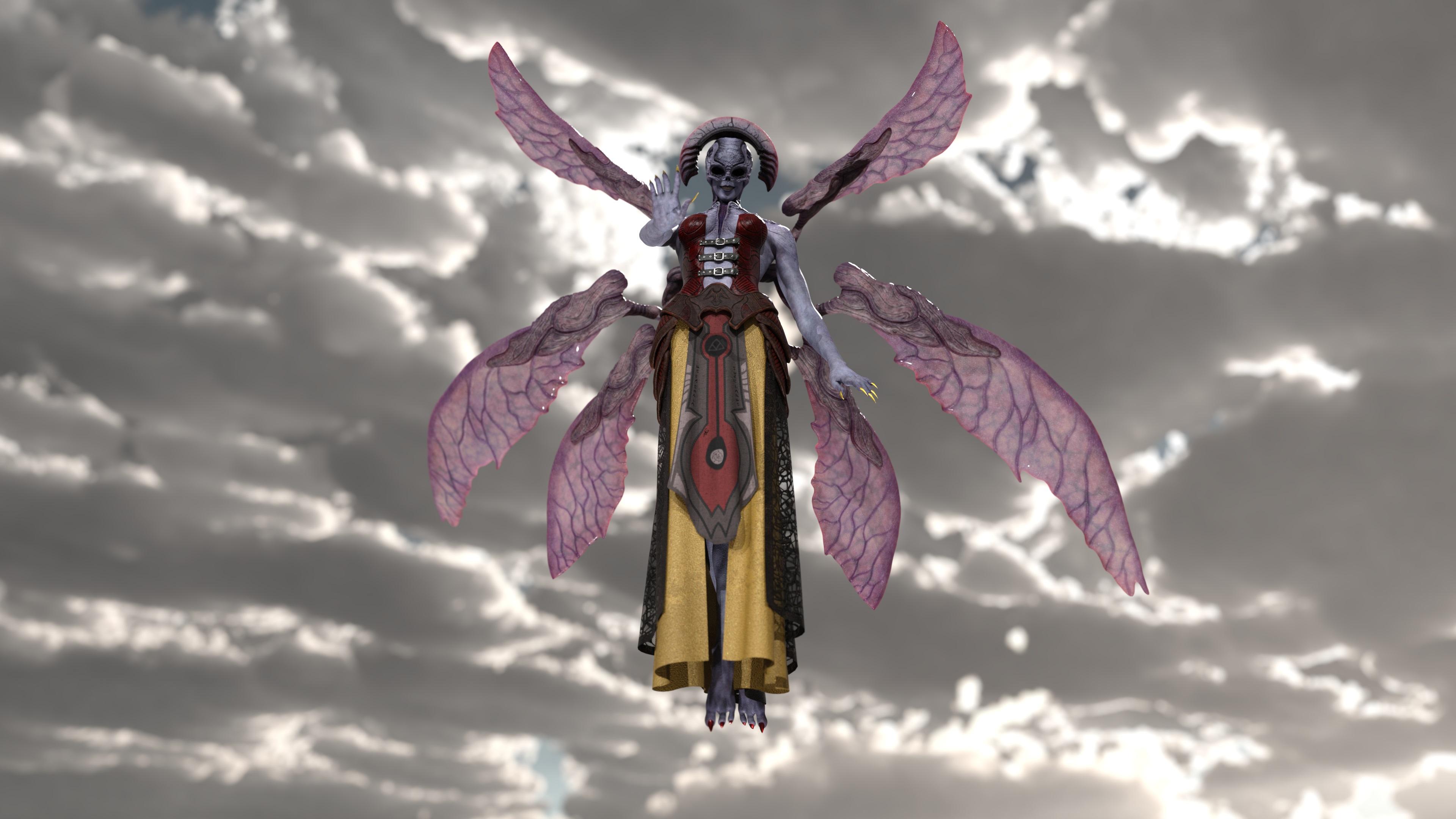
Cheers!Villain Horde BundleI had to try out the fallen angel figure!
Not quite stock as I've applied a morph and done some surface setting changes to the outfit.
Still going to look at adding a bit of post processing, but very much unused to that yet.
 (Released) dforce Regina Hair for G8F [Commercial]
There is no morph to raise the volume just at the top/near the roots but 3 simulation settings that control the hair's overall volume are included.
The first two images are default volume and the third and fourth are low and medium volume. There will be a promo showcasing side by side comparison of all 3 with the same pose and shape on the product's page :)
Shape Splitter - Divide, Combine and Save (The new version is already available. 1.2.1)[Commercial]" This product does not transfer morphs to other figures."
So I can not use this product to grab a morph from G8F To G8M? I like the Butt of a G8F :D and wanna move it to a G8M :) giving him a nice butt :p
Is that possible with Shape splitter?
This is possible with the DAZ Studio build in tool: Transfer Tool.
But CGI3DM is working on a transgender tool, which alloqws you to transfer morphs between genders more easiliy as with the Transfer Tool.That would be awesome :) I love cute butts and the most Manns have a uhm strong butt xD...
@Leana also thanks for your quick feedback.
Shape Splitter - Divide, Combine and Save (The new version is already available. 1.2.1)[Commercial]" This product does not transfer morphs to other figures."
So I can not use this product to grab a morph from G8F To G8M? I like the Butt of a G8F :D and wanna move it to a G8M :) giving him a nice butt :p
Is that possible with Shape splitter?
This is possible with the DAZ Studio build in tool: Transfer Tool.
But CGI3DM is working on a transgender tool, which alloqws you to transfer morphs between genders more easiliy as with the Transfer Tool.Shape Splitter - Divide, Combine and Save (The new version is already available. 1.2.1)[Commercial]So I can not use this product to grab a morph from G8F To G8M?
No.
You can use this product for example to take a full body morph for G8F and create individual morphs for just the head or just the arms, but those morphs will still be for G8F.
Shape Splitter - Divide, Combine and Save (The new version is already available. 1.2.1)[Commercial]" This product does not transfer morphs to other figures."
So I can not use this product to grab a morph from G8F To G8M? I like the Butt of a G8F :D and wanna move it to a G8M :) giving him a nice butt :p
Is that possible with Shape splitter?
How to make eyeballs adjust to eye morphs?
Will try, thanks Richard!If parts are distorted that sounds like an issue with the morph.
You can use ERC Freeze to link the eye adjustments to the morph - but make sure that you don't use ERC Freeze on a controller that has already been frozen, without using ERC Bake first.
How to make eyeballs adjust to eye morphs?If parts are distorted that sounds like an issue with the morph.
You can use ERC Freeze to link the eye adjustments to the morph - but make sure that you don't use ERC Freeze on a controller that has already been frozen, without using ERC Bake first.
Help with body injection morphs for Kids 4Thank you, I'll try that. The only control I saw was one that said "realistic" and I tried moving that but it didn't change the body. I'll try it again, though.
Kids 4 predates any and all Genesis characters, and they were developed for Poser.
The morphs may show only in the individual parts of the character, not necessarily on the main character, check your hands, arms, feet, thighs, etc...
As far as I remember, it took quite a while for fullbody morph to appear for any of the Generation 4 figures (V4, M4, K4, A4...)
Geo-Graft Breastacular has stopped reacting with clothing.So I could use some help with this. For some reason, a few days ago, my Breastacular Geo-Graft stopped working right. I would like this think this was because I tried to add morphs to it using d-formers. I do believe it was right after I had saved the 3 morphs that the problems started. I had wanted to use them on other models. I think it worked fine with the first model(maybe) but afterwards when I reloaded the scene I had made the morph in that's when it seemed to break.
When I would load it onto a model or re-opened a scene that had it in use the geo-graft was seemingly not attached to the body. It would go into place, but the breast underneath would still show through and the part of the graft where it would meet the chest would show even in renders. So I thought maybe something happened like what happens with hair caps sometimes and the mesh was out of place. I thought maybe a hidden property had affected it somehow or that my morphs had causes the issue, but getting rid of the morphs or putting all the currently used values to 0 didn't seem to help. I could just scale the grafts, but then it wouldn't match up with the rest of the model's textures in the chest area. And another bigger problem developed. Now no matter what clothing I put on the model the graft just clips through it.If I increase or change the sizes in anyway the clothing don't react to it at all. Despite being fitted and parented to the model, the graft acts like a completely separate object where as before it would react the same to clothing as were it always a part of the original model.
I've tried using smoothing modifiers, D-force, deleting the graft and morphs completely, reloading the scenes, trying it on different models, nothing seems to help it. If I load the graft on the base model it still has the clip through of the original mesh underneath and while I can "fix" that by enabling smoothing or having the original model collide with the breast graft, I still can't get the clothing to now react to it. Oh and deleting all of it from my Daz Library too. Oh and i just noticed that after I had done this it seemed to mess up my golden palace grafts too somehow. I'm gonna try redownloading them too now since I get the grey block issue.
Thank you for reading and if anyone has any ideas I'll be checking in. It kinda sucks cause I was so excited at being able to create some extra "squish' for the graft, but now the graft don't work at all. Hopefully I put this in the right area of the forum.
Edit: After several days of trying, I just loaded up one of my scenes again and now for some reason the graft is acting like it did before even with my morphs...Well if someone still has a reason why it happened let me know. I was gonna upload a screenshot or two showing the issue, but since it's working normal now I can't really do that...
Opinions on the HD Visemes for Genesis 8 Female?They would complement the arrangement. They affect the lips, not the expressions. On the Parameters Tab there is only the one 00_HD to dial up and then as each of the default visemes are activated, so too is the HD morph for that viseme. So it's easy to use.
Where tehy are activated? I can not find it
Help with body injection morphs for Kids 4Inject only merges the morph to the figure, you still need to dial it to see the result.
Celebrity Look-a-Likes for 3D figures Part 2Here are a couple of tests of my Naomi Scott after what I hope are some further refinements to her nose.
Now I can't stop staring at the nose, lol - I think it's better but still looks slightly too squared off. I'd love to see the morph with a skin-tone closer to the one by ChadCrypto above.
Daz 3D is part of

Connect
DAZ Productions, Inc.
7533 S Center View Ct #4664
West Jordan, UT 84084Licensing Agreement | Terms of Service | Privacy Policy | EULA
© 2026 Daz Productions Inc. All Rights Reserved.