-
HH Scarlett for G9 [Commercial]
Maybe the boat has sailed on this, but I think I found an issue with some of the leg JCMs on Scarlett. Some morphs are inadvertently influencing vertices on the jaw and lips (and eye socket), though some definitely are worse than others (like bodyHHScarlett_cbs_thigh_x115n_l). Individually, it's a small influence even at max strength, but there are multiple morphs doing this and triggering all of them adds up to noticeable distortion. Perhaps it's not worth the time to fix this so long after release, but hopefully this is useful for future characters you make.
To reproduce this, load a Genesis 9 base figure and dial in Scarlett full body morph. Bend the thigh bone all the way (either one) and look at how the jaw reacts. Both sides of the jaw deform slightly even if only one side JCM kicks in. Bending the shin and the foot causes a similar distortion.
Hopefully the GIF I made works here. In it, I'm bending the Lthigh -> Lshin -> Lfoot in that order, then undoing those bends.
 Unity JCM Controller Script
Thank you, today I worked with the AI to make a script to handle JCM's
It auto populates all bone names, fills in the name of the joint, and it moves the blendshape JCM appropriately.
After about 2 to 3 hours I have a perfect copy you just drop it into the game, put the skinned renderer mesh (Genesis) into the field, and click Auto Populate JCMs, and any JCMs on the morph go into the fields, with the appropriate names. My mind was blown it actually has worked, this has been a problem I've had for years wanting to make a Unity game with Daz characters.
I don't know if people want it but if they do I can post it but maybe there are other solutions I don't know of? I spent weeks looking for one so writing one and seeing it work and all the JCM's fire off is making me really excited.
I am not sure how to make it better, it seems to do everything I needed. I'm trying all the JCMs I can find in Daz to export since it just is using the auto add ones so far. If people have an interest I'll post it
Edit: I also have a clothing script that can put your clothes on the bones of the daz character, so you can switch out dozens of outfits easily and I just learned you can add ExecuteInEditMode and it will just let me have my daz char clothed in scene view as I move her around...this is tons of progress.
Additionally, one that lets blendshapes follow across multiple meshes... 3 problems solved using Daz characters in Unity.
Just noticed my clothes had lots of pop in, so I put on the 'JCM manager" script I made, and all the JCM on my person are on the clothes, but they did not move, I have the script used for eyelashes to move with the rest of the face, so I put it on the shirt, the pop in is gone and the shirt moves with the JCMs. DAZ characters are looking great now!Buy Something That Doesn't Work in Carrara? Post your Questions and Workarounds here. (please)Another tip for Premier members and/or folks who have Mesh Grabber:
In Daz Studio we can use Mesh Grabber or Studio Premier's Geometry Scultor (Mesh Grabber on Steroids) to reshape directly while the figure is wearing the item (or not) and then save the results as a morph directly from Mesh Grabber or Geometry Sculptor. Then save that as a new garment to retain those new morphs.
I did this all the time in Carrara, however, without Mesh Grabber. I just couldn't reuse the results in anything other than Carrara - which was fine for me. I'd just save the new garment as a CAR file in my browser.
We can make morphs in Carrara - but I often just left it as the new shape.
Buy Something That Doesn't Work in Carrara? Post your Questions and Workarounds here. (please)Thanks Dart - was wondering if the obj morph from Carrara might be the sloution. Will be interested in what Wendy thinks !!!
Buy Something That Doesn't Work in Carrara? Post your Questions and Workarounds here. (please)Possibly.
It might be working in Daz Studio, but not in Carrara, if within Daz Studio the clothing is using the Smoothing Modifier
(with item selected in Scene pane > General > Mesh Smoothing)
If there is Not as Mesh Smoothing listing under General, then that's not the problem - but it likely is.
I really Wish that Carrara had that same modifier - maybe it does and I don't know about it? In DS, it works So Well for So Many Things. And many things - especially tight-fitting clothing (and clothin in general, for that matter) rely upon it.
The only possible solution for this for Carrara that I can think of is to reshape the mesh to fit the Semi-Realistic morph, export that as an OBJ. The import that into the original item in DS using Morph Loader Pro as a new morph. We'd likely have to dial it ourselves in Carrara manually, but it should would - albeit not neccesarily with all poses.
Buy Something That Doesn't Work in Carrara? Post your Questions and Workarounds here. (please)Webboid by Walt Sterdan - https://www.daz3d.com/forums/discussion/comment/9182416/#Comment_9182416
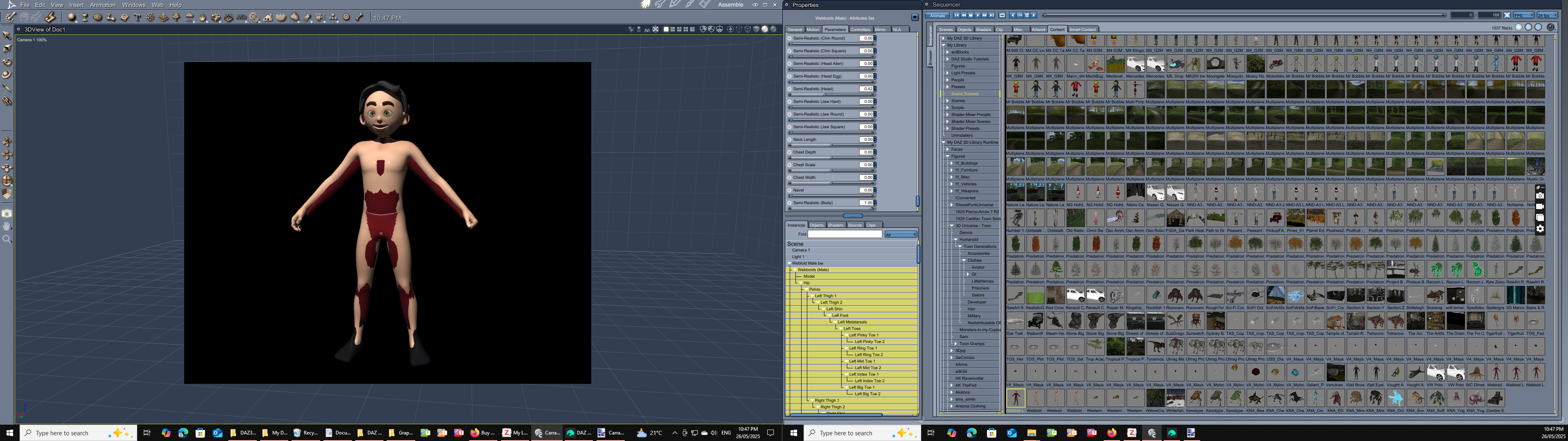
Problem with the rigging not posing when loaded into Carrara - solved by converting to Blended Weight in DAZ Studio.

Next problem - clothing not playing the game when the Semi-realistic morph is used.
1. Tried just using the Autofit with the clone - not working on Semi-realistic morph in Carrara
2. Loaded the clothing onto the Webboid in DAZ Studio, converted to Blended Weight and saved as a Scene Subset, not working on Semi-realistic morph in Carrara
3. With the loaded blended weight clothing on the Webboid in DAZ Studio, applied the Semi Realistic morph in DAZ Studio, saved as a scene subset, not working on Semi-realistic morph in Carrara
Any thoughts on other methods ?
 Free Toon Characters coming July 1st, early download available now
Thank-you ! Works in Carrara after converting to Blended Weight in DAZ Studio.
Clothing from Toon Generations needs exploring to come up with best method for Carrara, as the Realistic morph with the clothing Auto-fit was having issues a couple of ways that I tried.
There's Always Another Sale Thread -- Discussions Only Pt 4send to Hexagon and smooth it send back as a morph
There's Always Another Sale Thread -- Discussions Only Pt 4It looks like the standard reaction of clothes simulated on a non supported body with breasts differing too much from the base ones, something that will also happens on Genesis 8.
Same thing can happens with the triangular deformation appearing on skirts or dresses around the crotch area.
Possible solutions:
- creating a body morph for the clothes with Blender, Hexagon, Zbrush, etc (it seems to also be possible to remove the problem by using lots of iteration with a smoothing modifier, exporting the result as OBJ and importing it back as a body morph, but you'll likely be losing lots of details in non impacted areas).
- using a simulation timeline starting with the base shape and base pose at f=1, with the final figure shape in base pose at frame 15, the final pose at frame 30 and with 15 frames after that to let the simulation settle.
There's Always Another Sale Thread -- Discussions Only Pt 4Richard Haseltine said:
SilverGirl said:
xyer0 said:
You guys are hilarious. Tell me: I've noticed these kinds of underboob artifacts in promos a lot recently--is G9 breast projection immune to dForce?
Yes, and it drives me up a wall.
Projection morphs do not, as far as I am aware, interact with dForce any differently than others - the image looks like a morph applied after any simulation was done, or an outfit that was not responding to simulation in that area.
Ah, apologies on not understanding the reasoning behind why it doesn't work. All I know is I keep winding up with those underbreast issues when I load things in, and dForce doesn't fix it.
Transferring Genesis 8 morphs to Genesis 9 using clonesgibrril_fa945a6cee said:
Hi all,
I'm trying to transfer some genesis 8 morphs to genesis 9 using clones:
My idea wold have been to apply a genesis 9 clone to a zeroed genesis 8 and then dial in the morph I want transfered. Export genesis 8 to obj and then import that to genesis 9 as a morph using morphloader pro.
But... How does that work with the eyes and mounth and such? Do I need to delete the eyes, mouth, tear, eyelashes, brows, etc of any figure? Or do I keep them in? Is there any tutorial available on how to do this given the differences in "structure' between genesis 8 and genesis 9?
Thanks a lot!!!Both G8 and G9 at base resolution ... no attached geografts, yes for G9 to remove all the additional parts. Dial G8 shape into G9, export out G9 obj [no groups, making morphs] [might need to hide G8 and anything else in scene]. Then bring back into D/S the shaped G9 .obj which must be landing exactly on G8. Make clothing out of it. Save it [esp if planning to use again, save some time]. Then in G8 with the G9 clothing "fitted" to it, dial in the morph that you want. Hide G8 and export out the G9 clothing [again no groups]. Using Morph Loader pro, select the shaped G9 clothing to make the morph. If you like the morph [i.e. it took], then zero that morph and save it. I would suggest clearing the scene and reloading the scene with a fresh G8 and G9 [both set to base resolutions, and no extra parts or geografts on G9].
The above is "off the top of my head" -- hopefully didn't miss any super important steps.
n.b. depending upon which morphs are being transferred over, some will require extra morphs to make them work nicely with G9.
There's Always Another Sale Thread -- Discussions Only Pt 4SilverGirl said:
xyer0 said:
You guys are hilarious. Tell me: I've noticed these kinds of underboob artifacts in promos a lot recently--is G9 breast projection immune to dForce?
Yes, and it drives me up a wall.
Projection morphs do not, as far as I am aware, interact with dForce any differently than others - the image looks like a morph applied after any simulation was done, or an outfit that was not responding to simulation in that area.
GENERAL FREEBIE REQUESTS part 3I don't know if other scripts like that exist, but they are a couple you can get from @richardandtracy:
https://www.renderosity.com/users/richardandtracy/freestuff?keyword=transfer
Whats it gonna take?wolf359 said:
I have seen all of those years ago.
I suppose I should have clarified that I meant examples of how poser is
"so unique and powerful as an animation tool in ways industry standard 3D software is not.”
Those animations you showed, have terrible foot sliding which is why so many of the shots are framed above the knees with very rapid camera cuts whenever the feet are shown.
While the RWBY stuff is "well done" (for poser animation)
it is no where close to what cna be done in Reallusion Iclone or
“industry standard 3D software “ such Max or Maya or even Blender.
particularly with Foot contact IK animation and motion retargeting from various sourcesI heard iClone is good but i'll probably never touch it due to that high price.
Maybe i'll be alone on this hill unless I can come up with something good down the road. Poser is amazing it comes to mocap editing though. Esp if you have access to OptiTrack...but that's like $20,000 more than most people can afford. I was using AxisNeuron suits for a while but they are so fragile and break easy. Its just nice ot be able to import the data right onto the character and start editing. no transfer rigs or retargetting. but rarely use any mocap as is. Still takes a lot of manual work. But the fast efficient workflow comes with practice and learning the hotkeys. And this is not something you can do very well if using a Mac. I also really like how "hackable" things are. and being able to animate fx on cards and custom geometry sequences with a single dial. Its possible to do that in other software too but not an easy setup. I'm not going to convince anyone by talking about it though. I guess if I can ever manage to get around to making something cool then maybe someone will wonder. but till then, :should shug.gif:
Free Toon Characters – Released Early!In case you missed the announcement on July 1st, they're now available at:
https://webboids.comThe latest version of the Webboids is always available from the front page, and new freebies are being uploaded regualrly. Check it out, and have fun!
As mentioned in another thread:
https://www.daz3d.com/forums/discussion/726366/free-toon-characters-coming-in-june/p1I'll be sharing my Webboid toon characters, male and female characters created for me by Steve Corder (3D Universe) at the very end of June. By the "Official" release on July 01, Canada's Birthday, I hope to make or link to a tutorial on making Genesis clones for using with The Webboids (I'm not allowed to supply the Genesis 3 and Genesis 8 clones as the mesh shapes used are too similar to the shapes of Genesis meshes) and hopefully some simple clothing and hair props, with some pose sets.
This preliminary release is to allow people to try the characters out and see if they're something they can use, see if there's any issues that can be resolved before June 22 and hopefully to have fun with.
This package only contains the Webboids, simple bathing suits for clothing and a clone that will allow them to use clothing packs designed for the original 3D Univese Toon Generations; all the clothing i've tested from 3D Universe and 3Djoji so far work beautifully and if you don't own any, they're often less expensive than many others packages.
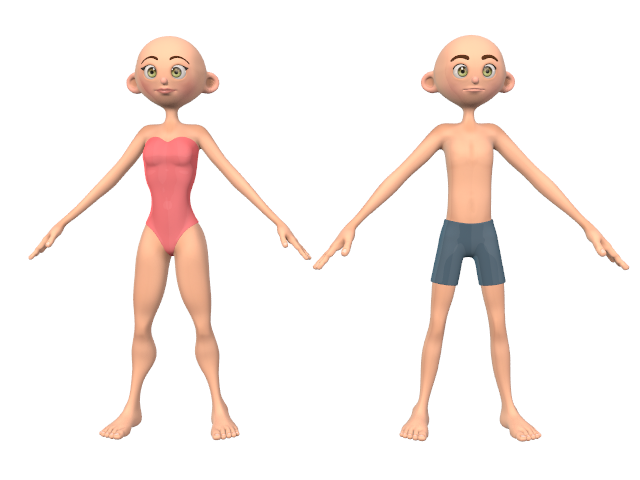
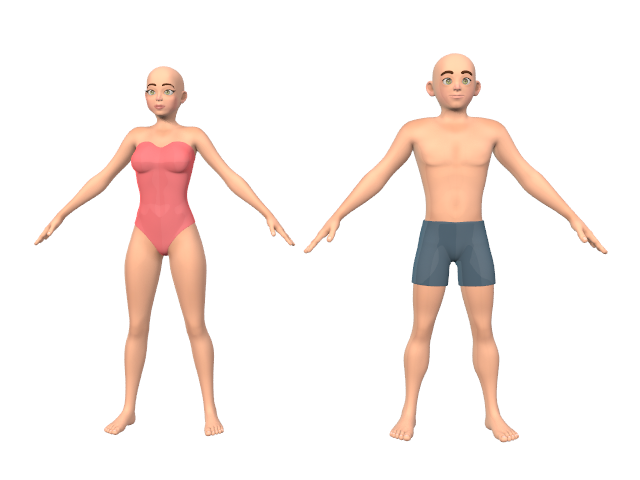
You can go to download page for a better example of how much range the characters have, but here's the base toons as they start out and after they've had their "semi-realistic" morph set to 75% with a little of the "curvy" morph dialed in for the female and a bit of the "buff" morph dialed in for the male. There's lots of options for changing the shapes of their ears, eyes and nose, their head and face shapes, body types, and more.
https://sterdan.com/walt-sterdans-webboids-advance-download/
Have fun!
 Free Toon Characters coming July 1st, early download available now
Silent Winter said:
Point 2 specifies 3D interactive games. Which would exclude 3D interactive experiences like a populated walkthrough environment for a VR program. Entirely your call, just wondering if you intend it that way.
Point 7 is now much clearer, though the "please try to..." part probably wouldn't hold up in court as a requirement. I'm not sure what Daz's interactive license says in regard to use in 3D games, but might be worth looking up their terms and conditions to get an idea for phrasing (though you can't copy directly as those would be copyrighted).
Thanks again for your feedback. I think I've finalized the licence using your earlier comments (very helpful) and updated and tweaked a few others. I'm okay with both 3D interactive games and 3D interactiive experiences (and I'm sure if there's not already some we haven't thought of, there probably will be next year); same goes for the "please try to..." as it's not something I'm actually worried about enforcing but thought I should at least suggest it. I think your comment about the end user making a minor tweak and so on pretty much hit the nail on the head about the problem with my earlier version. This way, they can make derivitive versions of the Webboids but can't share them except through 3D interactive games or experiences.
Here's the final version of the license (someone else suggested point 9 regarding my liabilities, something I would never have considered):
••••••••••••••••••••
Licence Agreement for the use of “The Webboids” 3D character packageWEBBOIDS as 3D mesh characters are ©2025 by Walt Sterdan. Webboids as fictional story characters are ©2002 by Walt Sterdan
Questions or comments can be emailed to: xxxxxxxxxxxxx (address is in the licence, just not listed here)
The character mesh has been crafted by Steve Corder (3D Universe) as a commissioned work for Walt Sterdan. For information on commissioning work from 3D Universe go to:
https://www.3duniverse.co.za/commissions
To keep things simple, here's the rules for using the Webboids.
The simplest rule to remember: Webboids must be free.
In short: the Webboids package – mesh, textures, code, etc. – cannot be resold in any way, shape or form.
In more detail:
1. You may use the Webboid characters in 2D renders and animations free of charge for both commercial and non-commercial works.
2. You may use the Webboid characters for 3D printing or 3D interactive games – for free or commercial product – free of charge.
3. You may share the Webboid characters for free on a one-to-one basis as long as you include the complete, original package which includes this license.
4. After June 22, 2025 (The Webboid Official Release Day) you may post the complete Webboid package on your website for distribution with some restrictions. You may not charge for the download of the Webboid package or for any part therein; the Webboid package must appear on a page dedicated to the download of the Webboid package and any other Webboid assets you wish to provide for download; Webboid assets being provided (hair, props, clothing, morphs, etc.) for commercial sale must link from the dedicated Webboid page to your store or an order page for checkout, to keep those transactions separate from the free Webboid package and free asset downloads.
5. You may not charge for the Webboids package, in part or whole, via the internet or as part of any commercial package in any form. Webboids must be free.
6. You may create add-ons (hair, clothing, props) for the Webboids and distribute your works for free or commercially, as long as the Webboids package isn't included as part of a commercial product or collection. Webboids must be free.
7. You may make derivative works of the Webboids for personal use and projects only and those derived works can not be shared other than as 2D and 3D prints or in animations. If used in 3D interactive games, please try to ensure that your derivative works cannot be extracted.
8. You can make morphs for the Webboids and charge for the morphs, as long as the morphs are a separate product that the end user would need to add to their own copy of the Webboids. In short, no adding morphs to your copy of the Webboids and selling it, you can only sell the morph itself. Webboids must be free.9. There are no Warranties included. The Webboids 3D character package is provided on an "as is" basis, without warranty of any kind. In no event shall Walt Sterdan be liable for any indirect, incidental, special, punitive, or consequential damages whatsoever, whether based on contract, tort, warranty, or other legal or equitable grounds, including, without limitation, damages for loss of business profits, business interruption, loss of business information, or other pecuniary loss, arising out of the use of or inability to use The Webboids 3D character package.
•••••••••••••••••••
Unless you can find anything else, I'm just building the web page for the preliminary release now.
Daz Studio 6 Beta - version 6.25.2026.19821! (Updated July 23, 2026)I tried out the alpha. Looks really good and shaping up nicely. The font is so much more readable. I have it set to city limits. The new texture shaded mode looks sweet. It's better than Filament lol. Animation playback in the timeline works well for me. it's smooth and plays quicker than current Daz. Genesis 8 figures move around so easy! It works like Genesis 2,3 and 9 now and like Genesis 8 on my M1 Mac. I'm so happy about that. It's a dream to pose with the Uni Tool and Active Pose tool. Obviously not all scripts are working. hope they transfer over, like Limbstick, Heels Control, etc., etc. So far I'm having a little trouble selecting the bend, twist, side to side guide circles when I have the universal tool active. Hope to see Animate 2 and aniblocks return for my current backlog. I'll post more feedback as I encounter any bugs, issues, and so on.
My rig is a 2022 ASUS M16 Laptop with 12th Gen Core i9 and RTX 3080Ti w/ 16GB of Vram if that info is necessary. Thanks Daz!
Transferring Genesis 8 morphs to Genesis 9 using clonesHi all,
I'm trying to transfer some genesis 8 morphs to genesis 9 using clones:
My idea wold have been to apply a genesis 9 clone to a zeroed genesis 8 and then dial in the morph I want transfered. Export genesis 8 to obj and then import that to genesis 9 as a morph using morphloader pro.
But... How does that work with the eyes and mounth and such? Do I need to delete the eyes, mouth, tear, eyelashes, brows, etc of any figure? Or do I keep them in? Is there any tutorial available on how to do this given the differences in "structure' between genesis 8 and genesis 9?
Thanks a lot!!!Anatomical Elements for genesis 9felis said:
I don't have that product.
But just to check, you own this? https://www.daz3d.com/genesis-9-starter-essentials-expansion
And to answer your question: you can create your own morph in a modeller (but only in base resolution, while Daz PAs can do HD morphs).
Yes I own the starter expansion and can apply anatomical element on the female. But I cannot do the vaginal opening.
Free Toon Characters coming July 1st, early download available nowUpdated licence:
°°°°°°°°°°°°°°°°°°°°°°°°°°°°°°°°°°•WEBBOIDS as 3D mesh characters are ©2025 by Walt Sterdan. Webboids as fictional story characters are ©2002 by Walt Sterdan
The character mesh has been crafted by Steve Corder (3D Universe) as a commissioned work for Walt Sterdan. For information on commissioning work from 3D Universe go to:
https://www.3duniverse.co.za/commissions
To keep things simple (which will no doubt come back to bite me) here's the rules for using the Webboids.
The simplest rule to remember: Webboids must be free.
In short: the Webboids package – mesh, textures, code, etc. – cannot be resold in any way, shape or form.
In more detail:
1. You may use the Webboid characters in 2D renders and animations free of charge for both commercial and non-commercial works.
2. You may use the Webboid characters for 3D printing or 3D interactive games – for free or commercial product – free of charge.
3. You may share the Webboid characters for free on a one-to-one basis as long as you include the complete, original package which includes this license.
4. After June 22, 2025 (The Webboid Official Release Day) you may post the complete Webboid package on your website for distribution with some restrictions. You may not charge for the download of the Webboid package or for any part therein; the Webboid package must appear on a page dedicated to the download of the Webboid package and any other Webboid assets you wish to provide for download; Webboid assets being provided (hair, props, clothing, morphs, etc.) for commercial sale must link from the dedicated Webboid page to your store or an order page for checkout, to keep those transactions separate from the free Webboid package and free asset downloads.
5. You may not charge for the Webboids package, in part or whole, via the internet or as part of any commercial package in any form. Webboids must be free.
6. You may create add-ons (hair, clothing, props) for the Webboids and distribute your works for free or commercially, as long as the Webboids package isn't included as part of a commercial product or collection. Webboids must be free.
7. You may make derivative works of the Webboids for personal use and projects only and those derived works can not be shared other than as 2D and 3D prints or in animations. If used in 3D interactive games, please try to ensure that your derivative works cannot be extracted.
8. You can make morphs for the Webboids and charge for the morphs, as long as the morphs are a separate product that the end user would need to add to their own copy of the Webboids. In short, no adding morphs to your copy of the Webboids and selling it, you can only sell the morph itself. Webboids must be free.Daz 3D is part of

Connect
DAZ Productions, Inc.
7533 S Center View Ct #4664
West Jordan, UT 84084Licensing Agreement | Terms of Service | Privacy Policy | EULA
© 2026 Daz Productions Inc. All Rights Reserved.