-
PBR rendering- is there a way to make an emmisive lighting?
Sorry for the late reply what I mean by Filament is those new Dazstudio rendering called Filament(PBR), I see is it as a new addition to rendering but was it possible to apply emmissive lighting like those on Iray?
Quadro k6000 for irayJust realized that. Thanks. I guess my m6000 was the best choice for me. It handles iray beautifully not to mention filament
Remote Rendering in iray or filamenthey guys! got a bizzare question for ya.
I have a decent laptop with 32gb max ram and an i7 and a old as heck gpu and i have a upgraded powerful and very capabible desktop computer. ive been cranking out lots of renders on iray and filament on my desktop while everyone was stuck at home but things are opening up where i am and people are asking me to come visit left and right-most of which im not exactlly interested in seeing but my folks are and theyre dragging me along with. So i pose this question:
is there a way to create the scenes on my laptop ie my friends house and send it over to my desktop in my basement hit render and render the scene or even a group of scenes in my render qeue without having to manually phyisically save the scene to a flash drive or whatever take an uber from my friends house transfer the file from my laptop to my desktop render it and take an uber back here to my friends house? like instead do it all remotly between my desktopp and laptop? because that'd be a lot of money for uber and im gonnna be here a while on family vacay so....
New Jay Versluis WebinarI wasn't able to watch the whole webinar while it was live, but just the first 50 minutes of it had a ton of useful information I hadn't known about. How to make Filament work, tricks for improving viewport speed in Iray preview, tips for moving through a scene faster, tips for positioning objects faster...
Definitely worth the watch and I'll probably be reviewing that section again later when I have access to the program to follow along. I definitely want to watch the rest of the replay to see what else was mentioned.
New Jay Versluis WebinarI liked the event. I recorded it with OBS but only too late realized that my mic was open and it recorded me eating some chips during one segment of the tutorial
 . I wasn't planning on sharing it anywhere, but it's still annoying because it makes it less enjoyable to listen to later. Oh well. At least I could still hear Jay talking in the recording.
It was nice to learn about puppeteer, the filament draw options node, and all those handy shortcuts. I really hope they do more of these in the future.
Daz Surveyrichardandtracy said:
I have to confess I am surprised that the interface for filament doesn't try to ensure similar lighting levels as are expected in iRay. Always seems a great deal brighter, and I do feel that could be made user invisible.
I picked up some tips on this during the Daz live tutorial event today. If you create a filament draw options node, you can change some parameters that will reduce the blown-out effect and hopefully make it look more accurate. First, reduce the environment intensity scale from 15k to 6-8k. Then reduce the scene light scale to 1.5- 1.2.
Another suggestion was to turn off generate texture minimaps which is supposed to help accuracy I believe.
Daz SurveyI have to confess I am surprised that the interface for filament doesn't try to ensure similar lighting levels as are expected in iRay. Always seems a great deal brighter, and I do feel that could be made user invisible.Kiko 8.1 - cute kitsune, stands on her own without a "seasonal passport" or the likememcneil70 said:
The Blurst of Times said:
Complaint: Makeups do not come with no-brow option, so every overlay has the eyebrow painted on. (EDIT) I can fix this by hand, but kind of dumb that I have to do this.
EDIT2: Okay, Kiko's Makeup Weight map is MUCH less aggressive than prior 8.1 makeup weight maps, which tend to paint the entire facial region as "White" (pass-through from the Makeup channel). Kiko's weight map for makeup is much more limited, so hopefully that means the brows won't actually show up in an Iray render even if they show up in a Filament viewport.
Reading the product pages, there were supposed to be an eyebrow on/off option and 6 make-up options without eyebrows. I am also not seeing these options upon download in Smart Content, but the no brow face is in My DAZ 3D Content, under Genesis 8 Female characters and takes a long time to become available (I have tooooo many characters.) I double-checked and the no brow make-ups options are not in My DAZ 3D Content.
Yeah, I think they will say that the Makeups do not have the eyebrows because the Makeup Overlay map doesn't extend White (i.e. overlay turned on) to the eyebrows.
The problem is that the Makeup maps are based on the Eyebrow face.
The eyebrows are rather low on Kiko, and some of the makeup extends up to the brow region... I guess I'll have to do a tight render of the face, but I think there's bleedthrough at the bottom of the eyebrows for some of the options.
Kiko 8.1 - cute kitsune, stands on her own without a "seasonal passport" or the likeThe Blurst of Times said:
Complaint: Makeups do not come with no-brow option, so every overlay has the eyebrow painted on. (EDIT) I can fix this by hand, but kind of dumb that I have to do this.
EDIT2: Okay, Kiko's Makeup Weight map is MUCH less aggressive than prior 8.1 makeup weight maps, which tend to paint the entire facial region as "White" (pass-through from the Makeup channel). Kiko's weight map for makeup is much more limited, so hopefully that means the brows won't actually show up in an Iray render even if they show up in a Filament viewport.
Plastic skin... the SSS map looks like a lighter/more white version of the Diffuse map? (Like, literally the Diffuse map with the brightness turned up.) So, maybe not a lot of tonal variance coming through the Translucency channel.
I'm going to re-do the SSS maps for myself and see if that gives more drama.
Reading the product pages, there were supposed to be 6 make-up options without eyebrows. I am also not seeing the no brow make-up options upon download in Smart Content, under Genesis 8 Female characters and takes a long time to become available (I have tooooo many characters.)
OS Big Sur and the M1 chipAscania said:
wsterdan said:
Panzer Emerald said:
Richard Haseltine said:
They who? What do NFTs have to do with the people working on Daz Studio? Development isn't some simple, by-the-numbers process that any warm body can handle.
Richard, come on now. The fact we've had radio silence on any update since February is, disappointing and frustrating as a customer of 10 years. Just an update from someone in the dev team to let us Mac users know we haven't been forgotten would go a long way to ease worries, rather than your dismissive remarks that cape for Daz's upper management. Just saying.
I suppose, in a pinch, one of those warm bodies (possibly from Marketting or Customer Service) could ask/phone/email/text someone on the Mac development team and ask them, "How's it going?". Depending on the answer, the same warm body might tell us, "Things are going better than expected and we hope to have the Mac Big Sur update with Filament a little sooner than expected", or "We're right on track and should have it for you guys at the end of July, early August" or even, "We've run into a couple of unforseen glitches and we're running a little late, but don't worry, we're still working hard on it!"... just so we'd know.
-- Walt Sterdan
"We've been so busy answering status requests and filling in update reports we haven't done any work on it."
"While you're waiting for an update on Big Sur-compatible DS, and we know you've been waiting since February... could we interest you in some NFT during this trying time?"
New DS Filament Render EngineAre there any possible solutions to the hair/cap transparency issues with Filament? I wonder if any of the latest betas may have changed this behavior.
More Non-photorealisitic Renders (NPR II)
Here another experiment to check if using low samples IRAY as base render ( before doing NPR postwork) better than FILAMENT
Skin issuewhen I go into Filament mode the problem disappears but it's back when I render/iray mode
More Non-photorealisitic Renders (NPR II)juvesatriani said:
Thanks guys for nice words , Here another experiment to get comic styles from Filament Render . And since I prefer to work in Photoshop than 3D apss, so Filament render is enough as base editing . Left is filament render and right after run my custom action and add accent edges and hatch(strokes) from filter gallery
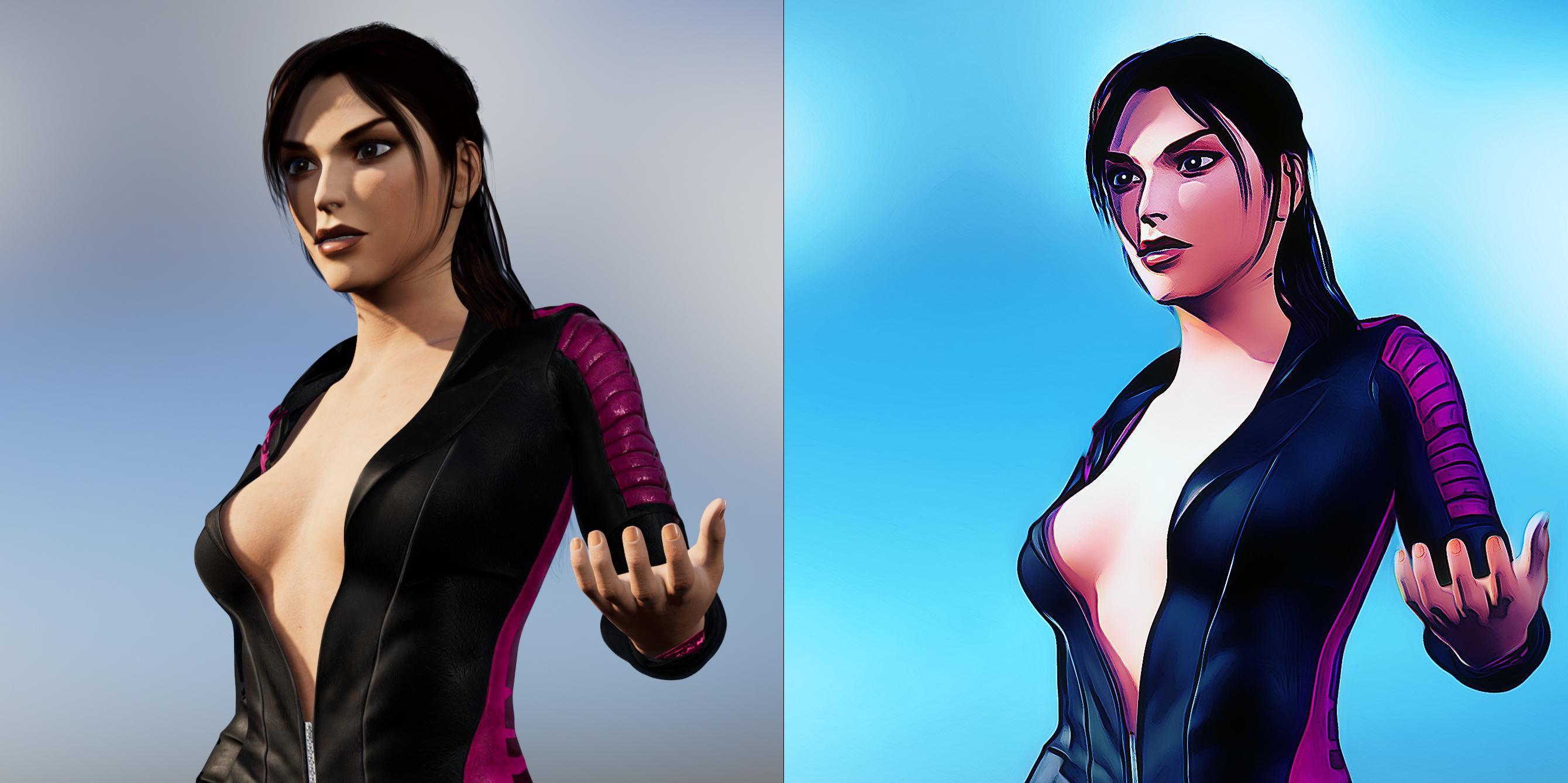
Nice as always. How do you achieve shadows in Filament?
More Non-photorealisitic Renders (NPR II)vrba79 said:
I can never get hair to look right in filament. Is there a method to preparing hair in filament?
I tend to bring down Reflective and glossy parameter in each surfaces first . Then in Filament Draw option I`m also lowering ISO and Environtment Intensity scale until hair looks ok .
To counter dark scenes , I`m adding Distant or Spotlight and sometimes using Enviroment Option Node > Dome Rotation
AIUTO...CHI CONOSCE L’ITALIANO? PARTE TREDICISilvhe said:
Imago said:
Io uso viewport "texture shaded" e renderizzo con 3Delight a non ho problemi di sorta.

Ho provato Filament, nessun problema con i materiali e le luci (a parte quel bug delle ombre) e nessun problema con rendering di nulla.
Sarà ora che impariate la lezione?

Io ho usato 3Delight per anni, credo che tutt'ora la mia gallery su DA sia composta per metà da render in 3Delight. Tempo fa sono passato a Lux (con il plugin Reality per DS) e quando è venuto fuori Iray ho inziato a a usare questo. I due "mondi" hanno pregi e difetti entrambi ma non credo di poter più rinunciare al realismo delle scene che si riesce ad ottenere con Iray e simili
Realismo? Con tutte quelle fireflies e quel rumore impossibile da rimuovere?
 In tutti i render IRay che ho visto fino ad ora non ce n'è uno che sia "pulito", tutti granulosi, rumorosi e poco definiti.
Ora butto un occhio alla tua gallery, voglio vedere i tuoi render IRay, magari tu sei riuscito in qualcosa che agli altri non riesce.

P.S. Mi sarebbe piaciuto ma la galleria qui è fracassata... Link?
More Non-photorealisitic Renders (NPR II)I can never get hair to look right in filament. Is there a method to preparing hair in filament?
Kiko 8.1 - cute kitsune, stands on her own without a "seasonal passport" or the likeComplaint: Makeups do not come with no-brow option, so every overlay has the eyebrow painted on. (EDIT) I can fix this by hand, but kind of dumb that I have to do this.
EDIT2: Okay, Kiko's Makeup Weight map is MUCH less aggressive than prior 8.1 makeup weight maps, which tend to paint the entire facial region as "White" (pass-through from the Makeup channel). Kiko's weight map for makeup is much more limited, so hopefully that means the brows won't actually show up in an Iray render even if they show up in a Filament viewport.
Plastic skin... the SSS map looks like a lighter/more white version of the Diffuse map? (Like, literally the Diffuse map with the brightness turned up.) So, maybe not a lot of tonal variance coming through the Translucency channel.
I'm going to re-do the SSS maps for myself and see if that gives more drama.
AIUTO...CHI CONOSCE L’ITALIANO? PARTE TREDICIImago said:
Io uso viewport "texture shaded" e renderizzo con 3Delight a non ho problemi di sorta.
Ho provato Filament, nessun problema con i materiali e le luci (a parte quel bug delle ombre) e nessun problema con rendering di nulla.
Sarà ora che impariate la lezione?
Io ho usato 3Delight per anni, credo che tutt'ora la mia gallery su DA sia composta per metà da render in 3Delight. Tempo fa sono passato a Lux (con il plugin Reality per DS) e quando è venuto fuori Iray ho inziato a a usare questo. I due "mondi" hanno pregi e difetti entrambi ma non credo di poter più rinunciare al realismo delle scene che si riesce ad ottenere con Iray e simili
AIUTO...CHI CONOSCE L’ITALIANO? PARTE TREDICIIo uso viewport "texture shaded" e renderizzo con 3Delight a non ho problemi di sorta.
Ho provato Filament, nessun problema con i materiali e le luci (a parte quel bug delle ombre) e nessun problema con rendering di nulla.
Sarà ora che impariate la lezione?
Daz 3D is part of

Connect
DAZ Productions, Inc.
7533 S Center View Ct #4664
West Jordan, UT 84084Licensing Agreement | Terms of Service | Privacy Policy | EULA
© 2026 Daz Productions Inc. All Rights Reserved.