-
Lost Order
Thanks Gordig. I think a step might be missing though. I went to Help, found an Installed Plugins Link but all it has are a couple of links about Face Transfer. Nowhere to enter a serial #
XTransfer Module 1- Genesis 3 to Genesis 8 Morph Converter (Commercial)Can I see the morphs being transferred please in this dialed up character. Also are you applying your transferred morph to a new Genesis 8 Base with lashes on or are you adding lashes after it is dialled up.
Skin Builder 8 Merchant Resource for Genesis 8 Female (Commercial)Ok so you saying when you go to graftkdesigner/Face Transfer/callie there is no texture files in there after you created a material preset?
Do this test
Load any skin on the figure (doersnt need to be created with SkinBuilder)
Set a new path for Final Textures (Just for testing)
Choose Create Material Preset next to Full Material Preset Name (Call it anything)
After that is processed, now click on the Browse Final Textures Directory Button and tell me if the textures are there for the material preset.
Suit shaped bodiesA potential issue is that one morph can't lock the mesh against others, so if you want to buff up your man the muscle shapes will show through unless there is a specific projection morph to stop them.
XTransfer Module 1- Genesis 3 to Genesis 8 Morph Converter (Commercial)GRFK DSGN Unlimited wrote: "Well, you do have to save the morph after clicking the "auto-follow" box...".
Well that explains why the auto-follow box was unticked when I next opened DazStudio
 .
.I have now resaved the morph (and that box now stays ticked when I reopen DazStudio).
Unfortunately no change to the result - the eyelashes still show as per my screen shots above.
The older generation: Victoria 2/3, Michael 2/3 and their children rendersReckon I agree with you. Shame it's not a good pose for V3. Her elbows are, err.. bad. Good thing she's a way away.
Really ought to see what I can do about moving GV3's shape as a morph over to G8F. I don't fancy using the GenX conversion to G3F and then RiverSoftArts' conversion to G8F. Seems to be too many chances of getting it wrong. Maybe I'll have to try some other method. Might involve writing a program to do it with massive manual intervention. We shall see. Ahh. And for GND2. That will make for a good deal of work. It's not that I dislike V3, particularly when updated with iRay. The problem with V3 is that the joint movements are not as good as G8, and fitting clothes can be a nightmare. Just some of the figure shapes were so good can't leave them to moulder away un-noticed & un-appreciated.
when did they pull the Millennium CatThe HW cat is a cat, but what type I have no idea, probably 'Slightly Deformed' is the best description of its breed. A recognisable breed model of cat would be great. Labradors, GSD's, and many others exist for Dog8. Yet there is no Cat8 with a recognisable breed. A real shame.
I will confess that my Avatar Cat, Albert, was probably classified as 'Domestic' but looked more like a cross between a cat and a football (Soccer ball to US readers) given the shape of his stomach. That would be a difficult morph even for a good cat model...
Regards,
Richard.
AIUTO...CHI CONOSCE L’ITALIANO? PARTE DODICIHo visto che ora nel download di genesis 2 (Male e Female) hanno aggiunto qualcosa per il geografting e il 3D printing, ma non credo sia il caso. Al limite faccio come hai detto tu, anche perchè aumentando i vertici e i poligoni, con gli SBH si ha più superfice da sfruttare.
Crea un semplice Skullcap, magari con tanti poligoni come serve a te.
Immagino tu lo voglia fare per G8, per cui taglia la testa al toro e fatti un GeoGraft e ci ficchi tutto dentro quello che vuoi, specie perchè G8 ha un numero ridicolo di poligoni.
Niente a fare, ho creato l'obj, ho messo i SBH, ho esportato come prop parentato, ma nulla. Il prop si carica, ma niente capelli. Riprovo domani.
Hai provato con Scene Subset? Dovrebbe salvare correttamente tutto.
Si ma poi come lo conformo al personaggio?
Dopo aver creato lo scalpo lo conformi alla base come un wearable (Transfer Utility), dopodichè applichi gli SBH e lo esporti come Scene Subset (solo lo scalpo).
Ma se non sbaglio lo puoi fare anche dopo aver applicato i SBH.

*EDIT*
Leggo ora che sono i piedi... Stessa cosa, creai delle "calze", le conformi e le ricopri con SBH.

Se non stavo in ufficio mi sputavo n faccia, ho una mesh per lo sviluppo proprio per Genensi 2, a volte dimetico le cose....a volte....di cosa parlavamo?
Comunque non credevo che fosse cosi difficile esportare gli SBH, per questo non ci osno free items fatti con loro.
AIUTO...CHI CONOSCE L’ITALIANO? PARTE DODICIHo visto che ora nel download di genesis 2 (Male e Female) hanno aggiunto qualcosa per il geografting e il 3D printing, ma non credo sia il caso. Al limite faccio come hai detto tu, anche perchè aumentando i vertici e i poligoni, con gli SBH si ha più superfice da sfruttare.
Crea un semplice Skullcap, magari con tanti poligoni come serve a te.
Immagino tu lo voglia fare per G8, per cui taglia la testa al toro e fatti un GeoGraft e ci ficchi tutto dentro quello che vuoi, specie perchè G8 ha un numero ridicolo di poligoni.
Niente a fare, ho creato l'obj, ho messo i SBH, ho esportato come prop parentato, ma nulla. Il prop si carica, ma niente capelli. Riprovo domani.
Hai provato con Scene Subset? Dovrebbe salvare correttamente tutto.
Si ma poi come lo conformo al personaggio?
Dopo aver creato lo scalpo lo conformi alla base come un wearable (Transfer Utility), dopodichè applichi gli SBH e lo esporti come Scene Subset (solo lo scalpo).
Ma se non sbaglio lo puoi fare anche dopo aver applicato i SBH.
*EDIT*
Leggo ora che sono i piedi... Stessa cosa, creai delle "calze", le conformi e le ricopri con SBH.
Why do outfits need FBM for Daz Original female characters?not generally something you really need to worry about unless you're deviating a lot from the base shape, autofollow works with all the shape morphs so the outfit will 'fit' and if it doesn't fit well you can often use dForce to morph it into a better fit or create your own fitting morphs.
but either way if you want it to work gauranteed out of the box check the supported shapes listed as it might not support all the daz name 8 characters either.
for instance this one https://www.daz3d.com/dforce-fiesta-outfit-for-genesis-8-females which doesn't support Eva 8, it'll still work but might not look as good on Eva 8 as it would on Gabriela 8
Suit shaped bodiesI was thinking a bit more though, about the outfit shape being the body so to speak. Then applying outfits to that. Too often, for example, outfits look odd across the shoulder. So something with shoulder pads, to make it look more like a body wearing cloth. I mean, we have tons of monsters. Wouldn't a body thats more sqared off, create a less lumpy clothing look.
I mean, whenever I put clothing on the characters I like tto use, I really have to dial out some of the musculature or the outtift strains to fit the fiture anyway. So wouldn't it be easier to make a smooth body morph, that clothing fit better?
Suit shaped bodiesI think that is what projection morphs are for. They morph clothing without affecting the shape of the character. I don't know much about them, but SickleYield did a tutorial about them on DA once. I don't know if they can accommodate any arbitrarily shaped character, though.
XTransfer Module 1- Genesis 3 to Genesis 8 Morph Converter (Commercial)Well, you do have to save the morph after clicking the "auto-follow" box...
Halloween Expressions? Scared or Frightened?I find it hard to get true 'terror' in the expressions - the more you morph the face, the less realistic it ends up looking - but with the right combination, you could do it - good luck :)
How can this image be improved?I would agree there should be more in the skin and eyes. I think they suffered in the transfer from High Definition EXR file to JPG file. Part of the learning curve with canvases.
Shape Gen & Shape Gen Plus for Genesis 3 & 8 (Commercial)I did a search for HD and built this character from those morphs. Then I looked at the result to see which character's head morph had the highest percentage and used her skin (Edie 8). I used Brow Remover to remove Edie's reddish painted eyebrows and gave her some other fibermesh eyebrows.
Edi: Hmmm. I see I have some other morphs in there, too, besides the HD morphs. I'm not sure how they got selected and used. Operator error most likely. I still find the result very interesting.
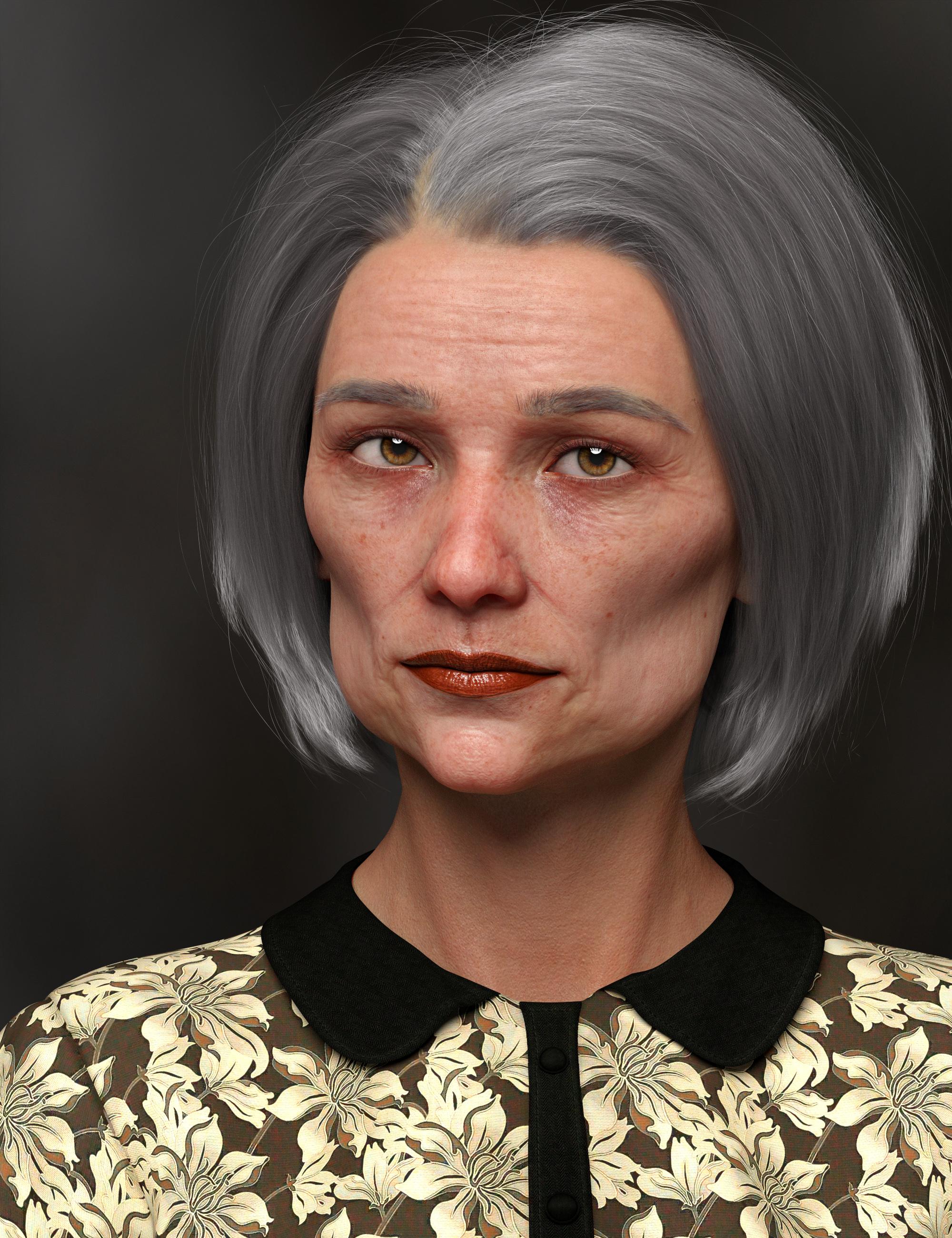
That's a very believable and interesting face.
All it really needs is a touch of asymmetry.
New morphs aren't found when saved as morph assets ?!Hi Richard. About the composite morph, this is a good idea I didn't think about the lost of all the original JCMs and MCMs. I do that to simplify my user interface and because I've heard that the more sliders you're using, the slower Daz becomes (at least that's what I've heard). But the FBM composite morph I did actually works well, it is all the other morphs after that that I have a problem with, and those morphs are 100% Zbrush on top of my newly created FBM; "Yes" on reverse deformation while importing with morph loader pro.
I haven't checked the log file, Idk how and what to look for :/ I can if you tell me. I already went through redoing all of it 3 times, with the same results --> morphs aren't saved. I haven't tried with a new morph, only the 4 from yesterday that didn't work.
"Had you modified the geometry iteslf in the scene?" What do you exactly mean?
Okay so for one of the 4 morphs I have a problem with: It is a corrective for when she bent her waist.
My character is shaped using only the new and perfectly working FBM, I also use the posing slider "waist bend" at 85%. Export as OBJ> morph into Zbrush> morph loader pro> yes to reverse deformation. I edit the parameters for the sliders and save as a morph asset. The morph appears in the corresponding directory underData>DAZ 3D> ... > morph >'username'> products. But when I load another scene, the morph is nowhere to be found...
That's what I did for the second and third time around with this morph. At first, I did a legit JCM with the pose slider 'waist bend', but after I saw it didn't work, I kept the process simpler for the subsequent attempts, without any ERC freezes.
Converting characters from Genesis 3 to Genesis 8 that use head and body morph addon'sNot now the .duf files are encrypted.
I'd recommend the G3 head and body morphs by Daz, even for those just using G8, cause you never know.
AFAIK Dufs can always* be converted to readable text just run it through the batch converter tab in DS and uncompress them
*I've actually done a lot of experimenting with this, as I recently have gone down the rabbit hole of manually editing dufs in notepad++ (Its infinitely faster if you're creating a bunch of material presets where just the image texture names change) Stuff that Daz considers proprietary will remain scrambly (you can only read parts of the uncompressed dufs for hd morphs or dforce hair) but everything else is completely readable and even for dforce hair and hd morphs the information that does not directly relate to the proprietary elements is readable (you could still manualy change the location of the dial in the parameters if you had some weird urge to do so)
You could load G3. screen shot the various slider settings of how the shape was created and repeat in G8; the morphs used look the same as come with G8, so it is likely that a very close likeness can be obtained.
Except you can't do that if you don't own G3 Head and Body Morphs. You don't see what sliders are being used if you don't have the sliders.
Is there a way to find out what G3 Head and Body Morph sliders a character uses without actually having G3 Head and Body Morphs?
I too am in the same boat as Pitmatic and have asked myself the same question... I don't own G3 Head and Body Morphs, but I do own the G8 equivalents (as well as XTransfer).
You can open the morph file with something like wordpad or notepad++ It will list all the used morphs and their strengths (I actually have Ceridwen and checked and successfully opened it) If you get gibberish it is compressed and you need to run the file through the batch converter (its a tab in studio)
the file location will be content/data/daz 3d/genesis 3/female/saiyaness/ceridwen (or if its a different figure whatever the file equivalent is) since I specifically went diving "Ceridwen Face is the unique morph data so if you open that its a bunch of vectors which will not be helpfull to you "Ceridwen Head" will contain all the morphs used and their values though I wont say its the nicest thing to read. Reankly the gen 3 head morphs are on sale I think the cost of them is worth the time you will spend doing this.
Hm, I tried this and it seems hit and miss.
I opened Drako's head and indeed, I can see that he uses 100% Drako and 50% Ivan.
Then I opened Rex' body, but I can't see what morphs he uses... it's not gibberish, but I can't see the information. I can see that he uses 100% Rex, but he's also supposed to use some other morphs.
Nevermind, I now see that I have to open the files under data/daz 3d (as you said, I just didn't read properly) and not under people.
Thanks for the info!
Converting characters from Genesis 3 to Genesis 8 that use head and body morph addon'sNot now the .duf files are encrypted.
I'd recommend the G3 head and body morphs by Daz, even for those just using G8, cause you never know.
AFAIK Dufs can always* be converted to readable text just run it through the batch converter tab in DS and uncompress them
*I've actually done a lot of experimenting with this, as I recently have gone down the rabbit hole of manually editing dufs in notepad++ (Its infinitely faster if you're creating a bunch of material presets where just the image texture names change) Stuff that Daz considers proprietary will remain scrambly (you can only read parts of the uncompressed dufs for hd morphs or dforce hair) but everything else is completely readable and even for dforce hair and hd morphs the information that does not directly relate to the proprietary elements is readable (you could still manualy change the location of the dial in the parameters if you had some weird urge to do so)
You could load G3. screen shot the various slider settings of how the shape was created and repeat in G8; the morphs used look the same as come with G8, so it is likely that a very close likeness can be obtained.
Except you can't do that if you don't own G3 Head and Body Morphs. You don't see what sliders are being used if you don't have the sliders.
Is there a way to find out what G3 Head and Body Morph sliders a character uses without actually having G3 Head and Body Morphs?
I too am in the same boat as Pitmatic and have asked myself the same question... I don't own G3 Head and Body Morphs, but I do own the G8 equivalents (as well as XTransfer).
You can open the morph file with something like wordpad or notepad++ It will list all the used morphs and their strengths (I actually have Ceridwen and checked and successfully opened it) If you get gibberish it is compressed and you need to run the file through the batch converter (its a tab in studio)
the file location will be content/data/daz 3d/genesis 3/female/saiyaness/ceridwen (or if its a different figure whatever the file equivalent is) since I specifically went diving "Ceridwen Face is the unique morph data so if you open that its a bunch of vectors which will not be helpfull to you "Ceridwen Head" will contain all the morphs used and their values though I wont say its the nicest thing to read. Reankly the gen 3 head morphs are on sale I think the cost of them is worth the time you will spend doing this.
ONLY Render shows pokethroughI've found often hd morph on figures cause pokethrough on men's clothing.
Daz 3D is part of

Connect
DAZ Productions, Inc.
7533 S Center View Ct #4664
West Jordan, UT 84084Licensing Agreement | Terms of Service | Privacy Policy | EULA
© 2026 Daz Productions Inc. All Rights Reserved.