-
The "The Weather Changes More Often than the Thread Title" Complaint Thread
LeatherGryphon said:
Complaint: Smart Machines: I complained a few weeks ago about my trusty, ten year old blood pressure (BP) monitor, deciding to die, and the cost of finding a new one at today's prices. And having to replace it someday. Well, today was the day. I had talked to my primary physician a few weeks ago about a recommendation for a decent BP monitor and he suggested the brand name "Omron". OK, so while picking up prescriptions this morning I decided burn a hundred dollar bill on a medical necessity.
 Not fun, but presumably wise. Thankfully, it was on sale so I saved 20% (small yay!) When I got home I opened the box, assembled the unit, fit it to my arm, turned it on, and it went through the usual operations and at the end it reported "AF". Tried it a few more times, and same problem. A quick look in the quickstart manual says that it is reporting that I have Afib (i.e. atrial fibrillation) but didn't give me any numbers. Yes mr. machine, I know I have Afib, I've had Afib for 30 years, every doctor's nurse always tells me that I have Afib but gives me the numbers. My old machine gave me the numbers. But this machine in its infinite wisdom says I have Afib and leaves all the numbers blank and the manual says "tell your doctor".
 Now, granted, this is a smart machine (it says so on the box) and it has modern features like being able to connect through Bluetooth for some demented reason. I haven't yet gone through the process of connecting it to my smart phone to find out what it tells me more than what it displays on the device itself, nor have I read through the bigger complete manual to find more information, but this $#%@$& device better be able to give me the numbers or it's going back to the store.
 There's a lot more I can do with $80 than simply get reminded that I have Afib. At minimum they need a button on the device to bring forth the hidden numbers.
As I've said for the last 40 years, "The trouble with smart machines is that you have to be smarter than they are" And that is getting harder and harder. Have you tried working with AI services, even just Google AI? Amazing what they know, and can shovel forth
 , but sometimes they need additional intelligent, suggestive prompting to avoid getting the wrong idea or going off on a tangent! But I fear the next generation of people are going to be completely incapable of thinking for themselves.
 Which, when you think of it, is not much different than today.
So I have and use an Omron BP machine every morning, so with my own vested interest, I did a little bit of research. Apparently, the AFIB detection is built-in to your Omron's operating system and it can't be overridden.
According to my own PCP, the Omrons are just about the best machines out there.
But there's good news! There are many Omron BP machines out there that don't detect AFib. You may need to find one of those.
Here's the google search term I used:
is there an omron bp monitor without afib?
Good luck!
How to create or modify a grid?If you just want a 3D scale - rather than know how to make one - then free ones are available.
Links, if I posted them, probably wouldn't survive, so instead search with your favourite engine for: "making a scale grid in daz studio" - there's a couple of ready made models will appear in the first ten results. One by SpyroRue, in particular, looks pretty great (I haven;t used it, but a few who also post here probably have?)
 barbult's Discursion Thread
Not really possible for us here on the forum to fully understand.
It's really only you who can do that, but have you looked into accessories (attachments) for that walker thing you use? Over here they even have things like supermarket trolleys that attach to walkers and stuff. So I think it would be very remis of manufacturers to not create dog-walking attachments for their walker equipment (assuming it's a well known brand).
If not, then I suppose you could look into that. See if there are any walkers on the market that are specifically designed to enable immobile dog owners to walk their dogs without risc of it tipping or being pulled over. I'm not saying they make such things, but I'd be very surprised if they don't since a lot of immobile people depend on dogs, like those with little to no eyesight etc.
Freebie Challenge July 2026 - "Summer holidays" - Main Threadrichardandtracy said:
This is a very slightly exaggerated image of my typical summer holidays - lets just say: I have a reputation. My colleagues at work now ask me when I'm going camping and make sure they aren't on holiday at the same time. This summer I have been asked a couple of times if I can plan a camping holiday so they'll know when the hot weather is going to end.
The image is of a campsite in the process of flooding. We have, twice, been on holidays where the deluge started as we arrived and within a couple of hours the river next to the campite rose above its banks and people's tents and caravans flooded - leading to emergency evacuations of parts of the site. Being used to this sort of thing, we choose higher ground to camp on... One campsite we'd intended to stay at that evening was featured on the front of a national newspaper (The Daily Mail), where the inshore lifeboat was photographed rescuing people from their caravans. We gave that site a miss to avoid putting anyone's lives at risk.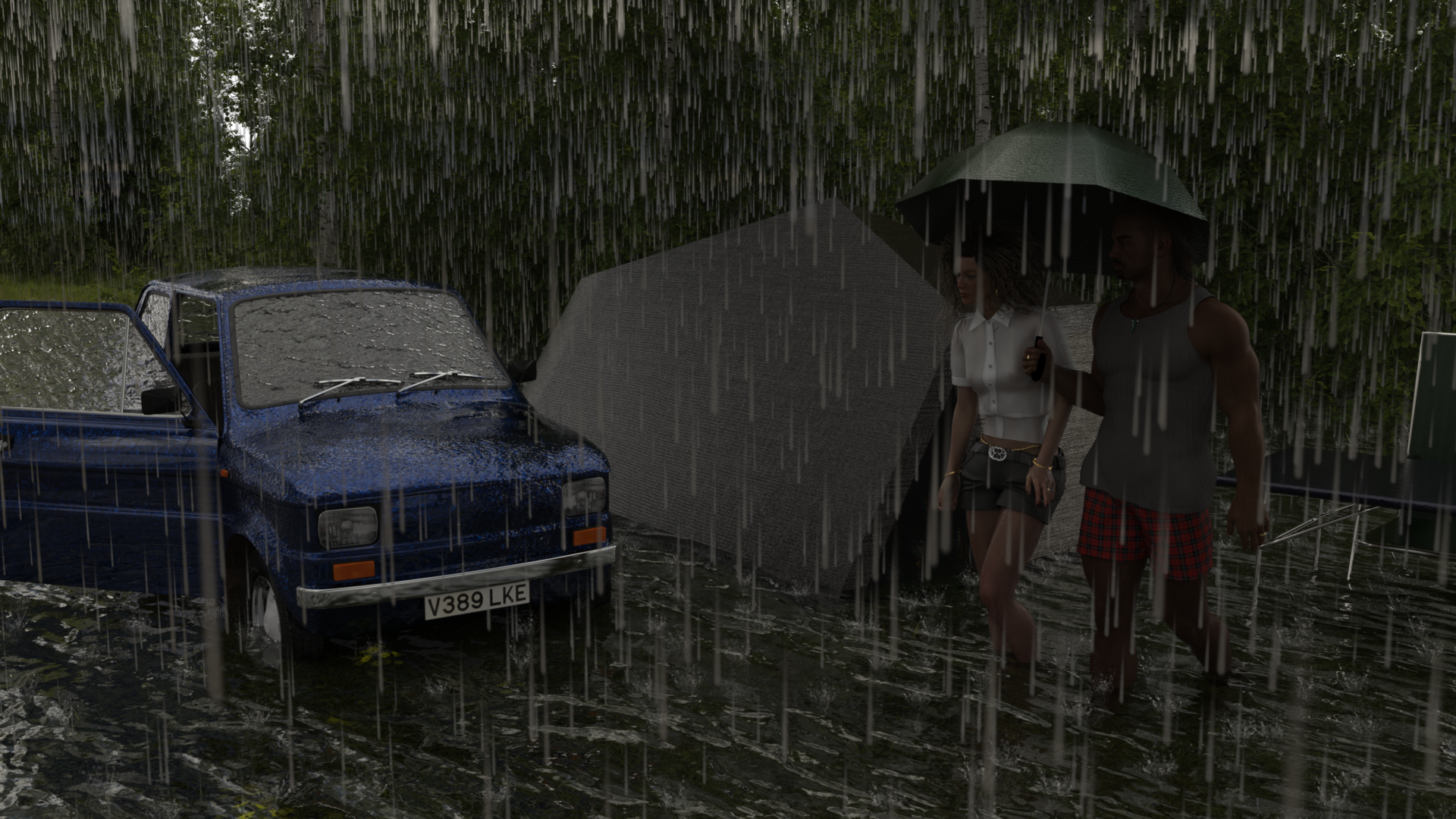
Details of items used:
List of Freebies:
1) Tent by richardandtracy: https://www.renderosity.com/freestuff/items/100281/ridge-tent-with-porch
2) Rain by SquarePeg3D: https://www.renderosity.com/freestuff/items/87625/prop-bring-the-rain
3) Car by DryJack: https://www.renderosity.com/freestuff/items/69312/fiat-126
4) Flood Water surface texture on a plane primitive, also converted to bump and normal using Materialize. Source Texture Lib: https://texturelib.com/texture/?path=/Textures/water/water/water_water_0084
5) Overcast Sky HDRI. Not sure exactly which it is, because I used to re-name them and this is one of those and they are very similar, but it's one of these two, probably the latter:
https://polyhaven.com/a/kloofendal_overcast_puresky or
https://polyhaven.com/a/snow_field_2_puresky
6) Camping Chairs and table by MikeB51: https://www.renderosity.com/freestuff/items/74449/camping-equipement-tent-more
7) Umbrella by marcPoser: https://www.renderosity.com/freestuff/items/91547/low-poly-umbrella-kit-0-for-bialas-crowd-figure
8) Male Shorts & Top: Basicwear for G8M. May not count.
9) Female Shorts by Yomiuri: https://www.renderosity.com/freestuff/items/98886/leather-jacket-and-pants-for-g8f
10) Female Top by Yomiuri: https://www.renderosity.com/freestuff/items/98793/hs-shirt-for-g8f
11) Wedding Ring on Female character by richardandtracy: https://www.daz3d.com/forums/discussion/734466/various-rings;
12) Elephant's Hair Wrist Bangle on Female character by richardandtracy: https://www.renderosity.com/freestuff/items/95881/elephants-tail-hair-wrist-bangle-for-g8f-g9
13) Hoop Earrings on Female character by richardandtracy: https://www.daz3d.com/forums/discussion/535511/g8f-hoop-earrings-freebie
14) Golden Waist Rope on Female character, by Noone102000: WARNING: NSFW Promo Image hence no active hyperlink www.deviantart.com/noone102000/art/Odalisque-Dress-FREEBIE-TO-DOWNLOAD-822900201
Paid for items used:
1) UltraScenery: https://www.daz3d.com/ultrascenery--realistic-landscape-system
2) Male Character: Scar 8: https://www.daz3d.com/scar-8
3) Female Character: Tritium CG Custom Character commissioned for me.
4) Hair (Mel) by Kool: https://www.daz3d.com/allen-hair-for-genesis-8
5) Hair (Fem) by Linday AND wet Geoshell for fem: https://www.daz3d.com/dforce-classic-wet-hair-for-genesis-8-and-81-females
Freebie Tools Used:
1) Materialize: https://boundingboxsoftware.com/materialize/index.php
No post work on the image. Mostly because I can't, not one of my skills.Putting in the links above was an absolutely monumental pain. I had a text file on my tablet where I had written all the links out, added the code for the hyper links, all the paragraph info, carriage returns and so on. I copied that and pasted it all into the mobile comment box and... The DAZ forum comment box added a non-printing character between every character I had written. It was completely Fubar'd. So I started again using the full editing box in desktop mode (where the text is really small on my tablet), and pasted it in using the paste option (didn't work). Well, the least bad version was with the Paste Text option where it changed every 'less than' character into '&alt', every 'inverted comma' into '&Quot', added links in the wrong places to the wrong destinations and so on. Basically I had to go through the wretched description again to correct every link. So, writing the list: 60 miutes, correcting the link list after it was Snafu'd: 90 minutes. It really helped my frame of mind, I can assure you.
Regards,
Richard
Entry approved, please move to entries thread!
Freebie Challenge July 2026 - "Summer holidays" - Main Thread
Entry approved, please move to entries thread!richardandtracy said:This is a very slightly exaggerated image of my typical summer holidays - lets just say: I have a reputation. My colleagues at work now ask me when I'm going camping and make sure they aren't on holiday at the same time. This summer I have been asked a couple of times if I can plan a camping holiday so they'll know when the hot weather is going to end.
The image is of a campsite in the process of flooding. We have, twice, been on holidays where the deluge started as we arrived and within a couple of hours the river next to the campite rose above its banks and people's tents and caravans flooded - leading to emergency evacuations of parts of the site. Being used to this sort of thing, we choose higher ground to camp on... One campsite we'd intended to stay at that evening was featured on the front of a national newspaper (The Daily Mail), where the inshore lifeboat was photographed rescuing people from their caravans. We gave that site a miss to avoid putting anyone's lives at risk.
Details of items used:
List of Freebies:
1) Tent by richardandtracy: https://www.renderosity.com/freestuff/items/100281/ridge-tent-with-porch
2) Rain by SquarePeg3D: https://www.renderosity.com/freestuff/items/87625/prop-bring-the-rain
3) Car by DryJack: https://www.renderosity.com/freestuff/items/69312/fiat-126
4) Flood Water surface texture on a plane primitive, also converted to bump and normal using Materialize. Source Texture Lib: https://texturelib.com/texture/?path=/Textures/water/water/water_water_0084
5) Overcast Sky HDRI. Not sure exactly which it is, because I used to re-name them and this is one of those and they are very similar, but it's one of these two, probably the latter:
https://polyhaven.com/a/kloofendal_overcast_puresky or
https://polyhaven.com/a/snow_field_2_puresky
6) Camping Chairs and table by MikeB51: https://www.renderosity.com/freestuff/items/74449/camping-equipement-tent-more
7) Umbrella by marcPoser: https://www.renderosity.com/freestuff/items/91547/low-poly-umbrella-kit-0-for-bialas-crowd-figure
8) Male Shorts & Top: Basicwear for G8M. May not count.
9) Female Shorts by Yomiuri: https://www.renderosity.com/freestuff/items/98886/leather-jacket-and-pants-for-g8f
10) Female Top by Yomiuri: https://www.renderosity.com/freestuff/items/98793/hs-shirt-for-g8f
11) Wedding Ring on Female character by richardandtracy: https://www.daz3d.com/forums/discussion/734466/various-rings;
12) Elephant's Hair Wrist Bangle on Female character by richardandtracy: https://www.renderosity.com/freestuff/items/95881/elephants-tail-hair-wrist-bangle-for-g8f-g9
13) Hoop Earrings on Female character by richardandtracy: https://www.daz3d.com/forums/discussion/535511/g8f-hoop-earrings-freebie
14) Golden Waist Rope on Female character, by Noone102000: WARNING: NSFW Promo Image hence no active hyperlink www.deviantart.com/noone102000/art/Odalisque-Dress-FREEBIE-TO-DOWNLOAD-822900201
Paid for items used:
1) UltraScenery: https://www.daz3d.com/ultrascenery--realistic-landscape-system
2) Male Character: Scar 8: https://www.daz3d.com/scar-8
3) Female Character: Tritium CG Custom Character commissioned for me.
4) Hair (Mel) by Kool: https://www.daz3d.com/allen-hair-for-genesis-8
5) Hair (Fem) by Linday AND wet Geoshell for fem: https://www.daz3d.com/dforce-classic-wet-hair-for-genesis-8-and-81-females
Freebie Tools Used:
1) Materialize: https://boundingboxsoftware.com/materialize/index.php
No post work on the image. Mostly because I can't, not one of my skills.Putting in the links above was an absolutely monumental pain. I had a text file on my tablet where I had written all the links out, added the code for the hyper links, all the paragraph info, carriage returns and so on. I copied that and pasted it all into the mobile comment box and... The DAZ forum comment box added a non-printing character between every character I had written. It was completely Fubar'd. So I started again using the full editing box in desktop mode (where the text is really small on my tablet), and pasted it in using the paste option (didn't work). Well, the least bad version was with the Paste Text option where it changed every 'less than' character into '&alt', every 'inverted comma' into '&Quot', added links in the wrong places to the wrong destinations and so on. Basically I had to go through the wretched description again to correct every link. So, writing the list: 60 miutes, correcting the link list after it was Snafu'd: 90 minutes. It really helped my frame of mind, I can assure you.
Regards,
Richard
The "The Weather Changes More Often than the Thread Title" Complaint ThreadMcGyver said:
Complaint...
I thought there was a 3D printing forum here, but my stupid brain lied to me like it did about those styrofoam peanuts being a good snack choice...
My beloved departed splotchy kitty was convinced they were an EXCELLENT snack choice. For a while it was absolutely baffling because I kept catching him with them, but I couldn't figure out where on earth they were coming from. I finally found him raiding a stash from a forgotten box in the basement and looking extremely guilty when he was caught.
(I later learned that his first mama had given him the corn starch kind to play with as a kitten, although this was also the cat that would try to eat anything, whether it was edible or not.)
Thank you for that smile. I hadn't thought about that in ages.
non-complaint: Finally, a few days of reprieve from the heat! Getting to 90+ isn't unusual around here, it's just not usually so sustained. We actually set a record for third-longest run of 90+ degree days for the state... 10 days in a row. The two ahead of it were 14 (in the 1930's) and 11 (in the 1940's). Unfortunately, it's back to 90+ starting Saturday, but by then we should be on a schedule for dawn walks, so it matters less as far as keeping us cooped up.
What product is this fat male character?As a plus size male myself I find the description of "fat male" a bit problematic. Would you call a female the same if she was plus size? Would a post mentioning a "fat female" stay unchanged here in the forum? Just so I know to use proper descriptions in the future, when needed.
Freebie Challenge July 2026 - "Summer holidays" - Main ThreadThis is a very slightly exaggerated image of my typical summer holidays - lets just say: I have a reputation. My colleagues at work now ask me when I'm going camping and make sure they aren't on holiday at the same time. This summer I have been asked a couple of times if I can plan a camping holiday so they'll know when the hot weather is going to end.
The image is of a campsite in the process of flooding. We have, twice, been on holidays where the deluge started as we arrived and within a couple of hours the river next to the campite rose above its banks and people's tents and caravans flooded - leading to emergency evacuations of parts of the site. Being used to this sort of thing, we choose higher ground to camp on... One campsite we'd intended to stay at that evening was featured on the front of a national newspaper (The Daily Mail), where the inshore lifeboat was photographed rescuing people from their caravans. We gave that site a miss to avoid putting anyone's lives at risk.
Details of items used:
List of Freebies:
1) Tent by richardandtracy: https://www.renderosity.com/freestuff/items/100281/ridge-tent-with-porch
2) Rain by SquarePeg3D: https://www.renderosity.com/freestuff/items/87625/prop-bring-the-rain
3) Car by DryJack: https://www.renderosity.com/freestuff/items/69312/fiat-126
4) Flood Water surface texture on a plane primitive, also converted to bump and normal using Materialize. Source Texture Lib: https://texturelib.com/texture/?path=/Textures/water/water/water_water_0084
5) Overcast Sky HDRI. Not sure exactly which it is, because I used to re-name them and this is one of those and they are very similar, but it's one of these two, probably the latter:
https://polyhaven.com/a/kloofendal_overcast_puresky or
https://polyhaven.com/a/snow_field_2_puresky
6) Camping Chairs and table by MikeB51: https://www.renderosity.com/freestuff/items/74449/camping-equipement-tent-more
7) Umbrella by marcPoser: https://www.renderosity.com/freestuff/items/91547/low-poly-umbrella-kit-0-for-bialas-crowd-figure
8) Male Shorts & Top: Basicwear for G8M. May not count.
9) Female Shorts by Yomiuri: https://www.renderosity.com/freestuff/items/98886/leather-jacket-and-pants-for-g8f
10) Female Top by Yomiuri: https://www.renderosity.com/freestuff/items/98793/hs-shirt-for-g8f
11) Wedding Ring on Female character by richardandtracy: https://www.daz3d.com/forums/discussion/734466/various-rings;
12) Elephant's Hair Wrist Bangle on Female character by richardandtracy: https://www.renderosity.com/freestuff/items/95881/elephants-tail-hair-wrist-bangle-for-g8f-g9
13) Hoop Earrings on Female character by richardandtracy: https://www.daz3d.com/forums/discussion/535511/g8f-hoop-earrings-freebie
14) Golden Waist Rope on Female character, by Noone102000: WARNING: NSFW Promo Image hence no active hyperlink www.deviantart.com/noone102000/art/Odalisque-Dress-FREEBIE-TO-DOWNLOAD-822900201
Paid for items used:
1) UltraScenery: https://www.daz3d.com/ultrascenery--realistic-landscape-system
2) Male Character: Scar 8: https://www.daz3d.com/scar-8
3) Female Character: Tritium CG Custom Character commissioned for me.
4) Hair (Mel) by Kool: https://www.daz3d.com/allen-hair-for-genesis-8
5) Hair (Fem) by Linday AND wet Geoshell for fem: https://www.daz3d.com/dforce-classic-wet-hair-for-genesis-8-and-81-females
Freebie Tools Used:
1) Materialize: https://boundingboxsoftware.com/materialize/index.php
No post work on the image. Mostly because I can't, not one of my skills.Putting in the links above was an absolutely monumental pain. I had a text file on my tablet where I had written all the links out, added the code for the hyper links, all the paragraph info, carriage returns and so on. I copied that and pasted it all into the mobile comment box and... The DAZ forum comment box added a non-printing character between every character I had written. It was completely Fubar'd. So I started again using the full editing box in desktop mode (where the text is really small on my tablet), and pasted it in using the paste option (didn't work). Well, the least bad version was with the Paste Text option where it changed every 'less than' character into '&alt', every 'inverted comma' into '&Quot', added links in the wrong places to the wrong destinations and so on. Basically I had to go through the wretched description again to correct every link. So, writing the list: 60 miutes, correcting the link list after it was Snafu'd: 90 minutes. It really helped my frame of mind, I can assure you.
Regards,
Richard
The "The Weather Changes More Often than the Thread Title" Complaint ThreadComplaint...
I thought there was a 3D printing forum here, but my stupid brain lied to me like it did about those styrofoam peanuts being a good snack choice...
I got a Bambu Lab P1S (FDM) printer recently and I'm looking to get a resin printer for higher quality fine detail prints and I'm really annoyed that nobody out there (or probably it's just Google's crappy search results) has good pictures or descriptions of what the resolutions mean in comparison to real world objects... like the closest I found is an image of a figure next to a penny, but there is no explanation of the resolution... all the pictures show ambiguously sized prints next to each other (8k, 12k,16k) but without knowing the actual dimensions of the printed objects being shown it's kinda unhelpful... yeah I can see 16k is way more detailed than 8k or 4k, but is the figure shown 2 feet tall or 2 centimeters?
I'm aware of the concept in microns and lcd screen size and layer height, but visually what does that look like? And apparently lcd screen size, independent of "K" can make a difference in resolution and crispness... and apparently, apparently there are "high resolution" resins that can make a difference too...
My solution if I were writing an article would be to print a 3cm block or square plate with different (fine) point size raised letters (Ariel Regular font) on it and maybe some detailed sculpted relief of some sort on the surface too and photograph it next to a penny and a 5 cent euro coin and print it in several different resolutions. The lettering can exemplify clarity, detail and sharpness in a known format (points) and the coins a real world object that is familiar.
When I used to have to deal with clients when I was a model maker, I'd often have to give the client a real world example of material properties... like "the 1.35mm/.053 in. wall section is about as thick as a dime", "75-A is about the same durometer equivalent as a pencil eraser", "160,000 cps (centipoise) is about the same viscosity as peanut butter "... stuff like that. I worked with a few industrial designers who couldn't visualize what their own dimensions were like... and you'd have engineers who'd just be tossing out numbers and dimensions like popcorn to pigeons and the client would be baffled by all the nonsense flying around... but you'd give a good real world example and their brains would recalibrate and they'd suddenly have a reference point.
Too many people just say or write stuff without thinking if it makes sense to others or its helpful... (yes I realize the irony of that coming from a person who has frequently written about the international Ninja Space Hamster Peanut Butter Conspiracy... but then again I'm an irony wrapped in a conundrum stuffed with bacon)
Megh...
I hate trying to figure stuff out in this crappy useless timeline.
Pbfffffft!
And by the way... howdy folks... I hope everyone is well and doing as okay as this crappy timeline will allow.
Anyway... I'm gonna go finish off this bag of styrofoam peanuts before they go bad... see youse folks later.
Hugs and puppies y'all.
[Released] Magic - Smart Actions for Posing [Commercial]hejjj12 said:
crosswind said:
hejjj12 said:
Does this not work on Daz3D 6? Can move the body parts, but not rotate them. (Gen 8)
The latest visit of this PA dated two years ago.... I'm afraid they won't upgrade the scripts for DS6.
I see, how unfortunate. Daz should start having warnings about that in the shop.
Before buying these kinds of plugins, I always search the forums first. If the seller hardly answers any questions, then I won't buy from them.
They should learn from Steam and add warning messages such as, "This product was last updated two years ago," or "The developer's last answer to a question was two years ago," etc.
barbult's Discursion Thread@Wendy
Love the music on that video. Reminds me of the soundtrack to the movie "Barbarella" (which is one of my fave movies ever)!
@Barbult
As Ron said, nice to see you both! It's always nice to put a face to an online forum user. You look very friendly, and nowhere near as scary as I thought you would :-DCracking camera there, too, barbult; Olympus OM-1 D is an absolute beauty! Looks as if your husband was doing a spot of stereo photography, too, unless perhaps the dual rig was for backups and stuff.
Congratulations on your 50 years together, too!
Let's appreciate/discuss today's new releases - ongoinger still further threadI saw the tease 'Loosing Your Hair' and hoped someone had come up with a script to either search the store or our Runtimes for a specific style we need (part on side?; length?; curl?; straight?; updo?; braided?; ...) but no. Will still have to do that manually.
But there was a hair that is what my own hair was like when I would grow it out long enough to drive me nuts, https://www.daz3d.com/dforce-fe-messy-short-strand-based-hair-for-genesis-9-8-and-81. Not thick enough for ponytails or to put up in an updo when it was longer, just long enough to stick into my eyes, irritate my neck, stick to me when it was a humid day. And make me think I had bugs crawling up my face and neck. Or just look like strings on a hot, sticky humid day.
I am buying it. It is a real hair. Thank you @FeSoul.
Hardware Requirements for a PC to run only DAZ3d3DRenderBoy said:
I would know what DAZ Studio Pro version do I need to run it properly with my nVdia GTX 970 graphic card (and the newest drivers (NOT the Studio drivers))?
Since DAZ Studio 4.20/4.22, I am having problems when viewing in 'Iray Render' and clickin on 'Render' to render my work. Soon, Microsoft Windows 10 begins to make loud noises, slows down other applications, so that it is not possible to work properly while DAZ is rendering in Iray.
I would know where I can get older DAZ Studio versions that work(ed) with nVdia GTX 970 (too). I do not know where to ask for older DAZ versions (here on DAZ Forum). Sorry.
At the moment, I use 4.24+. But the nwever the version (since 4.22) the more problems happen(ed) with Windows and nVidia.
By the way, I really do not understand, WHY it is not possible to get older DAZ version here? Is it "illegal"!? I ask it because I do not have nVdia RTX (that is required by DAZ Studio, if I'm correct, since version 4.20).
Thnak you! . .
* * *
My system specs:
Microsft Windows 10
Intel i7 (4 cores / 8 threats)
16 GB system RAM.
nVidia GTX 970 (with 6 GB DEDICATED RAM)
SSD hard disk drive (250 GB), plus 1 TB SSD hard disk drive.
* * *My best guess, you're system is dropping to cpu rendering, cause you're running out of vram on the gpu and/or you're running out of system ram and it's going to the Page file(hdd).
A couple things to check, see if "Allow CPU Fallback" is enabled in Render settings and have Task manger open to see what your cpu and sysram usage are during rendering.
If "allow cpu fallback" is enabled, turn that off, so if you exceed your available vram the render will just fail.
It's generally a bad idea to try and do anything else when rendering and you only have a single gpu. It can cause all sorts of problems, upto a full system crash.
There's not going to be much of a difference in drivers for a 970 on windows 10, as they are designated "legacy" and are only getting security updates at this point.
Latest driver, for win10, is 582.66 released in june of this year.
Hardware Requirements for a PC to run only DAZ3dI would know what DAZ Studio Pro version do I need to run it properly with my nVdia GTX 970 graphic card (and the newest drivers (NOT the Studio drivers))?
Since DAZ Studio 4.20/4.22, I am having problems when viewing in 'Iray Render' and clickin on 'Render' to render my work. Soon, Microsoft Windows 10 begins to make loud noises, slows down other applications, so that it is not possible to work properly while DAZ is rendering in Iray.
I would know where I can get older DAZ Studio versions that work(ed) with nVdia GTX 970 (too). I do not know where to ask for older DAZ versions (here on DAZ Forum). Sorry.
At the moment, I use 4.24+. But the nwever the version (since 4.22) the more problems happen(ed) with Windows and nVidia.
By the way, I really do not understand, WHY it is not possible to get older DAZ version here? Is it "illegal"!? I ask it because I do not have nVdia RTX (that is required by DAZ Studio, if I'm correct, since version 4.20).
Thnak you! . .
* * *
My system specs:
Microsft Windows 10
Intel i7 (4 cores / 8 threats)
16 GB system RAM.
nVidia GTX 970 (with 6 GB DEDICATED RAM)
SSD hard disk drive (250 GB), plus 1 TB SSD hard disk drive.
* * *Daz Studio 6.25[.0.x], General Release!nimonsi said:
jjb24 said:
sidcarton1587 said:
nimonsi said:
Good afternoon, could you tell me what the problem is? I launch Daz6 (5070 Ti) — just the start screen, nothing more. Moving the mouse, Ctrl+Alt+LMB works fine. But if I scroll forward a few times and then back, everything starts to lag as if I had a huge scene loaded. I've never encountered this before — everything used to work fine with this version! Pressing View: Reset (LMB/RMB) helps, but only for a few seconds.
Please help, it's very hard to work like this!
Thank you!
Without further information it's hard to tell -- but then again this is essentially beta software. What you're describing sounds like a memory leak, probably in the video card driver. Have you updated your video card driver recently? You may need to update it, or potentially roll it back if you did update it.
If you are using the NVIDIA Studio Driver version 610.62 then I believe sidcarton1587 is correct. Since I installed this driver I have been having trouble with DAZ and Renpy games similar to the problem you describe. I posted a question in the 'Technical Help{nuts & bolts)' forum asking which NVIDIA driver version is recommended for DAZ and when I receive an answer I plan to roll back to it. Unfortunately when I updated the driver the Nvidia app deleted the old version so I don't know what one I was using before the update.
Yes, I have exactly 610.62, just the game driver. I'll try reinstalling, thanks.
Just FYI, I followed advice from DoctorJellybean and rolled back to NVIDIA Studio Driver 596.36 a few hours ago and so far I've had no problems. Perhaps that will work for you too. Good luck!
Daz Studio 6.25[.0.x], General Release!jjb24 said:
sidcarton1587 said:
nimonsi said:
Good afternoon, could you tell me what the problem is? I launch Daz6 (5070 Ti) — just the start screen, nothing more. Moving the mouse, Ctrl+Alt+LMB works fine. But if I scroll forward a few times and then back, everything starts to lag as if I had a huge scene loaded. I've never encountered this before — everything used to work fine with this version! Pressing View: Reset (LMB/RMB) helps, but only for a few seconds.
Please help, it's very hard to work like this!
Thank you!
Without further information it's hard to tell -- but then again this is essentially beta software. What you're describing sounds like a memory leak, probably in the video card driver. Have you updated your video card driver recently? You may need to update it, or potentially roll it back if you did update it.
If you are using the NVIDIA Studio Driver version 610.62 then I believe sidcarton1587 is correct. Since I installed this driver I have been having trouble with DAZ and Renpy games similar to the problem you describe. I posted a question in the 'Technical Help{nuts & bolts)' forum asking which NVIDIA driver version is recommended for DAZ and when I receive an answer I plan to roll back to it. Unfortunately when I updated the driver the Nvidia app deleted the old version so I don't know what one I was using before the update.
Yes, I have exactly 610.62, just the game driver. I'll try reinstalling, thanks.
Daz Studio 6.25[.0.x], General Release!jjb24 said:
Thank you for the driver information, I haven't received a response to my question posted in the "Technical Help(nuts&bolts" forum yet. I was able to find the 576.80 studio driver (June 2025) and I also have 596.36 studio driver (April 2026) which is 2 version before the 610.62 studio driver. I can install either one and I'm curious why you'd install 596.36 instead of 576.80. Dealing with frequent driver updates is new to me because this is the first time I've bought a new PC with up to date components. I used to always build my own PCs with 1 or 2 year old parts to save money and drivers for older components are usually stable. Thanks again!
No specific reason, purely a personal choice. I may update to the latest to see if it breaks anything.
NVIDIA driver questionOn the DAZ Studio 6.25 forum I received the information I was after from DoctorJellybean:
REQUIRES:
- NVIDIA Driver 576.57 (R575) on Windows
- NOTE: 576.80 is the first Studio Driver (SD) after the minimum
That was in December 2025.
Daz Studio 6.25[.0.x], General Release!DoctorJellybean said:
jjb24 said:
sidcarton1587 said:
nimonsi said:
Good afternoon, could you tell me what the problem is? I launch Daz6 (5070 Ti) — just the start screen, nothing more. Moving the mouse, Ctrl+Alt+LMB works fine. But if I scroll forward a few times and then back, everything starts to lag as if I had a huge scene loaded. I've never encountered this before — everything used to work fine with this version! Pressing View: Reset (LMB/RMB) helps, but only for a few seconds.
Please help, it's very hard to work like this!
Thank you!
Without further information it's hard to tell -- but then again this is essentially beta software. What you're describing sounds like a memory leak, probably in the video card driver. Have you updated your video card driver recently? You may need to update it, or potentially roll it back if you did update it.
If you are using the NVIDIA Studio Driver version 610.62 then I believe sidcarton1587 is correct. Since I installed this driver I have been having trouble with DAZ and Renpy games similar to the problem you describe. I posted a question in the 'Technical Help{nuts & bolts)' forum asking which NVIDIA driver version is recommended for DAZ and when I receive an answer I plan to roll back to it. Unfortunately when I updated the driver the Nvidia app deleted the old version so I don't know what one I was using before the update.
REQUIRES:
- NVIDIA Driver 576.57 (R575) on Windows
- NOTE: 576.80 is the first Studio Driver (SD) after the minimum
That was in December 2025.
Personally I would go 2 versions back from the current release version, which is 610.74 (610.62 for the Studio driver).
Thank you for the driver information, I haven't received a response to my question posted in the "Technical Help(nuts&bolts" forum yet. I was able to find the 576.80 studio driver (June 2025) and I also have 596.36 studio driver (April 2026) which is 2 version before the 610.62 studio driver. I can install either one and I'm curious why you'd install 596.36 instead of 576.80. Dealing with frequent driver updates is new to me because this is the first time I've bought a new PC with up to date components. I used to always build my own PCs with 1 or 2 year old parts to save money and drivers for older components are usually stable. Thanks again!
There's Always Another Sale Thread -- Discussions Only Pt 6rokkr said:
It's pathetic Daz Store hides vendors who are no longer selling here from your Library search... For instance, Powerage and Rhiannon are no longer selling here, so when I type their names in the "Artists" box in my Product Library, nothing shows up... Where can I complain about that? Would a ticket call their attention to the problem?
I would think that, rather than anything being "hidden", it would require additional coding to add inactive vendors to the filter list. It's a legitimate feature request, but please make it politely rather than indignantly.
Daz 3D is part of

Connect
DAZ Productions, Inc.
7533 S Center View Ct #4664
West Jordan, UT 84084Licensing Agreement | Terms of Service | Privacy Policy | EULA
© 2026 Daz Productions Inc. All Rights Reserved.