-
Headshop 13 + Lovechild for G8 - eyes mis-shapen
hello, i bought HS13 in the hope that i'd have better luck with it than i did with HS OneClick. I'd like to get this working if possible, as it might work with photos that FaceGen and Face Transfer have issues with - angled heads, open mouths etc.
this post was originally going to be about the eyelashes not adjusting to the morph, but i've just discovered that if i quit/restart DS then it solves itself...
...however, the eyes are noticably mis-shaped, with the irises being stretched taller/narrower and canted inwards at the top.
unlike the eyelashes, they are still like this even after a quit-restart-reload. pic on request.
is there any fix for this, or a way of replacing the eyes with a vanilla pair? i haven't yet googled anything useful.
(fwiw - i read that Abalone's support is conducted via Skype, and i'm mostly deaf so that's not going to be much good to me unfortunately.)
Creating a Genesis 8 character from a custom mesh?Hi Arstropica, this is Laslo from Abalone LLC, creators of HeadShop. I sent you a PM, love to talk to you about a project.
My email is [email protected] or [email protected]. My skype is lasloves, I am in California.
Hope to talk to you soon.
Laslo
3D Head From Photo?You basically have 3 options, but not sure on the Mac compatibility since I never use Macs.
https://www.daz3d.com/headshop-13-with-lovechild-macintosh
https://www.daz3d.com/facegen-artist-pro
There there is the in app face transfer option https://www.daz3d.com/face-transfer-unlimited
Fatal Error Crash - How to resolve? - SOLVEDinfo_b3470fa520 said:
Catherine, right on as usual: we do not recommend using HeadShop with beta DAZ Studio for several reasons, you just mentioned one. Good to have you provide tech tips, they save some user frustration. Happy summer to you!
And a happy summer to you as well :-)
I was happy to get it working in the beta because that's the only edition on board atm.
Fatal Error Crash - How to resolve? - SOLVEDCatherine, right on as usual: we do not recommend using HeadShop with beta DAZ Studio for several reasons, you just mentioned one. Good to have you provide tech tips, they save some user frustration. Happy summer to you!
Fatal Error Crash - How to resolve? - SOLVEDSuccessfully ran a few Iray renders in the beta with the up-to-date NVidia driver :-)
It did crash on a scene file - that gas store that was on sale the other day. To be fair though, this is but a laptop. If does have limits ...
n.b. a number of Iray situations which crash any of the programs - can be run using 3Delight [might need to change the shaders and lights but still, 3Delight is nice too]
Most of the plugins seem to load by moving over "all" the concerned elements ... but NOT Decimator. For starters to get the installer to run one has to fool it with a DS exe file in the folder it expects to find it [details like this can be annoying at times, I understand 'why' but still] so I got an up-to-date Decimator and ran the installer, whether or not I move the driver over to the beta folder, it redlines. Not a game changer -- so far this beta seems to be rendering faster in the beta. That has to be good news. Maybe somebody on a proper desktop can confirm such details but for me, so far it seems to be taking a few minutes instead of very many minutes on a head portrait [I actually put a hair on it too].
Something I noticed while combing for installers, DS used to be a much lighter program. Under 200 mbs for example. Now it is certainly not. And that could be why we're noticing more issues when it comes to RAM usage, etc. too. The beta folder has a lovely drawer of Iray drivers ... so indeed much work appears to have been done towards Iray rendering, yes :-)
If we should all live so long, my next achievement goal is to learn something better about how to light scenes. I noticed a limit on my NVidia videocard - for 8 lights. Info can be retrieved in D/S :-) So the number of lights in a scene matters, esp. on ye ol' little laptop. Then maybe I can rise to become the forum's 3rd worst renderer :-) [self-appointed positions] I bought some tutorials I did I did. The first one claimed to be about an hour and a half long ... turned out to be about half an hour waiting for the show to begin!
Rambling on ... to use the HeadShop plugin in the beta edition, one has to go to the Preferences editor in DS and redirect the temp folder from the beta temp location over to where it would be if one had the regular D/S installed. HeadShop is rather attached to that folder ... if it's not there, AFTER all the work is done, then at the last instance no it will not transfer over the morph and textures to the figure. The Temporary Files selection MUST BE: AppData/Roaming/DAZ 3D/Studio4/temp
Oh yeah, the bridges to Blender [I never installed the others] are "poof" ... BUT the important one - to Hexagon does appear to be working. [one does have to tell the program where to look for Hexagon of course] Item was sent over and returned, no issues. It's possible that if one goes through all the fiddling again it might reappear, but if that appearance is like the rest of the script drop-down, it won't last.
n.b. I never updated the Blender bridge - it took too much fiddling to get it working the first time 'round and I don't really use Blender much as everybody knows. So hopefully if one does both the updating and the fiddling, their Blender etc. bridges are working.
Are there any actually good face cloning tools out there? (E.g. not Facegen or Headshop)AHutchins Art said:
videoninja719 said:
i understand its genesis female 8.1 is new, but i can get the free face transfer to work with 8.1. i wonder will headshop support genesis 8.1? so far i only use headshop and face transfer free for cloning. i think headshop is good as i gets but the textures can screw up, so i just reskin with other character mats
Do it on Gen 8 then apply the morph to 8.1
HeadShop 14 fully supports Gensis 8.1 Male and Female Base figures. HeadShop 14 has been submitted to DAZ for QA and publishing.
New Tech Support email for HeadShop, URL for Abalone LLCTo reach Abalone LLC, creators of HeadShop products, pls. use [email protected] or [email protected]. The new URL is Printahead.net for manuals or contact info.
Are there any actually good face cloning tools out there? (E.g. not Facegen or Headshop)Personally I think Face Transfer is quite good, I just really wish I'd known that you should-- but you don't have to, it's up to you-- purchase PhilW's Face Transfer Shapes with it for the Fix morph. Once you've applied the Fix you can continue working on the face from there, but it's the difference between starting from zero and starting from something recognizable as the person in the photo, in my personal opinion. I was almost about to try combining Face Transfer with Headshop until I read about the fix.
Are there any actually good face cloning tools out there? (E.g. not Facegen or Headshop)videoninja719 said:
i understand its genesis female 8.1 is new, but i can get the free face transfer to work with 8.1. i wonder will headshop support genesis 8.1? so far i only use headshop and face transfer free for cloning. i think headshop is good as i gets but the textures can screw up, so i just reskin with other character mats
Do it on Gen 8 then apply the morph to 8.1
Creating a Genesis 8 character from a custom mesh?Richard Haseltine said:
I'm sure Blender must have some kind of projection/shrink wrap type function. Hexxagon will snap to a background object, I think, though not sure if it works with a push/shrink type of tool.
Based on my research, Blender's shrinkwrap uses a combination of vertex positioning and groups to deform meshes. As a tool, it is more of a broadsword than a scalpel for doing any type of detailed retopology work. I've checked out HeadShop, Facegen and Daz's Face Transfer plugin and none of them really deliver good results. My initial goal was to take a 2D information from a photograph of a face and project it onto a Daz figure as accurately as possible. I had to come up with my own modeling workflow which uses 3 different types of software to import photogrammetric objects into Daz.
1. Face Alignment (free / open source)
URL: https://github.com/1adrianb/face-alignment
Requirements: Linux (apparently mac and windows too), Miniconda (https://docs.conda.io/en/latest/miniconda.html), Python 3.7
Installation: Clone my repository fork (https://github.com/arstropica/face-alignment/tree/demo) and follow the Github instructions.
This python script is part of a 2-step process that generates an accurate 3D facial model from almost any photograph of a human in which the facial features are visible. The purpose of the script is to identify and localize facial landmarks on a 2D photo that can be used to build a 3D model later on. In it's original form, the script will generate 69 facial landmarks using DLib, a Computer Vision library. But we really only need 5 of these landmarks (2 eyes, 1 nose, and 2 lips corners).
I had to write my own implementation of the script to extract the 5 landmarks for the next step. (https://github.com/arstropica/face-alignment/blob/demo/scripts/batch.py).
Run python scripts/batch.py <image directory> to generate the landmark text files.
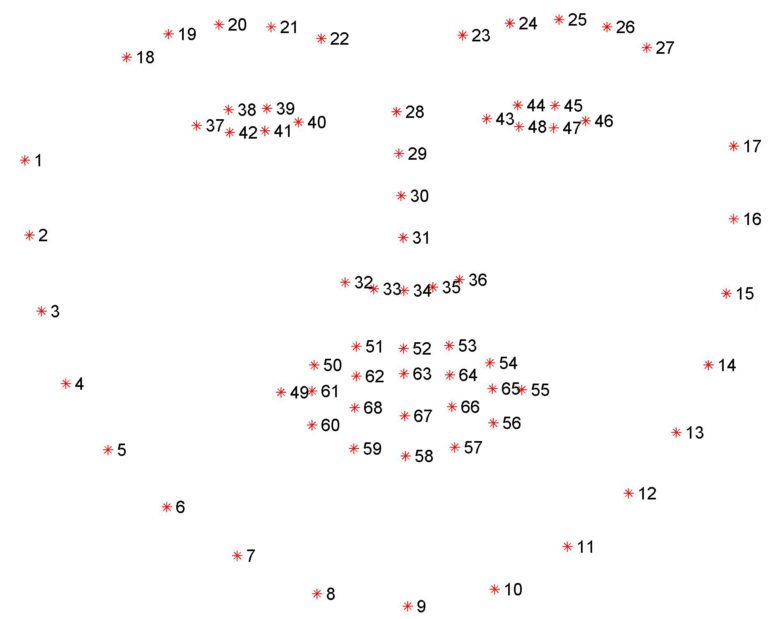
2. Microsoft Deep 3D Face Reconstruction (free / open source)
URL: https://github.com/microsoft/Deep3DFaceReconstruction
Requirements: Linux, Github Large File Storage (https://git-lfs.github.com/), Miniconda (https://docs.conda.io/en/latest/miniconda.html), Python 3.7, g++ & gcc Linux libraries
Installation: You can either clone the original repository, setup an anaconda environment and then download the dependencies separately or use my branch (https://github.com/arstropica/Deep3DFaceReconstruction/tree/demo) which contains the anaconda environment file as well as the dependencies and follow the Github instructions. If you do use my branch, you'll also need to install and initialize Github's LFS extension (https://git-lfs.github.com/) in the cloned repository in order to be able to download the 100M+ model files.
The Deep 3D package uses AI to reconstruct a 3D facial model from an image. The python script accepts the 5 landmarks from the previous step (similar to Facegen) and uses a trained AI model to render a textured 3D mesh of the facial characteristics of the subject in a photograph.
Copy your text and image files from the image directory in the face-alignment repo, to an "input" directory in Deep3D and run the demo.py script to generate the mesh(es).

3. Softwrap for Blender (paid plugin)
URL: https://blendermarket.com/products/softwrap
Requirements: Blender v2.8+, Meshlab
Installation: install from the settings/add-ons panel like any Blender plugin.
This is finally where the magic happens!
Softwrap is a Blender plugin that uses a cloth-like physics engine (not unlike dForce) to deform one mesh using another. It does it without changing the vertex order of the source mesh so it's perfect for Daz. There are a ton of settings from symmetrical deformations to mesh filtering, smoothing, elasticity, etc. A better way to look at the plugin is that it treats your source mesh as a cloth that wraps around a hard 3D object. Using the plugin to get a Genesis model to conform to a 3D mesh requires a few preliminary steps.
First take your 3D face mesh from Deep 3D and use an application like MeshLab to convert it to a DAE model. You need to do this if you want to import the face model into Daz Studio as it doesn't handle OBJ vertex colors well.
Then, in Blender, unwrap the model's UV map and bake the DAE model's vertex colors to a bitmap texture. (Here is a good tutorial if you don't know how: https://www.youtube.com/watch?v=7cphcAZ5ai8). It is a good idea to normalize the positioning of the model by rotating and aligning it with the origin and resetting its pivot.
Export the baked texture and the unwrapped model back to an OBJ and MAT format. Now you can import it into Daz.
At this point, I usually make shape or pose to adjustments to my Genesis character's head in Daz. I import my textured facial model into a scene with a vanilla Genesis character and position and/or scale it so that it covers the character's face. I then use the shape and pose morphs to make gross changes to Genesis facial characteristics so that the forehead, eyes, nose, mouth, chin and jaw are roughly the same shape, size and dimensions as my facial mask. This doesn't have to be perfect, but it will help with Softwrap's retopology process.
Export your Genesis character from Daz as an OBJ at base resolution (I use 1% scale to work in Blender). Also export your positioned 3D facial model the same way.
Import both OBJ models into Blender (ensuring the Poly Groups option is checked).
You may want to create a custom vertex group for the part of your Genesis model that will should not be affected by Softwrap. I usually create a group excluding the character's face, lips and eyelids.
In the Softwrap rollout, select the Genesis character as the source mesh and the Deep 3D mask as the target mesh. Select your vertex group as the Snapping & Frozen Group to protect the bits of your Genesis character that shouldn't be affected by the plugin. Hit the Start button and slowly increase the Snapping strength control to see the changes.
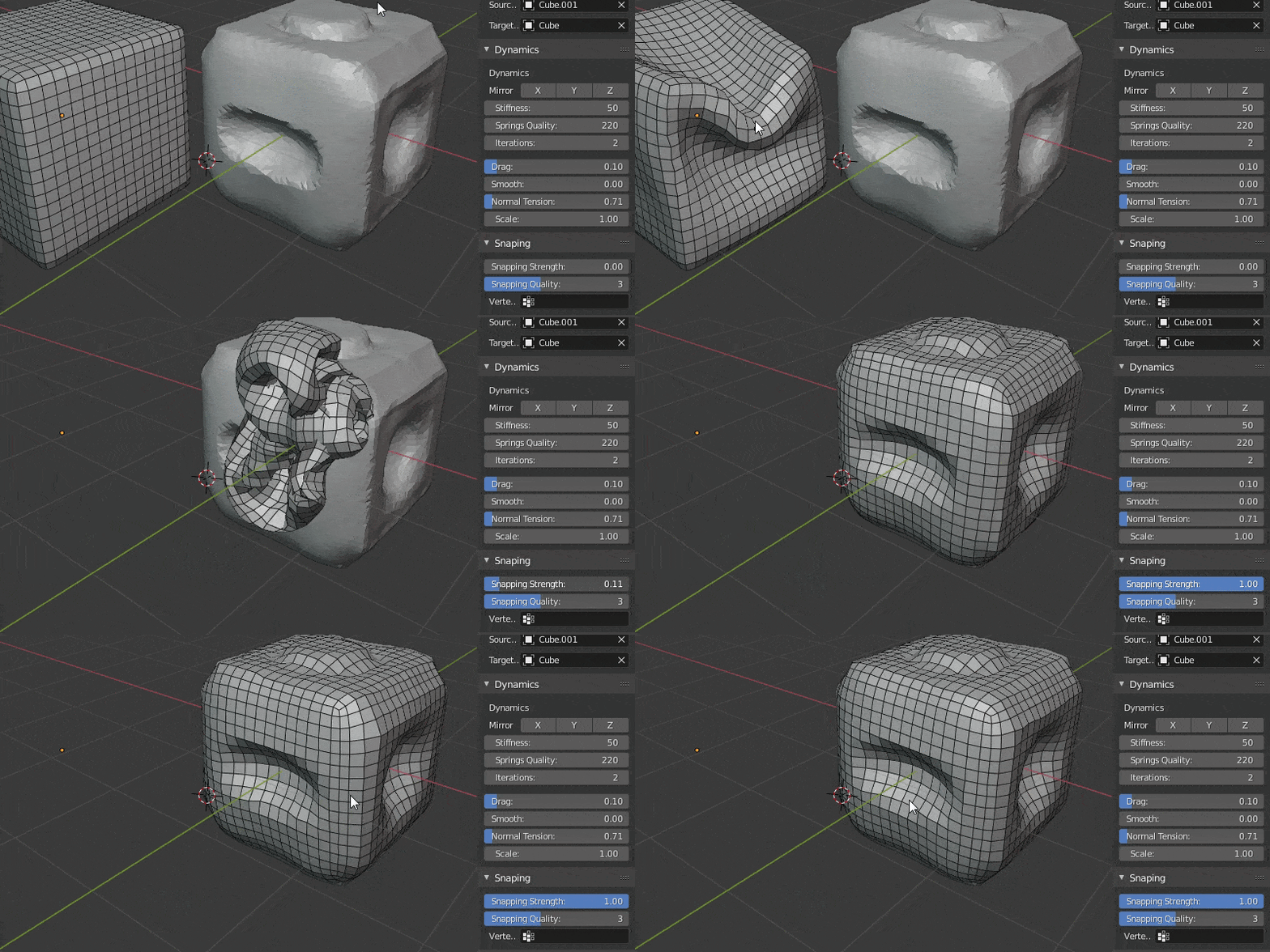

Use the pins, and other settings to fine tune the fit and then hit apply once you are satisfied. You can also leave the deformation as a shapekey and continue modifying your mesh.
Then you just export the mesh back to Daz (this time at 100%) and import it as a morph on a clean Genesis character and you have a good beginning for a custom character without ever having to do manual modelling.
Hope someone finds this helpful!
HeadShop 14 WIN with Gen 8.1 Support Submitted to DAZ (Commercial)HeadShop 14 is a software product used to automatically create 3D heads from photographs. It is used inside DAZ Studio as a plugin. It works with Genesis 3, 8 and 8.1 Basic Figures. HeadShop 14 is outputting a modified morph OBJ file and 4096×4096 texture files. HeadShop has been in development since 2007 and regularly introduces features not found in other photo-to-3D software.
What is new in HeadShop 14?
- HS 14 adds a new easy-to-use “AutoSculpt” tab to create nose shapes, facial features such as eye-bags, cleft chin, hollow cheek and more, as well as creases and wrinkles.
- HS 14 now supports Genesis 8.1 Male and Female Basic figures
- HS14 integrates LoveChild, an additional piece of sophisticated software that allows the morphing between two photos to create a third image. A slider can regulate the degree of resemblance to one or the other photo.
- HS 14 introduces much improved retouch capabilities to improve textures
In addition, HeadShop 14 features a number of break-trough technologies that cannot be found in other similar programs, such as:
- Auto-find 50 significant points in a photo
- Auto-detect gender
- Ability to use photos that are rotated or 3/4 turned.
- Ability to mix and morph between two photographs
- Ability to “mirror” sides to account for poor lighting
- Ability to retouch small blemishes
- Large library of hairs, accessories and hair textures
See „How-to” video here: https://youtu.be/5N-8KE4BCbo
Preliminary Manual: HS14 Manual
HeadShop 13 with LoveChildAlmost all installation issues are attributed to users not being sure where their DAZ Studio is installed.
This tutorial shows you how to find where your DAZ Studio is and how to enter the correct destination in your HeadShop installer. If you have further questions pls. email to [email protected]
Please ignore this threadMcGyver said:
kyoto kid said:
...we had one here on the Southeast side of Portland called The Thrid Eye, that was an urban icon for over three decades It closed down four years ago due to losses amounting to 600,000$ after cannbis was legalised and competition new cannabis shops increased.
The death of the mom and pop headshop. Sadly mom and pop weren't corporate billionaires pumping rivers of hot green cash into... ah... never mind.
My "legalize it" friends used to envision a leafy future where the green stuff was no longer vorboten and everyone danced in the sun, but I was always the boring one who said it would eventually end in big pot and the little guys getting the shaft... it's not there yet, but technically it's barely begun and it clear it's heading in that direction... not the reason for the place pictured above going under, but eventually it will for others.
Tis the way of all things.
...the big cigarette companies have been ready for years.
Please ignore this threadkyoto kid said:
...we had one here on the Southeast side of Portland called The Thrid Eye, that was an urban icon for over three decades It closed down four years ago due to losses amounting to 600,000$ after cannbis was legalised and competition new cannabis shops increased.
The death of the mom and pop headshop. Sadly mom and pop weren't corporate billionaires pumping rivers of hot green cash into... ah... never mind.
My "legalize it" friends used to envision a leafy future where the green stuff was no longer vorboten and everyone danced in the sun, but I was always the boring one who said it would eventually end in big pot and the little guys getting the shaft... it's not there yet, but technically it's barely begun and it clear it's heading in that direction... not the reason for the place pictured above going under, but eventually it will for others.
Tis the way of all things.
Please ignore this threadMcGyver said:
I think the only time I ever heard that song clearly (it wasn't really a radio song) was in a "head shop" in the early 80s... In case the term Head Shop is not a widely known term, it was funkigroovidelic store that sold velvet black light posters, incense, fragrance oils, unique occult items, wind chimes, sometimes records, groovy jewelry (mostly "roach clips", aka joint holders), various handcrafted glass sculptures (bongs), and "health scales"... I think you see where that's going... basically it was where one could go to buy accessories for their "hobbies".
The place was called Yogi-Lala's and the (I think) owner was the quintessential grey haired mellow hippie... I used to go there to buy cheap glass eyes, which sounds weird, so I'm not going to explain that any further.
Whenever I smell patchouli oil or hear certain kinds of sitar music it reminds me of that place... also the owner, who'd I'd get into long philosophical discussions with on occasion.
Ooh, ooh, the smell of patchouli... instant fond memory lane revisit of a headshop...tie-died T-shirts, haze filled shop, perpetually trippy music, and the ubiquitous bead curtain deliniating the sacred area where friends and some especially trustworthy customers would get to enter and sample the currently available crop.
I bought some patchouli scented incense sticks a few years ago. I tried actually recreating that memory in my living room. Kak... gag me with a spoon, the smoke is too strong, sickening and it coats everything in the room. Back in the '70s smoke was everywhere, cigarette smoke, cigar smoke, industrial smoke, trash & garbage smoke, vehicle fumes, we were use to inhaling smoke 24/7. Incense was a respite from the perpetual drudgery smoke. We were used to brown slimy sludge on all once-white surfaces. But now, after the nationwide "clean up the air" campaigns and the "cigarettes are really gross" campaign and being personally cigarette free for almost 20 years, my whites stay white and even the smell of incense makes it hard for me to breathe. Progress.
 Now if we could just get rid of the irresponsible gum chewing.
 HeadShop 13 with LoveChild
skiman44 said:
Does anyone know what folder I'm supposed to install Headshop 13 to? It doesn't show up in the Daz Central app to install. Thanks! - Ski
When you download the product [should be in your Product Library available for manual download AFAIK], there should be a .pdf or some type of readme file explaining what to run to where and where to place manually any addition files provided [depends how he set up].
HeadShop 13 with LoveChildDoes anyone know what folder I'm supposed to install Headshop 13 to? It doesn't show up in the Daz Central app to install. Thanks! - Ski
Face Transfer Squash Facescharles said:
All the plugins are really bad IMO, if you want something goofy, sure, but if you want it to look realistic you'll need to use other sources, combined with blender and then back to DAZ, and LOTS of work. The reason is the sampling is just too poor. You'll never get something like this:
{image removed}
Ok you wont' get this in Daz either..well maybe if you try hard enough. This was by a pro in Maya.
Actually Daz Studio artists have gotten some excellent results in their artwork - many using Zbrush for morphing and skin texturing. There is at least one product for those tiny face hairs, several for fiber eyelashes ... IMHO hair is the hardest item to get looking realistic although a few artists are getting close.
In the meantime, many are quite happy to make use of the D/S plugins {Face Transfer, Headshop, Facegen} to make a likeness or simply another character for the Genesis clans. Not everybody has hundreds or thousands of dollars to blow for one image render.
AIUTO...CHI CONOSCE L’ITALIANO? PARTE TREDICINo Imago.. ne Face Transfer e nemmeno Headshop. Per il render ho proiettato le texture originali a 4k sulla surface Face (Se noti il collo è di colore diverso perché usa la texture standard di G8M). Non l'ho proiettata dappertutto perché prima è meglio verificare il morph e poi fare tutte le texture. Al momento ho messo solo il morph senza texture.Daz 3D is part of

Connect
DAZ Productions, Inc.
7533 S Center View Ct #4664
West Jordan, UT 84084Licensing Agreement | Terms of Service | Privacy Policy | EULA
© 2026 Daz Productions Inc. All Rights Reserved.