-
Coffee Break - April 13 2022
This is heartwarming and very imaginative in how the problem was solved...lol

Awwww, we need Cat 8, or whatever.
This video should inspire those who like to make poses or simply want a new idea for a render. Sofie has a youtube channel so you can see more of what she does at this link.
https://www.youtube.com/user/SofieDossi/videos
Also Sophie is adorable, probably make a good character morph.
This was my first introduction to Sophie and since this video is 16 minutes long, might be best to wait for lunch break to watch it.

The video below is a small bio, just the right size for a coffee break.
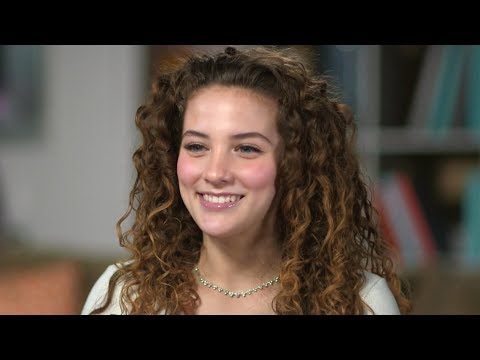
Bloody hell, she's amazing, but is a tough watch, due to being bloody scary.
Horse2GoatYour list of required products is incomplete. Here is the error message I get when loading the presets:
data/daz 3d/daz horse 2/base/morphs/linday/dark knight/dark knight hd details.dsf
data/daz 3d/daz horse 2/base/morphs/midnight_stories/llama/llama-ears-back.dsf
data/daz 3d/daz horse 2/base/morphs/midnight_stories/llama/llama.dsf
data/daz 3d/daz horse 2/base/morphs/rawart/raw_toypony/raw_toypony.dsf
data/daz 3d/daz horse 2/base/morphs/sickleyield/dh2unicorn/fbmunicorn01.dsf
data/daz 3d/daz horse 2/base/morphs/sickleyield/dh2unicorn/fbmunicorn02.dsf
edit: off-topic, but why does the horse have a "Roman nose" morph?
most popular types of character?I have always been a sucker for Sliver now @Jessaii characters going all the way back to when she and Countess had their own site. Most of the characters I create have at least one element from her characters, either a face morph, skin texture, eye color or nail morph. :)
No Pose Controls on Import [SOLVED]I can't quite get the finer controls/finesse that pose morphs seem to offer. I've been moving the face rig with axis controls. I would much prefer the pose morph tags. Thanks for your input!
beginner questionsWhat files exactly are reproted as being missing? How did you install?
Are you referring to my missing gen 3 female? It does not say missing file then, I just cannot find it anymore. For example when I start up Daz studio, I can choose from scenebuilder, interactive tutorials etc. if I choose scenebuilder, then choose male character, I am asked to choose between gen 3 and gen 8. But if I choose female character instead, I am only asked to choose gen 8. Also in the library when I search for "female", it only shows gen 8 female, not gen 3. If you understand what I mean :)
That sounds as if you have Genesis 3 Male Starter Essentials installed, but not Genesis 3 Female Start Essentials
When I am trying to add the morph of Alysha, as one of the links I shared, I get plenty of missing files. alysha_eyes ref.jpg, Alysha--legs__1003.jpg, alysha--faceb_1001.jpg, alysha--torso_1002.jpg and maybe 20 more. I really dont understand what I am doing wrong here.
When I access the area on the left, content library, some of the files\morphs or what they are called, have a small picture as a preview, while many of them have a triangle with an exclamation mark in it. For example Alysha Body, Alysha Face and Alysha nails have this exclamation mark, while Alysha skin and Alysha Eyes have small preview pics. None of them work when I try to apply them. There is no error code either. In the logfile it says: 2020-09-14 13:19:21.871 Loaded file: !Petra Head inj.duf. (this is a different morph, but has the same result)
When looking in the Content Library do you see the /data folder, possibly /content/data/? You shouldn't, having that (or Runtime) visible as a folder in the Content Library means that the product was unzipped with an extra sub-folder (usually Content) containing its files, in which case the fix is to take the stuff out of the sub folder and merge it with the matching folders in the main content directory (e.g. /Daz 3D/Studio/My Library/ in the documents folder).
Does Sweet home 3D export OBJ? Does it have an option to export textures/maps?
I do not think so, I believe it exports in a .sh3d.
That sounds like its native format - does it have File>Export as well as File>Save, and if so what formats does it offer?
You can see the log through Help>Troubleshooting>View Log File. The error you report often means that you are trying to apply a preset of some kind without having the target object selected in the scene.
Thank you, helps alot. Now I saw through it, and I believe most of the times I am told to look at log file is when I try to apply a morph or pose without selecting the character. However, it did say many times : Could not resolve : "/Runtime/Textures/EmotionalDreams/Genesis8F/Ebony/Alysha/Iray/Skin--Alysha--LegsB_1003.jpg" repeatedly for similar jpg files. I have no idea what it means.
That again sounds like a bad path - either in the file for the product or in the installation.
Also what does this mean: 2020-09-14 13:11:07.700 WARNING: ..\..\..\..\..\src\sdksource\fileinput\dzassetdaz.cpp(5617): Could not find modifier definition.
That may be another bad path, or for some other reason the content DS is reading says "go here" and Ds can't go there or the file it finds is in some way corrupt.
beginner questionsWhat files exactly are reproted as being missing? How did you install?
Are you referring to my missing gen 3 female? It does not say missing file then, I just cannot find it anymore. For example when I start up Daz studio, I can choose from scenebuilder, interactive tutorials etc. if I choose scenebuilder, then choose male character, I am asked to choose between gen 3 and gen 8. But if I choose female character instead, I am only asked to choose gen 8. Also in the library when I search for "female", it only shows gen 8 female, not gen 3. If you understand what I mean :)
When I am trying to add the morph of Alysha, as one of the links I shared, I get plenty of missing files. alysha_eyes ref.jpg, Alysha--legs__1003.jpg, alysha--faceb_1001.jpg, alysha--torso_1002.jpg and maybe 20 more. I really dont understand what I am doing wrong here.
When I access the area on the left, content library, some of the files\morphs or what they are called, have a small picture as a preview, while many of them have a triangle with an exclamation mark in it. For example Alysha Body, Alysha Face and Alysha nails have this exclamation mark, while Alysha skin and Alysha Eyes have small preview pics. None of them work when I try to apply them. There is no error code either. In the logfile it says: 2020-09-14 13:19:21.871 Loaded file: !Petra Head inj.duf. (this is a different morph, but has the same result)
Does Sweet home 3D export OBJ? Does it have an option to export textures/maps?
I do not think so, I believe it exports in a .sh3d.
You can see the log through Help>Troubleshooting>View Log File. The error you report often means that you are trying to apply a preset of some kind without having the target object selected in the scene.
Thank you, helps alot. Now I saw through it, and I believe most of the times I am told to look at log file is when I try to apply a morph or pose without selecting the character. However, it did say many times : Could not resolve : "/Runtime/Textures/EmotionalDreams/Genesis8F/Ebony/Alysha/Iray/Skin--Alysha--LegsB_1003.jpg" repeatedly for similar jpg files. I have no idea what it means.
Also what does this mean: 2020-09-14 13:11:07.700 WARNING: ..\..\..\..\..\src\sdksource\fileinput\dzassetdaz.cpp(5617): Could not find modifier definition.
AIUTO...CHI CONOSCE L’ITALIANO? PARTE DODICIScusate, ho notato una cosa strana su Sharecg, ma è possibile distribuire i scene subset? Cioè non memorizzano nulla all'interno a parte dove s trovano i vari "pezzi" che li compongono?
Mi spiego meglio, è possibile distribuire ad esempio un scene subset in cui ci sia Genesis 8 che indossa un determinato vestito?
In quel caso è meglio usare un Character Preset, salva tutto quello che ti serve e di sicuro non ci sono geometrie dentro.
No a questo ci arrivo ancio, ho vistoun freebiee su ShareCG salvato con il Scene Subset, e mi chiedevo se non andasse contro il (C). Anni fa successe una cosa antipatica per VS, un tizio salvo un morp con l'export del CR2, e praticamente salvo un character con tutti morph che aveva, morphs++, Creature Creator e cosi via. Fu segnalato alla DAZ e fatto rimuovere. Non vorrei che questa fosse una cosa simile.
Crooked teeth due to mouth morphs
Thank you very much jesusaramenes !hi CHWT ;)
there are many ways to do it with shape splitter but in my case,
first follow the tip above
secondly open shape splitter
in the first tab "divide" in step 1 under "easy" choose "head"
in step 2 choose the morph concerning
in step 4 launch the "preview"
in step 5 save the morphthen once done in the third tab "save asset(s)" click at the bottom on "save morph asset"
voila ;)
Critical Reviews of DAZ Products?As a PA who has had published errors.... I hate it when that happens!!
Usually, I am more than happy to submit a fix right away. If it's a recently released product, I'm double checking the forums to see if you guys find anything. I totally hate it when the morph default loads on G8F, but it happens, 1 little number causes a whole host of issues. In general, tag a PA by name @PA_Name, or send a site mail. Those get sent to our emails. I try to be respectful and responsive.
However, an older product? One that was made for genesis2 or 3? That is not going to get my priority attention.
Regarding critiques. Specifics are the key, The ears are too short, the muzzle is not long enough, the skin tone is too yellow. Those are helpful. Just saying that it doesn't have the right look is not helpful. Then beyond creative choices on a product, there can be technical reasons why something is the way it is. Those we have far less control over and it's frustrating to see complaints about it.
Even when offering critiques, be gentle and kind, These products are a lot of work and we pour love into all of them, (even when oopsies happen.)The Marvelous Designer ThreadI've just started using marvelous designer with my Patrick Troughton (second Doctor) model. I'm still learning to create clothes so hope to improve. I'm mainly using it for cloth sim in animation. Unfortunately as I have to export from MD using Alembic I then have to remap all the separate clothing, as Alembic doesn't export textures. I was wondering if there was a quicker way of doing this. If I export it as an object I can have uvmaps for each clothing, but don't know if I can somehow transfer the uv to the alembic? Alembic just exports one default map of all the clothing.How do you morph or modify parts of clothing?In the picture, how do you morph the clothing like that?
I know how to add a dforce modifier and simulate it but it only adds a gravity, I cant figure out how to add a pull or something?
And however this method works for clothing does it work for most anything else? Just curious, it might come in handy.
Im brain dumbing on how to word this so maybe thats why im having a hard time trying to google it.
Daz 4.12 iray doesn't workHas anyone else experienced this? Any resolutions?
I re-installed Daz 4.11 after discovering that iray does not work in my 4.12. It only says "Preparing Scene" for infinity. I have the same exact settings.
I use 4.12 for the Face Transfer, but everything else I use 4.11. Is there a fix for this, like a magical button in 4.12 to use iray? Or is there a way I can get Face Transfer into 4.11?
Thanks for any help in advance!
Crooked teeth due to mouth morphshi CHWT ;)
there are many ways to do it with shape splitter but in my case,
first follow the tip above
secondly open shape splitter
in the first tab "divide" in step 1 under "easy" choose "head"
in step 2 choose the morph concerning
in step 4 launch the "preview"
in step 5 save the morphthen once done in the third tab "save asset(s)" click at the bottom on "save morph asset"
voila ;)
OT: RIP Mrs. PeelMrs Peel, we're needed. In memory of Diana, I have uploaded an update to an old morph.
You can get it here : https://sharecg.com/v/96364/browse/11/Poser/Emma-Peel

..very nice. I need to find a Bently Blower and Lotus Elan model.
Crooked teeth due to mouth morphs
Hi jesusaramenes, could you please tell me how to do it with shape splitter? Thank you very much.thanks for the tip, but when I reopen my scene the teeth are deformed again, what do I have to do to make this permanent please?
edit : i saved the morph with shape splitter and problem solved, there is surely another method but we do as we can
*Released* Porefectionist for Genesis 8 Females- CommercialNice! I'd like to see a comparison of a core figure WITH the DAZ HD added and then yours with and without the DAZ HD to see how different it is compared to the HD morph and to also see how much more it can add to the HD morph
Holt 8: The West Gone Wild / WeirdI wasn't going to pickup more Holt 8 stuff. To be honest, the morph is really mundane, but CC Jack is an excellent character... Nice skin, and tons of options.


And the vamp option:
My my what a cute little bikini you got there
SereneNight's Sci-Fi Fun Thread 2I was thinking of putting the basics, Owen, and Boyd, Michael 8, and base male, and the skins and hairs from all the guys. Then taking the whole g8m morph folder out of the DAZ data file. I'll throw that in the second DAZ runtime. When I need a monster, or a figure, I can always run the installer.
SereneNight's Sci-Fi Fun Thread 2I am thinking of creating a second base directory which I can 'turn on' and off depending on what I want to render. I'm running into a lot of slowness when I load male characters, and I admit to having a ton of morphs, most of which I don't use. So I think one of the projects I will try this week, is creating a new runtime, to activate, and deactivate which will just have boyd and Owen and their morphs. Then when I need to add the othter guys, I will load their directory.
It is sad, but I think it is strange that by now, DAZ Store, has not come up with a way to stop every possible morph from loading.
I think they haven't really needed to until now, so they didn't think about it. With Genesis 1 and 2, there just weren't that many characters or addons. With Genesis 3, by the time all that started to become an issue, Genesis 8 came along. Now with G8 in the middle of year 3 with no end in sight, weekly "major" releases, and with more G8 characters than in all the previous Genesis generations combined (and that doesn't count add-on morphs and expressions and all that), things are getting kind of dire.
I've got a computer with some serious muscle, and even so, now it takes a fairly notable amount of time to load G8M. Unfortunately, the stuff I don't use more frequently is hard to isolate, beyond a few expression sets.
beginner questionsHello again! Thanks, I will try to see more at the requirements for the downloads :)
So I am having some trouble importing some stuff. When it says "error, see the logfile for more discriptions." where is the logfile`?
Also I found a whole lot of nice stuff in renderhub. Downloaded a whole lot. But some of the things I had some issues with. for example this:
https://www.renderhub.com/emotionaldreams/alysha-for-genesis-8-female
To my understanding that is a morph of a gen 8 female, and that is everything that is required, right? So when I use the program, I load a genesis 8 female, and try to apply this morph but nothing happens. When I try to apply some of the files it says some files are missing. Am I missing something here? Is this also another character required? Or maybe I am just trying to apply the morph incorrectly? if so, how do I do it?
Same issue with this:
https://www.renderhub.com/batov3d/pop-body-morph-for-g3f
and this:
https://www.renderhub.com/bu-es/carlos-alberto-for-g3.
Does it mean I need this Carlos guy from before?
Also my generation 3 female character dissappeared. How can that happen? i tried downloading the genesis 3 starter essentials again, but still doesnt show up in daz studio.
The environments I downloaded works just fine, motel room and alley works perfect! One more thing, if I design a house in Sweet Home 3d, can I import that house in Daz3d?
Thanks again guys, you are making this alot easier for me. Have a nice day :)
Daz 3D is part of

Connect
DAZ Productions, Inc.
7533 S Center View Ct #4664
West Jordan, UT 84084Licensing Agreement | Terms of Service | Privacy Policy | EULA
© 2026 Daz Productions Inc. All Rights Reserved.