-
Is animating broken ? Something ain't right....
Animations run really slow even on high end pc's, your right but something isn't right, every animation i've bought is pointless in daz3d, better used in Unreal 4 engine moving the keyframe that works into that editor because it's just too heavy in any mode in daz3d except maybe filament where assets are a little lighter.
OS Big Sur and the M1 chipGlad to hear there’s another way to run the Windows version of D|S; when you say “FAST” can you estimate if it’s faster than a non-m1 Mac, and if so, roughly how much faster?
At any rate, thanks to the project status updates over the last eight months, we know that it’s not here yet/might be here soon/might be having problems/may be a few more months for the Mac Big Sur/Filament update, and some of us can use that info for planning our next Mac updates/purchases.

— Walt “getting just a little grumpy” Sterdan
Forced to update to 4.15?I've not had a DAZ Studio crash in so long now, at least 6 months. I have trouble in DS switching to Filament render style as for complex scenes it's cause DS to run out of RAM and crash.
Where's Filament?Deke said:
What's Qt and how do I update it?
You and I don't, DAZ has to. It's a programming framework used by DAZ to help them maintain a consistent user interface between Windows and the Mac OS. Essentially DAZ has spent many months rewriting much ot the program to use the newer framework, necessary to be able to update the Mac version to use the latest OS and at the same time make Filament possible as well. Mac users might be able to update their DAZ Studio without requireing the latest OS, but we'll have to see.
I wish I had more information for you (boy do I ever) but for now, it's "wait and see".
For what it's worth, I installed VM Fusion on a couple of my Macs so that I could test Filament for a project I'm in the middle of, and for me at least Filament is worth waiting for.
-- Walt Sterdan
IRay Glossy RoughnessRafmer said:
marble said:
So far, after a few experiments, I think I may go back to having PPS turned off. With it on I get strange effects when there is an opacity map (when cloth is semi-transparent, for example). Also there is no indication of gloss at all. I guess I will just have to go back to turning down the Glossy Roughness even though I might need to turn it back to 100% for the render.
I have never used the OpenGL view as an indicator of anything (shaders wise). If I want to see how roughness looks like I just use the Iray preview, so I don't care about the OpenGL inaccuracies as long as it doesn't hurts to look at.
Yes, that's what I do too but I have got used to seeing the OpenGL image and judging somewhat how it would look in IRay. But yes, I hop in and out of the IRay preview all the time now that I have a GPU capable of doing that without slowing down my workflow too much. I was not happy with the Filament preview either so I actually prefer OpenGL for the viewport even though it is ancient and so very limited.
Iray viewport performence became incredibly slow for me lately.Also say you have preloaded a character with a bunch of gear and saved it as a scene ready to use in your scenes with multiple hair pieces that you hide and show when needed will also slow down perfomance, say you fully rig a character with 10 outfits and hair pieces & this character takes forever to load into scene even if you hide 9 sets it still may impact Iray renders even tho it shouldn't because it's not displaying the other outfits hidden, it will certainly impact moving the figure and posing it, which will take forever to load it's movement because of the memory it requires, the figure becomes very heavy in the scene and you will get massive slow down just trying to change it's position in the scene even in texture mode, use filament mode in that case it's a little lighter when making adjustments.
Rendering issue with Natty HairYep same here, at first I thought I had setup for a Filament render but its the hairs fault.
Has anyone raised this issue with Daz yet?
Where's Filament?Deke said:
Thanks for the link. I'm not running Big Sur...not even sure it will run on my older Mac Pro Towers. 4.15 boots up fine, but no Filament, which I assume is a plug-in issue.
In order to get Filment to work, they need to update their version of the Qt that's needed to keep D|S running on both Mac and Windows machine, which theyre doing anyway to run Big Sur. The two aren't directly related, but both require the Qt update in order to run either.
-- Walt Sterdan
Where's Filament?Thanks for the link. I'm not running Big Sur...not even sure it will run on my older Mac Pro Towers. 4.15 boots up fine, but no Filament, which I assume is a plug-in issue.
Where's Filament?I installed 4.15 on my Mac, but can't see filament as a display option from the pull-down menu. Does it have to be installed separately? Or is this a Mac thing?
AIUTO...CHI CONOSCE L’ITALIANO? PARTE TREDICIKainjy said:
Secondo me gran parte dei tuoi problemi sono dovuti alla tua pipeline di lavoro che è rimasta inalterata nel tempo...Posso capire che G1 non sia più supportato da tutti... Ma lo script non funzionava su nessuna figura, non solo su G1! Devo dedurre che anche G8.1 non ha più supporto?

Quanto alla pipeline... Cosa ti fa pensare che il mio workflow sia invariato da tempo?

Nel corso degli anni ho cambiato parecchie volte i miei metodi per sfruttare meglio tutti i vari plugin che sono usciti. Ho iniziato che usavo otto software diversi e ora ne uso appena tre e nemmeno così spesso come prima, proprio perchè ho cambiato metodo nel corso del tempo.
 Il fatto che io non usi spesso G3/8/8.1 è causa del fatto che sono stati creati senza pensare agli animatori, non perchè pianificassero di abbandonare altre figure o fossi restio a cambiare figura.
  Da quel che posso vedere sono totalmente orientati agli still.
Tornano al workflow, fino a due/tre anni fa realizzavo le textures animate utilizzando un vecchio plugin di MCasual e ImageMagick, ma poi mi sono messo a "studiare" un pochino e adesso utilizzo un mio set di prop speciali che mi permettono di avere le textures animate dove voglio e salvate nella scena. Fino a due anni fa le "simulazioni fisiche" le facevo a mano, ora utilizzando DForce ho un set di proxy che mi danno la possibilità di far cadere gli oggetti in modo naturale.
Per qualche mese ho anche studiato IRay, tanto che ho preset e shader fatti da me, ma quando mi sono reso conto che era rotto, inaffidabile e costoso l'ho mollato. E non perchè non volessi cambiare io ma proprio perchè è rotto... Ero molto entusiasta della novità. E sono molto interessato a Filament e anche in questo caso ho una intera cartella di "studi", test e prove. Sono riuscito a crearmi un preset di luci perfetto... Ma Filament soffre ancora di quel brutto bug delle ombre tagliate, purtroppo.
Magari è proprio il contario, sono io che sto variando troppo, ahah!
Lights for interiorsThere is also this: https://www.daz3d.com/interior-light-pro-for-filament-and-iray . It has a camera with special planes parented to it that make everything behind them invisible. This will cause walls and anything behind the camera to disappear in Iray, letting in the light of the hdri. It includes many hdris.[Released] ROG Fantasy Home: Entrance + Furniture Set Products [Commercial]barbult said:
I decided to do a Filament render. I did some postwork in Luminar 4. The chair and side table are from the large room furniture.
I like the way it came, out and rendering 3840x2160 was instantaneous with Filament.
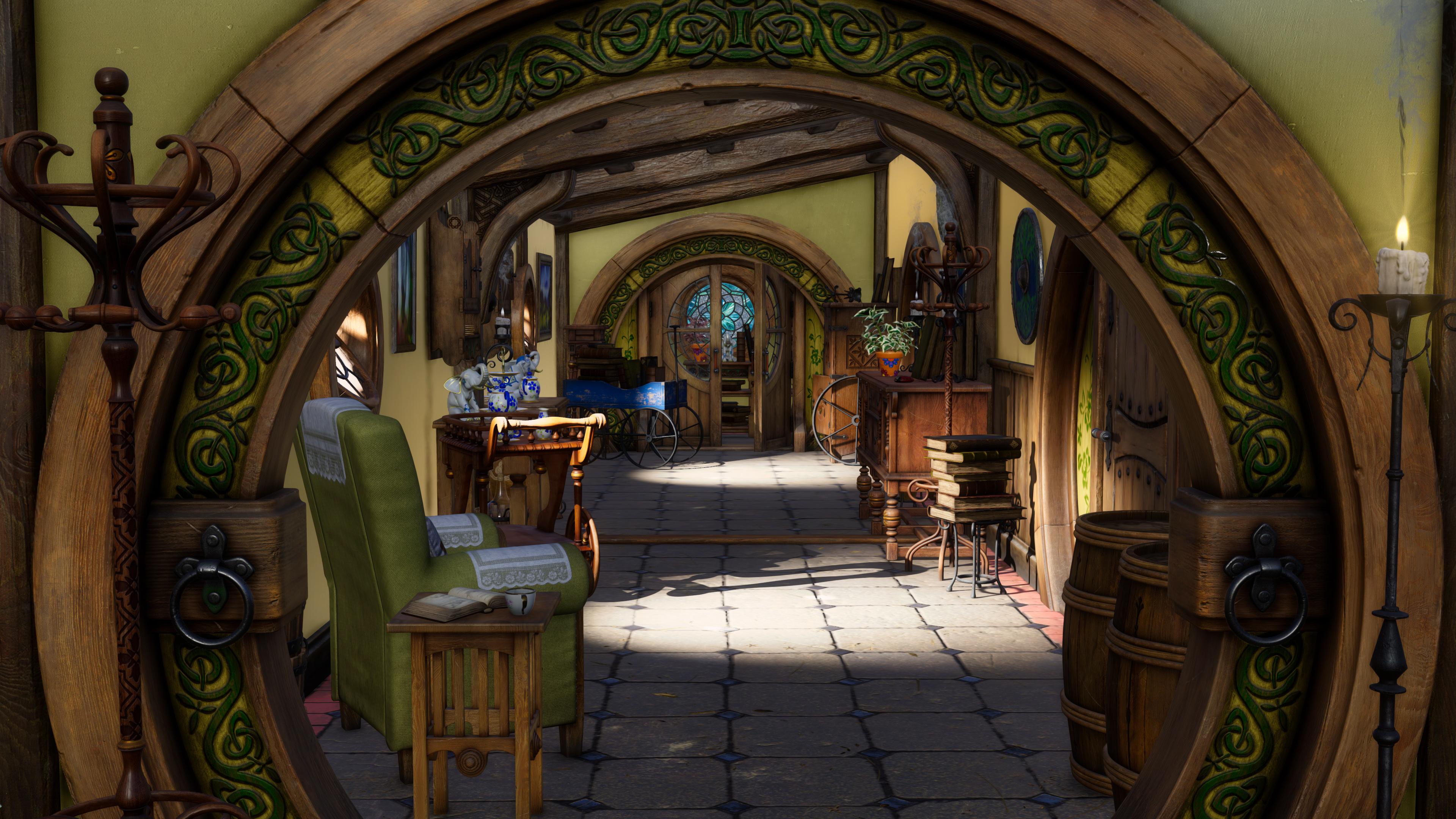
Wow. Good idea - that looks amazing for real-time/Filament, @Barbult.
- Greg
[Released] ROG Fantasy Home: Entrance + Furniture Set Products [Commercial]I decided to do a Filament render. I did some postwork in Luminar 4. The chair and side table are from the large room furniture.
I like the way it came, out and rendering 3840x2160 was instantaneous with Filament.
[Released] ROG Fantasy Home: Entrance + Furniture Set Products [Commercial]Strangefate said:
Thanks for the support, everyone!
@BlueFox - I too hope they do well of course, but I do worry about people having enough of the fantasy home before we're done with it. We'll see.
@alexcowley - For those looking to free up some space and only work with Daz Iray anyway, there's some interior and exterior architecture textures that come in 4k that are not used by default. They're alternative wall etc textures for those wanting to export to another app or use 3DL or Filament perhaps.
The walls by default use a 4 layer Iray blended material (better on memory) that is included with Daz by default but doesn't display very well yet outside of Iray.
Anyway, deleting those sets of alternative 4k textures should free up a good amount of disk space, if needed.
I think you may have misunderstood my last post.
I have two 6 TB hard disks and an 8GB 1080 GPU (with a 12GB 3080 TI on the way) so I'm not short of space. I also consider high quality textures to be a good thing.
Have you seen Herschell Hoffmeyer's Wyvern? Like your interiors, this has very high quality textures. They look absolutely amazing.
Cheers,
Alex.
What do you want to learn?There's a good amount of features that I feel either dont have any reasources to learn about, or what reasorces there are don't go in depth enough to learn critical things:
Dforce wind node
Ik chains
Iray section planes
Strand based hair
Dynamic clothing
Face transfer
Filament PBR
Bloom (Edit,nevermind, that one does have tutorials on it)
Shader mixer
[Released] ROG Fantasy Home: Entrance + Furniture Set Products [Commercial]Thanks for the support, everyone!
@BlueFox - I too hope they do well of course, but I do worry about people having enough of the fantasy home before we're done with it. We'll see.
@alexcowley - For those looking to free up some space and only work with Daz Iray anyway, there's some interior and exterior architecture textures that come in 4k that are not used by default. They're alternative wall etc textures for those wanting to export to another app or use 3DL or Filament perhaps.
The walls by default use a 4 layer Iray blended material (better on memory) that is included with Daz by default but doesn't display very well yet outside of Iray.
Anyway, deleting those sets of alternative 4k textures should free up a good amount of disk space, if needed.
Filament gpu minimum requirementsIt's not going to be the one written for android's mobile phone OS specifically.Every OS is different that's why something written for mac won't work on Windows.
If you have a look at the projects github page you can see the source code for the different platforms it's been ported to.
https://github.com/google/filament
Filament was written for low resource environments so it could render in real time.As features are added more resources are required, and more time, to render the scene/image.
https://google.github.io/filament/
The platform you want to run it on, and the intended use of that platform would decide what features you include and what OS you build/compile for.
I personal like having it in Studio.I don't believe it was intended to be a replacement for iray or 3delight.It's another option for those that want to use a fast PBR style render engine instead of the opengl, or iray preview as they work.Some like the look of the renders so actually use it for their finished product.
It's good to have options.
Filament gpu minimum requirementsFaeryl Womyn said:
Richard Haseltine said:
Filamaent does not use CUDA so it is not tied to nVidia GPUs
Richard is IceCrMn right and the Filament used in Daz is the same as the one used on an android phone?
It's the Google Filament, but I have no idea how the implementations vary between platforms.
Filament gpu minimum requirementsRichard Haseltine said:
Filamaent does not use CUDA so it is not tied to nVidia GPUs
Richard is IceCrMn right and the Filament used in Daz is the same as the one used on an android phone?
Daz 3D is part of

Connect
DAZ Productions, Inc.
7533 S Center View Ct #4664
West Jordan, UT 84084Licensing Agreement | Terms of Service | Privacy Policy | EULA
© 2026 Daz Productions Inc. All Rights Reserved.