-
Morph/shape only allows limited control - is there a way around this?
I bought the "Mouse by AM" package expecting/hoping to be able to morph arms, legs, torse, head, etc. bigger or smaller to make my own character, but I see many of the controls only allow me to go one way (increase body mass, thicker loins, fat belly, smaller head, etc.). I'd like to be able to make the body longer, or the legs shorter, or eyes bigger, etc.Is there a way to do this?
I see some reference to exporting to Blender or Hexigon and/or using some kind of add-on, but I thought I'd ask if it could be done with the tools I already have (Daz Studio 4.12).
Thanks!
https://www.daz3d.com/mouse-by-am
If you select one of those controls and right-click -> select Edit.
Then on the desired-to-be-changed dial, either right-click or select the tool cog ... select the appropriate option and make the changes. As long as you do NOT 'save' those changes, nothing will be damaged. Upon deleting the figure from the scene and/or closing D/S, all will revert back as it was.
HeadShop 13 Genesis 8In these pictures, the middle picture is the original, the left picture is the Headshop one, and the right picture is the Face Transfer one. My first impression is this software works best on white people. On the two Black girls, regardless of light skin or dark skin, it seems to interpret their actual skin color as more of a blemish painted on the default skin color that it uses.
No instructions seem to be included. The included PDF file only explains how to install, which involves both clicking on a .exe installer and unzipping a file into a folder created by the installer. Everything I click on in the app generates a popup message linking me to a YouTube video in lieu of included documentation. Maybe I should actually look at those videos to see what I'm missing. But there don't seem to be many adjustments to make to the texture if it's way off. Even mirroring the texture didn't remove Hayley's hair from the texture. I am hoping this is just a case of me not knowing how to use the software yet.
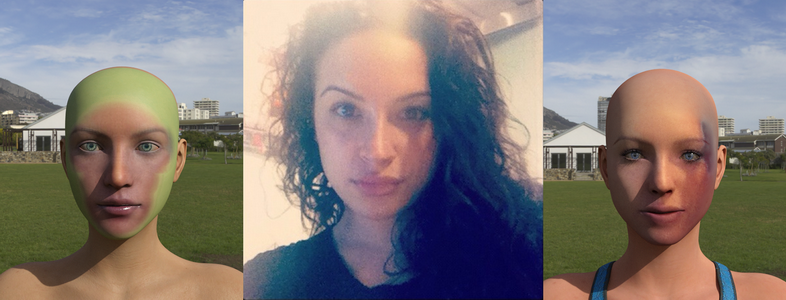
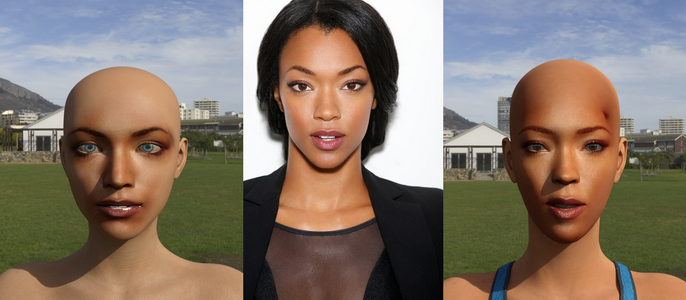
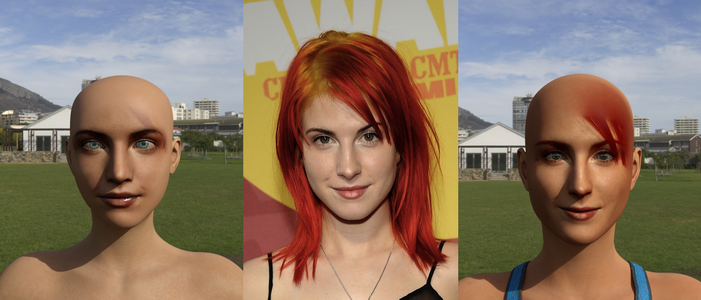
Photos like that first pic will never, ever work. You absolutely must have good quality photos for any of these sort of apps. The best result here is easily the best source photo, but still try for better pics. I know this may be tough if you are looking to do like celebs, but is very important to have a good source pic. If you take a pic yourself, you can control these things. Do NOT use a selfie cam. Use a proper camera, with a proper FOV. A big issue with many selfie pics is the FOV, it blows up the proportions. Mugshot style shots can work pretty well, but again, they need to be high resolution. Tie hair back, use soft, even lighting, and you can get decent results.
Genesis Morphs Eraser pluginHas anyone had success using this with Genesis 2? I have tried it a couple of times, and can only reduce the file by 15 megs (not much in a 700 meg scene).
I do the following:
The three layers in the instances tray are:
Michael 6 - top
Genesis 2 male - middle
Actor - bottom
I select Genesis 2 male
Then I open the morph ereaser, and navigate to Daz Studio content>data.>DAZ 3D.
Under that I open Genesis 2>Male>Morphs. Highlighting "Morphs," I click OK, and get the following list:
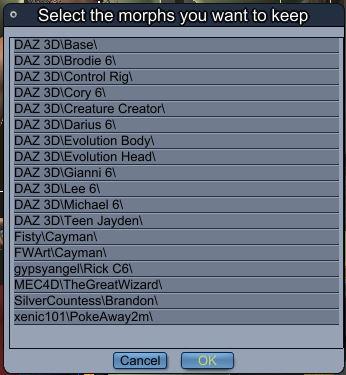
The next step is somewhat confusing. The instructions are to select only the product morphs I want to save. So, does that mean if i click on none of them, that they will all be deleted? I've tried that before and it didn't seem to do anything. For now, I click on Michael 6, and then say OK. Very little file reduction happens.
Can someone point out my error? Thanks!
Hello UB
I click on the Genesis 2 male then apply the eraser. I next apply the eraser to each individual clothing items and also the hair. Hope it works for you !
Razor Thorn for G2F & the RSSY clothing converter?I vaguely remember a tutorial by sickle that explained how to transfer clothing without losing extra bones. I think it was on deviantart or something.
Razor Thorn for G2F & the RSSY clothing converter?Alternatively, you could look into D-Formers that can be saved with the new outfit and adjusted as required, like any morph. You would use them instead of standard posing, where the bones would be rotated as needed. There aren't any poses for the outfit, so you would have to position them manually either way.
LAMH Look At My Hair and Iray TutorialAlso AFTER you make it an object/fibermesh can people later on add bones/rigging (is that the word?) to the hair so it can move/be adjusted later on?
Mmm, well, there is, just not within DS unfortunately.
I don't want to get your hopes up as I'm using another app, with custom tools that I don't think are developed for anything else, and another set of tools where the author has gone MIA with orders piling up.
But essentially I export as FBX. Depending on the figure, there may be some morph baking work & rig alterations. With Fur, I've a tool that will apply weight mapping correctly to the fur geom. This can really balloon up the object size. Where there's an All Body fur group, I'll divide that group into 4 or 5 sections.
The resulting fur can be animated with bone deformation, but won't respond to morphs.
Here's a recent example with the Snow Leopard. He ended up with 8 fur sections:

 HeadShop 13 Genesis 8
In these pictures, the middle picture is the original, the left picture is the Headshop one, and the right picture is the Face Transfer one. My first impression is this software works best on white people. On the two Black girls, regardless of light skin or dark skin, it seems to interpret their actual skin color as more of a blemish painted on the default skin color that it uses.
No instructions seem to be included. The included PDF file only explains how to install, which involves both clicking on a .exe installer and unzipping a file into a folder created by the installer. Everything I click on in the app generates a popup message linking me to a YouTube video in lieu of included documentation. Maybe I should actually look at those videos to see what I'm missing. But there don't seem to be many adjustments to make to the texture if it's way off. Even mirroring the texture didn't remove Hayley's hair from the texture. I am hoping this is just a case of me not knowing how to use the software yet.
Problem Areas for Photorealismi think symmetry of faces is a big one too. speaking of which, is there an easy way to morph in asymmetry? Vendors sure love symmetry.
A couple morph sets / figures come with assymetry morphs. They help a lot!
Any for the guys? I've seen ones for G8F, but haven't come across any for G8M; they could be out there and I've just missed them because it's so much easier to find that kind of diversity in products for the female figures.
There was a G8F pack I considered picking up on Rendo to see how well they transferred, but given the more difficult return policy I'd rather pick some up here in case it doesn't work out.
Problem Areas for PhotorealismYes, hair in Daz is so bad.
i think symmetry of faces is a big one too. speaking of which, is there an easy way to morph in asymmetry? Vendors sure love symmetry. Do you have to use like Shape Splitter/X-morphs to split morphs or what?
I see many users making realistic figures with bespoke texture sets and bespoke hair and bespoke eyes etc, but very few vendors. I mean, isnt the value proposition of Daz that i can just press the make art button and have a realistic character? The fact that im expected to put in lots of effort to even set up the characters and environs is a bit annoying lol.
PowerPose is an underutilized tool in helping to achieve more realistic images. With G8 and PowerPose, more realistic expressions and asymmetry are extremely easy to achieve.
Also, a light and subtle touch with the Mesh Grabber tool can provide asymmetry to faces, bodies, hair, etc.
Problem Areas for Photorealismi think symmetry of faces is a big one too. speaking of which, is there an easy way to morph in asymmetry? Vendors sure love symmetry.
A couple morph sets / figures come with assymetry morphs. They help a lot!
Problem Areas for PhotorealismYes, hair in Daz is so bad.
i think symmetry of faces is a big one too. speaking of which, is there an easy way to morph in asymmetry? Vendors sure love symmetry. Do you have to use like Shape Splitter/X-morphs to split morphs or what?
I see many users making realistic figures with bespoke texture sets and bespoke hair and bespoke eyes etc, but very few vendors. I mean, isnt the value proposition of Daz that i can just press the make art button and have a realistic character? The fact that im expected to put in lots of effort to even set up the characters and environs is a bit annoying lol.
Transferring Raiya's Genesis 2 Characters to G8Oh, I love the Felicity and Yanmei you did!!! Those two were my absolute favorites back in the day.
I'm going to try to follow your process!
Thanks so much, and good luck!! I think I used RY Tessa as the initial materials base for Felicity before using Altern8 and then playing with the skin settings from there (and RY Rika for Yanmei). Please share your renders and let me know if anything I wrote was unclear.

I've tried something. Perhaps it's the character I chose (Alpha Male), but the transfer is easier if you apply everything on G8M. Another thing, the Cayman UVs don't come with a Michael 5 UV for the gens, since it's apparently the same with G2M. But I don't think that would be much of a problem in your case since Raiya was pretty good about only using M6 and V6 (or M5 and V5, when it was strictly a Genesis-only character.)
Example in screenshot is Ryuu for M5, who uses M5 UVs but no longer available. It's another character I'd love to transfer over but the tattoo is a challange with what I'm working with. If the PAs who made him ever decide to re-release this skin for G3M UV's, I'll happily buy it again.
Problem Areas for PhotorealismThe 4 things that ruin photorealism the most are:
1) Poor shaders - this includes not only the shaders for the people themselves, but also hair and fabric.
2) Poor hair - again poor shaders, bad transparency maps, poor geometry, bad rigging all contribute to fake looking hair
3) Poor eye geometry - even when the above 2 things aren't a problem, this usually is a giveaway that you're looking at a rendered image
4) Poor expressions - mainly due to insufficient geometry, rigging, and / or limited morph capabilities, natural expressions are rare, most images I see that approach photorealism involve very muted expressions, anything more than that and the illusion is broken. Images with convincing non neutral expressions seem to always involve custom morphs to create the expression
Transferring Raiya's Genesis 2 Characters to G8These are great! I have several of her characters that I am wanting to transfer as well. I am not quite sure about how you are doing the materials tho ... what is texture transformer?
Thank you!
I can't remember if I can link to Rendo on these forums, but it's there if you search for it. You'd also need the Female Add-on pack. If you want to transfer V4 textures, you'd have to get the V4 add-on pack as well.
You don't absolutely have to have them if you're willing to work with the Legacy UV series. For these Raiya V6 characters, you'd need: https://www.daz3d.com/legacy-uvs-for-genesis-8-victoria-6. If you plan on using Altern8 or even Anagenessis, I think you have to apply the same settings to the geograph portions.
I prefer Texture Transformer because I can use other G8 products if need be, and it's just easier for me to mess with the skin settings. I apply Altern8 and then make more adjustments from there, trying to match their skin tone a little closer to the original figures.
Transferring Raiya's Genesis 2 Characters to G8These are great! I have several of her characters that I am wanting to transfer as well. I am not quite sure about how you are doing the materials tho ... what is texture transformer?
Reset morphs?Ok, if I understand you both correctly, I cannot restore selectively. Will have to redo the morphs for body parts that are ok, hmm.
Thanks a lot, much appreciated - will take your tips with me, and work some more.
Kind regards,
Mi
The second thing to try I forgot to menetion was choose a character that has a reset morph in its library and just reset the head morph using the character head remove reset preset , see screen shot you can choose to just reset the head that way as well. but those character reset prests will just return the head morph to the default character base morph , most characters bought in the daz store has morph remove preset for them
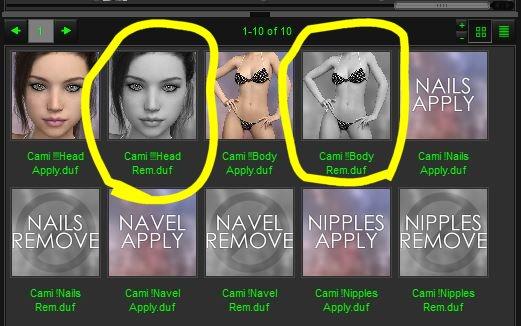
Those should remove only the properties set by the character, not others.
Genesis Morphs Eraser pluginHas anyone had success using this with Genesis 2? I have tried it a couple of times, and can only reduce the file by 15 megs (not much in a 700 meg scene).
I do the following:
The three layers in the instances tray are:
Michael 6 - top
Genesis 2 male - middle
Actor - bottom
I select Genesis 2 male
Then I open the morph ereaser, and navigate to Daz Studio content>data.>DAZ 3D.
Under that I open Genesis 2>Male>Morphs. Highlighting "Morphs," I click OK, and get the following list:
The next step is somewhat confusing. The instructions are to select only the product morphs I want to save. So, does that mean if i click on none of them, that they will all be deleted? I've tried that before and it didn't seem to do anything. For now, I click on Michael 6, and then say OK. Very little file reduction happens.
Can someone point out my error? Thanks!
Reset morphs?Ok, if I understand you both correctly, I cannot restore selectively. Will have to redo the morphs for body parts that are ok, hmm.
Thanks a lot, much appreciated - will take your tips with me, and work some more.
Kind regards,
Mi
The second thing to try I forgot to menetion was choose a character that has a reset morph in its library and just reset the head morph using the character head remove reset preset , see screen shot you can choose to just reset the head that way as well. but those character reset prests will just return the head morph to the default character base morph , most characters bought in the daz store has morph remove preset for them
Reset morphs?Okay I went and checked that what I describe above was right and yes it indeed it resets the morphs .
It clears the figure morph shape by those steps i described above. select just the head and highlighting the head bones in the scene tab and then clear the shape will just restore the head back to the default character shape that is why I said you would need to reapply the morphs once you cleared them because it pretty much clears it back to default .. here a screen shot .

edited for spelling sorry I am very dyslexic
But a lot of head-shaping morphs aren't on the head bone, so depending on what is wanted that answer may not help.
Why is this happening to all of my Genesis 8 male modelsPlease put the Viewport n Smooth Sahded mode, put some trunks on the figure, or zoom in to show only the upper figure.
I doubt this is an issue with a non-zero default, more likely it is a morph that's meant to apply a correction when a figure is posed with a specific shape dialed in that is isntead applying whenever the figure is posed. The method nemesis10 gave should reveal the culprit - it will be one of the properties that turns on when you lift the arm - but you may need to turn Preferences>Show Hidden Properties on in the Parameters pane option menu (the lined button in the top corner, or right-click the pane's tab).
Daz 3D is part of

Connect
DAZ Productions, Inc.
7533 S Center View Ct #4664
West Jordan, UT 84084Licensing Agreement | Terms of Service | Privacy Policy | EULA
© 2026 Daz Productions Inc. All Rights Reserved.